I'm Holding It Wrong? Really?!

Now playing
I'm Holding It Wrong? Really?!
Show Notes
Darth Chris makes an appearance, Niléane has an exclusive first look at…checks notes… the iPhone 16 Pro, Matt insists on talking about MacWhisper even more, and the crew actually all followed the rules in this week's challenge (a miracle!).
Weekly Topics Other Things Discussed Follow the Hosts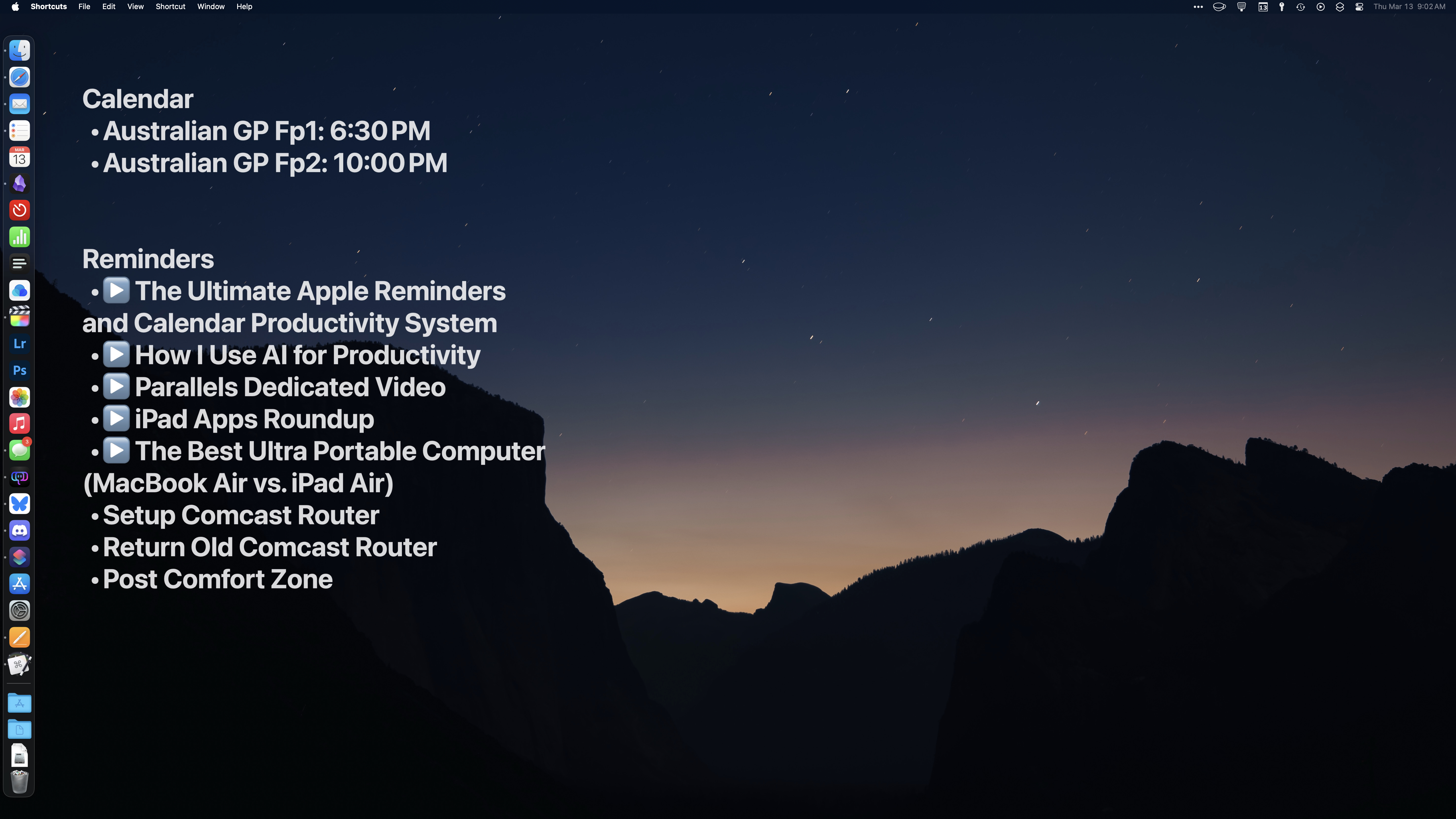
Transcript
990 segmentsWelcome to Comfort Zone, a podcast all about pushing your hosts, well, outside of their comfort zone. I'm Christopher Lawley, and each week I am joined by two incredible co-hosts, and this week I'm hoping they feel a lot better than I do. As always, I am joined by Matt Birchler. Matt, how are you doing? Chris, I'm doing great. I'm going the opposite direction as you today. Yeah, yeah, I have a massive cold. We're also joined by Niléane. Niléane, how are you doing?
Not sure, because I'm not sure who you are. Hello, I'm Johnny Cash. I've always wanted to do that. Yeah, no, I just have a massive cold. Luckily, it's a light Chris episode, except the Tiny Topic session is all mine this week. On the last episode, we talked about, Ari mentioned how the MacBook Air wasn't exactly great at editing video, didn't have enough RAM or anything like that. Well, I went back. Can you just... Yeah. Yeah, go back to your normal voice. I literally can't.
This right now is my normal voice. This is extremely disturbing. I'm so sorry to everyone. I have a few things in tiny topics, and then you won't hear from me until the challenge, because, yeah, this is what I've got this week. I love it. Yeah, sorry. But anyways, the MacBook Air that I have here, the review unit only has 16 gigs of ram i mentioned i i tried editing a video on it and like it got really hot and then like it thermally throttled um i actually edited the very last episode of comfort zone all from that macbook air start to finish even running everything through hush
on the macbook air and it handled it fine the trick is close everything else out when you're doing those big tasks so if you're editing video uh doing ai stuff close out all the stuff in the background uh and it'll handle it just fine um the only thing that took forever was the render but uh i just set that up and and kind of set set the macbook air to the side and let it let it do its thing but yeah uh macbook air worked for video editing still only has 512 gigs of storage so uh i
probably won't be doing a lot of video editing on it because that's not enough storage it really video really takes up space quickly i have a one terabyte macbook pro and i basically get two projects at a time and then it's off i have to offload it to the nas yeah so that that's about kind of so my two terabyte ipad pro has about 700 gigs of base store like base stuff that because i keep all my files all my photos and my music library local so that's about 700 gigs so i get about two to three video projects on it before i have to start putting things on external drives
and the NAS or things like that. So yeah, back in my M1 Max MacBook Pro days, I had a four terabyte M1 Max MacBook Pro, and I would use that storage, like I would use that space easily. And then the other thing I wanted to call out in the tiny topics is Matt put out a video about defending all of the apps he has installed on his Mac, and it is a very good video. I've been watching it over the course of the week like as i eat lunch and stuff like that because the long video i'm proud of you for
making long videos you're becoming me um but yeah it's it's a very very good video so everyone should go check it out that's good to hear i recorded that video weeks ago and was like does anybody even care every once in a while i feel this about a video i make i like get to the end of it and i'm like is this any good uh and yeah well not only do i like it but i know the boss federico vatici likes it because he linked to it in his story about web apps on the ipad so um yeah i i i think
you did a great job i think it's a really interesting video and kind of a different take of like here's a bunch of apps i use no here's everything i use let me defend it for you and you were very honest about like yeah this is here i don't know why this is here for a few of them and I'm going to delete them afterwards. That's true. I got to an app at one point called Flurp, and I was like, what is this? Yeah, yeah, absolutely. All right, well, that just about does it for Tiny Topics, because I need to stop talking for a while. Niléane, you're first up in our document.
What do you have for us this week? Can you just say something iconic? Okay. I don't know. Oh, I got something for you. No, I am your father. Perfect. Okay. Now I can go. So last week, as part of my challenge, I unveiled that I got a new iPhone so that I could have more storage to store all of my music. I realize now you told us the storage, but you didn't tell us what color you got.
I got Desert Titanium. Nice. There's something funny because I went to the Apple Store for this because I traded in two devices to purchase it. And so the employee asked which color I wanted. And I said desert, like in French. And they were so confused. And the reason for that is that in France, it's not called desert. Oh. It's called stable, which means sand.
It's called Sand. Yeah. You know, sand is coarse, rough, and irritating, and it gets everywhere. Yeah. That's a Star Wars reference for you, Matt. Oh, okay. Yeah. It's a great series of movies, if you've never heard. Mm-hmm. Yeah. But anyway, so I wanted to talk to you about this one today and give you an extremely very exclusive first look at the iPhone 16 Pro.
Nobody's ever seen it. First look, first review ever. Yeah, first review unit ever out in the world. So, yeah, anyway. No, I like this because it's a great way of kind of like catching up on the iPhone like almost halfway through its life cycle or this cycle. Yeah, I guess. Yeah. Yeah. So it's actually the first time in years that I've had a new iPhone that's like the latest model.
Usually I always buy the one that came the year before because I buy them used or something like that. So it's interesting to be caught up. I get to try out the things that people talked about not so long ago, including camera control. Tell us everything. So I was dubious at first because it feels finicky. It feels finicky to even press on it.
But I think after a few days, I think I like it. I like it a lot. Nice. Now, did you do the thing where you disabled all the extra features and camera control just launches the camera app and takes a photo? I did not. I'm using the full set of features. And like, I think I've got it dialed down. I can pretty reliably do the double press thing, the light press to get into the menus and out. Yeah, I think I like it.
Zooming with it is just very satisfying in general, switching between the cameras. And yeah, this led me to an issue which I did not expect to encounter. That employee talking about her again. She did great, by the way. But she suggested at the Apple store, like, do I want a case with that? And I went, no, no, I don't need a case because I'm going to get it on by myself later.
Yeah, you want me to go naked? I will not go naked. Team caseless. I haven't had a case on an iPhone since the iPhone 6S, which ironically is the only iPhone screen I've ever cracked. Yeah, but I think you have a car, you live in a house, and the outside world is not great for you. Yeah, that's true. I mostly just stay indoors. I'm pretty much a shut-in. Whereas I take, so I'm not saying I go out much, but when I do go out, I take the train, I go on walks, I go into public transit.
Do you think my car is dangerous for phones? No, I'm saying it. My phone has a little cubby in my car. Just sits right there. Yeah, on the contrary, I'm saying your car is very comfortable for phones. It's very safe for phones, which is why you probably don't need a case. Whereas I take trains and there's so many people around me all the time when I go out. So it's a dangerous environment. And when I go on walks, sidewalks are dangerous, pedestrians, cars that I am not inside of.
That may collide with me at any time. Can I tell you real quick the most insane way I've ever heard someone break their phone? Oh, yeah. They, um, they, they break, they somehow break a phone every year or so. Like they, we continue their, their family member who continues to get like hand-me-downs for other people, um, because they break at least one phone every 12 months. Somehow they had their trunk open of their car. They had their phone resting on the back window, kind of just like resting at the bottom.
They didn't really think it was, think about it. And they slammed the trunk shut and it folded the phone completely at 90 degrees. First foldable iPhone. Yes. It did not survive. I delivered an old iPhone to them hours later. Yikes. So, yeah, that's a perfect illustration of why I'm going with a case once again. But anyway, I did not want to pick one up at the Apple store because...
So, the colors this year, they're not great. like the Apple's silicon cases some weird color choices there I think some people like it, I don't really like them so we're talking colors now but the shades of colors that they've picked are very cold on the cold warm slider they're towards the colder side, not really warm colors and I tend to like warm colors so yeah, I thought I would
get a separate case. In the span of one week, guys, I've gotten two cases. The first one is a silicon case, a yellow silicon case from Elago, which is a brand I've mentioned a few times already because I've got an iPad case from them, which is great. It's just a back cover, magnetic back cover, as well as an iPad stand, a magnetic iPad stand, which are an aluminum one, which are nice.
So I thought, hey, I will give their cases a try. They have silicon cases, and they have colorful MagSafe compatible cases. So I picked one of those up. This yellow case is not great at all. I really dislike the feeling of it. It's no Nicolas Cage shirtless being peeled out of a banana. Oh, sure, sure. Call back to our iPhone case challenge. Yeah. Did you win that poll? Is that one of the... Yes, I did. Yes, I did. I did win that one by a lay and slide.
And he calls me a coup maker, you know. So, and more importantly, to come back to the camera control, that silicon case had a cutout for the camera control, which was very uncomfortable. Like, it was very close to it. The cutout was very small around the button, which made using it not great at all. And this is when I realized that it's a nightmare to get a case, like a decent case now easily.
If you go, usually I would just either buy one from Apple or get one from Amazon. And this time around, like just browsing on Amazon, the cutouts all look terrible. They all look just as uncomfortable. And I didn't want to buy yet another one like that. So in the end, I got a leather case from Nomad. Oh, I like Nomad. I like them too. That's what my watch band is. Yeah, I've had a few of their cables and chargers.
They're always really nice. So I got their traditional leather case from Nomad. And this one is really nice. I got it today, actually. It's very nice. The buttons are very clicky. They don't feel mushy, which I'm always afraid of. And a cutout around camera control is significant, let's say. Like, there's a lot of space. I will show it on camera right now. It's a very large cutout around.
Yeah. Focus in some way, please. Okay, there you go. So it's comfortable. You can just use it as normal, as if you didn't have a case, because you can just swipe around on it easily. And it's MagSafe compatible, which is nice. So that's the case matter of it. Otherwise, regarding iPhone itself, this is my first time actually interacting with Apple intelligence on iOS.
Until very recently, it was simply impossible to access in the EU unless you are called Federico Vettici and you have a weird Apple account set up. Which is not my case. Federico finds a way. Yeah, not my case. I have a very simple Apple account set up. I have a French Apple account. I always had. So yeah, I did not have access to it. But now it's available if you install the beta for iOS 18.4 in the EU, which I have done.
Okay, so it's okay. Siri looks nice. That's a nice glow around the edges. Why not? I like it. The voices are nice. There are new voices. Double tapping the bottom, the bar at the bottom of the screen to type to Siri. Very nice. I like it. Very nice. Setting time hours with that is useful. It's practical. Apart from that, yeah, I don't really notice them.
Notice Apple Intelligence. Apart from one thing, which is summaries. Yes. Oh, the summaries. I finally get to see what it's all about. They're not great. I think like most of the time it's funny though. For now, I'm keeping them on just because it's funny, just seeing how it tries to summarize things. Yeah. And there's one thing that since like my unique aspect here is that I'm French.
And I use two languages back and forth every day on my devices. My devices are set to English. The UI and all of that is set to English. But I do use a French keyboard on my Mac. And even on the iPhone, I have a French layout that I can switch to to type in French. So anyway, just to say I have two languages going at the same time. And the summaries, for some reason, for a few days, they would not work with notifications with French content.
And I could not figure this out. No idea why. I posted about this on the Club MacStories Discord. Great Discord server, by the way. If you want to join, just subscribe to Club MacStories. somebody mentioned that maybe it's because I don't have French added as a preferred language in the iOS settings. The thing is, I first, I don't think I had that because I had to reset entirely my phone last week, shortly after getting it, for reasons that I will not get into because it makes me mad.
But I had to reset my phone and it was gone. So, yeah, could have been that. But it did not fix itself for a few days again until yesterday. Suddenly, yesterday, the summaries started working for both English and French on my phone, including in the mail app, but also on the lock screen with notifications with French sentences in French. So that's good. Okay. So it just needed a couple of days to warm up. Yeah, maybe. I don't know. Downloading Macron on device.
I just assume the correct answer is you can't summarize the French. They're too complicated. You can't summarize a beignet and a Renault. That's everything I know about French culture. Beignet, Renault, and the Eiffel Tower. And baguettes. That's what I meant to say. Bicycles and baguettes. Bicycles? Is that a French thing? Well, like a bicycle with a basket with a baguette sticking out of it. All right. It's definitely a stereotype. I think Match is stereotyped all of France.
You know that anecdote where the reason why the wheel in cars is on a specific side, depending on if you drive on the left or on the right in your country, is because it dates back, apparently, to the time when we were driving horse carriages and you didn't want, like, was it weapons to cross?
Yeah, I know exactly what you're talking about. Because if you're right-handed, you, yeah, so you don't want to shoot. Yeah, I know exactly what you're talking about. Something like that. Yeah, I know what you're talking about, yeah. Yeah. Why did I mention this? I have no idea either, but I do know. There was a reason, but okay. Anyway, yeah, so, summaries, that's good. And I want to conclude this. First, exclusive, first look at the 16 Pro by commenting on the storage tier I got, which is 512 gigs.
Nice. Very comfortable, I must say. Very comfortable. So I did transfer over since last week my entire music collection. I finished doing it. I was in the middle of doing it last time. Now it's done. Less than a quarter of that is filled. So I've got room to grow, which is perfect, which was the attempted goal. How did you transfer everything over to it? Did you use a wire or just wire?
How do you? How does it work? Yeah, good question. And Doppler has a few ways to import music from the Mac. So you can use on the Mac a utility they have, which is called Doppler Transfer. It lives in the menu bar. One more menu bar app to add to yours, Chris, if you want. Nice, nice. Love a good menu bar app. Yeah. So basically on the Mac in Doppler, you can right-click on an album, a playlist or whatever, and click Send to iPhone, which opens Doppler Transfer.
And if your iPhone is on Wi-Fi, it will show up in the list. You just open Doppler on the iPhone and it will transfer over Wi-Fi directly to the app on the iPhone. That's nice. This is not how I did it, though. But that's the easiest way to do it because you don't have to plug anything. For a one-off album, that seems like the best way to do it for a one-off. But I'm assuming because you did quite a few albums, you did something different. Exactly. So there's another way you can do it in a very old school way.
You can plug your iPhone into your Mac. Nice. Over USB-C. And your iPhone will show up in Finder. It's the same UI that you used to have for managing your iPod, for syncing stuff to your iPod and the first gen iPhone, etc. So in that UI, inside the Finder window, you click the Files tab, and there you will have a Doppler item onto which you can drop files directly.
This works over Wi-Fi, but over USB-C, it's using USB 3.0 transfer speeds. So that's good. That went really fast. Yeah, that's great. I would love, and this will never, ever, ever, ever, ever happen, but I would love for Apple to make a one-off iPod classic again with, like, Bluetooth support and maybe Apple Music support and stuff like that. Like, just make a modern iPod. They'll never, ever do it. And I know that there's people that kind of, like, hack iPods to kind of turn an end of that.
But, you know, I'd like something official. That would be amazing. It would be great. I'm not a nostalgia person, but I do miss it. I do miss a good iPod classic. Imagine like a new-gen iPod Classic with just Apple Music on it, and then it messes you up with your library every once in a while just to make you mad. Hey, like we've established, my library already got messed up years and years ago, so I'm just all in on Apple Music now. I'm using it exactly the way they want you to use it. So anyway, I'm done.
If you have any questions about the iPhone, which you have never used or seen or heard about before today, go ahead. but I'm done. How are you loving the, because you went from a 14, right? 14 Pro. 14 Pro. So how are you loving the USB-C lifestyle? Yeah, it's great. So it's funny because last week in our conversation, I just got out of the, in our group chat, I just got out of the Apple store, went home, tried to plug it in with a lightning cable. And this is when I realized it would not go in.
It would just not go in. I was like, hey, my iPhone is messed up. But no, yeah, it's great. I think it's not making a huge difference for me. I carry around my AirPods Max anyway, which are lightning. I wireless charge at home, all of my things, including the AirPods Pro. But okay, it doesn't change much for me. I don't think so. It did change something because now it has a USB 3.0 speed. So the transfer for that music went really fast.
But yeah. Yeah, that's one of my favorite upgrades because I've been shooting some short stuff that I'll put out on the channel at some point in the near future. But I've been shooting it all on a 16 Pro and the fact that not only can you shoot ProRes, but you can shoot straight to an external drive and then you can just take that external drive, plug it into a computer and edit right off that drive. And it's short stuff. but performance-wise, I'm not too worried about it. I'm not worried about getting the most amount of speed out of it because it's a minute-long video.
It's such a convenient workflow. It's such a nice workflow. I can definitely see a time in the future where when it comes for me to upgrade cameras, I go, do I really need a dedicated Canon camera anymore, or should I just keep my old iPhones around and just keep using those instead of buying dedicated cameras? Yeah. Oh, boy. That's big. Yeah. I mean, I don't think it's right now. The big thing that's holding me back is I want an actual 50 millimeter lens on the iPhone, not this like digital 2X crap.
It's a 2X zoom. There's five lenses on this camera. It's incredible. Okay. Yeah. Sure, Apple. And you can switch between them using camera control. Yeah. No, that's not going to happen. There's a funny thing, last thing, about the Apple Store journey that I went on. While I was there, so they asked me, do you want to set it up at home or set it up here, restoring from my cloud, etc.? I was miles away from home because I traveled to Lyon, which is about an hour away from my place.
So I wanted to set it up right there in the Apple Store before I got home on the train. I did that and at the table that I was sat at, there was a, like an older couple. Like, maybe, yeah, maybe, yeah, maybe your age, like really old, you know what I mean? So, sorry. Maybe your age, like really old. Okay. I'm going to hang up this call. Yeah. No, I'm kidding. No, I'm kidding. Yeah, another couple of folks.
And the husband was getting a new iPhone. And their new iPhone was an iPhone 16e. And can you try to guess what they were upgrading from? Because that shocked me. The employee was shocked, if that can help. I'm guessing. 15 Pro. I don't know. No. I'm going to guess an iPhone. Is it an iPhone? Yeah. Okay. An iPhone 5C. Oh, wow. Okay. You went far. Okay.
It was an iPhone 6, not 6S. Wow. Wow. Yeah. That's incredible. Yeah, that was crazy. And so this is the first time they've upgraded in, I don't know how many years, and they got an S16E. So I guess that's who the iPhone is for as well. Okay. I'm telling you, the SE is underrated. I think there's people for it. Yeah. Okay. So you're coming from the 14 Pro. What color 14 Pro did you have?
The black one. The black one. Okay. So you went with the light color this time. And the 14 Pro did not have the action button? No. So what are you using the action button for? Oh, good question. I've chosen to set it to the... So last time I said lamp of the air. And you said that's not how you call it. Oh, flashlight. Yeah. I said it to flashlight. To the flashlight. Okay. I wasn't sure that changed. For UK viewers, that would be the torch.
The torch. Okay. Yeah. Yeah. Okay. That's interesting. So for me, I'm still using my Action Cut shortcut that I built way back when the 15 Pro first came out. And I love that. Just having like a list of like shortcuts I use all the time. just pop up, just run one of those. I find that still to be really useful. And then I have the flashlight on the lock screen. And then obviously the camera launches with camera control. Oh, you guys are. Matt, what are you using your action button for?
My action button is the camera. Oh, that's right. The camera control. I would buy a whole new case that just covered up the camera control. And I could never use it again. That'd be great. Okay. I am not a camera control fan, I guess. have you tried turning off all the extra features i have i dislike it greatly seriously interesting why like what what what is different about the camera control button i'm not trying to say you're wrong or anything but what's different between the camera control button and the action button for launching the the camera it's not where my fingers are when i'm taking a picture because i'm
usually taking it in landscape and i like hold my phone like this and my finger is already there so I just tap it, whereas I have to kind of reach all the way around. Yeah, but if you hold it, for me, my index finger is on it. Yeah, my index finger is there. You guys are giving me a I'm holding it wrong? Really? Yeah, you are. We're doing this again. I thought I was out in 2010. Steve Jobs berated me for holding my phone wrong, and now it's been great. I'm going to get holding it wrong.
I mean, my thumb is on the action button, but my index finger is on the camera control button. And if I can, you know, I'm not going to waste a whole physical button. Apple doesn't add physical buttons to iPhones very often. They don't. I love buttons. I'm a huge fan of buttons. Buttons are great. But yeah, this button isn't doing it for me right now. There's a funny thought is that when you look at this, at the camera control, it feels like it should be Touch ID. This should be Touch ID. That'd be great. It looks like Touch ID. I like Face ID so much better. Face ID where both is good.
Yeah, we should have both. So many Android phones have both. yeah do we really want to use like android android phones like the bar like i think we can anyways well this is pretty cool anything else you want to add before we move on uh no it's great uh feel free to let me know how what what did you think of my first look honestly best review i've ever seen marquez brownlee get out of the way thank you that's what i hoped yeah yeah all right
Matt, your next step in the document, what do you got for us this week? Oh, I'm bringing a classic. I'm bringing an app that I think has come up a million times on this show, and it's not Clack, which I mentioned again, goes in the show notes. Actually, I never do it. I always forget. But I'm bringing Mac Whisper, which we bring up all the time. We talk about this all the time. But I just have a new appreciation for this app because it's just, I wanted to give it its time in the sun because it is wonderful.
And it's, I just love this app. The first thing I love about this is that, or the big thing that I like about it is that it's all local LLM stuff, which is great. I have this theory that we'll see if it's right. I really feel like the quality of LLMs is leveling off and we're kind of as good as we're going to be for quite a while. Oh, you think? I agree, yeah.
Yeah, I'm just surprised. I thought it's not getting better. I mean, it's getting a little better here and there, but it's not growing like it was. It was spiking exponentially, just constantly getting better and better and better. And now it gets a little bit better. There's the research models and stuff, which I think are actually a really cool thing. I used it for, we have a Disneyland trip coming up, and I used one of the research models for that. And it actually gave me some really good information. But even that's like, it's a new way of using the model that was already out.
Exactly. So yeah, I mean, like, ChetGPT 4.5 came out, or GPT 4.5 came out, and people were like, I guess the tone of answer is a little different. like we're really the the jumps aren't what they used to be like a couple years ago and so my my grand theory is that it's all we're kind of getting as good as we're going to get for quite a while and as tech gets better and they optimize these better we'll just have more of this running just on our phones which will be great um but i love the mac whisper is doing that already uh
basically if you don't know i should introduce mac whisper if you're not familiar with it basically it is an app you download on your Mac and it lets you download certain models that will take audio and turn it into text. That's the gist of it. And you can use this for many things. You can use this to feed it a podcast episode and generate a transcript. It not only lets you generate a transcript for the podcast, but it can do multi-speaker, which is very cool. So we're recording into Riverside, it's going to give us three audio tracks, one for each of us. And you can drag those
three into MacWhisper and it will make a single transcript that has the names next to each person. Oh, that's really nice. Which is very nice. Yeah, it's very, very nice. But you have to have separate tracks. You do need separate tracks. I think there is a way for it to auto-detect, but I tried this on one of our episodes and it gave us like it said there were like six people and it was not accurate um yeah like i would start a sentence and then it would say you started talking midway through my it was it was weird especially with chris's voice like hello i'm johnny cash there's one more people
um but i should also mention i need to send a support email to libsyn libsyn hosts our podcast I create a transcript of every podcast we create I think Chris you might upload that to the YouTube channel I do excellent Castro and Pocket Cast users may wonder why they don't see a transcript it's because Libsyn just doesn't let you upload a transcript there's a thing there that you can like drag it in but every single time it says this file type's not supported and it's like it needs to be an SRT and it is an SRT anyway it used to work it doesn't work anymore I need to ask their support
but it's been months but anyway I generate a transcript for every episode of this podcast and then I feed it well what I used to do was feed it into chat gpt now in mac whisper you can actually enter your open ai or anthropic or google api key and it can take your transcript and you can ask it a question and so or you can do whatever you want with it and so what I do is I say what are the things we talked about and what did we say would be in the show notes and this is a lifesaver for me because it finds
the times where i said oh we'll put this in the show notes and i will invariably forget that i said this or you said this but the robot knows and so the robot tells me and it's very very nice too the robot know robots know all um i also use it for my youtube videos i think it's great for that I use it for mine as well. Yeah, it's very fast. I just, out of curiosity, while we were recording, so while I'm doing a whole podcast episode, I also in the background was transcribing
our last podcast. It took 10 minutes to do a 90-minute podcast. Like, it's very quick. And that's an M2 Pro. Yeah. That's just an M2 Pro. You got your M4 Max boys over there. You guys can do whatever. I'm sure it'll be very, very quick. I have no idea, but it's probably very quick. It's, I mean, one of my like 20 minute, 30 minute videos, it does it in like four minutes on the M4 Pro. Like it rips through those things. It takes no time at all. In fact, usually it's, I'll start it and I'll start doing like the descriptions and stuff for videos.
And it's finished before I'm even done like gathering all the links for the video. Yep. Yeah. And then the last thing, and the thing that had a top of mind for me today, is it does dictation on your computer. So not only can you give it an audio file or a video file, you can also have it monitor your web, your meetings. So if you have apps that you take like video calls in, you can have it automatically record those as well if you want. So you can get transcripts and summaries.
Oh, that's amazing. But the thing that it also does is dictation. So instead of using Apple's kind of built-in dictation, if you have issues with that, which I tend to if I talk for a long amount of time, it seems to get bored or run into some sort of limit and stop transcribing well for me. You can just hold a keyboard shortcut down. So I have it set to the right command button. I just hold that down, and anywhere in the system where there's a text field, I can just start talking,
And it transcribes it very, very well for me. Like proper nouns are capitalized. That's sick. It's very, very nice. The one thing that's not as nice as the native one is that it's not, it doesn't put the text on there in real time. Basically, once you let go, it will transcribe it. So it takes a couple seconds. So it's not perfect, but it's pretty cool either way. I'm sure it's probably more accurate than Apple's version. I have so many issues with Apple's dictate. Like I love dictating things, especially like text messages and stuff. But I have so many issues with Apple's dictation.
Yeah, I find dictation works better on the Mac than on my iPhone. I try to, like, dictate it on my iPhone. It's always, like, pain. I don't know why. Yeah, it always gets, like, very common words wrong. But, yeah. What do you use dictation for? Taking notes? No, I don't take any notes or anything. It's all up here. And a lot of it just falls out. But, no, what did I do? So I, because I'm old and decrepit, as you so nicely pointed out earlier, I occasionally, if I'm like typing a lot or coding a lot, I will, my hands will start to like get sore.
And I still want to keep going. I still want to blog. So actually I posted a blog post yesterday, entirely dictated through Mac Whisper, which is pretty cool. So yeah, basically, so it's, I tend to use it for when I'm writing things. um yeah and then so sometimes like especially if i don't know what to say i can kind of like talk through it and then i'll kind of go through that transcript and then i'll just write whatever write something more coherent more focused but just talking through it is helpful so i'll sometimes dictate that and then edit down to something nice okay i uh i i love mac whisper uh and i preached
the good word of Mac Whisperer to other boss of the show, John Voorhees. And he actually didn't care for it. He had a lot of issues with it. He found another service called Eleven Labs, and it's instead of it being local, it's on the web, so you send your stuff out server-side, and it handles it. And he really likes that for creating transcripts and stuff like that. What's nice is because it is on the web, and not uh not just a local machine it means you could use it on an ipad or even an iphone uh you just
upload your files and it handles its server side so there are other options out there especially if you're not able to install mac whisper locally on on a mac whether you have like a lockdown corporate machine or you work from an ipad or something like that like there are other options out there but i do i i haven't had issues with mac whisper the only thing that i ever have to do is if I do the transcript for our show or if I do the subtitles or something for my videos or something like that,
I have to go in and you have to do find and replace for names. It struggles with names. It struggles with my last name. It especially struggles with Niléane's name. And I think it struggles with Matt's last name as well. Yeah. So another pro tip for Mac Whisperer, in the settings, there is a place, I forget what it's called exactly, but there are like, you can have it auto replace things. So if it misspells the names wrong in the same way, then you can kind of, I have a list of our names as well
in my version where it'll have like, like there's like Niléane, like with like three E's like it'll do. So like there's like- That's my favorite. That's my personal favorite. But yeah, there's a few ways it misspells our names. And so I just put those in there. And most of the time now, the transcript will auto fix it for me, even if it gets it wrong. so um nice i'm glad you brought up the price though the price is one of the things i really love about mac whisper um so it's free for the basic stuff but if you want to use all the stuff i just talked about um it's 60 euros which is a you know it's a decent amount of money but it's unlimited use it gets updated like every three days and i'm looking at some of the other options
out there and the pricing sucks compared to this so like the 11 labs things you i believe you pay per use yeah of it which it is fine if you don't use it very often like that's that's not that big of a deal but it like for us you and i both do it for our videos and we do it for this podcast yeah that that could add up pretty quickly we do four podcast episodes a month that's like if they're like i don't know 80 minutes each oh god why did i decide to do math 240 minutes of uh No, 320 minutes, 320 minutes of transcript,
subscriptions every month on 11 labs. That would be a hundred dollars a month. Oh, wow. And, and I couldn't do multiple runs at it. Right. Like what I, I just did an extra one for no reason right now, just to see how fast it went. That would have cost me credits and like, yeah, locally, it doesn't matter. Um, I found an app called super whisper. Yeah. Super whisper, uh, which is kind of the same deal. Um, but it is $85 per year or there's a $250 lifetime.
I don't know, man. I just really like that. It's, it's local. If they went out of business today, which it seems like they won't because they sell a enormous number of these, like it's very, a very successful app. Like it'll just keep working. It's a local model. I don't need to worry about credits. I don't need to worry about limits. I don't need to worry about, um, energy usage, right? my mac uses a marginal amount more energy i guess but like no more than a video export would so i think it's great like it's if there was a better option i would love to hear about it so please let
me know on mastodon if there is something better than mac whisper that lets me transcribe podcasts transcribe videos and if it could do the dictation as well that'd be fantastic but i think this is the goat as far as i've found myself yeah i i've i like it like i like you said it i just use it it's really nice i wish they had an ipad app um i know that there is a i have a test flight for a uh whisper transcription app for the ipad um but it is a beta right now it's not on the app store i'll talk about it when it comes out but um there is an ipad is it good can
you tell us if you like it um i've only ran like a couple of things through it okay is i i need to play around with it more. I've been playing around with the Mac a lot more, and I just haven't been doing stuff with that app, because I've been editing video on the Mac just to play around with that. You're a changed man. Well, I wouldn't say that. I'm still a grumpy old man, but I'm a grumpy old man that likes Mac mini bar apps right now. So yeah, that's it. Great app. We talk about it all the time, but wanted to really get into it a little bit more today. I like it. I just wanted to
I've used it once, exactly once, about a year and a half ago. I had to transcribe a video for work. And so I've got an M2 MacBook Air. And it took about 30 minutes to transcribe at the time. But I was impressed. Like, the quality of the transcription was really impressive. And that was a year and a half ago. One thing that you could do is you can pick different models you want. So if you prefer, if you want something faster and maybe a little less accurate, you can get a really fast model.
I personally, since I have an M4 Pro Mac Mini that I'm running it on, I pick the most accurate model, but it's also the slowest. But it still rips through a video that I do in four minutes, no problem. So the accuracy is, I'll take the accuracy, especially because I'm putting them on YouTube, where, yes, YouTube does auto-generate subtitles technically, but oh boy, are they not good. And the nice thing about whisper transcription is you get punctuation. It's not just like, it's just not a cloud of words.
It's actually like proper subtitles. Oh, prediction. youtube at some point they are going to upgrade their automatic subtitles but my and this is my prediction it's going to be only for youtube premium subscribers i could see that i can 100 see that and i could also see um i'm actually kind of surprised they haven't done something with these whisper models already or at least some whatever the gemini version of a whisper model is but
um i i youtube is so large like i've actually i've had dinner with a couple of like uh people that work at youtube and the amount of video that they're constantly being it's it's it's unfathomable like you can't you you like the amount of video and storage it's just so like making changes like that i i can see definitely takes time it's not something like oh yeah let's just jam this whisper model in there. But yeah, I am kind of surprised.
I'm sure they're working on it. Yeah. All right. Anything else on that or should we get to the challenge? So before the challenge, before the challenge, maybe we can convert part of the audio audience to the video version of the podcast by mentioning the fact that my cat is sleeping right here in the frame. There you go. I mean, the only thing that gets more people to watch a video than a cat is a dog yeah and no such thing right now
there's only my cat i was hoping matt had his dog next to him he's sleeping next to me i don't want to wake him up oh yeah let's not yeah see this is why i'm better because my pet is also asleep but she does so in the frame he's away you're really kicking me and matt while we're down today You're making fun of my voice. You called us old. Now you're like, I'm better than Matt because my cat sleeps in frame. Like, I like you. Just for the record, I like you.
All right. Well, let's get to the challenge. And yes, you should be watching the video version because the video version is quite entertaining. We will often make fun of each other or do something to tease each other while the other is talking. And yeah, you should check out the video version. But anyways, let's move on to the challenge. And Elyon, it was your challenge this week. Yes. And for once, I wanted there to be no possibility to break the rules, which is why the challenge this week was three words and only three words.
Automate your wallpaper. And the idea is interpret that however you want. Just automate your wallpaper however you want. There's no breaking the rules here. Unless you chose to automate your icons instead of your wallpapers, I don't know how you can manage to break the rules here. I'm honestly a little nervous. Matt, Matt, you're very nervous. But yeah, I want it to be nice. Let's do something that we can have fun with, however you want. Should I go first?
Yeah, if you want to, yeah, absolutely. Mine is pretty simple, so I will go first. You know how I love dynamic wallpapers on the Mac? Yes, of course. And I'm really sad that we don't have a lot of them out there. There are some. I mean, you made your own. I made my own once for this show as part of a challenge. But I wanted to get back into dynamic wallpapers once again. And I wanted specifically to set the macOS Mojave wallpaper as my Mac's wallpaper.
Do you remember that wallpaper? I do not. You did not. The sand dune? I don't think I used Mojave. I think that was big iPad time. Yeah, probably. So you're right, Matt. That's the big sand dune in the middle of the screen. It's a good one. It's one of the best. It's one of the very first dynamic wallpapers that shipped because it shipped with macOS Mojave, which introduced dark mode on the Mac.
And so it's a beautiful wallpaper. And the reason it's beautiful is because it's not just dynamic in the sense that it will switch from day to night. It will, instead, it will actually switch between, I don't know how many frames. Let me check. Wasn't it hourly? I just looked it up. Now I remember this one. Wasn't it hourly? Like there was a new image for every hour and like as the sun shifted. Maybe not hourly, but for some reason, preview on the Mac.
Closed by itself, so I don't have it anymore. Open, there you go. There are 16 frames, 16 photos inside these dynamic wallpapers. And yeah, they go from like middle of the night to middle of the day to middle of the night again. there's sunrise sunset middle of the afternoon zenith all sorts of different phases of the day around this dune this sand dune it's beautiful um so yeah i wanted to use this wallpaper again
you know what though in mac os if you go into system settings today in 2025 in mac os sonoma It's nowhere to be found. Apple removed it. It's not included in the dynamic wallpaper section on the Mac. So first off, why? Second, so, okay, how do you get it back? So I tried to get it back as I started searching on Google, etc. And a lot of people have re-uploaded this wallpaper.
but I have had no luck finding the original file with all 16 frames inside. When people re-upload this wallpaper, they usually either upload just a day version and a night version separately, or they have a dynamic wallpaper which only includes a day version and a night version inside. But it's extremely difficult for some reason find someone who uploaded the original wallpaper.
And the answer to this question, how was I able to find it, is a bit disappointing, probably. I found it on my hard drive. That's awesome. No, that's fantastic. No, not in my iCloud drive, actually. Inside a folder deep into my iCloud drive, it was there. I had saved it a few years ago. And so the full original quality, 6000 by 6000, I don't know how many pixels, and with all 16 frames inside.
So here's the thing. I have something to suggest. If you can find it online, someone who has uploaded this original version, please let us know. Otherwise, maybe I can upload it myself, but I don't know how. If I'm allowed to, I don't know. So, yeah, I know. Yeah, I was thinking about this. I was about to re-upload it before getting on the show, but I was like, should I do that?
Yeah, technically it's owned by Apple, but I don't know. All right, well, show notes me. I'm going to put a link to Stephen Hackett's page on 512pixels where he has all of the old ones. And I'll just leave that there. And if you upload your own, maybe that'll be in the show notes. We'll see. Yeah. Okay. And just wanted to mention on Stephen Hackett's page where he collects all the macOS wallpapers. It's a great place. It's really good. To go to save your wallpapers and to restore some of your old favorite ones.
Unfortunately, yeah, for the Mojave one, yeah, he doesn't have the original file. And just a day and a night versions. So there you go. A bit disappointing end, but happy end as well. Because, yeah, I have my wallpaper. I'm happy. And it's beautiful. Nice. Well, I'm glad you found it. Yeah. And the automate part, I shall mention, is all managed by macOS itself. It's a dynamic wallpaper. Automatic.
Yeah. When are we going to get dynamic wallpapers on the iPhone and iPad? Yeah, I know. I think Apple's answer to that is the live photo thing. Yeah. Or the astronomy ones. Yeah. I don't know. There's a live weather too. Yeah. Oh, yeah. They can do it. They have them, I guess. They have the technology. They just choose not to. We can rebuild them. But even on macOS now, the dynamic wallpapers included in macOS are like, they're very simple.
They don't vary as much just like in the same way that the macOS Mojave one did. They just move a little bit. Yeah. Yeah. Slight changes in shades. Yeah. All right, Matt, what do you got? I took this very literally. Oh. You automated the wallpaper in your office. I was trying to think of a way to have like a little poster come down or something to make it look like wallpaper.
green screen oh dang it yeah can we can we restart this podcast can i uh set up no i i feel terrible i want to go to bed yeah chris can you do another hour no i want to go to bed um so i i mean i just i just did what of course i was going to do i booted up keyboard maestro and I set up a very simple automation to ironically I haven't seen this happen since we last recorded
I tested it to make sure it would work but I haven't actually seen it totally function on my iPhone or on all my devices I guess I have a weekend focus mode that kicks in at 4 p.m. every friday and ends at like 4 a.m every monday morning and it does a few things um but one thing it doesn't do is change my wallpaper because i don't think you can do that with focus mode i don't think a focus mode can have a wallpaper can you focus uh well okay on an iphone on an ipad a focus mode can
have a dedicated wallpaper can it okay i'll need to i'll need to figure that out i knew you could change like the lock screen and what you do so what you do so for focus modes you set up a specific lock screen and then it ties like the home home home screen wallpaper with the lock screen so when you switch a focus mode so i'll have like a focus mode for my personal stuff my focus mode for work yeah and the person wants a little bit lighter mode and then the the work one is a darker version of kind of the same photo.
Okay. Well, I didn't realize they'd added that at some point. And so I didn't do that. Somebody doesn't watch my videos. But you were talking about your Mac. So on my Mac, where maybe it doesn't work anyway. I have no idea there. Yeah. What I did was I have my normal wallpaper that I use, which is a really nice one. I'll try to put links to these in the show notes. But I would use that wallpaper through the week. And then when weekend mode kicks in at 4 p.m., I have a keyboard maestro automation that just sets a different photo as my wallpaper that looks very very nice
as well but is indicates to me visually that it is the weekend and i should stop thinking about work and i could just have fun and so that's it and then it kicks in again at again 4 a.m on monday morning it goes back to the normal wallpaper and i can get back to business um but i could automate this more like keyboard with keyboard maestro all things are possible so i could do something probably should do is uh when i record a youtube video i should probably just set the same wallpaper and make it boring um although that would reduce my engagement if you post a youtube video any all
the comments will be about where's the wallpaper is there a link to the wallpaper oh my gosh you you know one of the comments that annoys me the most link question mark i'm like okay and like i know what you're referring to let's use a complete sentence here like like it's and also they're always in the description so yeah well i i often forget also i'm very bad at interacting with youtube so i apologize if i don't respond but um but yeah i should just make it the same wallpaper every time so that question doesn't come up should we message every weekend chris just link
that's how you get blocked oh okay i actually literally sent that to you last weekend or last week when we recorded because i was in the wrong meeting that's right you did yeah you knew what i was talking about though so i did i did did he reply i was gonna say it would have been great if you're just so in the like oh this stupid all right here we go 10 bucks to join the podcast now so yeah that's what i did very simple keyboard maestro um every time you say automate something i'm gonna open keyboard maestro and be like can it do it and yeah i bet it can do
it nice nice i like it will you keep it oh yeah yeah this is great i hadn't thought to do this um because yeah my phone adjusts like my home screen it's like different apps on my home screen um for the weekend so like more just like movie watching and game stuff is on there um but i'd never considered updating my mac for the weekend so yeah this will be this will be fun nice well uh i i kind of took a journey uh one thing i did way way way way back before i even attempted to be an ipad person is i used to play with an app called geek tools do you guys know
what this is no basically it allowed you to put like custom things on your home screen so like a clock or your calendar or media player stuff like it like it was widgets before widgets were a thing uh and like it would be like right on right on the wallpaper and like people would do like wild stuff like split the wallpaper up so like it would do the thing that kind of ios already does where like if you had like a mountain peak popping out like it would just like cover a little bit of a
clock or something like that yes anyway i remember this oh so so i was like okay i'm gonna kind of recreate that. Now keep in mind, pretty much this whole week, so we recorded the episode last, the last episode late, so pretty much this whole week, I have had a cold, so I haven't been exactly at the top of my game, so I haven't exactly been batting a thousand. So I decided, I was like, you know what I really want? I want my calendar and tasks on my wallpaper. I want to see that, and I want to automate it so it shows up every single day. So I built this shortcut, and I put a
in the show notes for you guys and we can put it in the show notes for everyone um but basically what this does is it you you pick an image and that's your wallpaper and then it goes through it pulls all your calendar events pulls all your reminders formats them and then overlays that text on your wallpaper and then sets that as your wallpaper then i use keyboard maestro so that it runs every time i logged into the mac mini so that way it was always you know every time i'd log in it would be updated for that day uh there's a screenshot in the um uh show notes you can take
a look it is not the best looking thing because like i just i could not design something this week like my brain was like that but then uh as i was sitting down uh to prep for the show this morning uh i remembered there's a feature in mac os now that allows you to put widgets on the home screen so I was like what was the purpose of this I did the challenge I kind of was sick this week so I totally forgot about a feature of macOS because again I'm rediscovering the mac right now
that kind of makes this whole pointless because using widgets would be way better than this because you could actually check things off and it would update you know instead of just when you log in it would update all the time so yes you could use this if you like geek tools you could totally do this kind of thing with shortcuts where you overlay information it does i mean you could do other things other than calendar reminders you could have like the weather or you could have like it like you could pull like a quote from like a web service that has an api or something like that and put that on there like there are a lot of other things that you could do with this this shortcut um just my brain this week
would basically that's all it allowed me to do but yeah um that's kind of what i did just overlaid text onto a wallpaper i didn't want to change my wallpaper image because my wallpaper image is a photo i took and it's one of my favorite photos i've ever taken where it's it's a shot of tunnel view in yosemite at night and it was a long sort of a long exposure shot so you kind of see the stars moving just a little bit uh and i really like that so yeah that's what i did uh i felt silly when i sat down this morning and remembered yeah widgets on the home screen on the macro i think you just invented widgets there's nothing wrong with that yeah non-interactive
widgets thinking about geek tool really really takes me back like right i i was a big mac os customization guy i was confabulator which was it was confabulator widgets that was the way that was like widgets way way back i yeah i think that was even before geek tools i want to say but like confabulator quicksilver was my launcher oh yeah quicksilver quicksilver i had it quicksilver was the thing never never anything better i used uh shapeshifter to theme the ui i really wish you could theme the mac os ui still though that was so so cool you know what bugs me about mac os ui
right now so they did the whole thing with ios 18 where like hey if you use dark mode you get dark mode icons but they didn't bother to do it the mac like oh come on just wait for the fall massive updates to all the interfaces we'll see transparent icons but yeah because that's what the ipad needs ui overhaul not a functionality overhaul hey you know what the the rumor is an overhaul that's beyond just ui so we'll see we'll see i i hope so but i i'm well yeah anyway i'm too many times i will say if they're making another mac os update look for more touch friendliness because it's coming
i'm not gonna give this up i i do think on a eventually the mac and the ipad are on a path to uh they're on a collision crash collision thank you my my brain has just i i'm yeah my my brain's dawn. Just wanted to say, this wallpaper that you shot, this photo, I love it. Thank you. Even before we knew each other, before we started the show, I was using this wallpaper for some time. Really?
Yeah. Oh, thanks. But also, like you're saying, there's no really an interest into doing this, but I think if you got into it and spent some time, I'm just talking to, like, if people want to get into it and spend some time on it, they can make it look really nice. Like, the ability to integrate it into your wallpaper directly. 100%. Aesthetically speaking, potential. Yeah. I was going to spend some time making this look really pretty and stuff.
That just did not happen, being sick this week. But, yeah, you could do some really cool things. If you're somebody that would love a new quote on your wallpaper every single day, you could absolutely do that. I actually think this could be really useful. And all this is doing is using the overlay action in shortcuts. So basically, it's just taking the image. You put in whatever actions for the information you want to add to it. And then it's just the overlay action. The overlay action has a lot of customization options, including margins, font, font size, all sorts of color,
all sorts of different things. So it's actually a very powerful action that I don't think I've used it much in the past. All right. Well, that's the challenge. I have no idea how we judge who won this one or not. I do appreciate that we all respected the rules. The three words. Yeah. Well done. Did I mention I used Keyboard Maestro? Yeah, I did mention I used Keyboard Maestro to automate it. Okay, yeah, sorry, my brain's... Okay, let's kind of get to the end of the show because my brain is just diving off a cliff here.
Matt, it is your challenge for next week. What do you got for us? I have a similar one. Find a clever way to use text expansion. Ooh, I like this. So more than just at, at expands your email, something, something clever, something, you know, something interesting. I like this. My brain's turning, but it's not turning very fast right now. That's okay. You got a whole week to think about it.
Okay. All right. Well, I like this. All right. Well, that just about does it for the end of the show. I'm just now realizing that normally I ask an end of the show question to the two of you, but I forgot to pick one and I can't think right now. So do you guys have something you want to ask the others by any chance? Would you rather ride a bike for one year without pause or get on a train for 10 years?
Train. I'm literally on the bike all year long, 24-7. Really? no i'm just i'm clarifying that's that's me i'm sitting on the bike i i cannot get off the bike that's the situation what bike the bike you said in your your question bicycle yes do i understand the challenge are you not the challenge you have a bike at home no he's asking if you're writing the bike like if you pick the bike option are you permanently
stuck on the bike for a year. Are you asking for clarification? Yeah, clarification. Do I get to sleep or am I just constantly sitting on the bike seat? No, you live your life on the bike. Oh, the train then. You just... Instead of having a car or something, you have to take a bike. I could live a life from a train. I would do a train. 10 years is a long time. Especially if it's a bougie train with like food car and like a bar or something.
Like, yeah. But you got to keep in mind with a train, you cannot get like in too many places whereas a bike, you have more flexibility. Well, as you've already established, I'm just a shut-in. So that's not a big deal. Oh, okay. So that was a great question. What's your answer, Ilion? Bike and train. Train all the way. Okay. All right. So we're all trained. All right. Cool. All right. Well, that just about does it show uh big thank you to MacStories we are a MacStories podcast after all go check out all the
other podcasts and writing and stuff uh do you guys have anything you want to promote that's coming out this uh upcoming week severance severance is coming out today as we're recording and this week as you're listening it's the finale i'm excited oh my gosh i'm so far behind i'm still on like episode three you gotta catch up oh episode three you got episode four coming up that's a good one it's a good one Yeah, that's one of those shows. Danielle's not interested in it, so it's one of those shows I have to watch on my own.
And right now Daredevil's out, and I'd much rather be watching Daredevil. That's an insane statement. I mean, it's Daredevil. Who doesn't love Daredevil? Anyways, all right. Well, that just does it for the show. Thank you all so much for listening. Have a great day. Bye.