This Challenge Escalated Quickly!

Now playing
This Challenge Escalated Quickly!
Show Notes
Matt and Chris have all the new Apple hardware, and Niléane takes the challenge to the next level.
Weekly Topics Other Things Discussed Follow the Hosts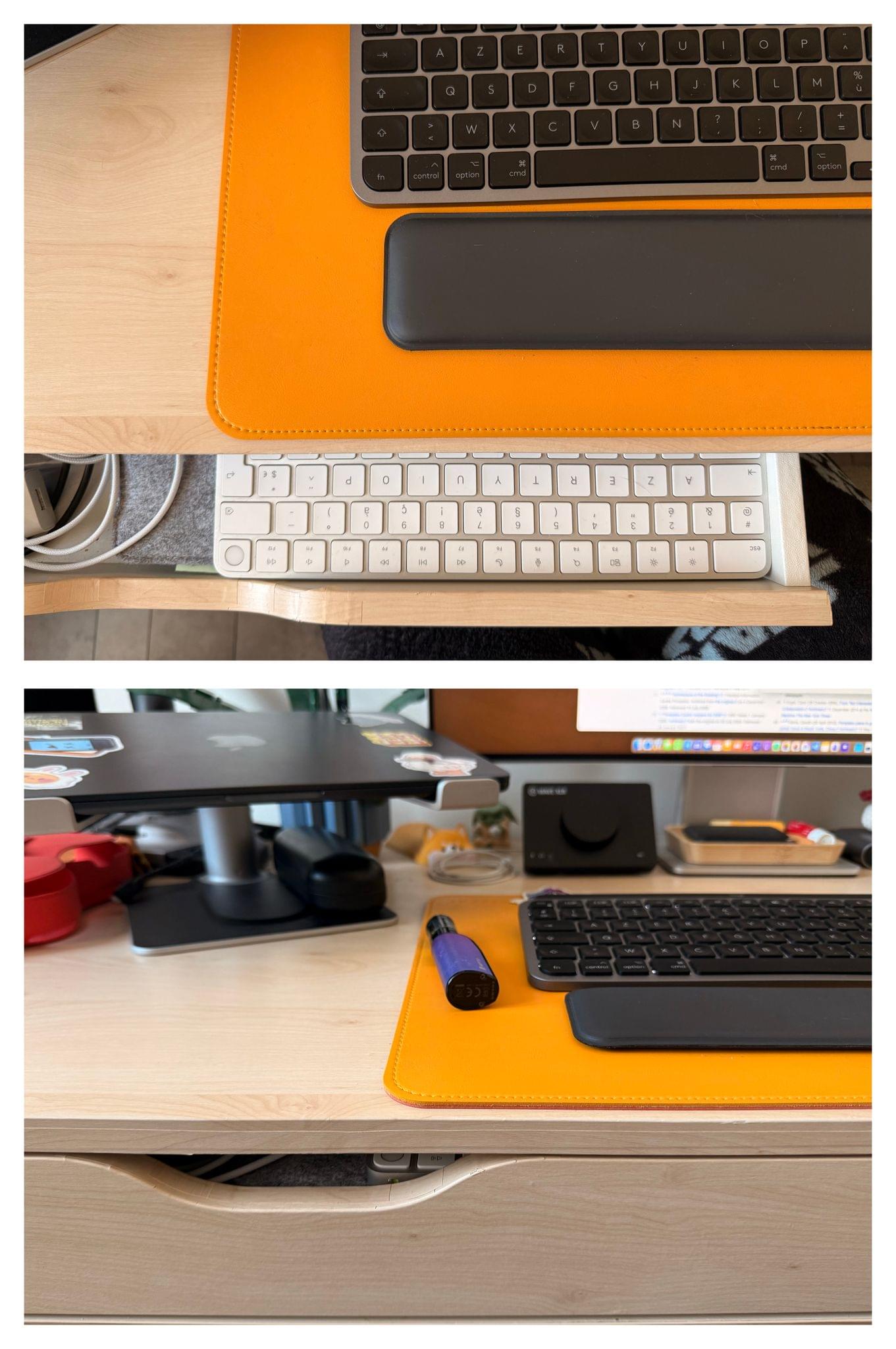
Transcript
1361 segmentsWelcome to Comfort Zone, a podcast all about pushing your hosts, well, outside of their comfort zone. I'm Christopher Lawley, and each week I am joined by two incredible co-hosts, and this week we're all hoping we don't have any more audio sync issues. As always, I'm joined by Matt Birchler. Matt, how are you doing? I'm doing good. I'm putting all of my energy into praying you don't have audio issues this week. We will see. Yeah, I don't know. But we're also joined by Niléane. Niléane, how are you doing?
I'm doing well. Good, good, good, good. We have a big, big show for you all today. If you can't even tell if you're a video viewer, you might be able to see a little bit of it just right now in my shop. Yeah, new haircut. Yes, haircut. Yep, exactly. That's it. That's the whole show. We're going to talk about my haircut. Can't wait. No. But we have a few tiny topics. And I don't know who put in what. So you guys go.
Okay. So I've put in that last time, I believe, I talked about how I taped my magic keyboard underneath my MacBook stand. The high rise by 12 South, whatever. A laptop stand on my desk. I've taped the magic keyboard underneath so I can still have access to the Touch ID button to unlock my Mac. I've changed that. So I've included a photo in the notes, which you can click.
Now, I figured I can simply put the magic keyboard in my drawer because my desk has two tiny drawers. And I can just have the magic keyboard inside one of the drawers. And I can reach through the opening of the drawer with my index finger and touch the Touch ID sensor very easily. And it's more reachable this way than having it underneath the laptop stand.
So I just wanted to show you that because I'm very smart. I'm very proud of coming up with this. This is great. This setup. Yeah. This is perfect. I love it. It's very like James Bond in a way is what I'm getting from it. You're just like, oh, how do I unlock my computer? And then you just kind of like stick your finger in your desk mysteriously and it... I tell the people, just look away. Don't mind me. Putting my finger right here. Don't look at my biometrics.
So that's it. I have two tiny topics. And they will both, I think, make Chris happy. A rarity. We like making Chris happy on this show. At least I like making Chris happy. That sounds a little crazy. No, it's not crazy at all. I bought this Wi-Fi setup. Yes! This is the TP-Link Deco. It's the BE11000, which I think is 1,000 more than the one you showed on the show way in our early days.
Yeah, this is probably the updated version. But it's fantastic. is it still like a white cylinder that kind of looks like the original lexa yes it's a white cylinder i think one difference on this one is there's on the back of each one there is a five gig or five gigabit per second port ethernet port and the rest are 2.5 oh now you're gonna make me upgrade it's pretty good um i i got this after listening to connected and the boss federico vatici
bought a Wi-Fi 7 router and was very happy with it. And so I saw these on sale for like $300 off. So it was a good deal. Wait, so you didn't upgrade after I made the recommendation. You upgraded after Federico made the... Am I not good enough for you, Matt? It's... Well, I mean, you know, you're both great. And I really appreciate both of your input on this. One of the two is the boss.
It was five minutes after Connected that I did place the order. Wow. I'm deeply hurt right now. We're on a break. We're on a 10-second break. This was supposed to make you happy. It's just failed miserably. Yeah. Yeah. I'm deeply, deeply hurt now. That being said, I love these routers. They are fantastic. Wi-Fi 7 is a really nice upgrade. like i get i get gigabit down throughout my whole house like it's it's fantastic i love it yeah the the the thing that is improved for me because i had a wi-fi 6e set up before um everything in the
office which is within like five feet of the router has always been great and is still basically the same it's i don't really notice any difference in the office but it's in my living room it's in my kitchen when I'm making Legos it used to have like literally zero internet I had to like hold my iPad like towards the office to really get it to download the PDFs for the guides that I of the thing I was building and now I just have the same internet everywhere in the house and it is it's glorious yeah there was something about like 6e not doing well when going through like certain kind of walls and stuff like that yeah these walls are just horrendous for 6e apparently but 7 loves it so
I don't understand the science. So at my old condo, I had a Wi-Fi 6 setup, and it worked great through my whole condo. And it had a main router and a satellite router, and I would get internet in my backyard. It was fantastic. I had it in the garage, everywhere. But as soon as I moved here, those routers really struggled going through walls. If you were in the room with that router or the satellite, it worked great. But the minute you went anywhere else, and that was a big reason why I upgraded.
But yeah, I'm happy you got this. I'm a little hurt. My recommendation wasn't good enough for you. I'm not good enough for you is what you're saying. I'm not perfect, and that's hurtful. No one's perfect. This is good for me. I mean. One of these days my topics will make you happy, and that moment might be now. Okay. Because I have a very important update on Superhuman, which I know is over the year or two has become the thing that I'm known for, which is upsetting to me in some ways.
Yeah. I, over the weekend, finally canceled my subscription to Superhuman. You got out. I got out. It was very easy. Very easy, actually. I'm a little concerned. Do we need to get you in like a deprogramming program? so that wait i don't know how deep programming program huh i don't know but that way you don't go back you know we need to make sure you don't go back yeah you need to decompile my programming yeah is matto robot when when you get pulled out of a cult or something like that you go through deprogramming like because you you kind of get brainwashed when you're in a cult into thinking
like oh yeah this cult is great like i need to give him all my money and other not so great stuff so like when you get pulled out like that's called deprogramming so i'm like do we need to do that to matt yeah so the thing that did it is my mime stream annual subscription renewed and within a week or so of that uh i also saw the creator of that app post a screenshot of mime stream in his doc on his iphone and said the beta is coming soon and so i was like you know what
it's time. But that was a while ago, right? He posted it again? Maybe, I don't know. Maybe there was a little bit of a delay. It's hard to tell how time passes when you're in a cult. It's a little different from real life, you know? So anyway, hopefully there's no bad things there. I was listening to Connected and Federico was like, I don't want you superhuman anymore and then that's when I stopped. It had nothing to do with your berating, Chris. Yeah, again, it was all Federico. Me lovingly trying to pull you out of a cult, trying to rescue you, give you a better life, wasn't good enough for you.
It was Federico. But okay, all right. You know what else it was? Here's my confession. A few months ago, I actually hit the button already. I had already canceled my subscription. And they sent me an email and said, hey, would you come back for 15 bucks a month for a few months? And I said, yes. And then my superhuman subscription went back up to 30 a month. And I was like, well, this is too much. Oh. Yeah. So, yeah. Yeah, that's a cult for you. At $10 a month, I'd pay for it.
No problem. But yeah, it's too much. So anyway. $30 a month for an email. I hate email. There's no way I'd pay $30 a month to do email. That's just too much. I hate email too much. MimeStream is great value, though. Especially when it comes to the iPhone. I just, I need it to get IMAP support. I don't have, my primary email is not a Google email. I am one of like the five people that doesn't actually use Gmail. Yeah. And so I need it to get proper IMAP support.
I mean, maybe I should just like give in and go over to the Google business stuff, but I really don't want to. Yeah, the number one reason for nerds like us to use Gmail is that you can just use all the apps. Every app works with Gmail, but. Yeah, when we get into our challenge, I'll talk a little bit more about kind of like the Google suite versus everything else. But yeah. Whoa, spoilers. Interesting. Eh, not really. Okay. All right. But let's get into the main show. Matt, you're first up in the dock. We have a plethora of new things for you all.
A few weeks ago, I reviewed the iPhone 16e before I even owned it. But now I'm happy to say I do actually own it. And I've been using it for the past week and a half as my phone. Moved my SIM or eSIM over here and everything. And yeah. You committed. I did commit. It's very, very easy in this eSIM world. I guess it's always been easy, but still easy. Now, annoyingly though, like my carrier, I can move my eSIM like a couple of times a year.
But after that, they charge me three bucks every single time. So come iPhone review season, when I'm like jumping between multiple iPhones, I end up having like, you know, 12, 15, 20 something dollars in charges because I'm moving SIMs around. It's just a little frustrating. Is it still a thing that in the US there's no SIM slot on the iPhone? Yes, yes. There's no SIM slot at all. That's still a thing. That's wild. I don't think we're ever getting it back. I think it's, yeah, on this side.
And isn't the 16e all eSIM as well? Everywhere? Or am I just, am I making that up? I swear I heard that. I swear I thought I heard that. I saw the Canadian version. Oh, okay. It does have it. So yeah, under the volume buttons, I guess, is where the SIM slot is these days. But us Americans would not know. Yeah. It's not there. Okay. Yeah, that's the socialist slot, the communist slot. You know, we have the freedom of not having the slot. This is the smoothness of freedom.
Yeah, you fought well. So I wanted to open by rehashing a discussion that I had with the guy at the Apple store back in September who sold me this, which is my normal phone, which is the iPhone 16 Pro. And while, you know, you're like, oh, and you're like, hey, I'm picking up my order. And I'd like to, and they're like, go have someone get it out of the back. And you've got like a minute or two, you just like just chat with the person who's helping you. And I like to ask little questions, like just a little inside info.
What are they seeing? What are the people selling the phone seeing? And I asked, because I was trading in a 15 Pro to get a 16 Pro. And I was like, so I forget exactly what I asked. But it was something about like, what do you see? Like, what are people buying this weekend, the weekend the new phone came out? How many people do trade-ins? I think I asked him, like, how many people do trade-ins? Or do people just buy the phone? And he told me, and I don't know if this is true everywhere, but I've seen some other metrics that might back this up.
that people who buy the pro phones tend to be more likely to do a trade-in and they tend to be upgrading newer phones. So they wait less time between updates than people who buy lower end phones. Yeah, I get that. That makes sense. If you want to be on the bleeding edge and have all the new features and pay extra for the pro phone, you're probably going to upgrade every year, every other year, something like that. Yeah. So, so yeah, cause cause yeah, we were talking about like the cheaper phones and his, his basic idea was there was like, they tend not to do trade-ins for them. Cause they wouldn't get
that much for their old phone and their old phones cheaper and years older. So they don't tend to do it. And I thought that was interesting going to the 16E for a while because I for, because I've been, I guess fortunate enough to be able to do it. Um, I've been a pro phone owner for many years, 10 years at this point, basically. Like, what's the best phone you can give me? That's the phone I would like, please. And so I haven't had like a regular iPhone since the iPhone 8.
I was one of the few people who bought the iPhone 8 rather than the iPhone 10. You didn't go iPhone 10? It was $1,000. I couldn't afford that. I had the 8 Plus. Yeah, I technically had the 8 Plus in gold. It was great. But so I haven't had like a lower end iPhone for a long time. And I wanted to give it a shot and see how I would do with it and kind of like how I think this phone works for the sorts of people who don't upgrade on a regular basis. And I thought kind of the idea that people who buy lower end phones tend to buy them less often is a really interesting way to look at like what features would be valuable to them.
So the number one thing about this phone that I think is awesome is the battery. Which I've never been able to say about the SE phones before. They were horrendous. Because they were like the newer hardware in the smaller, older form factor. So like the battery was just tiny and it was bad. And nerds like us will take care of the battery, I guess, if we have to. We're not happy about it. But like we can create a charging plan. We'll buy a charging brick.
We'll like figure out when we can charge like when we're on vacation or something. But like my mom doesn't want to do that. My dad doesn't want to do that. my like siblings who don't care as much about phones don't want to do that and so it was really hard for me to recommend an sc to people even if they didn't really care about phones and just wanted an iphone um because the battery was terrible and you're going to carry use it for like three four years five years it's just going to get worse so apple says this will get basically the same as the
16 pro in battery and i would say it does at least as good as the 16 pro it is really really just as an example I used it quite a bit on Saturday this week I woke up at 5:30 took my phone off the charger went to bed at 10:30 that night I had just under six hours of screen on time which was quite a bit and I was at 50% whoa wow it's great it's very very good and that's like
pretty consistent like I don't do any scientific testing or anything but like I have not worried about my battery ever with this phone it's only been 10 days but like yeah it's pretty good does it have the feature where you can limit uh to how to to which part it will charge at most like uh set it to 80 so it won't charge past 80 it does yeah you can do 80 80 to 100 any kind of thing that range okay i like that feature i know some people don't like it uh i like it because i'm always mindful about the longevity of the of the battery and especially the 16e like you said like
the se people who own this phone will own it for a while and maybe it's important that they can do that that's actually it's one of the things i really want to see so i'd love to see it's so hard to do because it's like really long-term testing but i'd love to see like good evidence that dropping it down to 80 when it's new and then like slowly creeping back up will actually make a difference in the long run because i i don't know if it does i haven't seen it's just like all anecdotal and like as you know with like people who say it is it is true but yeah didn't somebody
at the verge do that test last year like for like a whole year they left that feature on or something like that and like the turns out was like yeah it kind of saves your battery life battery health but it's you know at the cost of losing 20 of your battery life throughout the day is it really worth it yeah but it's it's so tough though because like you'll you'll see people like post like their battery health they'll be like i've used the iphone whatever for 12 months and now my battery health is at 99 and someone else is like well i've had the same amount of time and mine's at 89 and it's like well that's a big difference i don't know what the difference is how do you use your phones
depends a lot on if you wireless charge or not as well yeah and like are you chart like when you sit down at your desk are you charging through the day and when you go to bed at night or are you using it your iphone maybe as like a camera and constantly have it plugged into usbc cables so it's constantly like topping it off and stuff like that like there's tons of different reasons why one person's battery health may not be the same as the next person and i don't think it's like malicious on apple side like they're trying to get you to buy another iphone or something like that oh sure yeah yeah but yeah it's it's impossible because yeah some people will be like if you don't you need to
not wirelessly charge you need to not have it charged up all the time i 100% wirelessly charge same most of the day my phone is on a charger well it was now it's not but it used to be like on a charger so i was like i was doing all the bad things wirelessly charging 24 7 and my battery's great but anyway long story short battery on this guy is awesome so i'm really really happy with that so i can if someone is like i just need an iphone can i get the cheapest one i could say yes nice on battery alone nice the second thing that is very good is the a18 processor which i don't
have a ton to say about it's pretty quick it's pretty great and that is the current one that is in the current uh what iphone are we on 16 16 16 yeah yeah the regular 16 line yeah so it's the same same system on a chip just with one fewer gpu core than the regular 16 two fewer than the pro um i did play call of duty i played one round of call of duty oh sick bro sick 360 no scope bro totally did it with touch controls um it's it's it's it's fine um i assume there'll be it'll come back to some games won't perform in the long run but um or compared to the higher end phones but
like it's so so awesome for a phone that you're gonna buy and use for four to five years to have a good processor um coincidentally the nothing 3a phones came out the same week um were announced and came out the same week as this. And they, I forget what Snapdragon they have in it, but the Geekbench scores, which, you know, take them with a grain of salt, but the Geekbench scores were about a third as quick as the A18, which is about as fast as the iPhone XR.
Oh, wow. For context, yeah. At least in Geekbench scores. So I think it's really, really nice that if you're going to buy this, you're going to get a good processor. Forget Apple, like Apple intelligence works on it, but like set that aside. You're just gonna have a nice processor. Yeah, but you're gonna have a good processor that is really great for years to come. I think that's pretty good for someone buying the least expensive phone. They're not sacrificing performance.
Last two things I'll bring up, the display, super great. Super good. Ever so slightly dimmer, especially in HDR than the normal 16 and 16 Pro, but fine. Really, really high quality OLED screen. So I'm very happy with that on the whole. And the design, I'm mostly happy. This one camera, I love this. I love this one camera look. It looks so clean, it looks so good. It makes me miss the days when we had single camera setups.
I like the utility of more cameras, but it is just like looking at this like sitting on my desk is just very nice. So I do appreciate that. Although it does have the more sharp corners that I don't miss from the iPhone 12 to 14 generation. Oh, it does. How dare you? I think they were form over function. Nope. Flat edges, baby. Bad form and bad function. I love flat edges. Yeah, but Matt is saying the corners are sharp, right?
Yeah, yeah. So if you like the iPhone 12, 13, 14, then this is that same kind of thing although it's less sharp than the pro phones which is what i was used to having so it is kind of a middle ground between the more bezel beveled what do they what do we call these the softer edges of the newer phones yeah so i have one of these as well apple sent me a review unit uh and i played around with it i took it out of the box i did not move my sim over to it uh but played around with it i like it it's nice i love that it has the action button
um that's great fantastic weird that it doesn't have the camera control button because the other iphones in the 16 line do but i guess save money whatever um but ultimately like it's a fine phone but i think it's 100 too much yeah i see that um i think the interesting thing to me about this phone is a lot i've seen a lot of people wonder like will se buyers go to this because it's more than the last one i could see people who buy the normal iphone typically going down to this
actually i think because when i'm looking at like i made a list of things i like i miss like i don't like about this phone compared to what i'm used to and outside of the dynamic island and macro and magsafe okay there's a few things but like there if you just want an iphone that doesn't isn't like the cheap iPhone, which I know some people don't want to get, that looks modern, looks nice, and just has iMessage, has all the apps and stuff that you've already bought over the years.
I could see why this would totally work for a ton of people. Like, it's really good. I think it's very, very close in quality for a lot of things to the normal iPhone 16. Yeah, I just want to say regarding the price, like in France, it's so expensive. Like the 16E, I was just looking now, it starts at 719 euros. It's so expensive. Like if I said that to my partner who was used to buying iPhone SEs before, like they would buy an Android now, I think.
Like, there's no way they're buying an iPhone now. Not at this price. 700, like, 700 euros and plus. That was the price of the regular iPhone before. Yeah. And now you're getting the cheaper version. So, yeah. Yeah, that hurts. Yeah. Not great. So, yeah, I wonder how well it'll do. Maybe it'll totally bomb. But I do think it's an easier sell for people to, like, Maybe I could save $200 or however many euros the difference is.
Instead of buying the normal phone like I normally do, I could just buy this one, which is most of the way there. Yeah, I don't know. Yeah, right now on the French Apple Store, you can get the 15. Apple still sells the 15 at 869 euros. So it's very close. Why would you choose between the 15 and the 16e? Yeah, I would take the 16e. really over the 15 15 so 15 is going to have dynamic island 15 is also USB-C as well not to worry about lightning
mag safe A14 processor A14 wait in the 15 yeah because that was when it was a year behind A16 Yeah, because we're 18 right now. So it would have missed the 17 and stuck with the 16. It says A16 Bionic. All right. The only thing you wouldn't get, though, is Apple intelligence.
Yeah, yeah, true. You would get a 2X camera. Yeah. Yeah, you'd get that in the 16e because that's just the digital zoom one. The digital zoom, yeah. I hate the 2X camera. I hate that Apple's like, yeah, it's just as good as a regular optical lens. We're just cropping in. I'm like, no. That's no. Absolutely not. Well, the 15 has a separate camera, so there you go. Oh, it does? Oh, okay. Oh, yeah. Oh, heck yeah. Then the 15 all the way. The other camera's an ultra-wide.
Is it? Even still. I mean, the ultra-wide is useful. Am I losing my mind? Yeah, it is an ultra-wide. Is it an ultra-wide? It is. Yeah, and then the 2X would be the digital one. Oh, yeah, you're right. Okay. Oh, that's so confusing. Anyway. Anyway. I mean, yeah, you could get the 15. I mean, that's, it was, what, 100 and some euros more expensive, though? So, like, you're spending more to get an older chip, but more modern design, so another camera. So, yeah, there's trade-offs either way, for sure.
I do, Chris, I do agree that if it was $100 less, the price would not be a part of the conversation. It would be a lot more appealing, especially because Neleon isn't the first person I've heard say that in Europe. I actually think it was Federico was the first person I heard say that the prices of iPhones in Europe, they're just insanely high. And this one is no different, which is a shame. The regular 16, because now I just want to mention it as well, just so people know, the regular 16 is €969.
So the cheaper 16, apart from the 16e, so that's only like 256 gigs of storage. And that's close to 1,000 euros. And if you want a 16 Pro, now we're talking 1,300, no, 1,200 euros. Wow. For the normal 16 Pro? Yeah, the 16 Pro. And the 16 Pro Max, I don't know. but it's close to 1500 euros the 16 pro max lordy it's extremely expensive to get an iphone now uh yeah and i want to mention this because like most people i know who have an iphone here
like they buy it second hand and or refurbished or they buy an older model like it's very rare like unless you have decent money on your salary every month but yeah okay interesting yeah so i'll be going back to the pro of course i mean you may as well right like this isn't like you you already own it like yeah no normal person should like downgrade from whatever phone they have like this is just a youtuber experiment i guess um but like yeah promotion oh the dynamic You have to do an I was wrong.
Oh, my God. I was wrong. I have to go back to the Pro. I miss 120 hertz. I can't live without it because it makes me 10x more productive. I'll tell you what. The two things that's really made me appreciate about the Pro, the Dynamic Island. I thought the Dynamic Island was kind of worthless. Not worthless, but kind of a blah. Now that I don't have it, I really miss it. timers, media playback. I love it. It's not all the live activities, but those two things alone, I really, really miss them. It's really, really annoying
not to have them. Apple TV, it's a quick way to pause something on the Apple TV or control stuff on HomePods. It's really nice. I love the Dynamic Island. I actually think it's one of the better features when they do eventually get rid of the notch, or not the notch, but the pill, the I wonder what they'll do with the dynamic island. Because to me, the dynamic island is essentially the menu bar, but for the iPhone. Right?
But anyways. Yeah. And the other thing real quick was the always on display. I really missed that. My screen on time was higher with this phone. And it was because when I listened to a podcast with the phone on my desk or next to me or wherever in the house, I would just keep the screen on because I like seeing the progress and being able to quickly like hit the buttons to skip ahead or whatever. And yeah, without a noise on screen, I had to just actually have the screen on. And yeah, so always on, underrated, love it.
Nice. Nice. Well, I have a couple of new items for you all as well. Video viewers can see one right here in the frame already, but we will save that for just a minute. I'm going to start first with the new iPad Air. As of recording, we're recording this on Monday. My review just came out this morning, so it's already been out for a few days by the time you're hearing this. This is the M3 iPad Air and the new Magic Keyboard. Literally, the only thing that is different is they took out the M2 chip and put in the M3 chip.
Yeah, there's the iPad itself. There's nothing different. It even ships in the same colors. The last three iPad updates, so if you count this, the new base iPad, which I don't have one of those. I'll probably just go buy one, but they didn't send me a review unit. And the iPad mini, they've all just been very minor spec updates, which I have kind of found very disappointing. The one thing of note with this iPad Air is there is a new Magic Keyboard.
which is an improvement over the original Magic Keyboard which is what the M2 iPad Air used. What is nice about this Magic Keyboard, this new one is it works with both the M3 and the M2 iPad Air. So if you already have an M2 iPad Air this is the only upgrade that I would even consider. What's nice is it has a lot more viewing angles. It goes a lot further back than the original Magic Keyboard as function row has a slightly bigger trackpad, but the trackpad is still, it's not haptic,
it's still physical, so it clicks, and it's loud. It's very loud. I don't like that at all, because sometimes I will work in bed, and Danielle will be asleep, and that would absolutely wake her up. Like, absolutely beyond a shadow of a doubt. The USB-C port charges just as fast as the USB-C port on the iPad Air now, which is great. I love using the USB-C port on the Magic Keyboard. But this keyboard has some significant compromises, especially compared to the iPad Pro's Magic Keyboard. It's got that rubbery, plasticky material that the original one was made
out of that I caused to separate not once but twice on the original one. So I actually had several... I own three of the original Magic Keyboards. I had bought three of those, and those things are expensive. Nobody add that up and tell me I've already added it up in my head, and I know how much I spent on those. That's ridiculous. This keyboard, this new Magic Keyboard, isn't backlit at all. There's no backlighting, which is a bummer. I think that's kind of a shame. And also, so one of the absolute biggest complaints when the original Magic Keyboard came out in 2020
was the weight of the iPad with the Magic Keyboard together. Everyone did the math and figured out, oh, it weighs more than a MacBook Air in your backpack, and it weighs almost as much as a MacBook Pro. And for an iPad, that's a lot. This iPad Air, the M3 iPad Air, and the new Magic Keyboard actually weigh more than the old M2 iPad Air and the old Magic Keyboard. I actually have the figures right here. The old one weighed 1,319 grams.
This new one weighs 1,372 grams. And for reference, the M4 iPad Pro, one of the selling points was it's thinner and lighter. Same thing with its Magic Keyboard. It weighs 1,254 grams. So between this new iPad Air, new Magic Keyboard and the old and the M4 iPad Pro and its Magic Keyboard, there's 122 gram difference. And let me tell you, dear listener, when you are holding them both in your hand, you can absolutely feel that.
Like this is heavy to me. Like I am for audio listeners, I am holding the Magic Keyboard and the iPad in one hand. It is it's it's beefy. It's heavy. I don't feel this way with the new iPad Pro. So this is not a super light and portable setup. Overall, I actually think this is a really disappointing update. And I feel like I've said that the last few iPad updates that have come out, which is very, which is a shame. Because I love the iPad. But the last few iPad updates haven't been really anything interesting.
There hasn't been anything to address the big issues. Like when it came to the iPad mini, some people can still see jelly scrolling, some people can't. This iPad Air still has a very old display, still at 60 hertz. The base iPad still doesn't have a fully laminate display, which I think is one of the biggest upgrades that has ever come to the iPad. Yeah. I've seen a few people who wonder why someone would upgrade from the normal iPad to the iPad Air, and it's the display.
The display on the base iPad is worse than you remember, if you haven't used it in a while. I understand that $350 price point is very appealing. That display is not a good display. Yeah. That fully laminate display technology, I don't even remember when it came to the iPad, but that made a huge difference in using the iPad because now instead of it looking like there's an air gap between the glass and what you're tapping on, it looks like you're, and feels like you're actually just tapping on an app icon or something like that.
And I know that sounds kind of like, oh, who cares, whatever. but it actually makes a big difference using it. It makes that device feel really special. I should say the base iPad is 410 euros. Jeez. These numbers. I can't keep track of these numbers. But I'm trying to convert what that is to dollars in my head, and I'm like, is that close? That's 444 American dollars. Yeah, that's a lot. Oh, wow.
That is a lot. 329 US dollars. is the price here. No, it's $350. Oh, is it $350? The base iPad is $350 now. So remember when the 10th gen iPad came out and it was like $400 and something dollars and they couldn't get it to that $329 price point that the old base iPad used to be. And then when they refreshed the M4 iPad Pros, one of the things in that announcement was they got the base iPad down to $350. Gotcha. Still not as good as the $329, but hey, it's a $20 difference.
It's a decent device for somebody. Like my grandparents have. They each have one of those base iPads. Yeah, my wife does too. All they do with it is go on Facebook and play Solitaire. That's all they do with it. It's fine. Like it's fine. But I think for most people, if you're listening to this podcast, if you're looking for an iPad, you start looking at the iPad Air. Then maybe you might want to go to the Pro if there's a specific feature or something you want. Or if you're going to be doing like really heavy creative tasks like video editing or Procreate or something like that,
where it could benefit from that extra RAM, then maybe you go to the Pro. Yeah, even then it's hard, right? Because the Air has an M3 with 8 gigs of RAM as well. Yeah. Yeah, that's right. Yeah, so the only way you would get extra RAM with the iPad Pro 2 is if you go to a minimum of 1TB of storage is when you get 16 gigs of RAM. So it's an update. Literally, the subtitle in my video review is technically it's an update. It's true, but other than Apple had a bunch of M3 chips laying around and they didn't want them to go to waste,
and they were probably running out of M2 chips, so they were like, well, let's just put them in the iPad Air. I can't see why this update exists, because this iPad was just updated 10 months ago. The only time an iPad has ever been refreshed that quickly was the iPad 3 to iPad 4, And it was because the iPad 3 was the first Retina iPad. And that thing got so hot. You could cook an egg on the back of that thing. It got ridiculous. I had one. It was uncomfortable to use.
And Apple rushed out an update to fix that. But that was a hardware update. They couldn't do anything in software. After we talk about the MacBook Air, I have a question for you. Spoilers. I haven't said what I was going to talk about. Okay. Well, I'll cut this. Okay. No, that's fine. Okay, so the next product I have is the MacBook Air. Whoa. What a surprise. Yeah. So it's been sitting here this whole time for video viewers. That's not an iPad. It is. It's the new 15-inch iPad Pro. That's what I thought. Oh, I wish.
Oh, boy, do I. Anyways, so this is the 15-inch MacBook Air for video viewers. This is sky blue. I'm going to tilt it because down here it just looks gray. If I tilt it up and hits the light, you can kind of see the blue. Hopefully that comes across in video. In person, you can see the blue depending on the lighting, just like every other Apple color that they do. It's like, yeah, technically it's purple. If you shine light on it at this degree, at this intensity, yeah, you can kind of see the purple.
That's what this is. It's kind of blue. i i had a a friend one time describe la croix as just plain water that was made in a room with someone yelling pamplemousse and that's that's how much it tastes like pamplemousse um or whatever raspberry apple whatever um i kind of feel like that's how it is with the colors like they're mixing paint in the same room and some of the like you know there's some dust particles that get to the devices but it's not uh it's corrupting yeah i i i desperately want apple to give us i don't
i don't get it apple makes these imacs with these beautiful colors uh and we we why not the rest of the line of products like come on oh yeah like colors even even i the guy that dresses in all black would love a blue laptop or a purple laptop or an orange laptop like i just give me something like even the starlight ipad air that i have is like you can't really it just looks gray like i in my thumbnail for the video i had a brain i had a chance i had to literally create a mask for the ipad and change the white balance and shift it to more yellow so that way you could
actually see the starlight color of it because without that it just looked gray um anyways anyways let's get back to the macbook air so the one i have here is the 10 core cpu 10 core gpu 16 gigs of ram and 512 gigs of storage so this is a review unit i didn't buy this this is what apple sent me you don't really get to pick what uh you you want in fact it's kind of the polar opposite of what i was hoping for i was hoping for a 13 inch with maxed out ram and maxed out storage
but that's okay um i tried i tried doing a little bit of video editing and a little bit of photo editing in this thing and i thought i broke it um it got so hot it got so ridiculously hot i had to just shut it down move back over to the mac mini um it's just it for for a creative workflow the MacBook Air isn't the thing. It just can't quite handle high-intensity tasks like Final Cut, Photoshop, Lightroom.
It was just a bit too much for it. Probably didn't help that it only had 16 gigs of RAM, but I tried. Was it slow or was it just hot? It got really slow, and then it got really hot. Oh, interesting. Or it got really hot, then it got really slow. Yeah, because if I'm just doing normal stuff, so say I close all the applications and open up Final Cut and I'm just cutting up video, like I'm just cutting up my A-roll, it's fine.
It can handle that just fine. But the minute I start throwing in B-roll, start doing color grading, start doing mass, start doing optical flow, start doing stabilization, that's when it got to be a bit too much for it. Interesting. Yeah, interesting. Because, yeah, my editing machine is an M2 Pro. with 16 gigs of RAM. And it does great. But it does have fans. So I don't know. I'm going to go. Yeah, I was going to say that's that's probably the thing is that it just didn't. The no active cooling system is probably the whole like, OK, this thing's getting hot.
Now we have to throttle back down. And like it came to like a screeching halt. But that was OK. Like, it's fine. Like, I wasn't expecting it to be able to handle Final Cut, Photoshop, and Lightroom to the level that I do on that M4 Pro Mac Mini. It just, it's not fair. In fact, I actually made the M4 Pro Mac Mini's fan spin up for the first time. I was doing whisper transcription, and I was doing the AID noise feature in Lightroom at the same time, and I finally heard the fans for the first time.
But this MacBook Air, I've been loving it for writing and doing research and stuff like that. I'm working on a few other scripts right now, and I've kind of been writing them here just to play around with it. And it's absolutely perfect for that. The 15-inch screen size, when I first took it out of the box, I'm like, holy crap, this thing is huge. I'm never going to get used to it. I've actually started to get used to it, and I'm actually kind of liking it because it's perfect for having my Obsidian document open for my script. and then like a Safari page for research or something like that.
And it's a lot less cramped than the iPad Pro's display. I feel like I'm able to kind of get my elbows out a little bit. And like, I'm kind of starting to like this bigger laptop size. I've never been a big fan of like the 15, 16-inch MacBook size, but I'm kind of starting to like it. The big thing about this MacBook is the battery life is insane. This MacBook Air, so I got it Friday afternoon at around noon.
Unboxed it, did migration assistant from the Mac Mini to this one over Thunderbolt, because I just wanted to get up and running. I didn't want to manually install a bunch of stuff. I was doing the iPad Air review this weekend. I didn't have time. So I'm like, migration assistant, just move everything over. That took like no time at all over Thunderbolt. It was like a couple of minutes. I like maybe 20 minutes. It was insane. So I used it Friday to kind of like finish up my iPad Air script.
Because like I had the iPad Air over here testing. And then I was writing everything over here on the MacBook Air. Great. Then I used it Saturday a little bit. I didn't use it all day because that was when I filmed a lot of my iPad Air review. But I did use it a little bit Saturday. And then Sunday. Sunday was the first day I had to charge this thing. The battery is insane on this thing. Like, the iPad, I have to charge my iPad Pro halfway through my working day. Like, it doesn't even make it a whole working day.
This made it to day three. Now, it wasn't three full days of using it. It was, you know, probably like one solid work day of using it, but it made it through that whole time. And that was with me taking it out of the box. And yeah, I was super impressed. And it just reminded me of like, yeah, the quote unquote 10 hour all day iPad battery life is not good enough. It's really not. It's something I've been harping on a lot for the last couple of years. It's not good enough anymore.
And something needs to change there because what these MacBooks are getting in battery life is just wild. Yeah. I'm on Apple's site right now. They advertise 18 hours from both errors. is nearly double the iPad. Yeah. Yeah, and I think the MacBook Pro 14-inch gets like 22, and the 16-inch is like 26 or something like that, 24, 26, something like that. But yeah. But I just wanted to say, I've been having a ton of fun using the Mac again.
I've been using like Raycast. Raycast just came out with this whole update for this Raycast AI thing that I think we should talk about on an episode at some point. We don't have time right now, but I'd love to talk about that because, like, it's actually, like, what Apple intelligence is trying to do, but works and is really cool. And then there's things like just simple things like menu bar apps. Like, I've been having a ton of fun. I won't get into a little bit more in a minute, but I've been having a ton of fun just, like, playing with menu bar stuff.
And then there's like Hazel and Keyboard Maestro, like background automation utilities that will never be allowed to exist on the iPad. I'm just having fun just playing around with it and nerding out. And I kind of said this in the video I made about like the Mac mini and my iPad workflow. But playing with Mac OS again is reminding me of why I started my YouTube channel. To talk about applications, to play with apps, to just do cool and nerdy things. And the iPad hasn't had significant growth in like the last three years.
The last big OS feature to come to the iPad was Stage Manager, which was iPadOS 16. As far as iPad updates go, yeah, the M4 iPad update was cool, but it was kind of just like a step up of what we have. Like there hasn't been anything new and exciting in the iPad hardware realm. It's all just been like updates. There hasn't been anything new in like the last three years. Software-wise, the only thing that Apple has really done with the iPad is Final Cut and Logic in that time.
So it's kind of like, are the lights on? Like, is anyone home? Like, I love the iPad. I want it to succeed. But like, what's going on? Like, what's happening over here? And then the Macs over here flourishing. There's new third-party. There's so many new third-party apps since the last time I used a Mac that I'm just like, this is awesome. Like, I have way too much crap in salt right now. I'm constantly running out of RAM. So, like, I need to go in and clean that up.
But, like, I'm just like, this is so much fun. Like, there's so much new stuff over here. And the iPad, like, I couldn't tell you the last big third-party iPad app to come out. Like a big iPad app that really changed how people can use their iPad. I really honestly couldn't tell you. I know there's niche stuff, and I would even throw Final Cut into that niche category. Like, what was the last GoodNotes or things or something like that that, like, is one of those apps that, like, every iPad user can just take advantage of?
Procreate, something like that, yeah. I've been biding my time because this is where I want to. So you mentioned no real hardware innovation in the last three years or something. Three years is your number. In the past three years, the MacBook Pro has changed zero. The MacBook Air in the last two and a half years has changed zero, except for that blue color. No, didn't the M2 iPad Air come out in that time?
Yeah, the M2 was the big change, but then they did the M3 last year. Now this year they're doing the M4. so it's the exact same design it is just a well they have added the 15 inch version too they added the 15 inch version as well that's true they added the 13 inch air though in a similar time window so and we all agree i think that the mac is in a pretty good place and when a better mac comes out we're all happy um but you just you have two products there that are pretty boring spec
bumps but you were very positive on the mac and pretty negative on the air on the ipad it's an interesting spot we're in because you're right i think it is i i said this like a year or two ago in mastodon i think of like i feel like all the innovative apps are they used to happen on the iphone and ipad and now they are back to happening on desktop systems yep or the web yeah um so for me when i sit down at a mac i know that mac so if i if i was to go out right now and buy a 14 inch m4 max macbook pro i know that mac right there i could throw my workflow at it and it'll use that
hardware okay it hasn't been redesigned since the m1 pro and m1 max macbook pro i don't really care about that too much. I'm excited about the potential rumor of an OLED MacBook Pro, because I love the OLED screen on the iPad Pro. Looks gorgeous. Bring that OLED screen everywhere, especially to an external display. Apple, please bring it to an external display. But if I was to throw my workflow at an M4 Max MacBook Pro right now, it would handle it no problem. macOS would be able to handle it no problem.
I throw my workflow at an iPad. I texted you guys last week. I sent you guys a picture. I, while editing this show Completely crashed My iPad Pro to the point where It came up with the You need to plug this into a Mac in order to recover its screen I am definitely feeling The edge cases of iPadOS now I am feeling the Like You guys know the meme Of the guy, he's holding the girl's hand
But he's looking back and looking at the other girl Yes I'm the guy right now. And the girl's hand that I'm holding is iPad. And Mac is the one that I'm looking at. Because I'm like, why can the Mac do all these cool things? And Apple's like, oh, security. We can't allow these apps because of security. But has there ever, ever been a huge, I know there's minor things here and there. That's just the world. But has there ever been a massive issue with allowing people to go and download apps for their Mac from the web and doing things like Raycast or menu bar apps.
And I am kind of tired of being stuck as like, well, yeah, here's this app that can open up in full screen and perfect example. Final Cut. When I go to export a video on my iPad, I can't do anything else with my iPad. Final Cut just has to stay there and open. Technically in Stage Manager, you can open apps on top of it but I've had it I've had Final Cut crash because of that so like when I go to export a video I have to leave Final Cut open full screen on the Mac I literally just jump over to another space start working on the thumbnail or description of the
video or something like that while it's exporting and I'm just like these are the kinds of like paper cuts that are just like should have been solved years ago and they're not getting addressed and I kind of have a feeling, and I don't know anything. I legit do not know anything. I'm not hinting at something, but I kind of have a feeling iPadOS 19 is not going to be the savior that it needs to be. And I am just like, macOS just keeps getting better and better with third-party apps.
Like, there's so much cool stuff. Like, SuperCharge, Matt. Like, I know you love SuperCharge. I've been having so much fun playing around with that. Like just getting like tweaking Mac OS to be the exact way I want. Oh my gosh, adding cut to finder. Why has Apple not done this? But yeah, that's kind of where I'm coming down. I'm loving this 15-inch MacBook Air. Yes, it's not a massive update. It's just a processor update. Actually, no, I take it back. There is one massive update to the MacBook Air line.
It starts at $999 now. And that is where it needs to start. I mean, I'm sure in Europe, that's probably like 10,000 euros. I know. I saw you. Literally reach. Strap in, boys. It's going to be 1,200 euros. Yeah. Well, I can't do anything about that. In freedom money, it's 999. You're not paying taxes right away, right? No, you do. You do. But it depends on the state.
How does it work? So taxes depend on the state. Some states don't have sales tax at all. Other states like California have high sales tax. So I usually pay about like, I just add 10% to like whatever I'm going to buy. I just add 10% to it in my mind. $9.99, that would be in California? Yeah, so it would probably be, so if I was buying a $1,000 MacBook, I would just add $100 to it. It's not exactly that, but it would get to that just about right.
It's getting closer, at least. Yeah, but then there's some states that are like Oregon. Oregon doesn't have sales tax. In fact, my very first MacBook Pro might have been shipped to Oregon and then shipped to me when I was in high school because I didn't want to. It was my graduation present from high school, but I had to pay half, and I didn't want to pay sales tax. Tax evasion? Yes. But they have a really high income tax. So, like, if you don't have sales tax in your state, like, you will have a high income tax.
So, and then you live in California where you have high sales tax and high income tax. It's just fun all the time. I might be in the middle of doing my taxes right now. This might be a sore subject. But yeah, I don't know. Do you guys have any questions on either one of these? Like, I think I'm really enjoying playing with the Mac. Something needs to happen. Apple needs to do something with the iPad because the state that the iPad is in right now, to me, is not acceptable.
Yeah. And that hurts me to say that. I'm not doing this for the clicks. It hurts me to say it. Yeah. And I agree with you. I've said this many times. I used to be iPad first, iPad only even. And I got the M2 MacBook Air when it came out. And living the best life since. I'm not looking back anytime soon. Even now with the M4 coming out and the M5 next or whatever, I don't think I'm upgrading anytime soon.
This M2 MacBook Air is great. It's going to last. Oh, yeah. There's YouTubers I know that are still on the M1 Pro and M1 Max line of MacBook Pros. And they're like, yeah, my workflow is fine. I don't need to upgrade. Marques Brownlee uses an M1 Mac still. Yeah. He could buy anything. He's not limited at all. Yeah. He could upgrade every single time. But, yeah, iPadOS, man.
It all comes down to iPadOS. Just wait for WWDC. This is the year. Here's the thing. I've said that too many times four or five years too many times I've said it too many times and I kind of feel burnt and this is the year of iPad on the desktop oh we're gonna break Chris do something just do something anyways I think we need to move on to our challenge but yeah that's the 15 inch MacBook Air really enjoying it
that's the new ipad air it's fine if you have an older ipad air it's it'll be a decent upgrade because you get everything from the previous updates but if you have an m2 one there's really no reason to upgrade maybe consider getting the new magic keyboard if if you use the magic keyboard a lot uh because it is an improvement over the previous one nice challenge time all right challenge uh it was my challenge it and my challenge was to find an alternative app to one of your staple apps. So something that's like in your doc that you just like constantly use all the time. And it
must be a new app to use. So if you get it from the app store, it must have like the price or get next to it. If you get it from the web, uh, scouts honor. Uh, all right. Um, normally the person that does the challenge goes first, but because I had stuff, um, to talk about, we kind of, we swap things around and I actually woke up with a really sore throat. So I'm kind of tired of talking. Niléane, you want to go first? Okay, I can go first. Okay, so I should start by saying that this challenge has escalated very quickly for me.
But in a good way, in a fun way. So I chose one of my staple apps, which is the music app on the Mac and on the iPhone, everywhere. I listen to music all the time, every day. There's not a minute in the day when I'm awake and I don't have music in my ears. And when I don't, it's because I'm watching videos or I'm on a call. Otherwise, I always have music in my ears. So I don't know if... I think it qualifies as a stable.
So there's something I've wanted to try for a while, which is try using the app called Doppler. Do you know Doppler? Yes. No. So Doppler is an app available on the Mac and on the iPhone. No iPad app. I don't think so. Right, Chris? So anyway, this app is great. Probably. Probably, yeah.
This app is great. What it does, it's a music player. The tagline is the music player for people who buy their music. So the idea is it's an old school app in a way. It lets you manage your files, your music files. If you have files sitting in a folder on your Mac, on the server, on the NAS, you can just import it into this app and it's beautiful. Like it presents your library in a beautiful way.
And you can edit the metadata on your files. And it's great. It's also on the iPhone and on the Mac. There's no syncing at all. Very old school in this way. It's very basic. So you import your library on the Mac and you have to import it on your iPhone as well. You can work around that by storing your files on the remote server, on the server at home. so it's easy to import music on either device.
The app also comes with a utility called Doppler Transfer, which lets you send the music from the Mac to the iPhone app directly, which is really useful. So you can select a bunch of albums in the Mac app and send it over to the iPhone immediately. So that works nice. And the reason why this has escalated quickly is because I've fallen in love with it. And the reason is pretty simple.
It is because the way I use the music app, usually, is I go into the library tab, select an album, and play it from start to finish. That's how I listen to music. Same. I don't listen to play... Yeah, same. Except Coldplay. I don't listen to playlists. Coldplay. I don't listen to playlists. I don't go into the home tab often, if at all, to discover stuff in this way. I always discover music organically, I want to say, like people mentioning music to me or sharing music with me
or coming across music in movies or on TV. That's how I discover music. I never use the music app to discover music. So yeah, I only go into the library tab. And if you use Apple Music for any length of time, you know that the music app is both great and terrible at managing your library. Why is it great? Because it's a bit of old school. You've got the iTunes roots. It lets you do everything. You can add the albums, edit the metadata.
You can import the music you bought. So you can import files and it syncs everywhere. So that's nice. But Apple Music for years now and still in the year 2025, will still mess up your library at random just to piss you off uh like every day i discover duplicates of albums in my library um i posted on mastermind a few days ago uh there are nine now nine and kento soundtrack albums in my music library on apple music and i this is this is driving
me insane because this is the main way I listen to music is I go into the library and select an album and now every every so often it gets messed up the way Doppler works is refreshing because so I have a collection of music I've purchased over the years it's an old collection now it's now today it's about 100 100 gigs large I think it's about 200 200 albums
in pretty high quality most of the time when I could buy it in high quality. So I imported all of that into Doppler. And it's so good, guys. Nice. It's just like a library that I can scroll through and play music. It's like an iPad. Yeah. And I did the same on my iPhone. And this is where it has escalated even more because, like I said, there's no sync and there's no streaming.
This player plays your music locally. And I must mention, Doppler looks very good. It's an old-school app in the way it works, but it's very modern. It looks really modern and it looks really nice. It's very pleasing to use on the iPhone as well as the Mac. And on the iPhone, the issue is my iPhone is an iPhone 14 Pro. I've had it for two years but like I've never had to store things on that iPhone like which is why when I bought it it was
the lowest tier 128 gigs of storage yeah I could not store all of my music library on that iPhone so this week I went to the Apple store and I bought a new iPhone all i wanted you to do for the challenge is find a new app you didn't have to go buy a new iphone this was a 32 000 euro challenge so i bought a new iphone at the apple store this week i traded in two devices to be able to afford this uh which is the iphone 14 pro in question and an ipad pro
11 inch. What? How are you going to get your work done now? I don't know Chris. I don't know. Wonder. Yes I traded in two devices to be able to afford this and it's great. I have no regrets so far but it's been amazing. It's been only a few days. It's been amazing to have my entire music library on my iPhone locally and I can browse through my library without duplicates and it works great because it's all locally it's very fast and you don't notice it in the daily life when you use the Apple Music app like the streaming
aspect but also the animations and the fact that everything is taking a little while to load and even on the 14 Pro like Doppler extremely fast super responsive and you can on the iPhone as well you can edit the metadata etc it's very nice so there we are guys I have a new iPhone and I've replaced the music app with Doppler. I must mention, because I know that this is going to be a question, I'm not unsubscribing from Apple Music.
One, because I haven't bought everything that I listen to. Like, I'm not that rich. Also, I still pay for Apple One, because we share that subscription with my partner. So that's included in there anyway. And I will still use Apple Music for those times when I want to listen to something new, whether that's something that I've shazammed or something that some people have shared with me.
So I think I'm going to use both. Right now in my macOS doc, I have both apps side by side, the Music app and Doppler. And on my iPhone, the music app has been demoted to the icon grid. And in the dock, I replaced it with Doppler. So there you go. Any questions? That's my subject, my entry to the challenge. I have to say this is probably the most above and beyond for any challenge ever.
Like, find a new app. Okay, I went and bought a new iPhone. Yeah, I don't know what the challenge is this week. I'm going to go buy a new MacBook this week. I'm going to go find an X server. This has happened because I've fallen in love with it. Like, I obviously I needed this. Like, this is something that I've been looking for, that I've been wanting. I just never took the step to actually try something, to try to do something about it. And I'm happy that I've done. That's awesome.
I'm really glad this challenge, like, led you to something that, like, you love, like like Doppler yeah me too and and it's something I'm going to check out as well because I I like that I can like buy music and put it into uh the music app and it syncs over to my devices and stuff but also I find myself not doing that as much because if you like make playlists in Apple Music with songs that you own they don't like go into like if you share the playlist with somebody those songs don't go over.
So I kind of like the idea on my Mac at least to have a traditional iTunes style thing. Here's my music on this computer and that's it. So I'll definitely check this out. There's also the fact that when you import music into the music app on the Mac and have it sync, it will mess you up. It will screw your library up. I've done this many times. It will make duplicates. I will have an album with three, every track is present three times in the album.
Yeah, that helps me too. I've stopped doing that for this reason. It's terrible. Apple, fix your stuff. Like, seriously, this makes me mad. This has been going on for so many years now. Fix it. Do something. What's worse, though? Music or iPadOS? Music. Music. Wow. Oh, okay. Easy. All right. I want more from iPadOS, but like, yeah, music is just rough, especially on the Mac.
It's rough. Yeah. To be fair, I'm using the music app exactly how Apple wants you to use the music app. So I used to have a local library of all my music. CDs I ripped, music I purchased, all that stuff. It was hundreds of gigs. It was on an external hard drive. Before I had a NAS, it was not backed up. That drive died. Oh, no. Lost my local music library. And then that was about like months after Apple Music launched. So I was like, whatever. I'm not going through the process of ripping. I mean, I still had those CDs and stuff. But I was like, I'm not going through that process again.
Like, that's just too much work. I'll just add the stuff from Apple Music. So my whole music library consists of like Apple Music streaming stuff from their catalog. So to me, it's not as bad because I don't have a local library as well that it's like trying to like merge with. But yeah. So I just want to say next week, you will have my first impression on the 16 Pro. Nice. Nice. Great.
Matt, what do you got for us? So I have brought, you're never going to believe it. Can I guess? Can I guess? Go for it. It's going to be Matt Birchler. What do I know about Matt Birchler? Matt, web browser. It's a web browser. Yay! I have found yet another web browser that I have never used. How are there this many web browsers? I said it couldn't be done. So I am using another thing I don't know how to pronounce.
Ecosia? Ecosia? Which is a, you may recognize this as the odd search engine that you can set as your default search engine in iOS and iPadOS. It's basically the big ones, DuckDuckGo, which I guess is kind of a big one, and then this guy. They also have a browser, though. And it's kind of a boring pick, but it was super easy to use for the past week. and actually a couple extra days since we are recording a few days later than normal.
It is just Chrome. Okay. End of sentence. So it's Chrome. You brought Chrome. So it's truly of all, like, you know, like there's all these Chromium forks of like the rendering engine, but like they'll usually do some interesting stuff in the UI. Not Ecosia. It's just Chrome, and it is with a green accent. And that's pretty much it. Although there is a couple of interesting things, I guess.
There's one very interesting thing. I will say, I tend to have Chrome installed on my Mac just for occasional things where just Chrome is just ideal for development work, especially. It's just very good at that. I could probably uninstall Chrome now and just use Ecosia because it does all the things Chrome does exactly how Chrome does. So I could do that. And it's green. And it's green, which I do like. I like this.
I mean, I don't blame you. I like green. I mean, it doesn't come through on the video very well, but my walls are green. Yeah. You can also theme Chrome, whatever color you want. But anyway, anyway. Did Apple pick the shade of green for your wall, Chris? Yeah, can you tilt the wall a little bit so the light catches it? Yeah, yeah, yeah. It's space green. Space green, yes. And there's 50 different versions of it. So basically, the way this company seems to work, and I don't really know these guys very well, but basically they have a search engine, which is, this is going to sound crazy, is just Google.
It just looks like Google with a green tint again. I couldn't tell at first if I'd even changed my rendering or my search engine when I switched over. But yeah. Are these people's whole business taking other people's products and just relabeling them? So what they do is their whole kind of quirk is it's supposed to be good for the environment. So they have the search engine.
They make money. Their business model is making money off ads in the search results. But they commit all of their profits back to planting trees, other environmental stuff. So, you know, I haven't vetted this out to know how great this is. But in theory, it's better than using Google. So I've been using it. It's been nice. They do have this kind of cool thing on the Mac version of the browser. where it will automatically accept cookie alerts for you or like will do whatever you want on them.
And it's not just like hiding them like a lot of extensions do. It actually like agrees to them or rejects them or whatever. Oh, nice. Which is kind of cool. So I found with those, the extensions that block the cookie banners, sometimes like the website is just inaccessible until you do that. So this is kind of cool because it gets around that. It does not work in their iOS and iPad version of the app, but all hail the Mac. But they do have an iPad version that's very nice.
But it's just WebKit. It is just WebKit. It's just Safari rebranded because we don't – why would we allow other web engines on the iPad? Who would need a Chrome browser to, I don't know, say, record a podcast, change keyboard firmware? I'm not bitter. I'm not upset. It's too dangerous. so yeah but it's really good this was actually super easy I've used as my default browser on all my devices I switched my search engine over as well just for bonus points for anyone voting in any polls that might be happening I didn't spend I didn't buy a new phone for it but I did change two things and yeah it's quite good I'd say give it a shot it's not the most innovative
browser like it doesn't do side tabs which we all know is the clearest sign of an innovative excellent browser but absolutely um but it's it's really good i really enjoy it so i'm going to keep it installed and chrome might be on the chopping block on the mac for uh so it says on the site that it's powered by the sun and that ecuja generates solar energy every day that you use the browser. Have you verified that? I mean, I don't.
Does your electricity feel greener now? It does. Okay. I'm all bought in. Are you like Dr. Octopus and have the power of the sun in the palm of your hand as you're using this? Yes. Go install it. Give it a shot. Nice. No, that's cool. I like both your picks, but I have the clear winner here for this week. um so um strap in children it's time for a story not really uh when i set out for this challenge i knew the kind of app that i wanted but i didn't know like what i didn't know like what app it was
like i didn't have like a clear app in mind but i knew the problem i wanted to solve like i've been saying i've been playing around with the mac a lot more i love mini bar apps mini bar apps are awesome because they can just be these little utilities that could be almost nothing or they could be like very powerful um so i wanted a calendar app that lived in the menu bar that showed my upcoming appointments for the day and my upcoming reminders because i'm still using apple reminders and and you know a lot of apps will show both reminders and calendar appointments in the
same view just like the calendar app does now uh now i tried a ton of different calendar apps uh i found some that are very very very very very culty um and i was uh staying away from those one thing i did notice because i've been using iCloud for both my calendar and my reminders and stuff is it is so difficult to sign in to a calendar app using iCloud like all of them want like your google stuff like just sign with your google account no big deal we'll load that calendar up but man with icloud it's like you got to go generate a one-time password and they changed
the icloud website so i didn't even know where that was anymore so there's a few of them i just gave up on i was just like this this is too much work and they weren't really the apps that i wanted they didn't they weren't exactly working the way i wanted and then i found calendar 3662 i'm not not entirely sure what the 2 is and now here's where this might get a little debatable and i i will be scouts honor here i have used calendar 366 on the iphone and ipad but this was an entirely separate purchase it's named differently calendar 366 2 i'm not entirely sure i paid for it i think
it's it was like 10 or 15 bucks i paid for it i downloaded it i had never used it before so that's where i think there was no reason for you to bring this up and disqualify yourself from the challenge i i'm i am being honest i am being honest so honest it doesn't pay but but they work differently too that's true i'm seeing it now you're right they both work entirely differently the only thing they seem to share is is the name uh but they are not universal purchases they are they don't work the same they're named differently i i i think this still counts but i wanted to be i
wanted to be honest i think it counts so calendar 366 on the iphone and ipad it's just like a regular calendar app you tap the icon it opens in a calendar whoop-de-doo the calendar 366 2 on the mac app just lives in the menu bar there is no like calendar view like click an icon in your dock and it opens up in a calendar or something like that it just lives in the menu bar and i love this because it shows all my calendar appointments and reminders for that day. Plus, you can have a keyboard shortcut to activate it. So I set it to hyperkey C. So this way I can, and we've talked about hyperkey
in the past, but this way I can just hit that. And it literally shows me a list of, okay, here's the next task you need to do. Here's the next appointment you need to do. I don't need to go into an app. I don't need to go into reminders and see a bunch of extra stuff. I don't need to go into calendar and see a month of tasks. I just see literally what is next. And yes, I can click around if I want, but I can just see what is next. Now, what's really cool is you can go into the settings and limit how much you want to see in that view. So I've set it to three days. So I see today and the next two days.
And that is so if I have something coming up, I can prepare for it. So like, say I'm working on a video and I need to order something for that video. I will look ahead in the next couple of days so I can make sure I have all that stuff needed. Love, love, love the way this works. I love not having to open up the Reminders app and get distracted with my ADHD kicking in and get distracted with other stuff. I just hit HyperKey C and I see a list of everything.
Again, this is the kind of thing that will never, ever run on the iPad. I would be willing to make a bet that this kind of thing never comes to the iPad in the next five years. I just don't see it happening. What's interesting about this is that as an old man who's been using the Mac for a long time, this reminds me quite a bit of the original Fantastical. Yes, yes. Which originally was a menu bar only app.
Yes, it was. So yeah, this is cool. I'm loving this for just viewing stuff. Like for creating new tasks, I have the reminders plugin for Raycast. So I can just create a new task right from Raycast. I'll still open the reminders app or the calendar app when I'm planning, when I'm going to the Kanban views and being like, okay, video projects and sponsors and actual planning. I'll open those apps up. But when I'm working through my day, right now I just hit hyperkey C, see what's next up on my list, take care of it, I can mark it done,
and then move on to the next thing. Like, it's so nice just for my brain and my ADHD, just to have this little list that pops up, mark something as complete and move on. I have two quick questions. One, when you use the keyboard shortcut to bring it up, can you also mark the task as complete with the keyboard? Do you have to use the mouse for that? Ooh, that's a good point. That's a good question. I've just been using the mouse. Okay. Because I don't think it auto-selects anything. Okay. That's kind of what I guess, but I was like, ooh, that would be very nice.
That would be really cool. I didn't even think about that. I don't see anything. I'm just kind of, like, quickly browsing through the settings. I don't see anything in here because it doesn't bring it up. Like, when you open up Calendar 366, there's two sections. The top part is a traditional month view, and it has all the dots for, like, when appointments are on there. And you can click that date, and it'll show. And then the bottom view is everything that's happening for that day. So all your tasks, all your appointments and stuff like that. So like I can see, oh, comfort zone on here.
iPad air embargo. Oh, I need to set out the green and blue trash cans tonight. Like, that's great. Like, that's fantastic. And it just makes it, from my brain, it makes it really easy to stay focused and stay on the, stay on task without having to open up a bunch of different apps. Yeah. Nice. The other question, real quick, was, so I use BusyCal as my calendar. And one of the things I like about BusyCal is that up in the menu bar, it will put just the calendar with the current date in it.
But there's a setting where however many minutes ahead of a meeting, you can have it actually show the name of that meeting and the time. So that you can see without even clicking into it that, oh, I have this thing in 17 minutes or something. I was curious. Oh, fantastic. I'll do this, yeah. Oh, very nice. That's interesting. I didn't see anything like that in the... Yeah, no. In menu bar, it just has the option to show the icon, icon date and time, and icon plus date and time. So there's nothing like that.
That would be nice, but honestly, I actually think... I think with my ADHD, I wouldn't like that because I'd be like, oh my God, I have a meeting in 50 minutes. I can't start anything. Like, I can't start anything. Like, that's ADHD for you. So I don't think I would ultimately like that. But that is a cool feature for people that are useful for. I'm like the Hulk in this manner. I always have a meeting in the next 15 minutes. Nice.
All right. Well, that's Calendar 366. I think all of us did a great job, I think, nearly on going and buying an iPhone. It was a very interesting twist. But yeah. I completely forgot to mention the iPhone I bought. is 512 gigs. Oh, nice. Because I figured I said it, but I think if I've not said it, it's not clear why I bought an iPhone. Yeah, I bought it to have more storage. Nice. Gotcha. Also call back to my section.
This is a 128 gig, the cheapest... 16E. 16E. And I'm coming from a 256. I did a restore, phone to phone, and at some point, this phone just stopped downloading apps and I didn't know why. It didn't say anything. And then I went to the iPhone storage and it was like zero bytes available. So it just, it didn't throw an alert or anything. It just stopped downloading. It's weird. It was very weird. Yeah. It's weird. Anyway, strange. All right. Well, that just about does it for our challenge.
But Niléane, what do we have going on next week? I believe it is your turn. Yes. I figured since we have rule breakers on this show, People keep breaking the rules. This week, I have a prompt for us that's very vague, intentionally so, so that we can interpret it however we want. Ooh, interesting. Interpretive challenge. Exactly. So the prompt is, the challenge is automate your wallpaper.
Ooh. Oh. Okay. Okay. Yeah. I have a couple of ideas. Don't know what I'm going for, but yeah. Okay. All right. Interesting. Interesting. Any device. Automate your wallpaper. You know what that means? I'm going to put wallpaper in the studio, like physical wallpaper, and I'm going to automate it. Go for it. Yeah. That's how I'm interpreting this challenge.
All right. Well, that just about does it for this episode. Thank you all so much for listening. But before we wrap up, we have the end of the show question. And because I have a newfound love for menu bar apps, I wanted to hear from you two. What is your favorite menu bar app in macOS? So mine is obviously Clack. Is that a menu bar app? Clack is everything. Clack is her task manager, her note-taking app, email client, web browser.
It also handles grocery shopping. I saw this in the notes. I was like, obviously, I'm going to respond. Yeah. I knew as soon as I put it in there, I was like, yeah, I just want to say clack. Oh, man. Okay. Well, for me, it would be great if I said clack as well. I would bleep you. You can still say it. Mine is it's iStatMenus. And it's iStatMenus because almost every other app I wish was not there.
i'm looking at you adobe creative suite i wish you were not there i'm looking at the mac os camera green icon i wish you were not there yeah um and other ones are fine i've got like one password there but i typically don't use it a couple other things but like yeah i staff menus is the one that i intentionally want to have there i actually only have the uh network traffic visible at all times The other ones are hidden behind Bartender. But yeah, every once in a while, I'll see like six megabytes per second down and I'm doing nothing.
And I want to know what's... You're being hacked. That's me hacking you. If I'm being hacked. I'm hacking you. I've got one and a tip. The tip is, and I think Niléane has mentioned this before, if you use the new passwords app, you can turn on a menu bar setting. And it's great. I've set it up so that... Actually, I think Supercharge gives you a feature to use. I was going to say. To set a keyboard shortcut. So I have HyperKey P, so I can just open passwords right there from the keyboard, authenticate with Touch ID on the MacBook Air,
or type in my password with one of my fancy keyboards, which I'd much rather do. And boom, there you go. You're in passwords. But my favorite app, because I've been doing a lot of video calls this week, because I've been doing, like, I have the media briefings and stuff with Apple, is HandMirror. Hand mirror is this little utility that just sits up in the menu bar. You click it, and it just activates your camera, shows you what's going on. You can see, does your hair look good? Is there anything in the background? Is the lighting good or something like that? It's a really nice utility.
Something like on the iPad, I used to have to open up FaceTime in order to do that. Even if I was going to do a Zoom or a WebEx call, I would open up the FaceTime app to make sure everything looked good. Photo booth. I was going to say, I used to do that with photo booth. Yeah, okay, yeah, there you go, yeah. Yeah, but now there's like this little utility that just lives in the minibar, click it, boom, looks good. Great, move on. I use Handmirror as well every day. Yeah. Yeah, it's fantastic. All right, well, that just about does it for the show. A huge thank you to MacStories for having us.
We are a MacStories podcast. After all, go check out all the other writings and podcasts and everything else that MacStories does. Matt, Niléane, you guys have anything you want to promote this week? Not sure yet. I redesigned my website. Oh, he did. Yeah, new app on the block. It looks good. He's added animations and everything. He's bougie. He's a bougie web developer. I love the purple favicon. Yeah.
Thank you. You haven't noticed it. No one said anything, but I've always hated my favicon. Those are so hard to design. It's so hard. Because they're so small. you're so bad I've always wanted to put a B in there and it always looked bad and I was just like what if no B looks better B's Bloomberg oh jeez yeah alright well thank you all so much for listening have a great day