Should We Do a Conclave?

Now playing
Should We Do a Conclave?
Show Notes
Niléane insists she's not bringing another task manager, Chris has a new e-ink toy he loves, and the whole crew finds interesting ways to add some more text expansion to their lives.
We want to hear from you! How would you have done our challenges? How would you answer the question at the end of the show? Let us know on Mastodon or Bluesky!
Weekly Topics Other Things Discussed Follow the Hosts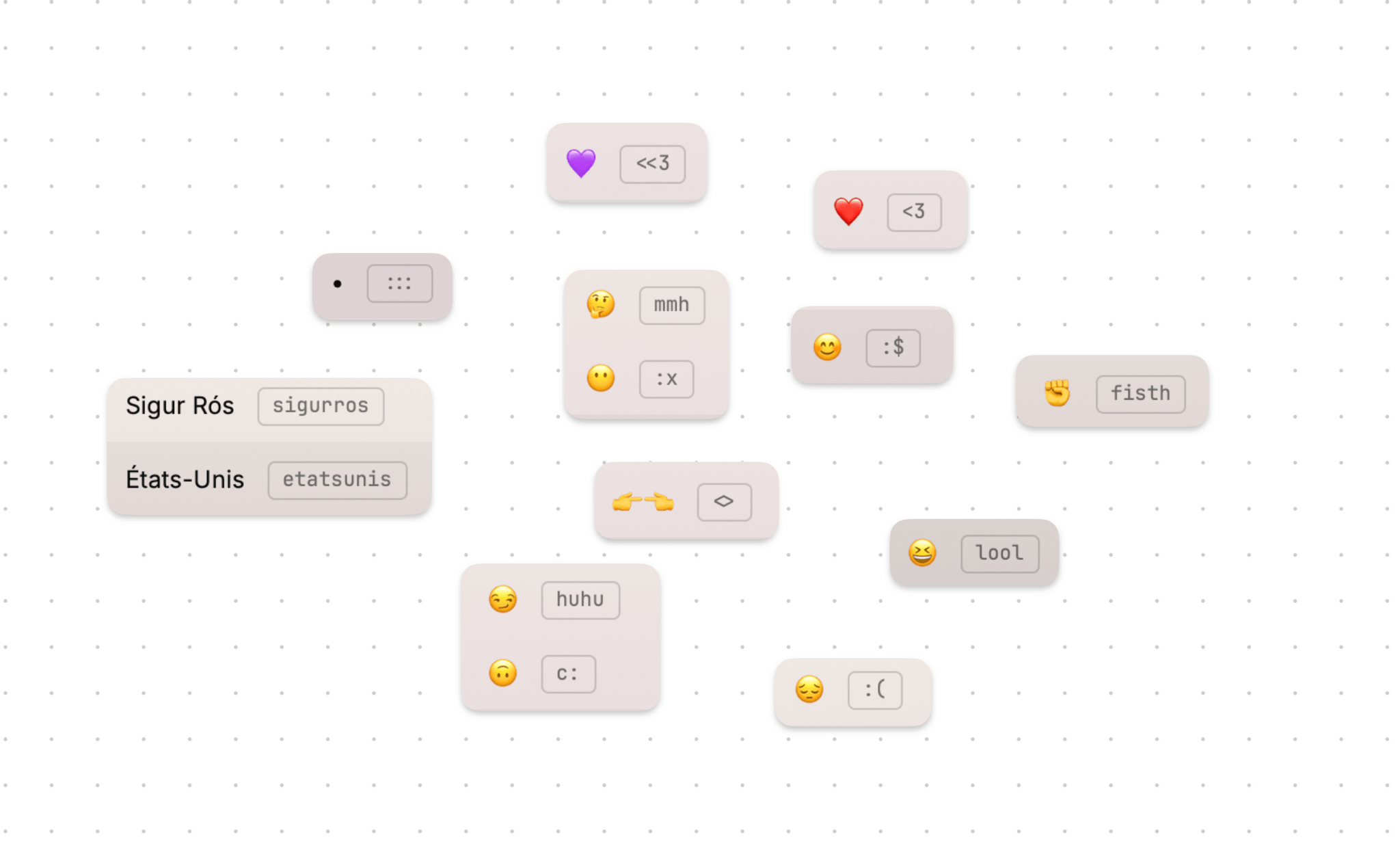
Transcript
1052 segmentsWelcome to Comfort Zone, a podcast all about pushing ourselves, well, outside of the comfort zone. I'm Christopher Lawley, and each week I am joined by two incredible co-hosts, and this week, none of us sound like Johnny Cash. As always, I'm joined by Matt Birchler. Matt, how are you doing? Hello, hello. I am not sounding like Johnny Cash, but I am reporting from a slightly different location in the office today. Yeah, your angle is off, and it's frightening to me. I don't know. I'm like, is this truly Matt Birchler?
You'll have to find out. Tune in to find out. As always, we're also joined by Niléane. Niléane, how are you doing? I'm doing well. And every week as we move into the summer, it's more and more daytime for me. So right now it's bright daylight on my face. It's going to get dimmer as we go. And maybe you have the, if Chris cannot catch it in the edit, you can hear some construction work. Like, it's buzzing outside.
Great, lively, very lively. That's just ambiance. That's just the life of the area. Yeah. Yeah. We kind of have a weird recording schedule because you are at towards, like, the end of your day. I am at the, it's 8 a.m. here. Like it's so like it's we have like a very narrow window of like, OK, reasonable recording time for the three of us. It's full p.m. for me. All right. Well, we have a few tiny topics. And Matt, you actually came up with a new idea for the show that we were all pretty excited about.
You want to you want to explain it to everyone? Yeah. So basically, we want to hear from you guys. Every week we do things. We have fun. we do challenges chris asks us and uh sometimes very challenging question at the end of the show and we're kind of interested in what you guys are doing how would you do the challenge how uh i it's always a wild card what you ask at the end it's sometimes tech it's sometimes life it's it's always something interesting so uh we'd like to hear from you and we kind of want to share what
the comfort zone audience is doing like can you do the challenge better than us you can do it better than me as the worst challenger, I think, mathematically. But can you beat Niléane? I mean, you issue challenges, you issue challenges, and then you don't even follow your own rules. So, I mean, you kind of bring it on yourself. I do. This is a spoiler for next week when I issue the challenge. I don't even know if you guys will accept this as a challenge.
Anyway, that's not the point. I'm so looking forward to that. that. But yeah, we want to hear from you guys. So I think we're going to work on in the future getting a way for you to email or fill out a form to give us feedback. But we're on Masadon, we're on Blue Sky, so you can just mention us there and we'll try to call some people out next week. Yeah. You can mention the show or you can mention us, but ultimately we will have a form or an email address that you guys can all send stuff to because we know not everyone is on Mastodon.
We know not everyone is on Blue Sky because everything's fragmented. So yeah, but I'm excited for this because we want to hear from you all. We want to hear like, did you do the challenge along with us? I mean, we give you a heads up about what the challenge is going to be the week before. So yeah, I'm excited about this because I want to hear some wacky stuff. I want to hear people get weird with what we do. Yeah. We have passionate listeners too. So I, I, I think they could inspire us to even, uh, even do it even better. Yeah. Yeah. Uh, so next up in the tiny topics,
uh, I tried the Metallica concert and vision pro the, the, whatever that things, it's amazing. I know I'm a week late with this, but like I mentioned last episode, I had a cold, so I didn't try it until after i was feeling a little bit better that was amazing and so surreal like there's this moment where the camera is pushing into the crowd and i'm like no no no no no no no no no i don't like this don't like this one bit pull back pull back and luckily it cuts but it was really good i was a little disappointed there was no master of puppets um i mean come on but there was inter sandman so that was pretty good but yeah metallica the apple picked an actual band that makes
music to partner with and didn't do like you know like Coldplay or Daft Punk or something like that oh my god we just asked people for feedback and now you've ruined it no comment they'll agree with me um I watched the thing as well I am not a Metallica fan I'm not I guess anti-Metallica I'm just well that makes sense you like Coldplay it's not it's not my type of music um but it was freaking awesome it was really really great it was really well made and I the the sicko in me so since they've started doing these spatial videos i am always spending about 20 of my brain power
while we're watching them trying to figure out where the cameras are and i want to see i want to get a sneak peek of the cameras um and this one they're just all over the place right because it's a live concert like there's like one just sitting on a tripod next to the drummer and i'm just like lars yeah lens okay now i see what they're doing um yeah but it was it was spectacular um i really think i mean this is the reason i still have my vision pro right is every few months there's some thing like this that's like oh that's really really cool so i am a little worried that all
the cool things are just video um and not any like computery things or any games or anything but like you know ipad's gotten quite a ways with a lot of people using it just for media so maybe if a lot of people use this for just for media it'd be okay but hopefully cheaper soon did you just tell me you work done on an ipad i did not say those words i almost agree with you right now um what did i just say that no no no no no no uh but no i completely agree this is the kind of thing that the vision pro
shines for yeah it's a shame that it's so expensive uh and more people don't get to try it that's why there's not gonna be like a full feature length thing until you know the price comes down to make it because like the whole time i was watching this i was like okay i know it's like four songs and then there's like a little bit of like kind of like an interview voiceover thing in between them from each member of the band uh and i was like that's cool but i would really love to see the whole concert but could you imagine how much data that would be like and how how much of an intense machine you would need in order to be able to edit all that like i i i i i want a behind the scenes
of how these are made. I'm so curious. - Yeah. - Yeah, I really wanna know how these are made, and yeah. - I will say, the last thing I have to say on this is, this is without a doubt the best spatial video I've seen. - Oh yeah, 100%. - By a mile, I would say. I think the documentary stuff is kinda cool, and I guess it's technically a documentary by definition, but like, this was energetic. I think even if this was just on a traditional video format YouTube or whatever it would be great so yeah I was really impressed and Metallica has always been
a band that's kind of kind of does this sort of stuff they have a couple they have a documentary about uh when they I forget the name of the album but it was it was literally it was a really interesting time because it was when they fired their original bassist or the bassist that was with them a long time the lead singer went into rehab and they hired a new bassist and they were putting out an album it was just like a really interesting time they have a documentary on that and then they have another concert video that they did years and years and years ago when imax was
becoming a thing and like they made like this whole like imax movie out of it that was really cool uh and that was a full concert uh so metallica has always kind of done stuff like this and it was cool to see this in vision pro because i do like metallica never heard of it okay Niléane, it looks like you put a couple of things in the tiny topics. What's going on with you? Yeah, I don't know if you remember. A few weeks ago, there was some news from the UK.
The British government passed a law which endangers encryption worldwide because that law forces companies to allow the government to access a backdoor, essentially, in end-to-end encrypted services. And there was a report, I believe in the Washington Post, which told us that the UK government had asked Apple
to access data on iCloud accounts worldwide, for all users worldwide. And the result of that is that Apple announced they would turn off entirely end-to-end encryption for iCloud accounts. So the feature they call advanced data protection, which is something that's not enabled by default, but you can enable on your iCloud accounts unless now if you are in the UK, because Apple has turned it off in the UK.
Ever since that bit of news, I was worried because there was a similar thing going on in France. My favorite government in the world, which is Macron's government, they tried to pass a law, which on the surface doesn't simulate it at all, because it's a law that aims to fight against narco-trafficking. So like drug dealers, I don't, I don't, I won't get into the weeds on this.
But yeah, it has an article in there, in this, in this bill, which would have forced tech companies to allow the French government to ask for any bit of conversations in end-to-end encrypted messaging services. And yesterday, as I'm talking, that was yesterday evening, the National Assembly rejected it. So that's a bit of good news that I wanted to bring in on the show because I was extremely worried about this.
And a lot of people were. I believe like the CEO of Signal, which is that famous end-to-end encrypted messaging service, they make the Signal protocol, which is also used by WhatsApp. So that's why WhatsApp conversations are also encrypted. But anyway, yeah, a signal has been outboken against this French law. But yeah, anyway, it was rejected last night. So for now, we are safe from the French government.
I fear they may come back to this at some point. Anyway, I wanted to bring some good news about this front. Political good news these days can be hard to come by. Yeah, I know, right? That's good. it looks like it lost convincingly 119 to 24 yeah yeah also there's a funny anecdote about that so I was watching it live last night as one does watching the French National Assembly live yeah that's how I spend my that's what I do in the Vision Pro
in the Vision Pro that full spatial audio French Assembly I am in there with those Frenchmen the screaming in spatial is amazing. Yeah, but that was a very funny thing because, so I don't know if you know how parliaments work, but usually I think it's always like this. The deputies, they have a little machine in front of them, a voting machine. Basically, that's always just three buttons. Yes, no, or abstain.
And for this specific article concerning end-to-end encryption, all the voting machines went down. Like there was a bug, which, so they had to suspend the sitting of the assembly for about an hour because they were trying to debug it behind the scenes. And they came back live an hour later saying, yeah, we could not debug it. So what we're going to do is we're going to call every deputy one by one, name by name, to the microphone,
And they will say out loud their vote, which took ages. It took about two hours for every deputy to stand up, come to the microphone one by one. And they were all very exhausted. It all seemed very exhausted. They burst out of laughter, out of exhaustion. But yeah, anyway, rejected. Well done. Nice. And I have another tiny topic, which is I got a new charger for my desk, as one knows.
it's a Qi2 charger from Anka I would recommend it actually because it's one of the cheapest most affordable ones you can buy and by that I mean the most affordable like vertical on a stand on a tiny stand Qi2 chargers that you can get so with the magnets and all so you can charge your iPhone up to 15 watts and it's well built and a little disc it rotates and it clicks when you rotate.
Oh, nice. Could you get a link for the show notes so we can share it with people? I will. Okay. And there was a funny side effect. Not so funny. Earlier today, I was trying to set up the microphone again, getting ready for the show. And so I put on my headphones and turned on monitoring so I could hear myself. And I was hearing this buzzing noise in my headphones.
Oh, I've been there. Oh, no. Oh, yeah. And I spent maybe about 20 minutes trying to find where this was coming from. So I unplugged the XLR cable, replugged it, unplugged a bunch of things and tried everything. Still, there was this buzzing noise. And I realized, so the way I realized it is And I was still hearing the buzzing noise in my headphones. And I was like, okay, I'm going to Google this. So I pick up my phone from off the G2 charger with the headphones on still on.
I pick up my phone about to Google the issue. And just as I pick up my phone, the buzzing stops. So it's coming from the G2 charger. It's coming from inside the house. Yeah, as soon as my phone is not charging anymore, there's no buzzing noise. And so when I realized that, I started to bring the microphone arm away from where the charger is sitting on the desk,
and it got quieter. So it's when the microphone is very close to it. So there you go. I thought that was... Interesting. XLR is weird. analog audio signals are weird i've i've had those issues before um well we've we had that whole episode where we recorded didn't hear it and then i went to edit it and then all of a sudden on matt's track there was just a buzzing sound throughout the whole episode that was a fun one to edit i'm so sorry no was g2 involved no um i have issues in my office with my steam deck if my steam deck
is running and it's too close to the audio interface i sometimes get feedback or not feedback hiss and also my metal desk legs. If the XLR cable is right up against them, I get some hiss as well. Every time before I record, I throw the cable as far across the room as I can and it works. Nice. So I sympathize. Alright, well, let's get in the main show. Niléane, you're first up in the document. I believe you have
what's this? It looks like you have a task manager. What? Yeah, no, if you read the show notes, I actually wrote, hashtag, not a task manager. I only see task manager. Matt, what about you? Do you see task manager? I don't want to get involved. Yeah, so, spoiler alert, there's not much going on in my tech life right now. I just got a new iPhone, and that was peak change in my tech life.
However, there was one change that I had this week to my workflow, which is that I got a notepad. A notepad. Yeah. And it's the notepad from Cortex Brand, if you know those guys. The notepad is called the Sidekick notepad. So if you've never seen it, it's a horizontal notepad, which was designed so that you can have it on your desk,
below or above your keyboard, which I believe is the intended purpose of this notepad. So I will not review a notepad. It's a notepad. It's actually well-made. The paper is not some frail paper. It seems high quality. And the layout on the notepad, I've got the basic one. I mean the first one they released which has a it's a layout where on each page on the right side of the pages
you have a to-do list where you can fill in with tasks and on the left side it's a dotted grid so you can do whatever you want on there. I've been using this this week for a few days now because I'm at a stage right now where I'm a drowning in notes that are scattered. And by scattered, I mean they are scattered across apps because I keep trying to put them in places and it's gone terribly.
I have notes in sticky notes, in stickies on macOS. So yeah, that's a nightmare. When I click the stickies app in my doc, my screen has a bunch of sticky notes on it and it's become terrible. Bunch of those sticky notes are outdated, not needed anymore, but they're still there. I have notes in Apple Notes. Sometimes I'm just in a meeting and somebody says something I need to write down and I panic.
I'm like, what? Okay, I need to write something down. I don't know what to do. You launch Raycast, but you don't know what to launch. Exactly. I mean, Raycast does have a note function. Yeah, I've tried it. I think it's too fiddly for me. It's very limited. But I know that's the purpose of it. Yeah. And I like something limited. I like something very simple where I can just open it and start writing things down. I even have some notes in Telegram. Because I don't know if you know, in Telegram, you can send messages to yourself.
I do this a lot. So you have a conversation that's called saved messages. It's actually just sending messages to yourself. My partner does this as well. They have a bunch of to-dos in Telegram of all places. I know some people do this in iMessage, send things to themselves to save things. I've never been one of those people. I never quite got that, but if it works, it works. Yeah, well, for me, it doesn't really work. Anyway, so the site kick not bad. I'm trying this because, yeah, maybe it's a good thing to have something permanent in front of me that I can just start jotting things down on it.
And it's very chaotic and I cannot show it. I've sent you a picture of the way I've placed it on my desk a few days ago in our group chat. Basically, I'm using it as intended just above my keyboard. sorry, between my main monitor and my keyboard. And I've got, right now I'm using three pages. So I flip them over. You can detach pages in this notepad.
I keep them in because otherwise I will lose those pages if they're not in there. And yeah, I have three pages, each for a specific type of work. And I've picked up a bunch of highlighters, like colored highlighters. And I've tried to build in my head a color coding system where I highlight things in a certain color depending on what they relate to.
And so far, it's like these past few days, it's been useful. because for each project, I've just written a bunch of things down that weren't scattered in apps on my Mac and now they're just in front of me. That's useful. And I've color-coded them. For example, I'm using a green highlighter. I'm showing it on camera. A green highlighter for things that are done. I'm using a pink one for things that are in progress.
A yellow one, just to highlight things that are important or need to be prioritized. And a purple one, which is random things. Like, this has no purpose, but I use it sometimes. Don't ask me how. And I cannot really show you pictures because a lot of this stuff is confidential on this notepad. And I cannot believe. Maybe I've been wondering, next time I have an article about my desk setup and this is still there, I will need to create a fake page in this notepad that's just pretty with just a lorem ipsum text placeholder just for the pictures.
But anyway, so that's not a task management system. Okay, it's a notepad where things are written down and tagged. With a side panel that's literally a single line with a circle next to it, so you can mark things as complete. Exactly, yeah. I'm just saying, that's there. Yeah, by the way, that side column on the notepad, I have come up with a neat trick where I fill tasks in from the top of the column for a certain thing,
and I fill it in from the bottom for another thing. So I have two lists, two to-do lists going on at the same time in the same column, just flowing in different directions. Anyway. Interesting. I have a Sidekick notepad as well, and I use it. So obviously, like I'm big into digital task manager, digital note taking, all that stuff. But I use it for when I get really overwhelmed. And I have a lot going on. I'll just kind of break everything down.
I also use it a lot for when I'm filming B-roll or like kind of just working on projects. And I'm like, okay, here's like the things I need to do. Like, oh, do I need to do reshoots? Do I need to re-record some voiceover stuff for a different part of a video or something like that? I'll write all that down there. I find it to be really nice, and it works really well as a wrist rest, too. Like, if you have it below your keyboard, you can use it as the wrist rest and type, and then you can just write and then go back and stuff like that. So, I have tried using it as a wrist rest, so just below the keyboard, and I think it's getting in the way.
Okay. But that's maybe because I keep the pages in, so they are rolled over, and it's in the way of my poems. So I know the difference between me and you here. You use low-profile keyboards, like the Magic Keyboard. I use big, thick, mechanical keyboards. So when I'm done with a page, I rip it out, but then I stick it on the bottom so that way the stack never goes down, and it's always the same height, because I use high-profile mechanical keyboards, and you use low-profile, like Magic Keyboard kind of things, right?
Yeah. Interesting. Yeah, 100% I bet that's the difference. Yeah, plus I've got the Logitech MX palm rest. They're a slim palm rest that I really like. So I don't want to keep that up. I was going to say, I am the third person on this call with one of these. Oh, nice. And this is going to last me my entire life. So this is what I used last year to track exercise. And I used the checklist to log all the games that I finished.
And so one year. So I could make it another century, basically, with this thing. That's just one page on one year on one page. Yes. Okay. So it is nice. I will be very excited to hear how this not a system, not a task management system evolves for you, if you still find it useful. Because like the first few weeks are always exciting with the new not a system. I really want to hear from you in like a month or so about like, are you still using this or something like that?
I can see it happening that when things start coming down, because right now I've got a lot of things going on at the same time. But maybe once things start coming down, I will just go back to not caring about writing things down and having a system at all. Not having not a system at all. double negatives anyway that's it it's a good notepad if you want a notepad recommendation nice and I know they're doing like a few different
variants of it too so like I think they're doing one that's like just a full notepad and then they have one that's like breaks down your week and stuff like that so they have one version where it's more for people who want one page per week so you have you have all the seven days on one page and there's one that's more like daily notes because they've got a section on each page that's daily priorities and several to-do lists
yeah for me i just like the original one i'm on my third one i bought one when they originally launched and then i just i i don't it's not something i use every day it's not even something I use every week, but it's when I do need to use it, it's really handy just to have it open and just kind of like, like a lot of times I'll take notes while I'm editing something or even like if I'm having a video call or something like that, and I'll just write handwritten notes while I do the video call meeting or whatever.
And then like afterwards, if I need to put something in Obsidian, I will do that. I did want to mention, so you talked a little bit earlier about like, if you were in a meeting somebody said something you need to write it down you had that moment of panic of like where do i go with this like what do i do with this this is why i have my quick note folder in obsidian in my my capture cut shortcut that i literally like if i have a moment like that of like oh i need to write this down this is an important thing i need to write this down but i don't know exactly where it needs to go it just goes there it that is that folder is exactly what that's for uh so everything
kind of gets dumped in there and then I can go back through it later on when I can think about it a little more clearly. Yeah. I don't know if you remember, but when I first started talking on this show about why I'm struggling with task managers in general is because when I write something down, I forget about it. Like it's out of my mind. I think the thing with this notepad is that I can keep it there. It's always in front of me. So it's always in my field of view.
Whereas if I insert it in an app and that app is closed or behind other windows, it's out of my mind. I will never think about it again. That makes sense. That makes a lot of sense. Yeah. All right. Well, anything else on that before we move on? That's it. All right. Well, I'm next up in the document and I'm really excited what I have for you both today, or for everyone today, really. This right here is the terminal, or terminal.
I don't know. They don't use any vowels. They go classic. Terminal. So this right here is a e-ink display tablet that all it does is connect to Wi-Fi and display one single bitmap image, and it refreshes, well, on whatever interval you set. Mine's set up to refresh every hour. This thing, I love this thing. I love this so much. I'm so excited about this. Have you guys seen this before? Yes. I know a few people have been talking about them.
I want it. I think it all originated, at least in our corner of the internet, it all originated with Charlie Chapman, the dark noise developer. It originated with him and then it kind of just spread like wildfire. and now these things. I ordered this thing a long time ago. It took forever for it to show up. Yeah, I found out about it with Quinn Nelson's video on YouTube. Yes, he did a really good video on it. We should link it in the show notes. I'm eventually going to do my own video about it, but it's going to be a little different than his.
So what this is, like I said, it's an e-ink display. I'm holding it up to the video. And it's definitely an e-ink display because if I move it over here where my filming light is you can't see it anymore but if you like directly in the filming light but off to the side you can see it just fine um and this uses plugins and a web server basically that's where the brains of everything is is on the web and plugins to gather information and then you can set up an interval for this thing to refresh with that information mine's set up to be every hour and then it just displays it that's all this is is a display board it's not a touch screen you can't
interact with anything um on the back there's literally an on off switch a usbc port to charge it and this button that you can program to do different things mine's literally set to just refresh this uh the screen uh so the plugins i'm using are google calendar uh this is what got me to move off of icloud calendar and over to google calendar which was a lot easier than i expected because the icloud calendar integration for this thing requires you to make your calendars public share a link to it and while you can bet on some security security through obscurity uh i don't want
to rely on that for my calendar which has information in it that uh if it got out i would be in trouble mostly like apple embargoes and stuff like that like no and like meetings with apple and other companies that i'm not supposed to talk about um even though i just did uh but uh So I was like, well, I am not doing that, but I really wanted my calendar on this thing. So I moved everything over to Google Calendar. It was actually really easy. You just go into Calendar, the Calendar app, select, you know, the calendars on the side.
So like I had my personal calendar, my work calendar, my secrets calendar. You just select which one, go file, export, and it gives you a file and you can upload it right to Gmail or Google Calendar. I'm sorry. You have a calendar called Secrets? Yes. So I literally have a calendar called Secrets, and the whole purpose of that calendar, so if I have an embargo, a meeting, or something I'm not supposed to talk about, it goes in there. So that way, when I enable my filming focus, that calendar gets deleted, so I'm not like Marques Brownlee and accidentally leaked the MacBook Air embargo.
Oh, he did that. He can get away with that. I cannot. Yeah, he did. Yeah. Oh, that's funny. Yeah, he accidentally leaked the MacBook Air embargo, which like everyone else, there's a few other embargoes around that and everyone else figured it out because of it. Yeah, it was not good. He can get away with it. I cannot get away with that. So I have a secrets calendar that gets disabled when I'm filming. And then when I turn off my filming focus, it gets re-enabled. Really nice. So that's the Google Calendar. There is also a Reminders plugin. And it's kind of weird how this works. So the Reminders plugin is not a first party terminal plugin. It's something that
a community member wrote. And as you know, Reminders does not have an API. Most of the plugins just pull from a web API, pulls all the data from web API. Reminders definitely does not have an API. So the way this plugin works is actually works in pair with a shortcut. So you download the shortcut. I looked over it, it was fine. It wasn't like sending my information to, you know, some random web server or something like that. Like, it actually made like the shortcut made sense uh so this shortcut you set up as a timed automation to run you know a little after
midnight and it sends off you know like what you have what's in reminders for the day what's overdue and what's upcoming to terminal and so that way you can just see on the left side or on the right side here i'm sorry uh my overdue tasks the tasks that i have due today and then uh upcoming tasks as well. So that's pretty cool. And then over here on the bottom left corner, this gets swapped out with another plugin as well. So right here, this is days, this is the days and tell plugin. So this
is counting down the days until our Disneyland trip at the end of next month, which I'm really excited about. That'll be fun. I hope we don't have a hard challenge that week because I will be in Disneyland the whole week. But every hour, this plugin gets swapped out with the parcel plugin as well. And Parcel just has an API, you put in your API key, and it just shows whatever packages you have coming up coming. And typically, I have a lot of stuff coming. So it's nice to be able to see like, okay, this is coming day tomorrow, whatever, just really nice. Overall, I really love this thing
for what it is. And because it's not trying to be an iPad, it's not trying to be a tablet or anything like that. It's just a display board. And it's perfect for that. So like today, I sat down and I was like, okay, I got comfort zone at 8am. And then the Chinese sprint Grand Prix is at 8pm tonight. So I was like, great. Okay, there's my calendar. I just see that I see all the tasks I need to tackle today. It's just off to the side. It's not being intrusive or anything like that. It's it's perfect for this kind of thing. In fact, I think I'm going to get another one for kitchen to put like our shared calendar and stuff on but really like this and then like i said you
can set up what's called playlists so that this refreshes this doesn't have to be a the static plugins you can have it refresh every 15 30 minutes or whatever with different plugins because it's not a very big display it's really it's really actually quite small they have a bigger one right no they no okay i thought so i wish they had a bigger one if they had a bigger one i would be ordering it now um but i and i'll get to that in just a second but playlists they kind of allow you to like swap out information and plugins and stuff like that on regular intervals so that's pretty cool
but what's really cool about this is it's all open source they if you want to build your own so Niléane if you want to build a bigger one they tell you how to build these they even give you the software to get it up and running like there's they they will tell you how if you want to build your own you can now that being said i have zero interest in building my own uh this is i think this was like a hundred bucks hundred i think and then i got the bigger battery and i got the um developer
kit which you need to develop if you want to develop your own plugins for this you have to pay like it's like 20 bucks for a developer license which isn't much at all like it's honestly it's like very fair just kind of covering their costs of like labor and stuff like that so um overall i think this was probably like this model was like 140 bucks or something like that i think regularly they're around 100 um so for what this is absolutely love it it's not trying to be you know an ipad or anything like that. It's literally just a display board. And I love it for that. I am kind of working, I have this idea for my own plugin, that would use shortcuts to pull data from your devices.
I haven't really gotten too started on it. So I'm not I'm not going to tell you all what it's about or anything like that, because I don't even know if I'm going to be able to make it or not. And as I've learned, don't promise anything before you know, you can actually do it. But yeah, so this is Terminal. I think it's pretty cool. I think it's a really neat device. If you want something to kind of tinker with, this is exactly it. Like I said, it's got a web server that you load up these plugins and you can tinker with.
You can build your own. There's a whole community. There's a bunch of stuff in there already. There's support for Todoist or you can put your YouTube statistics or gumroad sale data or whatever you want on here. There's a lot of things you can do. I've kind of just scratched the surface of it. Yeah, that's really cool. And I think you said it's just displaying an image, right? So like all the code is just generating an image and then it can be whatever you want. So you can go crazy if you generally know what you're doing. Absolutely.
Like literally there is no computer. I mean, I guess there technically is because it's connecting to Wi-Fi and all it's doing is connecting to Wi-Fi, connecting to the server and downloading a single bitmap image. That's it. That's all it does. So hardware-wise, it's not complex at all. What you're really paying for is the server-side stuff, the plug-in support, and all that stuff. But I'm guessing you can probably build one of these for really cheap because it's just an e-ink display.
It's not even a big e-ink display. You could probably 3D print a case. But these cases seem a little bit nicer than just 3D printed cases. They actually feel pretty good. So, I mean, if you're comfortable building your own kind of thing like this, you can, but I would just buy one. I have a question. How easy is it to set up the plugins? Incredibly easy. So, you basically, when you get this thing, when you take this thing out of the box, it's going to show like a QR image on it.
You just scan the QR image. It pairs to your Wi-Fi network. Great. Once you're paired to your Wi-Fi network, it tells you to go to a web address. And from there, there's literally a plug-in store. And you just browse through there. There's a search field if you want. But you'd be like, oh, I use Todoist. Add Todoist. I use Google Calendar. Add Google Calendar. I use, I don't know. There's so many things in there. There's so many different options. And then if you scroll even further down, you can get to the community-built plug-ins and stuff like that. And you can use those.
And you can tinker with those as well. There's so many different options in there, but it's incredibly easy and really friendly. You don't need to be some nerd. In fact, to the point that I've gotten right here, I have not had to write a single line of code or anything like that. Everything has just been a GUI. Nice. Yeah, I want one. Very nice. This seems really fun. I don't even know what I will use it for. Honestly, the big reason why I bought this originally was like, oh, I think this would be something that's really interesting to talk about on Comfort Zone.
But now that I have it, I'm like, this thing just lives on my desk because I'm like, oh, I can see what packages are coming today. And yes, everything on here could be a widget on my iPhone, iPad, or Mac. But it's kind of nice to have a dedicated device that just sits off to the side, does its thing. It's not this bright display or anything like that that's distracting. It just kind of sits off to the day. I can just glance and be like, oh, I have a meeting in 45 minutes. Or I have, you know, these are the tasks I need to do today.
Let's get those taken care of. Or, hey, I have 37 days left until I leave for Disneyland. Yeah, when I was thinking about it, I had some, like, the beginning of an idea. Maybe we, at our place, maybe we could have it on the entrance, like on the door, on the front door, so that maybe for grocery lists for my partner and I, so maybe it displays a
shared grocery list that we can contribute to whenever in the day. And when one of us is about to go outside, yeah, because it's on the door, we can just always see hey if i can go outside and i can have the and there's a list in front of me i can just pick this up uh when i'm at it i mean i was thinking about this yeah and it's not just all like productivity plugins too like there's a plugin for office quotes like yeah like there's a bunch of
like different things that you could do to have fun with this i could totally see this being the thing that like i buy a few of these and just put them around the house to have fun with and just like leave messages for danielle or something like that like it's just like it's a silly thing and the nice thing is it comes with this stand but there's also a like a little triangle back here so you can put a nail on the wall and just hang it from it as well so yeah yeah you could just display a clock which refreshes every hour.
The funny thing is there's a clock plug-in and it's like an old school mechanical clock kind of thing, like a wheel clock. And I'm just like, why? Because if you have a refresh every minute, the battery life on this thing is going to die. So if you don't have a refresh every minute, the time's not going to be accurate. So I'm like, I don't quite get that plug-in. but you know that's the thing right there's a type of clocks that I'm really into I used to be really into
which picture a classic clock with the hands but instead of 12 hours it's 24 hours so it's a 24 hour clock and it's just one hand the hour hand hand so you can only you can only read which hour is it currently on the clock. That would drive me nuts. That would absolutely drive me. But it's meant to be fuzzy like this. You only know hey, it's two something. Okay. So that would be exactly what that kind of plugin is for.
Interesting. Video viewers might have just seen this thing flash. That was it refreshing. That flash was this refreshing. Now it's showing my parcel deliveries in the bottom left corner. I actually have no deliveries in parcel right now. That might honestly be a first normally I always have something coming here but yeah it's it's uh I love this thing I think it's a brilliant device I love this kind of open source tinkering thing I've just been having a lot of fun playing around with it
um yeah like if you like this kind of thing this is like if you like fiddling with stuff this is going to be totally up your alley that's cool I like that both of you brought things that were like, what if I didn't have to look at my computer to see things? It's exactly the same thing. That's true. That's very true. And to be fair, this isn't like me trying to be like, I don't want a task manager on my computer or don't show me my calendar on my computer. I still have that open. But this just kind of sits to the side.
So while I'm working in Obsidian, because like I've talked about, I like a very focused workspace. So if I'm writing in Obsidian, I don't have anything else open. And maybe a web browser if I'm doing research. But typically, if I'm writing in Obsidian, I just have Obsidian open. If I'm editing in Final Cut or Lightroom or Photoshop, I just have those apps open. And I've been using Spaces and even full screen apps to kind of help me with that. So I don't want my calendar open to the side all the time.
I tried. So after our challenge last week when I was like, oh, yeah, I totally forgot widgets on the Mac were a thing. I actually tried them for about a day. I hated them. They were terrible. Oh, no. But it was just because they were there. They were always there. And I was just like, I don't like this. Which is funny because I have widgets on my iPad home screen. I don't know why it's different. I just didn't like it on the Mac. Maybe I need to spend some more time using it. It's because you can see them below the windows, right?
Yeah, I think that's what it is. Because with Stage Manager on the iPad, you can't see them below the window. So if I open up Obsidian and make it as narrow as possible, I don't see any of my widgets. But if I go to the home screen, then I see them. So I think you're right. I think it was just a little too distracting. It's funny because back when I was using an iPad, I wished you could see the widgets behind the apps. I would turn that off in a heartbeat. And if it wasn't a setting, I think I'd throw my iPad out because that would be disappointing.
But yeah, just having this off to the side, I could just glance over and it's not a bright screen. So it doesn't pull my attention or anything like that. It does kind of pull my attention when it refreshes because the screen flashes. And I see that out of the corner of my eye. But other than that, like, and that's actually a big reason why I set it to only refresh once every hour. But other than that, like, it just sits off to the side. And oh, because I set it to refresh only once an hour, this thing lasts 360 days.
The battery life is supposed to last 360 days according to the GUI because it refreshes once every hour. That's wild. Take that iPad. Yeah, right. My iPad doesn't even make it to lunch. But yeah, that is terminal. I don't think I have anything more on that. I would love a bigger version, like I said. If they ever were to make a bigger version, I would buy it instantly. I don't think I'm interested in building my own. That just seems like a step too far for me where I'm like, I don't want to get into that.
I got enough weird hobbies already. Building e-ink displays doesn't really seem like something I want to get into. No, absolutely not. I'm sure it would cost you more to make something close to as nice as that too. Especially the casing, because I would have to have the case 3D printed, and this is much nicer than 3D printed. Or if it is 3D printed, it's a very, very, very, very good job. But yeah.
All right. Anything else on that, or should we get into the challenge? Challenge. Challenge. Challenge. All right. Challenge was Matt's. Yes. So mine was very simple. Find a clever way to use text expansion. Nice. Nice. I will win this one. I think you probably will. I am not going to win this one, but that's okay. I'm actually okay not winning this one. So I can go first.
Okay. I did something that other people I'm sure have done, but I created some email templates, which I've never, ever, ever made before. I've never understood why a normal human would want them. If you're a business or on a support team, I get it. But I've never wanted this. Never understood. Every email should be unique. However, there is a certain sort of email that I get on a regular basis.
Chris, you actually talked about this last week. Yep. What wallpaper was that in that screenshot you posted or that video that you posted? I try to put a link I don't always do it so I'm often I'm often emailing what do you not use a template for your description in your videos I do but it's just auto put into YouTube studio so it's just there
when I put the video in buddy buddy buddy buddy buddy we need to talk I think my sister is great I have a whole template in Obsidian that just auto-paste and has all the links to everything from comfort zone to my wallpaper packs. It has everything in there because if I miss something, I will get these emails. Don't worry, Matt. I don't have a template for my videos. But yeah, so I took this as an opportunity to test out a new email app in beta, Notion Mail.
And so they have snippets built in and I decided to use their snippets. to create this. I could have done this anywhere. I could have done this in Keyboard Maestro or Raycast or TextExpander or Alfred or any of the options out there. But I was like, these are typically emails. So let me just do an email. And yeah, it's pretty cool. I was able to go in and since it is in my email app, it's able to use some variables. So I was able to like start it off addressing it to the specific person and i tend to use wallpapers from like two different sources um there's one collection from something called tap back uh that's really good i will put links
in the show notes of course um for tap back which has some really cool ones and then um ollieer ollieer i think that's how you say his name um he makes wallpaper packs all the time and they're usually quite good so I'm often using his and so basically I just have two templates that I can switch between to say hey it's from this pack or hey it's from this pack and I think this will make my life easier because especially the tap back when I always forget its name and I'm like struggling to google it and for whatever reason in like the email that I got after I because it's like it's like
an eight dollar paid one after I bought it like wallpaper isn't in the email so it's not coming up in my Gmail searches. And so I cannot remember what it is for the life of me. And so now it's in a snippet that I can just put in an email very quickly. I can customize it however I want after that, but I have the link and it's, it's good. So I'm very happy that I've done this. I should probably get it into just my normal text expansion. So I could do this on like social media as well, but step, you know, step one.
Nice. So that's it. I don't think I'm going to win, but for me, it was a big step to go to a templated email. Nice. So I have been using text expansion for a while, and I built a shortcut years and years ago when Simon Stovering released an app called Data Jar. And the whole idea of Data Jar was like, you can just store text, you can store images, all sorts of different things.
And I built a shortcut that basically allowed you to just pull up a list of different texts, and it would add it to your clipboard. Pretty straightforward, pretty simple. There are some text extension apps for the iPad and iPhone, but I was never really happy with them. And this shortcut just always seemed to work a little bit better than those. But I have been using the Mac more lately. And part of that means I've been using Raycast.
so i moved all of my text uh extensions from data jar one by one because the export feature from data jar didn't work with the import feature in raycast so i had to move them one by one out of data jar and into raycast and this is stuff like personal information like address phone number stuff like that because like i'll have people email me and be like oh we need your address to send you this thing and phone number for DHL tracking and all that stuff. So, uh, use that stuff all the time links because people will email me and ask where I got my wallpaper, uh, podcast,
all sorts of different stuff. So I have all, all my links in there. I have work information like, um, stuff I can't talk about, uh, or don't want to talk about, uh, like, like accounting stuff and stuff like that, like whatever. And then I have email templates as well, all in my, um, snippet stuff. Now we're in Raycast, formerly in Snippet Cup, because I use Apple Mail, and Apple Mail has no way of storing snippets and stuff like that. So I've just been using this. And this is stuff like person emails me about my ad rates, or person emails me about like, what gear I use, or all sorts of different things, or like iPad recommendations. I have a ton of these
I've built up over the years because I'm just like, I get the same 10 emails over and over again from different people. And I'm just like, I don't want to type out this information individually every single time. That would just take me forever. So I have these email templates to just send off. And then, you know, I'll customize them a little bit to make sure I'm answering the person's question. And it's not just like some generic email I'm just sending off. But holy crap, is Raycast great. The snippet thing is so fast.
The only thing I don't like is when you hit command space, I assumed you would be able to type in the name of the snippet and it just show up in the list and you would copy it right there. Maybe I'm doing something wrong, but it seems like you first have to go into your snippets and then you could type the name of the snippet. Is that correct? Yes, I believe that is correct. Okay. That was... Yeah. The workaround you could have is you can set keyboard shortcuts, I believe, to specific snippets. But if you have a lot of them, that's probably not scalable.
Ideally, what I would want is just hit command space, so bring up Raycast, and then just type the name of the snippet and it just show up in the list and I can just hit enter and copy it to the clipboard. That was how I thought it was going to work. and then I started using it and I'm like, oh no, you have to hit command space and then type snippet and like search snippet, I think is the option that you want. You hit enter and then you type the name of it, which isn't the end of the world. It's still faster than typing all that stuff out, but yeah. I don't get it. You don't have a short word, a shorthand to expand the text?
I do, but I have so many snippets that I don't remember them all. So like I remember the ones for like my common ones, like my address, phone number, stuff like that. But a lot of the email ones or some of my work accounting stuff and all that stuff, I use them enough, but I don't know. Maybe I just need to... I set up keyboard shortcuts or the keyword shortcuts for those, but I just don't remember them. So here's how I'm going to change your life.
Okay. So you have command space mapped to bring up Raycast. Yes. Are you using option space for anything? No, I am not. Okay. Here's what you can do. In Raycast's extension settings, you could go to search snippets. You could record a hotkey for option space, and then it will just open straight to your snippets list, and you won't have to search for it as the first step. Yeah. You just became my best friend. Finally.
Yes. Or whatever keyboard shortcut you want, but that is a way to do it. Because I was thinking, it's the same thing with their emoji picker, which I know, Niléane, you like as well. Oh, as well. I replaced the default emoji picker. A thousand percent. It's so much faster and better. Oh my God, this is amazing, Matt. Option space. You know what? I'm going to vote for you in the poll just because you gave me this. Not really, I'm still going to vote for myself. I don't know. I have no idea.
We should do a conclave just between us. Oh, yeah, that's the way. I love this. Oh, my gosh. This is going to make everything so much faster. Okay. I love you, Matt. Thank you for this. Chris discovers Raycast. Oops. I didn't even think about this, even though I actually have a couple of keyboard shortcuts for a few other things in Raycast. But I'm like, yes, because I have hyperkey C to bring up my clipboard history. Mine's on Command Shift V.
because Command-V to paste, Command-Shift-V to paste something else. See? Agreed. Logical. That actually makes way more sense. Yeah. I make sense sometimes. All right, Niléane, you're also going to be my best friend because of this as well. I'm going to change my clipboard history one to yours. Yeah, and for the emoji picker, I'm still using the Logitech keyboard, the MX Keys Mini, and it has an emoji key. I've mapped the emoji key to Raycast's emoji picker.
It's great. I use the default Apple Command Control Spacebar, which I know they have, like, the globe key and stuff like that, but the globe key doesn't work on third-party keyboards, so I use Command Control Spacebar for the emoji picker. Yeah. My turn? Yeah, yeah, yeah, absolutely. Okay, so I'm using... I've been... Sorry. I've been using text expansion using with Raycast as well.
I used to rely on the built-in thing in macOS and iOS. So if you don't know, in macOS and iOS, you can go to system settings or the settings app, general, then keyboard, then text replacements. I'm trying, I'm not, I think that's the path to it. It's called text replacements. And you can just, that's easy for small things, for short sentences. So for example, in there you can set, I don't know, BRB to expand into, be right back in full letters.
So I had a bunch of things in there. And Raycast allows you to import everything from that into its own snippets feature, which I've done. So now all of the things that I had in text replacements over the years, I've accumulated them over the years, they are now into my Raycast setup. And I've been adding a bunch of things. And my challenge submission is that I'm using text expansion for emojis.
So we were talking about the emoji picker and Raycast, it's really good. The reason why it's really good is because it's easy with keywords, I find, and it's fast. But easy with keywords, so you can just type a smile and you get all the smiles. And in a way that the native emoji picker really struggles, And with the native emoji picker, if you don't have the right word, good luck. So, yeah. Yeah. Yeah.
And if you're used to like Slack's nomenclature or everyone else's nomenclature, like Joy didn't always bring up the crying, laughing emoji. Ta-da. Ugh. Ta-da. I think it works now, but it didn't for many years and it drove me crazy because I was like, what is that? So, in the show notes, I've added a screenshot, if you can open that. It's a selection. I've pasted a bunch of small screenshots into freeform for you guys and for the audience. That's a bunch of my favorite ones that I've set.
So the idea is I want to be able to type in some of my favorite emojis really quickly without having at all to bring up an emoji picker. For example, one that I love is the emoji where the face is upside down. It's a smiling face, but upside down. Using this a lot for sarcasm. And so my shorthand for this is C and...
What's that called? Yeah, C and colon. Because if you type C and colon and you look at it the other way, It's like a reversed smile. I see it. I see it. Yeah, yeah. Some of the other things like this are... So I like one specific laughing emoji, which is the one with the triangle-shaped eyes. That's one of my favorite laughing emoji. So my shortcut for this one is I type LOL with two O's because I never type LOL with two O's other than that.
That would be psychotic. No, you can't. If I type LOL, I just type LOL. But if I want this emoji, I can type LOL with two O's and we'll replace it with my favorite laughing emoji. And same with two colored hearts. I have a purple heart that I use a lot. So the purple heart, instead of just the left carrot, is that called, with the number three, I can just type in two left carrots instead of just one,
and that's a purple heart. If I just type one, it's a regular red heart. As a bonus, I've also got one thing that I use a lot, especially notes on MasterDone when I post on MasterDone, because I like bullet points. It makes things very clear to type in with bullet points. However, you cannot have bullet points everywhere. Some software have support for bullet points, some others don't.
In Markdown, you can just type in a star, an asterisk, and it will turn it to a bullet point. But in other apps, you don't always have the bullet point. But there is a Unicode character for the bullet point, if you didn't know. So what I've done is a shortcut for just typing that character in any text field. And my shortcut for that is three columns. Nice. I'm going to steal that from you. I love that idea. Because I love a good bullet point, but you're absolutely right.
Like certain places like Blue Sky don't support Markdown to rich text conversion. Yeah. So, yeah. I don't want to blow your mind again, but at least on the US keyword, I don't know if it's the same on the French one, but option eight will also do a bullet point. Ooh. With no modifications. Definitely not on the French one. I didn't actually know that. Okay. So it's not a French one. So I have a reason to have it. Yeah. And two other bonus things.
There are two words that I often have to type, but that are hard to type. The first one is, do you know how to say United States in French? By any chance? Estados United No that's more That's Spanish That's Spanish Yeah But it's close Dumpster fire You say dumpster fire Yeah exactly Exactly No United States in French Is Etats Unis Etats Unis Yeah exactly And so you Often have
To write Etats Unis In life Especially Like for me at work And it's an annoying word to type in French because there are two capital letters in there. There's a dash in the middle and one of the capital letters is an accented capital letter. There's a little accent on top, the first letter, Etats-Unis. And so that's annoying to type. So I have a shortcut for that, which is I just... The shortcut is Etats-Unis, but without the dash, all its small caps.
And Raycast will automatically turn it in correctly capsed with the correct caps and the accent on top of it. And similarly, my favorite band is Sigurros. I've talked about it many times. I love that band. Often I have to recommend it to people. But it's a difficult word to type. Similarly, because there are two capital letters. And there's a voil. So the O in rose, in Sigeros, the O has an accent as well.
That's not an accent that we have in French. So there's no key for that on the French keyboard. So I just have my shortcut is I just type it without the space in the middle, all in small caps, and it just turns into well-formatted band name, Sigeros. So there you go. And if you look at the screenshot, there's a bunch of other shortcuts for other emojis that I use a lot. I do the same with your name because you have the accent over your E. So I just type out Niléane without the accent over the E and then it auto replaces it.
Because on the English keyboard, we don't have the accents over letters. You can hold down the key and then like I think yours is number two. Like it gives you a list of accent, like special characters related to that letter that you're holding down. And then the accent over your E, the proper one I think is number two. But instead of doing that every single time, I just type your name without the accent and then it auto replaces it. Did you know? Oh my gosh, Matt. Matt's coming in with all the tips.
If you need an accent over a letter, this works on the iPad and Mac. Hold down option E and it will put the accent mark and then you type the letter you want the accent over. Oh, interesting. I'm just the keyboard shortcut guy today. You are. That's really, again, not a thing on the French keyboard. But on the French keyboard, we have the dedicated accented E key. Ah, nice. Yeah. As well as an accented A and C, and that's it.
Hmm, interesting. Yeah. All right. Well, I think that just about does it for the challenge this week. So, let's do the conclave, because I don't want to do a poll on this. Okay, all right. I've decided. Go for it. I'm voting for myself. I'm voting for myself. Okay, Matt. I can do the funniest thing ever. I vote for myself. Yeah. Yes. We go to a second round. Kissing cousins.
We're a tie. Wait, do you know what that is? There's an American saying that a tie is like kissing your cousin. Okay, sure. That's good for you guys. Yeah, it's just not right. No, it's not a good thing. Americans don't like ties. This is why we don't like soccer, because it all ends in ties. Oh, that's true. Yeah. I don't think there is a single American sport that I can think of. Dear listener, please feel free to write in, but a single American sport, and by that I mean is either more popular in America than it is
anywhere else, or it originated from America, that could end in a tie. I cannot think of a single one. The NFL. football games can end in a tie? It's occasional, but every year or two, there'll be at least one team with a tie. Oh, wow. I legit did not know that, but I also really don't enjoy football, so... Okay, alright, never mind. I think after like three overtimes in the regular season, they just stop. They're just like, okay, John, yeah. Okay, let's move on. Okay, alright. Okay, fair. Alright, well, we all voted for ourselves. We have a tie.
Well done. I like ties. I'm okay with that. I can deal with it. You know what? It's better than Neleon's bots taking over the polls. all right so it is my challenge for next week are you guys ready for this yeah we're all raycast users right i think we've all established in this episode we're all raycast users nope no yeah spotlight all the way yeah we're so you guys are going to be fine uh going back to uh um launch bar or something like that like alfred quicksilver quicksilver that's what i was thinking
of? Okay, no. Okay. So this week's challenge is I want you to find a new Raycast extension to talk about. That's it. Nothing too wild. There's a lot of them out there. I've got them all. Okay. Well, if you have them all, pick one to talk about, but ideally find a new one. I thought this was interesting because Raycast launched their new AI feature, which is kind of supposed to be like what Apple is doing with App Intense, but Raycast 1 actually works? No. Oh, does it though?
Something we could talk about on the show. Is it what we could talk about? Works-ish. When it works, it's awesome. Absolutely. Yes. Yeah. But anyways, I thought this would be an interesting challenge. I'm using the Mac more. You know what's funny is I was struggling to come up with challenges for a little while. Now that I've been using the Mac, I've written down so many. I have a plethora of challenges to pick from. Come on in, Chris. The water's in. Yeah. I'm like oh wow it's like there's stuff actually there's a platform and stuff is actually being made for that platform
you just have a few years to catch up on yeah I have been speed running my way through a bunch of Mac stuff lately because I I'm feeling like I'm like having to play catch up on what's going on here but anyways yeah find a new Raycast extension that is the challenge and like we said at the top of the show dear listener we want you guys to play along so we will have a feedback form or email or something. I'm not entirely sure just yet. But if there's nothing in the show notes, you can reply to the comfort zone accounts on either MasterDonna Blue Sky or our accounts. And we'll pick a few. I mean, if we have like 10,000 responses,
we're not going to be able to read all 10,000 or read all 10,000 on air. But we'll pick a few to read on air alongside ours. We'll pick the most interesting ones. I think that's the best way to do Well, that just about does it for this week's episode. But we also have the end of the show question. And I want to know, what is your favorite utility app right now? And I'm going to go first because I want to steal Matt's pick. Supercharge. I'm having so much fun playing with Supercharge. I've been tweaking everything.
Seriously, Hyperkey F, bring up Finder. So useful. Hyperkey T, bring up Terminal. - Incredibly useful because I accidentally broke my internet the other day and I had to set up a ping to 8.8.8. - But you can do that with Raycast. - Yeah, I mean you could open it up. Oh, wait, oh, yeah, you could set up keyboard charge. Okay, I guess there's more stuff at Supercharge. Okay, let me bring up my Supercharge. - Yeah, that was not a great example is what I mean. - Fair point, let me bring up my Supercharge tweaks. What am I, oh, mission control improvements. I've been closing windows, quitting apps right from mission control.
- Oh, that's cool. - Super nice. uh, unminimize all windows instead of one when clicking on the doc icon. So I do minimize my windows. If you click on the doc icon, it brings them all back up. Um, add cut to a finder command, command X, you can cut stuff. That's great. Uh, moved files to trash. When you hit delete instead of command delete, that's, that's kind of a nice one. Uh, auto. Oh, I love this one. Auto adjust column width to file name and column.
view so that way the columns like yeah they're not even but you can see the file names guaranteed oh it's so good so nice uh there's a bunch more i'm gonna make a i'm gonna make a video about the mac apps i'm using and stuff like that and i'll go over more there but um yeah i i just wanted to go first so i could steal matt's pick because i knew that's what he would say well done what are What are your guys' favorite utility apps? Oh. I don't know if it's a... It's tough.
A few things come to mind. I don't know if 1Password qualifies, but I like that. I would qualify it. I would say it's a utility app. It's not something you're working out of. It serves a particular purpose. Yeah, it kind of... Yeah, I guess 1Password is my pick then. Because, yeah, it kind of... You don't go into 1Password to get work done, but it interacts with my browser, it interacts with like for example i use zen as my browser and in their last update they said we finally support pass keys and i was like oh i didn't even notice because one passwords extension just makes pass keys work great in zen so love it i really love their system-wide password
thing so you can hit a keyboard shortcut i think it's command space uh command shift space by default and it brings up uh just a floating window kind of like raycast and you can search your passwords and copy them quickly or autofill into an app, which Apple has implemented on iOS and iPadOS, so you can log into an app with a saved password, but not on macOS, but with one password you can. I'm so glad you said that. I thought I was losing my mind. That wasn't working. Okay. It does not work on the Mac, but yeah, if you have one password, it can autofill any app that you want.
So yeah, one password is my pick. Nice. Nice, nice, nice. Neil, what about you? What's your favorite utility app? I'm struggling to come up with something. So I have one, but it's not my favorite because I don't know, but I like it. It's CleanShotX. Oh, that's a great pick. That's a fantastic pick. I love CleanShotX. I mean, I just did a couple of Mac stuff and then I'm working on a, I just had to do a sponsor and it was a web app and I used CleanShotX to do all the screen recording stuff It's just so nice and so quick.
And then, like, my favorite bit about it is I can just have it dump all those files into a specific folder, unlike the built-in utility where you have to go in and manually save all those things one by one. You could just dump them all. You have everything dump into a folder. So, like, after I did all the screen recordings, they were dumped in a folder, and I dragged them right into the Final Cut. It's great. If you guys can't tell, I'm having a lot of fun on the Mac right now. You seem invigorated.
Yeah. Yep, yep, yep, yep, yep. All right. Well, that just about does it for the show. Thank you all so much for listening. And a huge thank you to Mac Stories for having us. We are a Mac Stories podcast after all. Be sure to go check out all the other podcasts and writings and everything else that is on the network. There's been a lot of stuff happening. I really enjoyed Federico's article about web apps on the iPad and how they are the sweet solution because as an iPad person, I have definitely been feeling the drought of iPad apps lately.
Yeah. All right. Anything you guys want to promote for the week? I will have a tip, an extended tip. I don't know. I will write something about BetterTouchTool once again. Oh, that could have been my favorite utility app. Actually, yeah, that's a good pick right there. That's a utility. Or keyboard maestro. Yeah, I've never... Yeah, better touch tool. Yeah, I will have something about how I'm using better touch tool to easily switch between Safari profiles.
Ooh, I like that. I've been using Safari profiles heavily lately. And by default, it's too hard to switch between profiles. So I've come up with a trick with BetterTouchTool. I like that. I've been using Safari profiles to jump between the YouTube Studio page for my channel and the YouTube Studio page for the Mac Stories one. So I'm interested in that. Matt, you got anything you want to promote? I am eagerly anticipating that tip as well, so I can see how it works in Safari, because that's a big complaint I have with Safari as well.
So I will promote that. Yeah, me too. All right. Well, thank you all so much for listening. Have a great day. Bye.