#1 Klack Affiliate

Now playing
#1 Klack Affiliate
Show Notes
Chris has moved on from Ball and now loves Bean, Matt thinks he's finally happy with email, and Niléane creates one of the most controversial home screen swaps in show history.
How would you have done our challenges? How would you answer the question at the end of the show? Let us know!
Main Topics Other stuff Follow the Hosts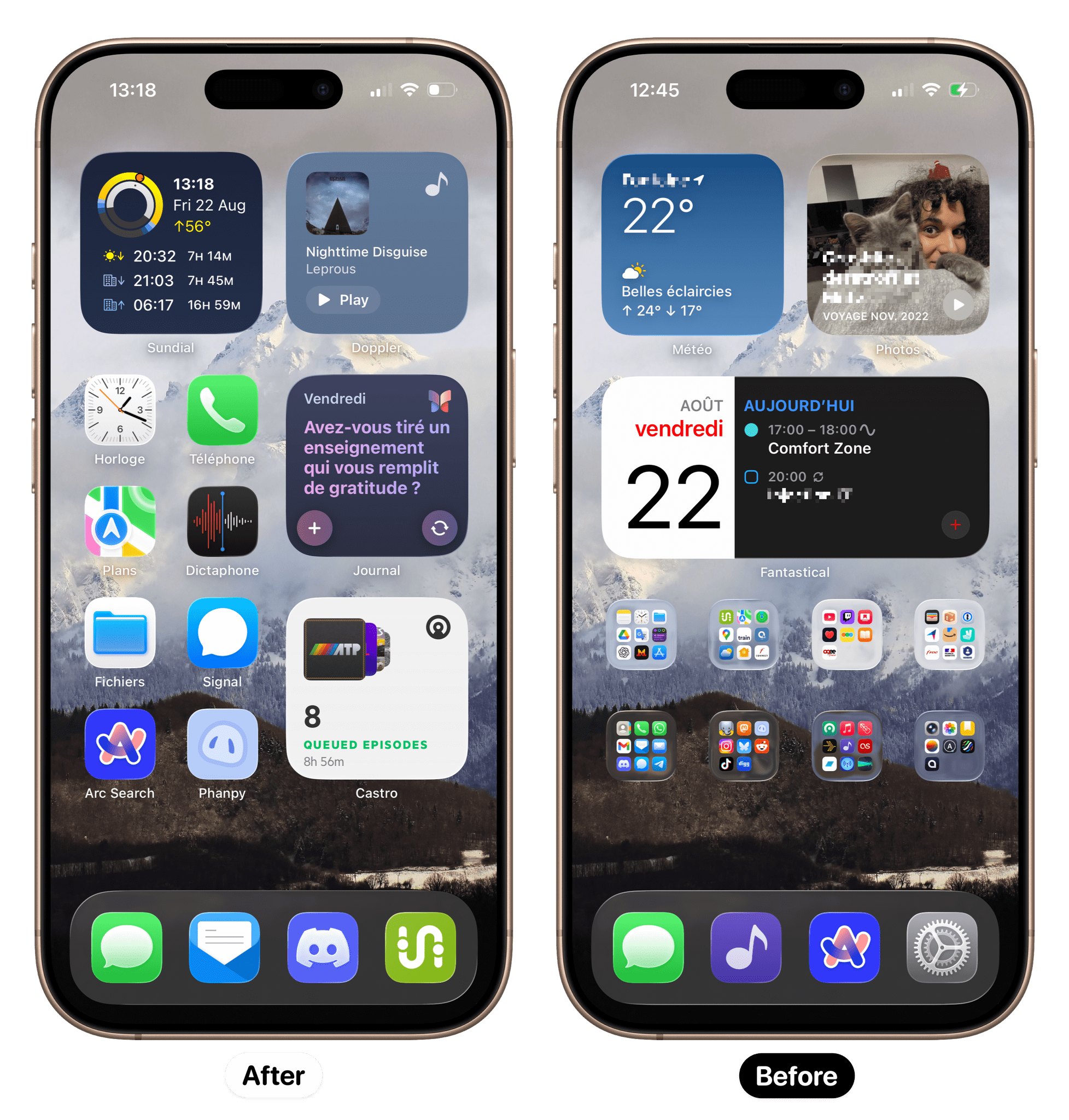
Transcript
1084 segmentsWelcome to Comfort Zone, a podcast all about pushing your hosts, well, outside of their comfort zone. I'm Christopher Lawley, and each week I am joined by two incredible co-hosts. As always, I'm joined by Matt Birchler. Matt, how are you doing? Chris, I've been out of my comfort zone all freaking week, and it'll all make sense once we get to the challenge. Thank you, Niléane. No, thank you, your wife. I basically haven't been able to use my phone this week for reasons.
And we're also joined by Challenge Giver and Destroyer of Phones, Niléane. Hello, I am accompanied by, now is a good time to place the full screen, by my cat. Here, look. She's got ears, she's a cat. And fur, and she doesn't care, just like a cat. So there you go. Yeah, both of you guys leave your doors open while we record, so animals come in and out. Actually, I leave my door closed. She opens the door.
Oh. I don't know how cats do that. I've heard several stories of cats. My sister-in-law's cat hurls his body against the wall, against the door, until you open it for her. Danielle's cat knows how to open the pantry door. If it's not latched all the way, Even if it's just partially there, but if it's not 100% latched, Danielle's cat knows how to open the pantry door and get to her dry food. Wow. Yeah.
But she eats it like a gopher where she picks up a bunch of it in her mouth, takes it out of the pantry, drops it on the kitchen floor, and then eats it. My dog does it sometimes, too. Anyways. We have sliding doors here. Oh. Our cat, she just does this on the door until it opens slightly, and then she can just insert her head to pull it all the way. Wow, wow, wow. Well, that has been Pet Corner on Comfort Zone.
Let's get into some tiny topics. I don't know. I'm assuming, I think, Niléane put both these things in here. Yes, it's people. So there are fun facts, boys. Real people listen to us and sometimes they write things to us. It's crazy. Why? I don't know. I don't get it. Ah, yeah. So on Mastodon, I don't know what your name is. Your pseudonym is Alian Le Barge. Sure.
Nice pseudonym. They wrote in, if there's anything about public transportation that works, of course, Fairtick is from Switzerland. So Fairtick, it is the app that I talked about as part of the challenge last week. The challenge was, let's use a European app. So I used Fairtick, which is a ticketing app for public transit. And I said wrongly that the app was German, but actually it's Swiss.
So Matt, this is following you around. It's easy to make mistakes with the Swiss. I don't know. I mean, both of you guys are going to be banned from going to Switzerland now. Yeah, I've been there already, so it's okay. If we do a Switzerland live show, it's just going to be me sitting up on the podium by myself. We'll be on those iPads on wheels. Somebody else wrote in. Paul, let's to comment on YouTube.
So people, not only some people listen to us, other people, they watch us. Crazy stuff. so Paul wrote in some feedback about the ball, the big ball like this is the mascot now of the show the big ball they wrote, I've got three big balls now, so for context the big ball is the accessory the gadget that Chris bought as part of a challenge, it's a big ball of LEDs that it emits soft lighting that you can color.
It's RGB. This is the Eve flare. So they say, I've got three big balls now. Got them discounted over a few years. They make great mood lights. The light is perfectly diffused over the whole surface, so it's very easy on the eye. I was wondering about that, Chris, actually, last week, because since it was clipping a lot on video, what was it like in real life? It is very soft light. I think it's clipping because I have my studio lights in here to get light on me, which we're also putting light onto the ball.
But the ball was also emitting light. So it was going to be very hard for it not to be clipping when my camera settings are set up to make me look good. It's all cameras and settings and stuff like that. But the big ball in real life, very soft lighting, very pleasant. It can get really dim. It doesn't get super, super bright. Like, you can't just use it to be the only source to light up a room. Okay, that's nice. Yeah, they keep writing, with HomeKit automations, that any delay doesn't matter, because yours was having Chris,
yours was struggling to keep up when you were changing the photos. Yeah, I was manually changing this stuff while we were recording. A HomeKit automation, yeah, wouldn't really matter. Yeah, they said, although mine reacts way quicker than yours, and they wonder, is your thread network okay, Chris? To be fair, I need to look into that because I haven't really done thread stuff since I changed my routers because I have been punting doing the whole smart home stuff in this new house because not only do I not live alone now,
I have Danielle, which she's not a super technical person, but Danielle's mom also stays with us a lot and she's very much not a technical person. So I'm going to have to, when I do get to smart home stuff, I'm going to have to make sure it works with light switches and all the regular stuff too. So it's going to be a whole thing. So I've kind of been punting that down the road. I just haven't been wanting to deal with it. Yeah, and I think Thread, it falls back to Bluetooth, doesn't it? I think so. Something like that. So yeah, if it falls back to Bluetooth, then yeah, it's not great.
They said, my two negatives about the Big Bold still are limitations with the color palette, they can't go extremely bright or extremely dim, and the HomeKit color picker won't let you pick the exact hue that you want, and colors don't match very well. Full-on red in a HomeKit is kind of a pinky orange, whereas if you press the button on the e-flare itself, it can cycle to a proper red, so that's a bit strange. So something in the software in a home kit makes it difficult to select the colors you want.
Thank you, people, for listening to us and reacting. We do appreciate it. We love the feedback. Let's get in the main show. I'm first up in the document, and I want to talk about an app that has basically taken over the app store. Despite what a certain car dealership owner says, it is possible to get a brand new app to the top of the App Store. I want to talk about Focus Friend by Hank Green.
This is a new kind of like ADHD focus timer app. And there are a million of these on the App Store. You can just type focus timer or ADHD app or whatever you want. And there's a million of these. But this one is different. First off, this one is actually sticking for me. A lot of these timer apps, I will try them, and I just don't like, I'm like, I don't want to waste a whole screen dedicated to this thing.
Like, I don't, it just doesn't work for me. But this one has amazing art. I will, I've been using it on my iPad, so let me pull it up here. For the, ooh, that's going to be clipping too. Let's turn down the brightness. So you can kind of see that this is my setup in FocusFriend. And it's kind of perfect. So you have a character, and it's a bean. Like, your character is a bean. And you can name your character.
Mine is Harry. I should ask you, have either of you tried this app yet? No. I have. Chris, I'm using it right now. Ooh. Okay. So, Matt, what is the name of your bean? I actually forget. I used the default name, whatever that was. I thought it was cute. I'm sorry, Matt. Can you show us your screen once again? That was my lock screen. Yeah, your lock screen. Yeah, it does have a live activity.
It's clipping. That's very readable. Wait for it. I'll see. Oh. Oh. To describe what I'm seeing, tell me if I'm wrong. That's a liquid glass live activity on your lock screen with white on white text. So I will say this app is not optimized for iOS and iPadOS 26 yet. Okay. I will get to that. It is not optimized for that. I wouldn't take what you see on Matt's screen there because I've seen the live activity too, and it does not look good, but it is clearly not optimized for iOS and iPadOS 26 yet.
To be clear, I want to dunk on liquid glass, not on the drink. Not the topic today. Not the topic. We're not dunking on it today. This podcast, if we just let this podcast go naturally, it's going to be the big ball and liquid glass hate, and that's all we're going to talk about. And traveling in Switzerland. That's true. That's true. Okay. Yeah. Nope. Nope. We're pulling it back. So anyways, when you are using this app, You start a timer and you basically get to pick like how long you want the timer to go.
And I think it's from like five minutes to two hours is kind of the range. I've been using about an hour. But when you start your character, the bean, my name, my bean's name is Harry. I don't know why. I thought that was funny. I have no idea. But they start knitting and they're knitting socks and scarves while this timer is going. And the longer the timer, the more scarves and socks that they are able to knit. and what happens is when that timer finishes you get those socks and scarves and you can spend that on furniture to design your office area so let me let me pull mine back up um you can kind of see
up it's going to clip again auto brightness um so you can kind of see my office area i'll put it like a screenshot or something in the show notes for the audio listeners so you can kind of see it But like I've added furniture and windows and stuff like that. So you can kind of design your space. And that's kind of like this fun, whimsical thing that a lot of these timer apps haven't had of like you kind of get a reward for, you know, filling out the timer. And if you cut the timer short, you get no scarves and no socks. So when you start a timer, if you really care about that part, you really need to think like, OK, how long am I actually going to be focusing?
You can't just start a two-hour timer, cut it short, and expect to get the rewards. You need to be able to kind of like understand like, okay, I have 30 minutes here to work. So let's just set a 30-minute timer or even like a 25-minute timer or something like that. And then you can kind of use those rewards to design your space. You can get desks, chairs, rugs, windows, shelves. You can put stuff to put on the shelves. Like there's all sorts of different whimsical things.
And the art style is gorgeous. Like I absolutely love the art style. While you have it going, actually just the whole time the app is open, there's like this lo-fi music kind of playing in the background. Matt, what do you kind of think of the lo-fi music? I don't really listen to it myself, but it's a little strange because like you're supposed to be, I kind of turn this on and then put my phone away. Okay. But I guess if it's on your iPad, maybe it's a little different. I don't really know. But yeah, I haven't really used that.
The cuteness is definitely the thing that's drawn me. I will die for this bean. Yes, this bean is my ride or die. Yeah, it's fantastic. But the lo-fi music is nice. I liked it. I've been leaving it on for the most part. But there is a toggle to where you can turn it off. And you can go use your own music, whether it's lo-fi or the Nintendo music app or whatever. Like you can go do your own thing. I just wish there was a few more tracks built into it because it's just one continuous loop of a track.
And there was a day this week where I pretty much had this going almost all day long. And about halfway through the day, I was like, okay, I got to turn this off. Like it was just, it was a little too much. There is a feature in here called Deep Focus. And what this allows you to do is it allows you to essentially blocks all the apps from being open. And then there's, you go into an allow list. So you can go in and be like, okay, I obviously want, you know, focus friends to be on that list. I want Obsidian. I want Mail. I want Todoist. I want Fantastical, whatever. Like you can set up these apps and they can still
open up on your device while you have your focus timer going. And when you start a focus timer, there's a little toggle that says deep focus you can hit it and that's great uh this is broken in ios in the os 26 betas ios and ipad os this doesn't work for whatever reason uh i i don't know if there's i don't know if there's an api change with this or something but i set this up this this is so everything else i mentioned before this feature is free you can use that all that stuff for free. This is actually
free as well. I haven't paid for it and I can still use it. What you pay for is the ability to allow list certain apps. You can still turn it on for free but it only lets you use Safari Health, a couple apps like that. But if you want to customize what's allowed through, then you need to pay for that. Wait, is it working for you? It works perfectly for me. That's weird. It doesn't work on my iPhone or iPad. You won't be able to see this, but if I try to open YouTube, I get the screen that says you can't open YouTube right now.
And so that works for, works for me. Works on my device. As they say. So your results may vary. Very weird. I have no idea why it's not working for me. It doesn't block anything. Like I, like, for example, I have ivory set up that it is, ivory is not on the allowed list, but I can open. You're not allowing social media apps during your focus time? I know, right? Oh, man. I'm a monster. I'm a monster. um but yeah i can open ivory while while deep focus is enabled so i don't know what's going on there that's interesting um i'll have to play around with that a little more uh so anyways but
like matt was saying the the allow list is the thing that's behind the subscription but it's only it's like 15 bucks a year and if this is something that is helping you focus 15 bucks a year is not that much money for being able to get a lot of work done and i've been using it this week um so the way i've been using it is on my ipad so i'm sitting at my desk i have my ipad plugged into my external monitor so i'm doing my work on the external monitor i have obsidian or final cut or whatever open on the external monitor and then off to the side i have uh focus buddy or focus friend
i keep calling it focus buddy because i think that's a better name but whatever um because like the bean like he feels like a buddy like focus friend seems very formal focus buddy seems casual Anyways, I don't know. But so I've been having that off to the side on my iPad screen. So that's where this has been living. So I can kind of see the timer. I can see Harry knitting away and doing his thing, you know, whatever. But I have probably had one of the most focused weeks of my life, thanks to this app, in a long time.
I've gotten so much stuff done. And it's just because I see this timer of like, okay, typically the way I've been working is I'll set up like an hour block of work. I'll work for an hour. And I'm like, I see the timer. I'm like, okay, I'm just working away. No big deal. I got 15 minutes left. I can keep going. Go, go, go. Timer's up. I'll take a 15-minute break. And it even has break timers built into it as a feature. I can use the 15-minute break timer and then get back to my work and stuff.
I can start another hour long timer after that. This app is very, very cool. I dig it. Video viewers may have seen me hold my head a second ago. I'll get to that in a moment. But it's so cool. I have never used one of these apps because they don't really resonate with me. But this freaking bean man, he turns around, he's got a cute little butt. I forgot to mention that. They literally gave him butt cheeks.
Like it's, it's like, it's adorable. It's a bean with a butt. And it's, it's, yeah, it's, it's lovely. It's kind of, it is, it's tapping into that kind of like home, like design kind of customize your space sort of thing. But there's no way to, uh, fast. Like you, you can't zip through it. You can't cheat your way through. There's no, I was wondering if there'd be like in-app purchases to like accelerate how fast it, the bean nits or something, but there's no way to do that. It's all kind of like you can get a, I don't know if you got one of the John Bean or the Hank Bean beans, but I don't know if that changes the appearance of your bean.
I've only made a few socks, so I haven't been able to customize mine a ton yet. So, yeah, I'll back up and say, so there's the subscription purchase for like the allow list. And I think there's a couple other features in there that you might get, but the allow list was the big thing. But you can't, there's no in-app purchases for the socks or the scarves or anything like that. the only other in-app purchases are like uh customizations for your actual bean i have not bought any of those i don't really care um about those i'm like i'll support the app through the
the subscription but then there but then there's like the separate uh bean purchases like customized character things i i those are fine um but i don't i they don't necessarily resonate for me but yeah Like the whole like being able to customize your space and the beam is what separates this app from all the other ADHD timers. And I'm kind of curious, Niléane, as my fellow ADHD-er, have you ever tried these kind of like timer apps and do they work for you? Because in the past, they did not work for me.
And so I'm kind of curious if you've ever used them. So obviously, I've tried apps like these. they never work for me I've said it before I think it's because I work when I embrace the chaos in Sims and tools like these that seem kind of punitive or put restrictions in place they just hinder me in ways that I cannot comprehend
but I will not function properly if I have obstacles like this in front of me and it seems interesting that there's a bean to be used with this I don't know I feel like if the concept is still blocking your apps when you're focusing on something it would just it would also like presume that I know how to decide when I focus on something
this is not something that I do like when I'm able to focus on something I will and when I'm not I will not so yeah I don't think this fits into my life but I'm glad that it works for you yeah I think for me this is kind of like a way it's like horse blinders it's kind of a way for me to kind of like okay yes there's a bunch of stuff happening out here in in the world over here on the sides but
it's a way for me to kind of just give me this tunnel view of like but this one thing is the only thing you should be focused on and this is how much time you need to be focused on uh using to be focused with on that one thing um matt i i kind of cut you off there you said you you held you mentioned you held your hand to your head, classic YouTuber face, and you said you'd get to that. Why'd you do that? This is completely unrelated, but I checked to see if it existed on the Mac App Store as well.
It does not. But to see, I went to the top charts to see the top free apps, and it also loads the top paid apps in the same view. And the top paid app is Logic Pro. The number three paid app is Final Cut Pro. but the number two app on the Mac App Store, Clack. No. Really? Yes. Are you kidding me? It's higher than Magnet, higher than Pixelmator 4, higher than Wiper 2, which I think we've talked about. I think, Niléane, did you bring Wiper 2 at some point?
I did. Yeah. It's number six on the App Store. You're welcome, developers. I'm selling all your apps. Seriously. This is like a who's who of apps Niléane has promoted on the show. Clack number two, more popular than Final Cut Pro. tough news for us it's not the case for me but I think it's because I have the French Mac app store on the American app store on Friday August 22nd 2025 clack dominating for me clack is at in the 18th place I mean that's still pretty good
but it's the Mac app store I mean come on is anyone actually downloading stuff in the Mac App Store. That could be like three people. Like, let's be honest here for a minute. It's not the iOS App Store. Wiper 2.12. Yeah, Wiper 2. Doing well. Anyway, I'm sorry. I was holding my head because of a clack unexpectedly. The third pillar of Comfort Zone. Incredible app. We've gone so long without mentioning it. I know. I'm sorry it was me. That's information you probably could have kept to yourself. No, it was too good.
I had to share it. anyways an actual good app Focus Friend I just like I don't know it's just clicking with me where these apps have never actually clicked with me before I need to figure out the allow list because I've been using previously mentioned app Focus OS in order to block apps which does have like all that timer stuff kind of built into it too but again it's just a clock like that does it's not as fun and whimsical as having a bean that's building their home office and knitting stuff while you
work like there's just something about that that whimsical level that's uh really interesting and i saw hank green mentioned this is developed by one developer like this is one person uh and you know like i was just like wow that's really cool there's some rough edges to it but it's also a very new app so i i'm not you know i'm not freaking out but uh so the developer is also like the person who did all the art? Yep. I believe so. Wow. Pretty cool.
Yeah. That's very cool. Yeah. So I think they worked with Hank to kind of like you know, come up with the concept and stuff but the developer is the one that did all the coding and design and stuff. So. Okay. So yeah, that's Focus Friend which should be Focus Buddy because I think that's a better name but I kind of disagree by the way. I think Focus Friend. Really? Because there's the alliteration where the double F I think works well. And buddy, maybe that's my French brain, French language brain, but buddy, is that less gender neutral than friend?
No, they're similar. Buddy is gender neutral. I'd say buddy is slightly more male oriented. Friend is totally 50-50. See, like, I'm one of those people that'd be like, hey, you guys, and use guys as kind of like a term for a group of people, not like dudes. So I don't know. But there's the barrier, like, there's the oral and written barrier. Like, when you write guys in a written thing, you see it as more male than neutral, whereas when you say it out loud,
I think it can be more often perceived as gender neutral. okay i think so i'm just theorizing okay yeah this is the sort of thing you have to think about when you're the top app in the in the world yeah that's fair no that's that's totally fair point i i absolutely like didn't think about it in that way i was just like i just was like focus buddy seems more casual but anyways we're not even the developers of the app it's not our app to name so um anyways yeah that's that unless you guys have any questions on it i i've been having a lot of fun with this. I encourage everyone just download and check it out, especially if you have ADHD and you
struggle focusing, like Neil and I both said, like these apps didn't work for me in the past. The whimsicalness of this app is what makes it work for me. Yeah. Same with me. I don't feel like I totally need this, but even for me, I enjoy kind of getting that bean knit. And also if you want to download this just to keep it at number one on the app store so that Elon Musk can see that if you make an app that people actually want to use, then it can actually be number one in the App Store. I don't know. It's a thing. Yeah, if you make an app that doesn't spew a bunch of...
Well, anyways, moving on. Yeah, cut to the bean six months from now and it's got an AI that's going crazy. You can also prove this point by downloading Clack on the Mac. No, no, no. Yes, comfort zone audience, go buy Clack on the US App Store, get it up to number one. Matt, what are you saying? I want the comfort zone bump to be real so I can use it to my benefit one day. Clack seems like my best horse to ride. Think like a businessman, Chris. We're not getting a kickback from Clack, so...
Yes, that's true. We're the number one Clack referrer, though. We gotta be. Yeah. We. Niléane. Niléane, not me. You brought it up today. I know. Anyways, let's move on. Matt, what do you got for us this week? Okay. I have, you guys should see so many notes underneath my section for the show notes. It's empty. So a little peek behind the curtain. Matt and Niléane, when they write something, they'll just kind of like write like a teaser for their topic.
Maybe Niléane might put like the product name if that's what she's covering, something like that. I sit here and write like my whole script. I write like so many bullet points of like everything I want to talk about for my topic. And these guys are just like one point, two points maybe. So I like that our audience doesn't necessarily know what we're going to talk about ahead of time. And I also like when you don't really know what we're going to talk about ahead of time. I have a guess. I have a guess. You, but you, we'll find out.
You're probably right. So my entire note that we have for this conversation is I have achieved email utopia for now. There's no such thing. I've heard this before. There's temporary utopia. You'll never always be there, but you can be there for a bit. Matt, I would like you to manage my email inbox for a week and tell me you have email utopia. I would, I, listen, I, we all have our email problems, but not me anymore, because Notion mail has come to the iPhone and I am very, very, very happy with it. It's so good. So here's,
here's the bottom line. Superhuman, my bugaboo is my favorite email app. Full stop. It is my favorite on the Mac. It is my favorite on the iPhone is my favorite on the iPad, but the sucker is $40 a month. and I will not pay it. So if it were $10 a month, I would pay it happily. Well, I mean, as a cult, you have to pay into it. Remember, not a leader. So if it was 10, even 20 bucks a month, it is so good. And like the value it gets me for managing my email, especially like work email, which is just a whole other level from what I do
personally, especially the last few months, it is worth every single penny. 40 bucks a month for an email app. And they're not hosting email. They're not doing any of the hosting. No. It's just an app. That is insane. Like, what are their costs other than the development of the app? Because they're not hosting. It's AI cost. It used to be 30 bucks a month, and they had to raise their price when they did more AI stuff. But anyway, what I'm saying is if I could use anything, if I had unlimited budget, I would use Superhuman because it is the best.
Notion Mail is the closest any other app has gotten to superhuman, in my opinion, for my use cases, than anything else. It is super fast. It is super reliable. It syncs in ways Apple Mail could never dream of syncing. It is just delightful. The keyboard shortcuts are brilliant. Like, it just, it feels good to use. That's kind of the thing that I am looking for most in, like, There's like this whole thing, not to get on a tangent, but like there's this whole thing with like trying to reinvent the email inbox.
And now we're trying to like reinvent the web browser with AI. Just whatever one feels the best to use and lets me go fast is what I tend to gravitate towards. And Notion Mail feels very, very, very good to use, in my opinion. And the great part about it is it's free. Like actually free in the way that Notion is free. like you can use basically all the features of notion completely for free and it's great um and with this installing it now yes uh with this you just sign in with your notion account uh and then
you can uh yeah load your email up at gmail only chris i'm sorry but uh but you're gonna tell me they have an ipad app as well right you're gonna tell me it may be gmail only but they have an ipad It is not on the iPad. It's on the other Apple platforms. Just not that one. I mean, you could run it in a vertical window if you wanted. So already. Email app? Already what I really like about Notion, Mel. There's no site of liquid glass anywhere.
I was going to bring this up. It is the antithesis of liquid glass. And I don't think Notion is going to do any liquid glass. I was just going to say, the way Notion is developed, it's like one app for everywhere like they're not going to do liquid glass like yeah absolutely not yeah and it's it's their design language they it's it looks the same everywhere it feels the same everywhere like they have their own aesthetic and they they're not going to turn it into glass it would it would make no sense for their kind of interface so if you are opposed to liquid glass don't worry about it it's not coming to notion mail anytime soon um but it doesn't i don't
really know how many things i have to say about the uh app itself um it has all the normal email things you can write emails you can reply to them you can swipe to archive you can customize the swipe actions a bit um i know uh it does search it kind of piggybacks off gmail's kind of built-in search this is my thing with email clients how good is the search because i okay i don't know how many emails I have but right now on in my uh inbox or my various folders and stuff like that that I use for filtering I have over 1300 unread emails so how good is the search so far so good like it's
it's instant for me I just tried it yeah yeah I mean it's it says I think it is literally just using gmail's kind of native search uh via their the gmail api and gmail search is quite good I think so yeah okay i have a question okay i'm live testing it right now this is great yes i have not tried it on a mac so i'm just discovering notion mail via the ios app uh where are the labels the labels are when you go into one you can hit the three dots and then add your and then there's a edit labels and you can add your labels there.
So you can add labels here, but where do you see all your labels? Where do you see all your labels? If I want to go look at a label. Oh, that's interesting. So, oh, I think I found it. It's in the sidebar. This is riveting. But this is very important for a Gmail client, how they handle the labels. I wouldn't know. I don't have Gmail. Okay, it's weird how they're doing labels.
So, basically, there's a label entry in the sidebar. You click on that, and then all your labels are in a horizontal scrolling list at the top of the screen, which I have a million labels, so it's a bit hard to navigate. Interesting. Yeah, I don't use that a ton. You should explore, yeah. So this brings me to the cost.
I did say it was free, but you can, of course, upgrade. And so the upgrade here is, I mean, you can guess what the upgrade, what do you think you would pay extra for for Notion Mail? AI stuff. AI stuff, yeah. So you can get AI features in this. And so the AI features are not crazy, but they're kind of what I would want. So the first one is auto labels. So you can create rules basically. So you can describe something so that when an email comes in that matches that description, it can create a label for you.
So an example is at work. We are working on projects. We're working on things. And so I can create a label that kind of describes the project and some of the keywords that might be in there. And even if the person isn't like, it's not like a Gmail rule, it's not like a specific sender or a specific keyword in it. Like if they are generally talking about this thing, I can still label it as that project, which is very, very nice. You can do all sorts of ones. I have, when I was using this last year, when the desktop app came out, I created one for reader feedback that would tag things that were feedback from like viewers or readers or something.
I had one for receipts to kind of filter those as well but so that's one thing the other thing is AI writer that helps you kind of compose emails which is actually is really nice especially for like if you are like me and you procrastinate replying to emails because you can't think of the right words superhuman does this as well basically you can type out here's what I'm trying to say and then it will format it into a nice email and I find this very very helpful so I like this quite a bit however and this is very funny because i was recording the my youtube video for this this
morning and i was going to upgrade to pro live during the recording just for fun and like what's what's 10 bucks because it was 10 bucks last year for this upgrade not anymore oh the notion ai upgrade is $24 per month. What? Or $20 per month if you pay yearly. So we're basically at superhuman numbers at that point. Is that okay, that upgrade, that $24 a month, is that
for all of Notion or just Notion mail? It does apply to all of Notion. So I don't know if Calendar does any AI things, but yeah, if you use Notion itself, then you would also get the AI features over there, but yeah so disclosure i should mention uh a few months ago notion did sponsor me to talk about the notion ai stuff and i think this was before they hiked the price uh because i think it was just like 10 bucks a month it must be because yeah it was 10 bucks and i was like oh that's a no-brainer that's the price that's superhuman i would pay for this is great so i think that was way back then but i actually really did like the notion ai stuff and one feature in particular was you could
describe what you want your Notion page to be. So I could be like, hey, I want an expense tracking page and I need to be able to list the item. I need to be able to list how much it costs. I need to be able to attach receipts and it would build out that page for you automatically. Which is pretty cool because there's a whole culture of like, I could build these complex Notion pages for you, but you're going to give me a thousand dollars or I'm just making up a number but like that it is kind of cool for like somebody that's just like hey i just
need this like thing and you can be as specific as you want and it'll build it for you and i i actually really did like that feature nice yeah so if you like it you can pay for it but it is more expensive than i expected which is which is a bummer so i'm just using the free version of ocean mail and honestly it's quite good the ai help the assistance the ai assistance with replies would be the thing I would want most, but not for 24 bucks a month. Yeah. It's insane. All of these apps are adding AI stuff, raising their prices, and building in the models and all that stuff.
But a lot of people are also paying for ChatGPT or Gemini or whatever. Whereas it's like there needs to... And I know everybody wants this lock-in effect and stuff like that, but there really needs to be a way of... I'm using Notion. Let me log into ChatGPT and use that API to build my tables or whatever. Because I'm not going to pay $24 or $25 a month or whatever for a bunch of different apps to have essentially the same AI model being used between all of them.
Yeah. Or local models getting good enough that you don't need to pay for it. But yeah. So the thing about Notion Mail is the views, right? You can create views. You can create views. Yeah. And so I think what's happening is you can't create them in the mobile app. But I'm guessing if you create them on the desktop app, they will sync over, right? Yes. Yeah. So you can create separate views. So you can say, like, if it has a certain label, put it in this view.
And it's kind of like a split inbox sort of thing with your own rules. But yes, all the management happens on the desktop app and then the mobile app syncs with that. but you can't set those rules there. Okay, I could probably fix the issues with the labels this way. The last thing I'll say as a quick tease, which I don't think I can talk about the app itself yet, and it wouldn't really be fair to, but stupid blowout. But I do have MimeStream in beta on the iPhone.
It is real. Now, Matt, I have two questions for you. Does it support IMAP? Yes. No, no. Gmail. And is there an iPad app? Technically, Chris, you can add other... Can you still do that? You can add another IMAP email account to your Gmail account. Can you really? No, maybe not. I'm imagining things. I thought that there was a way to do that.
Maybe not. Maybe that was still POP3. Yeah, I have a feeling after the beta periods, I'm going to be migrating my email to Google business. Because, yeah. I'm tired of not being able to use these cool email clients and stuff. You have phone calls. Yeah, I'm sorry. Well, I mean, I cover apps for a living, and there's a whole swath of up-and-coming apps that I can't do anything with, because the one Gmail address I have is set up to forward all the mail to my actual email address that I use.
I mean, obviously, I have a Gmail address because I have a YouTube channel. You have to have those two things. But all the email that comes to that Gmail address gets just forwarded to my regular email. I'm at the point where I have six Gmail addresses. Oh, God. When I include work, like all the email addresses for work and stuff. So Mimestream on the Mac is great because you can group accounts into profiles. That's amazing. So yeah, that's why I've been loving it.
One of my favorite moments was, it would have been December 20th, 2020, was the day I got to delete the second email account off all my devices, all my work email, all my day job email. I got to delete that and I went down to one email account on all my devices. That's incredible. Yeah. So that's my email Utopia. I like it. I mean, Utopia, asterisk. It's not going to last.
All right. You guys ready to get in a challenge? Yes. Please. Neil, Leon, it was yours. What did you have us do? My challenge was get your partner to modify your iPhone's home screen. You cannot give them any instructions, and you have to live with their modifications for the rest of the week. And yeah, I asked you guys off the air if you could provide before and after screenshots so we can compare what your partner did
to your home screen with what you had before. Should I go first? Yes, absolutely. Oh, hey, so mine is a weird story because I will have... So you can click the link in the show notes. It's a one screenshot combining the before and after. And so on the right is the before. On the left is after.
And I have some explaining to do. Yeah, you do, because I already see something that means you didn't live with this the whole week. Wait, what? So, down in your dock, you have Mimestream in your dock. Yeah, that was... That was the mail-in. And I know when you got the beta, you did not get that beta a week ago. You did not live with this homescreen for a week. Because I changed one icon? Yeah! I didn't touch anything. Okay, sure.
The challenge was, live with it for a week. So, where there was MimeStream.doc, yes, that was the mail app until I got into the beta. Yes. Shame. Oh my god. Okay, anyway, so you can see that my home screen in the before screenshot, it was already very different from the last time you saw my home screen, I believe. I've been living for a few weeks with folders.
Eight folders on my home screen and that's it, and four apps a dock and I've been doing this because I use too many apps and it was becoming really hard to choose what I need the most on my home screen and I only want one page. So I decided to go all in on folders. I used the same kind of grouping methodology that I had before the
library arrived. So basically there's a group for, there's a folder for messaging apps, another for social media, another for media, another for work stuff, another for anyway, for transit. So I've been pretty happy with this. And a fantastical widget in the middle, weather at the top, as well as a photos widget. My partner, what they did is interesting.
basically they added a bunch of widgets that I would have never added including the sundial one which is a cute app that I've had for a while that I've had for a long time and my cat just opened the door she does this she just opens the door Yeah, so Sundial, Doppler, which is my music player.
I don't see a use for a music player widget. I don't get it because when you're playing music, it's on your lock screen anyway. It's in a dynamic island. It feels like I'm adding duplicates, another duplicate of a music player on my screen. But anyway, they added the journal widget from the Apple's journal app. the one that gives you prompts daily prompts ideas to journal about this because they know I like to journal
I don't really like to use the journal app they added the Castro widget which is my podcast player of choice these days and then a weird selection of apps no folders, a weird selection of apps clock I have a widget on my lock screen that allows me to set alarms easily directly from the home screen so I don't really need the clock on my home screen
but okay Apple Maps which is strange I mean it's okay it's a good app but it's not it's not really good for and reliable when you're looking up opening hours of anything, at least here in France. They added the files app. Arc. So I'm using Arc as my default browser on the phone. I have for a few weeks because it syncs with Arc on the desktop.
My voice is going, guys. Fenpy, my master's own client that I talked about. a couple episodes ago. So it just opens a web app in the browser. Signal, a signal, the, what's that, the voice recorder? I don't know what it's called in English anymore. Voice memos? Voice memos, yes. They added this. I don't know why.
They explained that, hey, you can record voice messages in advance and forward them to multiple contacts at once. I think that was a troll because I hate voice messages. Thank you. You just became my favorite European. And the most baffling addition is the phone app. I was like, why do I need the phone app? And they said, because it's a phone. So you need the phone app. So, okay, sure.
And they got rid of the settings app in my doc. I really liked having the settings up in my dark, but they kept Discord, the messages up, which are very important to me. I think it's decent, but I hate it because so many things are missing. It's decent, but I hate it. Yes, but so many things are missing. So, yeah. What do you guys think?
I mean, the layout of it looks nice, But yeah, I'm with you. Like files and phone and clock on the home screen of your iPhone. I don't know about that. Yeah. Yeah. I don't know about settings on the home screen. In the dock. Yeah. Settings in the dock on the before is a choice. Guys, I know. I know. I tried it a few weeks ago when I redid my home screen with the folders and stuff. I think it's amazing because let's face who we are.
We are nerds who check up on better updates every week, who check up on settings all the time for small things all the way up to bigger things. We live in this app and just because we don't want to appear like the big nerds that we are, we don't want to admit this to ourselves. but if you do it like me and add the settings app to your dock, you will see that it's really nice to have it just right there all the time
instead of having to search for it. Okay. I will admit I am the sort of nerd who every Monday during the summer goes at noon my time is when the betas come out. So I will go to the settings app and do that. However, one thing I think is really great is when you swipe down on your home screen, the recommendations are based on your history. So my phone knows that on Monday at noon, when I pull down, it's going to show the settings app first and foremost.
That's how I open it once a week. Yep. Same. But I respect it. The first thing I do whenever I buy a new app or a new game is go into the settings before I do anything else. I appreciate the love of settings. Thank you. Doc is aggressive, but I appreciate it. Yeah. So I will revert very soon, as soon as we're done. They were kind enough to leave my home screen intact in a hidden page.
Oh, that's good. Because they realized that resetting up all those folders would be a hassle. Yeah. Yeah. Yeah, this is how you find out if your partner is mad at you or not. Because if they were really mad at you, they would have deleted all of that. Yeah. Yes. And final thing, you will have noticed that my phone is in French now. I did notice that. I did notice. Yeah. Yeah, it's a thing I'm trying to do. Like, hey, I will just say, because this is not the topic right now, but it feels very comfortable to have a device in your own language.
I missed that. It's been a couple of years since the last time I used my phone in French. It feels very comfortable. And now it sticks out like a sore thumb when I see an app that's not been localized. Fantastic help. Looking at you, Castro. Looking at you, Sundial and others. Doppler is localized, by the way. Nice. Maybe we've talked about that. Maybe, yeah. Okay, this is good. I honestly I thought the folders might have been the adjusted one at first I wasn't actually sure what your home screen looked like um and I have not seen the folders one but
yeah I think the uh the Castro and Apple music or Doppler widgets on the home screen is reason enough to go back that's eight app icons taken up by two yes two audio things come on Absolutely. All right. Who wants to go next? Matt, you're next up in Doc. All right. So I brought this challenge to my wife and she is, well, first she was like, what is this podcast? What even? Okay. Okay.
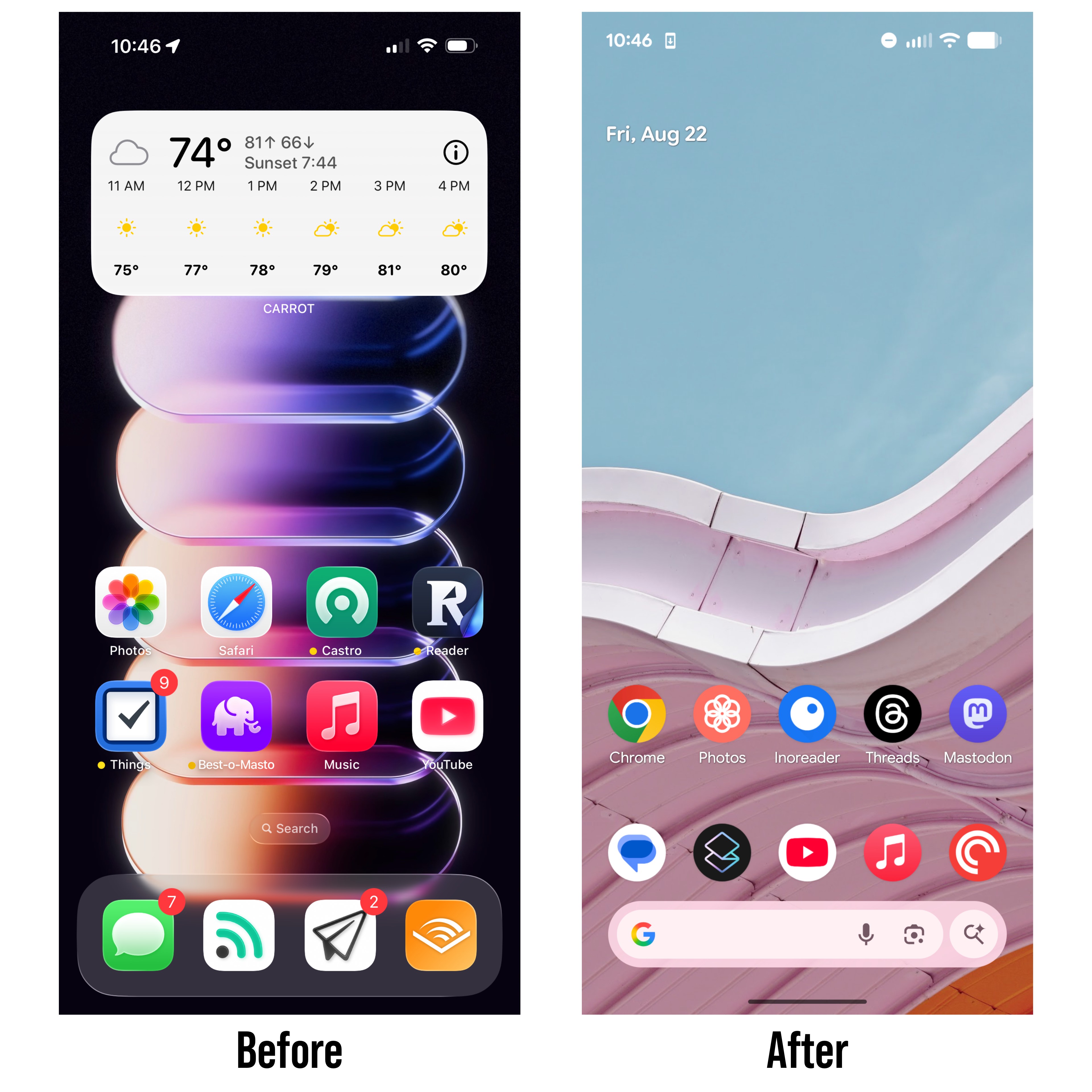
Danielle said the same thing. She's like, I don't understand what you guys do. But then she kind of looked at my phone for a little bit and she wasn't inspired but what did inspire her was to make me use one of my other phones as a whole new home screen so i've been using the google pixel 7 chris don't even start is that that wasn't the challenge this is way outside the bounds of this so far out the bounds
It's not even the challenge. No, no, no, no, no. Let me go back to this. Where is the challenge? New challenge. Get your partner to modify your iPhone's home screen. Yes, the iPhone home screen is gone. It is out the window. Yeah, because you're using a different device. They didn't modify your iPhone's home screen. The second line is, I cannot give them any instructions, and you have to live with their modifications. But then your partner, your wife, did not follow the instructions of the challenge. I couldn't give them to her. I literally, no, I sat there and I read the challenge, the instructions of the challenge, the actual challenge.
I read it verbatim and I was like, I cannot give you any more than this. This is the challenge. And I read it verbatim to Danielle. Your wife did not follow the instructions of the challenge. I, well, then I wasted a week. Like husband, like wife. Cannot follow rules. So I've been using no liquid glass on this phone. So, you know, you know, that's good. That's good. Also, your before picture has a wallpaper image that I believe came out after.
Listen, I forgot all parts of this challenge that I didn't. I forgot to take a screenshot on Friday last week. I didn't take it until today. Also, everything. Yes. I did notice the time was exactly the same on yours as well. But yes, the only difference on mine was that I had, again, Apple Mail in the doc instead of Notion Mail. But look at the legibility here. Look at how easy it is to read the text on a opaque background.
I mean, listen, it doesn't look as fancy as Liquid Glass when it looks really good. but like i think there's something here with the new i'm on the beta of whatever the new android version is that's coming out that does have the new material expressive i've seen um i think it's steven trout and smith on mastodon has posted quite a bit about how he doesn't understand how this is how material expressive is remotely sane he thinks it's madness doesn't understand why people seem why some people seem to like it i like it i like the fun like the the like volume sliders that have
like a squiggle uh line for part of it like i don't know i feel like we should have more fun with tech and uh i think there's definitely more whimsy here uh like if liquid glass like you can really see it hopefully you can see these screenshots um but like i am my iphone is glassed up right now and and the android one is just much more flat much more minimal you can't tell it from the home screens as much but like it like it's a very different aesthetic um so i've i've been using it i actually have a visible uh sim uh e-sim that i've been using for the week as well so that i can go out
with just this and still be connected to the world obviously i've been sending you guys messages through iMessage so haven't been using that for this but um yeah it's fine i'm just not an android guy. I'm an iOS guy. But yeah, totally new home screen. Totally new home screen. But not a modified iPhone home screen. It is modified in that it is in my pocket. Niléane, you are the challenge issuer. How do you feel about how Matt's wife handled this? If we are standing in France, Matt is standing in Moscow.
He's way outside. That doesn't have to be Moscow. Vladivostok. I don't know, the opposite end of the content. However, I will agree with everything you said about the design of Android, the way, the direction in which it's been moving. I really like it. And I've been playing with it on friends. They have a Pixel 8a, I believe, 9a. I don't know which one. A Pixel something A.
And yeah, it's really, so it's not the latest iteration of Material You, but even the one they got, I think it's very fun, very colorful. And like Steve, Aaron Masson and other people have said that it looks very confusing in some places, the way that they've added motion and some fun design quirks. And I disagree. I think like the, even if the progress bar, it doesn't make sense that it's a squiggle, but you still understand very clearly that it's a progress bar. You understand very clearly where is the thumb in the middle of that progress bar.
Controls are very clear as well. You can see I'm highlighting something here. Like even though the design that they've gone with is very quirky, very strange in places, very innovative even, it's still very clear and legible and readable. And this is very refreshing. because when I compared my friend's phone to my phone running the beta, I was like, I'm missing out here.
My notifications are freaking mess compared to this. So, yes. How is it that every topic today has turned into complaining about liquid glass? I will not rest. Justice is restored. Anyway, okay. The tragedy of Android, though, is that developers, however many developers I think will adopt Liquid Glass, we said Notion probably won't, but most will, almost no apps on Android use material design, like natively.
Like they all do their own custom things. So like you only see this like joy in the native, like Google's kind of own apps. Most other apps, the Mastodon app does it, I know, but like almost every app on this phone is not using this, which is very, very frustrating. Yeah. Chris is like, who cares? It wasn't the time. This is not the challenge. This is not a challenge at all. Nope. So what happened, Chris? So I told Danielle about this.
So when we recorded on last Friday, she wasn't feeling well. So she was like, I explained to her after challenge, or after we recorded, I explained the challenge. She's like, okay, can I do this tomorrow when I'm feeling better? I was like, sure, fine. even in that recording even in that recording you can go back and listen to it and Niléane said it can be a couple of days afterwards and Danielle was really sick that Friday so I was like I don't want to push her on this so we get to the day and she's like okay what do I have to do and I read the challenge in our document I read the challenge and I was like I cannot give you any more instructions
which was in there I was like cannot tell you anymore so for a little bit of background she does nothing to her iphone nothing at all she has the setting to where when she downloads a new app it just gets added to the home screen she has six pages of apps and you can literally tell in which order she's downloaded apps because it's just the newest one is the last one on there and the first one was on the first page like she literally does nothing she has one widget and it's the battery widget she does absolutely nothing the only thing i think i've ever seen her do is change her wallpaper that's it i've never seen her do anything else she does not care about this this is what my wife does as well she doesn't and it's not like she uses spotlight to
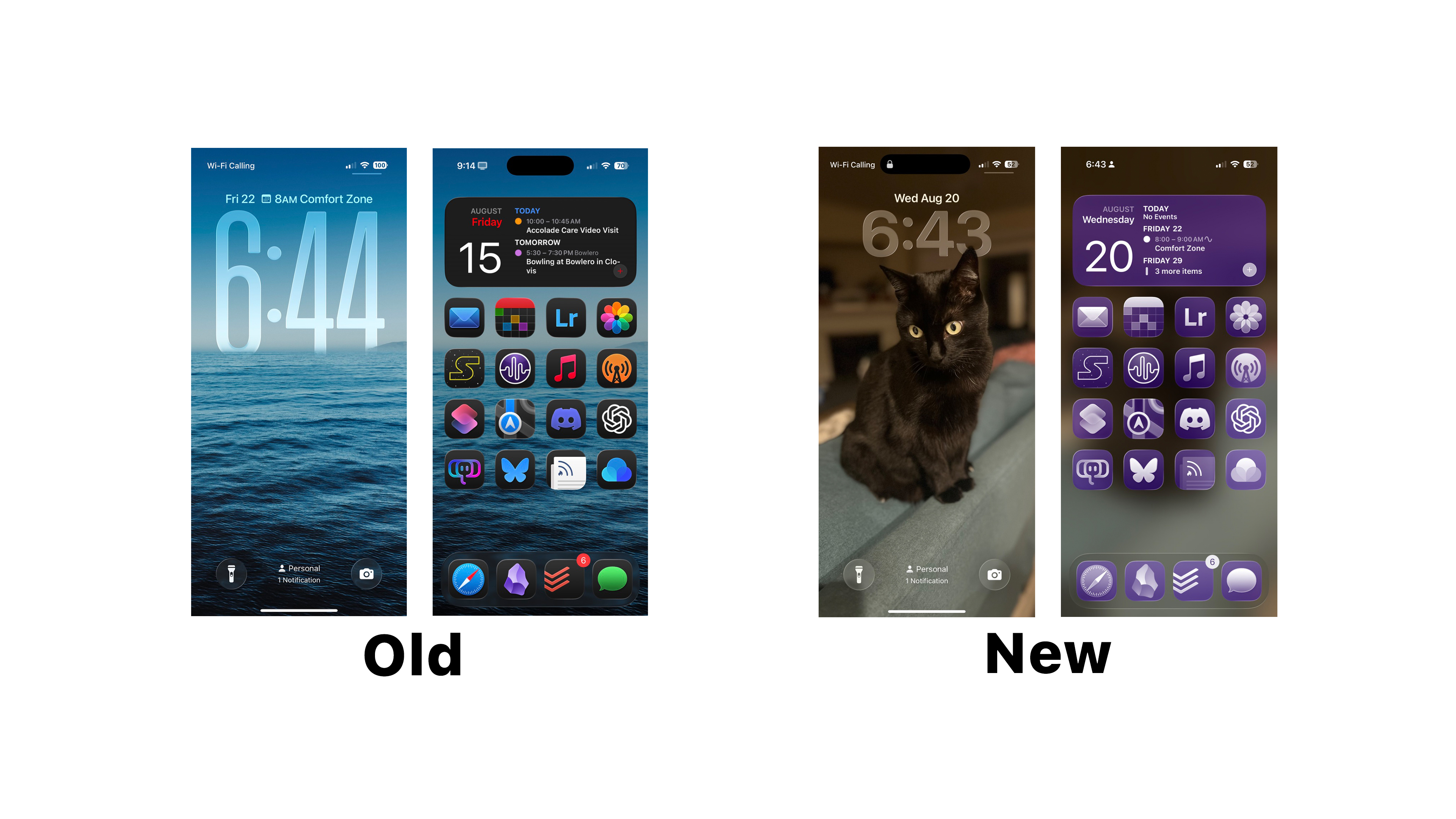
open stuff no she just knows where stuff is out of the six pages it's absolutely wild so i put four images sorry i should have combined them into uh um one one image for you guys but i didn't so uh if you open up the old ones you can see this beautiful photo that i took with the big glass clock which is one of my favorite features on on the lock screen and i included the lock screen because it is important to this and then she also did the lock screen so so kind of like kind it was a it was
a it was kind of like a a bison or a side effect of it uh and then you could see my my home screen it's all dark mode it's all nice I absolutely love this your images are faxing in for me I can't see I don't know why but then if you go into the new one the new lock screen she changed my wallpaper I can't see I should wait for Neil Matt is muted by the way
shoot It's a kitty cat on the lock screen. It's not loading at all for me. Yeah, sorry. I don't know why. I should have preloaded it. Portrait mode. One of the ears is covering the clock a little bit. It's got yellow eyes. Oh, this seems very nice and I can't see it. Wi-Fi calling is enabled. It's batteries at 52%.
Okay, one has loaded in, and I don't know which one it is. Okay, so. Okay, I just texted you the new ones. Oh, thank you. Okay. I can't wait. Did you get them? No. They're an iMessage. Oh. There they are. Am I connected to the internet? Yes. Okay, that's the new one. Yes, the two I just sent an iMessage, they're the new ones. I will try to load up. Okay, I've got everything now.
Okay. I'm connected to the internet. So the thing Danielle did to my iPhone was devastating. And I, unlike the two of you, did not modify it at all, all week. I did not change wallpapers. I did not change app icons or placements or anything like that. Absolutely devastated my iPhone. So she changed my wallpaper to a picture of her cat. Which just does not fit my look that I go for at all.
And it's just completely thrown me off because it has a very judgmental look on it. I feel like every time I pick up my iPhone, I'm being judged. She created a new wallpaper. So my big clock was gone. My calendar widget at the top of the lock screen, which I use a lot, was gone. And then we get to the home screen. She left the blurred wallpaper image feature on, which I actually appreciated that because that would have looked horrible if she would have turned off the blurb.
But she tinted my icons. She didn't do anything to the icon placement. All the icons and widgets are in the same place because she really didn't know what to do. Honestly, most of the apps on my phone, I don't even think she knows what they are. So she was like, I don't want to break your phone. but she put a purple tent over everything. And let me tell you, that purple tent goes over everything. It's not just the home screen, but it's the app library and settings as well. So for me, I'm the kind of person that I know what an app is based off the colors.
I can just quickly find Overcast or quickly find settings or quickly find whatever based on the colors. I know my app icons. I have not been able to use my phone all week because I can't find anything anymore. It's just a purple mess to me. And oh, and the other thing I forgot to mention is because she created a new lock screen image, you know that thing where like if you hold down on the lock screen, it goes in the edit mode and you can create a new one. She created a new one of those. So it was left in light mode.
So all the notifications that were coming in were in light mode. So they were all different app icons. So I didn't know what anything was on my phone this whole week. It's just been absolutely devastating. This is a big change. Purple is a choice. Yeah, she likes purple. It's rough. But it doesn't go with the wallpaper. Oh, no, no, no, no, no. That's not a part of this. But I lived with it for a week.
Okay, well done. I am literally changing it back right now. I'm doing it on the air. Challenge is over. I'm changing it back. Oh, I missed you, my perfect home screen. Oh, look at that. That's just perfect. Yeah. I will say you've done a good job with your normal home screen, especially with getting the clock to go just down, just below the horizon so that it looks like it's... Yeah, it's nice. And I did that... So the clock isn't as big as you can absolutely make it. I made it just slightly smaller.
So just the horizon's just peeking over. it it's nice it's we we appreciate your your commitment to the bit the the all purple i think the all purple is good i think the trouble with the photo is that it's it's a low light photo with kind of like a yellowish hue or like uh cast so it's it's not the best for a wallpaper in my opinion yeah oh no it's definitely not but she wanted to make blair her cat my my wallpaper image um and i
she was gonna she originally made it a photo of of her and the cat but i reminded her that screenshots will be in the show notes and she changed it so uh yeah yeah what can we say i think i think it's fine like the end result it looks fine but i agree with you like there's something is really wrong with the way Apple is doing tinting. I hate the tinting.
I don't like the clear. I don't like the color tint. I can't find anything. I cannot find anything. It is strange that it applies system-wide. It even applies to things in the settings app, right? Yep. If you go into the app section and stuff, it's all there, too. Yeah, that's strange. Why do they do that? Because it can also adopt dark mode or light mode too so it's trying to be like consistent yeah uh which i i think makes sense i think that's the right choice but i don't think the tenting and the clear icons are very good i just oh my gosh it was
literally i just did not use my phone this week luckily i don't go anywhere so it wasn't that big of a deal but i i think i went two places this whole week uh one was costco and one was to dinner so like I was like whatever I don't need it so I just I've been working off my iPad thank god you didn't say like change your primary device or something like that because that would have been devastating okay well done you can change your primary device though you never know where a challenge is going to take you I think I just gave you an idea
and I'm not looking forward to that alright anything else on this or should we get to my challenge for the week. No, nothing else. Well done, guys. All right. I mean, not Matt. Yeah, I mean, Matt definitely didn't follow the rules. Like, a whole new... Edit your iPhone home screen. Couldn't be more clear. Edit is not the word. You are changing words. Modify. Modify your iPhone home screen. Sorry, I used a synonym. Well, I'm just saying, if we're being particular... I didn't have it in front of me.
Get your partner to modify your iPhone's home screen. and you can't tell them you can't limit them that's not that but anyways let's get let's get to the new challenge we can we agree matt lost um okay so my challenge for you guys is kind of going to be an exercise i want us to come to the show next week and pitch a whole new apple product line a whole new product lineup this cannot be a touchscreen mac this cannot be an iphone without
liquid glass this has to yeah exactly i i thought about this i knew exactly what you both would do and i was like nope i'm gonna put this in there cannot cannot be a touchscreen mac has to be a whole new product line so maybe like apple makes a game console or something like that that would be boring and that's just the example but cannot be a a product line apple is currently in so it can't be headphones it can't be phones it can't be tablets computers it's got to be a whole new product line so i just want us to come and pitch a whole new product line and maybe uh
get apple to make something new and give us some money can the new product line be without liquid glass? I mean, yes, technically, as long as it's a new product, it has to be a new product. You can't be like, oh, it's an iPhone, it's a phone, but it doesn't have liquid glass, and we call it the U-phone or something like that. It can't be that. It has to be a whole new product line. It can't be something... You cannot go to apple.com and order something related to it from Apple.
So it can't be like a VR headset. It can't be a phone. It can't be a tablet. It can't be a Mac. It can't be headphones. It can't be a charger. Can it be a thing they've previously made but no longer make? I would say yes because they once made a game console, and that did not go well. That's true. If you want to pitch a new PDA, you could. They made a camera, even. They did make a camera. Okay. So I would say yes, but it has to be a new product line.
Okay. Okay. All right. Cool. Can we establish, like, some kind of standard, like a bullet point, a bullet list of things that it should feature? Like, maybe we come up with the name? Oh, yeah. Okay. Yeah, I like that. Like, come up with the name and maybe, like, a range. Like, you know, like, kind of how, like, there's the iPad, the iPad Air, and the iPad Pro. And, like, maybe, like, the feature differences and stuff like that. I like this. I like this. Okay.
Okay, I will put that in the document. As soon as we finish recording, I'll write all that out so we have it in the document. All right. Well, that just brings us to the end of the show. And as always, I have an end of the show question for you guys. And we got one submitted to us in the feedback form. Thank you so much to everyone that's submitting questions. I really appreciate it. We can use more. Please send in your end of the show questions. They are the hardest thing I have to come up with every single week. I really appreciate it. I like that we're begging every week for the initial questions.
I just appreciate it because we've been getting some interesting ones from people. So if there's something you want to know about us, write in feedback form in the description or show notes or wherever you're watching. But this one was from TrashPandas71. I believe that is their given Christian name. If you could change something about your desk setup right now, what would it be and why? I know what I would change I know go for it I would change my audio interface Elgato WaveXLR is killing me
these days I would get the Mode 2M2 or something like that one of those that's been in my Amazon basket for weeks nice Matt what do you got I had an answer and you guys were going to veto it as not following the rules. My answer is I want a second desk for all my PC and gaming stuff, but as we know, you can't have a second so you have to be modified. If you could change something about your desk setup right now. It would be to have two desks.
I think it works, yes. I actually do. I'm like thinking it through, I'm like yeah, it kind of does work. So what I would, my other answer my safe answer is I would like someone to take care of my cable management for me I don't want to do it myself but my cable management needs some work so I would you pay for my flight ticket I will do it yeah same same okay my visa as well my yeah you pay for my lawyer to get me out of jail when I'm stopped at the border all of that and I will come and do it okay yeah yeah it might be cheaper
for me but uh whatever uh i think for me uh so my big annoyance right now uh is with the studio display uh we talked about this with matt's challenge because the black levels are just not good like i'm having such a hard time color grading on this monitor now um just because like and like when it came out it was fine it was fine when it came out but now i have this ipad right next to it with an oled display that has perfect black levels and it's not that the black levels shifted on the studio display it's that the black levels are perfect on the ipad display and they're right
next to each other and i'm just like i want this but bigger so i would probably either go with like a fancy oled monitor but then it's not retina so i think i would probably go with a pro display xdr even though it's completely outdated but at least it has mini led so the contrast levels are going to much better than the studio display. That's a good upgrade. Yeah, I think that's what I would get. And I would include the $1,000 stand because why not? It would actually be cheaper for me to fly both of you to me and back than to buy that one monitor.
That's true. So mine is a cheaper fix. Here's a pitch for a new Apple product 9. I will not be submitting next week of course, But you could, like, do you remember the big loop that you could have on top of Game Boy Colors? Oh, yeah. Oh, yeah. Yeah. You could have that for your MacBook Pro screen so that you get all the advantages of your great MacBook Pro screen.
But just blown up. iPad Pro, sorry, screen. And just blown up right in front of your face. That's interesting. I mean, I do wear reading glasses, so I kind of already have that effect. Yeah, just thicker glasses then. Way thicker. All right. Well, that just about brings us to the end of the show. Thank you all so much for listening. And a huge thank you to MacStories for having us. We are a MacStories podcast. Go check out all the other readings and podcasts and all the other stuff that's going over there. I said readings. I meant writings.
I don't know. You read the writings. My brain's fried. I've been talking a lot. I needed to go take a break. It's Mario Kart time. thank you all so much for listening have a great day bye Bye.