Are You Matt, or Are You Matter?

Now playing
Are You Matt, or Are You Matter?
Show Notes
Matt decides to stop being so grumpy, Chris may or may not have survived WWDC, and Niléane brings a strange robot to the party.
Our thanks to ListenLater.net for sponsoring Comfort Zone and MacStories! Let them know you heard about them from us to get 20% more credits with your first purchase.
Weekly Topics Other stuff we discussed Follow the Hosts





Transcript
1052 segmentsWelcome to Comfort Zone. This is a podcast all about pushing the host outside of their, well, comfort zone. This episode is sponsored by ListenLater.net. I'm Christopher Lawley, a YouTuber and, well, now a podcaster. I'm joined each week by Matt Birchler. Matt, how are you doing? I'm doing splendid. We're coming off WWDC week, which is tons of fun, and I don't think we're really going to talk about it on this episode, so... Great. That's the nice thing about this show is it's not really a tech news show.
It's kind of a tech news adjacent show where we talk about stuff we like. So we're also joined every single week by Niléane. Niléane, how are you doing? All right. It's been a week. Yeah. And you're right. We are on our own cycle here on Comfort Zone. So I had a realization after our second episode that I keep bringing a negative energy to my items.
I was a little down on the Vision Pro in episode one. I was pretty down on perplexity last week. And so this week I wanted to bring something that I just enjoyed. And thankfully something came up that was new and pretty cool. And that is the theater app for the Vision Pro. So the app's called Theater. It's from Sandwich, who's like an advertising company and now has started doing some development.
They also make an app for the Vision Pro, I think, called Television. And the idea of both of these is basically you can take videos that you have or that are on YouTube and watch them in this app in a theater. They have a couple of theater, like fully immersive theater environments you can choose from. And in their television app, it's on a TV that you can kind of place in your room wherever you want. And it's kind of cool. The app is free. So if you have a Vision Pro, you can just download it and check it out.
I think the free version lets you play video files you have on your device, as well as some like pre-selected YouTube videos that they have. But there's a $4 in-app purchase if you want to unlock everything, which lets you watch any YouTube video, unlocks a couple more theaters you can watch in, and will give you the additional video sources, video types in the future. So I think they kind of implied that maybe immersive videos not distributed through Apple might be able to watch through here one day.
But yeah, so it's just a fancy way to watch videos in your Vision Pro. and from that perspective it's kind of cool i don't know i know chris you've got a vision pro do you i think you watch video on it do you use the immersive environments or you just kind of like have floating windows in your space um if i am sitting down to watch something so like i watched the first two episodes of acolyte through vision pro i did full immersive did the disney plus theater
and watched it that way so um definitely like that just because of my adhd and like i'm not like looking around i'm focused on the thing at hand uh and like the nice thing about like obviously i live with somebody so like i can just be focused on um the the task at hand yeah actually similar story for me i watched uh the first two episodes of the acolyte on uh in disney plus i did the Tatooine environment. For whatever reason, I just really enjoy the more fantastical environments. I find them just a little different.
I like the Tatooine one as well. The nice thing, I was just wanting to try another one. Usually I use the Tatooine one for all the Star Wars stuff, but I just wanted to try the Disney Plus Theater to kind of see if it was a different experience somehow. I don't even know what I would mean by that, but it was also very late at night and I just wanted to watch it. I had just gotten back from and was literally getting ready to go to wwdc it was the only time i was gonna have to watch the acolyte uh so i just wanted to try that one but i like the uh the the uh tattooing one and the
avengers tower one is pretty cool too there's a lot of fun easter eggs in that yeah it's i feel a little bit with these immersive environments we're kind of in the early days of like iphone app design the kind of skeu morphism era where like oh you would watch this in a theater so we're going to make a 3D theater that you can sit in. But maybe that's, I don't know, I don't know if that's good or if the more like places you could never go and watch these things are more compelling. But either way, this app is doing the kind of like, let's simulate real life. And I think that's good. I think that it's well executed. The theater looks good and all that. But what was really
interesting and the reason that i wanted to talk about it today is that they did to launch the app kind of like to get some buzz around the app they also live streamed the talk show uh john gruber's wwdc show that he's been doing for many years now and they streamed it in immersive video in the theater app and that was actually really really cool uh more than i expected i think
so the setup they had looked like they were using one of these new rigs that apple i don't know if apple invented or apple worked with someone whatever these new rigs that apple's using for their immersive videos uh they're using a similar rig and they just had planted front and center in front of the stage where the show is happening and it didn't move there were no cuts there there like weren't multiple cameras that it was switching between it was just this one camera right there and you could watch the show as if you were sitting front row center at the theater that it was actually
happening in and it was pretty low resolution compared to what you're used to with live streaming or anything like it's easy to like get a 1080p very high quality live stream these days on things like twitch and youtube and stuff uh but this was not as good it was a lower quality it's a much bigger video file i'm sure that's coming over but much lower quality it was choppy most of the time like the animation was definitely not perfectly smooth but despite that it was super compelling i kind of loved it like i was they were making jokes on stage and i was laughing at the jokes
way more than i would i think if i was watching it just on youtube like it felt more like i was at a live show even though that technically there's tons of things to improve like it felt very real it felt like i was watching something 3d i was in the space and it's it's one of those things where I shared a video, a screen recording of like 30 seconds of it. We'll try to put that in the show notes. And I don't think that captures the feeling. I had people like saying like, oh, the video doesn't look great.
It looks pretty choppy. And like all of that is true. But like when you're in, in the experience, it actually feels really, really good. And I don't think I'd want to watch everything like this, but like for a live show, it was kind of awesome in a way that I didn't quite expect. I thought it would be okay. And if I saw what the video quality was going to be, I'd probably say, oh, it's kind of a bummer. But I loved it. I thought it was really, really great. Just to be clear, there was no one there with you, right?
No. So there was no one there with you. You're in an empty theater. So every other seat is empty. The app does let you choose generally where you want to sit. So there's kind of a grid with the nine seats. So you can sit like left, middle or right and then front, middle or back of the theater. The only one that made sense for this was front, middle. Yeah. So it's kind of like the TV's app immersive environment where you can set theater mode and then like pick where you're sitting in the theater part, like the very front or the balcony or something like that.
Yeah. I found with this one, the, the, when immersive video works for me, it's when in like the Apple ones, it's when you feel like you are the camera, like it's a first person perspective. And since the like actual camera was kind of in the front row at the show, that was the only seat that felt right to me. It's the only one where you were close enough to like see the depth and everything of the people on stage. Cause it is a 3d video. Like you are seeing depth on stage and you can move around and everything.
But at the other seats, it was kind of weird. It was kind of like watching a video on a screen, whereas that front middle seat did feel like, oh, I'm actually here in an empty theater. But like, I'm actually here. Interesting. I didn't go to the talk show this year. I literally was that the day aired. I didn't leave Apple Park until almost six o'clock. And that's when the doors open and traffic and everything. It's normally a 10-minute drive from where Apple Park is to the California Theater. It was going to be close to a 50-minute drive.
So by the time I got there and parked and everything, I would have been late. So I wasn't able to go, but I've been the last two years. And it's a very different experience being in the theater than listening to the podcast after or watching it on YouTube or something like that. So the fact that this was available to people this year is cool. And definitely it's a proof of concept thing for Sandwich. Like, I'm sure, like, them and Gruber worked out some kind of deal. Like, I don't know the details of it or anything, but I'm sure they worked out some kind of deal.
Like, hey, let us test our, you know, new technical proof of concept thing. And, you know, we'll live stream the talk show for you. Because it was only available on Vision Pro. Like, I was like, oh, you know, I can't make it. Maybe I'll just download the app on my iPad and watch it that way. Because I thought I was going to be able to do it that. It's not. Like, it's just on Vision Pro. So, yeah. Yeah. So definitely like, you know, some marketing for them, some some agreement. But like it was really cool. And like you said, there is a difference between being in the room during a live show and then listening to a recording afterwards, like podcasts or live shows like this.
And again, I'm going to keep saying it because I wouldn't believe it if someone told me this, but I've done it now and I do believe it is I did get that feeling of being there. And if I was in it for a few minutes, I would feel like I was there and I would laugh along with the crowd as if I was there, which sounds so weird, but is what happened. And I think this is the sort of like thing that makes me more excited about the Vision Pro than some of the things where I'm disappointed in like how it's not the productivity machine that I wanted.
I think the more sorts of things we can get like this that give me an experience that I cannot get on my other devices, I think it'll be just good for the product in the long run and hopefully make it, hopefully for Apple's sake, make it a success. Nice. That's awesome. I'm really happy this worked out for you. I didn't bring my Vision Pro to WWDC. I plan on putting beta 2 and all that stuff on it. As soon as I basically get off this podcast, I'm going to load up the beta on it and play around with it.
But I want to use it for more. And I think one of the things that's going to enable me to use it more is actually in Vision OS 2, the beta, is keyboard pass-through. Because I'm a big environments user. Like, I love the environments. I don't want to. Like, if I just want to see the room around me, I'll just work on my iPad. I love the environments because I have ADHD. I'm able to block out the world around me and just focus on the task at hand. And now, Envision OS 2, keyboard pass-through is a thing, though. It's only for the magic keyboard.
Why do you keep doing this to me, Apple? Like, you're killing me. There are other keyboards. There are other much, much better keyboards. Keyboards with USB-C. Yeah. Or keyboards with actual travel on the keys and customizable and proper mechanical keyboards and not what you call your MacBooks keyboard. You know they technically call the MacBook Pros keyboard and mechanical keyboard? I mean, technically it is, but it's not.
Oh, boy. I like my magic keyboard. Just wanted to say it. okay okay no that's fair that's fair we're we're there will definitely be a challenge where it's build a build a mechanical keyboard and we're gonna get you on our train sure if you give me the money i'm up for it honestly i will i will send you the parts i i yeah i yeah i'll do it i'll yeah chris is like i am not lacking in parts i know i literally just bought big costco storage bins to put all my excess mechanical keyboard parts and stuff in and because I was like, I don't know what to do with these.
I don't want to throw them out because I know I'll use them in the future. And like, it's good stuff, but like, I didn't know where to put them. So yeah, it's, it's a whole thing now. Yeah. So anyway, there's our, there's our WWDC talk that we promised we wouldn't do. Terrible. It does sound good. Your universe where you guys have vision pros and immersive videos. She would like that. It's, it's coming soon to you. Like when does it launch in France? Yeah. July 12th.
I'm not getting it, though. Oh, okay. But my question for you is you'll be able to go to the store and, like, they'll have demos at the store. Will you go to the store and do one of the demos? Oh, yeah, I will. Okay, all right, all right, cool, cool, cool. Yeah, do the demo. Yeah, I will. I will have to take a train about one hour 30. Oh! But then I'm there and I'm going to try it. Okay, all right. yeah i mean it sounds like they they have the time slots i mean and at least in america they're having a hard time filling up like all the demos and stuff and it sounds like they might be doing
shorter and shorter demos now so you might actually it may not be that hard for you to get like the full 30 minute demo that they've been doing i will stay tuned then all right so this week i um well i was at wwdc i was in cupertino i got there sunday left thursday literally we're recording the day after I got back, I am exhausted. I am sunburned. I am just ready to take a break. But that whole time I was there, I was running around, did some video stuff, did a bunch of briefings, met with a bunch of people. It was a great time. But this year I did something a little
different than I normally do. Normally I bring a big vlogging mic and it's just attached to my camera and I run around and constantly I'm just like hitting record and it's this big shotgun that I'm just speaking into and the audio quality is fine but it picks up a lot of noise around you. So before I left this year I got this guy, it's the DJI wireless mic system and what this is is it kind of looks like a giant airpods case. What's cool about this is it has two microphones in it
and a receiver and a bunch of adapters. So the way this works is you have two lav mics and they they have magnetic attachments or clips that you can put onto your clothes. And so you can attach the mics. And the nice thing about lav mics is you can get them really close to your mouth. So that way it's very, it's not picking up a lot of noise around you. It's very focused. So this was really nice system to have. It's wireless, but there is a receiver. So what I did is I put the receiver on my camera and there's a cold shoe mount adapter. So basically, for those
that aren't aware on camera systems there are uh what's called cold it's cold shoe and hot shoe and i never know which is the difference to be honest i've been doing video stuff for most of my life and i still to this day don't know what the difference between a cold shoe and a hot shoe is but uh anyways there's a shoe mount and you could there's an adapter on the receiver that you can click in there it slides onto the top uh shows audio levels and stuff like that really nice and then there is a uh Audio out cable, so that way you can plug just a regular 3.5mm cable into the receiver and into your camera and record straight to your video clips.
Or the two microphones have 8 gigs of internal storage each, so you can record locally to them. It's something like 14 or 15 hours of audio you can record. It's more than enough. So this was a really great thing to have. I was able to do quite a bit with it. I was just able to record video, get clean audio. One of the videos I did, it's on Apple Intelligence. I just published it this morning.
I recorded in front of the Apple Park Visitor Center. There are a ton of people around there. In fact, when I was recording the video, somebody was literally buffing the outside of the Visitor Center. And they were going right behind me. I mean, they were doing their job. I wasn't mad or anything. I'm like, do what you got to do. But the mic did a good job of like kind of canceling that noise out because it is directional. And I did use like some of the Final Cut features like noise removal and stuff like that just to clean it up a little bit. But the mic itself did a really decent job at like canceling out car sounds and people talking and things like that.
Now what's nice about this mic system is that there are adapters with this. So if you don't have like a camera system like I shoot with a Canon R5. If you're not using that, say you're just using an iPhone, it comes with both a lightning and USB-C adapter. So you can plug that into the receiver and then just plug the receiver right into your iPhone and then use the microphones to record. So that way you can put your iPhone on a tripod, be six feet away, and these microphones go really far away.
I think I saw it was over 100 feet. It might be close to 200 feet, something like that. So you can be really far away. I don't know why anyone would want to be that far away from the camera, but you can. For a demo. I guess, yeah, exactly. The nice thing is you can plug it right into your phone. It will record right into the video that you're recording on your phone, so you don't have to go back and sync up audio if you don't want to. But again, you can record directly onto the mic.
The mics have USB-C, so you just literally plug your mic into your computer and you copy those audio files over. Really nice system. Kind of a niche thing to bring to the show. I promise. I know last two episodes I brought video stuff. I promise this won't be every week, but I've just been covering an Apple event. And, yeah, video stuff is kind of my bread and butter these weeks when I'm doing these kinds of events. So it's a really nice system to have.
It's definitely not going to replace, like, the mic that I used to record this podcast or the mic I have above me to record my traditional videos. But if you're looking for, like, a travel mic setup, this is not a bad way to go. How do these travel? Is there, like, a carrying case or anything? Or are you just kind of, like, loosely tossing them in a bag? Yeah, so there is a case. It's probably about, like, three size. It's, like, three times the size of an AirPods Pro case. and it works exactly the same like the lid lifts up it's a charging case for them so everything the mics the receiver the adapters they all go into this case which is really nice and then there's
a usbc port on the case so you then just plug one usbc cable into it and it handles charging everything the case itself has a battery so um say you're out and about you're doing a bunch of recording uh you're using the mics the receiver the battery dies on them you can just put them in the the case itself and it'll charge all that stuff back up you don't have to plug them into power okay and does the one that clips into the shoe does that get powered by the camera or no no that has an internal battery yeah so that that the the receiver so that's the receiver and then there is
the two mics all three of those have their own battery and then the case has a bigger battery and then you can charge you can charge like the receiver and the mics individually if you want um and there's a version you can buy of this that's literally just a receiver and mic it doesn't have the case but i would spend if i was you i'd spend the extra money and get the case if you're interested in this because you can literally just plug one cable into the case and it charges the whole system which is really nice and really convenient especially when you're in a hotel trying to
balance charging camera batteries your devices mics nintendo switch all sorts of different things yeah like i use i have the uh rode wireless go to uh system which is like similar to this it sounds like yeah yeah yeah but the things that bother me about this one actually all three things three things you mentioned to actually make it sound better uh i'm not going to buy it but makes it sound better is the carrying case is great these are just kind of loose so if i'm taking them somewhere i'm just tossing them into a bag which is annoying um they do all charge
individually uh but similarly it does not charge uh from the camera when it's plugged into that i was really hoping that would be a thing because sometimes that dies on me and i'm like oh i forgot to charge the thing on the camera uh and then the magnets the magnets actually would be really really great these guys only have clips to clip onto you and a magnet would be so much better for like the sorts of like t-shirts that i wear uh it would be a lot easier than trying to clip it like up to my neck or just randomly in the middle of my shirt so those all sound those all sound good
i'm sure it costs way more than the road ones but it's 250 for the version that i got there's cheaper version without the carrying case but the carrying case definitely makes a big difference because like you said it's not loose stuff because these things are small like the mic is small the receiver small all the adapters are really small so just throwing those in a bag that's a good way to lose them so the case itself is really nice like even the charging capabilities aside and the really nice thing is the case has an led light like battery indicator on the front so there's
four lights on the front so it'll tell you like how much battery life is left on the carrying case so uh and as soon as you put the mics and the receiver in the case it starts charging them right away you don't have to put them in a specific mode or anything like that it's it works just like airpods in that instance yeah that's that's very convenient these guys have zero indicator what their battery is so you just kind of hope that is not something i would use for a professional workflow then i am not a professional video maker yes you are you are you absolutely are
I'm a scrappy video maker. Okay, yeah. We're all a little scrappy. Every person that does video has to be a little scrappy. That's true. That's true. Yeah. Chris, I have two questions about the mic. Okay. First, is it one of those mics that you can hold up to your mouth like one of those TikTokers nowadays and it looks ridiculous? That's the question. That's it. So, so technically, yes, you can just like any mic.
I mean, technically you can hold any mic. I mean, you always see those people now with SM7Bs. Yeah. But does it look like the TikTok vibe? It is 100% the same mic. All the TikTokers use that they hold it instead of, instead of clipping it onto their, I do not get why they just don't clip it onto their shirts because when you hold it, you're moving your arms. So you're getting uneven audio because you're moving the mic further away from your mouth. You're bringing it closer to your mouth. I don't get that. That trend drives me nuts. I don't get it. I do not understand it.
These come with a magnet. It's super easy to just clip to anyone's shirt. Or you can mount it someplace or whatever. Or it has the clip option a traditional lav mic would have. But the magnet system is really nice. So, yes, it is the mic that all the TikTokers and YouTube short people that are using and they're hand-holding it. But I have never and will never use it that way. That is my promise to you. And they don't have a variant that looks like a tiny little microphone that you can hold up to your mouth.
All right. Those are the best. Yeah. Oh, the ones where like people are like pinching it. It's like the lav mics. But they're like pinching the clip thing. I especially don't get that. I'm like, what are you doing? You look like you're holding like this little dainty thing. Like, what are you doing? I don't know. Some people. Perfect. I really wanted an excuse to have your opinion on that. That's good. Next up, you talked about plugging into the iPhone directly.
How is iOS handling that? Is that all right? Yeah. iOS has handled external mics really well for a really long time. It does a really good job. I haven't used it for any production stuff, but I've done some tests with it. I tried it with the built-in camera app and my pick last week, Kino, as well. I tried it with that as well, and it worked fine. The audio from the microphones and from the receiver gets baked into the video, so it's using that mic and not the iPhone's mic. So it's really nice. So if you're, like I said, putting your iPhone on a tripod and standing six feet away, or in Niléane's case, I believe that's about two meters.
Thanks. Yeah, no problem. Hey, I did that conversion on the fly. you're uh that you're getting much better audio than you would get if you were using just the iphone's mics so if you're even somebody that's doing just like iphone videography or something like that this might be something to look into nice and and for comparison to the uh i was using the rode video mic pro plus that was all the stuff i was using for travel videos before i got this system and that mic's like 400 bucks and that's this like big shotgun mic that has to sit on the of your camera it has its own independent battery system it uses micro usb to charge it's really
annoying to travel with this is so much nicer to travel with this is basically replaced that i will probably look for somebody to give that uh the rode video mic pro plus to in a bit once i am positive these uh dji wireless mics have proven themselves yeah micro usb is a deal breaker in 2024 The only thing worse than micro USB is micro HDMI. And that's on my camera. And we were I was a little late to the recording because I was dealing with micro HDMI issues.
I hate that port so much. I hate it. I hate it. I hate it. Why, Kevin? Why? This episode of Comfort Zone is brought to you by ListenLater.net. ListenLater gets you through that big pile of articles you've been saving to read later. I actually use ListenLater myself and have gotten tons of value from it. With Listen Later, you can enjoy more of your reading list by listening to the articles that you saved. And how it works is really easy. When you find something you want to listen to, just email the URL to your Listen Later account.
Listen Later will use the latest and greatest AI models to turn that article into a spoken narrative with amazingly realistic voices. Then the audio version of the article is delivered to your personal podcast feed that you can follow in any podcast app that you'd like. I've personally used Listen Later to listen while I'm walking the dog, while I'm doing workouts, while I'm doing chores around the house. And because it's just in the podcast app, the articles are just there for me. It's super easy to not forget about it and listen to them right away.
It can even translate articles. So, for example, you can save a French article and listen to it in English, which is pretty rad. And Listen Later has a very fair pricing model that scales to your needs. It's built on credits, so you buy credits and use those credits to translate articles into audio. Once you've used all of your credits, you can either automatically or manually, whatever you prefer, reload your account and keep using it. How much you spend is always up to you, though. So visit listenlater.net today to learn more and sign up for free. When you're ready to buy your first credits, you can get a 20% bonus on your first purchase by contacting Listen Later by email or through their support channels and just mention Comfort Zone.
Again, that URL is listenlater.net to start listening to your reading list today. Our thanks to Listen Later for their support of Comfort Zone and of Mac Stories. This week, I wanted, so just like Matt, I wanted to have a more positive vibe. Because that went downhill last week. So I tried out two accessories by SwitchBot, if you know that brand. Yes, very familiar.
I've heard of it many times and never tried it. It's actually pretty cool. So I got, actually a few months ago, I already got the SwitchBot Hub 2. Yeah, that's the name. SwitchBot Hub 2, yeah. And what it does is it's a temperature sensor, a humidity sensor, and it's got a light sensor as well, all in one. and it has a neat trick up its sleeve it can trigger IR appliances infrared appliances so anything that you can control with a remote basically a
classic remote so what I did is enroll my AC using this so now I can control my IAC in the home app using that hub. I also got the SwitchBot bot. So it's just the bot. It's the initial product that gave birth to the company, I guess. And that's a little thing that you stick on top of any button, really, even a light switch on the wall.
And it's got a tiny arm. That's so cute. Oh, my God, it does. It's got a tiny arm that comes out and presses the button for you. And you can program the bot so that it has multiple modes, basically. It can work with one-way switches. So if it's just a press or if it's a rocker that has two positions, it can also trigger that as well in both positions. So that's really neat.
And, yeah, I'm really happy with these two products. They work really well. There is one issue, though. And that's where it's maybe going downhill again. Oh, no. Oh, no. SwitchBot doesn't have in any of their product native HomeKit support, right? So you have to use their app, their iOS app. But recently, the SwitchBot Hub 2, the one I got, got Matter support.
So that's good news. Yeah, it means you can enable it in the app and it will show up in the Home app like any HomeKit accessories. So that's the Matter idea right here coming in a clutch, I guess. And that works, although it is so buggy, guys. Oh, no. Switch bot, get your act together or something. I don't know if it's Switch bot, if it's their fault, or if it's the Matter support that's garbage in general,
like the Matter standard is garbage in general. I don't know. I've only had a couple of other Matter accessories, which are Eve products. So smart outlets, which I can upgrade to Matter using the Eve app. And that worked well, although there's absolutely no point in doing that if everybody in your house just uses HomeKit. But yeah. So yeah, SwitchBots Matter support is garbage.
It doesn't work. There's a huge latency between when you press the button in the app and when the bot or the hub actually does something. So I wanted to go another route to add these two devices in the home app. I wanted to leverage my home bridge instance that's on my server in the living room. I guess I can talk another time about the server in the living room.
I think I mentioned it, but it was on the secret pilot episode that we did. So nobody's heard that. But yeah, I have a server in the living room with HomeBridge on it. And there's a plugin for SwitchBot accessories that you can install, which adds HomeKit compatibility to your SwitchBot accessories. that works a lot better than the native matter support. There's a lot of downsides, of course, because you have to set it up.
It's not super easy. You have to read through a bunch of documentations on the GitHub page. So that may not be the most welcoming place for everyone. But once you're done setting it up, it works so well. There's no latency. I believe it's just using the SwitchBot's native API. So that's why it's so fast. Yeah, so I compared a HomeBridge homemade plugin and the company's native HomeKit support via MATA.
And I'm afraid the homemade stuff works better. The open source amateur thing is better than their actual service. That's not great. I'm shocked. I'm shocked, I say. Impossible. Right. I don't know, guys. I think over the past few years, I've been extremely disappointed by the promise of matter. I think it's an excuse to get into this for me.
But yeah, there was this promise that, yeah, everybody would make products that works with everything. I don't know. It's not been the dream. There's a few Matter products I have, and they work worse than just dedicated HomeKit devices. If they go through Matter, one thing I am interested in is for iOS, all the OS updates that have Home app support,
it looks like they're getting the new Matter standard, new Matter update later this year. So it's going to bring like robot vacuum cleaners and stuff to the home app, which I'm excited about. But I am like, is this going to work worse than just going into like the native app for my robot vacuum cleaner? Or is this because I would love I want everything to be in the home app. Like I have Homebridge installed so I can get everything in the home app as well. But matter is the promise to the people that are wandering the desert without any water.
And they went, just kidding. We don't have any water for you. We have Mountain Dew. That's tough. Yeah. So Matt, are you Matt or are you Matter? Well, based on this conversation, I am Matt. good connotations title so so what so this little switch bot bot yeah it's a little that's the best thing it's a little box it looks like you stick it to like anything to the wall yeah or anything
really yeah yeah they've got it like hooked up to a coffee maker in one of their photos what so So what are you using it for? And now that you have it, are there other things you're looking around like, ooh, I could use Switchpad on that? Yeah. So, yeah, I'm using it for something very specific in our living room. So we don't own our place. So we can't just replace things that are built into the apartment or some things like that.
So we have a bunch of smart lights in the living room, of course. But there are ceiling lights, which are tiny LEDs that are speckled on the ceiling. Imagine a grid of, I don't know, 12 or 16 LED lights, LED spots on the ceiling in our living room. And those you can only trigger using the wall switch, right? The built-in wall switch. We don't want to replace the wall switch to make it smart and make it show up in the HomeKit.
So that's perfect. I just stuck the tiny bot on the light switch and that's it. It works. The thing is that, and that's something really important, I think, is that you can still use the physical button. It doesn't prevent you from using the physical button. the bot is out of the way when you're not using it. So yeah, we can still press the button on the wall and it works.
Yeah. I think that is like my, I've been doing home automation stuff for years. And I think the thing that I realized at some point is if you're going to have a light, for example, that's smart, you need to have a way to just switch it on and off manually as well. You can't make your phone or your voice be the only way to do that. Because otherwise you're going to get frustrated. Your partner's going to get frustrated.
It's going to be. It's even worse when they get frustrated because you set it up and you're like, oh, it'll be so easy. And then if it's not, they're like, you said it would be easy. And it's not easy. How dare you? So, yeah, anything like this where the switch is still available, I think is really cool. I have something, it's a little different to this, but I have something that kind of like for my living room, I have a similar situation where there's a switch that controls all the ceiling lights and it goes on top of the switch so that you, there's like a button that goes on top of the switch.
So you can't actually switch it. The switch is always up. It's always on. But there's, it is basically a smart button that'll toggle it between on and off for you and has like a dimmer and everything. I'll try to find a link to that. It's on Amazon. But I'll try to find a link to that for the show notes because I've had a lot of luck with that. And it definitely improved our old situation, which was all smart, like has to have to do it through the phone. And yeah, that improved our quality of life quite a bit. Yeah, that's really nice.
As somebody that used to be a renter and used to live by myself, I, you know, I used to be able to like do all sorts of weird stuff. but I wasn't able to, you know, drill holes in the wall or replace things. So I did a lot of like Philips Hue stuff, but I would put like the Philips Hue light switches on the walls as well and use those. But now that I own a house, I am going down the Lutron Caseta route. And I'm going to save this for a future episode once I finish the project. I literally just started ordering everything, but I didn't want to start installing it and then leave for WWDC
and like my girlfriend not be able to turn on lights because that would not lead to a happy relationship if if if that was to happen and like the other thing too is like my my girlfriend's mom stays with us quite a bit so she's not a techie person at all she's the very very non-technical which is totally fine but that means i can't have her be like oh yeah in order to turn on the lights in the living room you need to yell at the assistant in the home pod to turn on the lights now there needs to be a light switch that she can hit so the lutron caseta stuff is really interesting to me
um you need to be comfortable doing a little bit of electrical work or hire somebody to install it yeah i think the other thing um the the hub too um it kind of feels really really smart And I guess that's their way of doing things, SwitchBot. The fact that you can just program IR commands. And the way it works is you launch the app and you enroll a type of device.
So in my case, that was an AC. And it's going to guide you, right? It's going to say, all right, point your remote, your physical remote at the hub. and start pressing buttons. And you can assign commands to each IR command. And yeah, it becomes a smart device. And it's a really smart way of doing things. So I guess the way it works is that the Hub 2 has an IR emitter. And it replaces your remote, basically.
Nice, yeah. I'm trying to think what I would use that for. I know this was a thing that Android phones had for a long time. I think they called it an IR blaster where you could do a similar thing. And then I think those died off eventually, but it would, it does sound like a cool way to automate things that are not smart. Like my TV does not connect to any smart home, any things, but it would be kind of cool if I could ask Siri to turn on my TV. Well, do you have an Apple TV plugged into your, to your TV?
I do. I do. Okay, so do you have CEC on your TV? I do. It does do that, but it's... Oh. Yeah. It doesn't work all the time? It's slightly annoying, but yeah, it's as reliable as Siri likes to be, I would say. See, what's interesting from my TV setup is the TV works just fine with CEC. My issue is my sound system. For some reason, when I moved, I'm literally using the same cables. There's nothing different.
The sound system isn't even plugged into the internet. But for some reason, all of a sudden, CEC is not working right with the sound system. But it works fine with the TV. And it worked fine at my old place. Like, it worked perfect at my old place. It would turn on with the, like, if I turn on the Xbox or the Apple TV or something, it would turn on the sound system. If I turned it off, it would turn that off as well. But now it doesn't always turn on. Sometimes it does. Sometimes it doesn't. Sometimes it turns off. Sometimes it doesn't. Sometimes it just stops responding and you can't control the volume until you go up and unplug the thing and plug it back in.
It's getting replaced because it's driving me wild. And more importantly, it's driving my girlfriend wild. And that's the reason why it's really getting replaced. Yeah. Yeah. Us nerds will tolerate a lot. Yeah. All right. When's the challenge? I can't wait. Challenge, challenge, challenge. Challenge, challenge, challenge. Niléane, it was your challenge. What did you make us do?
All right. I asked you and myself to revamp your dock on your main device. Yeah. Nice. Who would like to go first on who? What did you do to your dock? Let's start with Matt. Matt, what did you do? Okay. So you are starting, you've successfully chosen what is likely the most boring answer. So last week we agreed I would do my phone, which admittedly kind of restricted me to how crazy I could get because I only get four icons.
So I, at the start of the week, right after we stopped recording, I emptied out my doc and tried using my phone. and I forget exactly what was in my doc before. I think it was Messages, Ivory from Acedon, Overcast, and YouTube. Those are the four apps I had in there. And I took them all out and I was like, let's see what I actually need in there. Like, what do I want my phone to be? What do I find myself accessing quickly the most?
So let's just make the most utilitarian doc possible. So I am back to four icons in my dock, and three of them have changed. Messages is still there. Messages has been at the bottom left of my phone for a decade, and it's never going to move. I just need too much to messages, and I need it to be there. So messages has not moved. But I did make some other changes to the other ones. So ever since we started working with Mac stories, I'm suddenly an avid discord user.
And I have so many messages going through discord now. And I moved discord, which I don't love, but I need, uh, I moved it into my doc because it is something I'm constantly going into, uh, into a couple servers. So that's moved in there. That's made me use discord a little bit more, uh, which is, which is nice. I also moved podcasts into there. So Apple podcasts instead of Overcast. And I think it's because I just really love how beautiful the podcast app is.
And I love the discovery in there. Like I find more shows browsing through their kind of browse page than I do anything else. And so this is also maybe a bigger topic. With Overcast, I feel like I need to listen to everything. I need to be a completionist. Whereas in podcasts, the podcasts come in. If you listen to them, you listen to them. If you don't, you don't. It's not a big deal. And so I'm trying to see if I can handle that more casual podcast experience.
I don't know if I will, but it's a challenge. So I'm giving it a go. And then the fourth icon in my doc is reader, which is an RSS reader and is the one that I've used for many, many years, but it's never been in my doc. And it took the spot that ivory had. So when I would typically go to social media to see if I could find something interesting, now my muscle memory is taking me to my RSS reader, where it will still be clickbait stuff, but it will be at least longer form, higher effort, things that usually make me happy.
So that's what I've been trying to do. I tried to get wild with like shortcuts or like maybe there were apps that I could like put in there where a long press would trigger these like fancy actions and like no apps do anything interesting with that. So I couldn't really make like a launcher in my dock. Like I was kind of thinking I could, but yeah, uh, I just kind of turned it into what are the core things I want from my phone. And that was messaging people listening to podcasts and reading the news, uh, blogs, fun articles, like that sort of thing.
And I think I like it. I don't know if Discord will stay there forever, but it's been making it easier for me to stick up to date with everything going on my Discord servers. So, yeah, I would say it was not very painful, ultimately, because I did not get that adventurous, I think. I think you did a good job. I like that you swapped out apps. That's good. I fully agree with Apple Podcasts being really good these days.
And I want to say that on a more superficial note, the Apple Podcasts icon is really good. I like that it's colorful, saturated, and it's got a nice gradient. And yeah, I like it. It's a good icon. Yeah, it's very good. And they added a whole bunch of, again, this is not a WWDC episode, but they did add in iOS 18, which I'm running on all my devices, dangerously.
They added a whole bunch of little kind of nice UI features that just make using the app even better. And then the transcripts are great. It's super awesome. So, yeah, it's an underrated app, I think, in Apple's ecosystem. Although it's super popular, so it's not that underrated. But amongst nerds like us, it might be underrated. So the device I did was my main device, which is obviously my iPad Pro. Like, that's the device I work from.
So when we initiated this challenge, it was before WWDC. It was the Friday before. When we completed the challenge, it's after WWDC. So just keep that in mind. So my doc has looked like this. and we're going to put links in the show notes so you can go ahead and go and look at them if you want you can see my stuff Niléane's bat we'll have links in the show notes so you can go check them out my doc has looked like this for probably at least the last year or so it definitely since the action button came to the iphone because i think the last thing i swapped around was putting action
cut in in the doc so um i have um files which files the icon has actually been swapped out for the Finder icon. This is still my old doc. I hate the Files app icon with a passion. I think it's a bad icon. So I swapped it out with Finder, which is a much better one. Now it looks like you're on the Mac. Exactly. Like a lot of people think like, how did you get Finder on your iPad? I did not. It's Files. It's just using the shortcut method of replacing the app icon.
You fixed the Files app. Yeah, I fixed the Files app. Yep. Personally fixed it by just swapping out an icon. Yep. Fixed it. I wish it was that easy. Then I have Safari, Mail, Things, Fantastical, Obsidian, Drafts, GoodNotes, Reader, Raindrop.io, Final Cut Pro for the iPad, Lightroom, Photoshop, Photos, Music, Messages, Ivory, Discord, for the same reasons Matt said, Shortcuts, Action Cut, and then it's the app library.
One thing I did do a long time ago is I disabled the recent apps. And if you do that on the iPad, if you disable the recent apps in the dock, you actually get three more spaces to put apps. So it brings it up if you have the 13-inch iPad for a total of 18 apps that you can fit in the dock. And I use all of that space. So that's kind of my old one. You guys can go ahead and click on the after dock link in our show notes. And things look similar.
I didn't swap out any apps for, you know, I just couldn't. Like, there are apps I want to put in my doc, but I'm on the betas for them, and they haven't officially been announced. So I can't put that in there because then I would leak them, and I would feel bad if I was taking that away from the developers. So in the AfterDoc one, if it ever loads on my computer, let's see here. What you'll notice right away is I have iPadOS 18 installed on this iPad. This is my sacrificial iPad that I'm using for all my testing stuff this summer.
Not my production iPad, but the docs are the same. They just don't have the fancy new dark mode icons that I really like. The new dark mode icons in iOS and iPadOS 18 are really good, especially photos and maps. Those two in particular jumped out to me right away. And I just, I absolutely love those. Music looks good. I just, I really like the dark mode icons. Have you guys seen those yet? I am not a fan of all of them, but some are great.
Like you said, the Photos app looks really, really good in dark mode. The icon looks really good in dark mode. But you said the Maps app? The Maps one. I like the Maps one. In the maps icon, it looks bad. Really? I like it. It looks like they just added a negative filter on top of it. I guess. I guess. I don't know. I think it looks kind of interesting. I like it. It looks pretty good.
I'm with you, Chris. I think it looks pretty good. Like we said last week, I will be shocked if we ever all agree on something, which is kind of the thing I love about this show. It's absolutely the thing I love about this show. But I like the dark mode icons. The other thing I did is to kind of match the theme. Obviously, third-party apps haven't updated to support the dark mode icon stuff. Like, it was literally announced on Monday. There's no way they could have updated. I mean, they're not even allowed to use the new API stuff and submit that to the App Store until September.
So what I did is on icons that support multiple app icons, I went in and purposely picked ones that had black backgrounds. The ivory one is the one I've always used. I switched my raindrop.io one to one with a black background. I changed the Discord one to like this kind of cosmic dark one that looks really good. But I didn't go in and do any like icon theming for any of the other stuff. I just didn't want to.
The only app that I do that for is Files because, again, I hate that app icon so much. I will deal with the shortcuts bar that shows up at the top every time because of how much I unreasonably hate that Files app icon. Yes. But so I kind of did that. And then I also went in, and the last app icon in my dock is a shortcut called Action Cut. I made a video about this. Basically, it's a shortcut that I designed for the action button on the iPhone, but I use it on my iPad.
And it looks at what focus mode I'm in and gives me different shortcuts depending on which focus mode I'm in. So it kind of adapts to whatever situation I'm in. So if I'm in my personal shortcut, it'll show me stuff like laundry timer. But if I'm in my work shortcut, it'll show me stuff like new video projects and stuff like that. So it kind of adapts for me. I really like it. It's a shortcut I've been using ever since I got my hands on the iPhone 15 Pro.
But the other thing I did is I put a folder in my dock. And I have not used folders on the iPad for a really long time because I don't like the way they work. I don't like the fact that when you tap on a folder, it literally takes up the whole screen of the iPad. Like, everything else gets blurred out. You see this grid of, I think it's 16 apps in a folder that you can do or on a single folder page, and that's all you can see. It just takes up the whole thing. I think there would be a much better way to design that UI.
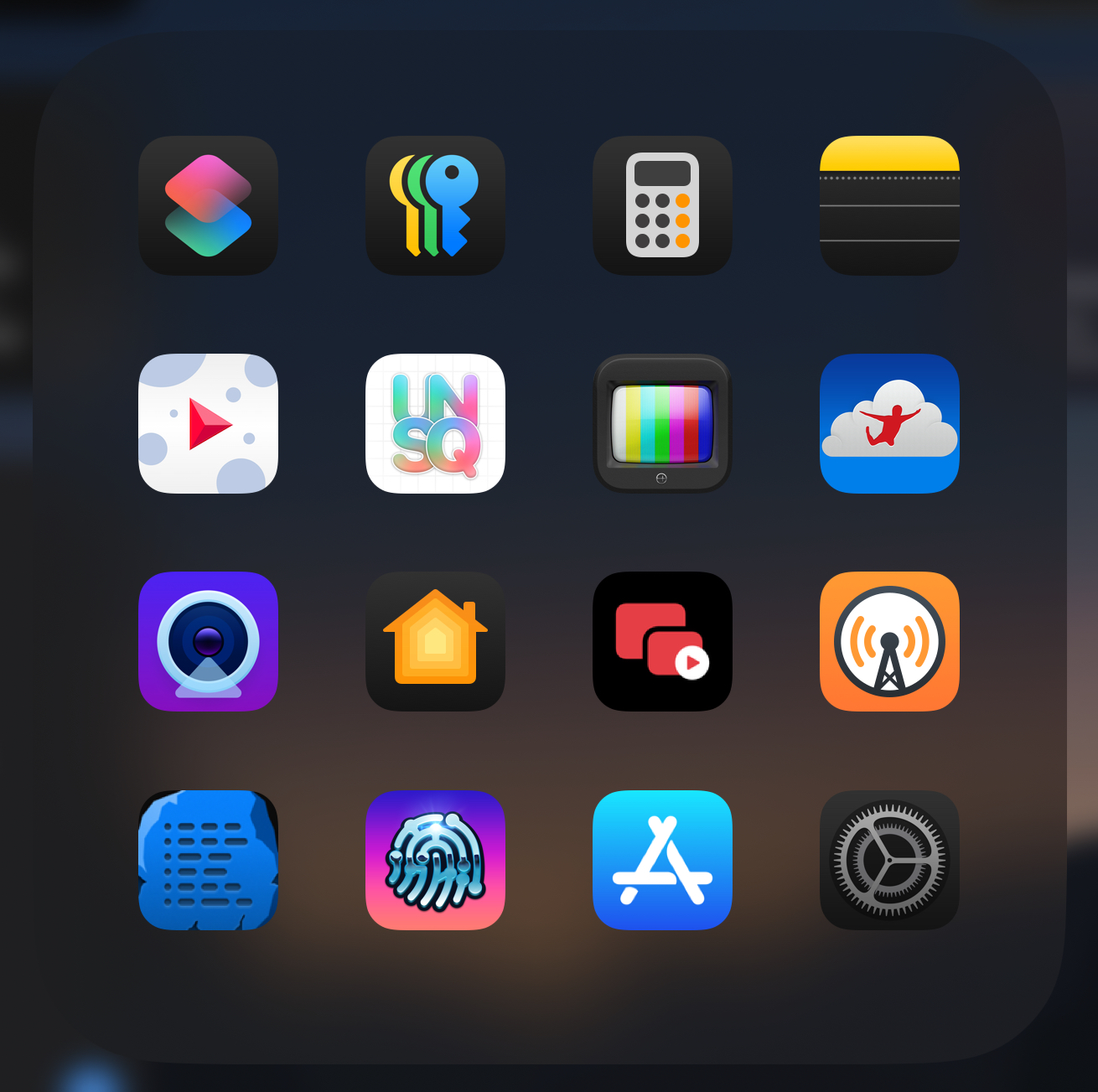
It's not good, but I was like, you know what? There's a lot of small utilities I've been using lately that I have to use Spotlight to get into or add them to Stage Manager or something like that. Let me try putting a folder in the doc. So I put a folder in the doc, and you guys can go into the show notes for this, and there is a link to the folder doc. It's called Folders for Utilities. And in here, I have shortcuts, the new passwords app, the new calculator app, notes, an app called Emulisio.
I always pronounce it wrong, but basically it's an app for stabilizing video. Unsqueeze, which is an app for up-resing video. Orion, which is the HDMI capture card app that I use to control my Mac and stuff like that. Jump Desktop, which is the app I use to remote into the Mac if I can't use a capture card. Camo, which is a nice app for video calls and stuff like that and doing multi-cam stuff. The Home app, Floating Player, Overcast, Runestone, Working Copy, the App Store, and Settings.
So I've just kind of been using these as a way to like quickly add them to stage manager, jump into those utilities when I need them. And it's been okay. I don't love it. I don't hate it. I'm kind of ambivalent on it. I just don't like the way the folder UI works. I'm very used to using Spotlight to adding stuff to stage manager because especially now since iPadOS 17, you can just type the name and then shift click on something or hit shift enter. and it'll add it to your current stage.
So I'm very used to launching stuff that isn't in my doc via Spotlight. Is the folder really any better than using the app library? Because I test a lot of apps, because I have a lot of test flight stuff, and I'm trying new apps all the time, my app library is kind of a mess. And my problem with the app library is it's based on the categories of apps developers pick. And a lot of times developers pick categories that they know their app will do good in, not the category the app should be in.
Like my classic example is Ferrite, the podcast editing app, is under the entertainment category for some reason and not the creative category. And that just drives me wild because I absolutely will like think, okay, Ferrite's a creative app, so I'm going to go into that first and it's never there. So there's a lot of use cases like that. And then there's stuff like test flight stuff where like test flight apps don't go into those categories. They go into their own separate categories.
So that folder becomes a mess, especially like in the summer. I just took all the test flights off my devices because we'll start getting test flights for the new updates here really soon. So that's going to become a mess. So I don't know if it's better for most people, but in my case, I think so. Yeah, so I revamped, in quotes, my macOS doc. So let's look at my initial doc, how it was a week ago.
My doc has been this way for months. I've not touched it in months. So in order, there is a finder, of course, which I can't change. Safari, Fantastical, Ivory, Threads, Messages, WhatsApp, Telegram, Discord, the Home app, MimeStream, my main mail client, Podcasts, Music, Day One, Photos, Pixelmator, Pro, Figma, Apple Notes, Visual Studio Code, GitHub, Obsidian, and Warp.
Warp is a terminal app. Then on the right side of the dock, I've got two stacks. One stack is where my screenshots go. And the second stack is the default downloads folder, followed by the trash can, of course. So my dock is at the bottom of the screen, which is the correct place where docks go in general in life. Yeah, yeah. and so hear me out and the issue is i can't my first thought when going to this going into this challenge to revamp my dog was let's try to move my dog somewhere else let's try to put it on side
on the left side like matt on the right side like weird people so i tried that the issue is that if i put it on the left side of my display then it becomes horrible horrible to switch my cursor to be on my second monitor which is on the left okay yeah right because then the dog sits in the middle of the two and um having the second monitor on the left means that your cursor doesn't bump on
the wall when you go to the left. So that's an issue. And it became really hard to just click on things in my doc suddenly. So I tried to put it on the right side of the display. So now you can click my second link in the show notes, which is my newest version of my dock, the one I'm rocking right now, the icons that are in there haven't changed much except
for one thing, actually two things. One thing is I removed the Threads app. So there's no Threads app, of course, on Mac OS. It's a web app, right? It's a Safari web app to open the Threads. So I removed that from my doc because I don't use it that much and I'm kind of a threads hater. So I'm just trying to be more positive. So let's just not use it as much and I'm going to be fine.
So I removed it from my doc. And let me just say, guys, when trying to remove anything else from my doc, I could not last an hour before I put it back. So let me tell you which ones I try to remove. I try to remove the home app. There's a reason why I have the home app in my dock. Because oftentimes when I'm at my desk, I just want to control my lights, the lights that are at my desk, the lights in the room.
And macOS does have home widgets. They are so bad, I just never want to deal with those again. They are really buggy. And they are widgets. So it comes with the inconvenience of having widgets on macOS. They're either on your desktops. You have to squash your windows away to see them. Or they're in your notification center. And that's just a mess in and of itself.
So yeah, I like having the home app in the dark. I can just quickly click it and control any light and close it again. And the home app is actually pretty good on macOS. It's just basically the same as the iPad app, and it launches fast. So I like having the home app in there. I tried to remove it. I just couldn't. I put it back right away after about an hour. Another app that I tried to remove was Day One. So Day One is my journaling app. I do a lot of journaling.
I wrote about it on MacStories, actually, when Apple's journal app came out. And I really like day one. The thing is, I thought I could remove it from my doc because even if I'm a big fan of journaling, I don't write that much, that often in the app, right? I don't have it open all the time. I open the app basically every, at least once a day at most, but sometimes it's just barely two times a week or something like that.
So it's really not an essential app to have in my doc. But, and here you're going to call me crazy, and that's all right. I want to have the day one app in my doc because I turned it yellow a few months ago. The default day one icon is blue. And I made a custom icon for it. I turned it yellow because it looked nice in my dock right in the middle.
And it makes for a nice gradient between the music app and the photos app. And if I remove it, that nicety is gone. And I could not bear it. So I put it right back. I get it. I'm the person that replaced the files app icon with the finder app. Because I want something that looks nice in there. So I totally 100% get it. Yeah, this is a little crazy, but I do get it.
All right, perfect. So the other big change that I made to my doc is at the bottom of the doc, I re-enabled the recent applications section. On the macOS, just like on the iPadOS, you can turn on that section at the end of the dock. So it's either on the bottom if it's on the side or on the right side if your dock is on the bottom side of your display. And that section is actually pretty useful. I'm quite surprised.
It means that apps stay in there if I open them recently. even if they're not open currently. And it's actually pretty useful. I found that pretty useful to be able to just relaunch an app that I just used an hour ago or something like that. So I would recommend turning it on if perhaps you turned it off because you're an old school Mac user and you're like, none of that. I think it can be useful. I'm not opposed to the recent section.
I would leave it on on the iPad if turning it off didn't give me more spots to use in the dock because the dock on the iPad is limited. There's a cap to how many apps you can put in there. So if it didn't give me more spots, I would 100% leave it on. But I would rather have the stuff that I really use a lot in the dock than like, oh, here's this random utility that you use once a week that you just opened. Chris, now you have a second dock in your dock with that folder.
That's true. Yeah. So you're all in. The thing I'm noticing, okay, there's two things I'm noticing. Number one, your custom Figma icon is delightful. Oh, I didn't know that was custom. That's amazing. Yeah, that's the icon made by Gavin Nelson, I believe. Okay. Yeah. I need to find his icon. You can purchase it on his Gumroad page, I think, if I remember right. Okay. Well, I'm looking for that after the show. And then both of you have much bigger docs than I ever use.
So my doc on my Mac and my iPad are basically nothing. It's just the apps that I currently have open, which is very different from... Oh, so you mean the number of icons in there, not the size? Yeah, okay. Yes, yeah, yeah, the number of icons. So I have like three or four icons on my Mac dock by default. And then as I open new apps, they show up there.
I guess I don't really use it as an app launcher necessarily. I tend to do that through Raycast. For me, because I'm on the iPad, having apps in the dock just makes it really easy to add them to Stage Manager, especially if I don't have a keyboard and trackpad attached. I can just drag it right up, which that's why it's like the core apps I use are in the dock. So that way, if I don't have a keyboard and mouse attached, I can just drag them up or tap them and jump between them really quickly. It makes switching between apps a lot quicker on the iPad.
But if I do have a keyboard and mouse attached, most of the time, like 95% of the time, I will just use Spotlight to either launch an app or add it to Stage Manager. Even if it's in the dock, like I will like if I'm adding something to the stage, say like I have ivory open and then I need to I want to like check out discord. I will just, you know, command space discord shift, shift, click or shift enter and just it adds it to the space. And it's a lot quicker than me going down to the dock, dragging the icon icon and dropping it into the stage.
That makes sense. That makes sense. What I'm learning from this is that we all have, like, very set-in-our-ways docs. And, like, I'm going to guess all of us go back to our original docs, maybe, except for, like, some custom icon stuff on my end. Like, I don't want to speak for you guys, but, like, I'm probably going to leave the custom icon stuff, but I think I might take out the folder. I don't know. Now that I'm thinking about it, and I love the way Matt phrased it, it's a second doc, and I kind of love that.
So I might just do that. Yeah, it's a good concept. There's one more thing. The stacks at the end of the doc. Yeah. So I'm used to having two stacks, a screenshots stack and a downloads folder stack. I believe the downloads folder is there by default. It is. yeah okay so i just yeah i just like to add the screenshots folder um let me say the stacks are vastly superior when your dock is at the bottom because they open in a fan
upwards and it's just really easy to just grab the latest file in there and drop it somewhere whereas if your dock is on the side it opens always in a huge grid that covers everything on my screen I just want to cry every time it's the worst thing and you can't just have the fan open on the side I guess it would look weird I guess but I just want my fan stack and so yeah I just want to conclude my section of the challenge by saying that right now live I'm clicking, right-clicking on my dock.
I'm navigating to position on screen. And I'm selecting bottom again. And I can breathe again. There we go. So that was a fail. I'm going to leave the folder in my dock for another week and play around with it a bit more. Because the more I'm thinking about it, I'm like, it is really nice to be able to just add those apps to stage manager or something when I'm not using a keyboard and trackpad. And with these new iPads, something I found, because they're so much lighter, I'm using it in tablet mode quite a bit more.
Like, I'm using it for reading. Because I have a 13-inch iPad. That's a big boy. It's kind of annoying to hold. Like, the old ones used to be really annoying to hold one-handed. They were terrible to hold portrait. This one's not terrible. This one's not bad at all. Like, I've been reading off of it. I've been reading books off of it. I've been reading articles off of it. Just in tablet mode. No keyboard, no mouse attached. So I think I'm going to keep the folder in my dock for another week as kind of like a second dock. Nice.
I've got to say the folder in the iPad dock looks a bit wild. Yeah. Because it's just a tight grid in a small space. They really need a better UI. Like they need a better UI and better icon design for it. That's something that has been on my wish list for a very long time. but it's such a low priority. I'm like, yeah, they should probably get to it. But like, there's so many more important things to do on the iPad. There should be stacks in the dock, right?
Yeah, it'd be fun. Yeah, well, I don't know if I like, so for me, whenever I had a Mac in the past, I always turned off stacks, the stacks icon in favor of the folder icon. So like, it would show like, if you had downloads, it would show the downloads icon folder, Or it'd show like if you put apps, the applications folder in there, it'd show the application folder icon and stuff like that. So I, the stacks just seemed a little messy to me, but I get the appeal of them.
Heresy. Hey, you put the talk at the bottom. That's heresy. Oh my God. If I could move the doc on the iPad, it would 100% be on the left side. But that's also where the stage manager stuff is. So I can see that never happening. All right, folks, leave a like on this YouTube video if I'm right. Also leave a like if I'm right, too, because... Yeah, let's do that. We'll know, we'll know. Don't worry about it.
Leave a comment. There you go. And you can find us on Mastodon as well and let us know. Yeah, if you agree with me, then hit the subscribe button, hit the bell. If you agree with me, smash the subscribe button and smash the bell. This is why you're the pro YouTuber. Is it highlighting right now? Is that a new thing, right? Nah, smashing it's been around for a while because it just seems way more dramatic. I mean, now in a YouTube app, when you say subscribe or like, I think the buttons light up.
Oh, do they? Oh, yeah, yeah. Oh, okay. Yeah, I'm the world's worst YouTuber because I don't actually watch YouTube videos. Oh, Chris. i watch matt's and a few others but that's it that's about it okay okay then that's fine i just realized i had a backtrack because i had a lot of friends on here are you guys ready for our new challenge yes i'm excited what do you have for us matt this week i'm I'm really excited.
Okay. So the new challenge is hopefully pretty easy, although it might be bad if you've been reviewing apps for a long time. Oh, no. My challenge is to go to the app store on your iPhone or iPad, whichever one you prefer, and go to the top apps. They can be the top free apps, top paid apps, and find an app that you've never installed. So not one that has the open icon, not one that has the redownload icon.
We need a price or a get button next to it. And find an app you've never, ever, ever installed. The most popular one you can stomach installing. And put it on your device and see how it goes. Ideally on your home screen. So you can stare at it all week. Do you know what one that is for me? Do you know what one that is for me? What is it? I have never downloaded it. It says get next to it. TikTok. Never have once downloaded it in my life.
Oh, my God. I'm so not happy about this. I have been so proud of... I'm going to find another app. I've been so proud of never getting it. You can find another app. It doesn't have to be number one. I legit... He said it. The reason why I hate TikTok is I hate vertical video. And they were like the precursor to it. They were the ones that made it popular. So I blame them for doing vertical and short form video. And I hate that stuff with a passion. I hate what it's done to YouTube and like the creator sphere and all that stuff.
I could go on a whole rant about that. I'm going to find another app because I refuse to download TikTok, but I will find something. I'll find something that's actually interesting because everyone's tried TikTok except me. I love this challenge, but I'm afraid what I'm going to find. My top app is Temu. So I'm going to just, next week you're going to see me with a whole bunch of cheap garbage around. Oh my God, my grandparents love that app so much. And I keep trying to tell them, like, it's not what you think it is.
You're not getting these amazing deals or anything like that. Microsoft Teams. Am I going to install Microsoft Teams? yes yes microsoft teams yes and it needs to be like a team of one where you're just like literally talking to yourself all day i just send you invites to no i did my time we all used microsoft teams i did that was my last big project in it other than dealing with covid stuff was getting microsoft team set up for everyone
in an almost 300-person company, and it was a disaster. It literally got abused from day one. It was a nightmare. So that's it for this episode of Comfort Zone. Thank you all so much for listening. Our thanks to listenlater.net for sponsoring this video. Matt, say goodbye and tell people what you're up to and where people can find you. Well, you can find me on YouTube, a better computer, find me on my blog, birchtree.me.
And yeah, I'm just enjoying the summer, taking a break, and mostly just working on this podcast with you fine people. So looking forward to next week. Oh, shucks. Niléane, tell people goodbye, where to find you, what you're working on. I know you probably have a really busy summer in front of you. Oh, yeah. So I just won't get into it right now, but there are snap elections happening in France and it's a both a nightmare and really exciting but mostly a nightmare so I'm
going to talk about that on Mastodon find me there and maybe I'll write something on MacStories next week probably yeah nice well I'm Christopher Lawley uh you can find me on YouTube it's my name L-A-W-L-E-Y or you can go to the untitled.site and links to all of my stuff are there as well our thanks to MacStories for hosting this podcast we are a MacStories podcast after all it's great being there it's been really fun uh thank you all so much for listening if you're watching on the youtube video hit the like button and if you're listening on the audio version maybe go into apple podcast or overcast and rate us or give us a star in overcast or something like that if you feel up to
it actually does help people find the show and we'd appreciate it thank you all so much for listening have a great day