Don't You Want to be Anxious?

Now playing
Don't You Want to be Anxious?
Show Notes
It's all challenge this week as the gang brings (and defends) their phone home screens. Rules were followed by all, but of course there's a little twist this time as well.
Weekly Topics Other Stuff We Discussed Follow the Hosts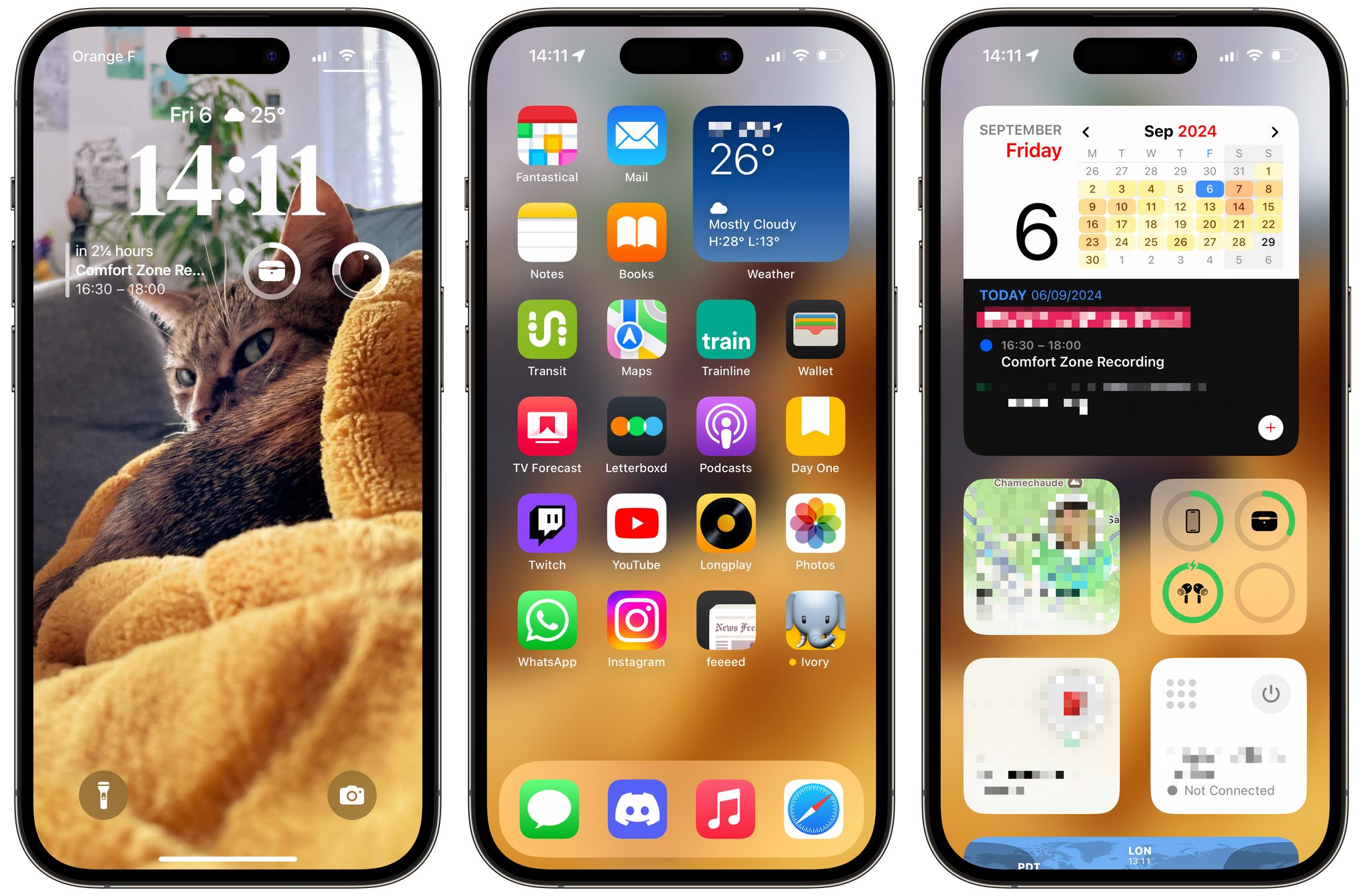

Transcript
1055 segmentsWelcome to Comfort Zone, a podcast all about pushing your hosts outside of their comfort zone. Each week, I am joined by two lovely guests with chaotic home screens. This week, we've joined, as always, with Matt Birchler. Matt, how are you doing? Chris, I'm feeling robotic. Okay. I don't even know what to do with that. So moving on. Niléane, how are you doing? I'm feeling like a victor. Oh, wow. I'm starting to suspect something's going on with these.
But why don't you cue everyone in? We did a Mastodon poll about our latest challenge. Why don't you let everyone know what's going on? And Matt and I will decide if something fishy is going on. Okay. So last week's challenge was to use a Microsoft app and say something positive about it. That's right, Matt. So I went with Microsoft Remote Desktop, Chris, Age of Empires 2 for some reason, and Matt with Doom for some reason.
Hey, at least Age of Empires was made by Microsoft Studios and stuff like that. Doom wasn't even made. They made Doom. Bethesda wasn't even owned by Microsoft. Yeah, that doesn't matter. TestFlight existed before Apple owned it, but I don't think we'd argue TestFlight is not an Apple app. Well, all right. Neil, what were the results and why is there, there might be some collusion or something going on here. All right. So starting from the bottom, Matt is at 13%.
I must say the poll closed at 225 votes. Pretty good. That's going up every week. And then Chris, second place at 15%. And myself at the top of the podium at 72%. I mean, like I said last week and the week before, we can stop this thing if you want. We don't have to democracy this.
No, because I want to win it. But what happened here? Like, come on, 72%? Like, look, I liked remote desktop in my IT days, but did I like it more than Age of Empires? No! No! But the thing is, people care about the rules. Ugh. Yeah. Fine. Then in that case... This is what I'm learning as well. We're trying to get too fancy with it. Yeah.
This week, I stuck within the rules. I mean, the rules were very simple this week for this week's challenge. And if you guys are ready, we can move on to it. But I feel like I stuck very, you know, inside the lines for this one. So we'll see what happens. Okay. All right. So this week we figured we would do something a little bit different because we're recording before the iPhone event. And I actually misspoke in our last episode. We're recording before the iPhone event, but this episode won't come out until after the iPhone event.
And we're not really an Apple news show, so that's not really an issue. but I didn't really want us to like make a whole episode ignoring the iPhone. So my idea for the challenge this week was to defend your home screen. And we decided that knowing us, we probably will have a lot to say. So we're going to make this the whole episode instead of where we normally bring topics and then do the challenge. So we're going to do this for the whole episode. We're going to kind of make this the whole segment.
And that way we can kind of really dive into the details. And if you're getting a new iPhone, you might get some ideas of apps or widgets or things you can do with it. So are you guys excited? Are you ready to dive into this? Yep, I'm so ready. All right, Niléane, you want to go first? Okay. All right. All right, click on my link and you'll be able to see my home screen. Okay, so every time I show my home screen, I will say it doesn't change much.
From one date to another, it's always very granular changes. So how are we doing this? Am I supposed to like present it to you? Or are you attacking? I think we should attack. I was going to say I would let you walk through each screenshot because you have three screenshots in here, lock screen, home screen, and I believe the Today View. That's right. I was going to say I would let you walk through it, and then when you finish each screenshot, we attack.
So it's kind of in the spirit of you're setting up your defenses, but then we can attack. So in the spirit of the challenge, defend your home screen, so you've got to set up your defenses. all right okay so um from left to right i'll go my lock screen um my lock screen has a beautiful wallpaper the best wallpaper because it's my cat it's zelda my cat and she's looking at you
judging you for some reason but you know why you know why she's judging you she looks like she's about to eat me yeah maybe there's a lot of judgment in those yeah i i feel very uncomfortable with this i i i am not the attacking has begun yeah i said i was gonna wait but i'm not like i feel like i'm about ready to get eaten right now like okay she's attacking that's the thing that's my defense she's attacking you she's the first line yep okay so the um the clock the the clock font is the one of the serif ones um it's colored white because i believe it's the best contrast
i tried using colors but contrast is more important um three widgets below the clock fantastical with the up next widget just shows the next event coming up then that one battery widget, small one, right now I'm showing my AirPods case, but I set it to automatic. And the last widget in the row is sundial. It's just a pretty sundial. It shows where we are doing in the
day. So right at the moment of the screenshot, the dot is in the middle of the whitest portion of the circle. So the sun is about just above our heads where I am. And above the clock, I've got one widget carrot weather just showing me time and then i confirm the condition and that's pretty much it um i'll just say this wallpaper is really nice it's my best wallpaper it's the best in the world because it's my cat and so whatever you say keep that in mind and the colors are nice it's a bright and mustard kind of yellow.
That's my favorite color these days. It's kind of yellow. And yeah. And there's a plant. Touch of green. I like this. I'm curious about the sundial widget because why? It goes back to me on my pet peeve of people putting analog clocks on computers. Like the clock app, a lot of its widgets are an analog clock face on a computer.
I'm just like, why? Like that is not the most efficient way to read time on a computer. And I get analog clock faces. I love analog watches or mechanical watches. But I'm curious, do you look at the sundial and go, oh, yeah, it's 3 a.m. or something like that? No, not at all. Okay. The sundial is, there's two things to it. I like the look of it.
Okay. I used to wear an Apple Watch, and this app had a complication, which looked exactly like this. It's the same thing. And I really love this complication. It was below my digital clock on my watch face, and I really love the look, because it adds another data to the time like during this winter and the summer date time and sun don't mean the same thing um and i like it looks pretty i like it and it's fun looking at it and thinking oh okay sunrise coming up sunset's coming down uh and sunrise coming up that's really important
because i tend to stay awake really late during the night and having a reminder on my lock screen that, okay, the night's almost over. Maybe I should think about going to bed. And the way those kind of work on the home screen, isn't it that if you didn't have that widget there, they'd kind of be offset because you have a two-eyed one and then the quarter-width one, but then you just have empty space. It's not like the two left would center. Yeah, there's a bit of story there.
I used to wear the Apple Watch, like I said, and in the place of the sundial, I used to have the activity widget, the rings, the activity rings. But you're right, I stopped wearing the Apple Watch, and there was just an empty space there, so I just added the sundial. Okay. Gotcha. Yeah, I like your wallpaper. I do think your cat is about to eat me. The clock, the top half kind of blends in with the background of the wallpaper, so it can be a little hard to see.
But overall, I do love that orangish-yellow color as well. I think that looks really good. And especially when we get into your home screen, I think it works really well. Yeah, it's a good lock screen. You're using the correct font for the clock as well. I honestly don't have much of an attack here. Okay. Unfortunately. That's good to hear. All right, so moving on to my home screen. Okay, so my home screen is filled with icons, almost completely filled with icons, and there's only one page.
There's a single small widget, that's the weather widget. Right now, it's the Apple weather widget, but it's a stack, and inside this stack, there's also underneath the carrot weather widget. I often swipe between the two because I like to compare. Apple weather tends to be more accurate when it comes to forecasts. And that's pretty much it.
But carrot weather is extremely accurate when it comes to the current data, the temperature right now, humidity right now, precipitation right now. As you know, the small Apple with a widget, it has dynamic data. So if tomorrow it's going to be way hotter than today, it will show that in the small widget with a small line of text. And I like that. Okay. And then my icons. I don't know if I should list all of them.
You've got my doc, messages, discord, music in Safari. And then I've got, I don't know, I arrange my icons by color. Like I like to try to balance out colors. So I don't try to group colors together. I try to balance them out all over the page. So there's a couple of yellow icons towards the bottom right hand corner. But then there's a touch of yellow also in the top left with notes and fantastical.
And I also like to add a bit of orange. So I've added books. I use books because I listen to audio books. That's why I use books. I've got my traveling apps. So that's Transit, Apple Maps, and Trainline. Trainline is an app to book train tickets in Europe. And on the same line, the Apple Wallet app, because that's where train tickets live. I'm curious about that. Why do you have wallet on the home screen when you could just double press the lock button to get to wallet?
Double pressing. Okay. I'm firmly against that. Okay. Because double pressing the side button, it doesn't bring you to your cards in wallet, does it? Yeah. It brings up the default card, but then you just tap that and it brings up the whole list. That's so annoying though. Okay. All right. Fair point. Okay. Because, okay, and it's not the same UI either, because when you double-press the side button, and then you tap away the stack of cards at the bottom,
they all lumped together. And that confuses me every time. I like to have my cards at the bottom of the wallet app and my debit cards at the top, separate. And when you double-tap the home button, it lumps them together. I hate that. uh i see okay i i see yeah you understand yeah i i had to look it up but i i see what you're saying i don't think i've ever noticed that uh but yeah i just do the double press whenever i'm
bringing up even if like it's it's not a card like it's like uh like if you go to an apple event they give all the press people like cards for the wallet app and stuff like that to check it and stuff like that so like all mine are there as well so yeah okay i i see what you're saying yeah otherwise bunch of entertainment things YouTube and Twitch are on my home screen I hate the latest Twitch update on iOS by the way
let that be noted for everyone out there please just keep saying it out loud maybe Twitch will hear it at some point it's the worst update they tried to add a TikTok like homepage to to the app even though 99% of streams on Twitch are horizontal videos so why are they using a vertical video layout anyway but it's still my home screen because I I watch Twitch streams a lot and it's not so much that I watch streams on my phone it's that I use the app to check who's live
right now like and that's why i hate the latest update especially because it makes that difficult um yeah that that's annoying yeah vertical video is the worst um yeah yeah i'm i'm curious are you right or left-handed right-handed interesting so i'm i'm curious just for reachability reasons i'm curious why the the widget stack is on the right top right side instead of the top left side Because it would be easier to get to the app icons if they were on the right side as opposed to the left side.
I mean, I don't think it makes that a big difference for me. Okay. Yeah. I used the small pro phone, by the way. Okay. I think it's pretty easy to reach either way. Yeah. Okay, so I feel pretty confident when you're not attacking much. I think my home screen is pretty much perfect. So you have a lot of transit things on there. Are those things you're using all the time? Are you just always on the go? I'm not always on the go, but like train line, I use often enough.
I take trains at least once a week sometimes, maybe more. And also, since I don't want to have multiple home screens, and some people have focus modes to have different home screens depending on what they're doing, I don't want to have different home screens when I'm traveling. I want to have everything in the same place. So when I'm in the train and I want to check on my trip status because train line also lets you check how your train is doing,
are you late, which stop you are, etc. So when I'm on a train, I just want to be able to just swipe away the lock screen and tap on the train line icon and see my trip. is feed um is that your current rss reader are you doing anything other than rss stuff in there because that's one of those apps that you can have like mastodon and youtube and podcasts and all those reddit and stuff like that in there yeah uh feed um so i've used that on and off i've reviewed it on MacStories when it came out and for the past few weeks i've been trying to use it a bit more
I've added it to my home screen just this week. Okay. Yeah. And I have RSS in there, but also like general French news. I'm trying that right now. It's just an experiment. I was telling you I'm using scheduled notifications, scheduled summaries for notifications, news notifications. But I'm also trying to have them in feed. Because feed is not only chronological. It ranks stories.
And I find it's pretty decent at surfacing new things balanced with things you might have missed. And I think that's valuable. So I'm trying to give that a go. Nice. I love that. Yeah, I don't really have anything else for your home screen. I totally get you have transit stuff because, you know, that's, you know, the area you live and stuff like that, you actually have decent public transportation.
Oh, yeah. Yeah, so I don't have anything else unless, Matt, do you have anything? So, I do notice you have two music apps, I think. Apple Music and Longplay. Yeah. Can Apple Music not play your albums for you? I'm looking at your face. well you see matt long play has a vinyl album on the app icon so that means the music that comes out of it it's it's warmer that analog feel yeah okay the sound stage
um no uh the real answer is uh long play is such a delightful app if you haven't used it i recommend it just has a beautiful wall of your album arts in your library and you can create collections i love the collections a long play i've created some collections and the fact that you can just browse through the cover art by themselves and recognize some of your favorites some of your some that you have forgotten and just tap on it and just plays the album i'm the kind of person who plays music
I listen to music by albums I don't tend to seek out tracks I just listen to entire albums at once so long play is really nice but I still use music most of the time it's just when I'm not sure what to play I like to launch long play okay my second attack is actually on your messages I noticed you have iMessage or messages in the doc and not WhatsApp.
And my understanding is that only Americans would have the messages app in the doc. So my question is, are you a secret American? Is that that sounds like the kind of questions that you ask Americans when we try to enter your territory? No, I think it's mostly because I have equal amounts of friends that have iPhones than friends and other stuff that use WhatsApp.
I will say that WhatsApp is like my circles are not representative at all of what's the real situation in France. Most people use WhatsApp and other apps too, like Facebook Messenger is pretty popular too. But in my case, WhatsApp is very much work related. So it's a lot of work stuff happening in WhatsApp plus my mom. Like it's the worst combination ever.
But like WhatsApp is my mom plus work app. So yeah. Discord is a bit of the same. Lots of friends in Discord, but also lots of work happening in Discord. Yeah. It's always funny whenever we have like a YouTube group chat or something like that. And the one European or Canadian goes, hey, can we move this to WhatsApp? And all the Americans just go, no.
I hate WhatsApp. I don't see the appeal of it. I think it is an ugly, ugly looking app. First of all, like I just have a hard time looking at it. Like, my girlfriend uses it because she has some international friends, and that's where they chat. And I just, like, I'll look over and see it, and I'm just like, oh, how can you put up with this? Like, this doesn't, ugh. Anyways, that's just the Apple person in me, I guess. I used to be like you, but I think the app has gotten a lot better lately.
Yeah. Especially on the Mac. The Mac app is really good. All right, you want to tell us about your Today View? I believe that's the last screenshot. All right, I forgot about that. Yeah, you got one more screenshot to go over. Okay, so today view, it's pretty simple. Fantastical, large widget at the top where you've got your up next in the bottom half of the widget and in the top half, it's the current date and the calendar. And a heat map.
I like the heat map in the calendar in this widget. Like I said a few weeks ago, last week, I don't remember when it was, but I don't use the calendar that much. It's very passive. I accept invites to go in there. Sometimes I add things in there and that's it. Below that, batteries widget, the small one. Two find my widgets.
One for my partner and one for my backpack. and a small tail scale widget to be able to quickly connect and disconnect from my tail net. And below that, the world clock widget. I don't remember. What's the name of the app? It's very generic like that. I think it is just world clock. World clock. Yeah. Yeah, world clock.
With a bunch of time zones in there. And we can't see here, but if you scroll, below that is my bank account widget. My bank apps widget. Probably a good thing we can't see those because you don't want people to get into that. It's intentionally at the bottom of the table. I'm curious, why do you have a whole widget for Find My for your backpack? Same question. Yeah, that's my attack on this one.
I can kind of get the partner. I feel like I'm pretty safe. Your attacks are pretty lame. Okay, sure. My backpack is something that I don't want to lose. I don't know what to say. But a whole widget on the Today View just for it? I have an AirTag in my backpack, and if I need to know where it is, I just open up the Find My app. I don't think I need a whole widget dedicated to it. I think we've established on this road that I am a forgetful person.
Okay. I don't want to... So equally, I don't want to lose my partner. I don't want to lose my backpack. So there you go. Side by side. Yeah. I don't have a lot to attack here. I'm jealous of your calendar. I've tried to use the heat map and due to my job, it is just red every single weekday, which is like, okay, that's not helpful. But I do have Fantasticals widget on my Today View. I also am tracking my partner on my Today View.
And I have the battery widget. So those three are exactly the same. The one thing I could maybe say is not to attack you, but to attack macOS Sequoia, which I cannot install Tailwind on right now for whatever reason. That's a personal thing. That's not your fault. But it's the best attack I have. Matt, we're trying to win. Of course it's E. Leon's fault. We're trying to. It's all good. She keeps winning, Matt. Why is it good? Matt, she keeps winning. We need one of us to win this week. Yeah, but I don't want to look like an idiot who is rejecting the good home screen.
I agree that it's not my fault. So there you go. Yeah, I will take this. This is tough. Yeah, no, it's a decent home screen. I appreciate you don't have a gajillion pages. It's stuff that makes sense. Except I can't wrap my head around having a backpack find my. That's the one thing I'm going to push back on. I mean, if you want to lose your backpack, you go ahead. I don't want to be in this case. I've never lost my backpack. Well, not yet? Yeah, well, I mean, I just opened up the find my app.
Maybe if you have the widget on your today's view, you will never lose it. But I've never lost it. Now you're risking the chance. But I've never lost it yet. So I don't know. I don't know. We'll see. Say it happens, I'll be in your messages. Yeah, exactly. You should have had a widget. That would have saved me. All right. You guys ready to move on to mine? Yes. Okay. Let's do it. I'm happy that I win again. Okay, let's go. No. No, no, no, no, no, no.
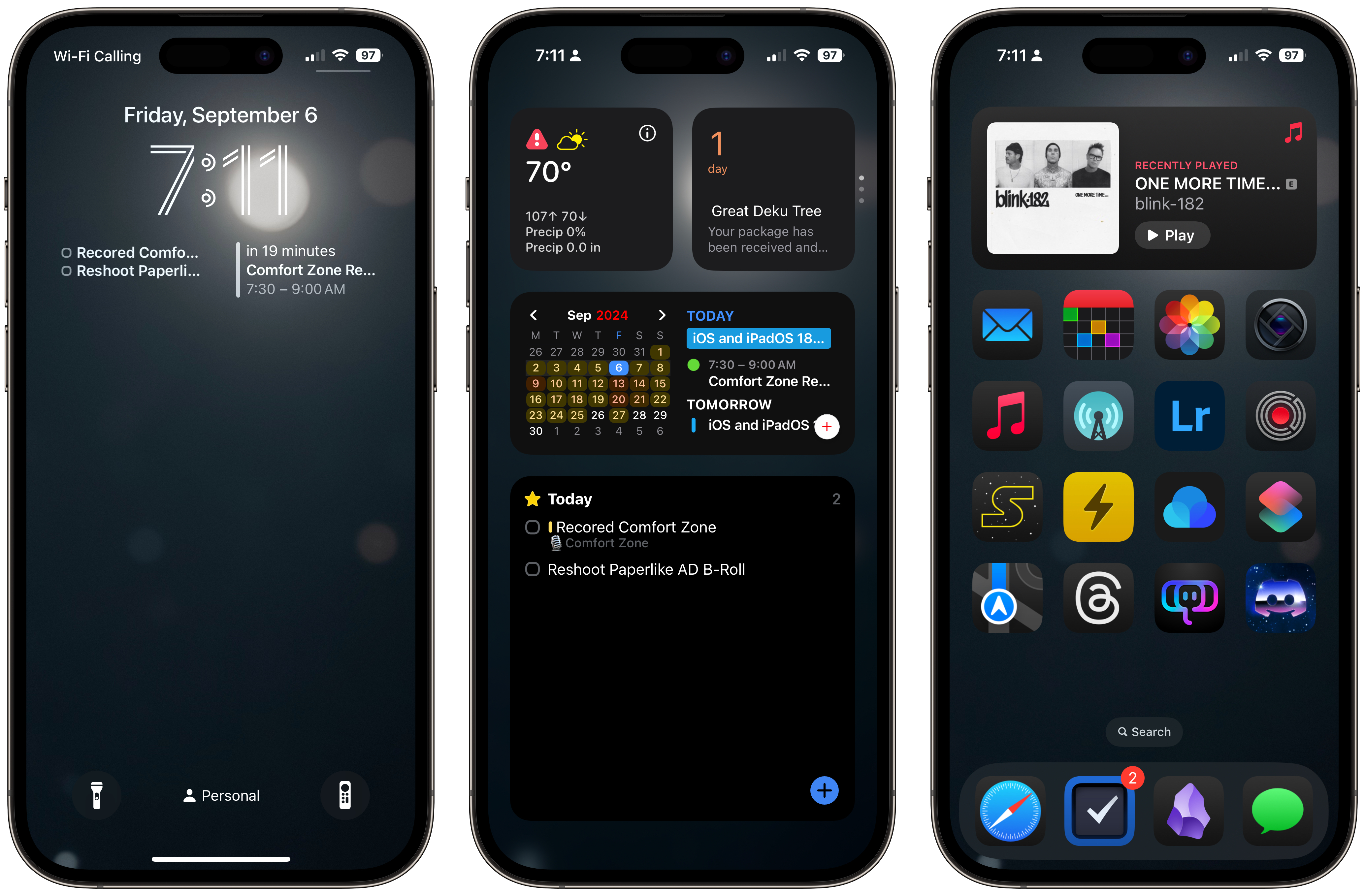
All right. So if you open up the link in our show notes, and of course, we're going to have links to all the images in the show notes of the podcast. So if you want to go check them out, you can. uh there are three images i'm gonna do one three and then jump back to the second one i just had some issues with apple frames and it wasn't doing it in order that i wanted so um we'll start with the lock screen the lock screen is pretty straightforward um it has uh the time and the date above it i don't adjust those at all the well i don't adjust what appears there i did set the time
to be like the the 3d line one because i kind of like that one i think that one looks interesting and then I have two widgets underneath that things for what's due today and Fantastic Health to show me my next appointment just because I want to be able to glance at my phone and see oh yeah we're recording comfort zone a half hour early and maybe I didn't set an alarm to wake up so I had to jolt out of bed this morning and get everything ready to record that definitely did not happen just for example that definitely didn't happen this morning it totally did then down at the bottom since I am running iOS 18
I do have the flashlight still on the left button what are those even called quick buttons I don't even remember lock screen controls I don't know I have the flashlight one right there but I replaced the camera one with the TV remote one now what you might notice is I have a focus mode on I always have a focus mode enabled. So these kind of switch depending on what's going on.
And like my personal focus mode, that basically means I'm like at home. I'm not working. It's kind of like my default one. So I have the Apple TV remote in the right slot for the lock screen controls. And that is because somebody else that lives in my house that is not me loves to lose the TV remote. And in the middle of the night, I know there has the Find My built into the TV remote now and stuff like that. But when it's like 10 o'clock at night and I'm exhausted, last thing I want to do is go hunting for that thing.
So I've just found having the TV remote icon right there on the lock screen. It makes everyone happy, you know, so it's not a big deal. So that's kind of my lock screen. Oh, the wallpaper I'm using is actually the one we did for our challenge that some people hated for some reason. i like it i think it looks great on a device i think eight percent of the people love that's the best eight percent you you you eight percent are the best eight percent uh now i i like this i think
look i get it doesn't look great as a single one-off image but as a wallpaper because it's got that blurry background so it allows kind of separation between um the text and the you know the action the buttons and things like that it allows separation between the foreground and the background So I like that. Do you guys have any questions about the lock screen before I move on? Yes. So you just said you're using focus modes at all times. Yes. So this is just one quantum reality that we're seeing here, right?
Not really. The only thing that really changes between the focus modes on my iPhone is the lock screen controls and the wallpaper. I don't have a bunch of different home screens that I jump between either on my iPhone or my iPad. I mostly use focus modes to control what notifications come in. So for this challenge, it doesn't really affect anything. It's mostly just so like I have a filming focus mode. So that way when I'm filming my devices, no notifications are allowed to come through.
Same thing with my writing one. But when I'm in like my work focus mode, like you guys can come through. My girlfriend can break through and stuff like that. But people that I don't text often or they might text a little too much, those people are blocked and stuff like that. Okay, I have one other question. How do you spare record? Oh! Yes! It's not me!
That's a recurring one too, isn't it? Yeah, it is. I literally have just now noticed that as a recurring task. There's a reason why I don't blog anymore. I started blogging before I did YouTube, and there's a reason why I don't do it anymore. You spelled it like you're multiplying the calls. Yeah. Yeah. Yep, yep, yep. That is something I did. Awesome. Oh, well, you can't fault me for a typo.
How many weeks have we been doing this? To be fair, I just set up those reoccurring tasks because I just set that up because I was supposed to get John Voorhees. So if you are listening to us on Spotify, you can now see the video version of us on Spotify. But the way it works is I actually have to get John Voorhees the video. And I was like, okay, I need to set up a reoccurring task for this. And so I went in and I set up a bunch of reoccurring tasks like pick a topic, complete the challenge, record the show, things like that.
And, yeah, I just messed that up. So cool. Cool, cool, cool. That's great. Anyways, anything else on the lock screen? Yeah, the remote. That's just cursed. It's useful. It's legitimately useful. This is what you do as well? Okay. Yeah. I'll set you a reminder to say this again then. if you live with somebody that typically loses tv remotes or and i will say in her defense our couch eats remotes like the way our couch works is like in between the cushions there's
this kind of slope and if you put your phone or a remote or something on there it's gonna fall in between those cushions i guarantee it every single time so uh it is just nice to have when you want to just quickly like change turn up the volume change what's on turn tv on or off or something like that it is legitimately useful okay all right i fully agree all right i've been quite nice with my uh critique so far so you have i think you've been the nicest out of everyone remember that i'm not gonna be nice to you okay again that's not the rules yeah you're supposed to be i'm i'm
here building defenses and you're supposed to be attacking me like I was I was expecting way more blow-by-blow but that's okay I have one um that's a terrible carrier name carrier Wi-Fi calling yeah that's oh that's just the that's terrible that's just a feature I can't control that I I have decent cell service where I'm at where I used to live I had horrible cell service so I had to Wi-Fi calling to get calls in and out, but I like Wi-Fi calling because it seems to have a better
quality of audio. I don't know if that's a placebo thing or what, but yeah, let's move to the home screen. All right, so for the home screen, I have a widget up top, but I'll come back to that in a second. So I just have a grid of apps. It's just one page, no matter what focus mode I'm in, I have one page it's always these same apps it's mail fantastical photos highlight because i'm really enjoying their new uh process zero feature where it takes a raw photo and it does a little bit of processing but it doesn't do like ai stuff or anything like that it's very light processing
and for the most part those photos look really good music overcast light room and then uh kino they're uh the same people that make highlight they made a video app uh and i am starting something uh by the time i'm i'm by the time this episode is out i the first one will be out but i am even though i hate hate hate vertical video i am caving in and i am doing a short series that's kind of like a behind the scenes look of like tips and tricks apps i use services um devices like just like a little short for every single day so uh the first one actually there should be a few that are
out by now i'm going to try and make it like a daily workday series so if i'm working that day i'll put one out uh about that the next day uh but i'm using kino to film all that because you just have way more control over uh video in that app than the default camera app uh same thing with highlight you just have more control over taking a photo and as a photographer i want more control I can use those controls to make a better photo. Then I have SQL, Reader, Raindrop.io, Shortcuts.
Oh, and I should go back. The Reader is the new Reader, so it's the one with all the timelines and stuff. I'm just testing it out. I have very mixed feelings on it. Maybe we'll talk about that in another episode, or you guys might have questions. But I have mixed feelings about it, but it's the new thing. I want to try it out. I don't want to be a grumpy old man. Maps, Threads, Ivory, Discord, and then in the doc, I have Safari, Things, Obsidian, and Messages. So before I move on to the widget, because that's like a whole thing, do you guys have any questions on the apps?
What is SQL? SQL is like one of those media tracking apps, so you can put in all of the movies you want to watch, TV shows that you're watching, games you're playing or want to play, and then you can log them, rate them, add notes, whatever. Okay. It's really good. And that's the Star Wars alternate icon. Yeah, and that's an alternate icon. It's a Star Wars one. Yeah. Not officially. Not official. It's a war star. Okay. Perfect. Perfect. It's a war of the stars.
Exactly. Okay, I have a question. Okay. How long ago have you been to the eye doctor? You know, my girlfriend is an optometrist. Oh, okay. So why? Have trouble seeing those icons? No. Oh, my gosh. No. Should they be even bigger? Oh, okay. I see where you're going. Yes. Okay. Is there an even bigger option here? I am using the iOS 18 feature that makes all the app icons bigger because you know what?
It gets rid of the text labels. and I will take bigger... If my trade-off is having to have bigger app icons in order to get rid of those text labels, I will because, oh boy, do I not like the text labels on the home screen. Now, my one issue with this feature is it also gets rid of the text labels in the app library, which I do not think it should do that. On the home screen, I think it's one thing. In the app library, I think that's actually useful. But no, I legitimately really like not having text labels on my home screen.
But yet, and yet you have the search bill enabled. So you like that text. I didn't know you could disable that. Oh, boys. It's not on mine. Have you seen mine? It's not on mine. I honestly forget that's there. Oh, it's not. Yeah. Huh. I didn't know that was something you can disable. Okay, so the people voting right now, remember that I just gave advice to Chris for his home screen.
Yeah, but you know what? It's one of those things I didn't even notice. But yeah, okay, all right. I just turned it off. It's fine. Now it just feels like there's an empty row. There's like a whole other row that you could put more apps, but you can't actually put that there. So I don't know. It does feel off balance. make the icons bigger to fill the space I think works no I don't like the bigger icons I just like not having the text labels I'm trying to role playing feisty here I'm the only one doing it I don't know I know you're doing you're doing a good job but
yeah okay turning off search that's cool because I always definitely do pull down to bring up spotlight but I don't think that's that big of a deal It definitely, Apple needs to give you the ability to add another row of icons, though. I agree. Agreed. So anything else on the apps before I explain the widget up top? The only possible negative I can think of is you're definitely going for a dark mode. Yeah. And you're using iOS 18's dark icons.
But it's not 100% successful. I think it's a bug. I know what you're talking about, and I know where you're going with it. It's Reader, right? Reader's the big one. Lightroom is also, it's technically dark, but it somehow also stands out to me as not being impacted. So Lightroom, I will give a pass to because I am not on their beta. So let's see in two weeks if they actually put out a proper dark mode icon.
Reader, what's weird is it will show the dark mode one in Spotlight, but when I go to add it to the home screen, it uses the light mode app icon. So that's an iOS 18 bug or a bug in Reader or something like that. That was nothing I could control. I thought about swapping that app out, but I was like, nope, that's not representative of what's on my home screen. So for now, I'm hoping it gets fixed here soon, But for now, I'm just kind of living with that because I want to test that app.
So those are the apps. The widget up top is actually a stack. So the primary widget, and I don't have it automatically rotate. So primarily, I just see the music widget up top. I was using Marvis Pro for a while. But my issue with Marvis Pro, while it does give you skip forward and skip back controls and theming and all sorts of stuff, it is very slow to refresh. It's often the widget is often a song behind. So, and that just kind of got frustrating.
And with iOS 18, the music widget is no longer a like standard red background. It now kind of like matches the album artwork, but also maintaining a dark mode theme. So, I like this one a lot better now. You can play pause. You can see what song's playing, who's the album, the artwork, all that stuff. The only thing I wish it had was the ability to favorite a song right from the widget. That would be nice. And then underneath that is Overcast for just quickly resuming a podcast or something like that.
But the reason why this is a stack is because when I'm traveling or going places or if I'm doing something, I will often add another widget here. So for example, if I'm flying, I will add the flighty widget here just to the stack. And having a stack makes it so much easier to add another widget already because you don't have to drag and drop two widgets on top of each other and mess up your home screen and all that stuff. So this is just a stack.
So that way, like, okay, I'm going to be flying at flighty. And then when I'm done and I see that I can remove it later. But yeah, that is just kind of the one widget stack that is on my home screen. Okay. Okay, I have an attack, maybe. Why do you need to have now playing on the home screen? Even though, like, that's one thing I thought about when adding maybe a music widget to my home screen.
is do I want a widget displaying what's playing now, even though it's already in four places in iOS? It's on the lock screen. It's in the dynamic island. It's in control center. I guess that's three in three places. So do I want to add a fourth place? Do you want to do that? I get that. I like it. I like having the album artwork on the home screen. I've always been a big like album artwork person. like I have records and stuff behind me.
I don't even have a record player in my office. It's in our living room. But like I have some records behind me that I just absolutely love the album artwork for and stuff. But yeah, I get where you're coming from. It is all over the place. But you know, I'm often fiddling with my phone and stuff like that. And it's nice to just be able to play pause right from there, see what's happening or just tap on it to jump into the app. The one thing I am noticing is, do I also need the music app icon on the home screen since I have the music widget there?
That is the one thing that's kind of just made me think, well, now I have two ways to get into music. I think you do. Okay. All right. Fair. Because tapping on the widget, it doesn't bring you to just the music app. It brings you somewhere specific. Yeah. It brings you to now playing screen. yeah that's a good point so um i just i kind of like it i like being able to play pause i like the look of it i like being able to see what's playing because a lot of times i won't uh if i'm
not listening to an album or something i'll turn on like the apple music um like personal radio station and like every once in a while like they'll start playing something new or something a little different i'll be like oh what's this who's this by and i could just look at the home screen really quick and see who it's for. Like if I'm already fiddling with my phone. If it was like my phone was locked and stuff like that, I would just look at the lock screen. Yeah. In reality I agree with you. Just wanted to find something. I get it. I get it. Anything else before we move on to the last screenshot for me?
No, I think you've embraced the new icons in iOS 18 without it looking hideous like it can look. Yeah. Thank you. Yeah, I like them for the most part um i wish apple would do things with like their mail icon and files icon to not make them so boring like i actually like what they did with like maps and stuff like that like i actually think maps is a good app icon um but when you just put like an icon on top of a white or black background it's like oh really okay uh photos i do think looks legitimately good but files mail Those could use some love.
They've improved the maps icon in dark mode. It used to be in earlier betas. It used to be, it looked inverted. Yeah. It looked kind of weird. It looks better now. Yeah. I'm going to guess they were literally just inverting it, and then now they did the smoke one. All right. So the last screenshot I have is for the today view. So a little bit of backstory. I didn't use the today view for a long time ever since we got the new widgets.
But what was happening was I kept adding more and more widgets to the home screen and it was causing for me to have multiple home screens. So like at one point I had like three different home screens and I hated it because I was always like swiping back and forth between that. And I was like, why am I not using the today view? So I built the today view out as like a summary. So this is kind of the thing I look at first when I grab my phone in the morning. It has a carrot weather, and then it has a stack for parcel, SQL, and batteries.
Then underneath that is Fantastical, and then underneath that is things. And that's all that's on that screen. Everything fits into one page. I don't have to scroll. I can just see a summary of what's going on in my day right there. Carrot weather is nice because, especially right now, the high is going to be 107 today for some reason. It is so ridiculous. We're in September, people. That is not okay. So I'm just waiting for the weather to cool down. I love Parcel for delivery tracking. I get a lot of stuff sent to me.
I need to know when it gets delivered. Fantastic how, like I talked about a couple episodes ago, I'm using Airtable for project management. And with that, I was able to take the calendar view and air table with all the dates for projects and stuff and actually have that sync to Fantastical. So I can get all of like what projects I'm working on that day in Fantastical and see them in the widget, which is really nice. And then things is the last one. And I use the large things widget, even though right now there's only a couple of things on there or a couple of tasks on there.
it fluctuates for me someday i'll have two someday i'll have eight someday i'll have 14. so i just like to be able to fit as much as i can in there as possible so yeah that's my today view you've once again made this difficult for me your weather is terrible but the app is great i mean i can't control the weather like i know grasping at straws here is the wi-fi calling of this uh of this page. Fair, fair, fair. How do you spell record?
Play the hits. And you're getting the great Deku Tree Lego set tomorrow. Tomorrow. Very excited for that one. I got mine yesterday. It is glorious. I'm also getting something else too from Lego this week. Let's just say I'm getting an early birthday present. It might be a Falcon Millennium. Really? the big one I'm very excited let's just say Lego points come in clutch when you are buying something big like that
I know that life any other attacks come on bring it at me I'm ready to defend the the plus button in the fantastical widget is overlapping the text. Yeah, but I find that button to be actually really useful, so it's just one of those things. I know what it says there, so I just kind of live with it, but I actually find the button on Fantastical and the button on things to be useful.
I do like that this is very on-brand because from my perspective, as somebody who doesn't know what the rest of the text on those is, it's just that you have every single day iOS and iPadOS, iOS and iPadOS, iOS and iPadOS. Yes, right now that's my work on iOS and iPadOS 18 walkthrough video. So that's just what I'm doing until probably midweek next week. Oh, I hope it doesn't come out on Tuesday like they did it with iOS 14. Remember iOS 14 when Tim came out and was like, and it'll be out tomorrow.
And literally you could probably just hear me from one side of the planet and Federico from the other side of the planet screaming. I was late that year because of that. So, yeah, thanks. But they haven't done that since. It's always been like the Monday after the iPhone event. So I think I'll be okay. Fingers crossed. Yeah. All right. You're using the wrong unit. I can say this. You can have a mention of this in every episode. I'm sorry.
Fahrenheit just has way more degrees to it. oh man 107 of them yep okay so it's so annoyingly hot it's supposed to start cooling down next week but that's only like to the 90s that's like the lowest setting on my oven it's a northern california it's so annoyingly hot here but yeah um yeah that's me that's basically it uh like i said i do use focus modes but it doesn't really change the home screen stuff
it just swaps wallpapers and stuff and it's all like other wallpapers that have been in my wall i have something oh okay yeah i just noticed this you have the battery percentage oh yeah you gotta have that why why do you want to be anxious in your life it's not that i'm anxious but uh because i am using the uh the the regular pro phone not the pro max i only get about three
quarters of my day through using this phone before i need to charge it back up again i do not get through the whole day so i like to see kind of where it's at the um the bar has never been like just just having the bar has never been enough for me i like seeing the actual battery percentage and especially now that I'm doing these shorts and stuff like that I want to make sure my phone is topped off so I can film these and not have to wait around for my phone to come back up. Okay, that's just anxiety in the battle.
I have plenty of anxiety. My iPhone battery percentage is not the cause of it. I can guarantee you that. Okay, and with you. I wish it was the iPhone battery percentage that caused my anxiety, but it's definitely not. I'm not saying that's what's causing mine. I'm just saying adds to it. Yeah. You live a better life without it, I think. Maybe when the new phones come out, because I am planning to go back to the Pro Max, maybe when the new phones come out, I'll turn that off and see how that goes for me.
But for me right now, it is helpful, especially now that I'm using my iPhone to film stuff again. I want to make sure my battery, I have enough juice to do those things. Okay, well, then not enough yellow. Okay, that's it. I'm done. I mean, the reader icon's yellow. So, and the accents today. It's the wrong kind of yellow. Okay, what about the accents in Carrot Weather, Fantastical, and things? All the wrong kinds of yellow.
Nice try. I can't help you then. But it has plenty of black, and that's all that really matters. Black and blue. Okay. All right. Ready to move on to Matt's? I'm assuming Matt's not going to let me down, right? I think his iPhone looks pretty good in general, right? Yeah. So, yeah. Let me click. Let's click. Matt. I'm so glad you guys are happy to see it Matt, why are you Why are you Literally a week before the challenge was issued
I was on a podcast Lee Peterson's podcast called Home Screens Where you talk about your home screen So I've already talked about my home screen Very recently, I'll put a link in the show notes To that episode if you want to hear about my iPhone home screen Really quick, Matt, do you like losing? I like winning And you're going to be shocked You guys have underestimated me Okay. So I have been using, since you issued the challenge last week, I have been using a Pixel 7 as my phone. I signed up for $5 for a month of visible service to actually use it as my phone. And I'm going to defend it.
starting with the lock screen lock screen rocks it is the the numbers are so fun there's many options you can choose from but this one is really good and they animate in and so the transitions between the always-on mode they kind of separate out a little bit and then as the screen turns on they shrink together and overlap a little bit it's delightful I think they look really nice and at the bottom I have two completely different options for the quick shortcut things I have the home app so
I can quickly access my smart home stuff and the wallet app if I want to make a payment in a store so which is a thing I do quite a bit for my phone so those are what I have set up there's no widgets which might hurt me here but it's a cleaner look Niléane you complained about my app icons being big how do you feel about Matt's clock on his home screen or lock screen this thing is massive it's so big he can't even fit the time
into one line and why do you need like a giant lock and unlock button on an android like what are you sure that's where that's where the fingerprint reader goes yeah oh i knew that i i did i'm cultivated i got kicked out of team pixel i'm not allowed to have those anymore no okay to be honest i like the look of this i i think it looks pretty and the fact that
you can the the clock looks so well with the wallpaper and it's not just one color you've got shades of green there. I think that's nice. The darker shade almost matches the paint of my office or studio. Does it? Yeah, it's a dark green. Okay. I hate one thing. Oh, no. The date. Why is it not centered?
So, oh, God. Maybe I should find another screenshot. Why is it not at least line it with the carrier name? Oh, God, that's terrible. He didn't see it. So, yeah. So what would happen is the way Android works is if there were notifications, right? You need to have, I didn't take a screenshot with notifications. Maybe I'll add that to one of my examples later. But if you do have notifications that it needs to show, then the clock will move just under the date.
It will go on to one line, actually. So, Chris, you'll be happy about that. And then your notifications show up underneath it. There'll be little icons for each one. So it does line up there. But I accept the feedback. Oh, I understand. No, that's bad. That's like constantly leave a notification on your phone because you want things aligned properly and not looking ugly. What's up with the LTE bar thing? Why is it like...
What is up with that? Like how many... What is going on with that? I was looking at this and Chris said it. What is the difference? You guys have the same thing. No, we do not. LTE labeled. I'm genuinely curious. What's wrong, Chris? How are you supposed to do anything with that? I don't even know. It just looks bad. LTE is a type of network. No, I get that, but the triangle next to it is my issue.
Yeah, it's got two bars. Yeah, that's the reception. So that's when you close it. It's so ugly, though. It's so ugly. Matt, why use four individual UI elements to represent one status? A single triangle that's partially filled shows you the status in one shape. I don't know why I'm defending this, but I like it. No, no, no. Go with that thought.
Go with that. I'm just saying I like it. I do not. I do not like this at all. In fact, I feel this is a very cursed image. Would you like to move on to the home screen? Because it only gets better from here. One question about the buttons at the bottom. Sure. Do they not have like home screen? Okay, I haven't used Android in a minute. Do they not have like a control center with like smart home controls in it or anything like that? Sort of. They do have a control center that's fully customizable so you can rearrange whatever things you want.
It's combined with the notification center. So you pull down for notifications and a couple controls are above all your notifications. And so I could put them there as well if I wanted. And that would be accessible from the lock screen and the home screen. But I don't use that for whatever reason. And then for the wallet, is there not like a double press button on the side? I mean, we've established Niléane is against that. But are you against a double press as well?
So I actually prefer double tap, double press to bring up the payments because I'm maybe just used to it. But double press on the Pixel opens the camera. So instead of having that, instead of having the camera icon down here like most people have for their iPhone, it's swatted. So you bring up the wallet with this. And again, these for many years have been customizable to whatever you want. So these are what I want, but I think I could change them to, let's see, quite a few other things, but I don't.
Okay. All right. All right. They are. I just, all righty. Are you ready to see what the other page has in store for us? Yeah, I'm looking at it. Oh, dear God. So here's what's going on with this one. So first off, the wallpaper. The wallpaper is from a collection that Google has called Living Universe. And you can't tell from the screenshot, but it's actually a dynamic wallpaper that is, I guess, technically a video.
So kind of like the wallpapers on macOS that they added last year, I think. It's constantly just very subtly animating. The camera's moving ever so slightly. The clouds are moving across the sky. And you can even see cars on the street driving by if you really get close to it. I love this. I think they're awesome. I think that would annoy me on my phone. I think that much movement would annoy me. I want this. So it's very subtle. You don't notice it unless you really pay attention.
Okay. So it is tasteful and subtle. And then the bonus is you might notice that, and this is specifically for Apple to hear, you might notice the icons are all uniformly themed and tinted based on my wallpaper, which is what they tried to do in iOS 18, but they had, for whatever reason, decided the backgrounds must be black, and we'll only change the icons to whatever color. And this is so pleasant in comparison.
And if I didn't like this, I could change it. I could tweak it to whatever colors I wanted. And I'm now realizing to get Neely on support, I should have had a yellow or orange wallpaper to theme them that way. But I think it looks great. I think this looks so much better for like a consistent theme for my home screen than anything I've been able to achieve in iOS 18. So I would agree it's better than the tenting in iOS 18 because, I mean, to be fair, a Colt steak that's been run over by a car is better than tenting in iOS 18.
but here's my issue with your apps half of them have the text labels underneath them the other half do not so i would reference every iphone ever which has the exact same thing yes but there is a visible here's the thing with the iphone there is a visible separation there is a dock like you can clearly tell there is a dock this to me looks like there's just some app icons on the home screen because there is no visible doc and half of them have text labels the other half do not this is that that's that's bad to me and also well i'll wait till you get to it but yeah that that
that's my big issue with your app icons is like what is going on there also like does does android not have a decent mastodon client you have to use the first party one oh brother let's talk so the apps that i have on the home screen um first off i have the date up there perfectly aligned ironically this time it is actually aligned with the time so the visit like the it's weird it doesn't it looks shifted to the right a little more i don't think that's perfectly aligned matt it's perfectly aligned but here's the problem i don't want that on my home screen and unfortunately
the pixel launcher i could change launchers and get rid of it but i want the pixel launcher and the pixel launcher does not let you remove the stupid date right there it takes up an entire row that could be icons and it drives me crazy but i'm here to defend myself and it's great you know when i took the screenshot um below that i have a very cool weather widget the google weather widget that's just showing me the current conditions this is the ugliest weather widget i've ever seen in my life yeah i agree with chris no i hate this this is the ugliest widget i love why is it on a slope
i love the weird shapes you guys are anti-fun classic ios users everything should be a rounded rectangle with no character i just i you know um google have weird shapes and i agree with their widgets and some of them look really i think the clock is like a badge yeah i love that actually the weather widget it it looks i think it looks
really awkward like something's missing it's like there's a bug there's a visual bug yeah something's not wrong something's wrong um why is the the condition icon blobby like that i mean it's got gloss on it where everything else is flat and maybe maybe should it adapt to your color tinting going on um can you have more information on that widget
or is that just it uh this one you can only have that much but there is another weather widget if want more information okay I can't quite put my finger on anything else I just know that it feels off this widget feels off yeah so what I wish I could do is put it up in the right corner but I can't because that stupid date which doesn't even go to the right so it is as high on the screen as I can put that widget which is insane that's that's weird all right let's get into the apps so i have my browser
chrome which is the only platform i use chrome on which is in not perfect but it is a great a good browser on android i have synology photos as my photo app over there um so i talked last week about using Synology photos as kind of this universal thing. And basically that is constantly monitoring the Google Photos app to add anything. So any photos I take, any screenshots I take, just upload to Synology and I get them on my iPhone, which is cool.
InaReader is my RSS app. Threads and Mastodon are my social media stuff. No, there is not a better Mastodon app that I can find. In fact, most of the recommended apps are just forks of the open source version of the Android app. Oh, jeez. And they are, to my untrained eye, identical. So I can't tell the difference. You've got the ones that popular is Megalodon.
And that's a fork of the official Mastodon app. And it looks very similar, but they just added tons of features. So when you first look at it, it's just the same app. But when you just start using it, you'll realize it's got a bunch of features that you just don't have in the official app. Okay, maybe I should dig deeper. And none of them do timeline sync, as far as I can tell. Every single one, when you load it, it just loads the last 20 posts, and that's it. So it's very frustrating as an iFree user.
Jeez, that's bad. I know. um i'm gonna wrap up the doc which is clearly designated by not having icons or labels um there's messages so google messages i've been using that for sending rcs messages and oh i love rcs it's so good compared to sms um shortcuts chris i'm gonna need you to mute for a second um this is superhuman no which i have not canceled my subscription yet and honestly it is the only
half decent email app i can find on android anyway so if you want a decent android email app it's 30 bucks a month please don't at me this is clearly the shortcuts app yeah yeah chris it it was a shortcuts app it was definitely superhuman though um then youtube great uh apple music and pocket casts because pocket casts is the best podcast app on android that i can find there it is
yeah yeah yeah um that's a corner i've worked myself into on a number of these um but yeah and then at the bottom there is a google search bar uh with voice and uh google lens has anyone ever actually used the hey pull out your camera point it at something and we'll search for it and it actually be useful like i've i've never seen i've seen demos of it and it it's a great feature that demos but has anyone ever actually used it for anything productive I'm going to take your silences now.
No, but it is really nice to just be able to quickly search. It is kind of interesting, like Arc Search on iOS, like their whole concept is like, don't you just want to do a search most of the time? And if that's what you think, a search bar on the home screen is great. So that's actually quite nice. I have some friends on Android who actually use the Google app on Android as their web browser. Like the Google app has tabs and you can just... That's weird. It doesn't just open a Chrome.
You can just pin sites and they just use the Google app as their web browser. They don't even open Chrome most of the time. So, yeah. Oh, man. Some people do that on iOS too, by the way. This is true. yeah i i do wish spotlight was a little bit more robust i know Niléane and i talked about this previously where like we we wanted to see spotlight get built in with type to siri and like it actually
be a proper search engine like you type something in you can hit search yeah there is like browse and safari or search and safari option in there but like it's an option that's buried at the bottom and stuff like that so or sometimes it gets surface to the top it's very unpredictable yeah The sometimes is what's annoying. I like search up there for an app in the app store. And then sometimes the app store is way at the top. Other times it's all the way at the bottom. Sometimes it doesn't even show up. Or sometimes it'll bring up the app's web page and not the app store. Yeah, it's, yeah. I totally get it.
But Matt, I don't even know what to tell you other than have fun. So what I will also say is it's not a home screen, but I don't really need to have any like secondary apps on another screen because a quick swipe up on the screen brings up the app library, which is alphabetically listed and not what seems randomly sorted like the iOS app library, which nobody can ever find what they're looking for. True. But the other issue is it's Android, so there's actually no really decent apps on there.
Oh, my God. Yeah, I said it. Come at me. Listeners, we are judging the quality of the home screen created, not the quality of the app library on the platform, which I will not argue for one second. Literally, you just said you couldn't find a good email app. I mean, that seems like that should be a dime. It's pricey. No, that's not a good email app. That's a cult. It's a good email. You found a cult. All right. Well, I don't have anything else. I don't even know what to tell you. Niléane, you got anything else?
I think we do need to get wrapping up here because Matt has to go. Yeah. I think it looks great. Just remove the weather widget and it's okay. It's decent. Okay. Decent's the best you're going to get, I guess. Yes. Better than I expected. All right. Well, that does it for the challenge this week. Chris, I feel like I've depressed you. I am. I'm depressed now. I'm just going to go through the motions. Anyway, I guess that's it. I guess that's it. He's starting down. I'm like, we shouldn't have saved Matt for last.
We're ending on a low. Niléane. I think that was nice. Bring us back up. It is your challenge for us next week. I'm excited for this. What do you got for us? Okay, I will ask you for next week to spend some money. Okay. Perfect. Yeah, but just try to keep it cheap. Let's not go over the top. And I will just disclaim that I've already got mine, okay? Okay. I was going to talk about this thing on the show as a topic, but I thought let's bring you in and make this a challenge.
For next week, find and use an unusual iPhone case. Ooh. Oh. Now, if... Okay. I do already have one that's pretty unusual, but it was part of a sponsorship, so I don't know if I want to do that or not. I mean, as long as they're not paying to be in this challenge. Yeah. I think morally you're okay. I'll disclose up front, I did get money from them, but I think as far as unusual, I'll do some searching and see if I can find something else,
but I actually think this could be a legitimately useful iPhone case for our audience, too. because I'm not much of a case person. Ever since the iPhone 7, I have not put a case on my iPhone. Okay, this will be interesting. There's numerous directions to go with this. Most unusual, most useful. Okay. Yeah, define this however you want. An unusual iPhone case. You do one of those ones that has a 3D face on it, like a cartoon character face.
I've seen ones that have Pikachu's face on the back of it. they have his ears sticking out yeah how do you even put that in your pocket like you just have pikachu ears sticking out of your pocket um some phone cases have bubble wrap kind of bubbles on the back that you can poke yeah you know what i want i want an iphone you know like how in like the 70s people had those platform shoes that were fish tanks where like it would be water and they'd put a fish in there and then the fish would die because you're stomping around a lot i want a fish tank on the back of my phone that's what i want anyway i'll go through that
the fish are not gonna do well no yeah no no they're not all right there is a lot of things we can do with that but let's wrap the show up i do have my in show question for you guys if you could have any item from a museum what would you choose um i would choose the mona lisa because boy the money that i'm gonna get just making people pay to come to my home and just look at it for two seconds i want it nice nice matt what about you i want the statue of david and i want to put it in my backyard okay all right because it's enormous
and it would be a real statement piece in the yard it would be for me it would require some remodeling in my house but i want a t-rex skull right in the entryway so like when you walk in you're greeted with that a little bit of intimidation yeah that's good yeah all right well that just about does it this week uh we will have links to all of our home screens in the in the show notes and stuff like that and i'm sure we'll end up doing a poll on mastodon on who has the home screen vote me remember who vote who worked the hardest to convince the others that they were
even on a decent operating system. I know my cat did. Alright, well, that just does it for us this week. Thank you everyone for listening. Big thanks to MacStories for having us. We are a MacStories podcast after all. Matt, Niléane, say goodbye. Bye-bye. bye