That's How I Drive My Truck

Now playing
That's How I Drive My Truck
Show Notes
Niléane and Chris have upgraded their desk setups, but Matt didn't get the memo and brought a hard drive or something. Then we see who can bend the rules the most to survive the challenge.
Weekly Topics Other Stuff We Discussed Follow the Hosts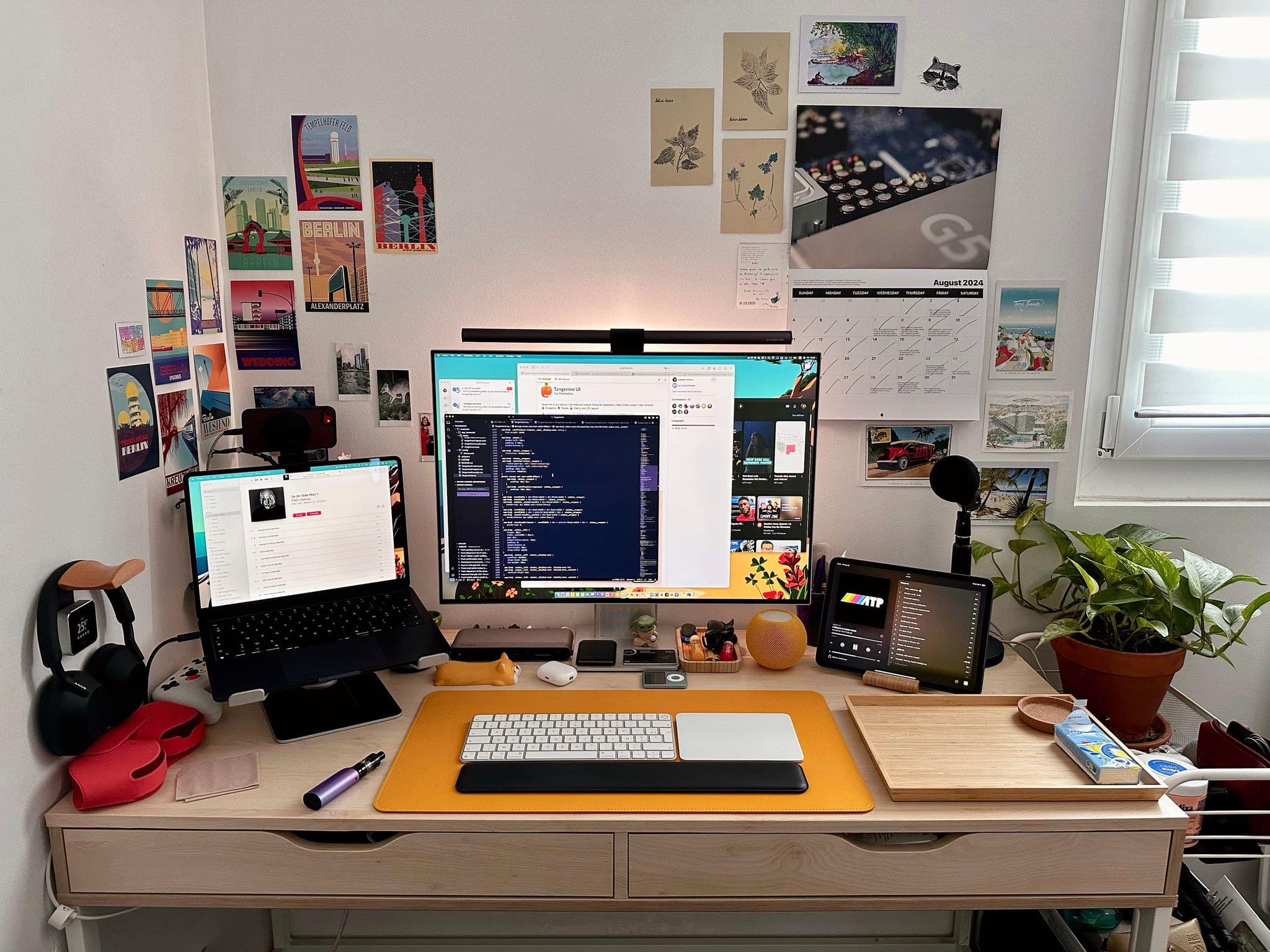
Transcript
1053 segmentsWelcome to Comfort Zone, a podcast all about pushing your hosts, well, outside of their comfort zone. I'm Christopher Lawley, and each week I am joined by two incredible co-hosts, but they will beat you if we have a wallpaper challenge. First up is Matt Birchler! Oh no. Hello, hello, it's I. I'm sorry if I clipped there. I tried to pull back as far as I could from the mic, but the energy was correct.
Yeah, yeah. And what else is your one by Niléane? Hello. I couldn't come up with anything like that for you. I'm sorry. I'll think about it, and I'll give you a good intro one of these weeks. But we have a show for you, but before we get into it, we have a little bit of follow-up. Niléane, you put the poll out there for our challenge last week. You want to go over the results? That's right. The poll closed at exactly 200 votes. Nice. That's pretty nice. And I'm assuming I won.
Okay, so the results are for last week's challenge. Who won as the best wallpaper? Who made the best wallpaper for last week's challenge? Starting from the bottom, Chris's wallpaper. The bottom? You meant starting from the top. Okay, sure. Okay, starting from the bottom, I'm in top, sure. Chris's wallpaper garnered a total of 8% of the votes.
Wah, wah. Well done, Chris. Oh, that's sad. That's a bronze medal for you. Yeah, okay. That's a nice way to look at it. Yeah. I mean, bronze medal is second loser, so. I don't know if our bronze medals, like in the Olympics, have a piece of the Eiffel Tower in them. Wait, is that really a thing? Yeah, that was a thing. Wow. Huh. Yeah. Second place, Matt's wallpaper at 34%.
At this point, I'm happy with second place. You were catching up at some point. I've never won a challenge, so second place. and to everyone's surprise the best wallpaper minds got 58% of the votes of the popular vote because it's the people here speaking we need an electoral college system so I can step in because clearly that's the only way
I'm going to be able to wait a second rig system I do not recognize the votes. Once again, my mom, my girlfriend said I clearly win. If you won, we can stop the democracy thing. No, because this week, I actually think I could win the democracy thing. Okay. I don't want to stop it because I actually think I could win it this week. Okay. Though I thought that last week too. I think in every week. In the week before that. In the week before that one.
Anyways, moving right along. Congratulations, Niléane, on winning. You do actually have a really good wallpaper, and you're the only one that came up with the dynamic wallpaper system that did that. So I really enjoy your wallpaper. Congratulations. Thank you. I concede this week. Thank you. Yeah. All right. So we have some interesting stuff to talk about. Niléane, you're first up in our document. You want to go first? Sure. Okay. So, it's something that I've had fun with today, actually, because some stuff showed up in the mail this morning.
So, just in time, so I can talk to you about it. So, what I did this week is experiment and add a bunch of new things to my desk setup. So my desk setup, I already mentioned it once here, was basically I have a big monitor in front of me. I believe it's a 30-inch monitor. It has a strange aspect ratio. It's a 2 by 3, I think, that's it.
That's the Huawei MateView. Bought it a couple of years ago. Still doing great. And most of the time, I just use that one monitor when I work from my desk. But over the months, I have added an iPad Pro to my desk. Because the idea here was, well, I didn't have an iPad anymore, and I wanted to have one.
Just to play with it, keep up with the updates and all. All three new features of this year's release. of iPadOS. Yeah, those customizable tabs really do a lot for your productivity, don't they? Yeah, so much so that my iPad is still running on iPadOS 17. So there you go. So the idea here is that I was using the iPad Pro as basically a second monitor, most of the time I had Sidecar enabled. So Sidecar is the feature in macOS where you can extend your
macOS workspace to the iPad and just use it as a small second display. And that works really well actually but I'm kind of sick of it at the same time because it's a bunch of small friction things for example during the Olympics like when I was watching some replays some vods of certain sports that had taken place on the French TV channel website well as you know when you watch Netflix
and other things like that, they are protected by DRM in the browser. And unfortunately, Sidecar is subject to that. macOS will blank out the player and just show a dark screen, basically, when you use Sidecar, because it assumes, I guess, that you can record the screen from the second monitor being the iPad and pirate that, I guess.
So anyway, Sidecar, it works actually really well as a second monitor, but in those cases, it really felt like, yeah, it's not actually treated as a second monitor, is it? It's treated as an AirPlay destination or something like that. So that was annoying because the main point of that second small monitor for me is watching something on the side while I'm working. Having something play on the side while I'm working. In that case, I was the Olympics. In some other case, maybe I'm just watching a terrible show on Netflix and just have it on the side because I don't want to focus too hard on it because it's really bad.
So, yeah. So, let's get rid of that. Let's get rid of Sidecar. Let's find a way to have a proper second monitor at my desk. And the cheapest way to do that has been to just open up my MacBook Air and just put it on the side. That should be free. Yeah, it's free. Just put it right there and I have a second monitor. This is news to me. MacBooks have built-in screens, huh?
Yeah. I almost forget about it. And for that reason, I ordered a new gadget. I love to order the new gadgets. This one is the 12 South. I will add the link to the show notes. I haven't done that yet. The 12 South High-Rise Pro. High-Rise Pro. So that's a laptop stand that you can... It's height-adjustable. It's actually really well-built.
It's rubberized on top. And the Pro version of the HiRise stand has a spot underneath where you can insert a MacSafe pack, the Apple MacSafe pack. And so you can just lay your phone down there and it charges with a MacSafe. That's really nice. So that's been great. I've been using that setup for a few days. I only got the HiRise Pro today, but I've been using the MacBook Air Open on the side for a few days.
That works really great. I actually really like this setup. But this has opened up... By the way, I have a link to my current new setup in the show notes that people can check out if you want to see how it looks like. But this has opened up new possibilities that I'm sure you will be excited about. So first thing is I am actually touching the iPad's touchscreen again.
Ooh. Yeah, because the iPad, I no longer keep on a stationary stand all the way back there beside my monitor. have it right in front of me to the side lower so I can easily just tap on it with my finger and control it. No longer have to try to use universal control which is the most unstable thing Apple has ever made in software maybe. Yeah universal control disconnects all the time for me. It's terrible. I would like to introduce you to my friend stage manager.
Yeah I'd argue universal control is Way bugger. So yeah, I can just touch the screen again. Wow, iPad has a touchscreen. Incredible. But that's the boring one. The new possibility. That you will be excited about, I'm sure. I'm thinking, hey, maybe I can get a new keyboard. Ooh. All right. Yes, okay. My ears are hooked up. Now we're talking here.
You know why I'm saying that, right? Because since the MacBook Air is now on the stand, I have access to Touch ID now on the MacBook Air. So I can imagine now using a different keyboard in front of me than the Magic Keyboard because I mostly like it because I really like having Touch ID right there on the keyboard. I feel like Chris is already shopping. Yeah, I'm literally like in my head.
I'm like, okay, what kind of switches? What kind of, what size? Okay. Yeah, yeah, yeah. Yeah. Do we want to get into this, Niléane? Are you interested in mechanical keyboards? Yeah, I think I could be. Okay. But I think I would be very, very challenging. It would be very challenging to satisfy me. I want something that's low profile. Ooh, okay. Low profile is tricky. There are a lot of interesting low-profile keyboards.
I'm going to pull up a link here that I have of one that I have been wanting to get. I've heard nothing but good things from this keyboard, but I just haven't bought it yet. Is this the Newfie? No, it's the Mono Key. Not Newfie. I didn't say that. Oh, this product is currently sold out. That sucks. That's classic mechanical keyboard. Yeah. experience though. Okay, hang on. I'm going to send you this link, Niléane.
I'll just put it in our group chat. This is the keyboard. I've kind of been thinking about a low-profile keyboard for a few things. This was actually the one that I was going to order to use with the Vision Pro before I found out. Vision Pro, the QuickType bar only works properly with the Magic keyboard, but this is the one. It's the mono-key low-profile keyboard. It comes in black and kind of like a silver white. It has a dial on it so you can control the volume. And I believe you can press it to mute.
It looks interesting. That being said, if you're willing to try a non-low-profile keyboard, there's a lot of really good options out there. Yeah. I don't think I'd be willing. Okay. So low-profile is the must-have. I like this knob. I like me some knobs the white one is really pretty every time I hit the E key on my keyboard in Safari now it's bringing up the emoji picker yep, iPadOS 18 is definitely ready for here we're just gonna Keychron
we're gonna use, nope that didn't even work anyways, Matt, maybe you could pull it up Keychron has a low profile keyboard that I believe has a knob that you can control the volume and stuff like that, I don't know why nothing seems to be working on my stuff right now oh they do i'm posting a link as well to another one this is uh this is the low free one which i'm a huge fan of oh the low yes i have this one i thought you said new fee earlier i did oh okay but low free is is i love this one it feels good it feels very premium um and has a white variant that i honestly wish i got but i got this
review so oh i love it i have the black one because of course i have the black one uh and i i love this one as well uh it's wireless so that's kind of nice if you if you need that there's when you get into mechanical keyboards a vast majority of them are not wireless uh for various reasons because like sometimes the housing is like made of this like super thick aluminum so like bluetooth doesn't work very well with it stuff like that but um this one's wireless has leds which i turn those off
immediately uh does this one work with um uh the uh why do i want to say them but it's not them the uh the keyboard customization thing it doesn't via no it's not customizable with via that's that's the one downside keychron has one and the nice thing about keycrons is they're customizable so So with customizable keyboards, there's a web app called Via, and you can use that to customize what buttons do on your keyboard.
So you can reprogram like F1 to be music play pause, always be play pause or something like that. Or you can reprogram. Like I have a lot of those. I have a couple mechanical keyboards that have like home, end, or page up, page down. And I don't really use those keys, So I reprogram those to be media keys because they're smaller keyboards. So there's a lot you can do with that. I'm a big fan of the Flow 84 keyboard and MatSense.
Of which one? Flow 84, is that what it's called? Oh, the Low Free Flow 84. Low Free Flow 84, yeah. Yeah, that one's nice. I just think you would like a customizable one, just knowing you. Hearing that, all I'm thinking is I've got better touch tool, and I write about better touch tool every day. Fair. And I do think the low-free one is a better build than the... I have one of the low-profile Keychron ones, and it's fine, but the low-free one, if I had to pick between the two,
I would pick the low-free ASAPI one. But the only nice thing about the Keychron one is they are customizable, but like you said, you do have better touch tools, So that basically takes care of that. What's nice about VIA is you're not programming it at the computer level. You're programming it at the keyboard's firmware level. So if you were to take this keyboard, because like the low-free one and the Keychron ones, they support multiple devices. So if you were to pair it with your MacBook and your iPad, those settings you change would cross over between the two devices.
Okay, that's nice. All right. Thank you, guys. I knew a good card on you. You came to the right place. Yeah. Now, once we get you hooked on low-profile ones, we'll get you to the standard mechanical keyboards. I mean, I have played with some. I just... Feels like work. Just typing on those keys. Not if you get the right switches, and they're lubed properly, and, like, they're...
There you go. There's a lot you can do with these that... scratches an itch that the three of us definitely have customizing. I'm so worried. Okay. All right. Well, that's it for me. If you want to have a look at my photo and have any questions about my updated setup, go ahead. But that's it. I looked at it a little earlier when I was putting together my notes for it, and I think it looks pretty good. I really like it. I love the little decor things you have around.
I used to be very much against like having knickknacks and stuff on your desk, but I have completely gone against that. I'm all in on knickknacks. Yeah, I love it now. I used to find them distracting. But the HomePod mini that's on your desk, do you use that as like the speaker for your computer? No, I'm a headphone person. I use headphones at all times. The HomePod here is, as you know, it's a very compact desk because this is in our living room, me and my partner's living room.
My partner has a dedicated desk room in the apartment that's way over there, so we can't hear each other during the day. So the compromise was that I used the bedroom as my desk, which means I have to keep using this compact small desk I got from Ikea. It's very nice. And yeah, I have to make do with this small space. And I think that's why the laptop stand very important here.
Because having the MacBook open at all times takes up a lot of space on the desk. So it frees up some space, just junk, basically, because on the phone, my desk is clean, mostly clean. But during the regular day, I have paper lying around or a bunch of stuff lying around and just being able to shove it under the laptop. That's nice. Yeah, the HomePod is just for me and my partner when we are in bed in the evening.
There's one home pod in the bedroom, and we can just play some music on there quietly. And it's also just so we can talk to Siri in the room. Yeah, it's good. I respect the... There's a Stadia controller I see there in the corner. Yeah, I use that almost exclusively for Eurotrack Simulator via NVIDIA GeForce Now. That's right. That's awesome. That's basically by a truck controller.
Dedicated truck controller. That's how I drive my truck. I drive my truck during the day. Title. On the wall, those are my collection of postcards. It's a selection of them. On the left, most are from Berlin. Many of them are from La Rino Island, where I come from. And other places I collect buscouts. Anything else before we move on? That's it.
No, I'm done talking about desks. So hopefully no more of that comes up. Hopefully that's done. Well, what I have for you is a desk accessory. No! Let me grab it really quick. Hang on one second. It's kind of heavy. What are we doing? Why are we pretending we love desks? Okay, anyways, this right here. This is huge. I saw what Niléane was doing in the show notes, and I've had this for a little bit now, but I'll explain in just a second.
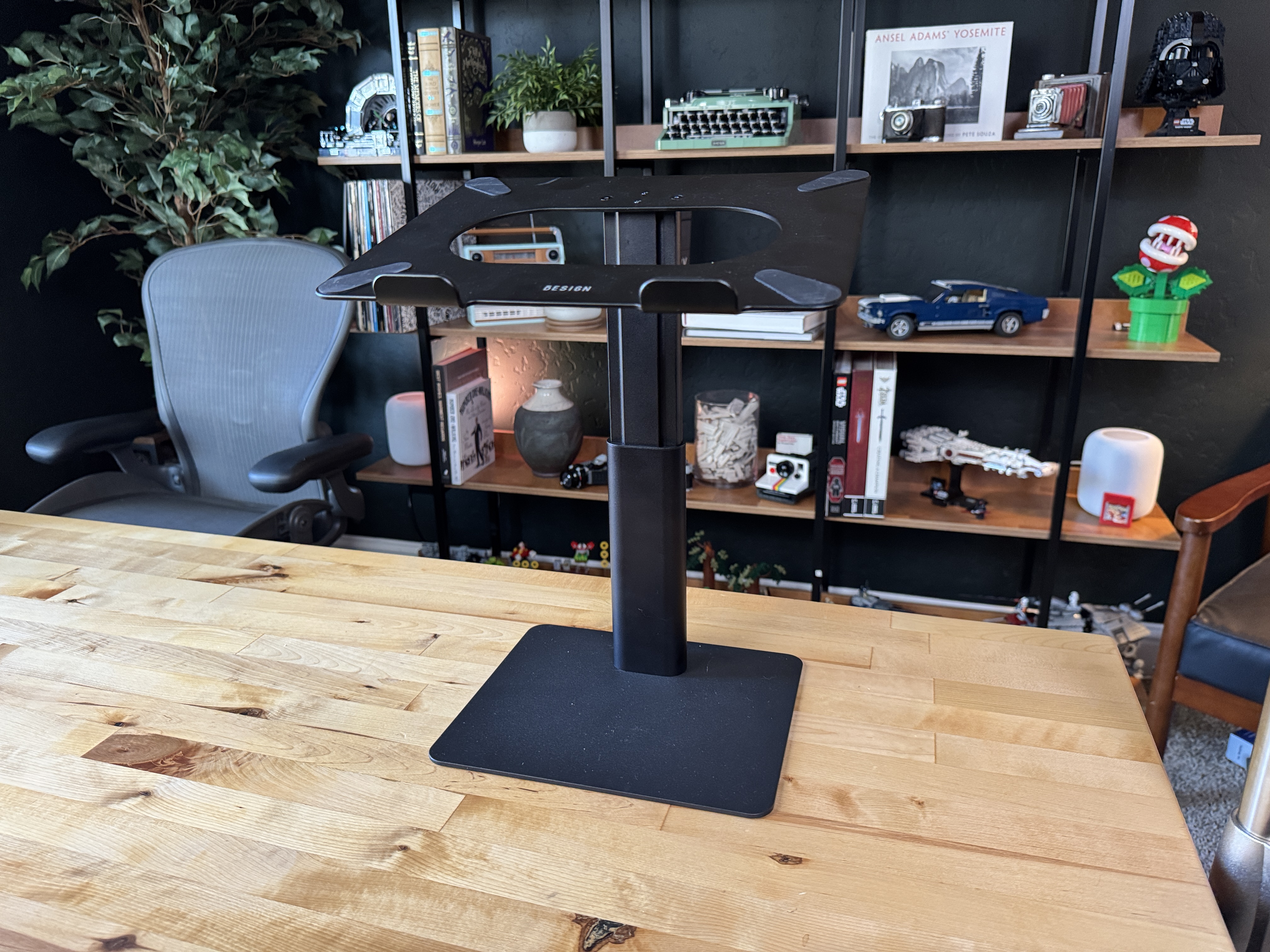
But this is the B-Sign Benson, I don't even know, LSA-X6. It's a random thing I found on Amazon, but this is a laptop stand. Now, there are a gajillion and a half laptop stands on Amazon, but this one does a few things that others didn't seem to do. But I'm kind of in the process of fixing my office area. I've talked about this before. So where I'm sitting, if you're watching, this is my studio.
It's just a random room in the house. I film in here, but I don't really, or I try not to work in here. But what I like about this room as compared to my office is this is an actual room. I can close the door. Nobody will bug me. If my girlfriend's mom's over, she kind of does her own thing, like when she's here during the day and stuff like that. My girlfriend, she'll come in if she needs something. But, like, at the end of the day, I'm alone in here, and that's really good for my ADHD. Because, oh, boy, when people are around, that's when I don't want to get work done.
So I've been trying to fix up my desk setup, and the new iPad Pro's kind of broke my desk setup. For the longest time, I had been using the MagFloat Pro magnetic iPad stand because I have an iPad on my desk, obviously, because I'm Christopher Lawley and I use an iPad. And I also have a studio display, and that's kind of my external monitor. That's where I work from when I'm sitting at my desk. But the new iPad Pros, the positions of the magnets changed internally.
So all of those magnetic stands that I've loved, I've used, they don't work at all anymore. So frustrating. Right. Dead. It's so frustrating. Luckily, I found homes for them all. I didn't have to throw anything away, but I found homes for them all. But it is incredibly frustrating that they just don't work anymore. I mean, I get it. Apple had to redesign the internals. I'm not saying, like, they should have made this work because they had to redesign the internals. I will take an OLED display over, you know, keeping magnets in the same position any day.
But because of that, I have not really found a magnetic iPad stand that I absolutely love. Most of them aren't height adjustable, so I can't get them to be the same height or the proper height of my studio display. Because I want, I'm trying to be a little bit better about my ergonomics. I hunch over a lot. And I'm trying to be a lot better about sitting back, having my back in the proper position. And if I have the iPad low in like a regular magnetic stand that's not height adjustable or something like that,
I hunch over when I'm looking at that or I'm working on that. So I want something that I can kind of put level with the studio display. So I tried finding a magnetic iPad stand for the new iPads. There's none out there. I know MagFloat, they're working on a new pro version of theirs that is the height-adjustable one, but that's not coming until the end of the year at least. So I needed something in the meantime. So I found this guy, the Benson B-Sign, whatever it's called, laptop stand.
It's height-adjustable and tilt-adjustable as well, which is you could usually find like one of those two, but I didn't find one that got to the height that I want. Let me rephrase that. I couldn't find any other laptop stands that could get to the height that I wanted with the studio display, because I'm tall. I'm 6'1". I have the tilt and height-adjustable studio display to, once again, keep it ergonomic, because the regular tilt studio display is way too low for me.
So I have the tilt and height-adjustable one. So this guy gets up high enough. It goes from, I wrote it down in here, 9.65 inches to 14.76 inches. That's the height adjustment. And for you millimeter meters people out there, that's 245 millimeters to 375 millimeters is the adjustment range for the height. Plus, you have the tilt as well. So, what I liked about this is I was able to put this on my desk.
It sits next to the studio display and it gets the iPad up high enough to where I can match the studio display. Now, usually I like when I'm working at my desk, I prefer to have my iPad in portrait mode because I use that for like reference stuff, like putting documents up there, referencing widgets, the music app, whatever. Like, I just like that in portrait mode and then my monitor, obviously, in landscape. But obviously, using a laptop stand, when you're combining it with the iPad and the Magic Keyboard and stuff like that, you have to have it in landscape, which has been fine.
It's not my favorite. I would much rather have it in portrait mode. But it was great. Last weekend, I was doing some work and had the Formula One race open on it. And it was nice to just have that off to the side. But in classic iPad fashion, the minute I went to go edit something, the audio got pulled and the video broke on F1. And is come on, Apple, like let's fix the audio system on the iPad so we can have two things happening at once. Two things.
Anyways, moving on, I'm still waiting for magnetic iPad stands. I don't think personally, this isn't a better solution for me. it's a much cheaper solution it's a much more affordable solution if you keep your ipad and a magic keyboard all the time this is a probably might actually be a better solution but the issue with it is it's a lot um uh it's got more depth to it so it takes up a lot more space on my desk and i i have a big desk my desk is six feet wide 30 inch or six feet long 30 inches wide or 30 inches
deep um and so it's pretty big but i got a bunch of stuff on there so uh i i would very much like for the mag float pro to get updated because that was my favorite ipad stand of all of them uh so i could have it next to uh my studio display but in the meantime this this seems to be working um again height and tilt adjustable is just it's it's killer for something like this i can't believe how many laptop stands are out there that are just like this is the tilt this is the height with it um but yeah any any questions on this it looks extremely tall in the it does i think in the
pic in the pictures i think they have it at the max height um i can take some pictures for the show notes um and i can take some pictures and send it to you guys here in fact if you look at the video if you guys are looking at the video that's as low as it gets um compare here here ipad mini for comparison it's you know if you if you do the tilt it's about ipad mini tall um okay yes we're using ipad minis as a system of measurement right now because we can't agree on meters versus feet so
ipads are the only measurement yeah universal measurement system yeah the ipad mini is millimeters the regular ipad is centimeters the ipad pro is is our meters there you go yards that's not confusing at all. But yeah, no, it does get tall, but it also does get short. It gets to like a standard laptop size height, but again, like I said, here, if you look at the video, that's as tall as it gets right there. And I'll put some pictures in the show notes so we can, so people that are listening to the audio version can take a look.
But it gets pretty tall, gets pretty short. Overall, it works for me. But I'm I'm just waiting for magnetic iPad stands. Or actually, the thing I'm really waiting for, Apple, clamshell mode. I only want one monitor. I actually don't like two monitors. Even when I was a Mac person, I didn't want two monitors because it's distracting to me. It's very hard for me to focus. I just want one thing up in front of me or the task I'm focusing on, whether that's multiple apps or whatever.
Yes, clamshell mode. Chris, I love when we agree. It seems so rare. Really? Oh my gosh, we agree on this? One monitor is the best way to do any computing. You know, I would agree with you, but I think this is where flavors of AGE come in again. Oh, interesting. Yeah, because to focus, I think I need to have something in the background. Whether that's just audio, most of them is just audio, music, or podcasts.
But yeah, it's been more and more videos as well. And that's why I went through this process to have a second, even a small second monitor, just to have something playing in the background. I get that. Yeah, for me, the only time I really have something like video or something playing in the background is if there's a Formula One race is going on. And normally I'll take that time to do like admin tasks. Like Formula One races, especially right now, The start is really interesting.
The end is really interesting. But the middle section is kind of boring. Right, Matt? It depends on the race. It depends on the race. But that seems to be the status quo right about now. So usually in the middle of the race, I'll keep watching. But I'll send invoices or deal with emails or something like that. But yeah, because I'm on the iPad, I can't edit or anything. Because we can only have one audio stream. But yeah, I just like one monitor. I think it would be really cool. I would love to have some kind of accessory.
And I can totally see this happening where they add clamshell mode to the iPad. And somebody makes a hook for the back of the studio display. So you can just put your iPad behind your studio display, plug it in, and it's out of the way. You have your extra desk space. You don't have to have an iPad off to the side or anything like that. I just want that extra desk space. Because, as we know, it's one monitor to rule them all, one monitor to find them. one monitor to bring them together and then the darkness bind them.
I'm such a nerd. We will have to talk about Rings of Power, by the way. Yeah, I think when season two finishes I might pull an acolyte and do that because I'm very excited about this. I haven't started it yet, so no spoilers. I might have been playing Star Wars Outlaws so I need to watch that. To round back to the stand one idea that just came to me is that maybe it could just replace a standing desk.
Like if you have a regular desk that's at sitting height and you just use a laptop. Yeah, you would have to just use a laptop for that to work. Yeah. And you can just quickly just raise the laptop to standing height. Is that high enough? Let's try it out. Hang on one second. But you're especially tall. So maybe for you it doesn't work. yeah it's it's it's not it's not tall enough for me but um i i there are if if you're somebody that has like a regular like sit desk and you're looking for something to adjust to a standing height there
are these devices that go on sitting desks and you can raise it up they're a pain okay they they're they're not the best thing in the world but if that is your only option you really want a standing desk they are out there they kind of work like monitor stands almost but they take up like the whole space of your desk so you put your monitor your computer and everything on them and then they have like a keyboard and trackpad tray or a keyboard and mouse tray uh down low so you can um like your your mouse and your keyboard or your mouse and your keyboard yeah are at the right height
either when you're sitting or standing and then you just raise the piece up so it could be either at standing height or sitting height uh at my old it job um it was decided that this was the it department's uh responsibility to set these up and uh it used to make me really mad because i'm like in what world does this have anything to do with it other than the fact that you need to pick up a monitor and set it on there but that's the point um but yeah no those those those work uh okay if if you only have the option for a sitting desk but i would say if you can get a proper uh you know
motorized sit stand desk that is a much better solution yeah of course okay cool all right matt uh round us round us out what do you got yeah so i also have a stand for my laptop that I want to bring out. No. I have something totally different. I have... Actually, I have my thing and then I have a statement I need to make at the end of this. Oh. So I'll let that linger.
Okay. So I have... So I got a Synology drive in the past week. Provided by Synology for review. didn't pay for anything anyway um so i've been using it i set it up i've been using it and oh boy this was the product i should have bought a long time ago i told you i told you years ago or at least a year ago i i just want i just want credit for this i told you so yeah so storage uh it's a problem for me uh i have a lot of stuff and i especially once i started doing
YouTube. I have hundreds of gigabytes of video that I don't want to just live on YouTube so I can have them myself. So a couple years ago, I bought a Western digital network attached storage from Best Buy, the cheapest one you could buy. And Chris, your face is completely accurate. It was horrible. Yeah, it was it was atrocious. It was not reliable. Like it would disconnect from the network regularly it was incredibly slowly if there's a if there's a drive slower than a 5400 rpm this is what that's what it was running out it was horrendous it was just it was supposed to
let me access my files from anywhere in the world never was able to access anything outside my home so i was like this is garbage this whole network attached storage scam is is a lie it's not actually good and so a year ago i bought a mac mini the cheapest base model mac mini you can buy and i strung four samsung ssds into the back of it and i accessed that from everywhere in my house and so i had like one drive with my youtube videos one drive with like my plex videos and just like other backup stuff on that and that was pretty good it was pretty nice um and it also meant it was a full
on Mac so I was able to use it to do Mac things if I wanted but it turns out Synology is actually pretty good and actually like good network attached drive is very useful so I'm only a week into it and I'm not a pro yet but a few things have become immensely powerful for me it's storing the the files. That's great. That's fine. But it actually works everywhere. I can access things at work
while if I need something very quickly on my work computer. My wife has some video files she needed for her work and I didn't have a good way to send them to her. So I just put them on the NAS. I created a public link and she was able to download them just like a Dropbox link or anything like that and it's lovely it's so convenient to have this the the downside is because my upload is horrendous at home that's the limit for downloading things elsewhere in the world so like a dropbox link would download it whatever the internet can do uh my 20 megabits per second upload
from comcast is uh suddenly the download speed everywhere i have the same issue buy house they say you'll be able to get fiber buy a house move in the set house nope you don't have fiber in that area yep yeah what um what speeds are we talking here i get so here's the fun thing i get 1200 megabytes per second down so 1.2 gigabits per second down i can only upload the fastest i am
able to get the upload speeds to work here 50 megabytes per second oh megabits megabits megabits that's yeah yeah it it's not great yeah yeah it's it's annoying um but matt uh i i have a couple of questions which synology did you get and how is it set up uh like plugged into your network yes so okay also with that western digital one because i was very uh frugal uh i read it ran it in raid
zero which i think is no redundancy never okay ladies and gentlemen never ever ever ever ever ever ever ever ever ever ever ever ever ever ever ever ever run something in raid zero you were asking double the storage it was so good um no actually again it was it was terrible so anyway um so it i got the ds923 plus which is a four bay unit and each and so all four bays have a four terabyte
drive in it which works out to 12 or about like 10 and a half terabytes of usable storage and it said raid 5 which i think is the recommended one yes uh ray okay raid 5 that's the way to go uh okay on synology it's called shr uh because synology has their own thing uh but it's the same tolerant like fault tolerance as as raid 5 so you can lose uh up to two drives and uh or well actually i don't know how it works on i have a five bay one i have the ds 1520 plus uh and I can lose up to two drives and I'd still be fine.
I have five 12 terabyte drives in there that are 7,200 RPMs. I wanted to go 10,000, but those were way too expensive. But I also have, well, okay, I'll explain why I did this in a second. But I also have a two, I have two, two terabyte NVMe chips in there that work as a read write cache. And mine has a 10 gigabit per second internet connection. So when I had the Mac, when I was editing off the Mac and stuff like that, I had the 10 gigabit per section section at 10 gigabit per second connection that that Ethernet plugged directly into the Mac.
And then they have four network ports on the back of them as well that are just one gigabit per second. I bonded those so they would be a four gigabit per second one. And that was what was running over my network and Internet and stuff like that. But the 10 gigabit one was plugged directly into the Mac, and I did that so I could literally edit videos right off the NAS with that 2 terabyte NVMe cache. It was incredibly fast. I don't do that anymore because I use the iPad and blah, blah, blah, blah, blah, blah. But, yeah, mine is way more tricked out than what it needs to be right now.
Yes, yeah. So mine does have the 10 gigabit add-on card as well. But I can't, but my whole network is bottlenecked at one gigabit. My router does one gigabit. My switcher does one gigabit. So I guess if I could plug it directly into the Mac or my Thunderbolt dock, maybe that would work. I'll still look into that. Just make sure it's either 10 gigabits or at the very minimum 2.5 gigabits per second. Because if it's not one of those, it's just a waste.
Yeah, so I did, I haven't done a Final Cut edit with remote files, but I did do a, my most recent YouTube video, that should be out by the time this comes out, I did edit in ScreenFlow with all the files on the NAS completely, and it was great, it was fine, it didn't have any issues, which was very cool. Nice. Surprising. The other thing I wanted to mention is Synology Photos, which at first I was like, I don't want this at all. I have Apple Photos.
That works great. I have, like, Google Photos as, like, a backup of my Apple Photos. So, you know, a backup is... I don't know. I feel like whenever people talk by backups, it's like, well, that's not a backup. A backup is a backup. And I'm like, well, what do you mean? What is a backup? Nothing's a backup. Okay. But anyway, so I have, like, multiple cloud providers. And I was like, I don' want Synology Photos. I don't want another, like, proprietary system. But much like Obsidian is a app on top of a folder of files, Synology Photos is an app on top of a folder of image files.
And so what I've done is I installed Synology Photos on my iPad and it just in the background is automatically syncing my photo roll to the Synology drive. And now I just have JPEGs of my entire photo collection. And so if Apple Photos ever dies or whatever, I lose my account, not an issue. And I was able to cancel my Google, like, two terabyte plan because I don't need the photos back up there anymore.
And I was able to cancel my OneDrive subscription because I don't need that anymore. I used that because I have a Windows PC and I need to get files from there to my Mac. And because of enormous painful issues, OneDrive is the easiest way to do that. Now I just throw on the NAS. So, yes, very lovely. The photos thing is awesome. I'm so happy that it works because I've been trying to figure out how to get a photos backup of just the photos themselves for years. And this was so easy.
The app looks pretty decent, too. It is pretty decent. it does like facial recognition too you can opt into facial recognition and like uh subject things so to like tag them for you um i haven't done any of that because i don't really need it but yeah it looks pretty it's pretty decent all of their apps are surprisingly good um they they uh integrate with the files app on ios and ipad os so they just show up in the file picker it's quite good i'm really really happy with it so i want this now i know why do i want this so to kind of tack on to that if you're wanting a nas but you're not wanting to do the
thing where you have to build the raid and find drives and envy me for cash and all that stuff and figure out like oh do i need 10 gigabits per second uh synology put out this thing earlier this year and they sent me one and i i needed to review it but i literally keep running out of time i just haven't had a chance to but it's it's going to come in a future video but they have this thing called the b station now which is kind of like the western digital networking uh thing that you were talking about the the western digital nas that that literally just has drives built into it but the nice thing about this thing is it's just plug and play for the most part you literally plug it in
download the app and it configures most of it for you you don't need a degree in networking you don't need to know how raids work it handles everything and you get all the stuff like the you can get access to like the photos backup app and stuff like that so uh if you're looking for something that's a little more user friendly that's a great solution but i love love love love my my five bay naz it's it's just it's one of my favorite pieces of tech i back up all my my videos to it i back up b-roll i back up uh like sponsorship stuff so like i have some sponsors that are just like reoccurring stuff so what i did is i filmed the b-roll for the ads and it's pretty much the same
script every single time so that way i just when i do that sponsor read i just download those b-roll clips for them i don't have to reshoot them every single time i don't have to leave them on my ipad it's fantastic it it is one of the uh well actually i was about to say it's one of the best purchase i've made but this this is actually my second nas i bought one and then literally a year later synology reached out and was like hey we want to work with you you want to make a video about this thing and i was like yeah i already have one and they're like well that's the old one we'll send you this new one uh so the one i have now was sent by synology uh and that's the one with like the 10 gigabit port and all that stuff so uh yeah that was really awesome of them and they they
are really cool to work with they don't they don't have a bunch of strings attached or anything they're just like just talk about it yeah which is not always the norm no it's not yeah so yeah so totally totally cool totally love it i i need to play a lot more with it uh figure some stuff out the next thing i think i'm going to try to do is you can uh so like the remote files and like the public links those use like their quick connect uh service but you can do your own uh custom url on that so i'm trying to get like birchtree.files or something and then i'll be able to share so everyone knows
where to hack now to get matt's files it'll be something else i i was just gonna say uh i've been playing around with that similar feature for uh emulators and stuff like that so that way uh whether i'm playing on my iphone my ipad legion go something like that i can use retro arc and save syncs and stuff like that will cross platforms and stuff like that so there's a lot you could do with this um but you don't do birch tree dot me slash files yeah so yeah i've also moved my obsidian vault to it and the sync just still works great uh plex server is over there as well so yeah it's uh
it's good i like are you using obsidian sync as well like putting your vault there oh okay okay so you're just using that as the yeah i've always used iCloud just iCloud sync um and that's worked well but it does take a while every once in a while because i switch vaults i have one vault for my blog stuff and one vault for my youtube stuff and i switch between the two and it takes a while on iCloud specifically uh to change the files out so anyway i i have one question um do you think i need this yeah you need a free work
what work whatever work you're currently doing right now for your task management system yes you need this to store your plain text files with your markdown task management um yes do you have a big photo library like do you have something that like it's huge yeah so i would do it for that i would do i also got this for as my time machine backup when i did have a mac back back when like you know a certain video editing app was letting me down um this was like my time machine backup for all my video projects and stuff like that um this is one of the big reasons why i really
want apple to bring time machine to the ipad because like right now when i edit a video project it's not really getting backed up to anything and that's a little scary i just try not to think about that and just move right along uh but yeah no it works great it's time machine because it's wireless and since you have a macbook air it'll just start backing up no matter where you are in your house great for photos great for just any like archivable projects and stuff like that but you see i'm currently my backup strategy right now is not really a strategy but anyway
i've got just a a big ssd plug into my thunderbolt talk at my desk and the ssd is under the desk with the cable management stuff. And so whenever my MacBook is at my desk, that's backing up. But I agree that I'm really tempted to set something up for my photos because time machine is not really backing up photos, right? It's just backing up the state of the library, but not so it's inside.
If they're not all on your hard drive, then no. Check out the B station. If you're not interested in going like full on like 4 Bay NAS or something like that, check out the B station because it's a lot it's a lot cheaper, too. It's a lot cheaper. It's less fiddly. And if you're just doing this for photos backup, that's exactly what this thing is kind of pitched for. It's like photos backup and some files management. So that might be that might be a better solution if you're just looking for something like that. Is it B as in the flying thing?
Yeah. B E station. Yeah. I, for me, I don't know about you, Matt, but for me, like if my house was to ever catch on fire, the two things I would grab are probably my iPad. Okay. The two non living things I would grab are my iPad and my NAS. Like those are the two things I'd be like, okay, I'm going to grab these really quick and get out of here. But like house on fire, it's that's, it's that important to me because all my data is there. And, uh, you can, now I've been trying to do this and, um, well, let me rephrase.
I had this working for a little bit and then I broke it because I moved, but, um, I had the, the first NAS that I ever bought is actually at my brother's house right now and he's using it, but I had some space carved out on it for me so that I could actually back up my NAS to that NAS, which is something you could totally do with these. But I broke it and I haven't had time to fix it. Yeah, I'll put a link in the show notes. There's one guy on YouTube who just makes Synology videos and they are so helpful.
But yeah, he says that's not a backup. A backup is a backup. And I'm like, what is a backup, my dude? But he talks about that. He's like, so if you get one of these, you obviously want to have your NAS in your house. But you want to buy a second one probably and put that in your parents' house, another like a friend or family and then you should have yours always syncing to theirs you can get wild with this it sounds like yeah there's a lot of things you can do with it i don't think you have to have that i did that because when especially at like the peak of when i was
using a mac and stuff like that everything was living on there all my business stuff all everything was there so it just made sense to back that device up but now that projects aren't syncing. I use, I use obsidian sync for all my text documents. I have air table for expense tracking and all sorts of different things, but like, it's not as important to me, but I, you know, I have my photo library on there. I have, uh, all basically every video I've ever made for YouTube, some of my student film projects, other projects I've worked on, even like every episode of a slab
a glass for my old podcast is on there um like everything that i've pretty much have ever made is on my nas so it's it's definitely the kind of thing i'd grab if there was a fire nice um okay before we get to the challenge i have one statement i wanted to make okay so a couple weeks ago i talked about the overcast redesign and how it was okay i didn't love it And I then the next week said and I closed that out by saying I should like PocketCasts, but for whatever reason, I don't love PocketCasts.
The following week, I talked about PocketCasts and was like, I love PocketCasts. It's so good. A few weeks have passed. I've been using PocketCasts and I'm back to Overcast because I don't actually like PocketCasts. I do not know what it is about this app. Everything is good about it. It is so good. I can't say anything bad about it. I just prefer listening in Overcast. And they added streaming back. The swipable now playing screen is coming back in an update coming soon.
So like the app is getting better. And even in the imperfect state it's in right now, I just enjoy it more than Pocket Cast. I do not know why I enjoy Pocket Cast for a week or two. And then I just get bored of it. Someone send help, but this keeps happening to me. RocketCast to me is the corporate version of a podcast app. You know what I mean? Like all the corporate apps, they're the corporate version. It's fine. It gets the job done, but it doesn't have that personality indie apps like Overcast or Castro or Things or all those indie apps that we love like Reader.
It doesn't have personality to it. Yeah. If I open the app right now, I could not tell you anything that's bad about it. It's not like the UI looks ugly. It looks beautiful. It's good. It's nice to use. Last week I said it had the best now playing screen. I still think that's probably true. I just don't know why I can't fall in love with it. Long term. I'm really glad to hear Overcast is getting the swipeable now playing screen back.
Because that's my biggest complaint about it right now. I'll open up the now playing screen and be like, okay, how do I get to the show notes? And I have to sit there and look at it for a second. The swipable screen just seemed very natural to me. Maybe it wasn't discoverable, but... Yeah, I didn't like how small it was. So I'm hoping it's... We'll see how he does it, but yeah. What would be interesting is if the main page had the show notes and all the controls and all that stuff underneath it, but as soon as you swiped over, it went full screen show notes or full screen chapters or full screen controls.
whatever it is. So that would be interesting. But yeah, I'm glad to hear that's coming back. Yeah, it was on the most recent ATP podcast. I'm so far behind on podcast listening. That's the problem with not having a commute. Anyway, I felt I had to say something because I was like, oh my God, I keep changing my mind every couple of weeks. But that's also exactly what I said about Pocket Cast. I know. I bounce right off every time and I don't know why. I was too early in it. I thought, oh, this is how I'll feel forever.
It's the corporate podcast app. And I'm not saying that as a bad thing, but I'm saying that as, like, it just doesn't have, like, opinions. It doesn't have a je ne sais quoi. Yeah, there you go. Ooh, je ne sais quoi. I like that. All right. You guys ready for the challenge? Yep, bring it. Matt, you forced us to do something. this week uh what would you have us do okay so i was so optimistic about this but i wanted us to all use an app from microsoft and find something nice to say about it and that was pretty much it
pretty open-ended yeah uh as as was uh revealed at the end of the challenge issuance last week I overlooked a loophole about what sorts of companies Microsoft owns we'll see how this goes but yeah we've got to say what has to be said someone cheated I yeah who cheated I think at least two of us cheated okay I'm looking around I don't know who cheated
we'll figure it out we'll figure it out as we go along You're first up in the document. Why don't you tell us what you did and then we'll decide if you cheated or not. Oh, my God. Okay. What I did is follow the rules and follow the assignment. So, I started looking for Microsoft apps in the App Store on the Mac. That's where I went looking. Oh, on the Mac. On the Mac, yeah.
In the Mac App Store. There's a lot of apps in there. for a second I thought I would install Word because that would be funny I think I literally had the same thought I was like I wonder if I can get like I went through my old CD like PC software CDs and I found Microsoft Office 97 and I was like that would be hilarious I thought maybe I could find a markdown plugin for Word but yeah
I let that go no I thought of a real use case as you know I have a server in my living room I keep talking about it because it's very useful to me so it's an old MacBook Pro converted to Linux and I have a bunch of stuff installed to it including Homebridge and other things and Plex and other things and the way I connect to it most of the time is via the terminal.
I just SSH into it and that's it. Because I barely, I don't have much to do on this machine except for tweaking settings and stuff. But there are times where I actually want to see the interface, to see the graphical interface. And for that, I used VNC until now. I used the app Screens on the Mac. pretty pretty good app actually up I will say it's the best VNC app you can get on the Mac right now it's also on the iPad and on the iPhone but really love
screens but looking at the Mac App Store I saw that Microsoft makes an app called Microsoft remote desktop and so let's just say that this took a bit of setup because Microsoft Remote Desktop doesn't support the VNC protocol. So what are we doing here? What are we even doing here? But it turns out it's using the RDP protocol, which is a protocol that they made, and it's pretty ancient.
And it reminded me of something, it reminded me when I worked in tech support. That's actually the stuff that shipped on most Windows machines in the companies I worked at. And that's how we connected the machines at the time. I didn't know that was the protocol behind it, but that was it. So I had to figure out how to enable this protocol on my Linux machine in the living room to be able to connect it. And it turns out it's extremely easy if you've got Ubuntu installed.
Because it turns out in Ubuntu since actually since it's only been two releases, so barely a year, that it's the default remote desktop protocol used by Ubuntu. So if you just go into the settings of Ubuntu, in the Gnome settings, in the Ubuntu settings, you enable screen sharing and that's what it enables. And so just one box to check on the actual machine in the living room.
And then boom, from the Mac, I could connect to it via Microsoft Remote Desktop. And boys, it's surprisingly great. It's great. Compared to VNC, it's great. Like, no lags. The picture is actually crystal clear. And I believe maybe Ubuntu is doing something where it's disabling most of the graphical niceties, the animations and stuff. So it can just render better over the RDP protocol and it works great.
This app is great. It's free, completely free, no account signups or whatever. So, yeah, I was worried about that. I was worried. Is it going to ask me to sign up for Office 365 or something? unfortunately no no such things it works it's free there you go and i follow the assignment yeah yeah okay so Niléane wasn't the cheater uh so i i'm very familiar with rdp or remote desktop
uh if you want to impress your it people call it rdp um i used it every single day in my it career very very familiar in fact when i was towards the end of my it career and i was so frustrated carrying a windows laptop uh i was like okay forget this i'm gonna stop carrying this and i started working for my ipad and i used uh so like just jump desktop supports rdp and the vnc protocol so i use jump desktop and jump desktop for those that don't know actually had mouse support before ipad os had mouse support like you could buy this little tiny mouse that would work with it
It's horrible, but it worked. And I use that to, to get work done. I had a, uh, a virtual server, uh, on one of our hosts that if I ever needed a windows, like to do something in windows, I could log into that on my iPad. If full screen app, it was like, I was just working on a windows laptop. It was incredibly fast. It was responsive. Really? Like you're right. It's an ancient protocol. It's been around forever, but it works. It still works to this day.
It's fast. Most of the time, if you have a decent connection, you can't even tell you're not sitting in front of that machine. Is this similar to the high-performance screen sharing that macOS has? Do you know? It feels like it. I've also worked when I was a tech support technician. I mostly worked with Mac machines and would remote into those Mac machines. And yeah, Apple's thing, the native screen sharing app that you can use on Apple hardware, that works surprisingly great.
It feels like you are on the local machine at some point. It does. It's so clear and really fast. It reminded me of that. Microsoft Remote Desktop. Okay. That's impressive. Yeah. We're speaking here on, I'm on the local network and stuff, so it's very optimized. And both are on wired connections. It's not over Wi-Fi. Yeah. But with VNC, you always know. But with VNC, I had artifacts all the time. And I had to take lag into account when I clicked on things.
And with RDP, like when COVID hit, I still had my IT job. But I was sitting on my iPad at home, remoting into our servers, which were running ESXi. So they had virtual machines on top of them. so I was from my iPad remoting into a virtual machine and it felt like I was just sitting in front of a local Windows machine like it's very good alright very good very good challenge yeah it's in the Mac App Store too nice alright Chris what do you have
I have the best Microsoft application Age of Empires 2 Remastered I'm so excited about this. Apparently we lost Niléane. So I used three Microsoft apps, by the way. I used Windows 11. I used the Xbox app on Windows. And I used Age of Empires 2, all made by Microsoft. He just said Windows 11. I'm just saying it's basically an application. I mean, what is an app?
What is an app? Let's figure this out. To back up, I actually went through and looked at almost all of Microsoft's current productivity. apps because I was like, oh, that's kind of my thing. I'll see what was there. But it has been an insanely wild week. I finished up my Obsidian video this week. I'm working on my iOS and iPad OS 18 walkthrough. I just couldn't handle looking at another productivity app this week. I just, like, I didn't have the brainpower for it. I wanted a way to relax. So I fired up the Legion Go and installed Age of Empires 2
Remastered. I love this game. This was a game I played a ton when I was a kid, LAN parties and everything. I'm not really a nostalgic person, but this brought back all the memories. And surprisingly, it works really well on the Legion Go with the controllers. I didn't expect it to work well with the controllers. I expected to have to pair a keyboard and mouse with it, but it worked great. I thoroughly enjoyed it. And it's Age of Empires 2. Who doesn't love that game? It's the best. It is the absolute best. I played a few rounds.
I didn't do anything online or anything like that. It was just kind of a way to relax. But so much fun. Loved it. I don't know. I think I went. Not only did I bring three different apps, but Age of Empires 2. I mean, come on. Who doesn't love this game? You fire it up. You're the Vikings. You go and attack some people. And it's not historically accurate battles, but who cares? It's so much fun. You build your walls. You build your armies. You build your villagers. The villagers get killed. You send your armies. Like, come on.
It's so much fun. Chris, imagine the poll on Mastodon. I'm going to win this one. No, but just picture the poll. The poll will say, who won? Who picked the best Microsoft app? And there will be three choices. Yeah. One of which is age of best. Exactly. Microsoft makes it. People are going to freak out. Microsoft makes it. What is an app? I mean, come on.
Understandably, people will say, is he even playing the game? He is playing the game. He's the only one playing the game. I am playing to win. Is he the only one playing the game? We'll see. But also, I needed to relax this week because it's been a high-stress. This week and next week and probably the week after because iPhone reviews are high-stress weeks for me. So I wouldn't expect a ton of crazy productivity stuff coming from me for the next few weeks.
It's mostly going to be about games relaxing and optimizing setups and stuff like that. This is the time of year where I get stretched pretty thin. But honestly, it worked great. It runs amazing. I ran it on my Legion Go. It was fun. It was nostalgic. And at the end of the day, I felt relaxed and calmed. And isn't that the purpose of an app? It should make you feel relaxed. Sure. I do have a question. Yeah.
So AOE, you can play that with a controller? Yeah. Yeah, yeah, yeah. It works. It's definitely not. That's got to be new in the remaster. I think so, too. It looks like Age of Empires 4 also works with a controller as well, because that's their new one. But Age of Empires 2, it works fine. There's a lot of weird things that you've got to remember. You hold down Y and then use the sticks to pick from a radical dial or a radial dialog, a radial options and stuff like that.
So there's a bunch of controls you have to remember, and there's all sorts of things on the screen. But once you kind of get into the flow of it, you can move pretty quickly through it. And the nice thing is the Legion Go does have that trackpad built into it. So if you do need a fallback, you can. I mean, the Legion Go is just a Windows computer. If you want, you can pair a keyboard and trackpad. You can plug it into an external monitor. You can do all that stuff if you really want to. Okay. Yeah.
So I win, but I don't even know if we even need to see what Matt's doing. But if you think I cheated, just wait. No. I'm confused looking at the notes. If it's what I think it is, Matt cheated. So, no, I did. Well, okay. So, here's what I did. I went through all the apps on the iPhone that they had and was like, there's got to be something good here. And it was a long list, but it's slim pickings is what I would say.
But I found an app I had not heard of. It's called Microsoft Start. It has 100,000 App Store reviews. It has a 4.6 average rating. So, pretty good. Pretty good. And it's their Apple News equivalent. Oh, geez, this is not what I thought it was. Okay. And so, yeah, it shows you news. Well, it claims to show you news. What it mostly shows you are ads. So in the feed, every three posts is an ad. Just like Apple News, I hear.
And you might be like, well, that's a lot. But like, oh, let me tell you this. It is the same ad. It is one Lego.com ad, which is relevant to me. So I guess points there. but it's a lot of it's mostly ads these stories are uninteresting and just on the home screen one two three four four buttons will take me to co-pilot ai every app every app has to have ai so yeah so co-pilot is built in they like the prominent button at the top of the app is to open the camera so you can take a photo of something to search for it in the news app.
Okay, so yeah, there's a copilot button. Yep, and that brings up the copilot chat. Can I say what I thought this was? Because all you put in the doc was Microsoft Start. I thought you were literally going to talk about the Start button in Windows. That's what I thought. In Windows, that's what I thought it was. That's what I was like. If I'm cheating, Matt's definitely cheating. You brought an operating system and an app store as two of your three apps. Yeah, you did count Windows 11 for some reason.
So this is, so one of the things I said is I had to say something nice about it. And I don't have to. It's terrible in every single way. I don't understand. Well, there's the cheating. You said we had to say something nice. No, here's the real cheating. I was like, okay, I have to say something nice about a Microsoft app. So, inspired by Chris, they own Bethesda Game Studio. Oh, jeez. So I reinstalled Doom, the 2016 game.
And, oh, that's a good game. That is so good. Everything about that game is satisfying and a delight. And I'm so glad. How is that Microsoft? Because they own Bethesda. They own Bethesda. They didn't own Bethesda when the game came out, but they do now. and power of recursion means that's a Microsoft app. I mean, I don't know. That seems like a stretch. I could have installed it from the Xbox app if that helps. That would have actually helped. I did it from Steam. I can't believe this.
Oh, my gosh. So I guess for the poll, what I would beg is that my entry is Doom 2016 and not Microsoft Start terrible news app. hey as long as age of empires 2 is mine i don't care what you guys put on there because i think i'll win yeah i i don't feel good about this one again this is a sham we'll have to rain back the challenge we'll have to rain back the challenges a bit so it's not every week where i try to find loophole in order to win i genuinely thought i had come across a hidden gem
there so many reviews so many people supposedly like it let's find something together okay let's do this there was a productivity app that looked interesting but i literally just i couldn't wrap my brain around it let me see what about outlook could have tried outlook oh loop uh no i would i would disqualify oh my god you know how many nightmares outlook has given me you know how many hours days weeks months of my life i've lost because of outlook yeah but it's an app check out um microsoft loop oh that's an employee app okay there's microsoft sudoku sudoku yeah i
would like that better okay uh microsoft loop it looks kind of interesting it's kind of like a like almost like a project management kind of app um it looked kind of interesting but uh i just microsoft selfie like no one picked microsoft selfie can you believe this we should have picked that was it uh isn't microsoft to do based on uh sunrise or not sunrise the the task manager what a wonder list wonder list wonder list wonder list yeah yeah microsoft to do was based on that but I've used that in the past.
I was like, I didn't want to do that. But anyways, I think that I think this was an interesting challenge. I don't even know what to say. I'm upset. I don't want this to end. This is not right. Well, it has to end because I want to get back to playing Star Wars Outlaws. On Xbox. So I should get another one right there. I should get another. We will see if democracy prevails and people make the right choice. I think well they will they'll pick me they might alright so I have a challenge for you too I believe it's my turn to challenge you
and I was really thinking hard about what we could do because this episode is going to come out right before the iPhone event right? yeah so I was thinking about what we could do kind of tangentially related to that so I have to talk about how we do this because it might just be the whole episode because I can see that going kind of long. But I want you guys to defend your iPhone home screens.
So I want you to come with screenshots and prepare to defend it while the other two attack. Kind of like Age of Empires 2. Vote for Age of Empires. So we have to attack the two others. Yeah, so the idea is just come with screenshots and we'll discuss the... Oh, I like this. We'll discuss it. But I kind of figured with us, we'll end up attacking each other and just be like, why did you do this? Because, you know, we like to have fun. We don't... My home screen is beyond reproach.
Yes! You will both love it. But this means you have a week to get your home screen in order. Like, that's basically what I was thinking is like, okay, you have a week now to get your home screen in order to get it to a position you want take advantage of new features in ios 18 or do icon theming or whatever take advantage take advantage of this time and then come next week and maybe we can discuss offline if we want to just make that the whole episode just because it's going to be a weird one because that one will come out right before the iphone event but also i can see this challenge taking a lot longer uh just because we we typically have a lot of stuff
to say and it could take a minute so yeah okay this is a fun one yeah all right i i i thought this would be a good like pre-iphone event one could okay stick with me for one second okay could we adjust just to spice it up a little bit okay could we adjust the challenge to be bring your smartphone home screen. Oh, is somebody using an Android phone?
I don't know. Maybe. Interesting. I mean, yes, but I will berate you for using an Android phone. The defense will be impossible. Yeah, exactly. But yeah, I mean, bring your smartphone. I mean, we could say bring your phone home screen. if somebody wants to bring like a dumb phone or something they can but uh we will say bring your smartphone home screen uh i will be bringing my iphone home screen because i got kicked out of team pixel a while ago before they start before the whole controversy happened back when like they said oh yeah you don't have to do anything with it and i actually didn't do anything with it so
then they kicked me out i mean that's fair i mean yeah i was i i legitimately didn't care they reached out to me and like hey do you want free pixel phones and i was like yeah sure i might make a video about that i'd love to see what what's going on with android and then they sent me and i was like oh i don't like this one bit and i just set it aside and uh then they they didn't like that too much so they kicked me out yeah um but yeah all right i think that just about does it i'm excited you have a week to get your home screen in order and then uh okay all right i i'm just gonna say like if you want to you know punch it up a little bit you know i i would say i'm i'm gonna come in a
little feisty i'm gonna i i'm gonna come in a little hot a little feisty to this challenge so just just keep that in mind okay all right well that just about does it for this week's episode i have a question for you guys uh so this week our dating question is what tv series do you think deserved another season i i think the obvious one the reason why i picked this one is it was really obvious the acolyte just got canceled after we talked about it and we all seem to have enjoyed it And I'm very upset they just didn't go like, okay, one more season and then that's it.
Because they left some pretty big cliffhangers in there that I'm just like, ugh. But you know they'll turn it into like a comic book or something, but still kind of disappointing. So that's your pick. Yeah, that's going to be my pick. Okay. I will say The OA. Okay. Yeah. I never watched it, but I heard good things. yeah i really love that show netflix canceled it shocking shocking matt what about you what what show do you feel deserved a second season or another season
oh that's it's tough most shows could do with one fewer season i feel like very true that's very true um there's a there's a really big obvious one there is i'm thinking about saying it because i don't have a better one and that would be firefly probably yeah there you go yeah but not not today i don't want them to do a new season no the time has passed yeah the time has passed but yeah that's the second one absolutely i love that show when i first saw it oh yeah no idea if it holds up
the creator doesn't anymore. Indeed. Yeah. Yeah. Anyways. So that's it. That's our show. Thank you all so much for listening. Neil and Matt, say goodbye. Goodbye. Goodbye. Goodbye. Bye.