Better Than Getting Into Crypto

Now playing
Better Than Getting Into Crypto
Show Notes
With Chris out getting a puppy, Matt and Niléane hold down the fort, celebrating an app, and lamenting a mouse. Then everyone pretends to be someone else for fun.
This week's Cozy Zone, the gang compared their Mac docks, and you won't believe it, monsters were revealed!
Want more from the gang? Cozy Zone is a bonus podcast every Monday where we let loose on all sorts of fun topics. You can get cozy with the Comfort Zone crew for just $5/month or $50/year, which not only makes the bonus episodes possible, but supports Comfort Zone, too.
How would you have done our challenges? How would you answer the question at the end of the show? Let us know!
Things discussed Follow the Hosts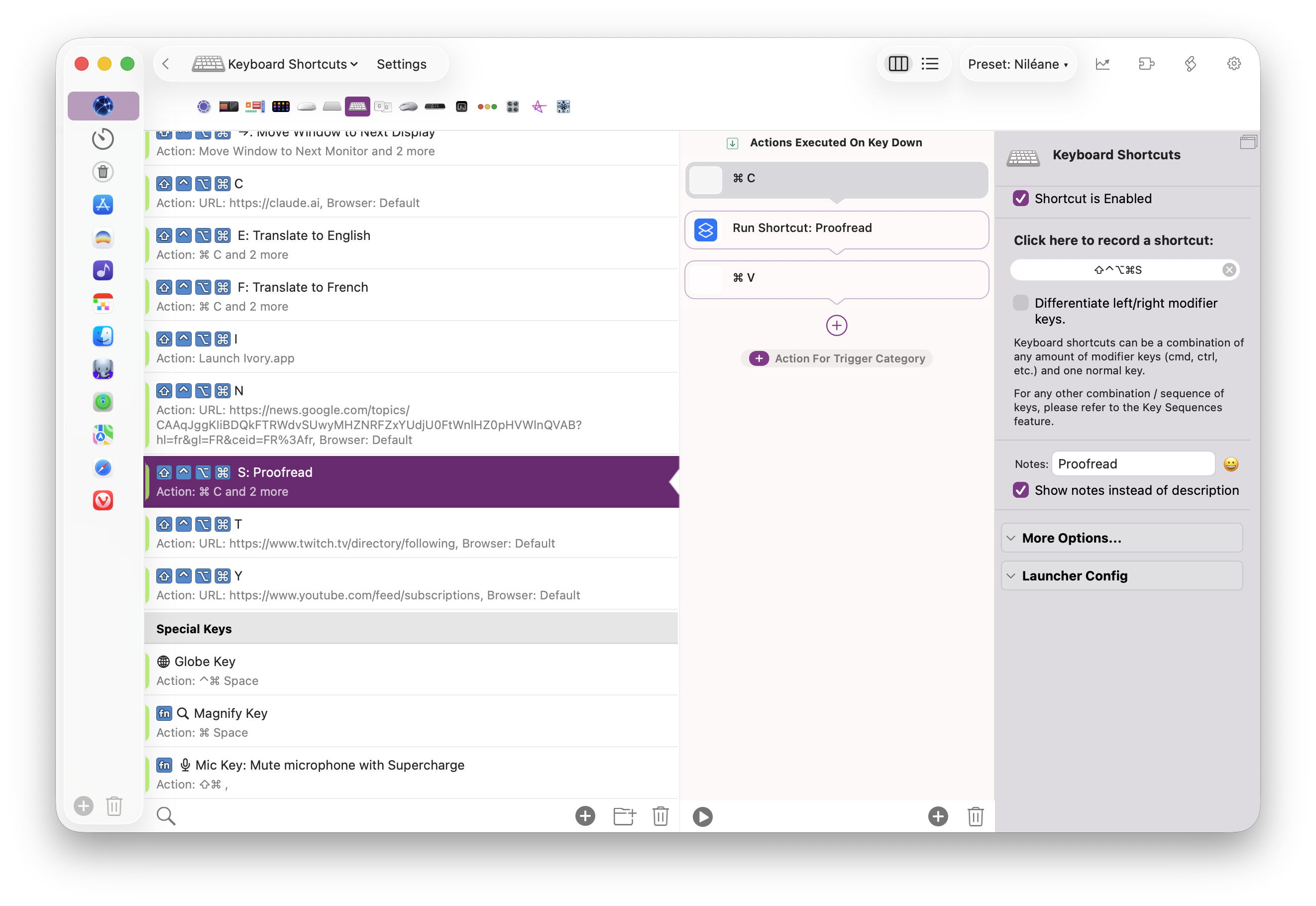
Transcript
455 segmentsWhat the heck does Chris say? Welcome to Comfort Zone, a podcast all about pushing your hosts, well, outside their comfort zone. My name is Matt, and I am not Christopher Lawley, but that's okay. He's somewhere in the world getting a puppy, which is about as nice a day as you can have, I think. So, in his stead, it is just me and Niléane. Niléane, how are you doing? Hello, I'm doing well. Thank you. I'm still in a semi-void as we're still moving stuff. You have a little bit of color there, though. Yeah, still.
That's part of the stuff that I still haven't taken apart. But yes. Nice. That's exciting. Very exciting things all around in the comfort zone world. Well, should we get to our tiny topics? I see there's a tiny topic about Tiny Start. Yes. I almost cannot believe it. Link in the description once again. Yes, just to like it's a bit of self-promotion I guess, but that's what we do on this show. I have pushed yet
another update to Tiny Start. This one, like, it's been a while. I took I don't know, about two or three weeks to do this one because I want to take my time don't want to rush anything because i i know i i with when i get really into a project i will rush stuff because it just it's the impulse to to just release stuff and keep iterating but i'm trying to force myself to take my time because hundreds of people are using this now and i'm really don't want
to push anything that breaks stuff so really gotta make sure that things are working so yeah this new update I released yesterday as we're recording is it adds something that a ton of people have been suggesting and it makes a lot of sense. I should have thought of it sooner. Now there's a setting to preserve the content of your search field when you quickly dismiss and re-invoke tiny start. And you can configure this. It's a setting, a new setting in a general tab in tiny start.
You can set it to 10 seconds, 20 seconds, 30 seconds, 1 minute, 2 minutes, 5 minutes. By default, it's set to 20 seconds. So if, for example, this is very useful if you're doing calculations while referencing something else on screen. So you're doing just like 2 plus 2. Okay, now you're looking at another number and clicking around. Now you have a new number that maybe you want to add to that previous calculation. You re-invoke tiny start. Oh, no, it's gone. That was what it was before.
But now it's still here. The 2 plus 2 is still here. If you're within that window, that time window that you set up, you can quickly resume a previous search. And, of course, if you don't want that, you can also set it to clear immediately. And so, yeah, so that you have the old behavior. But also you can set it to never, never clear the search field So that, yeah, even if it's been a few hours,
if you re-invoke Tiny Start, you will still have your old query in there with your last query in there with the last search results that go with it. Perhaps this is nice for people who don't find use in, like by default, when you invoke Tiny Start, it shows you like some of the frequent apps that you launch or the recently launched apps. If you don't find any use for that, you can set it to never and then tiny start will always display the last thing you searched for so yeah okay people like it yeah that's pretty cool i don't know if i've ever seen anyone implement
the never option i know but i guarantee you there's someone out there who's like finally someone did yeah maybe maybe nice okay yeah that is one of the things i do like is like yes being able to come back to a thing a few seconds later and then it's still being there so i can keep working and calculator is 100 the thing for me as well there's another way to do this like like raycast where you can do arrow up i think to go back through your history of recent queries
and i thought about doing this but i think that's like a step too far um especially for the feature set that i have like it's it's still a very basic launcher compared to raycast i guess in raycast it makes sense because you do much more complex queries you're maybe in talking to extensions and filling in fields with those extensions there's none of that in tiny start i don't feel like there's a use for just keeping a history of your hundred last searches it would be like would you rather
type in the first few letters of the app name or arrow up until you see it again yeah i don't know that doesn't seem as useful i agree keep it tight yeah that's right okay and now the next one i don't want to play the music but we could play the music and no one would stop us it's the browser podcast baby yes and there's nothing chris can do to stop us he's not here he doesn't have a say he
he's not even there in the corner moaning uh he's just not here but yes the browser podcast just because you posted something on Mastodon that made me think uh you posted the other day uh what was it again you were saying that how ai browsers are not the the agentic ai browsers that were like we will browse the web for you it seems like nobody cares about those anymore at all yeah they were a flash in the pan people were paying 200 bucks a month to like get access
to these like comet and um i'm projecting here uh and atlas and all these browsers and now it's like nobody even talks about these nobody wants them it seems like it's not a thing yeah they came and went a bit um and it made me think it made me want to check out Dia again uh it's been i don't know couple of months since i last launched it and i've got a new mac so i had to install it again I guess because
maybe I uninstalled it before because that's why it was not part of my when I transfer when I moved the Macs. I could see that happening. I feel like sometimes an app crosses into cringe territory for you and it just has to go. Oh, that's what happened. Yes, it got too cringe. Yeah, that's right. So I installed it again. And yeah, it's really good. In terms of UI, these people are good, like some really good designers over there.
And yeah, your post made me think about it because Dia is a very good browser and it's not because of the AI stuff. It still has the chat sidebar. It can still do ChatGPT, whatever stuff when you go into a new tab and type out a question or a query or whatever. That's still there. But apart from that, it's just a very good browser. It's just a very good new iteration of Arc. The sidebar is amazing.
They recently released an update, which is what I've linked in the notes, where they kind of revamped a little bit the design of the sidebar and the way tabs look and feel. They added a bunch of tiny animations everywhere that look really nice. Oh, the download animation. Have you seen that? Oh, yeah. This made me jump, actually, the other day. I downloaded an Excel file for something. Yeah, it just flies out into the download button. This is fun. Yeah, and the way they refought the sidebar,
it's kind of like arc where you can pin tabs at the top, and they are big squares that you can click on. And now they also have groups that you can pin. You can pin groups, which kind of resembles the way you could create folders in the sidebar before. Yeah, okay. Yeah, it's kind of a new approach on that, it feels, compared to Arc. And it works really well. Yeah, you can customize the colors, the icons. It's a very good UI browser for power users who are really into the sidebar, want something that feels really native.
It's so fluid to like, just moving stuff around, very fluid compared to even Vivaldi. Vivaldi is so awesome, but it's not native and you can feel it. Yeah. Yeah, no, it's super rad. It continues to be my favorite browser for work stuff. I think it's really nice when you have like websites that are just always open. If you have like Google Docs that you are just constantly going back to, if you have your Gmail, like, yeah. If you just have like apps in your browser, I think it's really awesome for that.
So yeah, it's fantastic. It's really, really good. They kind of just made a better version of Arc and that's fine for me. I guess I'm less grumpy than I was two years ago when they were like, we're giving up Arc. It looks like they agree with their people, like their users. I'm supposing most of the feedback they've got since Arc is people who have been in love with Arc before.
And just want that to continue on. Yeah, they got it, I think. They got it. Remember my prediction for our yearly prediction on the show? which was, I believe my prediction was twofold. First, Arc is going to die. They will kill off Arc, and they will rename Dia to Arc, which is a wild prediction. Fold. Yes. So, yeah. And the second fold is they will let you disable all the AI features in the new Arc slash Dia.
And they've started doing that, because now you can disable the fact that it routes you to a ChatGPT kind of UI when you do search in a new tab. Oh, I need to find that, because it always annoys me when it does it, because it's not like real ChatGPT, so it's not quite what I want. And it tries to detect if you want to do web search or if you want to talk to the AI. But no, now you can go to advanced and set the-- what is it? address bar, and you said that to prefer search engine.
And it will never route you to the chat. Okay. But if it's prefer, I bet I could manually select it if I wanted. Yes. It's still an option that you have to arrow down to. Gotcha. This is perfect. This is great. Yeah. Thank you for making Dia better. Then we have some listener feedback I wanted to share. First, we have Max and Joe, who have written in a few times before, I think. it's the only duo of people who write in but this is so funny like people who their online personas
are we are a duo yeah some people do that like they even have in social media accounts in common and all really i suppose most of the time it's couples but not often not always interesting um but max and joe said uh a few things but namely that they bought macbook neos for their whole company. They really think they're great devices for the business they have. And someone else wrote in responding to me talking about maybe in the future, I could buy a more powerful desktop Mac
instead of a powerful MacBook Pro and then use a cheap laptop. And I was like, but I'd kind of want the power on the go. They suggested using screen sharing. This could theoretically work, but it's not the same. This is, I feel like, yeah, I feel like there's network issues. Like there's all sorts of reasons why this would be janky out of the house, especially. But, um,
I do not like streaming video games like from the cloud. I, I just, I do not like it. I think Nvidia GeForce now is the best, but like I tried Xboxes, I've tried PlayStations, I have a PlayStation portal it sucks I hate it so much and it's because the latency is just too much it's too much and I'm just apparently very sensitive to this and I use high refresh rate displays with gamer mice that you know are optimized around response times and so like I'm
very keyed into response times on things and just like using a remote computer is like it's something you do in a pinch it's not something you do like for any amount of time so it's unfortunately i don't think a solution for me but maybe it could be for someone else yeah yeah i agree screen sharing it also brings up so many like frustrations it is when it works it works but when it doesn't work you just you want to you want to kill something and you have no idea what to scream like what to
scream at like where is it going wrong is it my network yeah what's happening oh my god yeah yeah I suppose with tail scale it's all right nope I believe everyone using tail scale is lying it's not actually useful because I can't figure out any real use for it but anyway um I will say I've been using my MacBook Pro around the house the last few days and oh man it is so refreshing in a way after using the Neo for so long. Like, it's a little bigger, it's a little chunkier, it's a little heavier. But, man, it's fast.
It's so nice to have just, like, the full-speed Mac again. I'm doing Xcode development, and ooh, it's very nice. Nice. Speaking of which, I need therapy because, you know, I bought a MacBook Pro M5, base M5, and already the thing that I was fearing is happening where the M5 Pro is on sale in some French stores right about the price that I got this base M5.4. So now I need therapy. I need to be told that it's okay. It's okay.
I could not have known. You need to adopt the Marco Arment theory that the Pro isn't actually worth anything. It's fine. You don't need the Pro. The bang for your buck is on the one you got. You're okay. That's right. Yes. This week on Cozy Zone, our members-only podcast, which you can subscribe to in the description, we talked about our macOS docs. And the only note I have in here is the left rules. Yes. That's all I can say.
And I've put in our notes the Bugs Bunny meme where he's doing the pose with the USSR flag in front. Yes, because indeed, the left rules. USSR not so much, but yes. Yeah, you know, it's a... It's a con. So check it out. It's a fun episode as always. Cozy Zone, great show. We've done like... What have we done? That was our 35th episode. We've done 35 of those episodes. If you subscribe now, you get access to the whole back catalog. That's right.
You wouldn't believe them. They don't go away. Yeah. Which means the membership gets more valuable every week. That's true. If you amortize the value of the membership, it's really outstanding. It's better than getting into crypto. Obviously. Obviously. Definitely. So, okay. Well, I think we should move on to the main show because I am excited about your topic because it might help my topic.
Yes, it might. Very well. Yes. Okay. So my topic is I want to talk about Better Touch Tool because it's been a while since the last time I did. Probably on the show, it was probably 80 episodes ago, last time I talked about Better Touch Tool. When I was writing on MacStories, this was my very regular topic of choice to write about my Better Touch Tool automations. So if you don't know, Better Touch Tool is an app that you can get for the Mac.
It's a one-time purchase, which you always love those apps. And it's extremely powerful. The UI is not great. Clearly, this person who makes Better Touch Tool, a great guy, by the way, he's not a great designer. he's not like, but it's okay. This app is amazingly powerful. It does so many things. And it's been, I don't know, it's been three years since I first installed Better Touch Tool, even more, even longer than that, probably. And I keep discovering new things that it can do,
even though it's sometimes things that it's been able to do since the beginning. So it's some of the, yes, just to tell you how powerful this is. And I want to run you through, maybe, if you'd like, my current automations in there, what I'm using it for. There's not hundreds. I regularly prune what's in my Better Touch Tool because sometimes I create automations that are amazing that I don't end up using. So, yeah, I want to walk you through the stuff that I have in there. Okay.
This would be very helpful. Better Touch Tool is one of those apps that I do not use because I do not understand what it will actually do for me. And this is how I felt about Keyboard Maestro for years and years. I was like, Keyboard Maestro is magic. It's incredible. What can it do? Everything. And it kind of can. But it eventually clicked with me, and now I love Keyboard Maestro, but I do not use Better Touch Tool. So I'm interested to see what you're doing with it. So the way Better Touch Tool is – so you're right. It does anything.
So first question of the way. What does it do? It does everything. but mostly it lets you set up automations that are triggered based on your inputs mostly it also can do that also has more advanced triggers so for example you can set up things to do with your trackpad things to do with keyboard shortcuts with mouse buttons with key sequences like if you yeah if you type a specific word maybe in the air like not in any search in any
field on your mac it will trigger something um so the first automation that i have and i've had this in there for as long as i can remember since using better touch tool it's for the trackpad it's an automation that lets me three finger tap on my trackpad to focus a window to bring it to the front because when I use the trackpad so I might ask I no longer use the trackpad but when I'm on the go I use the built-in trackpad of course and I think it's annoying to just to have to click on
windows on the trackpad to focus them always it feels like I'm tripling the number of clicks that I'm doing per minute just because I I need to click on the windows I want to bring to the front and to alleviate that, I've done this. It's your three-fingered tap. You move the mouse cursor over window, three-fingered tap, and it just brings it to the front. You don't have to press harder to click on something. It's less tiring, I find. Wait a second. I don't understand. Yes. Clicking. Oh, wait.
Do you have tap to click enabled on your trackpad? No, no, no. I hate that. Oh, okay, okay. I was going to say, this problem is solved by just single clicking. And I didn't understand what's going on. I don't like tap to click. I've never liked it because it's too easy to accidentally click. Yes. I like having to click on the trackpad to actually click. So, yes, you're right. If you don't have tap to click, I suppose it's not an issue that you need to deal with. Okay. Gotcha. I do tap to click.
So this one hasn't won me over yet. But it is weird because I bounce back and forth. I sometimes click. I sometimes just tap. And I'm just doing mental math every single time I need to click something. Like, how much effort do I want to put into this one? It's a weird thing. Maybe you need to switch to my way. You need to disable tap to click. Because sometimes my fingers get tired. I just like to tap. That's great. But maybe your fingers would not get tired if you had this automation embedded. This is interesting.
Okay, I'll consider it. Three-finger tap. Yes, think about it. Okay, so this is the only thing set up on the automation I have set up for trackpad. That's it. Moving over to keyboard shortcuts. Here, I have so many things, but it's actually one thing. It's just hyperkey stuff. BetterTouchTool can be your hyperkey app. You can set up the caps lock key in there to act as a hyper key. Chris has talked about it before. I have talked about it before. I think you as well one time.
So, yes, a hyper key is where you can set your caps lock key to act as if control, command, option, shift are all pressed at once. So, you can trigger anything you want with custom shortcuts like this. And yeah, so I have that set up and a bunch of hyperkey shortcuts beneath that. I have one where it's hyperkey left and hyperkey right to move a window to my other display, like to move windows between displays. I have hyperkey E to trigger a shortcut that I have,
which translate the selected text on screen, wherever it is on screen in any app, translate that to English. That's why it's hyperkey E. And the same one for French, hyperkey F, translate to French. So it's a shortcut. It's a combination of the two. It's a shortcut that I've made in the shortcuts app, but it's also a better touch tool doing some magic here. When I actually do hyperkey E,
what it's actually doing is it's pressing command C to copy the text that I've selected somewhere, then run the shortcut. The shortcut takes the clipboard content, translates it using the Apple Translate Included action, and then the Better Touch Tool does Command V to paste it so that it replaces whatever I've translated instead of what was there before. So this is really nice.
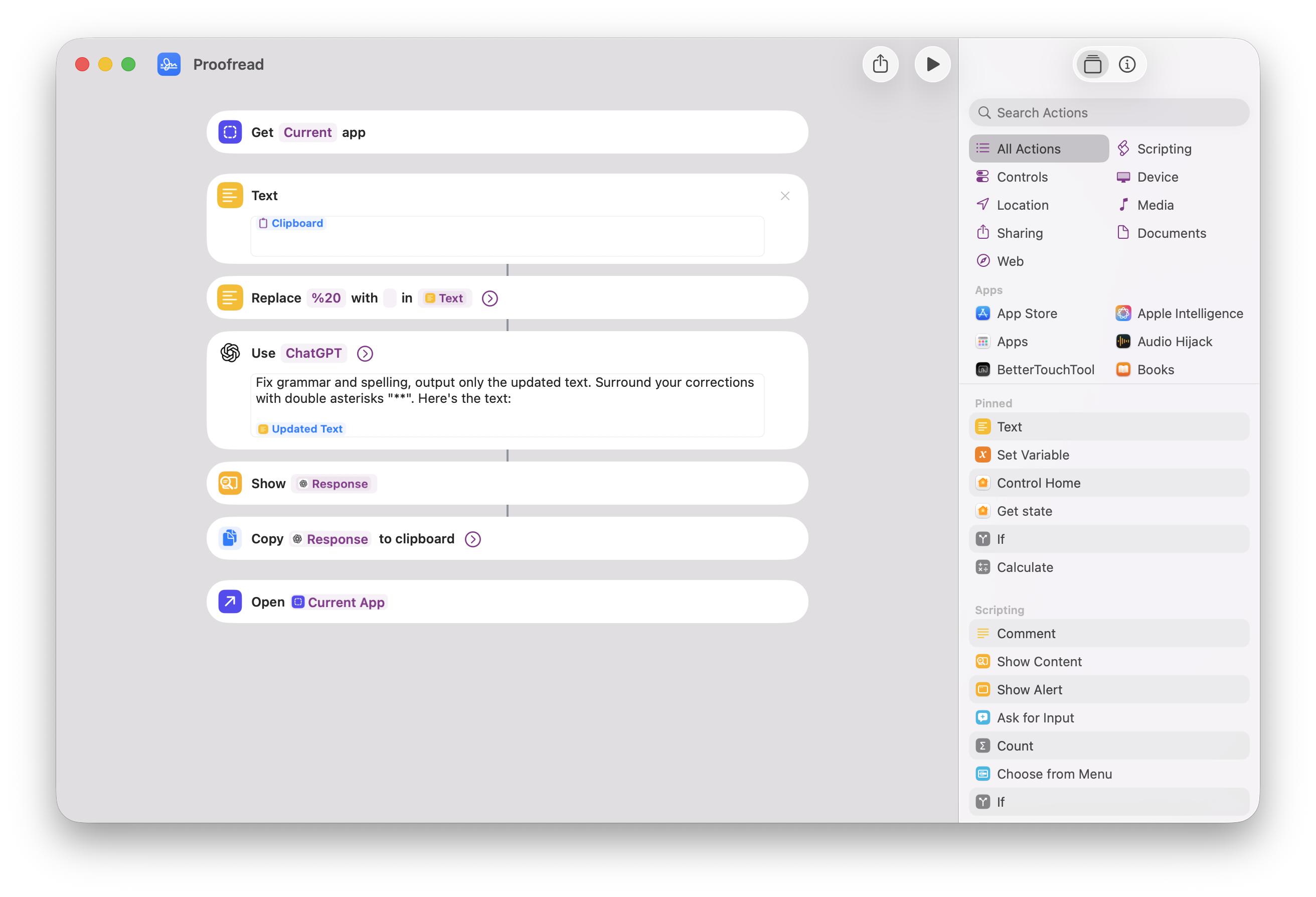
I have a hyperkey I, which launches Ivory, or brings it to the front if it's already launched. And a bunch of others that I won't mention. It's just like mostly bookmarks to websites. I have one where it's proofreading. Same concept as the translate shortcuts. It's just passing through the clipboard content to a proofread shortcut that I made. how does the proofread shortcut work I don't remember actually let me check
how does it work because now it just works and it feels like magic I don't remember what I did interesting I'm curious about this one okay let me check proofread there it is okay so it gets gets a clipboard yes it normalizes it okay for new lines and all of that. Oh, it's using a ChatGPT action. Ah, okay. And I have a prompt in there that says fix grammar and spelling. Output only the updated text.
Surround your corrections with double asterisks. So that it shows what it's modified in bold. Oh, that's nice. Okay. Yes. And then it copies the response to the clipboard so that better touch tool, the next step in the automation in better touch tool so that I can paste it and replace with the proofread text. That's pretty good. That's a good tip. I know. Okay. Well done. I have forgotten I did that, but it's nice. Yes.
Maybe I can include a screenshot for this or not. So, yeah, this is my keyboard shortcut stuff. I have one more in there, which is mapping F17 to SoundSource. So F17 is a key that probably doesn't exist, but it actually exists in software. And on my mechanical keyboard, the new fee, one of my special keys. Oh, okay.
This one, a special key here I've mapped to be F17 and chose SoundSource in the menu bar. Okay. There you go. Oh, by the way, let me look at this. So this is the F17 key I'm talking about here. Yep, yep. It looks like a waveform, right? Oh. Uh-huh. Okay. But it's actually the divide sign that's sideways. Oh, boy. Because I'm really smart. That's pretty good. That's pretty good. Can I show you my shame in my keyboard layout?
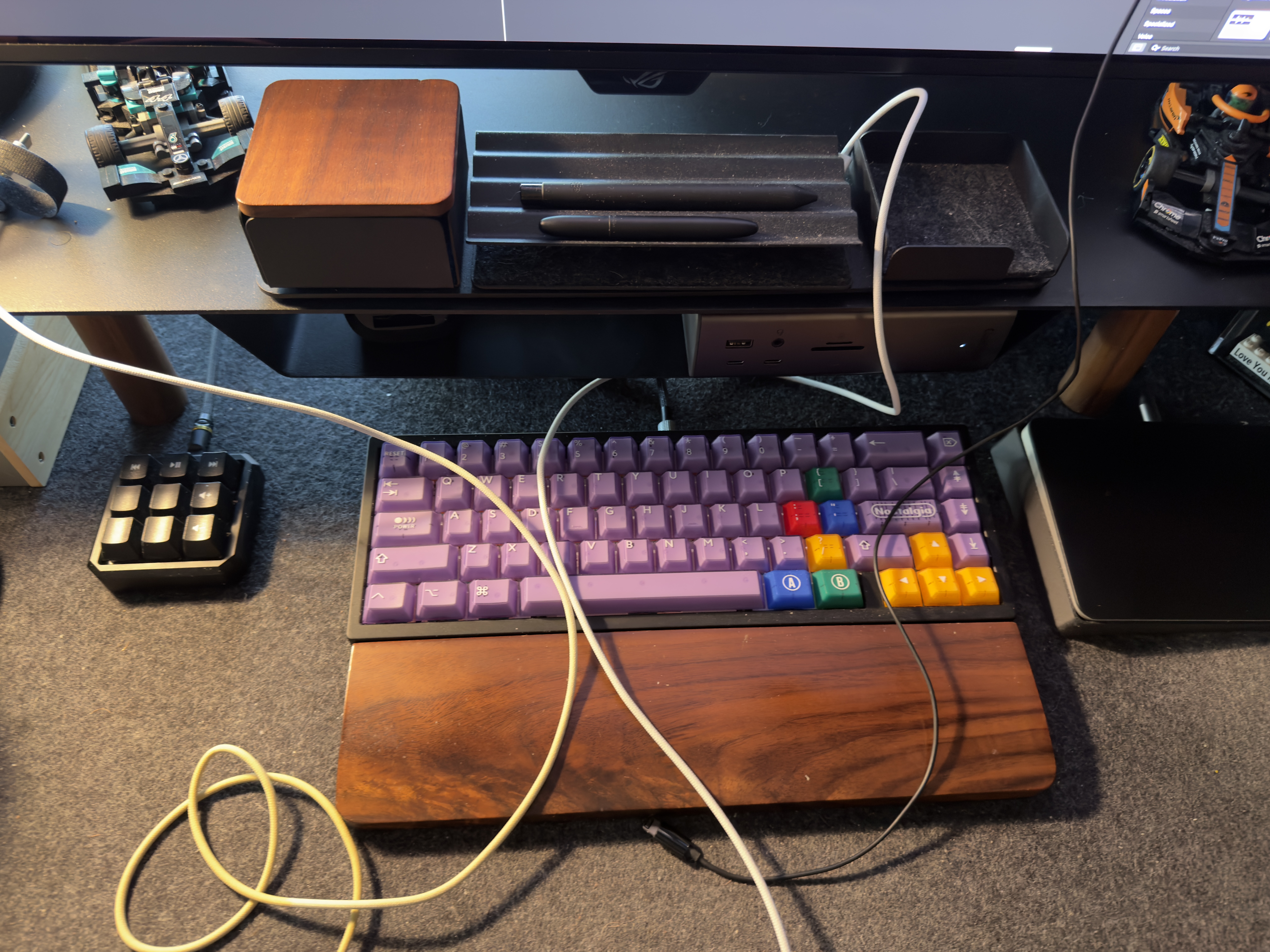
Oh, my God. Yes. this is my keyboard i'll try to describe it for audio listeners i have on the right edge i have delete at the top and then i have negative and minus and plus these are volume controls when i hold down the the function key um but this one is the plus and this is the minus so but it's because of the keycap set that i have they kind of go in that order naturally so i have them there but i i do
gymnastics with my computer, I guess. It's not intuitive. Oh, yeah, because it's not a low profile or the keys are. Yeah, so they're different heights, so I had to put them in that way. It's still the best keyboard in the world. Okay. And now we're coming to the juicy stuff. The stuff that I've just discovered. The touch bar customization. No, but a touch tool can do that still. If you have a touch bar, you can customize it with BetterTouchTool, I guess.
No, I've discovered that BetterTouchTool can fully replace Logi Options Plus. Mind-blowing. I had no idea. Tell me everything. Okay, so it's kind of weird because the UI is weird, but it works once you figure it out. And they have a support page describing everything. And they also have a preset available for download. So you can just download it, Add it to your better touch tool setup and modify it so it's easier.
But yes, it can fully replace Logi Options Plus for your MX Master. For instance, I have the 3S here. I know you have the 4 now. And yeah, it can do anything. You can set up the scroll wheel, for example. I hate when it switches to the free-flow, free-flying, whatever mode. I want it to be in the ratchet mode all the time. You can do that in BetterTouchTool. You can set a custom DPI setting. You can customize the acceleration, the cursor speed, and all of that. You can also do gestures.
So I have the same ones that I had set up in Logi Options Plus and in BetterMouse when I tried BetterMouse. So holding this, how do you call this button here, below the scroll wheel, the tiny button. I don't know. the switching mode button. Yes. So this is my gesture button. This is the one I'm used to using as the gesture button. I hold it down and move the mouse to perform gestures. So what I do is holding it down
and swiping left and right for switching spaces. I click it once to do the smart zoom in macOS because I tend to do that when I read stuff on the web. I really like zooming in on the column of text to read it. that what else I have got oh and also better touch tool it does a smooth scrolling and it's very very good very very good I really like it me like it you add a trigger in there the action is called
scroll modifier smooth scrolling like trackpad this is the full name of the thing that you have to add it's weird the UI is weird But in there, you have so many numbers you can tweak. If you leave it all by default, it's pretty good. So you can live with that and tweak the values as you go. The values that you can tweak are vertical speed, so how far down and up you go when you scroll one step, I guess, and multiple steps. A horizontal speed for the thumb scroll wheel, the side one.
For scrolling horizontally, you can tweak the smoothness, the acceleration strength. There's a discrete line mode where you can, it makes it easy to scroll line by line, for example, in an app like Excel or whatever, if you find that useful. And yeah, there's so many things you can do. And of course, because it's a better touch tool, and because it's a better touch tool, you can add exceptions to every single app. You can do that as well. You can disable the smooth scrolling in specific apps. You can change every single value for specific apps as well.
So it's very powerful like that. For example, in the Maps app, smooth scrolling is not good. It is doing weird things. So in the Maps app, I've tweaked it. I've tweaked it to be slower speed. In Ivory, I tend to scroll way faster than I do on a web page. So in ivory, I have my vertical speed way higher than in Vivaldi. So yeah, I think you should try it out. I think, Matt, you're suffering. I hear that you're suffering with your Logitech mouse. You may try this out.
Logi options, I hate it so much. So I would do almost anything to get rid of it. So this is the most compelling thing by far. If it can just make the Logitech mouse work nicely without that cursed app. Yeah. Okay. This is pretty neat. And it's got an option to simulate the trackpad scrolling as well. It's nice. I don't... I like it without, but it's a nice one to have. If you really like the feeling of scrolling with a trackpad,
you can add that to your Logitech scroll wheel. It feels weird, but I can see how you could like it. okay it's also nice because you can over scroll with this for example so if for safari for example you can over scroll when you at the top of the page and refresh the page that way it has some benefits interesting yeah same in ivory hmm yeah all right well that's intriguing they have a 45 day trial
that's pretty nice pretty generous and then uh what are you looking at 15 for a standard license 25 for a lifetime license that's pretty pretty cheap i got the lifetime one never regret never regretted it it's awesome okay well you have won me over a little bit all right last few things that i'm doing with better touch tool i have one too it's a weird one it's a weird one but i it's awesome um
i have my macbook on the side on the stand to act as my second display it's like a secondary display most of the time i don't use it right now there's overcast uh no not overcast castro open with an atp episode on pause and it's been there for a few hours so this screen is not super But what I use it most for is when I'm watching a stream, for example, I like to put it on the second screen. And to do that, I have a multi-step automation better touch tool, which for Vivaldi, for instance, it detaches the window from like the tab.
Sorry, detaches the tab from the Vivaldi window to put it in a new window, then move that window to the second screen and maximizes it. So it's just a few steps like that. And it's awesome. And I mapped this to command... What is it? No. What is it? What is it? What is it? What is it? Move window to next display. Oh, that's right. Hyperkey left, which moves windows to the other display. But in the case of Vivaldi, there's an exception there
to trigger that automation instead of just moving the window to the other display. Oh, boy. Okay. So it's the same shortcut. I don't have to remember a separate shortcut. Okay. This feels very much like Keyboard Maestro. I suppose. I've never used Keyboard Maestro. Okay. A lot of the same like sorts of like, I just, maybe the things it does are slightly different, but like this, oh, it can do literally anything. There's more mouse stuff here, I guess, than Keyboard Maestro has.
It started like that, I think. It started as a way to customize mouse and the magic trackpad. And you can do all sorts of things now. Okay. Well. So that's it. This was my BetterTouchTools 10 account corner. Hope you like it. I will try to include a screenshot of my proofread shortcut in there. Nice. Yeah. I just need to find this config for the MX Master, And I'll be in heaven. Yeah, it's on their website.
Yeah, there's a whole community of setup sharing, like preset sharing with like hundreds of thousands of views. Oh, yeah. They have a full-on forum where people are extremely active. And it's awesome to see, honestly. Nice. Lots of people trying to fix the touch bar. No one fixes it. Oh, my God. it can do widgets as well and i i hear that i've seen in the latest beta release uh better touch
tool has a spotlight spotlight alternative now as well oh the developer is working on yeah okay it looks a lot like tiny start but way more complex there's so many there's a lot more stuff i'm shocked i'm yes I don't feel threatened. It's okay. That's good. Yes. Everything, I do not know this developer at all, but based on, they also make better snap tool. Yeah. And then a keyboard clean tool, which is actually,
this is really cool. This is one where it like disables your keyboard for a moment while you clean it. Oh, yeah. Which is very cool. But in their description of it, they said, Years ago, Apple rejected the app from the Mac App Store because it apparently it's not useful. However, I use it all the time. And I clean my laptop keyboard sometimes, and it is so annoying because it just turns the computer on, and it starts typing, and you just have to be very quick and make sure you're in a text document or something. It's very annoying. So that's a cool app. But they seem like the sort of, they have every feature.
Like, oh, can you add this? Yes, I've already added it. Like, that's the sort of attitude, I feel like, which is not the tiny start. It's definitely the attitude because when you search for things on the forum, there's always the developer in there saying, okay, I can add this. And then it says two days later, okay, I've added it now. Can you update to the latest beta and try it out? So it feels like this person just wants to make people happy, whatever they want. Just he will add stuff. I like that there's people who do that. Not everyone can do that. Definitely some, lots of experience there.
It's a guy who knows what they're doing. Yeah. All right. What do you have to say to me now? What is your topic? Oh, boy. So, I mean, I've already spilled the beans a little bit, but my topic is a new mouse. It's the MX Master 4. And you love it, right? I love it. It is a perfect upgrade. Just for some historical context, my day-to-day mouse is this Pulsar mouse. I forgot what it was called. X2. X2 something. X2 Crazy Light.
Crazy Light is the official name. Oh, yeah. It's awesome. It's super, super light, as you might imagine. It looks nice, and it has everything that I need except for side-scrolling. So because I do sometimes need side-scrolling, video editing without that is a royal pain. I've kept an MX Master 3S around for a while because it has nice side scroll and I also have a Windows computer so I need a mouse for that. So anyway, I have this and I love this mouse. This is like such a nice mouse. The clicks, the clicks are, you can barely hear them. Like they're wonderful. Feels really good in my hand.
I like the material. It does get messy and is annoying to clean because it's kind of tacky and a little like, it's not like a hard plastic. It's a soft plastic. But other than that, feels really good. Feels great in the hand. All the buttons are where I want them. Looks nice. Wonderful. The MX Master 4, I think, is... So, a day after I got it, I wrote a blog post that was a little spicy. Yeah.
Because I was really frustrated with it, because I thought everything good about this mouse was just things that it inherited from the previous MX Master. and every single thing they changed about it made it worse, which is not a good update. The functionality is great, but the old one had it before. The three devices, awesome. They've had them for years. Yeah. The scroll wheel, I have it in the non-ratcheted mode. It just spins forever. Love it.
That's insane. But it's been there for years as well. So there are some things that are worse. uh i don't know how i feel about the design of it it's a little different and i think i like it less and when i go the only thing it has going for it is it's new the uh the 3s is so it feels like it's one smooth device there's not a lot of seams in it the only seams are really where the like the
mouse uh the clicks are um it's it's got this like subtle like lining like lines across the left side and i just it's just so nice and this feels like it's just it's a harder plastic which i don't hate but it's not great uh the frosted like plastic look on the keys around the the clicks i don't know what these are called buttons that's the word it's it's fine it's okay but uh i don't think i
prefer it and the thing that really kills me about it is the handling they've changed the shape a little bit so this is this is so minor but on the 3s if we hold it straight up there is a curve where your thumb sits, and it starts to curve back out away from the center of the mouse before the buttons. There's the back and forward buttons. So when you're using it, and because it's a tacky kind of surface as well,
at least with the way I held it, my thumb, when I just lift, because you're lifting your mouse off the surface a little all the time, my mouse or my thumb is underneath the buttons, and it just sticks there. It's nice and easy. I've had to retrain myself how I hold this mouse, because on the 4, it is not like that. If I hold it up to the camera, it's kind of straight up. So if you don't grip hard enough on the side, when you lift the mouse off the surface, you're going to be catching the bottom of the scroll wheel, and your fingers are now on the back and forward buttons.
So I kept accidentally clicking those when I just picked up the mouse, And because the thing below it is now like a haptic clicking thingy, when I held it lower and held it more firmly, I was triggering that action as well. Oh, wow. So I was getting like the radial menu that the stupid Logi Options app brings up, which looks so cheap and not like macOS at all. It's terrible. It looks like it's running at like non-retina resolution.
It's crazy. So I don't like the feel of it. And I don't feel like I've ever felt this with a mouse before. Like, I never felt like I had to, like, train myself, really, to hold it. But, yeah, didn't love it. This is a very me thing. I mean, I'm sure there's people out there who are like, you're crazy. It feels great. But I don't love it. Yeah. The one thing I do like is the side scroll is, like, right on the edge now. With the old one, it was kind of inset a little bit in the side, which is fine.
But I can kind of like spin it more with one motion than I could previously. So that's nice. And I don't know. That's pretty much it. It's okay. But I am frustrated by it because it feels like it's just, I don't know. They just had perfection. This was great. Maybe there's people who have to agree. The first person that I saw mentioned this shape problem. It's so obvious. I mean, I feel like... I feel like...
A lot... Okay. Have I written about this? I've been thinking about writing this. I don't know if I've written about it. Oh, I did it on my solo podcast. One of my pet peeves with reviews. This is where I'm getting into my... I'm doing a Chris thing in his absence. One of my pet peeves with reviews is where it seems like it didn't matter if they had the product or not. They just looked at the spec sheet. They looked at the marketing materials, and they're like, this is my script for this review. I don't understand how you could not notice this sort of thing.
The whole point of you doing a review of a product, especially if you had early access to it, is to tell me things that aren't on the spec sheet, to tell me other things. And sometimes I feel like it didn't matter. Like this review would have been the same whether they had the product or not. And that's kind of what I felt with this because no one said anything about that. But like it was immediately obvious to me that like, oh, this has a different feel. And that's like a lot of what a mouse does. So I had to talk about it. Especially because the MX Master is a bit heavy. So you do tend to lift it often when you do big gestures. So, yeah.
It's fine. If you like it, I get it. But for me, and now I'm in the sunk cost space where I bought it, so I should keep using it. But, yeah, it's not my favorite. I think the 3S is still the productivity champion, and I just love this little gaming mouse so much. I can't give it up. Look at how there's so little plastic in here. You can see the circuit board. it's great the zebra pattern I don't know you gotta have a little fun you know
so that's the MX Master 4 it's alright if you have a 3S I would really not suggest getting it gotcha I will have a mouse on the way but this is for another time it's on the way I have a mouse on the way The mouse podcast is beginning. Yeah, that's right. Should we move on to the challenge? We should move on to the challenge. And it's possible we will get a real-time contribution from Chris on this. Let me...
Okay, so the challenge was imitate one of your two co-hosts with your text setup. The idea being that me, for example, I can tweak something about my setup, whether on my phone or on my Mac or with my physical space, to imitate either you or Chris. And you did the same as well as Chris. Chris is not here, but Matt just texted him and he's supposed to send us something because he did participate.
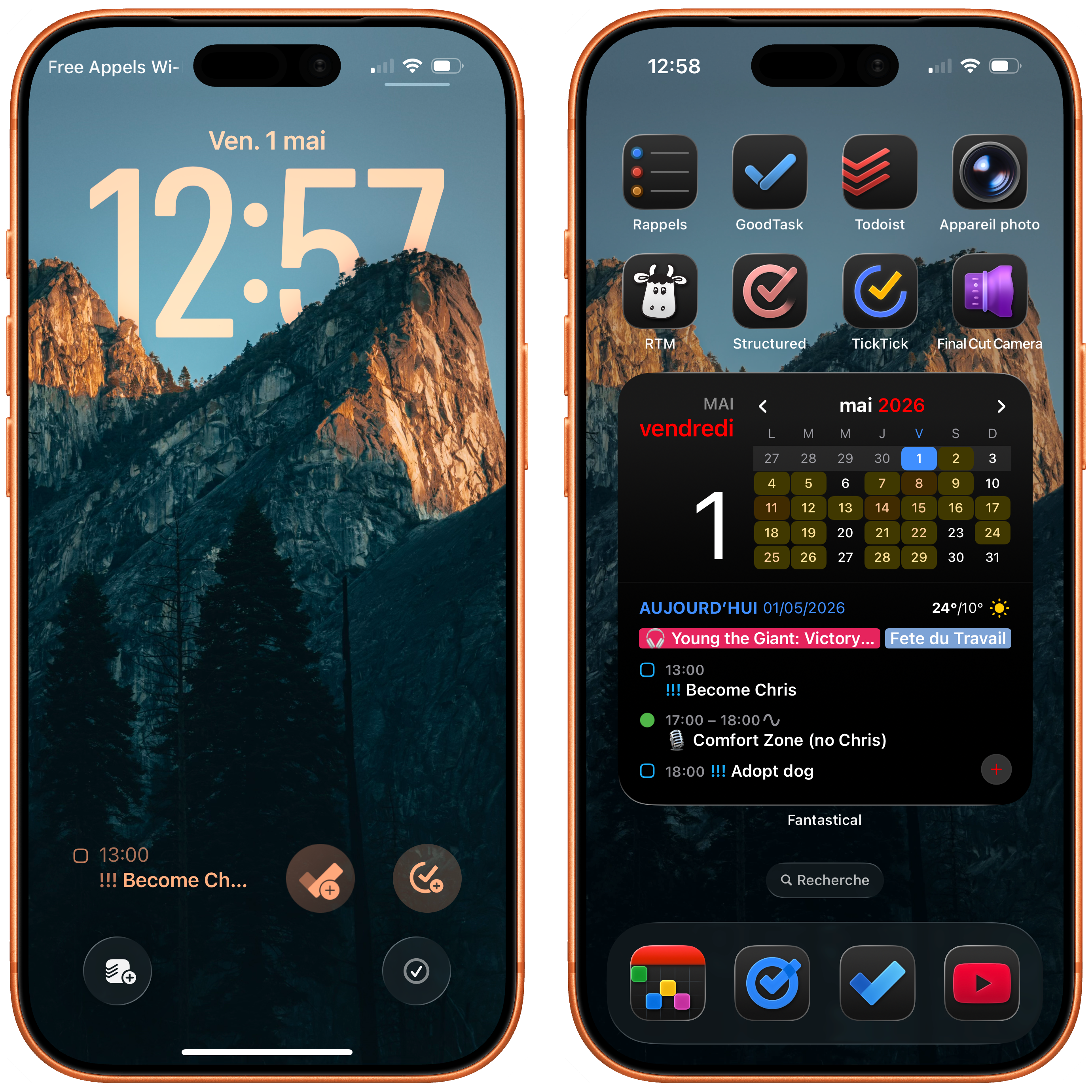
So we'll see. In the meantime, we'll just go through ours and then we'll finish with Chris. Okay. Okay. So you can unfold mine in the notes in the spoiler tag. I have made a Chris home screen setup. Yeah. So, yes, if you look in the show notes, there's a screenshot. in screenshots. I have pulled one of Chris's wallpapers
that he sells that I bought years ago. I've always been a fan despite what he says. So yes, it's one of those Yosemite, whatever mountains, the California ones. Nobody cares. Yeah, no one knows. One of those mountain photos that he has. Very dark. I've put all the icons in dark mode, of course, because Chris is a dark mode boy. And yeah, and I've made a full Chris setup. I've downloaded the apps that Chris uses.
First off, for the home screen setup, I've put the camera app in the top right. This is something that it's a pet peeve of him. Weirdly, he just feels like the camera app should be where the actual camera is on the back of the phone. It doesn't make sense. It's not how all he cares about. It's weird, yes. So, yes, I have a camera app. Camera app all the way up there. And, of course, what does Chris use? Chris is all in on to-do apps.
So, I've got all the to-do apps. It's all the to-do apps on this home screen, just like Chris, just like the real Chris setup. So we've got Reminders, GoodTask, Todoist. Remember the Milk. Structured is like an agenda planner that he obviously uses as well. TickTick. Obviously, he's a YouTuber, so we've got Final Cut Camera here. He's a Final Cut boy. So obviously, he's filming with Final Cut Camera all the time on his phone.
In the dark, fantastical, because, yes, one more place for the to-dos. Which one is that? I think that's Microsoft to-do as well. You've got to use Microsoft to-do as well as Google Tasks. So all the to-dos. The YouTube app is there because he's got to look at his subscribers' numbers. Very important. Daily task. And, of course, a massive fantastical widget with all of his to-dos as well. in this fantastical widget.
You can see with some priority tasks as well that are very important. Become Chris is the task that I had put in there for myself to become Chris and to impersonate him for this challenge. And obviously he's adopting a dog as well. So I've put in that as a to-do for today. So there you go. This is like Chris's setup. He's all in on the to-dos as he has always been and will always be. This is inspired.
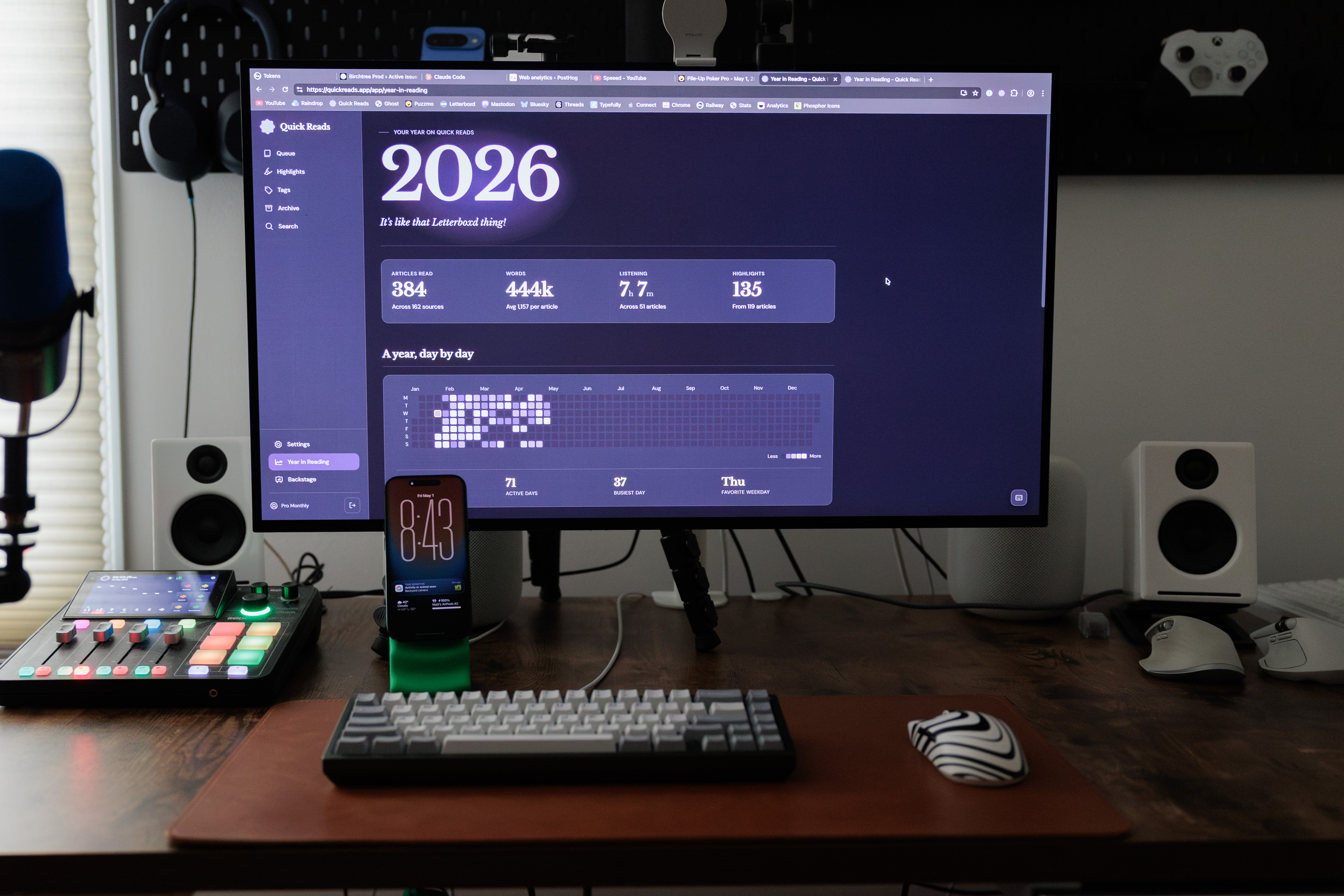
This is very good. It is enough task managers, I think. You could shrink that Fantasical widget a little bit and you could get things in there. I'm sure there's 100 in there. That's true. But man, okay. All the to-dos. This is perfect. I love it. Even the lock screen has all the to-dos, the widgets. Yes. Okay. All right. Well, I have also imitated Chris. Oh, yes. But it is more of an attack than a compliment. So I have provided this photo,
and I would like you to guess what about this makes it Chris. What is this? So I'm looking at a photo of your desk. There's a full screen web browser with Quick Reads on there. oh I got it you've got your iPhone on a MagSafe stand that's covering I don't know not exaggerating 90% of the screen because it's in front of the monitor
yes absolutely this is a Chris move 100% and yes if Chris was there right now he would argue that it's not covering anything on the screen it's just so indeed well done i think this this works well this is chris nice yes i had to specifically 3d print that to make this work oh you did okay i did oh yeah i didn't just have that around that would be crazy the green stuff that's a 3d print with a little MagSafe puck in the back
all right um we do have a hard out today in a few minutes so we're gonna do chris's next and Chris is an attack as well Oh wow Chris has sent us a photo of his desk with cables lying around all over the place with cables coming out of the monitor cables going over the keyboard I don't care I don't know who he's it could be either of us I mean I don't know who No it could not be either of us
I think it's one of us, but it's not me. Yeah. Well, well done, Chris. I guess it works well that we both did him. Yes. We allied against him. It would have been more work for us to do one of you because we'd have to make it very aesthetic and very nice. But simple boys who don't know how to do that. Yeah, I was guessing maybe if one of you did me, you would have like an EQ app or something. Yeah.
I'm just always on the lookout for a way to use my 3D printer. All right. So it's my turn to do the challenge for next week. And it is actually very related to what you talked about today. And it is to use a web browser that supports mouse gestures and find a really nice gesture that revolutionizes the browser. So easy. I'm clapping. Perfect. Love it.
This is awesome. This is something that I'm already doing. So this is great. Okay, perfect. We'll bring your best one next week. By the way, BetterTouchTool lets you do mouse gestures in browsers that don't have that. Oh, my God. It does everything. Yes. all right uh that brings us to the end of the show i do not have an end of the show question me neither okay well we will just carry on and look forward to seeing chris next week
uh puppy in hand hopefully puppy on camera but uh yeah that's uh that's it i don't remember what chris does for the ending something about the r max stories podcast there is a cozy zone you can subscribe to uh next week is the episode 100 and we're doing q a so send us questions all of the questions yes link we will post on Mastodon asking for questions probably and we will have a link and you can use the feedback form to ask questions we will answer any question that you give us
within reason but it can be about anything yes it could mostly be about chris like the weird thing that Chris does. Don't make it too much about Chris. He's going to get a big head. All right. Well, that's it for this week. Niléane, anything you wanted to plug besides Tiny Start? Tiny Start. Yes, that's great. Incredible. All right. I'll see you next week. Bye.