I Need to Tell You Something

Now playing
I Need to Tell You Something
Show Notes
Matt is leaving you Unread, Chris is gaming on the go, and Niléane brings an addictive drug you can download from the App Store. Oh yeah, and there are several terrifying reveals.
Weekly Topics Other Stuff We Discussed- Dark Side of the Moon on Apple Music
- Daft Punk on Apple Music
- Reeder 5
- feeeed
- MacStories feeeed review
- Feedbin
- Inoreader
- The Verge full-text RSS feed
- Delta emulator
- Backbone controller
- 8BitDo Micro
- Gamesir G8
- Analogue Pocket
- Firefox OS TCP
- Firefox tablet photo 1
- Firefox tablet photo 2
- Firefox tablet photo 3
- Firefox tablet photo 4
- Wordle
- Puzzmo
- Grindstone
Transcript
925 segmentsWelcome to Comfort Zone, a podcast all about pushing your hosts, well, outside of their comfort zone. I'm Christopher Lawley, and every week I am joined by two intrepid co-hosts. First up, Matt Birchler. Matt, how are you doing? I am feeling revitalized today. Ooh, I'm loving the big words. We're also joined by Niléane. Niléane, how are you doing? I'm doing well. No big words for us? Nope. Okay. All right. Moving right along.
Well, we have an interesting show, but before we get into it, we had a little bit of follow-up I wanted to do. Niléane, you texted our group chat right after we recorded the last episode about something, and I just want to take a minute to say somebody on this podcast was right, not Matt, but you tried something with your AirPods Max. How did it go? What did you try? Oh, you're springing this on me, huh? Yeah, yeah, yeah. I literally wasn't going to put it in the dock.
Yeah, after the show last time, I tried to listen to a bunch of albums in spatial audio. And turns out they're not so bad anymore. I think they're pretty good. Yep, as long as it's mixed right. And I'm telling you all, if you haven't listened to Dark Side of the Moon in spatial audio, you haven't lived. Yeah, that one is impressive. Yeah. I have stumbled upon a bunch of other ones that are really good. The Daft Punk one, the 10th anniversary edition.
So good. Can I be... I know this isn't exactly a safe space, but I've revealed quite a bit on this podcast, so I'm going to reveal something else. Chris, you don't have to say what you're about to say. I don't like Daft Punk. Oh, no, you said it. Any of that kind of like EDM electronic, hey, I can hit the space bar on my MacBook Pro music. I'm not a big fan of it. Oh, Chris. Oh, you have such an education to be delivered. All right, that's a show. See you next week. Bye. Yep. Hey, this is all about getting us out of our comfort zone, being honest with who we are.
I canceled my therapist. You guys are my new therapist now. Oh, no. I didn't sign for this. No, I'm not getting paid for that. Next week, I am bringing a listening party. We're going to listen to random access memories all the way through, and Chris is going to smile the whole time. It is your challenge this week, and I'm really hoping I just didn't convince you to change whatever you had planned. Listen to Daft Punk. Appreciate it. I don't even like the Tron Legacy soundtrack. Even though I like that movie, don't even care for the Tron Legacy. Oh, my God.
What? We're two minutes in, and it's chaos. This could be. What? Yep. Yep. Nope. Anyways, moving right along. We have some items we brought. Not challenges. Yeah, we'll get to that in a bit. But we have some stuff we'd like to talk about. And Matt, you're first up in the doc. All right. So I wanted to bring Daft Punk's latest album. No. I mean, it could be their greatest album. It doesn't mean it's a good album. I mean, every band has a greatest album, but it doesn't mean it's a good album. What are you saying?
Stop talking. Oh, my God. I can hear the subscribers dropping off. Oh, no. I can't believe this. I'm so getting canceled for this. Okay. Okay. I'm going to do you a favor, Chris, and move us off this topic. So I am bringing a brand new app, which I'm very excited to be able to do. So I'm bringing the new version of Unread, which is a newsreader, an RSS reader, for the iPhone and iPad.
And with version 4, they have a Mac app now. And that's made it very interesting to me. Someone who uses RSS, never stopped using RSS. And yeah, use it across all my Apple devices. So this was very exciting to see. Do you guys use RSS at all? Or am I alone here? Big, big RSS person. Typically, I go with a reader, but I've been using, I've been trying out a lot of these different, like, one-in-box apps for all these different sources.
So, like, feed and, like, and I guess I can talk about this one because the developer has been talking about it publicly and put out public test flights. But the next version of Reader is going to have not just support for RSS, but all the different things like YouTube, Macedon, Reddit, all those kinds of different things. I've been playing with those, but it's very early days for those apps, and a lot of them don't have some features and stuff that I rely on. Yeah, makes sense. Yeah, same here. I love Reader.
It's my favorite RSS app. It's been the case for years. And I'm really excited about the new version. And I've been checking out Unread on the Mac because I will be reviewing it on Mac Stories next week. Actually, it's probably going to be out by the time you hear this. Oh, you keep... This is the second time, at least, on the show this has happened. You keep doing this to me. I don't care. You're bringing this on yourself. I've been using the beta across all my devices.
And the big exciting thing to me is the Mac version, because I don't think there was a Mac version previously. And Reader, like you guys, is the app that I've preferred for many years. It's consistently been the best, the quickest for the way I use RSS. I think it's awesome. But I got invited to this. I wanted to try it. And I know people swear by unread. There are people who absolutely love this app. So it's never quite clicked with me as much as Reader. So I wanted to give it a shot. I put it on all my devices. And I really like it. I don't know if I'm going to stick with it after the beta.
I really do like Reader quite a bit. So we'll see. I'm kind of torn right now. I don't know where I'm going to land. But there's some really nice things here. And I think the big change here is the Mac version. And the Mac version is not a Catalyst app. It's not a Swift UI app. It's a full-on AppKit Mac app. So kind of a more traditional Mac app, separate from the kind of universal things that they do for that they're really pushing lately. And it feels so fast. It feels so good to use.
I'm really, really impressed with the Mac app. And yeah, it basically has feature parity with the stuff that's on the other apps just in a Mac wrapper. And it feels really, really good. And I've been using it to do all my news reading for the past couple weeks. It's really nice. The one thing that's really stood out to me as like the thing that is useful for my use case is that I subscribe to like 100, 200 RSS feeds. And I get hundreds of articles in my feed every day.
So I'm not reading in this app. I'm more using it to triage. And I'm saving them to a read later app. And they have this awesome feature called article actions in Unread, where you can configure a specific read later app. So I have Readwise Reader connected to it. But it also supports Raindrop and Pocket. And I'm sure a bunch of other, there's a couple other ones I can't remember right now. But when you enable that, you can basically just like double tap on any article and it instantly saves it for you on the Mac.
There's an easy keyboard shortcut to just save it. So I'm just kind of like flying through my list of articles. And if something catches my eye, I just double tap it on my iPad and it's saved instantly and I can keep on going on. And that's quicker than reader, which as far as I can tell doesn't have something quite like this. I'm using the share sheet in reader. Yeah, you have to use the share sheet in reader. Which is fine, right? But it isn't as quick. And again, I sometimes don't look at my feeds the whole day and I have 200 articles.
And speed is of the essence when I'm going through that. So I really do dig it. There's a couple UI decisions I don't love. I like to go through. I have folders set up for Apple stuff, movie stuff, and I have numerous feeds in each of those folders, and I kind of like to go through each feed. It'll be 9 to 5 Mac, and then Mac Rumors, and then iMore or whatever. And I like to go through one feed at a time, and Mac Stories, of course.
Mac Stories is in a different folder. We don't have time to get into my RSS sorting, but it's just a whole a whole hour on its own. But, um, uh, yeah, so I think reader does a few things better. Still reader has better keyboard shortcuts in my opinion. Um, but unread it, this is the first time in a long time it's clicked with me in a way where I could see using it. And, uh, Chris related to what you mentioned about a new version of reader in the works.
That's kind of an all in one app. I've been using that as well. And I am really skeptical of it and it doesn't feel like it's not a an app that I would ever use. So I'm worried that Reader 5, which is the current version of Reader, is going to just kind of trail off. So we'll see. We'll see. It's still in beta. It's still early days, but my early impressions were eek. Maybe not the app for me, but it feels great. It looks great. That developer is really, really awesome. But I'm not sure it solves my use case. Yeah, I wouldn't read into it too much. No pun intended there.
I literally did not mean to do that. the uh the the big thing with that is it's it's very very early on like you don't even have support right now or or the beta of reader the the next version doesn't even have support for signing into like rss services like feed bin or feedly or anything like that right currently so like i i think there's going to be a lot of things that change in that um if you want to try one of these all-in-one apps and you don't want to like go scouring for test flight invites or something like You can try feed, and it's feed with four E's.
So feed! That's like the third time I've made that joke, and I love it. It's better every time. I reviewed this app on Mac Stories, by the way. It's really good. I like it. I like it a lot, but it has the same issue that the reader test flight has for me, is that you can't sign into like Feedly or Feedbin or one of those RSS services that syncs your RSS stuff between, like has a backend for RSS. Because that's, so I use Feedbin and I really like that.
So what that means is if I can use different apps on different devices and my read and unread stuff will sync, like the articles I've read will sync over to the other devices and stuff because it's using a universal backend. But yeah, I'm guessing unread, I haven't used unread in a very long time, but I'm guessing Unread does have support for like Feedly and Feedbin and stuff like that, right? It does. It would be a non-starter if it didn't. So yeah, things with all the big ones you would expect. I use I Know Reader, but all the ones you mentioned are supported as well. So yeah,
it does all of those. I should mention the pricing as well. It is a subscription, so I think it's going to be $3 a month and $30 per year. So definitely a lot more than like the $10 one-time payment that reader is. But yeah, that's always like to mention the pricing. So people kind of know what they're getting into. But yeah, I think it's pretty cool. And like you said, with the like using a syncing service, I know some people like to just use their app to sync it. But I like using a third party service because if I like unread on the Mac, but I like reader on my iPhone, and I like something else on my iPad, like I don't have to use the same app, I can use whatever's
best everywhere. So yeah, that's one of the reasons I really like using a syncing service. Nice. So other than like article actions or anything like that, is there any like specific features in unread that makes it like stand out from other RSS apps like reader or whatever? Yeah. So one thing that's really nice is it handles truncated RSS feeds really nicely. So a few of the sites I follow just when you, they have an RSS feed, but the first like, the feed only
includes like the first sentence or two from the article so you can't really read it in there uh reader has a way to like hit a button and it'll try to load the web page and then parse the text for you unread lets you either always do that so it always gets the full article text uh if there's a truncated feed or you can do it on a per feed basis so you can specify on specific feeds like hey, always pull the full text for this one. So I like that because it's not a lot of sites I
follow. I feel like most people don't do that anymore, but there are a couple and they're annoying and they kind of just disappear. I forget which ones they are when I'm using on red. So I do like that quite a bit. The one thing that I love about reader is it has support for a feature called bionic reading and bionic reading. It's kind of this API that developers can plug into their apps. And for people like me with ADHD and other neuro atypical things, I totally you guys know what I'm trying to say.
I'm trying to be anyways. I love Bionic Reader. It helps me focus on what I'm reading. And that's one of the things that the fact that it expands partial RSS feeds that that would be killer to me. because right now, like I'll see long articles, but because I'm only getting the first one or two paragraphs, I can't use Bionic Reader. And there are Safari plugins for to use this, but it kind of breaks the web a little bit. It's nice just to have it in a standard dedicated reading app.
So my question is, does Unread have Bionic Reader or some feature that's similar to that? Or do you even know what that is? I do know what it is. I'm looking it up. It does not seem to be here. Okay. Yeah, that's something that I absolutely love in Reader. But again, not a lot of, especially big blogs, they don't support full RSS articles anymore because, you know, they need the clicks. They do. This is one of the things I respect the hell out of about The Verge.
They still do full RSS. It's wonderful. Do they? You feel like they would be one of the ones who wouldn't, but yeah, totally works. I read everything. I thought mine. Yeah. I'm double-checking. Maybe I have a different feed or something? And MaxTorys too. I know MaxTorys. And MaxTorys, of course. Of course. Of course. And VergeTree. No big deal. No big deal. Yeah, VergeTree. Okay, see, I must have a different feed or something, because the Verge feed that I have literally has two paragraphs and then a continue reading button at the bottom.
So I must have to swap out the feed for something else then. I will. The RSS feed. If I can find it, this is a note for editor show notes, Matt. I will try to find my feed and put it in the show notes. I might have, because I saved mine like 12 years ago. Well, you should be able to just go into what, I forget what, did you say you're using iKnowReader as the backend? You should be able to just go in that and be able to copy the feed out of there. This is a good point. I'm on it. Cool.
But yeah, pretty good app. I don't know if I'll stick with it forever, but I've stuck with Unread longer than I ever have, which I think is pretty awesome. So we'll see. And I'll be looking forward to Niléane reading your review. When you scoop me again. Well, hey, you're the one that controls when this podcast goes out. I mean, you could scoop her if you really wanted to, but it might be breaking an embargo.
Yes. We'll see how reckless I get. Okay, yeah. Let's not do that then. All right. Well, any other stuff you want to talk about on this? No, I think that's good. Yeah, we'll have a link to it in the show notes. But yeah, definitely worth checking out. Awesome. Well, I'm up next in the document. And I am back on my video game searching for the perfect controller for a very specific use case.
stuff uh so like i've mentioned in this podcast in my videos i have a bunch of really weird travel happening this summer uh just like a bunch of small trips and a bunch of things where like i'm gonna either be spending a little bit of time in hotel rooms i'm gonna have some downtime and just need a need something to do uh in places that aren't exactly like touristy so it's not like i can just go to a museum or something like that like i just i literally won't have anything around me i just need to kill some time so with emulators coming to the iphone and ipad i have getting been getting back into playing um just a ton of older games a ton of game boy games and stuff like that
and i've just been having a ton of fun with that but i don't like the on-screen controls of something like delta or arc emulator or whatever like like just on screen like i like having physical buttons to press i like that physical feedback so i have been looking for a controller that could just live in my backpack for travel that i don't need to think about packing it's literally just going to live in my backpack when i'm not traveling when i'm not like i'll never use it at home kind of thing
uh and i found this guy it's the 8-bit do do uh light 2 controller and it is a controller that's kind of designed to work with the nintendo switch but it works perfectly with an ipad and iphone uh what i was really interested or excited about is it's thin it is not a bulky controller it doesn't have like a palm rest for it it's kind of if you're not watching the video it's very much like
a super nintendo controller where it has a d-pad uh but it has it also has two analog sticks it has a b y x buttons uh left and right triggers left and right shoulder buttons uh plus and minus buttons all sorts of stuff works really well uh something that i was really excited about is that you can pair two different devices with this so there is a switch right in the center of it and what that switch does is it allows you to kind of uh change the the you know the bluetooth pairing device so
there's an s and a d and the s stands for switch and i don't know what d stands for but uh the s the even the switch one can be paired with the iphone so the s is paired with my iphone the d is paired with my ipad and i can switch between the two and with delta because delta has a um you can use either dropbox or google drive for syncing i can sync my saves back and forth and play games that way uh works really well uh this button also has like a star button and kind of like a menu button down
at the bottom and the menu button in the bottom right corner actually brings up the menu in delta so if you're playing a game in delta you can hit that button and you can hit like save state or load state or go back to the main menu it's really nice but overall like the controller is very responsive the analog sticks feel really good it's a bit on the small side and i i have big hands it's something it's weird how much i bring it up but uh i have big hands but it still works great yeah it is weird but like i'll talk about why i like that's important in just a bit but
i i love um the feel of this controller it works great for me i was playing super mario world on it and like i was the timing didn't feel off like i was able to jump on them goombas and koopas and bowser's and all that well you don't jump on bowser but uh yeah no i was able to play games it felt good um it works really great with like pokemon games and stuff like that um but yeah overall really good it's super thin it's super thin and it's super light so it doesn't add any extra bulk or weight to my already heavy backpack and that was absolutely key for me so this just
lives in my backpack i have a couple of other controllers i tried just for like a little bit of feedback but do you guys have any questions on this one in particular i have one very important question yes how noisy are the buttons when you press them okay i'm gonna put it right up against the mic so this is the a button this is the y button here's the trigger here's the sticks d-pad okay this is good did you hear any of that barely okay this is good some controllers have very clicky sounding yes like like they almost seem hollow and like there's like an echo and
you and i both have gotten into mechanical keyboards we know if you open those things up cover it up in a bunch of like like painter's tape or masking tape or something like that like you're gonna you'll fix that issue but no this this i think it benefits from how thin it is that there isn't a lot of extra room because it does have a battery it is it is a bluetooth controller it charges via usbc um so i don't it doesn't seem hollow um i'm somebody that cannot stand a hollow controller so like the standard xbox and playstation controllers drive me wild uh because they are hollow
the button presses echo i don't like that so like on my xbox i use the xbox elite 2 controller because it has like this extra weight in there like it feels hefty uh it might just be the built-in battery but uh it feels hefty there's extra weight in there and because of that the buttons don't sound echoey uh which is very important to me nice agreed hugely agreed actually um second question You said you use it with your iPhone as well.
How are you propping up your iPhone? Is it just laying flat? Are you doing like a weird two-handed thing? Lately, so I just had a sponsor. It was Anchor sponsored me recently, and they sent me an iPhone case, and the iPhone case actually had a built-in stand to it. So that's how I was doing that. But I also have just like, you know, I could just prop it up against something too. But I have mostly been using this with my iPad. It's just one of those things like if my iPad was dead or maybe I'm exporting a video on the iPad or something like that and I can't use the iPad, I could always just jump over to the iPhone.
Gotcha. Nice. It looks good. Looks very switchy. Yeah. And it comes in colors, too. I have the turquoise, bluish, greenish one, and I like it. I think it looks pretty good. Yeah, looks good. I tried a couple other controllers, too. I have the Backbone controller. This is just for the iPhone. This is specifically the USB-C one, but they do have a Lightning one as well. This is really nice because it turns your iPhone into a Nintendo Switch-like device.
You just pull it apart, put the phone in there. The controls feel really good. It has basically all the same buttons that the 8-bit Do Lite one does. Triggers, A, B, X, Y, two analog sticks, D-pad, all that stuff. But the thing about this one that drives me wild, well, first off, it's not Bluetooth, but you can use it with an iPad because there's a USB-C port on it. So you can actually take the USB-C port and plug it into the iPad and plug it in and use it that way.
I did try that. But the USB-C port is mainly meant for pass-through charging, so you can charge your iPhone while playing the game. But the thing that drives me wild about this controller that just makes me absolutely can't stand it is there's this dedicated backbone button on it. And if you hit that, it tries to open the backbone app. And if you don't have the backbone app installed, it tries to go to the app store and get you to download it. And it's right where, like, the side of my hand where, like, my thumb connects to my hand, basically.
It's right where that rests. So I'm hitting it all the time. It drives me nuts. Because, again, I have big hands and I just keep hitting that button all the time. So it's okay. It just takes up too much space in a bag because it's meant to be the Switch-like thing. So it has the space in between the left or right controller side for you to put your iPhone. And it just takes up too much space compared to the 8-Bit Do Lite one.
If you're watching the video, I'll hold them up together. You can see the 8-bit Do Lite one is significantly smaller because, you know, you don't have to put your phone in there. But the nice thing about the Backbone one is it uses your iPhone, uses the power from your iPhone. So that way you don't have to worry about charging it. Like there's no built-in battery or anything like that. So that is kind of a nice feature. And then the other one that I tried, actually I tried this one first. This was the first controller I ordered right when Apple said, okay, emulators are allowed on the App Store.
And it's the 8-Bit-Do Micro controller. You might have seen this one go around a few months ago. And it's just this really small controller with a D-pad, A, B, X, Y buttons that's perfect for Nintendo, Super Nintendo, Game Boy games kind of thing. And it is so small. I actually couldn't find it. I don't have it here in the video stuff. I don't know where it's at because I literally tried it once and I was like, I can't use this. And it probably got thrown in a drawer somewhere. And I just, I don't even know. Or I gave it to somebody and I forgot about it.
But when I would hold it, I was doing this pinching gesture with my thumb and my pointer finger. And I'm like, how is anyone supposed to be able to play with this? It just, it wasn't even reasonable. Maybe for a game like Final Fantasy Tactics, Fire Emblem, Pokemon, where timing isn't important. But a game like Super Mario or Kirby or something like that, where you have to get the timing right for stuff, it's just too small and it just didn't work. And then the last controller I just want to briefly mention, because I talked about this on a previous episode of the show, is my modded GameSir G8 controller.
The one where I got a 3D printed extender for it so I can use it with my 13-inch iPad Pro. That's great. It's way too big, especially with that extension in there to travel with. So that just wasn't even something I even considered. It still works great. I play with it around the house, but taking it out of the house, it's just too big. So ultimately, like I've settled on this 8-bit do light 2 controller as my traveling video game setup. I like it. And you're mostly using it for emulators, you said, right?
Yeah, yeah, mostly emulators. There are a few kind of classic video games and stuff that are on the App Store that work with controllers and stuff like that. But because emulators are new and I've been revisiting a lot of games that I own. Before anyone jumps at me, I own these games. I'm not doing the thing like AI companies and going around and stealing stuff. Oh, did I say that out loud? She's getting political again. Yeah.
I got so mad last night at something that came out, but we don't have time for that. Yeah, so I've just been mostly playing like emulator games. I've been revisiting a lot of like the old Super Mario World games. And I am going to play some classic Pokemon games, but I am going to save that for a little bit later in the show. No, this one looks more like a mobile controller I would personally use, especially with the iPad. And the price is right. It's like $35. Yeah, it's not expensive at all.
It was one of those things that, like, I bought the microcontroller, and that might have been, like, I think it's somewhere between, like, $10 and $20. And I was annoyed it didn't work, but I was like, okay, it wasn't that much money I wasted on it. And then I was like, I saw that this one was a little bit bigger, had the analog sticks, and I was like, okay, I'll just take a chance on that. And it works out great. I absolutely love it. So, yeah. Niléane, what do you have for us this week? Yeah. So this week, I am perverting the concept of this show.
Oh. And I picked something that will put us back into our comfort zone. Oh. Yeah. So it's a short and sweet pick. It's a small game on iOS that I really love. It's called Disk Brick. There's not much to say about it. It's one of those games where you've got a launcher. You launch a ball at the bottom of the screen and you have to break bricks on the screen.
But it's done in a way that's really satisfying. And I think that's the special sauce that this game has. It uses the haptics on the iPhone. And it's so satisfying, guys. I think, Chris especially, you're going to love it because you're artistic. And this is great. So each brick has a number on it, and you've got to break them down to zero. And once your board is filled with bricks, you lose.
And that's it. And the game is free. You can pay a small amount. I don't remember what it was. I didn't write it down. You can pay a small amount to unlock two bonus maps and two special bonuses that you can break on the board as you go along the game. But that's it. Most 90% of the game is completely free. And you can play this game in an unlimited way.
And it's really satisfying. Please try to play the game and keep the haptics on. Because at first it's a bit jarring because there's a lot of haptics happening. Every time the ball hits the wall, hits a brick, the phone vibrates and it's a bit weird at first. But then as you go, as you play along the game, it gets really satisfying. because I didn't mention as well, every time you complete a launch, you unlock a new disk.
So the further you go, the more disks you launch at once. So after 100 launches, you may launch more than 100 disks at once and it becomes super satisfying. Your phone goes... It's really cool. that's it short and sweet really like this game it's free almost completely free and really satisfying i uh i might have just downloaded and i'm playing it right now it is incredibly satisfying the habits feel amazing i i'm really enjoying this game um yeah i uh we're gonna lose chris
we're gonna lose him it's one of those games that couldn't be as good on android because most Android devices don't have a Taptic Engine that's as good as the iPhones, except maybe the Pixels. I think the Pixels have pretty good. Pixels are pretty good. Yeah. Yeah. This is totally the kind of game that I could start playing, and there goes my entire afternoon. ADHD for the win, people. There you go.
Yeah, no, it's very satisfying. I literally just had to lock my phone and put it down on the other side of the desk, so I wouldn't keep playing with it. Yeah, that's very satisfying. Keep me up with your high scores. Yeah, I will. Does it have a GameCenter integration? Maybe. I'm not sure, actually. We'll look into that. I don't know if I've added you on GameCenter or not, but, I mean, to be fair, does anyone ever add anyone on GameCenter? I haven't added anyone in 15 years.
Remember the Greenfield? Oh, that was awesome. You know what? At the time, I was very excited when skeuomorphism was going away, but now I kind of miss it. It's like the... You don't know what you're missing out on, you know? Yeah. Should we bring Scott Fostle back? I don't think so. Onto the podcast? Yes. Yes. And all I want to talk to him about is the musicals he's working on. That's it.
You guys know about that, right? Sure. No, I don't. Yeah, so he just works on Broadway now. That's it. Oh, damn. He doesn't do anything with tech anymore. He works on Broadway. He does musicals and theater. That's a fun fact. So we'll bring him on, but that's all we're going to talk to him about. We won't even mention the iPod or anything like that. All right. That was it for me. Wow. Are we into challenge talk? Is it challenge? I think it is. Challenge.
Challenge. Challenge. I hear that's how they're going to open the Olympics. People screaming. Yeah. Absolutely. I honestly forgot the Olympics were this week until I was reminded when I did Magic Raise the Light. Simon reminded me and he asked me if I was going to watch it and I was like, oh, I was even on. Oh, man. Sorry. I am never more patriotic than during the Olympics. Believe me, if you're in my place, you can't not know about it.
Yeah, it's probably... And you're not even in Paris. I'm not even in Paris. Yeah, that's wild. I forgot to mention that last week when we talked about the Vision Pro. When I went to the Apple store in Paris, yeah, you cannot not know. You're overflown with Paris 2024 written everywhere you go. People swimming in the Thames. yeah sure this is all in the thames yeah sure i think that's the wrong country yeah no wait what thames is in uh england what's the big river in paris the seine oh boy oh and that would be
at matt birchler ladies and gentlemen yeah this is the most american thing i could possibly do mention matt on social media and blame him do do not email chris do not email me leon Email Matt. Oh, my God. So shameful. Challenge. Let's move on. Niléane, it was your challenge this week. Niléane, it was your challenge this week. What did you have us do? All right. I wanted us to dig up an old piece of tech and try to revive it.
Who wants to go first? I mean, I can go first because mine, I definitely did not win this week. I'm a little disappointed. I did three. well i tried to do three different things uh so the first thing i did was i was like you know what i'm gonna do i have the very first gen ipad in my closet here and i have the the you guys remember the uh the dock with the the keyboard the magic keyboard that was actually attached to it it was the vertical dock yeah i had the keyboard attached i have that here too i was like okay i'm just i'm
gonna do that and i'm gonna like talk about how i wrote an entire script using this first gen ipad And I couldn't even get it to turn on and did a bunch of searching. And the thing that it's usually it seems like it's one of two things. It could be the battery is just completely dead or it could be like the logic board and all that stuff. But so I looked into it. But to fix it, it was going to go a little bit. I want to say a little bit outside of my comfort zone, but that's the whole point of the podcast.
But it was a little bit out of my depth as far as repairing it because you are going to have to take the screen apart and all that stuff. And there's glue. And I was just like, this is beyond my skill set. So I was like, okay, there's another piece of tech I have here that I really wanted to try and revive. And that is my Nintendo 64. It's my original one from when I was a kid. But I think the power supply in it is going bad because it doesn't stay on all the time. Everything else works. controllers work all the cartridges work everything works fine but you can play it but after some time
between like 15 and 30 minutes it just shuts off um so i was like okay so i went and found the parts uh basically i just ordered a another nintendo 64 it seems like but without the case uh and i was gonna swap everything around but those parts didn't get here in time uh so spiritually i tried but that one didn't work so what i ended up settling on was uh i have my original pokemon red game boy cartridge uh from the what what 90s uh 97 something like that when that came out 96 97 somewhere yeah
yeah so uh the cartridge itself still works fine the issue with it is those original game boy cartridges have a battery in them for their safe state uh and basically all the batteries in those old game boy cartridges have gone bad now just the nature of batteries so i opened it up found a guide online opened it up replaced the battery and it works fine i mean we'll save my pokemon red game now i was playing a little bit on my analog pocket with it and it was really fun revisiting it oh boy has the original pokemon game not aged well like the sprites don't look great like there's like
little quality of life things that have changed like like like well like if even if you go back and play like fire red like fire red is the remake of the original red game and uh it just has all those quality of life improvements like oh hey yeah here's a little symbol showing that you've caught this wild pokemon before uh just like a little quality of life stuff like that that's nice but it was very nostalgic to revisit that game because i put a lot a lot of hours into it uh but yeah yeah so that's kind of what i did i don't i i i doubt i won this week which is a bummer because
i i wanted to win but uh yeah yeah i i think i hopefully i fulfilled the spirit of the challenge yeah i think you did you did cool you went for it i i will i will say i agree um i have an analog pocket as well to play my old game boy advanced games is all i've played on it but those batteries are still surviving and i've been able to like pick up i've got golden sun plugged in here now i was able to pick up my save from 20 years ago which was a really religious experience it was something special to like zip back to that point in my life and just have like the same like party
the same stats and everything like where i was so that was very very cool so if you have an opportunity to play your old cartridges i highly recommend it yeah the the bummer thing about the batteries going dead is you lose your save state yeah so i lost my original pokemon red save so my original charizard is oh well it's just a chance to choose a new starter then it becomes a speedrun machine yeah yeah but i have a new charizard now i have a new charizard i don't know how i feel about
this new charizard though i technically okay uh my my biggest pride and joy when it comes to pokemon i have a shiny charizard that i hatched myself with perfect ivs uh that is my pride and joy in the current pokemon games uh is my shiny charizard that i hatched myself i need to tell you something oh is this gonna be like my daft punk uh uh not at all um yeah the thing is i don't like pokemon that's exactly the same thing it's exactly the same that is worse that is absolutely worse i think
it's better but no i think it's allowed not to like pokemon whereas it's illegal not to like i didn't realize we were living into authoritarian authoritarian uh dictatorship environment now it's the rules of the challenge all right so i had similar uh pain that you experienced uh so i was like oh this is a great thing this great opportunity for me to try and use an ipod and
see that experience again and i conveniently have three ipods if you're watching the video you can see them here i've got a fifth generation um i can't tell if this is the one that does video or if it only does photos um and i can't tell because it will not power up so the battery seems worked on this one um also all these have the 30 pin dock connector this connector sucked it is so bad i am so angry at every time i have to plug something in it's it's everything bad in a connector so i'll see remember yeah remember how upset people got to when that went away
like that whole that whole controversy i'm like this is dumb lightning at the time lightning was just such a much better connector i'm like i don't get why everyone's upset were people upset oh my god people were furious i was in school i don't remember that adults were angry okay like they were getting to the point where they had a bunch of like 30 pin accessories like i had one of those alarm clocks that you could dock your ipod on top of and it would play music through and it had a 30 pin uh and it had like it came with a bunch of different adapters to like
any size ipod would fit it and stuff like that but yeah people were absolutely furious about that uh and i was like this is the greatest thing ever you can plug the cable in two different ways like both ways it doesn't matter which way it goes in yeah so well that that can burn forever um Then I tried the fourth generation iPod classic kind of line. This was actually the first iPod I bought myself with my own money from a job that I had right before I went to college.
And I love, love, love this iPod. It's got so much emotional connection to me. This one turns on. My computer doesn't know what it is. So I couldn't do anything with this one. But I didn't lose all hope. I also had the second generation iPod Mini in kind of a turquoise-y blue. Oh, I remember that one. And this is not my favorite iPod, but in 2024, it is the only one that macOS Sequoia recognizes and syncs properly with.
So this is the one I used for my test. And I like it. My phone's better, but I do still like this. it does still feel good to use something so small and so colorful from Apple, like really bold colors are refreshing to see. And yeah, I just love the click wheel. The click wheel instantly like comes back as intuitive. I kind of forgot how bad the screen was. The screen is atrocious. It's black and white. And like it's the refresh rate is so low and like the frame persistence or whatever it would be on this sort of screen is like everything's smeary and it's hard to see as you scroll like
but all that aside it is satisfying to use and i think it's incredible that this thing that's like 20 years old now something around there still works with the current version the newest like the still in data version of macOS Sonoma like i was able to add podcasts and music onto this and it's super slow it's a very very slow usb connection over the worst uh cable connector in the world but it uh it works and i was able to listen to last week's episode of our podcast on it which was very surreal to be able to do such a head-to-mouth i know listen to podcasts on my
ipod when i manually sync it with itunes yeah so yeah it doesn't have wireless so i had to find some old earbuds or ear pods to plug in. This one's old enough that apparently the, like the connector thing or the remote on the earbud, like in the middle of the earbud wire doesn't work. So you can't play pause and skip to the next track. You have to actually take it out of your pocket to do that. That's kind of annoying. But I did have a quick quiz for you guys on this because it's probably been a long time since you've used an iPod, an old iPod,
not an iPod Touch, nothing like that. And I want to see how much you remember about old iPods. Oh, that's unfair. I love this. I was a child. Did you ever have an iPod before the iPod Touch? Oh, yeah, I did. I still got it on my desk right now. Kids remember everything. I haven't used one in years. I haven't touched one. in years. I think totally game on. Let's do this.
Okay. So, just shout it out when you think you've got it. How do you turn on the backlight on an iPod, Classic or Mini? What? I've never used one that doesn't have one. Don't you just touch the touch wheel? No. There is, I think, an option to do that, but if you don't have it automatically turn on, how do you turn on the backlight? Click the settings button. Oh, don't you have to press the top button, right? What button would that be?
I don't know what it's called. Is it menu? Menu, yes. You hold the menu button down for a few seconds. I'm still lost. Just a backlight comes on. Okay, that's fine. That's fine. How do you turn off the screen? There's a lock switch. No. Isn't there a... Well, there's a lock switch. It just locks the screen on. You hold the top button in the click wheel for like three seconds. Oh, you're so close. Or five seconds or something. I have no idea.
Oh, boy. I don't remember. I thought it was that. So this all comes back to you once you have one in your hand. You hold down the play pause for like three seconds. Oh, that's what it is. Okay. I think you can get into like recovery mode by like holding down play pause and then menu and then release it. Like there's some combo you do. Yeah, I remember that. Also, there is zero security on these things. This was actually my dad's. And it said, like, when I plugged it in, it said my dad's name, his iPod. I just restored it. There was no protection. It was easy. Weren't you able to use a pin?
Am I misremembering that? I don't. If you were, nobody did it because I had two iPods with the click wheel. So I had the very first iPod Nano. Love that thing. And then I had the very first iPod video. And that was my all-time favorite iPod. Both of those got stolen out of my backpack. So those were like the easiest things in the world to steal and wipe and sell on a black market, essentially.
Or out of a backpack in a high school, if you're the person that stole mine. I know exactly who you are. Yeah, it's me, Chris. Yep, it was Niléane. I fled to France. That would have been about 2005, 2006. Check that. Okay. Cool. Shocking. Okay. Two more questions. There are a few extra apps on this device beyond music playing.
Is it a calendar or a calculator? Calendar. I have no idea. You got to pick one. It's a calendar. So I went, it's a calendar. Yeah. I remember, I remember because I, I, I synced my calendar with it and I was like, oh yeah, I'm in high school. I don't really have anything. Like I don't put anything in a calendar. Like I didn't have anything, but I definitely remember opening up the calendar app on it. It is atrocious.
Maybe there was a better way to sync back in the day. But as far as I could tell, the only way to do it today is to export your calendar from as an ICS file and then you drag that into the hard drive portion. They don't sync. It doesn't sync back and forth. Life was slower back then. You didn't have meetings going on and off all the time. Okay. Last thing. Can you name any of the games that came pre-installed on these black and white screened iPods?
This one doesn't have Snake. I don't think they had Snake. I remember there was a brick-breaking game. A circular brick-breaking game. I don't remember what it's called. Yeah, very similar to the game you just recommended. I was thinking of BlackBerry. That's right. I had Snake on my BlackBerry. Yeah. The only game that I really remember is the Texas Hold'em game with Phil Schiller in it.
That's the only game I really remember. oh man okay so there's a brick breaker game there's solitaire there's a parachute game where you just kind of move in a guy left and right and then there's music quiz which is actually pretty cool where you play a little bit of a song and you have to guess what song it is which is pretty cool I remember someone was it for automation April on MacStories or something like that someone rebuilt kids oh i think that's awesome yeah so yeah that's it for the ipods i was successful on one of the
three and uh i will probably just go back to using my iphone but really really cool device yeah i i my my dream apple product that i know apple will never ever ever ever ever make uh i mean obviously like i would love a foldable ipad or something like that but that that's actually possible that they can make that one day but my dream apple product is bring back like the the classic ipod video form factor and make it nice put a retina display in it let it sync with apple music wi-fi bluetooth airpods support stuff like that i would i would go wild for that uh i i would give you all
my money apple but uh they'll never make that yeah we need analog to uh to do it i feel like that's do with their retro game things no one will buy it either yeah i i don't think anyone would buy it because why would why no who wants why would you carry around a separate device for music now when you can have all your music on your phone or even your watch too all right Niléane what do you got for us this week all right um so i was looking at my pile of old things
in the living room. And there's a bunch of stuff there. But I think I picked the most interesting one, I hope. So I said this two weeks ago. I used to be a contributor to Firefox OS. Long time ago. Firefox OS is a defunct operating system developed by Mozilla. So Mozilla, who makes the Firefox browser, of course. And Firefox OS was
a weird thing. It was meant to be a competitor to Android and run on low-cost devices. And it was entirely based on web technologies. So HTML, CSS, the stuff, JavaScript, the stuff that makes web pages possible. But imagine this, but for the entire OS. So the entire interface is made with this stuff. It's made like a
fancy web page, basically. Yeah. So there have been a bunch of Firefox OS devices that were released in a bunch of markets. Most were pretty bad because they were so low spec that they really didn't run well and because this was a this was this was a bet to to make an entire os run on web technologies and you had to have this whole thing started off as a bet like like somebody just challenged another person no no okay maybe a corporate gamble yeah a gamble that's okay okay
I literally thought you meant somebody at lunch was like, Hey, Steve, can you make a whole OS off web technologies? Yeah, just drunk at a bar on a Saturday night. Yeah, a gamble. Yeah, sorry. Both are the same words in French. So, yeah. And that didn't go well because the OS didn't run well on those devices. But anyway, at some point, Mozilla started working on a tablet version of this OS.
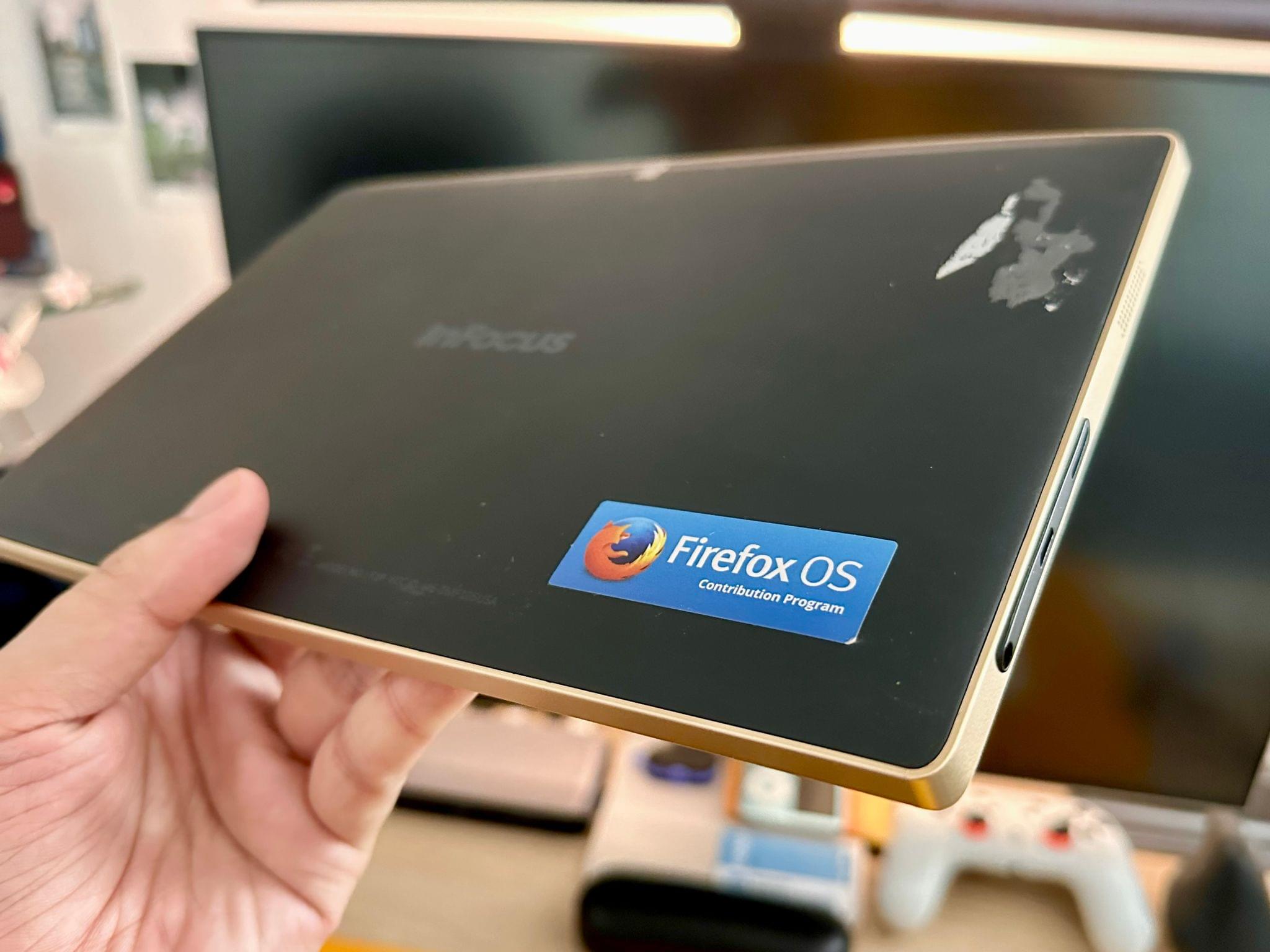
And to that end, they started building a tablet. So they started building the hardware in partnership with Foxconn at the time. And that tablet was never released. But it was distributed to a selection of developers around the world and to a bunch of contributors who were working on Firefox OS like I was.
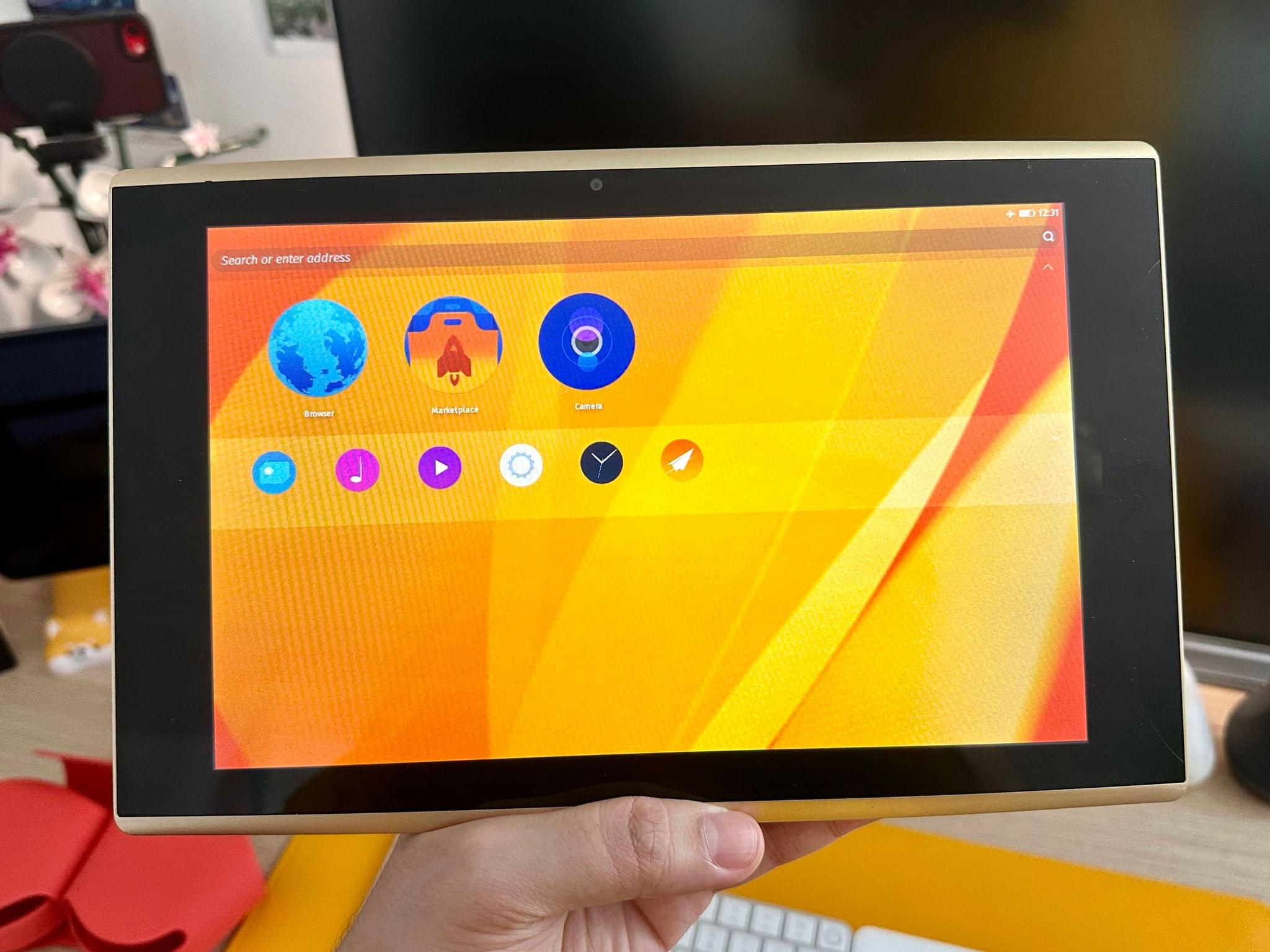
So there I am. I still have this Firefox OS tablet that was never released on my shelf in the living room, picking up dust. So I was trying to check if it still turns on. And if you're looking at the video right now, you may see that it does turn on. Nice. And it looks really bad. I'm going to, while describing it for our audio listeners whom we love, I will turn it around 360.
So on the back, it's called in focus for some reason. I don't know if that was the name that it was going to be called. In focus on the back, there's a Firefox OS contribution program sticker. And there's a really small camera. It's like a dot on the back. And on the front, you've got a front-facing camera as well, really small as well.
Oh my, this screen is very reflective. I can look at myself right now in the screen. Anyway, and yeah, this OS is really hard to revisit today because it makes me remember that I used to work on this for hours at a time. And the end result is not good. I prepared in advance and loaded up a bunch of websites on this tablet because they take forever to load.
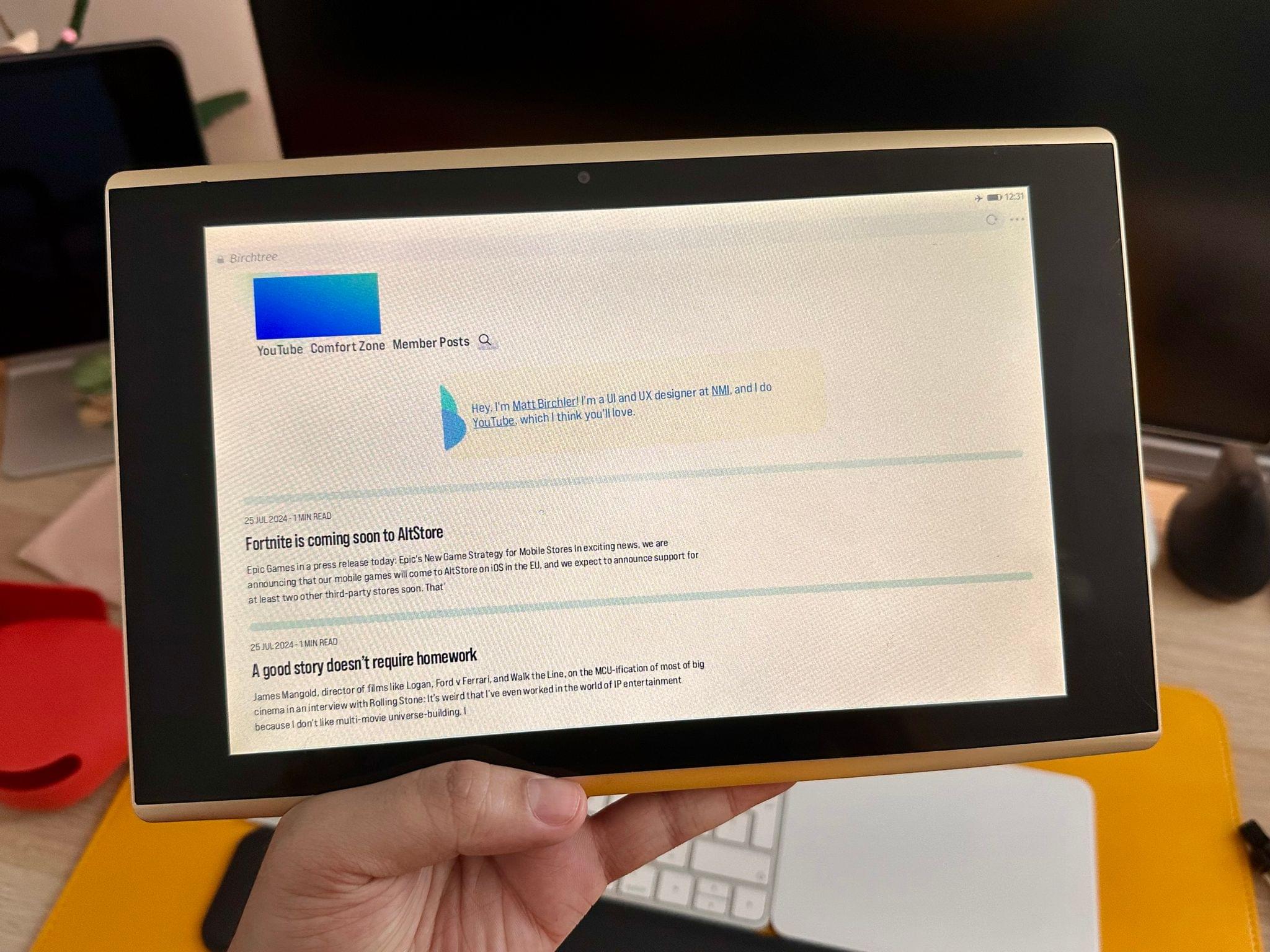
So hopefully they're still in cache. So if I swipe here, that's butch3.me right now on this tablet. It's very broken. The logo is a blue rectangle. Matt, why isn't birchtree.me supporting Firefox OS? This is anti-competitive behavior, and I'm going to make sure the Senate hears about this. We'll get the EU commission on this.
That's not good. I actually know exactly why it looks that way on that browser. I do. But, yeah. Because I'm using some trickery that every modern browser knows how to do. There you go. I'm exposing you. I've got another website loaded here, and that's MacStories.net. So on MacStories.net, a weird thing is the images are not loading. I'm suspecting an SSL issue with the CDN that MacStories uses. But the MacStories logo is there.
And is it a box or is it... It's a good logo. It's a good-looking logo. Fair enough. Well done, MacStories. MacStories is better than Bunch without me. I mean, you're putting me in an impossible spot on the Victoria's podcast. All right. All right. So, yeah, I don't know. There's not much to say about this thing, except that it came out in 2014.
So it's now, I mean, came out. No, it went out to those who got it in 2014. So it's a 10-year-old device. So this seems like the kind of thing, if I remember my timelines right, that's a little after Chromebooks came out. So, like, was this kind of pitched to take on Chromebooks? Maybe. I think at the time it was mostly pitched as an alternative to Android tablets that were taking off. Cheap Android tablets. Because this was meant to be cheap.
Really cheap. Yeah. And you can tell. Obviously, we're looking at it 10 years later, but I think even in 2014, that was really, really cheap. The touchscreen, there's a latency to everything you touch. Ooh. Yeah, it just crashed. After we're done recording, you'll have to send photos to me and Matt and let us know if we can put links or something in the show notes for the audio listeners. Because I want to see this thing. For those that are watching, we turn off the video feed so we don't...
Yeah, I'll take some photos. Yeah, we want the audio listeners to have just a good experience, but we turn off the video feed between us. To describe very shortly the UI, how it's like, so the home screen has a bunch of big round icons. And like I told you, every app on this OS is a web app. So even if you tap the browser icon, you're actually opening a web app that opens web pages. Oh, that's wild.
That's, yeah. That is a hat on a hat. Exactly. This entire web browser interface that you're looking at right now is a web app that opens web pages. And everywhere in UI. So if I go, I'm going to settings. I'm going to go somewhere where there's no Wi-Fi networks visible. There you go. And I'm doing this while going back into the Wi-Fi menu.
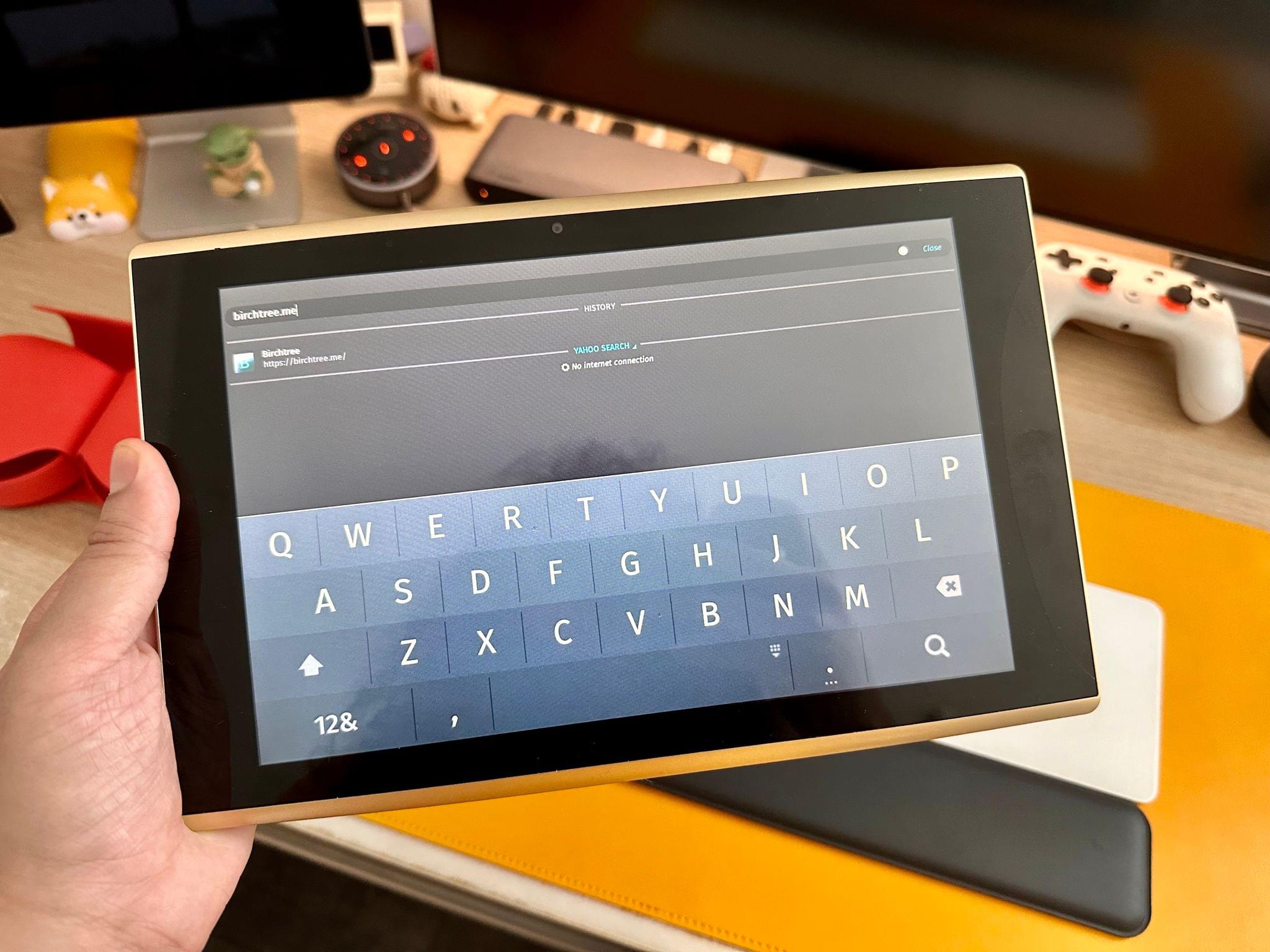
So that doesn't work. So there you go. So even if you go into the settings app, the settings app is a web app. And everywhere in the OS, you can access a search field, an address field, that's accessible at the top of the screen everywhere in the OS. So basically, you've got an address field readily available anywhere you are on the OS.
So that was a concept, right? Yeah, it's kind of, I mean, it is very, I mean, in a world of electron apps, where so many apps are technically web apps, and like, I'm thinking about Chrome, like you go to the settings in Chrome and in your address bar it's like Chrome colon slash slash settings or something like that and like everything's the URL there so it's like that's just taken to the extreme where everything on your device is yeah it's just very weird to me to have like a address bar at the top of every page that's so strange that yeah that would be wild but uh too bad something like
this didn't see the light of day like I you know I don't know if it would have been able to take on tablets but i mean android tablets kind of did themselves in like the the you know but even android people like back in the day when uh you know like the android versus iphone wars were at their hottest even i knew a few android people that would admit like android tablets aren't good like just go get an ipad but um yeah no that's that's pretty cool i i on Niléane i think you win this week i think you win the challenge go i i matt and i had you know we fell short in a couple of
on a couple of tries but bringing prototype hardware that was never released i i think that qualifies as a win i tried so hard too i brought a quiz we had some fun i tried multiple devices i thought i had it in the bag your your quiz was great but the challenge wasn't bring a quiz Oh, my God. But speaking of, unless you guys have anything more on Niléanes before we move on. One last thing I was showing to the camera, the quality of the camera of the tablet.
I'm going to guess like what, four megapixel camera or something like that. I have no idea. It's really hard, unsurprisingly, it's really hard to find any specs about this device. How dare Firefox not release a full product page on an unreleased hardware? Do they not care about the open web? Moving on from that. Hey, Matt, guess what? It's time for me to give a challenge. It is. What do you got for us?
Okay. So my challenge is a fun one. it's very specific so there are daily games right ever since like wordle popped onto the scene how many years ago uh daily games are like a thing there's a whole bunch of places you can play like a game that's like just a few minutes every single day and there's a new one what i would like us all to do is play a couple of them ideally try to find one that you haven't played before but you can play ones that you already enjoy or know you enjoy and for next week i want all of us to bring two daily games okay back one that's your personal pick for like this
is my favorite daily game i want to play this forever i love it and the second one is the competition this one is what you think is the most universally adored popular the most people would like this game and we're going to vote on which one is actually the official comfort zone recommendation for daily game oh i like that so not not like bringing wordle because that's the most popular i would say wordle is the one game that is not allowed okay all right so we're thinking that kind of games though right yes yeah okay so it could be as short as possible like some examples i know
The Grindstone has daily challenges. That's an Apple Arcade game. There's Puzmo, which has a bunch of daily games. New York Times has a bunch of daily games. Basically, every news place has daily games now. So something, yeah, the only requirement is that every day there's one game and you kind of get one shot at it. And then the next day there's another one. You're supposed to come back every day. So that just about does it for us this week. Wrap up, I have our dating game question for us here.
I think this one is pretty appropriate for considering we're all in different regions. Well, mostly Niléane's different from me and Matt as far as countries go. But this question is, what's your favorite film from a different culture or language? Niléane, we'll have you go first. All right. That's always my pick when I'm asked this question. Yeah, anyway. That's the Seagulls film, Heima.
Okay. Yeah. Really beautiful. I don't think I've ever seen it. Matt, what about you? There's a lot. The one that probably hit me the hardest when I originally watched, I haven't watched it in a long time, is the movie City of God, which came out in the early 2000s and just really, really blew me away. Can you repeat the question, by the way?
What's your favorite film from a different culture or language? Oh, okay. So the way that's written, I can answer Star Wars. Yes, you can answer Star Wars if you want. Yeah, you totally can. uh-huh uh-huh yeah yeah neil and kind of got it easy for us that so for me i would it comes down to two and it kind of gets i just depends on the mood i'm in uh i love pan's labyrinth uh great movie but i'm also from fresno and california culturally not that different to be honest uh i'm not from mexico i'm not mexican but uh not that different culturally uh so if i had
to pick something that was a little different uh i would pick the toho godzilla movies the classic godzilla movies i loved those as a kid i've seen probably every single one of them a few of them multiple times love those you know what movie i still haven't had a chance to see though godzilla minus one uh it is on my list i think i'm gonna watch it tonight because it's not something like godzilla movies in general are not something my girlfriend isn't gonna is not is gonna she's not gonna want to watch godzilla movies so uh i still haven't seen the new godzilla and kong movie so
like i've kind of been waiting for her to be busy one night and she's actually not going to be home tonight uh so i am going to probably watch the new godzilla and kong movie and godzilla minus one as well. So yeah, that's kind of my pick right there. Those are good picks. Thank you. So that just about does it for the show this week. Thank you all so much for listening and a special thanks to MacStories for having us. We're a MacStories podcast after all. You can go find all the other MacStories podcasts like AppStories, Magic, Raise the Light, and PC and all that stuff. So thank you for having us and thank you all
for listening and have a great week. Everyone say goodbye. Bye-bye. Bye-bye.