What is This, 1995?

Now playing
What is This, 1995?
Show Notes
Chris has a Creator Studio, Matt has a less official Creator Studio, and the whole gang shows off their Minecraft houses.
This week's Cozy Zone, we tier listed iPads. Chris has never been more in his element than in this one!
Want more from the gang? Cozy Zone is a bonus podcast every Monday where we let loose on all sorts of fun topics. You can get cozy with the Comfort Zone crew for just $5/month or $50/year, which not only makes the bonus episodes possible, but supports Comfort Zone, too.
How would you have done our challenges? How would you answer the question at the end of the show? Let us know!
Main topics Other things discussed- Hand Mirror 4 is cute!
- The Secrets of the Apple Creator Studio
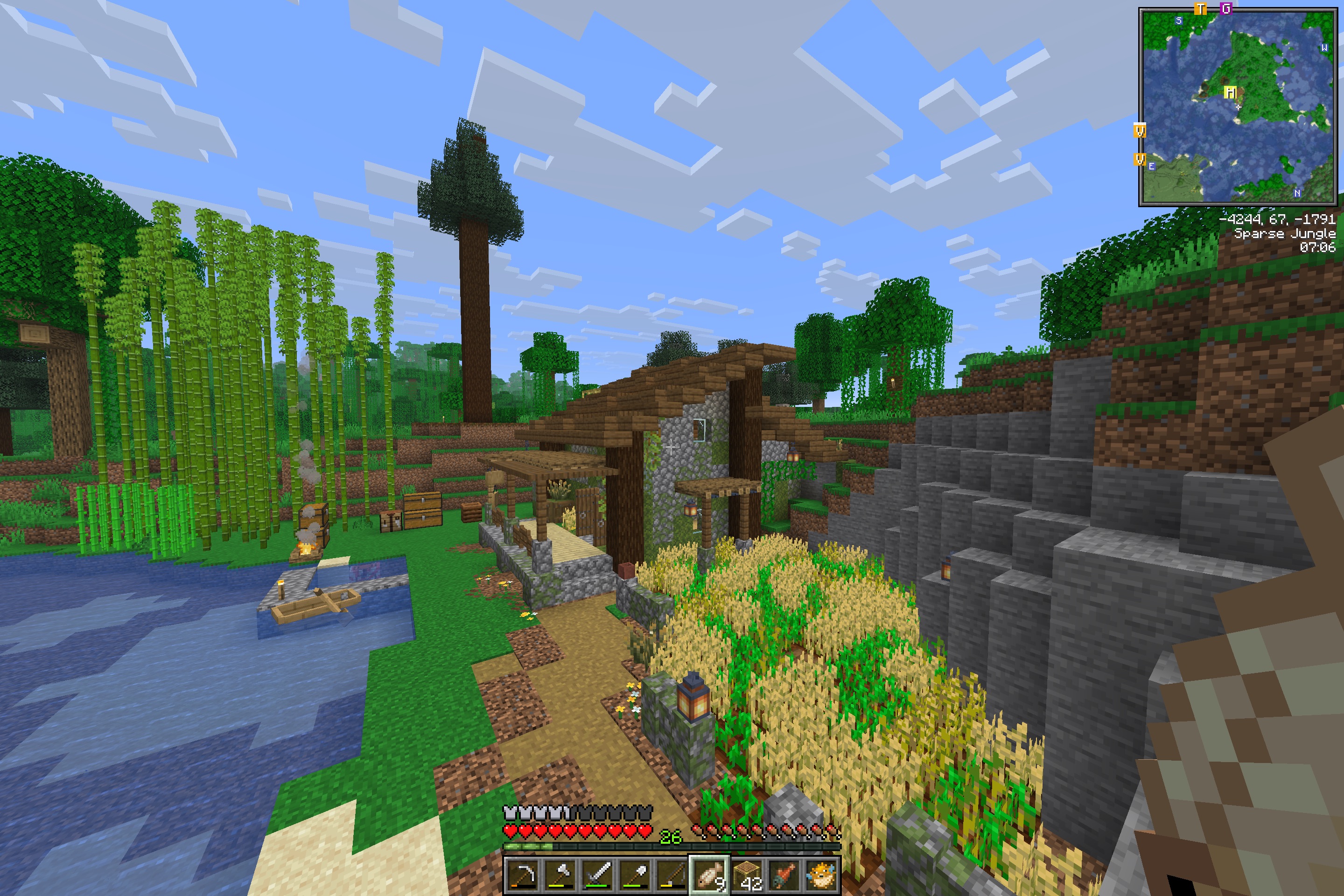
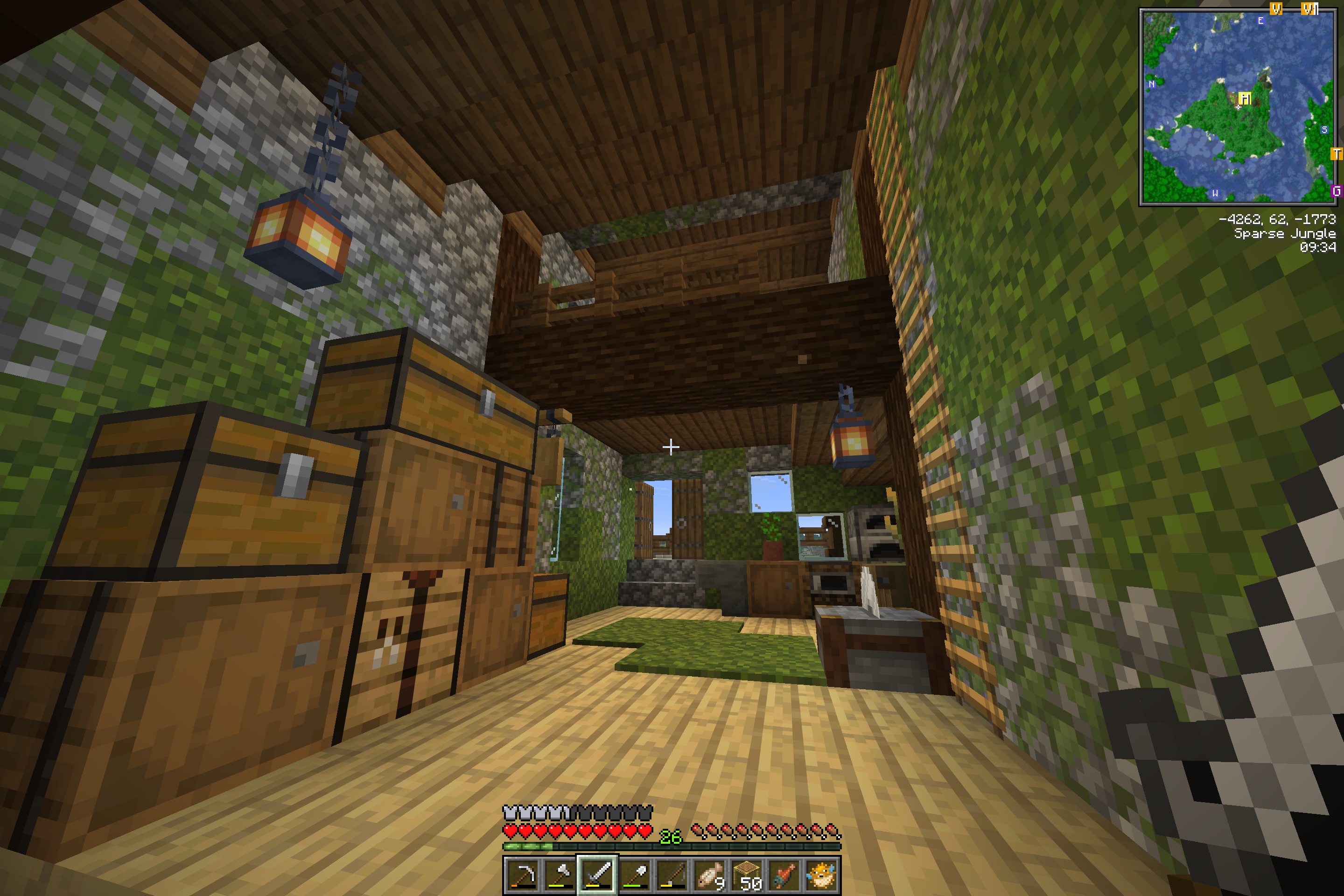
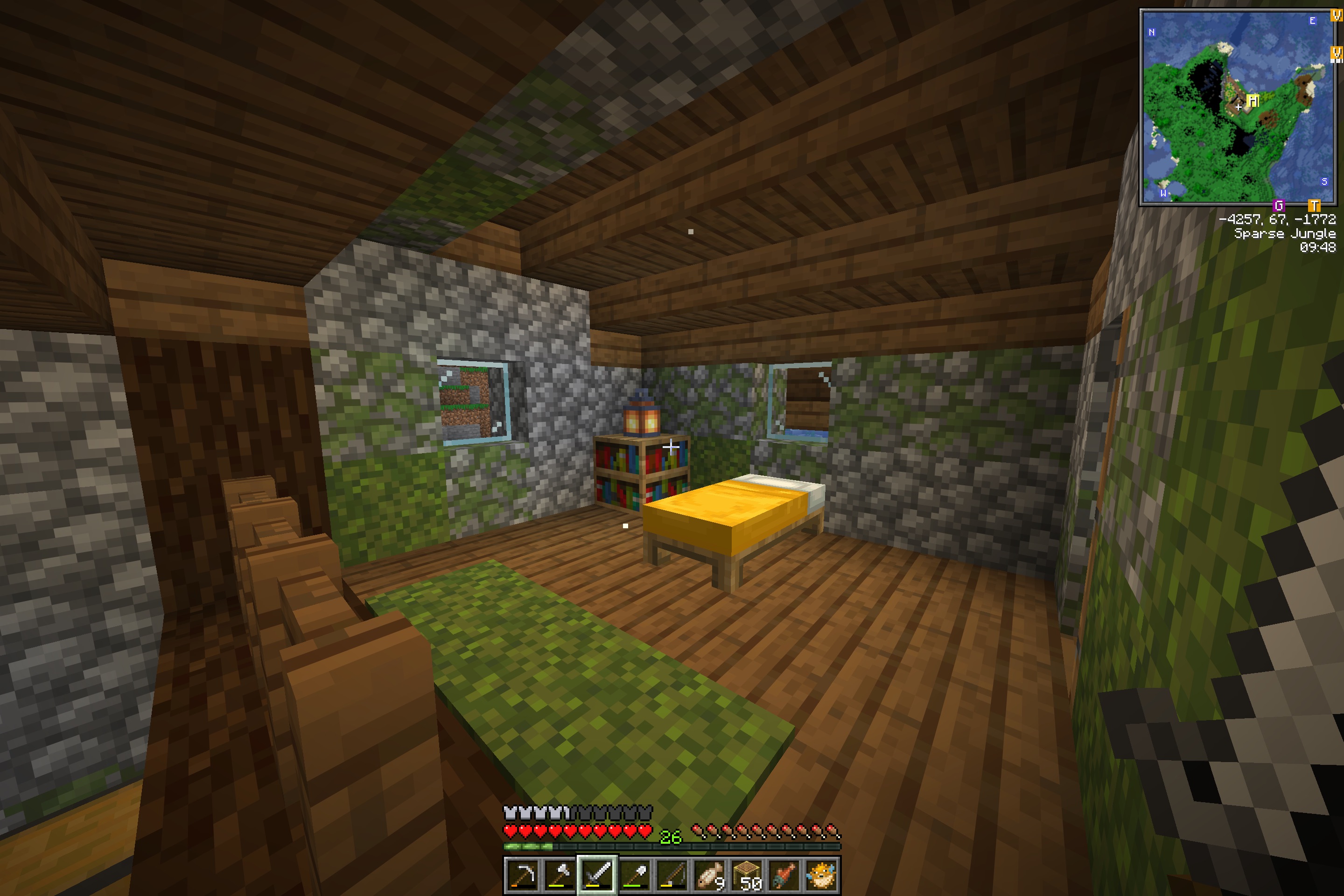
- Niléane's Minecraft House 1
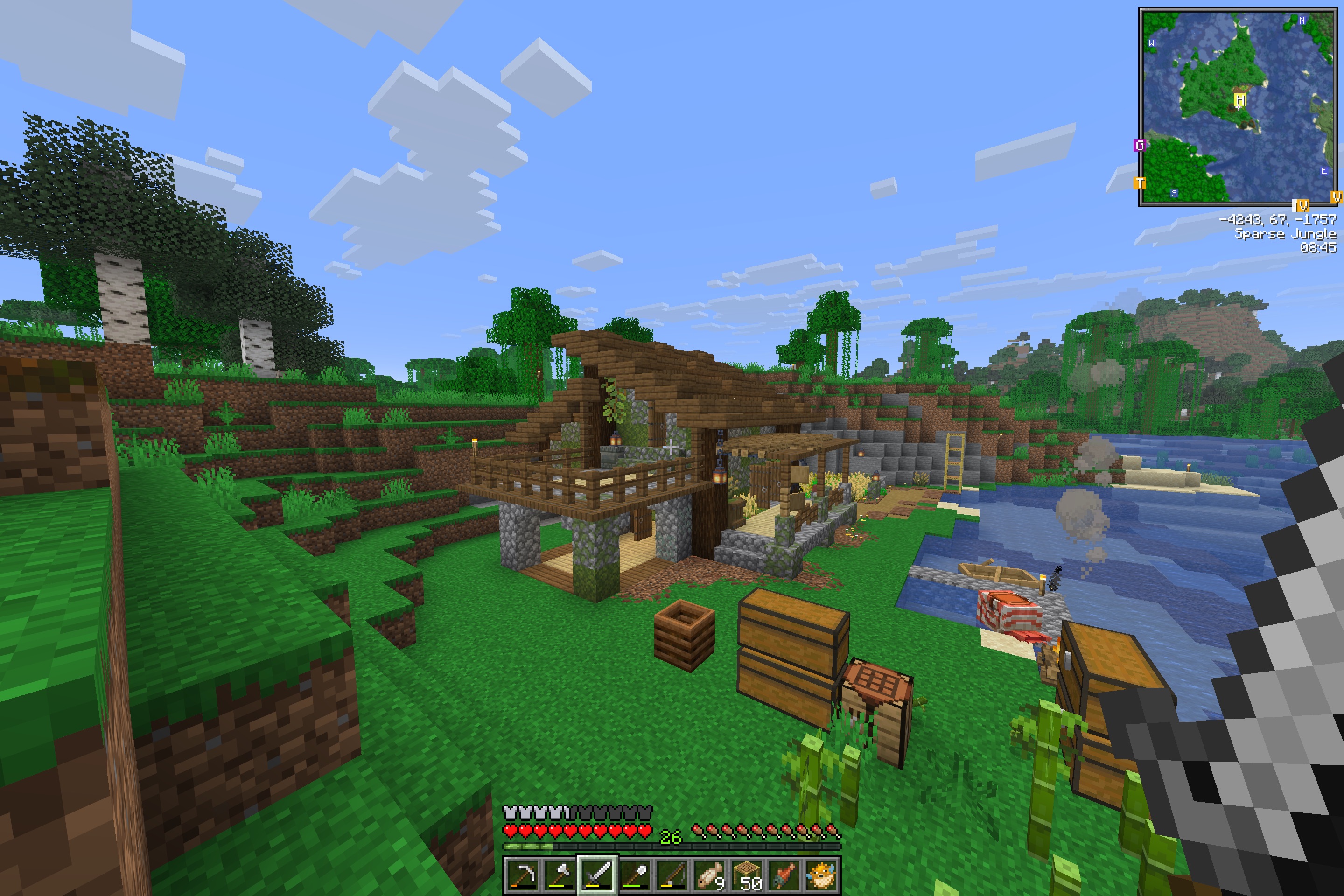
- Niléane's Minecraft House 2
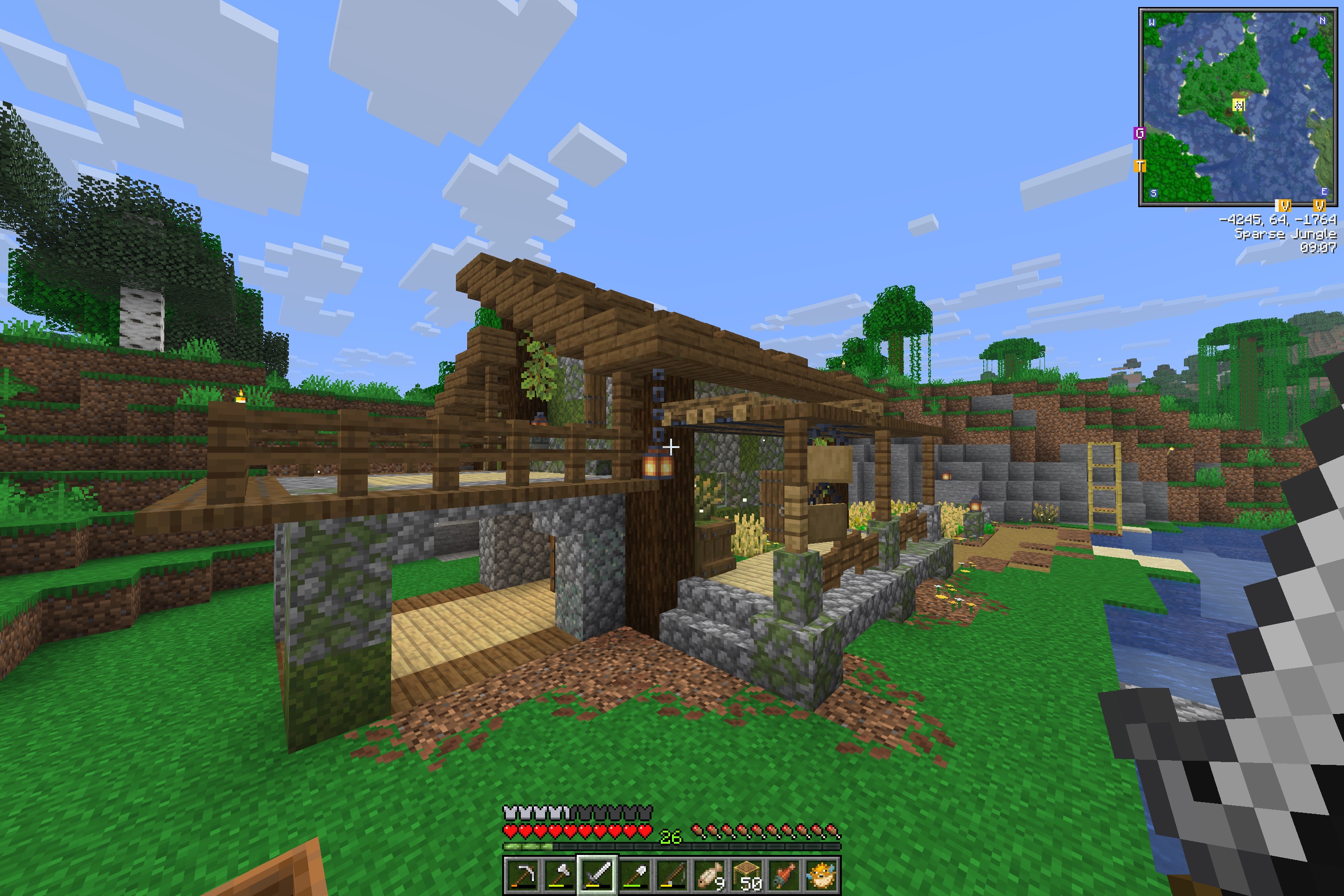
- Niléane's Minecraft House 3
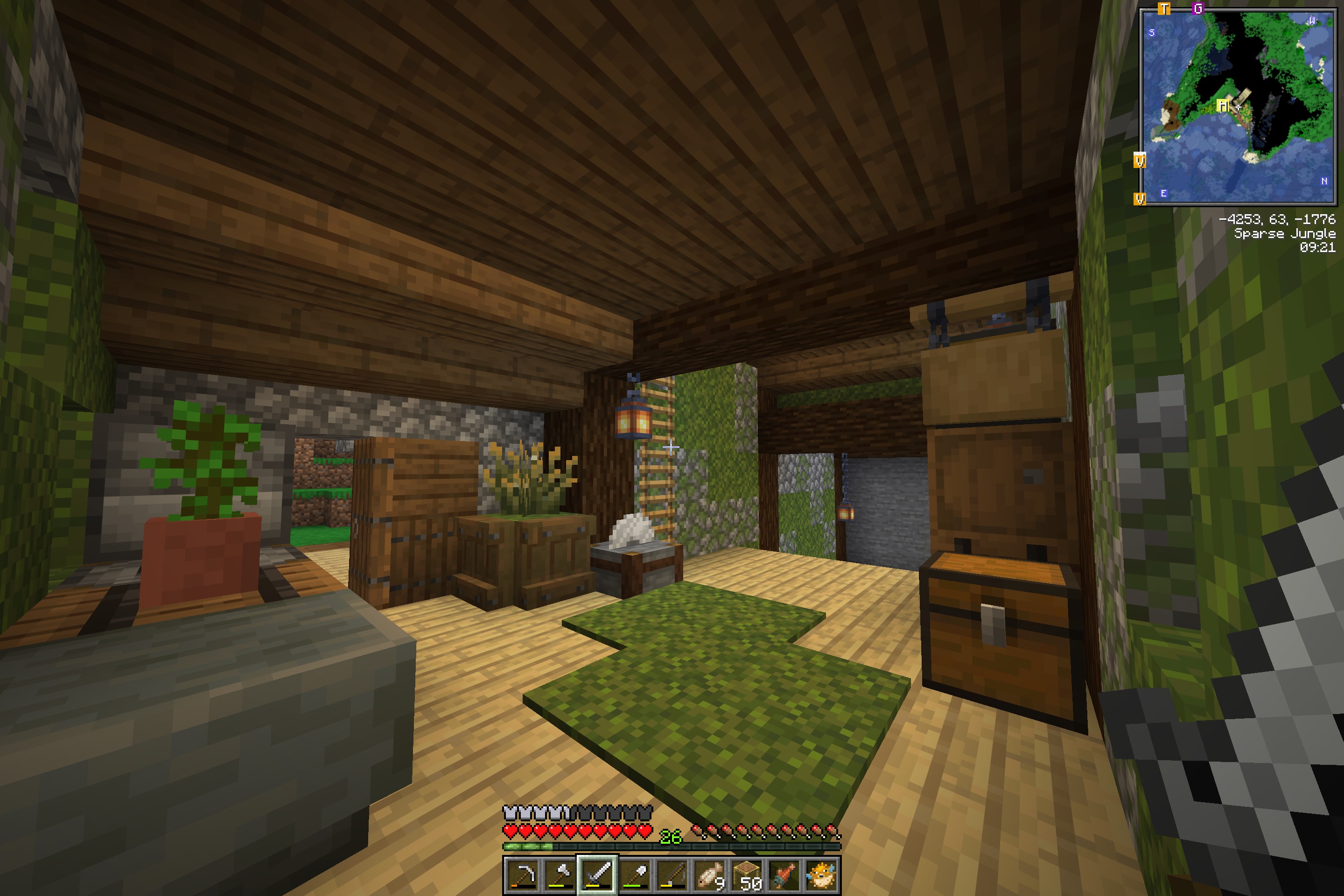
- Niléane's Minecraft House 4
- Niléane's Minecraft House 5
- Niléane's Minecraft House 6
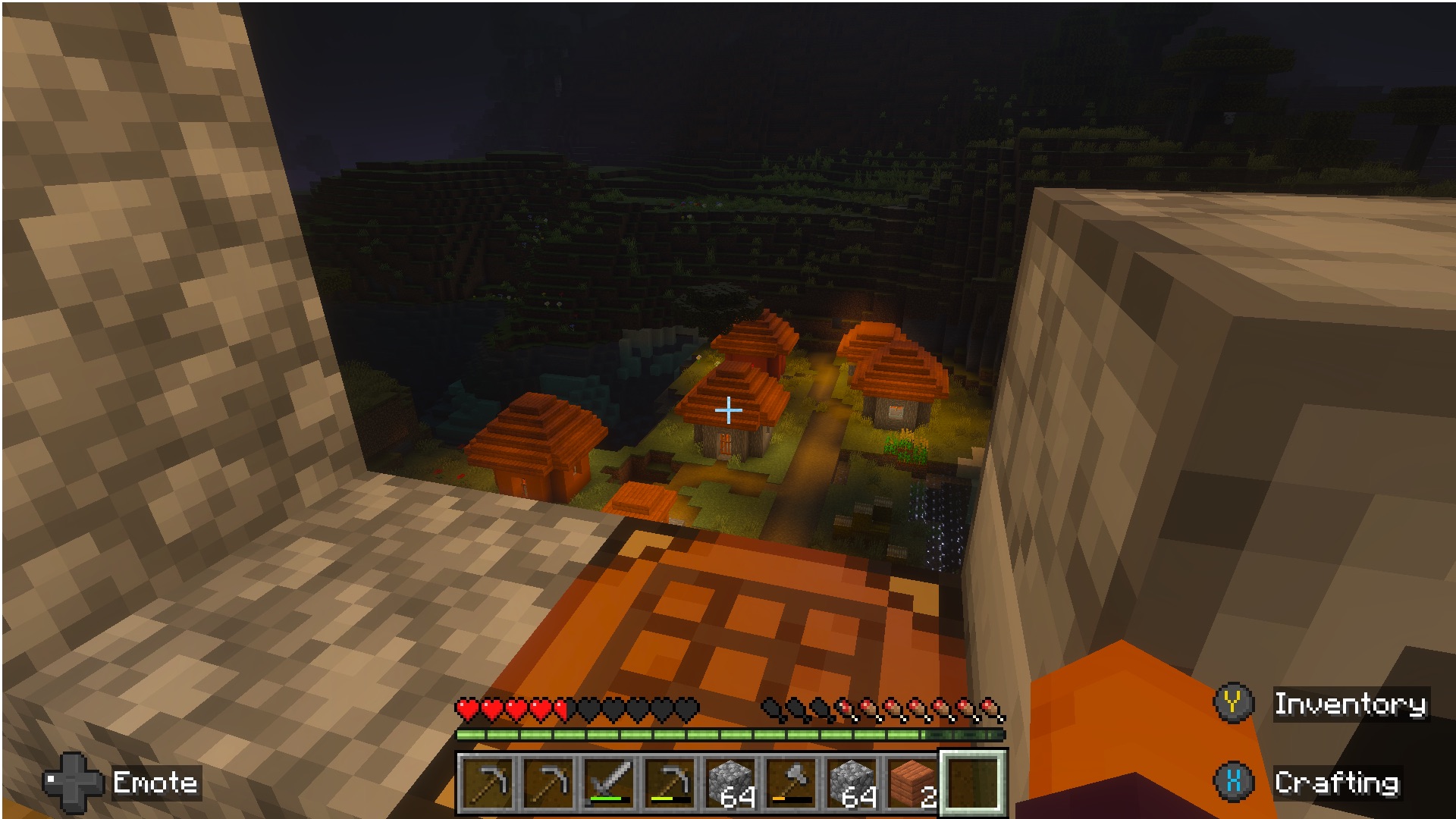
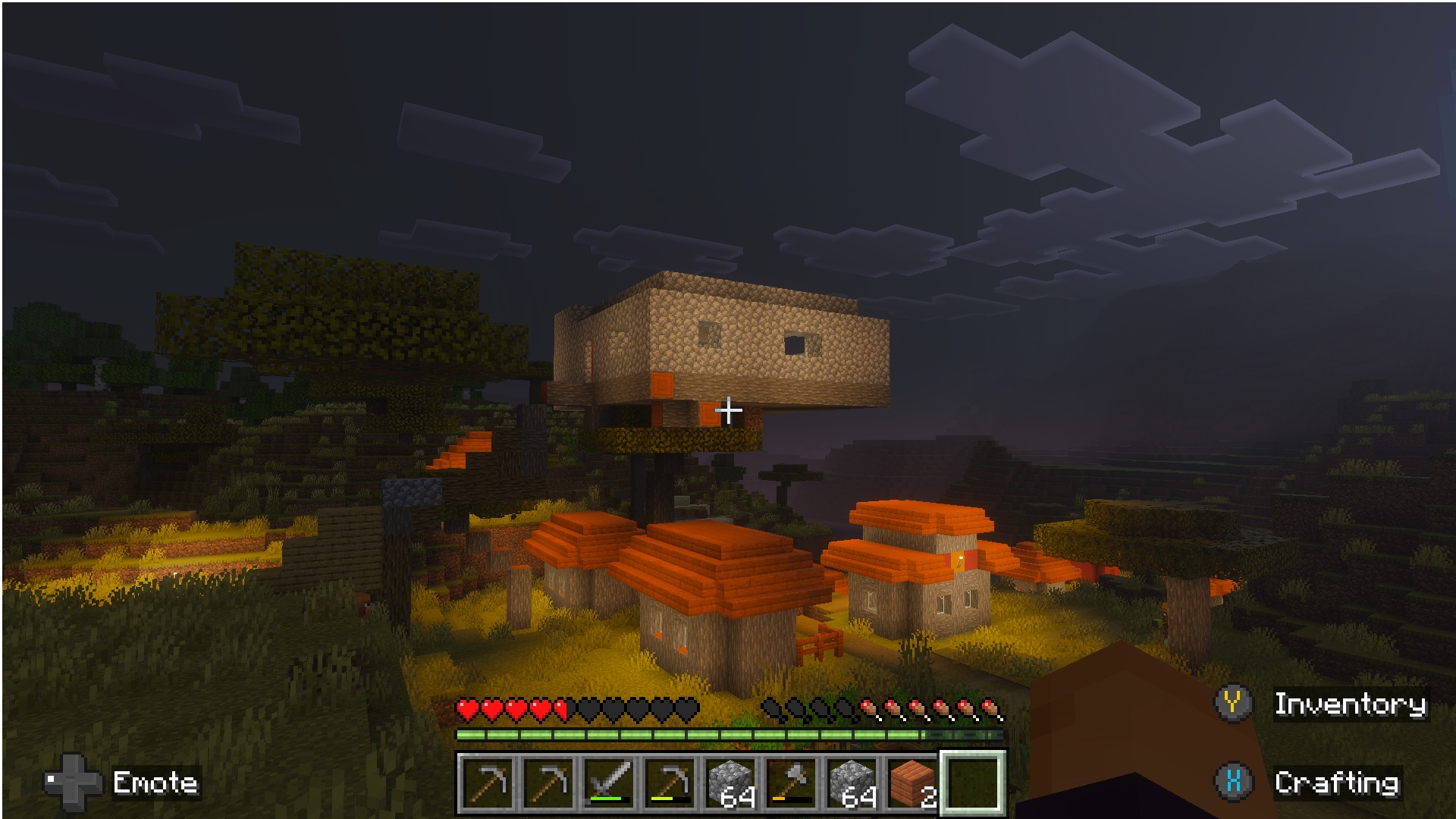
- Matt's Minecraft House 1
- Matt's Minecraft House 2
- Matt's Minecraft House 3
- Matt's Minecraft House 4
- Matt's Minecraft House 5
- Matt's Minecraft House 6
Transcript
1292 segmentsHello and welcome back to Comfort Zone. As we say in France, la zone de confort, obviously. I am Christopher Lawley and this is the line, right? And yes, every week I'm joined by my two co-hosts, Niléane. Hello, Niléane. Hi. Hello. This is me, Niléane. Yes. and also Niléane. Hi! This is also me. Niléane. Yes, it's just me this week.
Unless it's not. Are we doing two solo episodes in a row just this time Chris and I are just going silent? We're just going to watch you? No, I'm also joined by Christopher Lawley. Hello. Thank you for having me. I'm excited to be back. Back on the browser podcast. I mean, comfort zone. And also Matt Birchler. Hello. I'm still getting my voice back from carrying the load last week. An unbelievable episode. It must be said.
Thank you so much for doing that, Matt. Both Niléane and I were out of commission. I had about a two-week stretch of just about everything that could go wrong. Went wrong from multiple holes in my roof to Danielle's car breaking down to me getting what is a severe iritis. to the point where any light I saw, like any lights that got turned on or I came in contact with, would cause a severe shooting pain throughout my right eye.
So you could imagine sitting under bright lights was not something I wanted to do. Not fun. No. I was hoping you'd have an eye patch this week. I thought about it, but I don't need it, and I like being able to see out of both my eyes. Depth perception. It's one of those things you don't realize how nice it is to have, until you don't have it. Because I was walking around with my right eye closed all week. Let me tell you that. Yeah. So, you know, I've talked about this exactly once on the show, but I've been having for one year now, it's been one year,
I've been having an issue with my left ear. Because last year I got like a severe case of the flu. And ever since, I hear less in my left ear. It's annoying. And I've seen a doctor for this, et cetera, et cetera. And it's driving me nuts, by the way. I'm considering surgery or whatever. I don't know. But yes, I can relate to depth perception. Once you miss it, it's hard.
It's hard. Obviously, in my case, it's in terms of audio. Yeah, it was a rough, rough, like a two-week period. But especially last week, that was... It was probably the most pain I've ever been in my life. And then, like, my eyes were having to be dilated. So, like, even when I could, like, it wasn't painful. It was a whole thing. Anyways, we have a podcast to do. This isn't about my right eye. We have some tiny topics.
What do we all got this week? All right. So, Chris, very horrible, terrible week. So, we did that. So, it would be my turn. I have, and my turn is, I have one question from Matt Birchler of BirchTree.me. Is he here? Oh, no. He's here. Yeah. I always get nervous when you use my full name. And that is his legal name, ladies and gentlemen. Matt Birchler of BirchTree.me. That is, yeah. That question is, do you still use Aerospace?
I do. I do. I really do. The street continues. Is this going to be an every week thing? Maybe, because I'm wondering at which point does he give up? Is there something that will make him leave behind him? If he was sane and not a part of a cult, which, by the way, Matt, bravo for not making last week's episode all about the cults that you're a part of. I could have. All cults. Oh, that'd be a great episode.
All cults. All cults Tuesday or something. Like Taco Tuesday. The cults zone. Okay, so you still use Aerospace. And has your Aerospace setup evolved in any way? No, I'm pretty locked in. Browser and messaging stuff is in my first space. And then work stuff is in the second. Video editing is in the third. And development stuff is in the fourth. And that's pretty consistent. Incredible. Okay. I'm a remarkable user of the Mac.
I guess we'll see next week if that's still true. Okay, I have another thing to mention. You know, do you know about Handmirror? It's a tiny menu bar app for the Mac that's made by Rafa. Friend of the show, probably. We like him. They used to work until recently at Sketch, and they're moving on. good luck to Rafa for the next step.
But Handmirror, yes, is a very nice menu bar app for the Mac that has been covered on Mac Stories before. And I use it all the time. What it does is you bind it to a keyboard shortcut or you click the menu bar icon and it displays a preview of your webcam so that you can check yourself out before joining a podcast recording session or a video call or whatever. It's really nice. It sits in the menu bar. You can forget about it when you don't use it, and you can just invoke it when you do.
And they released version 4 of the app, and this version 4 is super cute. I've linked in the show notes to a thread that they made on Mastodon, highlighting the new features. One of them is called Snaps, and what it does is now, in the tiny webcam window that appears, You can click a button to snap a picture of yourself. And the way that it's done, it's really cute. It looks like a Polaroid kind of photo that's coming out, like coming from behind the webcam preview,
just like as if it was just printed in place. It's really fun. And you even have a marker on the side that you can change the color of and you can just annotate yourself. You can draw a mustache on your face if you want, or write the date, or just a note. It could be a fun way to journal. Just snap a picture of yourself using webcam every day, and maybe showcase your outfit of the day. I don't know. It's really fun.
It has a bunch of small, cute things as well in this release, and I recommend people check it out. My favorite, because Rafa sent me the beta for it, and I've been using Handmirror for a while, but my favorite is the box art that they included. So there's like software box art from, you know, old school days of when you actually had to go to the store and buy software. I love it. Yeah, that's really fun. Very cool. It stands as the about window, if I know that's right.
Yeah. Just a shout out. Check it out. And this week on Cozy Zone, well, actually, let's do the last two weeks because we didn't mention it on the last episode. Someone forgot the structure of the show and just started talking. Shame. That's okay. So two weeks ago, we did a surprise, almost TSA-level bag inspection where we went through each other's bags, but there was a twist to it where the others could require the person to pull out an item, but if the person whose bag it is didn't want to, there was a safe phrase that they would have to say.
Let's just say none of us wanted to say it, but oh boy, did one of us get close to have it. Maybe. Just go check it out. And this week on Cozy Zone, it was my time to shine. It was, oh boy, was it my time to shine. We tier listed iPads. And we all had some hot takes. Some were spicier than others. And some of us were more correct than others. Mostly me. Actually, always me. Yep, just me. I was correct as well. No. I'm very enthusiastic about the iPad line from start to finish.
No. There were a couple where I was like, these are bad iPads. These are bad iPads and they should feel bad. But you got to go listen to the show to figure out which ones I meant. And for those that aren't aware, Cozy Zone is our extra podcast that we do every single week. So you get an extra episode. It's a members only thing. Link in the description or show notes or wherever you're listening or watching. Go check it out. really does help out produce the show so thank you all right all right let's get in the main show i'm
first up in the document and this week i want to talk about the new apple creator studio uh by the time you're listening to this the embargo was yesterday it's it should all it's all out now and um i've had access to it for two weeks oh no so i've been using it well well well and there is some interesting stuff in here that is not that was not a part of the public announcement uh specifically final cut related stuff so i figure we can kind of tackle some of the software and then we can have an overall discussion about it and together but first but first the icons chris
oh god okay yeah the icons are bad i know some people are being like apologists on the icons and And they're like, ah, whatever. No, all the icons are bad. Have you guys seen the basic Apple guy post about like they took the icons for all the apps, they flipped them, and they went from the current ones as the oldest, and the oldest ones to be the newest. And they progressively get better. Let's make icon design fun again. That is my biggest take right now in design world, that icon design sucks and it's not fun.
Yeah. I was looking at old Mac OS Leopard era screenshots. And when you look at the dock on that version of Mac OS, so everything looks kind of bad, honestly, on Leopard. It's way too much. There's glassy effects all over the place, and the dock is 3D for some reason. Yes, the 3D dock was incredible. It needed some more liquid to add to that glass, right, Elion? Yeah.
But apart from that, the icons in the dock are all super nice. It's so fun. It's all very interesting looking. Yeah. Anyways, I don't like the icons, but I will live with it. I do think pretty much they have all gotten worse, especially Pixelmator Pro. But whatever. Everyone else has already had that discussion. But what we can talk about is the stuff that's in the apps, because unlike other podcasts, well, some people might have access to it.
But I know I've had access to it for two weeks. So let's start it off with my favorite app, Final Cut. So I'm going to start off with stuff that is both in Final Cut Pro for the Mac and Final Cut Pro for the iPad. And then we'll just get to iPad-specific stuff. because what's interesting about this release is everything that's in the Mac update. So everything that's new in the Mac version is in the iPad version, but not everything in the iPad version is in the Mac version. The iPad got stuff, the Mac didn't.
So first off, there is now transcript search. So when you import video, audio, whatever, it will now analyze that, create a transcript, and you can search based on words or phrases. This is great for making clips or just finding little segments. If you're, you know, if you're doing interview style stuff, this is great for like finding that specific segment that the producer needs, putting that in there without having to scrub through an hour's worth of footage. Like super cool about this.
I'll just say for my use case, when I record a lot of A-roll, I'll like, whenever I make a mistake, sometimes I will curse. and just like upset with myself, now I could do that as a system where I could just search for the F word and then I know exactly where my new segments start where I maybe got it right. So it doesn't quite work like that. What it does is it's in the, so it's the search in the library.
So I will have, so like if I have a video talking about the apps I use and I want to find every mention of Obsidian, I could type in Obsidian. Okay. So it'll take you to the clips. It's not like Descript where you can edit via text or something like that. That would be cool. It's not like that. Okay. Okay. Well, you know, something for the next version. There's always got to be something. Yeah, I can see that coming next. So it started off being able to add subtitles in there, and that's how they started off with this feature.
okay, now that we've analyzed the audio, we can do transcript search. And then the next thing that is a feature in this update is visual search. So what you can do is if you have clips of, say, like a bike, and you have a bunch of B-roll footage or something like that, you can type in bike, and it'll look for that object. Or you can look for that action. You can be like handwriting or something like that, and it'll look for all the actions of somebody handwriting and stuff like that. It'll pull up all those clips. So if you have a ton of B-roll and you're looking for that one specific shot, this will dramatically speed that up.
Really cool thing. Nice. Another thing is beat detection. So you can... Okay. Okay, sorry. Sorry. I apologize. I was getting funky there. But this is actually really cool and will save me so much time. So what this does is if you put a music track in your timeline and then you select it and hit option B or you can go through the menu, but hit option B and this will analyze that track and look for the beats.
Look for kind of where and there'll be a green line in your timeline. So now when you're cutting together a montage or editing to a beat, you see exactly where you need to cut. No more like, OK, I think it's here to go back, play, go back, play. No, it shows you right where it is, and it is spot on. Every single time. I've tried probably half a dozen to ten, six to ten music tracks with this so far. And every time it's spot on, you can just cut up stuff, make montages so much easier in your timeline.
Really, really cool feature. Is that also in the macOS version? Yes. Yeah, so all this stuff so far is both in macOS and iPad. i'll tell you when we get to that just the ipad os specific stuff and then there's also a new dynamic titles and graphics including uh like countdown timers and stuff like that this is the stuff that's built into final cut this is actually pretty great stuff that i use in my videos uh because what i like about this stuff because the ipad version still doesn't have plug-in support uh these are on both the mac version and the ipad version so i can have these consistent visual looks no
matter where i'm editing video so and they're actually pretty good and they're pretty customizable as well so uh they're they're play around with them the nice thing going forward and they've done this for the last few releases is all the new stuff has like a purple dot next to it so you don't have to be like is this the new thing or is it not no there's a purple dot next to it you know it's new and you can check it out nice all right so that's the stuff that's both on mac os and ipad os let's get into ipad specific features i talked about beat detection for being good for making montages but in
the ipad version of final cut there is now montage maker which what this does is this will take a look at your library for all the clips you have you can add your music or you can use the final cuts library of music if you want and this will automatically build a montage based on that you can change the timing you can change the aspect ratio of it you can swap out clips it's a starting point if you do a lot of montages personally i think i'll just stick to beat detection and manually create my stuff because this like assumes like it picks a lot of the clips for you and every time i've tried it it's like it kind of gets like 50 of the way there
whereas like if i just dropped in the music track hit option b and then like cut everything myself I'm going to get it there 100% of the time. So this is cool that it's there, but I think it's a little too like rely on our machine learning and AI algorithms kind of thing in order for it to be perfect. There is a big finally in this update, and this was something that was not publicly mentioned during the announcement on like the press release page
and stuff like that. You are now able to select multiple clips in the timeline at once and add effects to them. You can drag and drop effects to them. If all the clips you selected have the same effect, you can change them. So nice. There's a select button right there above the timeline that you can hit. And you can also use the cursor to drag and drop, create, just select multiple clips. But there is no command or shift click option.
So you can't shift click arrange. You can't command click multiple apps. You can only tap on them or drag the little mouse cursor thing. I cannot believe they left off the command and shift click keyboard shortcuts. It kills me. At least there's an option. So are you able to now apply? Because I know you apply like effects like a LUT and everything to your footage. Does this help with that situation? Yeah. So what I can do is I can, like, apply all my effects to one clip.
Because for me, it's multiple things. It's I color grade the footage, then I apply a look, then I apply a sharpened effect, then I apply a vignette, and then I apply some grain. So I apply all those effects. So what I could do is I could go in and then copy them and then select a range and then paste them if I wanted to. So yes, this does help, but I can't believe they didn't add command and shift click keyboard shortcuts. On the iPad version, the external monitor support for the iPad version now supports full scaling.
It's not stuck to that 4x3 window. You can go full 16x9 or whatever aspect ratio your monitor is now. You can do that. Plus, what you can do is if you want, you can have final cut on the iPad screen. so like your timeline and library and all that stuff, and then use the external monitor as like the playback monitor so you can have what's in the timeline playing back on the external monitor full screen if you want it. So you can do it both ways. Can I get a drum roll from you too, please? Drum roll.
Background exports is here. Hey. Background exports for Final Cut Pro for the iPad is in this release. Wow. I have used it. It's here. It works. And it's pretty, pretty good. Pretty good. Wow. Welcome to 1995. I was going to say, I'm going to Google when Final Cut for the Mac got back around. But that's too sassy. That's too sassy. Google when were computers best able to run two things at once.
Okay. Let's let Chris enjoy this. This is a good thing. This is exciting. This is my moment. This is great. So that's Final Cut. Some iPad-specific features, some good stuff on the Mac version as well. But yeah, Final Cut got some love. This is a pretty big update. For our picks, I don't quite get the yearly pick just from this one update, but I would say this qualifies as a big update. I think there's a lot of really good stuff in here.
Plus, there's a lot of bug fixes, too. I noticed a few bugs I've ran into in the past have been fixed. But the other big app, especially for the iPad, is Pixelmator Pro. Pixelmator Pro is not just on the Mac anymore, but it's also on the iPad. And from what I can tell so far, and I'm no Pixelmator Pro expert, but it seems to be feature parity between both the iPad and the Mac. And this is one really nice thing. Pixelmator Pro for the iPad, on day one, it shipped, has the pin tool.
looking at you, Adobe Photoshop, that still does not have the pen tool on the iPad. And I'm not joking. Wow. Yeah. So is that the one to draw vector lines? Yeah. Yeah. Okay. Yeah. So the Photoshop for the iPad, even though there's the Apple Pencil and all that stuff, and it would make perfect sense for it to have, does not have the pen tool. Pixelmator Pro has it day one. It also has like everything you would expect from Pixelmator Pro, layer support, super resolution, auto crop.
It has transform. What I didn't realize is Pixelmator Pro for the Mac, did it not have warp tools before? Did it not have the ability to do warps? Okay, so maybe they're just overhauled. Because in the reviewer's guide, they're like, oh yeah, new warp tools for the Mac. And it looks like it's the same on the iPad as well. Let me check. Let me fact check. Yeah, there's a warp. Niléane is checking on that. But it also has stuff like brushes, pencils, inks, crowns.
Like, great if you're going to draw with the Apple Pencil. Like, Pixelmator Pro has all that stuff. So it does a good job there. Yeah, I've got it. I'm whopping. I'm whopping. Okay, so the tools must be updated then. I'm not a Pixelmator Pro expert on the Mac by far. Officially a Pixelmator Pro Pro, just to be clear. You know, I will get to that in just a second. But I like Pixelmator Pro on the iPad. It's good. It's good. Like, one of the reasons why I never really used it on the Mac was because it wasn't available on the iPad.
So I would have Pixelmator Pro files, but I couldn't do anything with them on my iPad. Whereas that's where I primarily work on photos. So I just, I owned it. I just didn't really do anything with it. Hey, fun fact. If you warp an image enough, it's almost like liquid glass. Like, you can't see anything. I'm warping the three of us right now and it is horrifying yes I'm doing it with a Minecraft screenshot and it's it's something anyway it's three bros discovering the warping tool wow yeah what is this 1995 there's also like masks and templates
like it's kind of everything you would expect from Pixelmator Pro So fun fact, Pixelmator Pro is the only app in this new update in Apple's Pro suite of apps to have liquid glass. There is no liquid glass in Final Cut. There's none in Logic. There's none in Motion or Compressor or Main Stage. It's only in Pixelmator Pro. So what do you think of the take that's been going around that, oh, even Apple realizes that this design language doesn't fit a Pro app?
I don't agree with it. I don't think that's the way Apple's coming from. So Apple's Pro Tools have always been built on a different foundation than the native tools. It's like Pro Kit or something like that. It's Pro... It's called something else. But so it doesn't... They don't have all the liquid glass elements. Pixelmator Pro, because it used to be a third-party app, was built on all the native Apple stuff. So it was a lot easier for them to update to liquid glass because it's not the foundation of the Pro Kit stuff
or whatever that's called. I think it's called Pro Kit, but I might be wrong there. But I don't think it's a, oh, Apple doesn't believe in wood glass thing anymore. Like the icons too, everyone was like, oh, see, Apple design is doomed because Alan Dye left and they are still putting these out. I guarantee you those icons were designed way before Alan Dye put in his resignation. Like way before they were. Those weren't designed like last week. They are three weeks ago or whatever.
Those were designed months ago. Yeah, I think that's a bad take. Don't you want a floating timeline in Final Cut? No, but I will say the liquid glass in Pixelmator Pro isn't bad. It's not bad. It's fine. It's really not that big of a deal. The few screenshots that I've seen of it, I just want to throw myself off a bridge, honestly. Like, why are there sidebars over the photo I'm editing?
Like, I just... I think that's more of a we're trying to make this look pretty for screenshots, whereas, like, you don't have to have the sidebars over your image. Like, you could zoom out, you could zoom in. Like, I think that's just more... If you zoom in, it will overflow over... Yeah, if you zoom in, it will. But you can also zoom in all the time when you edit stuff. But yeah, you can also hide the sidebars too. Like you can turn them off. Like, yeah, you can, yeah, like the layer window and stuff like that. Like you can turn that off.
So if you're just drawing, like if you just want to draw, you can turn off all that stuff and just have your canvas. I'm so mad. This is stupid. Like why? So your answer is just get rid of the tools then. Just open in the preview app. It's the same thing. There's no winning. No, I think it's dumb. I think it's objectively dumb, which is why you can't win. Okay. But what I will say, so here's like the shoe to drop.
I have canceled my Adobe subscription. I do not have an Adobe subscription anymore. I am happy with Pixelmator Pro. For what I do in Photoshop, and I'm no Photoshop expert, but for the stuff I do in Photoshop, Pixelmator Pro does it just as well, or if not better. In fact, I think they're warping tools and like they're magic selection tools. So like one thing that I did was I took an old thumbnail that had the iPad. And what I used to do is I would have just like a green screen on the iPad.
And then I would just use like the magic selection tool in Photoshop to erase that. The Pixelmator Pro does a better job at making a mask and leaving less of those like little green lines on the side. In fact, like I didn't see any of those little green lines in Pixelmator Pro. It got rid of everything, and I was able to warp a proper screenshot on top of that iPad's photo. On top of the photo, which is of the iPad, I was able to warp a screenshot right on top of it, and it looked perfect. So I'm happy with that.
And I am just going to use Photomator. I've been playing around with Photomator as well. I'm really surprised Photomator is not a part of this bundle. I have asked Apple about that. I didn't really get a clear answer. I didn't really get a clear answer. I think it's a goner. I've always thought that this app was kind of weird because it has everything that Pixelmator already has. If you want, you can edit your photos in Pixelmator Pro.
Yeah. All the same tools are in Photomator. It's kind of a duplicate app. It's weird. I disagree. I still think it is the Lightroom competitor Apple needs. I am using this as my Lightroom replacement, and I've been really happy with it. It's come a long way in the last few years since I've tried it. The weird thing for me is I was able to just download it again on my iPad, and there was no subscription, so I'm wondering if I was grandfathered into something, because on the Mac, it wants me to subscribe to it.
Interesting. Yeah, I was just going to say, I do like Photomator because, yeah, it is more of a Lightroom experience. Like with Pixelmator, you can edit one photo at a time. But I would hate to do that with like a hundred photos. Yeah, I guess that's true. Like Photo Roll or whatever. So different workflows. But yeah, this is why people who like do their like, they don't use Lightroom. They use Photoshop for all the photo editing. They confuse me greatly. Yeah, I don't get those people. That is the one thing I really miss about that I'm missing about Pixelmator Pro and Photomator.
is that in Lightroom, so you would start with editing your photo in Lightroom, you'd get it all looking nice. And in Lightroom, there's a button to send it to Photoshop. So you get the highest quality image, not a JPEG, but like the highest quality raw image with all of your Lightroom edits sent over to Photoshop. And then you can do like add text or screenshots or whatever you need to do or photo manipulation stuff. I'm hoping that comes. I'm hoping, what I'm really hoping is that they just didn't have time to get to Photomator and do the stuff that they wanted to do to add it to the bundle
and this comes to the bundle later. That's my optimistic take and my optimistic hopeful wishlist, I guess. But I would like to see that stuff. You know what's strange is I'm sassy today because I was sick and now I need to catch up on stuff. I see this argument sometimes as kind of weird. When you say and when people say in general, they didn't have time to do such and such.
And it's weird because it almost makes you forget who are we talking about? We're talking about Apple. It's weird. I don't think that if there's an explanation, I don't think that that's the one. Okay. I know people on the pro teams, on the pro apps team, I know they care about this stuff. I got to be kind of careful what I say. I truly believe that they just, the resources that they were given and the time that they were given,
I don't think they, I think they had to prioritize some stuff. I know there's the IWork stuff that was added into this. The IWork stuff, from what I understand, that's a separate team. So I'm not too concerned about that stuff. But I think the... So I know Pixelmator, when they were bought, they were added right into the Pro Apps team. That's where they went. I think they just... I do believe they didn't have time and they didn't have the resources.
And I'm just hopeful that Photomator comes to the bundle later on. Because I know everyone wants Apple to do Aperture again. and I think this is their way of doing Aperture again. Though I don't think it'll ever be called Aperture. Okay. Which it should because that's a great name. But yeah, like I said, so there's also Logic updates. I don't really know what's going on there. I'm sorry. I know I'm doing a disservice to people, but I'm not a music person.
I can't wrap my head around it. There's some like synth stuff in there. Look, if you know about Logic, you already know more about what's in this update than i do and i got the briefing so yeah and then there's all the iWork stuff which has like templates and content hubs and stuff like that and there's actually like some interesting things like in numbers there's now like this magic fill option which basically it takes pattern and looks at like it analyzes the patterns and like kind of um
it i don't even know how to explain this right forget i said anything i'll put it in my video Once I have a better way of explaining it, it'll be in my video, which should already be out. But pricing wise, I actually think this is really competitive. $12.99 a month, $129 a year. Or if you're a student, $3 a month or $30 a year. I think this is a really great way of getting in the door to pro apps and pro tools. Like when I was in high school and college, I was really into video.
Like all I wanted to do was make movies. I wasn't interested in anything else. That was all I wanted to do in high school and college. I could not afford Final Cut, which at the time, literally I was in college when they made the cutover to Final Cut 10. But Final Cut 7, like the bundle was like well over $1,000 or $800. It was really expensive for our high school student. And then in college, even Final Cut Pro 10 when the price was $300, it was still more than I could afford. Let's just say I got my video editing software from some other place and leave it at that.
I'm sure you can all figure out what that means. But yeah, I think the pricing wise, the bundle is very competitive. I think the issue is if you're somebody that's wanting to go into Hollywood, for example, and edit TV shows or movies, Final Cut isn't what you will be using in Hollywood. You will be using Premiere. You'll be using more likely Resolve or Avid. Avid and Resolve probably are the two more likely ones that you'd be using. And Final Cut just isn't in Hollywood anymore.
And it's very clear. I mean, by the name, by the name of this bundle alone, it's very clear Apple doesn't consider Hollywood to be their primary target with these apps anymore. Their target is creators, individual creators. I mean, it's literally called Creator Studio. They are not interested in Hollywood anymore. It's very clear to me. that's the case they are interested in the individual creators so if that's what you're interested in this is a great deal boom mic drop i win
all right any anything else on that or should we move on to matt's we can move on to mine i have a studio of my own in a way Ooh. Okay. Well, this was unintentional, but I want to do a little utility app roundup. So this, I'm declaring my BirchTree creator studio of utility apps that are just little things that I really like on my Mac and deserve a shout-out.
So first, the icons. The icons, they vary in quality. Okay. I will review each one as we go, though. So the first app I wanted to shout out is AquaVoice, which is a speech-to-text dictation app for speaking into your computer. And I know what people are going to say. You can do that. There's already a feature in macOS that does this, but it's not particularly good. I may or may not have made an entire app because it's not very good called Quick Notes.
Download it on the App Store. voice uh is an incredible tool where i just hold down a button i have it set to the right command key so i just hit the right command key it starts listening and it dictates or i dictate into my computer it says what i or does what i say and it's very very accurate it does punctuation great it's incredible i'm looking at my stats right now and it's not loading quickly but let's just say
that's probably because the numbers are so big uh i use this every day it's like a default way i use my computer it's like one of those things where oh here we go uh 106 000 words dictated since may you already talked about aqua voice didn't you i did but i wanted to give it a shout out again because it is the most essential of my uh these little things it's like when you use a mac and like your password manager isn't installed or like raycast isn't installed and you're like oh something's wrong that's aqua voice isn't uh running so that's all um the second one i wanted
to bring up is one from uh a friend of the show i would say uh charlie chapman infamous friend of the show infamous yes uh this is an app called framus uh which is a very simple but very useful app for me you just drag in screenshots of your apple from your apple devices and it puts them in a device frame so it figures out what device you have it has all the colors so you can uh have an
orange iphone pro if you want you can have a blue one if you think that's the correct color a wrong orange oh my goodness um it's really great it's uh it's it's reasonably priced uh and it just runs on the mac it's mac only apologies again uh but it uh he promised me an iphone and ipad app a long time ago i'm putting him on blast he promised me i am putting him on blast i want my iphone and ipad app charlie chapman i really thought this would be a positive segment for him, but it's happened again.
But I really like Framus, I want to say. Let's all start protesting outside Charlie Chapman's house. Oh my God. I don't have any beef with you, Charlie. Send me a DM. We can hang out in Paris and say mean stuff about Chris. Yeah, that sounds about right. I would say it has a good icon. We're not into great territory, but it's a good icon. So are you tier listing the icons as you go?
I just naturally tier list everything. I can't help. Oh, cozy zone idea. Cozy zone. Tier list third-party app icons. Oh, my God. Yes. Don't give me ideas. We're recording in a couple days. Okay. The next one is for my developer friends, my iOS developer friends. There's an app called DevCleaner. I think I first heard about this from John Syracuse on ATP. this is an incredible app because little beknownst to the average xcode user as you use the app more and more and as you build your app more and more to run it and as you
have more simulators running because you want to test on all the devices those are all taking up sometimes gigabytes of space on your computer and if you don't do anything suddenly you have the kind of Final Cut Pro library situation when you're like, why is this using a terabyte of storage? It happens in Xcode as well. So yeah, this is an awesome app. It's available. It's open sources on GitHub. It's also on the Mac App Store, whichever you prefer. But basically you run this, it scans your drive and finds all of those disposable files, lets you easily select them, clear them out.
And then it also has an option to automatically remind you every like 30 days or something to run it again to just make sure you stay on top of it. So I literally got the notification today, which is what reminded me to put it on this list. It's a great little app. This is the sort of little utility app that I think is awesome and love that it exists. Which brings us on to maybe the nerdiest app on the entire list, which is Belena Etcher. This is the, I know this one. I was going to say, I bet Niléane knows this one.
Yes. This is the app Linux people use. No. Yes. So. Oh. So if you have an ISO image for a Linux distribution, I think this works with Windows as well. There's a bunch of these. You need to put it onto an SD card or whatever storage device you have in a certain way for computers to recognize it as a bootable drive. And I am describing it probably poorly because I don't understand exactly what I need to do.
But that's okay because all you do is install this Belena Etcher app. You say, here's my ISO. Here's the drive I want you to put it on. And it just does it. It's super simple. It's awesome. Yeah. Yeah. Some background on this. It's because to be able to drive from... What am I saying? To be able to boot from a drive, that drive needs to be formatted in a very specific way.
So this will create multiple partitions on it, including a boot partition, including even something that talks to the... What is that called? EUFI, the BIOS or whatever. And you can do this manually if you've got the right command line ready to go. But yeah, it's hard. It's difficult. I used to do it back in my days when I used to install the NXDistros.
These things existed, but they were not as nice. And I usually did it myself and it often failed. So it's a good way to just make sure your drive will boot and it will not fail. Yeah. Back in the day, I would definitely just, I didn't know what to do. So I would just drag the ISO file onto the external drive and that didn't work. And so I tried to like open it and like a disk image and then I would just like copy all the files and drag those to the drive. That didn't work. And this just worked.
I am doing this because, as I talked about at length last week, Windows on the ROG Xbox is driving me up the wall. And every time it doesn't wake up from sleep or those RGB lights on the joysticks turn on again, I'm just like, I'll put Linux on you. I'll do it. Do it, Matt. Do it. It's the year of Linux. We've already discussed this. It's definitely do it, Matt. That's a fun threat. Give in to the dark side of the force.
I mean let's be honest Linux is definitely the dark side of the force No It's chaotic good It's chaos Windows is chaotic evil I mean Do I believe the dark side of the force is evil? Maybe not necessarily But I do believe it's chaos You like Nazis is what you're saying Whoa how did we get there? No No I'm shutting that thing this Whenever I develop on the Star Wars fan that's like oh yeah the empire they're so cool i love that way like this they're a fan of all the
nazi people in the star wars the empire did nothing wrong they were just defending themselves from an insurgency every time i hear that i'm like okay it's cool it's cool that you like cool things but you know what these people are right thing not the same thing not the same thing which i'm really excited about this one because this one might be a cult so
so this specific app is called sparkle and what sparkle does is you basically choose a folder or two or three or however many you want you give it folders on your computer and every day it will automatically sort that folder for you into the little subfolders. Do not install. What is this malware? This is going to go so wrong. So I'm clicking the link. The web page. Sorry, Matt, you didn't even have time to introduce the app.
But I'm clicking the link. And on the home page of this app, there's a comparison view between before and after on the Mac desktop. And before, like the map, the desktop is cluttered with files. And in the after, they're organized in three folders. Is that what you want to do? You want it to organize your files automatically into folders in the background? Yes. No, don't install this. Oh, my gosh. Don't install this.
Pricing. What do you mean price? $10 a month for this. What do you mean? There's a quote on the website. Wonderful way to liberate human time and spend more time on creative work. What? Liberate human time. So I promised you maybe a cult, and did I not deliver? You delivered. So I'm in the free trial for it, so I haven't paid anything for it yet.
I don't know if I'll stick with it, but it has been very nice to have my downloads folder not be an absolute mess. This is not good. Listeners, if you have an alternative that does something similar that won't make Chris and Niléane react I mean, irrationally, I would love to hear it. Claude does this now with the co-work? Is it called co-work? Is that the thing? Didn't you do a video on that, Matt? The Claude co-work thing? Oh, Claude co-work.
Claude co-work can do that as well. Yes, you kind of have to tell it to do it, but yeah. Okay, whose desktop is that messy every single day? Like if your desktop is that messy every single day, you have other issues going on. You need to go to therapy first and then organize your desktop and then stop saving stuff to your desktop. Imagine the kind of individual that has a desktop like this and wants to pay $10 a month for an AI thing, malware, to deal with it.
Right on their forehead, right here, right on their forehead, they have tattooed sucker. Man, oh man. You guys just are so stuck in your ways. Whose desktop is that messy every single day? If it stops saving stuff to your desktop, Make project folders. That's what it does. Why are you doing it? Do it yourself.
It takes 10 seconds. Oh, I'm sorry. You need it. Let me pull up the quote again. It's a wonderful way to liberate human time. Oh, yeah. Human time. How dare you waste human time as opposed to non-human time because there is a difference. I'm not detecting tone, so thank you for coming around. if you're human versus non-human. Okay. Well, anyway, we're going to pull out of this hole again. Each one of these is falling down a dangerous road.
I have two apps that I assure you are good vibes from here on out. Okay. So the next one is Ghosty, which is the best. Oh, my God. This is awesome. Terminal editor on the Mac or terminal emulator on the Mac. It is wonderful. If you're looking at the website right now, There's an awesome animation. And you might be wondering, is that a video? No, it is text. It's literally Asky Art being animated. Oh, my God. You can select the text if you want. It's incredible. Okay, everyone, everyone stop what they're doing. If you are driving right now, slam on those brakes.
Don't even pull over. Slam on the brakes. Grab your phone and open up this website. Like, link in the description, show notes, whatever. Also, maybe click on the Cozy Zone link and sign up. But, yeah, go to this website after you've signed up for Cozy Zone. this is the best website ever why do you not see what I'm seeing that's just a nasty ghost yes but it's animated is it and it's winking at me do you have reduced motion turned on I don't so this is another thing with the good vibes
yeah so as you can see recognizing and respecting the accessibility feature in the browser. Love that for reduced motion. But Ghosty is great. It's just a terminal. It is super fast. It's super reliable. It's super extensible. It is quite nerdy. There is no UI. You configure it in a text file. Somehow, my most popular post in the last year on my blog was just me sharing what my config is for this terminal, which is insane.
Yeah. So there's a lot of people out there using Capuchin for their terminal theme and ghosting because they found my post on Google. That's awesome. But it's great. It's totally free. The creator of it is, he got rich doing some other, he worked at some other company for like 13 years, did a lot of projects that web developers like. And there's just this passion project. It's free. It's open source. And I think he recently converted it to, is it an S corp? It's one of those corporations where I think it's similar to what Macedon did, I think recently where it's...
Non-profit kind of deal. Oh, I should have looked this up. I can't remember. But yeah, something where it's like not tied specifically to him and yeah, it needs to do good things. Be a good for the world. So very cool. He's also on Macedon. They have a cool AI policy for pull requests. Good stuff. Good guy. Good vibes. I will try this out. you should try it out it's it's nice i'm still using item uh yeah i term is good too yeah which brings us to my last app which is zed which is not zen not zen browser it's zed
with a d and it is a uh a text a coding text editor and it is not you'll be surprised to hear based on Visual Studio Code. It's not a VS Code fork. I know. They can exist? They can exist. This is written in Rust, which people tell me is exciting. And it's just a fast code editor. It has an extension system. I would say if you're looking for a very performant code editing app, this is a really good option if you don't want to use a VS Code thing.
So fewer extensions than VS Code. but it's very nice. I've been using it for a few months and it's good. So what's the pricing model for this one? It is free but you can pay to get like AI stuff. Okay. Oh, but the free version you can use API keys. Yes, yes. So if you want to, yeah. And it has a built-in terminal as well, so you could boot up Clawd code or codex or whatever if you wanted to do that.
And it has, I guess it has 2,000 edit predictions. So that's just when you're writing some code and it auto-completes three lines for you. There's 2,000 of those. I have not hit the limit because I use it and it just kind of works. I actually thought that was just totally free, but I guess it'll stop working one day. But it's great. It's fast. It's free. And yeah, it's cool. I might try it out VS Code is driving me crazy very often is it on the iPad?
no but it would not be able to run in the background anyway so why do you want it on the iPad? there's background tests now oh boy let's leave it on the good vibes a fun little app I think it's made by pretty good people so boom cool all right i like this this was a nice nice roundup of apps we have today for for for people it might be the most apps we've ever had is our main our combined main topics on any episode yeah press hand mirror for plus hand mirror shout out to hand mirror yeah uh not charlie chapman
because he uh he owes me an iphone and ipad app a famous famous um i'm actually really hoping i'm not confusing that with something else that I was told. But honestly, I want my iPhone and iPad app of Framus, so yeah, I'm going to just shame him into giving it to me. Somebody else promised you an iPad app? Everyone promises me iPad apps. Everyone. Even my mom, she promised me an iPad app and still hasn't delivered. Mom, what?
She delivered you. That's fine. Not an iPad app. What have you done for me lately? Anyways, we should probably get to the challenge. Yes. Niléane, it was your challenge a couple weeks ago, and then you and I had to go and get sick. Many moons ago. Many moons, yes. What was your challenge? So the challenge was to build a house in Minecraft. Which I feel like was a dig at me, and we didn't explain it at the time, but I have holes in my roof.
All right. You told us to have water sealed roofs. Yeah, you were having house issues. $13,000 to fix it. Oh, that's way more expensive than Minecraft. Yeah, yeah, yeah, yeah, yeah. Anyways, yeah. So, yeah, the challenge. That was just it. Build a house in Minecraft. Take however long you want. You can spend 10 minutes on it if you want. You can spend 10 hours if you want. Bring one or more screenshots of it once you're done.
so we will review those screenshots now what else I wanted to say oh you can play Minecraft whenever you can so I was kind of imagining Matt will be playing on a hardcore gaming PC or whatever Chris would be playing on his iPad and I would yes it is on the iPad and I would play on my Mac and so I did.
Should I go first? Please. Okay, so yes, I think I should go first because I think I have to introduce the game. You gotta set the bar. Yeah. You gotta set that bar. Okay, maybe not. I don't have such a high opinion of my building skills in Minecraft but I have many, many, many, many, many hours of playing this game over the years. I started playing in 2013. I was in high school. The game was very young at that time.
I believe 1.0 was 2012, 2011, something like that. I still love this game to this day. I don't play as much now. And if you're not familiar, Minecraft is just a world made of blocks. Infinite world made of blocks. You've got landscapes made of blocks. Everything is blocks. And you can, your character, you can play your character. You can mine blocks, just break blocks and place blocks.
And that's the fundamentals of the game covered. So I went in the game and I was thinking I want to play Minecraft. It's been a while since the last time I played Minecraft, like solo. start a new world and play it in the long term and i wanted to get started on that using this challenge i was yes let's start a new world and maybe i will play this world for the coming months
um and so i went in with the idea that i would be spending many hours anyway so i tackled kind of a big starter house usually when you start playing the game minecraft you just want to survive so you build a shack out of nothing just to be able to survive but i did not do that i tried to i i am too high maybe um so you can click my screenshots and in the end my house is not finished
but it qualifies because it's got walls and roofs and and a roof and and windows um you will see so i picked like a jungle biome there are biomes in in minecraft that you can travel through i picked a jungle biome i cleared some of the trees to be able to clear an area near near the water and i went for a house style that i built before like this is kind because it's easy
for me that this kind of house this model of a house i've made many times before i so i did that a bit on the fly it felt um easy enough for me to do uh it's made out of cobble cobblestone which is what you get when you mine stone so it's one of the very basic blocks of the game so it's very easy to build like in terms of material there's no nothing to complete um complicated this cobblestone
wood uh it's spruce wood mainly and a bit of moss like i sprinkled some moss in the walls to so that the house will appear green and like more a bit like it would look more like uh maybe a forest house like you know where you've got plenty of greenery all over it's got a nice terrace in the front and a second one on the side and it has an upstairs where there is my bedroom
if you scroll down through the screenshots you will see my bedroom upstairs and that's it and And the main room has a bunch of storage with my chest, crafting table, furnace, and that's it. Oh, my God. What do you think of my house? I didn't know you could do this. I feel so much worse now. I feel terrible. Why? Well, you'll see. You'll see. This is incredible.
The angled roof is really nice. I noticed there's a boat. You've got a little boat over there next to the house. Yes. You can see on my screenshots, I've got a minimap at the top right. That's a mod that you can... There are many mods that you can play with to customize your experience a little bit. I like to play with a minimap because I get disorientated easily. And when you play solo, it's a sandbox game.
So there's no cheating. You decide your own rules. And I like to play with the minimap. So why am I talking about that? Because I traveled quite a ways from where I spawned in the world. And I did most of that travel using that tiny boat that's docked. Oh, okay. Because it's very easy to get that boat. It uses five planks of wood.
And using that, you can just travel really far just if you follow the rivers or the ocean. You say easy. We'll get to it. You were talking about different kinds of stones and wood, and I'm like, wait, there's different kinds? Yeah. Okay. Okay. But that's fun. I want to see because we've done my turn. I'm glad you like my house. I will keep playing this world, I hope, on and off.
And this house will probably evolve. But yes, I was really happy to submit this challenge because I want to see what it's like for you both to discover the game because you've never played Minecraft before. I've played all of five minutes in the past, maybe 10. So Matt, maybe first. Yes. So you've gotten two assumptions about me so wrong. The first is that I have played Minecraft before, but it probably would have been in 2013-ish as well,
and I only did for like an hour or two. So I remember the sun going down and then seeing these things like start to walk towards me and be like, oh, hello, friend. And then they killed me right away. Yes. But I didn't play much. That was early on as well when the game was young. Yes. So I knew generally that there was crafting, but I did not play on my PC. I played on the ROG handheld, which is a PC, but it's not a beefy PC. And it was fine.
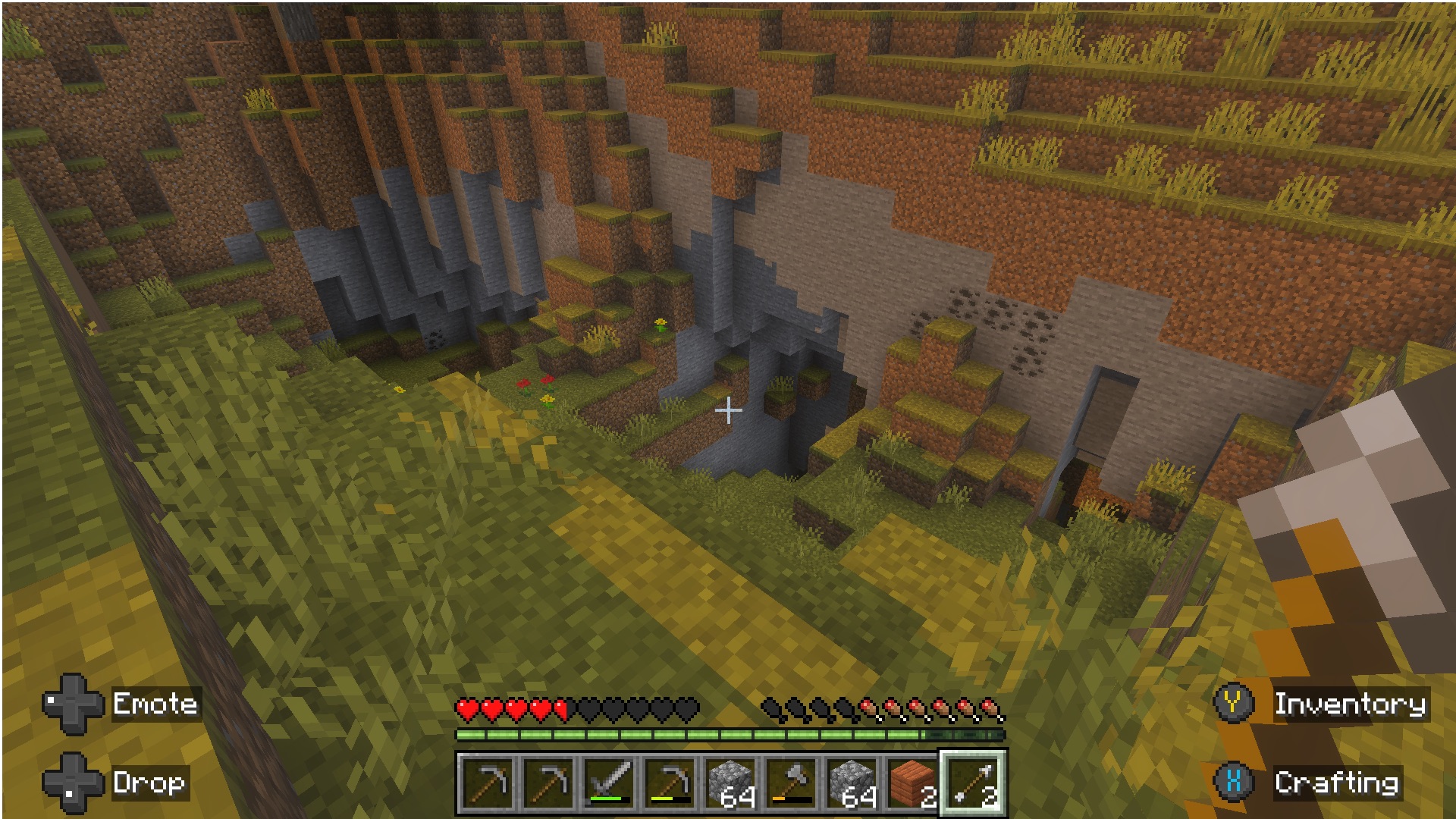
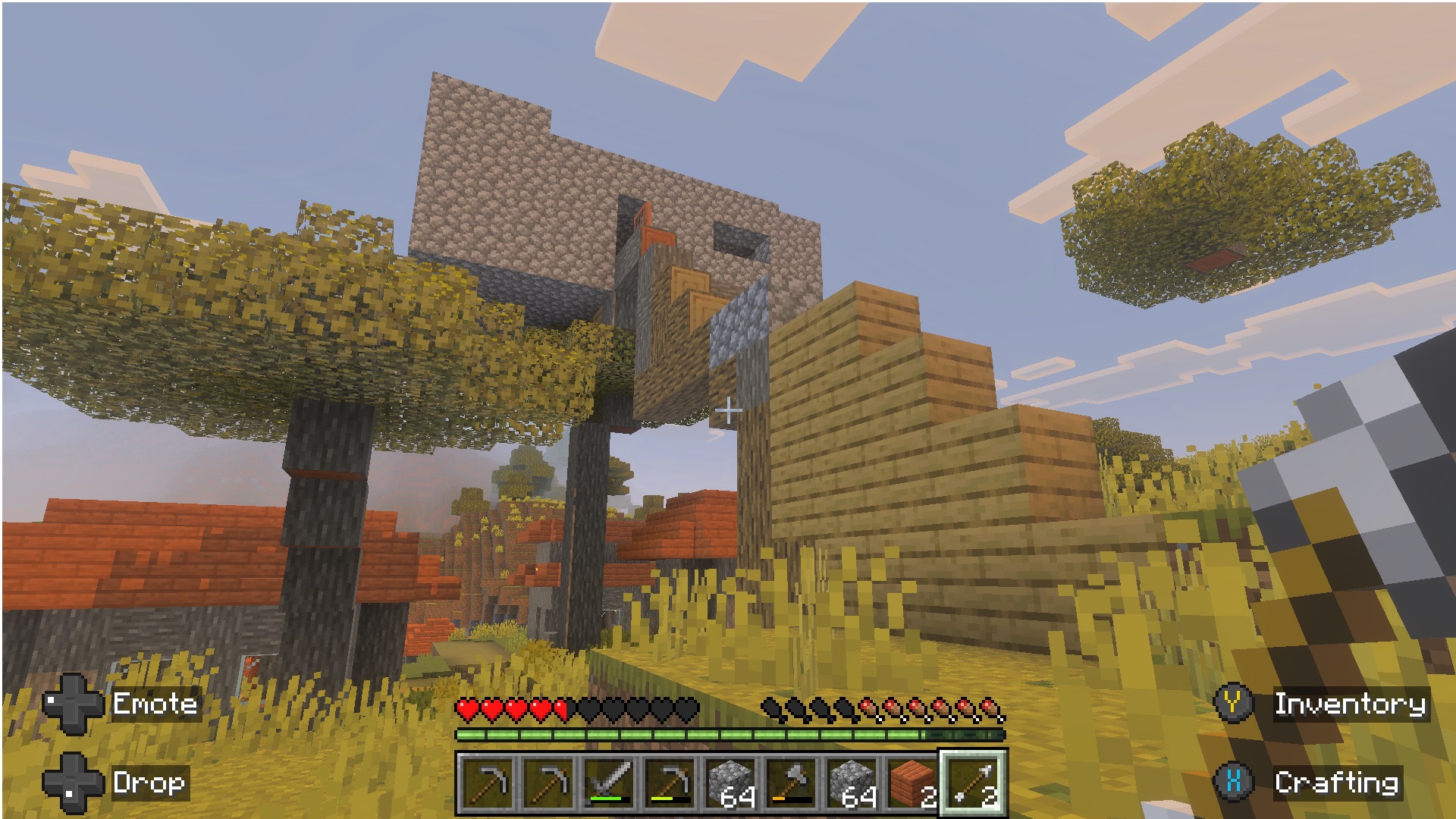
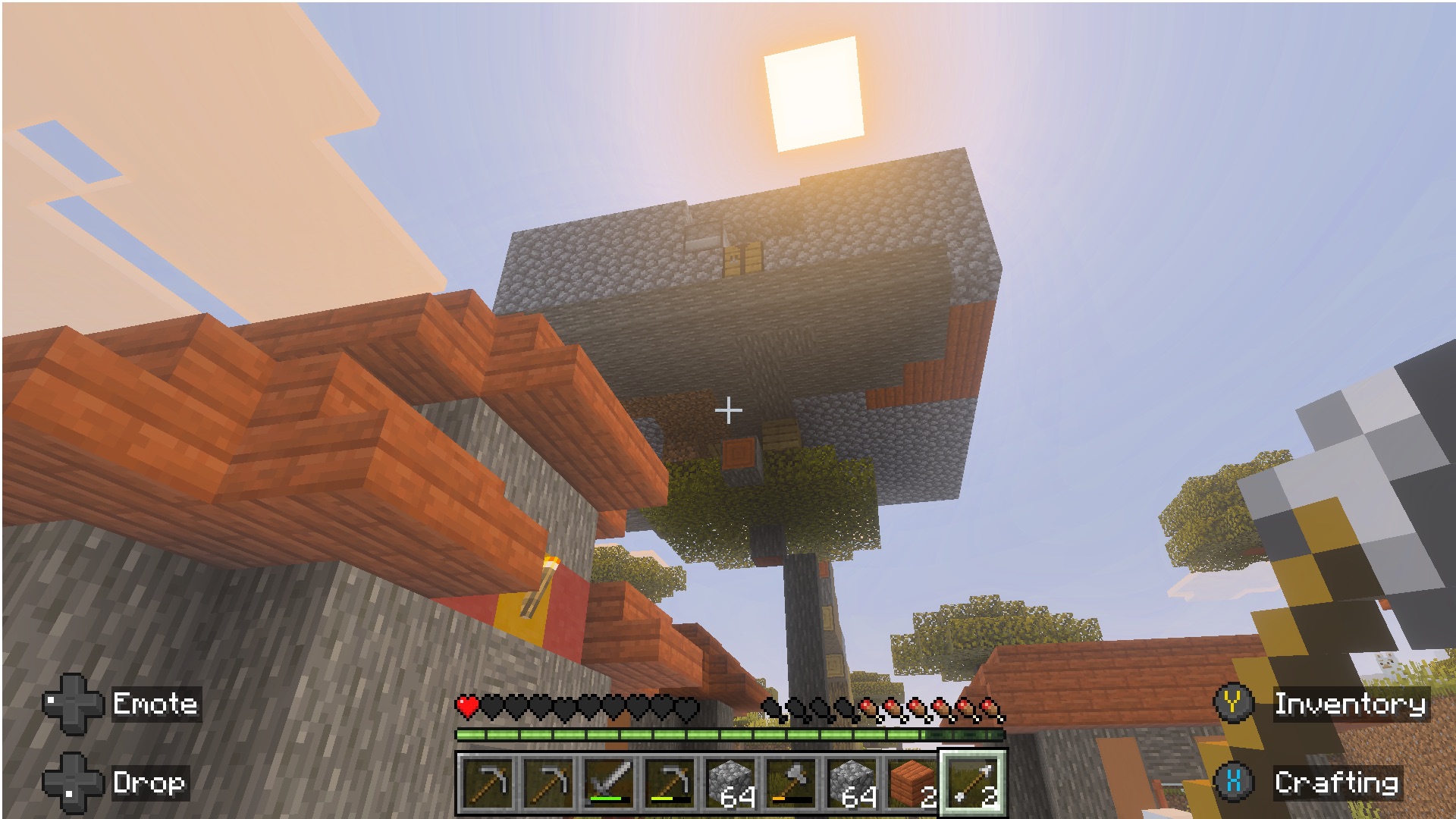
It was good. I actually did open the game up on my PC, like my desktop PC, this morning to get screenshots because I wanted them to be as high quality as possible. And it was at that point I learned it doesn't seem to sync worlds, even if you're assigned into the same account. Maybe it does, but mine wasn't there, so I have low-risk screenshots. But let's just take a look at what I did. So I did the opposite of what you did. I was spawned at a little village, and I built my house in that village, but not necessarily in that village. From this first screenshot, you can see it towers above the village.
It's above the village. In the second screenshot, you can see kind of a view of my house from the village. It really towers over for a few hours during the day. It actually blocks out the sun, so you get a daily eclipse, which is pretty fun. And, yeah, next screenshot is also above the village. You can see how I get into the house. There is a staircase. What a staircase. That does not look like that would pass inspection. No, it's built of...
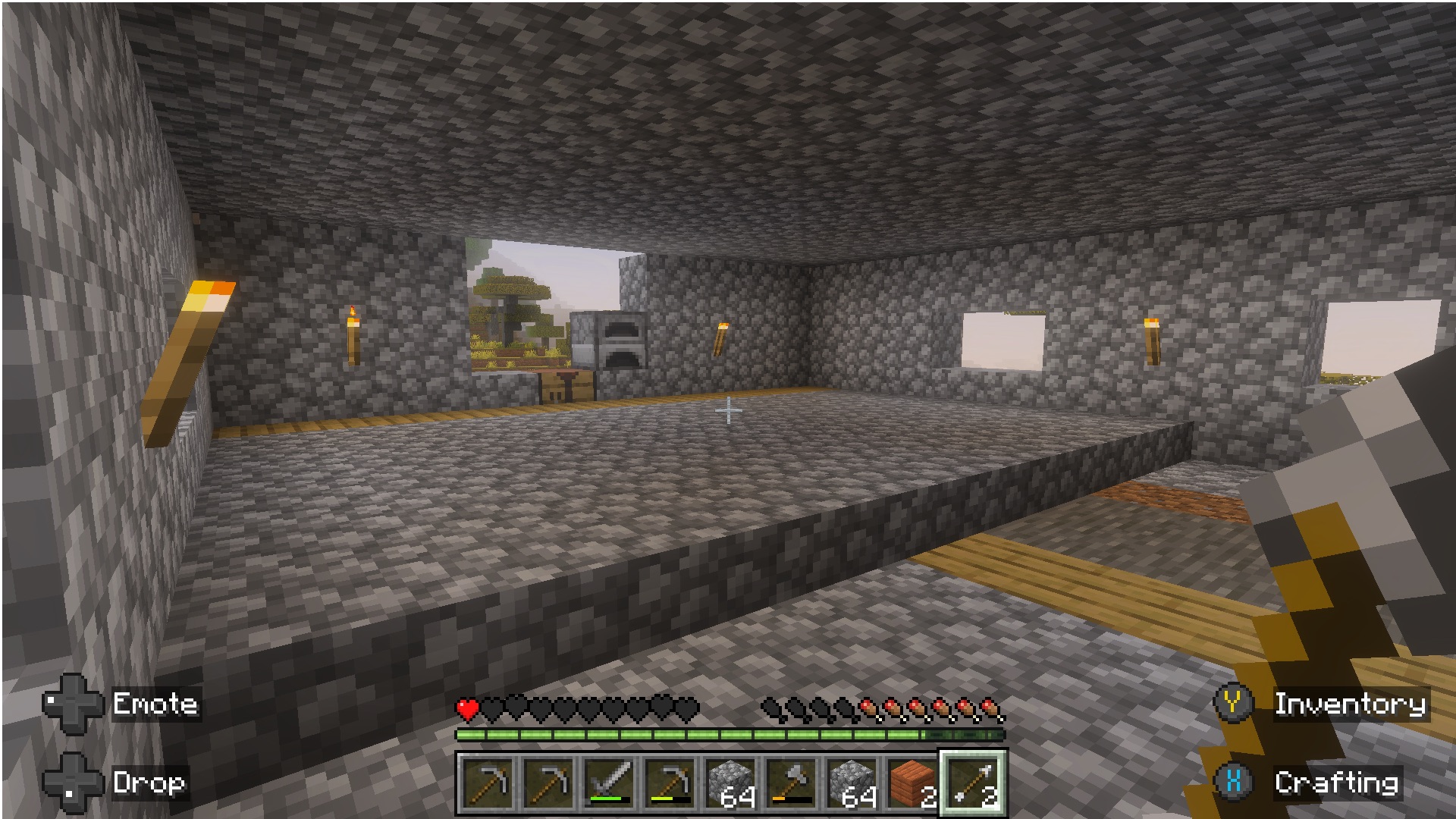
That's not up to code. Every material I found is basically whatever I could find that day. You can see I started by getting trees. So it's all wood. And then I eventually got some cobblestone. And yeah, so eventually we get into the house and you can see it overlooking the village. You can see my crafting table is right there so I can oversee the village while I craft things. And then finally we get to the interior shot, which is a little minimal.
Also made out of cobblestone. Also made out. So you can, yeah, you can, if you are looking at the screenshots here, you can see I actually have wood, dirt, and some other like materials on the floor. Because again, I was just building with what I had. I was usually building under duress with creepers sneaking up on me. So it was really, really tough. I didn't figure out how to make a door for a long time. So actually at night, I would just run up here, and then I'd just build three blocks tall so the creatures couldn't get to me,
and I would just stand up here. I didn't know how to fight back. I never really got a good weapon. So when night came, I just kind of stood and waited for daylight to come. Wait, there's weapons? I can see a sword in your hotbar. Yes, so I eventually did figure out how to make a sword. But yeah, it is a split level, so I got a little, you know, you kind of have to step up. to get to the second part of it. There's torches for lighting, so at night you can see inside there. And the final screenshot I provided is the quarry that I stumbled upon a few days into it.
And I just started. I just started. Every moment of the day, as soon as the sun came up, I was running over there. I was going through so many pickaxes, getting as much as I could. I was bringing hundreds back to the homestead and I was building through the night. And I think I made something pretty special here. This is pretty cool. I mean, it's fun. It's got windows and yeah. I'm impressed by the windows, yes. That's probably something that new players would skip.
Now they are open. Well, it was hard because without them, it was just like pitch black during the day. which was not ideal. So the torches, I guess, eventually helped with that. But yeah. One thing I noticed right away is that your game looks a lot nicer than mine. And I think, and to explain that a little bit, I know why. It's because Mojang, so the studio, developing Minecraft, last year they released something called Vibrant Visuals.
And that's something that adds like real moving shadows according to the position of the sun. That's very new in Minecraft. Ray tracing as well. It makes the game look really nice and it shows in your screenshots. The lighting looks amazing. And that's only for now in the Bedrock edition of the game. That's the version that you can play on Windows as well as consoles and iPadOS as well.
all the versions that are not the classic Java edition version of the game. It's reportedly coming as well. Like they said, it's coming as well to the Java edition of the game, but it's going to take a long time. But yeah, just wanted to highlight this. Your game looks a lot nicer than mine. Yeah. So I guess it's my turn. Yes. Okay, so I will say I kind of had a late start to this because of my iritis and then eyes being dilated.
I literally couldn't see. I haven't been able to play video games until like a couple of days ago. So you can go ahead and click the spoiler tag. Okay. Nick. Okay, I was just messing with you guys. I put the Jurassic Park Ned Landry gif in there. Okay, so I only have one screenshot for you, But this one screenshot sums up my whole time with Minecraft. Like, literally, this is going to be everything. I'm going to send it to you guys in our text group right now.
It will be in the show notes. You guys should get this in just a second. This is going to sum up my whole experience. You died. Literally. Not Lawley fell from a high place. I had no idea what I was doing. There is no tutorial to this game whatsoever. I was just going and, like, punching things. And I was like, okay, I have wood. And then eventually I made a crafting table, but I couldn't figure out what to do with the crafting table. Like, what do I, like, and then, like, I was like, oh, maybe I need, like, rock.
And so I'd, like, punch rock, but, like, that didn't do anything. And I'm just like, what is going on? And then I would fall or those things would come up and kill me. Or I don't know. This is a hard game. It is very hard. I didn't have a ton of time because I've been trying to get caught up on work, too. I was trying to do it without looking up a guide because Niléane, when we recorded last, very importantly put out this is something a toddler could do. A toddler with Google, yes. Oh, okay.
Yeah. I was trying not to do it without a guide. And I was like, this should be easier than it is. But I kept dying. Yeah. I died many times as well. I did not escape the creatures at night many times. I lost so much material when I died. And I saw you could go back and get it, but not everything was always there. So yeah, it was tough. I died quite a few times as well. Yeah. So the game, in that regard, the game has gotten much better.
It used to be that there was literally nothing to tell you how to craft stuff in Minecraft. You had to look it up. Or discover it by chance or try things out in the crafting table. Yeah. Because the way you craft things in Minecraft is you draw shapes in the crafting grid. So you have a crafting table. You've got a three by three grid of items that you could put in.
And you just draw shapes with different materials and you get stuff. So you put in two sticks vertically, three planks horizontally, that gives you a wooden pickaxe, for example. How would anyone discover that? In 2013, I had to discover this myself. That's what I remembered. I was like, oh, that's how you do it. Because I was like, I know you can do a pickaxe. How do you do it? And then I got the crafting table and I saw the three by three grid and I was like, oh. But now it just showed me a bunch of recipes and I could just choose the pickaxe and it arranged it for me.
So now, yes, over the years, they added the crafting book that shows up in the crafting table. You click on that and it gives you the recipes that you've discovered. And it tells you how to craft stuff. But still, yes, it's not holding your hand in any way. Okay, so I did this wrong. Okay, sorry. I tried, but this was hard, Raph. So you played on the iPad? No, I played on the Switch 2.
I try not to put games on my iPad. So it runs well on the Switch. Oh, yeah. It doesn't really feel like a very demanding game. Yeah, yeah. It's all right. Depends what you do. Yeah, no, it ran fine. I was playing in handheld mode. But yeah, yeah. I always wondered how playable this game is with a controller. Oh, I played with a controller. It seems impossible to me to play this game with a controller, but I guess it just takes getting used to. Yeah. Yeah, it was fine.
I mean, you get the triggers to switch between things in your hands, and crafting is probably more annoying because you have to, like, arrow around, or you can use the joystick as, like, a mouse, but, like, it's very slow. Hmm. Yeah. Hmm. Interesting. Okay. Well, I did, yeah, I don't even know. I'm glad you tried. I love Minecraft. I say this all the time, it's the best game ever made. Because so many things have been accomplished in Minecraft.
And some of the best value you can ever get in terms of video games as well. You buy it once and you get updates forever. I bought the game for less than 10 euros in 2013. And now the game is much more expensive. but I haven't had to pay a single dime since. And yet the game keeps getting bigger. It keeps getting new features, new blocks, new materials, new things all the time.
Now they're doing, they used to do yearly big releases and now they do game drops. So it's big releases but even more often, like four times a year, three times a year. It's some of the best value you can get out of a game. Nice. All right. Well, it is my turn to issue a challenge, and I was kind of inspired by Niléane's challenge here. Though you guys have the ability to veto this one.
I'll explain why, and I have a backup for some reason. But I want us to revisit Animal Crossing New Horizons, one of my favorite game series. That's not good value. What? Do you have it? Do you guys own it already? Maybe my partner does. Maybe. I don't know. I'm not sure. Maybe my partner has it. Okay. Do you want me to pick a different challenge? Because I don't want this to cost you $60.
That's the thing. Wait, what? Yeah, it's an expensive game. I don't want this to cost you $60. So if you don't have it, I do have a backup challenge. But I'm not sure if I do. Okay. Well, let's just do the backup challenge. Let's cut this. Editor Chris, cut this. Okay. So my challenge for this week is going to be, let me copy it here. Hang on really quick. Copy, copy. Notion. Okay. My challenge is going to be pull an old device out from a drawer and use it.
We all have that drawer full of old tech devices. So I want you to pull it out, dust it off, clean it up, whatever it needs to be. use it, use it over the week, and then bring it to the show next time we record. Okay. That's nice. Is there a requirement on how old it is? Nope, nope. I literally just need to be one of those things that you put in the drawer and you're like, you know, I don't want to throw it out, I don't want to sell it, but I'm probably not going to use it.
You know, one of those things. We all have that drawer. Literally, it's right behind me. Right down there. It's right back there. Yep, yep. So pull out an old device and revisit it. Yeah. In my regard, it's not a drawer. It's more like it's sprinkled throughout everything. It is everywhere. Okay, so pull out a device from your house.
Okay. The drawer is more of the metaphor, But you guys know what I mean. Like an old device that you haven't used in a long time, bring it, clean it up, use it, revisit it, that kind of thing. Maybe I can put it in a drawer first. There you go. I mean, it doesn't necessarily have to be in a drawer for a long time. How long does it have to be in a drawer? Five minutes at least. Just an old device you haven't used in a long time. We're really splitting hairs here.
But I think that brings us to the end of the show. And as always, I have an end of the show question for you too. And I want to know, why is Animal Crossing better than Minecraft? I'm just kidding. No. I want to hear from you too. I didn't come up with a good question. Do you guys have a good question for us? I didn't come up with one. Oh, no. Matt, what have you been 3D printing lately?
Ooh, I've actually slowed down on the 3D printing. Okay. But I did print a fun little thing just for fun. Okay. It's a little pencil holder. That looks like a puppy coat. Oh, nice. Nice. Nice. Oh, that's funny. Niléane, what music have you been listening to lately? I'm glad you asked. So I bought this week, I bought the entire discography of Daft Punk on Kobus.
Oh, yes. Okay. New Meons cut off. Okay. It's over. Okay. And I 3D printed. I got all the things. I got Discovery. I got a homework. Human After All. The lesser liked Human After All. People don't like it as much. I like it. It's all right. It's got some bangers on it. It's got some bangers. Is that the one with Technologic? No, yes, that's the one. Technologic. That's the famous one in Human After All. Television rules. Television rules the nation. Yep.
Rules the nation. That's my favorite American band. It must be said. We're claiming them as our own. What? Anyways. So I've been 3D printing stuff. Actually, my 3D printer has a big clog right now, so I had to order a new nozzle because it's unfixable. It's really bad. So 3D printing's on pause for the next couple of days. But I 3D printed. Let's see if I can block my face and get this to focus. This little dinosaur thing. And it looks knitted. I don't know if it'll show up in the video, but it's for audio listeners.
It's this green, like, small dinosaur, and it's knitted, and, like, the eyes I had to print separately because I can't print multiple filament colors at once. But, yeah, yeah, kind of cool. Very cool. It looks squishy. I've also been doing Gridfinity and printing like filament organizer stuff but 3D printing is on hold right now. Bamboo Labs. Ship things faster. I also got Random Access Memories. Okay. So that is the end of the show. Thank you so much for listening.
Big thank you to Backstories. We are a Backstories podcast after all. Thank you all so much for listening and have a great day. Alive 2027 would be great. Thumbnail. Comeback. Oh yeah. That would be amazing. Episode's still going, right? Oh, no. -