Sorry, Danielle

Now playing
Sorry, Danielle
Show Notes
Niléane is getting bold with laptop appendages, Chris is nostalgic about the iPad Pro, and everyone gets weird with text files.
This week's Cozy Zone is a deep dive into 2012's Les Misérables film.
How would you have done our challenges? How would you answer the question at the end of the show? Let us know!
Want more from the gang? Cozy Zone is a bonus podcast every Monday where we let loose on all sorts of fun topics. You can get cozy with the Comfort Zone crew for just $5/month or $50/year, which not only makes the bonus episodes possible, but supports Comfort Zone, too.
Main topics Other stuff we talked about Follow the Hosts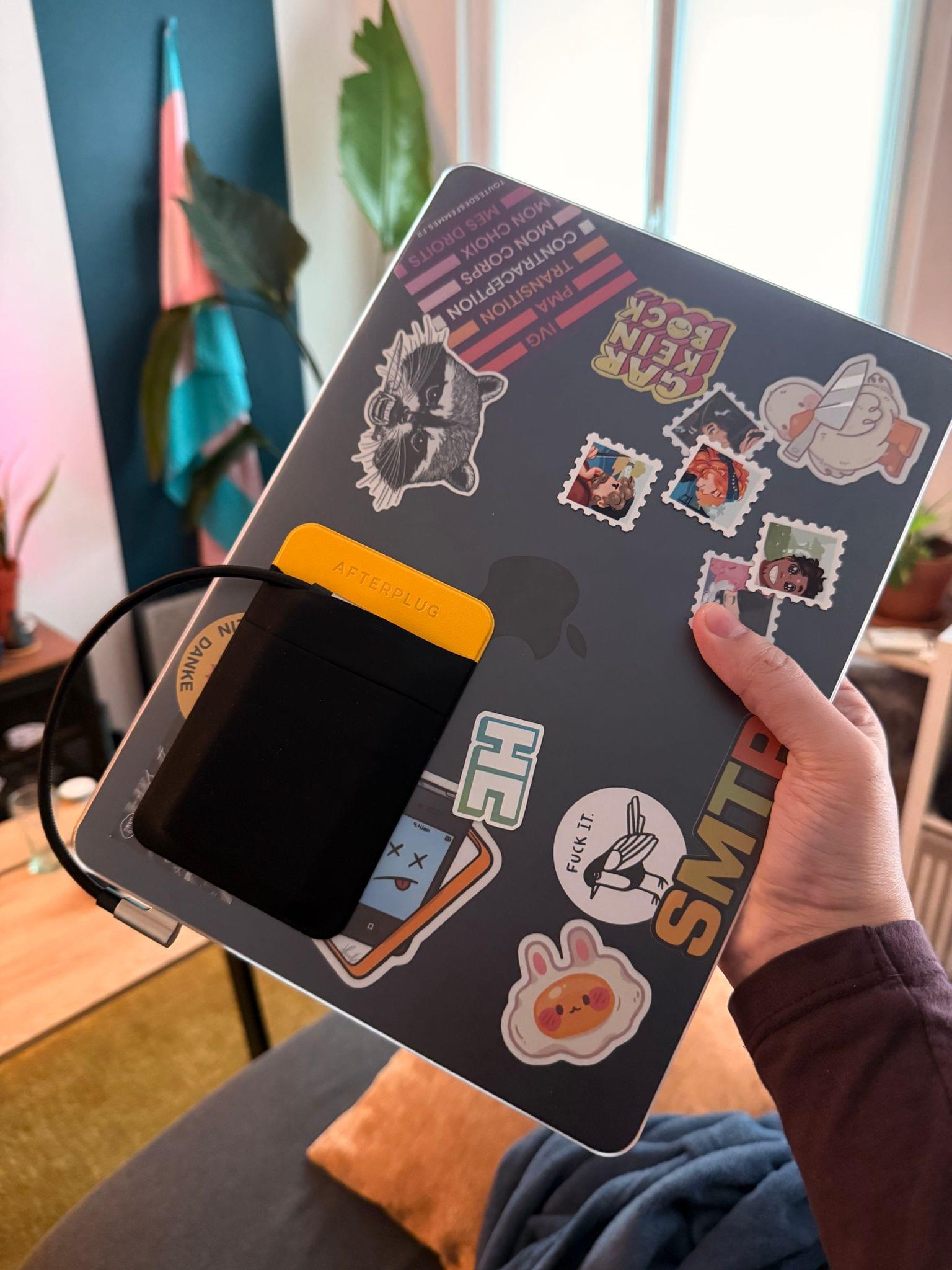
Transcript
1030 segmentsWelcome to Comfort Zone, a podcast all about pushing your hosts, well, outside of their comfort zone. I'm Christopher Lawley, and each week I am joined by two incredible co-hosts. As always, I am joined by the now 40-year-old Matt Birchler. Matt, how are you doing? Chris, I'm instantly devastated. Yep, I was listening back to our episode that we just put out, and remembered you are now 40 years old so um yeah just knife twist it's fine i feel good yeah i don't i don't feel sore
when i wake up in the morning or anything like it's you know that's what i was gonna ask you is anything creaking yet anything making weird noises when you move you know what um a couple last week i had a scare where i woke up and i was like really sore like my back was killing me and i was like oh no it's happening i'm getting to that point where i sleep the wrong way and i feel terrible the next day, but it was because I raked the yard, which is more strain on your back than you think it is. So I got off the hook there, but it's coming, and it's fine.
The alternative is worse, right? Yeah. Could be dead. And on that note, hey, Niléane, how are you doing? Hi, I am not 40. You're not. Hence, I am doing better than someone else. Enjoy your youth. you're more winning i'm turning 30 next year though that's terrible horizon to look forward to oh imagine being 30 what a joy yeah it's like there always has to be two of us in our 30s or
something as we do the show matt leaves his and Niléane joins me and i'm just stuck in the middle i also realized the other day that like um i realized how many years it's been since Macron was first elected president. It feels like forever. It feels like so much of my life was spent under this guy. When does it end? Anyway, just a thought I had.
Interesting. All right. I've never equated my age to political positions, but that's... For instance, have you never asked yourself under which president were you born? I mean, I know, but I just... Who? Who? Who is that? Mine was H.W. Bush. Oh, not good. Not good. Okay. Matt? Yeah. Reagan. Reagan? Not doing so well over there.
I mean, I can't choose when I was born. That's not really something... I know, but it's like the sky signs. What is that called? Oh, the astrology. The star signs or whatever. Every time somebody brings that up, I just like, I cringe a little. I'm like, how is like what month I was born affects my personality at all? And then like, they'll like, oh, list all this stuff off. And it's like the most generic thing that you can apply to everybody.
Anyways, I'm sorry. That's such a Scorpio. I'm going to say, Chris. Come on. However, under which president you were born, that decides your personality on the other hand. Yeah, absolutely. I was born under Chirac, if you want to know. So, yeah, there you go. No idea who that is. Let's get into some tiny topics. Niléane, I think you probably put this first thing in here, right? Yes, so we had...
So, time is a concept. So, last week in Cozy Zone, we roasted our listeners' desk setups. It was great. You're missing out if you're not subscribed to the Cozy Zone. That was fun. Yeah, we got great feedback on it. We had numerous people who we roasted right in to say thank you for destroying me. It was lovely. you know they knew what they were in for and I appreciate that they knew that yeah oh I just realized I'm referring to
the wrong tiny topic yeah I was wondering what you're doing here you're like throwing the order out of like the show is chaos again the intro is just absolutely sabotaged I have no idea what's happening well keep all of that in it makes sense so Matt will talk more about that but in the But in regard to a challenge that we did two or three weeks ago, depending on space-time and the laws of physics, we have a follow-up from Nicolas.
And that's why I mixed it up. Nicolas is the one who sent us his desk setup for the episode. So there you go. His follow-up has nothing to do with his desk setup. told us that when we did the Find My Challenge, you know, we had to spy on each other for a week and spot whenever one of us left the house. And I was the only successful spy. You were indeed. And Nikolai, he messaged me on iMessage, and he told me, you aware of this setting?
With a screenshot of the Find My app where there's a feature in the Find My app can set up alerts so that when the person leaves a radius, like leaves a location, you get a notification. So we could have used that. We could have used that. Oh, so yes, we could have. The interesting thing about that is it will, as soon as you enable it, it notifies the person. Of course. But it didn't always do that. For many, many years, it did not notify the person.
So you could just like secretly like know when they were somewhere. was interesting but my wife and i use that all the time like she works late sometimes and like you don't really know when she's leaving so i'll just say like notify me when she leaves and it's nice to know like get an idea for when she's gonna be home i'm i'm zooming in on matt burtsler's location i can see where matt burtsler is right now i see him so anyway he yeah and i thought he's right we we messed it up we should have used that for the challenge we could have yeah really should have
I didn't know that was actually a thing I don't really want notifications when people leave I don't really want notifications period I don't really I turned so many notifications off if you were an app that gets notifications on my phone you are a privileged privileged app yeah anyway so that was it Matt you want to talk about your thing since we hinted at it already and chaos is raining Yeah. Listener Trey Cook wrote in to thank us for roasting their desk setup. So you're welcome. And he also included in his feedback that he thought we were a little harsh on affinity and defended the power that enables people who take the time to figure it out.
So I wanted to call that out, which also brings me to a statement that I would like to make about what Canva has done with Affinity, which I think is maybe contrarian. I think they've done about as good as they possibly could have, and I don't understand why people are so angry. That is my statement. Wait, people are angry about this update? I really haven't followed this whole update. People are actually angry about it? Yes. I mean, I'm annoyed about the whole iPad app situation, but that's just me being me.
The anger I've seen comes from people who do not like that they will not be updating the old apps anymore, as well as I guess they think Canva is an evil company. And, oh, it's free now, but it might not be free someday. They say it'll be free forever, but maybe it's not. So there's a lot of angst that I've seen on social media, at least. And maybe that's just social media making everything a disaster. I think honestly it's pretty good and I've continued to use it since I talked about it a few weeks ago
and it's nice it's you know it's not the best necessarily but as like a photoshop alternative that costs you literally nothing I don't know could be worse so that's it that's what I wanted to say I I I continue to use the affinity app I think it's actually okay and I don't know if I don't understand why there is seem to be people who are quite upset about what they've done it's the internet there's always gonna be people that are angry speaking of people that are angry oh no i'm just kidding i i was trying to
transition there but i it wasn't it wasn't good because i am in love yes i'm i'm i'm i have found my true love sorry danielle uh not really uh actually i have a bunch of issues with it but i got the mouse oh it's a little baby mouse so matt talked about the pulsar something something hyper something 360 no scope bro mouse last week and uh pulsar also makes this mouse which i don't think is the same thing like it doesn't have the same branding it's and the
design is different not exactly no uh this is the gulf livery fifth anniversary pulsar mouse and this thing first off is stupid light like i i i didn't weigh it we have like a kitchen scale i probably could have weighed the grams or probably it's on their website but it weighs nothing in your hand at all um i love love love love love the look of this thing it's got the light blue and orange look um it's missing a bunch of the mouse but it actually still feels good to use in your hand like it doesn't feel like the magic mouse where it's broken um it does feel good to use
and the big question when i ordered this thing was will it work with the ipad and i am happy to report that it does it does work with the ipad you can plug in the wireless dongle thing to like so for example i have it plugged into the cal digit hub and i can just use this with the ipad all right yeah with the ipad except the forward and back buttons don't work oh i don't know why I plugged it into the Mac, did a firmware update, and I saw that the side buttons are assigned to forward and back,
but they do not work with Safari on the iPad. You cannot go forward and back between pages. Interesting. Do other mice? Yeah, on the mouse with the forward and back buttons on the side. I mean, other mice, like the MX Master, the forward and back, they work? Yes, yes, they do. Yeah. Okay. So I don't know why this one doesn't work. It's probably some, hey, we're PC gaming mouse bro kind of thing. And that's why.
I'm not sure if anyone has a fix. Let me know. But scrolling works. And since it's the ratcheting scrolling and not the free-flowing scrolling, it's not terrible on the iPad. Whereas, like, mice's with their free-flowing scrolling, like, scrolling gets completely out of whack. But it's still not great. So the way I've been using this is just, like, how nearly on a minute I am a superior being last week. I have this mouse on the right side, and I have the Magic Trackpad on the left side. So swiping, scrolling is all happening on the Magic Trackpad.
Clicking and moving is all happening with the mouse. I am a superior being. Thank you very much. I can use this. So, yeah, it's an interesting mouse. If you're an iPad user, do not get this, unless you really love the Gulf livery. That's pretty much it. I mean, I got it. I'm probably still going to use it for some things. It's definitely going to be a thumbnail thing that shows up in a lot of thumbnails because it's colorful and it pops and it's an interesting design. But, yeah, it was $150, not well spent.
Well, I'm glad you at least get some joy out of it, even if it's a sometimes mouse. Yeah. But that brings us to our podcast within a podcast. And this is your podcast, Is This a Good Orange? hosted by me, Christopher Lawley, with Niléane. And Niléane, as always, you are the judge, jury, and executioner on this podcast of Is This a Good Orange? And my question for you is, is this mouse, is the orange on this mouse a good orange?
And I also have something else I meant to pull as well. So while you debate, while you kind of look at it and maybe pull up the website, the link is in our show notes. Because I don't think Riverside does a good job of showing color over the same thing. Zooming on your video. But this mouse also comes with an orange USB-C to USB-A cable as well. A very orange. And it's a bright orange. For the record, it is a bright orange. But I am curious, Niléane, on our podcast, is this a good orange?
The question is, is this a good orange? So, I'm fighting with Notion to find the link. If you see under the intro, under Tiny Topics, Chris got the mouse. The mouse is the link right there. Yeah. There's so many different hues of orange on this page. I can't tell which one is the real one. I would say on the actual product, it is just one orange.
There's orange all over it, but it's just the same color orange. I think it's fine. It's fine. There's a clear lack of yellow in that tint of orange. I would say that's because it's based on the gulf livery of car racing and stuff. But yes. So you would say it is a good orange. It goes down as a good orange. A decent orange. Like a good orange for me tends more toward yellow.
Okay. All right. All right. Well, that was Is This a Good Orange with me, your host, Christopher Lawley, and our judge, jury, and executioner, Niléane. Thank you for listening. Have a nice week. Nice. Wow, that was weird, guys. It's like Comfort Zone. Forgot what our own show was called. Took a break for a second there. I'm the host of two sub-podcasts now. It's great. Yeah. Yeah, yeah, yeah. Yeah. Two podcasts within a podcast. And speaking of another podcast, this week on Cozy Zone, we watched Les Miserables, and we started Cozy Zone, the film school.
And it went over probably about as well as I thought it could go over if I would have stopped and thought about it for a second. But, yeah, you're going to want to listen to this one. So be sure to go check out Cozy Zone. That is our members podcast where we do an extra episode every single week. so really if you like us you can get two episodes from us every single week if you sign up for Cozy Zone link in the show notes and once again the desks set up roasting that was really fun that was a good one
that is one of our favorites but I think our absolute favorite is the one coming out next week at the time of listening if you're listening to this the day this episode comes out next Monday that might be my favorite one we get into it with each other. If you guys remember. Okay. Yeah. Yeah. All right. All right. You ready to get into the main show? I am. I don't know if you are. I absolutely am. I'm very, very curious about what your topic is.
As very typical in our show notes, sometimes we'll put a bunch of information. Like for me, I put like almost a script in there. I put a ton of information. Niléane puts very little information. And most of the time, I don't really know where her topic is going to go. So I'm always very excited. So usually when I have a story to tell, I tell you the story. And I include a ton of details, like how it started, where it arrived in the end, and all the steps in between.
I will change my method today, and I will show you the result immediately. Ooh, okay. So this topic is named my monstrosity of a MacBook Air. And you can click the link in the show notes to see what my current MacBook Air looks like. I don't see anything wrong with this. I mean, I know what you're doing here. Yeah. I know a lot of people that have done this.
Yeah. I don't, I don't, I see this as a way to solve a problem. It looks like someone is upset that they weren't able to upgrade the storage in their Mac. Yes, exactly. So the story is now, for the record, I hate this, but this is my life. So the photo is, so you have a link in the show notes for a click, is my MacBook Air is now encased in a clear matte sort of shell case.
You know the shell case for MacBooks that people put on their MacBooks? Oh, I didn't see that there was a case on this. Okay, yeah, no, that's problem one. That's a big problem right there. Yeah, so I've added that. Why? So that I could stick on there a little pouch, a sticky pouch that's very adhesive. Like, I did not want to stick this pouch directly on my MacBook. And this is the only purpose of this matte transparent case.
And inside this pouch resides an SSD, a Samsung T7 portable SSD, 2 terabytes. It is connected to one of the two Thunderbolt ports on the MacBook Air via a very short right-handled USB-C cable. And this is my life now. This is my life now because I'm running out of storage all the time, all the freaking time on my MacBook. And I can't live like this anymore. I've reached my limit. I extremely want to upgrade my Mac just for the storage.
I would buy the exact, like I would not even upgrade my Mac. I would not even get M4, M5, whatever. I would get the same one just with more storage. And that tells you how well aging is the M2 MacBook Air. I have nothing wrong to say about this Mac. It's really good. And it's three years old now. Still feels as great as day one, except for my co-est-tahoe and liquid glass, but okay.
And the only issue is I'm out of storage all the time. So I was inspired to do this because I was on the train a few weeks ago on my way to Paris and back. And I saw like some big business guy pulling out his MacBook Pro. So chunkier, way chunkier of a Mac on the tray in front of me in the TGV, high speed train.
So, yeah, pulls out the tray. Boom, full MacBook Pro in front of him. and as he went and opened his MacBook Pro, I could see on top of the lid, there was not one of these pouches. There were four. Whoa. So imagine my photo, but like a grid of four pouches like that. Oh, I love it. And each contains an SSD, a portable SSD.
Now that's a modular laptop if I've ever heard. Oh, yeah. And when I saw this and I was like, okay, this guy is living the life. His MacBook looks insane. Because each one of his, he's not optimized anything, by the way. It looks, his setup looks terrible. Because they don't have the pouch that I got, which has a bit of color, splash of yellow. Was it black? His is all black and they look like the material was different, felt like pleather or something.
While mine is textile, it's fully textile. So anyway, it looked really bad, super chunky. And I got my pouch that I got. I got it because it's slim, like it's as slim as you can get. His were like full-on add-ons on top of the thickness of the MacBook Pro. But I was like, he's living the life. He's got, I don't know how many terabytes on top of his MacBook, and he's traveling with it on the train, working on it on the train.
There are four cables coming out of those SSDs at the same time. And I don't know how they connect. Maybe there's a hub in there that I didn't see. Maybe they're not all connected at once. But the MacBook Pro has a ton of ports. How many ports? It only has three USB-C ports. So one of those isn't connected. At least one of those is not connected. It's a hot swap situation. He just swaps in the SSD. And they're like in a raid. So he's like doing it super fast. Everything's riding. I'm just kidding.
I love that. Yeah, you're right. It's probably just plugging in one at once. And he keeps all the cables on them. So it just has to, I don't know, I'm trying to imagine how he does it. Yeah. It sounds almost like when you have a camera rig. Like, I just have my camera. But I know, like, especially with cinema cameras, they have, like, screws on all sides and stuff. And you get, like, a rack. And you, like, mount this onto this side, this onto this. Like, you have stuff all around the place. Chris, I'm sure, does something like this.
He's a fancier camera guy than me. But, like, yeah, that's wild. I thought you were going to say he had two. And I was going to say, that's crazy. No, no. Like a grade of four. Yeah. Yeah, that thing. Yeah, you got to have yourself a cage with handles. I don't have any of the accessories put on this right now. One day you'll get the camera that goes in there. I believe in you, Chris. No, so I might have ordered a cinema camera this morning. Ooh, C50. C50, baby. Interesting. I like the wooden handle.
I do, too. And it feels good, too. It feels good to hold. And then you got the top handle. this is for my current camera. I'll have to, but the C50 has, it goes even crazier. But anyways, I'm derailing Niléane's topic. Yeah, you're right. Maybe I should get a wooden handle for my Mac. Well, that's great. Yeah, you could just hold it at your side, carry it like a briefcase. Yeah. So anyway, I, I did some tests. I have not gone out yet with my MacBook looking like this, but I'm going to Paris on Monday.
So I will try soon enough. So I did test, like, putting it in my backpack, my new backpack that you saw. And, like, it's perfectly fine. And since, like, I got the perfect length cable, the two ends are right angled. So there's no, like, bumping or whatever. Nice. Actually, it's pretty good. Like, I'm really happy with this.
And I don't know. This is just an update on my MacBook Air situation. Oh, and I forgot to mention why I have gone to this solution. So first, it's budget. I can't buy a new Mac right now. This will have to wait. But at the same time, I can't just live with constantly my Mac running out of storage. It's no way to live. If you would like to help Niléane upgrade her Mac, subscribe to CozyZone.
Yes. And so, yeah, so this was a good solution. But the reason I did this as well is because my offline music library has gone out of hand. I knew it. I knew it was coming to that. Absolutely. I was just waiting for that. This is just like, it was a little challenge that has gotten totally out of control. It's required upgrading everything in your life. Whose challenge was that? Was it, Niléane, was it yours or was it like Matt's or mine?
Oh, was yours? Okay, because I was going to feel bad if it was mine. It wasn't mine. I'm like costing you all this. Was it mine? We'll have to roll back the tape and see who it was. I don't remember. I don't remember either. Oh, yeah, I don't remember. But okay, okay. So you have MP3s for days. Or are they flak files? Most of them are flak files. Whoa. Okay. There's issue number one. There's not, like, my music library isn't huge, like, for real. But I basically, when I did this infamous challenge and moved to offline music library, I just basically revived my old music library that was sitting in iCloud Drive from, I don't know, 10 years ago.
Because at the time, I used to only download music and purchase music instead of subscribing to Spotify and Apple Music. So I revived that music library that inherited from all those years ago. And that didn't have a ton of albums in there. I don't remember how many. And it's just like over the past months, I've grown substantially that library because I've bought a ton more albums because I've just wanted to like aim to replicate the music library that I had in Apple Music.
So, like, progressively, it's going to take time, obviously, because I can't just spend $10,000 in music. But slowly but surely... If you would like to help Niléane spend $10,000 in music, subscribe to Cozy Zone. But slowly but surely, I am reaching the point where my music library is reaching the size of my music library that I had in Apple Music in the subscription service. Nice. So, which means it's getting big, but it's not that big.
Like currently, can I see this somewhere in Swinzean? I'm still using Swinzean, by the way. It's great. Absolutely great. Music player. 4,545 tracks. That is 340 albums. 165 artists. So, I mean, I have friends that have offline music libraries that are way worse than that.
But still, that amounts to, let me check, 173 gigabytes. Okay, that's not bad. That's not bad. I mean, I just looked, my music library is 89 gigs, and that's just like MP3s. Like, I don't have the... Yeah, okay. I just use the high quality. don't use the lossless setting in apple music yeah uh yeah i would say like about half of my music library is mp3s uh from the old days and now all the newer stuff that i've downloaded and uh and
purchased are lossless uh basically especially on the band camp like when you buy something on Bandcamp, the artists, they want to please you. They really want to please you and when you go to download the album and once you've made the purchase, you get all the options possible and it's really tempting to click the first option in the list and that is the highest quality setting and that's like
I don't know how many gigahertz of sample rate or whatever. So it's huge files. Anyway. And as you know, my solution up until now was to have my music library on my home server, a Linux machine in the living room. That's a MacBook port that's been converted. And now it's got Linux on there, our Plex server. And basically, I put all of my music library on there and I've accessed that music library from my Mac and other devices via Samba.
So a network drive. Or via the Plex app on my phone. Or via Dobler. But that's so unreliable. Anyone listening, if you can't really figure out how annoying it is to deal with network drives on macOS. I will just guide you to form yourself an opinion. By doing this, just go on Google, type Samba macOS fix.
Just those three keywords, you will find endless threads dating all the way back to 2007, 2008, those years. Some of those fixes still and workarounds that are deep, buried deep in those threads from 15 years ago. They are still work. Some of them still work today. Some of them don't anymore. But basically, Samba drives are so unreliable.
and I have had the displeasure of experience in that on macOS these days, they will not mount when you wake the Mac from sleep. They will dismount on their own. They will mount sometime when you wake your Mac from sleep. They will mount, but in duplicate, my network drive will be duplicated 10 times on my desktop. When you say Samba, are you using SMB?
SMB, that's it, yeah. Try AFP. So that's the thing. AFP is on the verge of being deprecated. Oh, is it really? Oh, yeah. It works so much better than SMB. Maybe, but it's on the verge of being deprecated, and it's actually way more annoying to set up on a Linux machine now. at least in my attempts.
But anyway, I've given up. I have a ton of experience with S&B back in my IT days. And it was one of those things that caused me a lot of headaches, like you. So when I set up my NAS, I set it up with AFP and it has been rock solid the whole time. It mounts automatically when I have it set up, so it mounts automatically when my MacBook Pro turns on. It works perfectly with Time Machine and everything.
It works fine. It's a bummer that it's being deprecated. I will fact check myself. I think it's about to be deprecated. I believe you. That's a bummer. I don't even know. It's already deprecated. Like, maybe it still works, but Apple, yeah. MacOS 15.5, Apple has officially deprecated AFP. When checking the mount AFP main page, users are now presented with the following message.
AFP is now deprecated in code version and will be removed in a future version of macOS. There you go. Never mind. I take back everything I said. I will have to fix my scripts. so anyway this is why i've given up on making it work um it's now so fast like i got i got a fancy cable i got like a usb 4 i don't know gen x 3.2 whatever the the usb standard names by the way
USB 3.1 Gen2. Yeah, but there's a Nex as well, Gen2.x1, something like that. That's new. Yeah, when I was looking at Reddit threads about which cable to buy with that SSD, people were like, "Yeah, but don't get the GenX2, na-na-na-na-na, just get the GenX2 with the The next two at the end as well. It feels like a fever dream reading those advice.
Anyway, that's it. It feels so fast now. I got a fancy cable. I opened Doppler, the music loads instantly. There's no worrying about if the drive has mounted or not. It's all mounted. And I've done this as well. I have another two terabyte drive that's been there for a while. It's plugged into my Thunderbolt dock. And now that backs up the drive that's mounted on top of my MacBook Air as well.
So now my music library is automatically backed up by Time Machine. And I've also set it up so there's a cron job. And I will not go into detail, but there's a cron job that runs on my Mac that will automatically R-sync, if you know that command, that will automatically R-sync all of my music library onto the server in the living room. So my music library is at all times in three places. So I'm pretty happy so far with that. I will add probably some cloud backup in the mix at some point.
So there you go. That was the monstrosity that has become my book. Well, I'm glad you have a solution. Thank you. It's very elegant. You'll be shocked to know I do a similar thing for my video editing. Because my laptop... No, we will not be shocked. We've seen your desk. No, we will not be shocked at all. We're not shocked. When I'm using that, I plug it into the Mac, and because my Mac is just on the edge of the desk, it just kind of dangles over the edge.
Oh, dear God. See? I go to all these lengths to make sure, like, so the SSD sits there and doesn't move, and it's secure, and it's padded. You'd be the kind to go in the train with your SSD dangling all over the place. honestly yeah when you said the guy had like four different pockets and they were just ugly i was like oh he's got pockets mine would just be hanging off the side of the laptop i don't know if you guys remember this i made a video it was years ago it was about this like grid system and i don't think they've made a new one for the new magic keyboard but like literally
it was this like grid system that slid on the back of the magic keyboard so and then you could still put your ipad on there but in the back there was like it was it was literally grids of straps so You can put like hard drives or whatever in there, hard drives, card readers, whatever in there. And so you could do that. I really like that. I need to see if they made one for the new Magic Keyboard because I still have that and I tried to put it on the new Magic Keyboard and it doesn't fit right. So I like that thing. That was pretty cool. Plus it had like pockets for AirPods and stuff.
You're making me think if that exists. Well, the issue with that, I don't know if it would fit. Well, okay, that kind of thing wouldn't work for the MacBook Air because it has to slide on the part that stands up. So it has to slide. It works for the Magic Keyboard because you can take the iPad off and the Magic Keyboard has its own separate back and it's not covering the display. Like if you were to do this with the MacBook Air, it would cover the display. So maybe they have something that's adhesive and they stick to the back of it and it's like that grid system.
But yeah, that would be kind of cool. Yeah. I recommend to anyone trying to do what I did, like if you go ahead with this kind of pouch that sticks on top of your MacBook, please do what I did and get a hard shell. Don't stick this on top, directly on your MacBook. If you try one day to rip it off, I don't know what happens. I don't want to find out, but the screen will suffer in some way.
um like it feels very well because this is really some really strong glue for real um it barely touched the shell and the that was it that was the position that it was in i could not get it off so yeah all right well this week i want to talk to you guys about well kind of two things but in one the ipad pro which just turned 10 years old sort of and ipad os 26.1 um the ipad pro was
announced 10 years ago but in september and then it shipped in november uh it was kind of like this weird thing that they announced it way ahead of time like it's not something apple does now but they did it back then so sorry i don't interrupt already but yeah it was announced on november 13th no it was announced in september 10 years ago so announced september 2015 and then it was released in november of 2015 i don't remember the exact days but um i just i know it's those months um and because in my ipad os walkthrough i looked it up before my ipad os walkthrough and jason
snell even said something to me he was like i um about like he even like like confirmed it because he was like that doesn't sound right but yeah no it's been the iPad Pro was announced 10 years ago in September yeah I was wondering because yesterday like France commemorated the 10 years of the Paris attacks and I was because I have no I have no recollection of the iPad Pro coming out so I was thinking maybe that's all a blur because that was during that time period yeah anyway just a thought yeah that's like if you ask me what happened in september 2001
yeah only one thing comes to mind only one thing happened um yeah so i i totally get that but yeah so it's been 10 years since it's been released i had the original ipad pro did you guys have the original one no i had a friend who had one it looked huge it was i remember how massive it looked It was massive. It was 15-inch MacBook Pro size with a 12.9-inch screen. That thing had bezels four days. But I loved that computer. I started working from the iPad with the iPad Air 2 and iOS 9. But when that iPad Pro came out, I threw caution to the wind and went all in on that sucker. I loved that thing.
And then iPadOS 26.1 just came out a couple weeks ago, which brought a bunch of features specifically to the iPad. The return of SlideOver is now here, so you can use SlideOver on the new version of multitasking with iPadOS. So you have your windowing mode or stage manager, so you can use either one of those. And if you long press on the stoplight buttons, there's now a enter SlideOver option in there for apps. And that will get them pinned to either the left or the right side. can still move them around and i'll put this like glass border around it so that it shows that this is the slide over window and it just like previous versions of slide over that window always stays on
top yeah but what's different is it's scalable so you can scale these windows out you can make them as big as you want you can make them as small as you want you can do slide over windows for iphone apps it's not just limited to apps that support support like regular multitasking on ipad os you can do any any window you open you can put in slide over now so that is a feat that's something i really appreciate because there's a lot of iphone apps i use on my ipad so it's kind of nice that they can do this um the case that i use slide over the most is with final cut pro for the ipad
because they still don't have a way for me to create user-created presets for effects. So I have this document in Obsidian with all of my effects and all the settings I make changes to. And I have to sit there and type it in manually. And because Final Cut Pro doesn't support good windowing, I can't put Obsidian and Final Cut side by side. So I put Obsidian in SlideOver, and then I sit there and type in all the effects and then copy and paste it, all the effects of the other clips, and it's annoying as all hell. It's crazy.
you know what you do in Final Cut on the Mac you set them once you hit save preset yep and you can even favorite that preset and then it's the very first one on the list every single time and you can just click it and it's applied I have been yelling about this since day one I have talked to people that work on the app please for the love of God give me this no one shoots log no Apple user shoots log come on except Apple makes a device that shoots log now I'm intentionally triggering him.
Sorry, have we moved on from slide over? No, sorry, tangent. So anyway, slide over is there. But the biggest complaint I've seen from people is you can't drag and drop an app to create slide over. You either have to go through the stoplight controls or use the keyboard shortcuts or go through the menu bar. There's three different ways to trigger slide over. So you have to do that. I've seen people complain about that. And there's also no multi-window switcher anymore. So in slide over of previous versions of iPadOS, you could swipe up on it and jump between all the apps that were in slide over.
Now it's just one app in slide over. And if you put another app in slide over, it kicks the one that was previously in slide over out. And it puts that new one in slide over. So, eh, not great. What in use, when you're trying to use it, slide over, What is your, how does it feel? Because looking from afar, looking at screen recordings and stuff and how people talk about it, I don't get it.
Like, I don't understand what this is used for. So, I use it for messages is the typical use case for me. so if i get a message that comes in or like i just know i need to message someone which is a common thing i guess i do on my ipad is i never have to think i never have to close the app i'm in i never have to like open up spotlight i just swipe in from the right side there's my messages i type out my thing and i swipe it away so like i for me it's useful for things that i'm using on a regular basis
but don't necessarily want on screen all the time i don't know so it makes it easy to pop into something without kind of losing what you're currently working on so i have a mac brain of course but i'm thinking how is that different from minimizing a window and clicking the icon to get it back think about it like this way like it's it's pinned on top so you have a macbook air like you yeah like imagine you got a bunch of stuff open but you always want one thing pinned on top but
you're clicking over to other apps and making them the active app. So instead of having that window go behind your active app, it's always staying on top. So you can reference that information. So if you have a PDF document open, or like in my case, an Obsidian Note or something that you want open, and Final Cut Pro is full screen, this keeps that note always pinned on top. And no matter what other app I'm working in, that note is always the thing on top. Okay. Yeah, I get that. I guess it's weird that they reused the name SlideOver because it feels very different in the context of a floating windows system.
I get it because a lot of people were complaining that SlideOver was gone. I would have, honestly, I think they should have just labeled it like pin window or pin this window or something like that. Yeah, it sounds more like that. but a lot of people were complaining specifically slide over was removed. So as a marketing angle, oh, hey, we brought slide over back. And it's not really slide over because like the whole idea of slide over originally was it slid in from the side and you can slide it out. Like you can take it and slide it out and hide it if you want and you can swipe back in.
But like, you don't, it's not, it's not really the same. But people were complaining because it's gone from the split view mode. Like not the, like the full screen mode, split view is gone. And it was useful in that context because with that full screen mode where you split view stuff, it's useful to have something that can float. At least one thing that can float. But in the context of everything floats, I have a hard time wrapping my brain around why would they go to like do make this effort to name a feature and brand it as such and give it a visual like highlight even with the class all around.
even though it's just a way to keep a window on top, which is something that window managers have been doing for the full history of window managers. I think it's just a way to visualize, hey, this is the window that is pinned to be on top of everything. There's no way to hide that slide over window. There's no way other than dismissing it or turning slide over off. You can't put anything on top of it. So that's the big thing. If you try and move something on top of slide over, gets moved behind it yeah um there's a couple of new window controls in ipad os 26.1 there is a now
hide others option which i love this so much so say i've got a bunch of windows open and okay i want to start doing some very focused writing in obsidian or i just want to tackle my email i can now go into the menu and under the name i can hit under the name of the app there's an option that says hide others or you can hit command option h and what this will do is it'll hide all of the background windows it keeps your active window open and in the forefront but everything else gets minimized and i love this i love that this is here um i've turned off stage manager because
of this and i'm just i'm using the normal windowing mode because of this and like it just lets me switch context super fast and i love this this wasn't an ipad os before no this was this this was with 26.1. Okay. Say it. Say it. Otherwise, I will say it. The more they make it like the Mac, the more people like it. Yeah. Okay, yeah. I thought you were going to say it. Did they add the thing from the Mac where you can option click or option tap, I guess, app icons in the dock
to hide everything else? No, that's not it. Is it option click? Option click hides that app. Yes. So it's option shift click. No. Option command. Option command click hides everything but that app. Yeah. Option command click. No. No, it does not. It just, unless I'm not able to do that from here right now.
I don't think so. I don't think they added that. Okay. But you have command option H, and it just hides everything in the background. They also added close other windows option as well. But this, you have to hold down. It's in the menu option. It's in the menu bar under window, and you have to hold down the option key to get this. But what this does is say I've got a bunch of windows open, but I have three Safari windows as well. And what this will do is it will close just all of those Safari windows. So you can, and it's the keyboard shortcut command option W.
And this will just close just the Safari windows, but leave all the other apps open. So that's kind of nice that that's there. Another thing in 26.1 is USB mics now have gain control. This was something that I and other people like Jason Snell complained about, that if you had a USB mic plugged right into the iPad, which is probably the use case for a lot of podcasters that are going to use a mic with an iPad, like they're traveling and they don't want to bring an audio interface or something like that. Most USB mics do not have gain controls on them.
So you had no control over your volume whatsoever because there was nothing in software wise. So now with the local recording option, there is an option to change that. A couple other things just really quick. External monitor support is so good now. I love external monitor support on iPadOS 26. Even just the base version of iPadOS 26.1 aside, the fluid windows, like the free-flowing, freely resizable windows and freely replaceable windows, it just makes it so good.
I've been working at my studio display. Like, I did it a lot with the old one, but I've been doing it a lot more with this one as well. Yeah. It's very nice. The one thing it makes me want is the ability to change the acceleration on the mouse, because it's a little different than it is on the Mac, and it is confusing to me. I feel like I have to move the mouse more than I do on my Mac. You can change the acceleration on the iPad. Yeah. So it's under settings. Okay. It's either under settings, general trackpad.
Hang on. Hang on. I have my iPad. My iPad is literally plugged into my external monitor over there, but I have the mouse that's paired with it. So I can control it over here. So hang on. Settings, general. Okay. If there is, I'll play around with it. It is in there because I've done it as well. because I agree with you that the acceleration is too slow. So I've cracked it up. Maybe it's an accessibility setting. I don't remember off the top of my head, but I know for a fact it's in there. Okay, sweet.
Lovely. So I have two questions for you guys kind of to wrap this topic up. First question, because it's the 10th anniversary of the iPad Pro, what do you both want from the iPad? Niléane, I know you've kind of forsaken the iPad and don't have one anymore. Matt, you've forsaken the ways of working from the iPad as well. What would tempt you to come back? And I swear to God, if either of you say Mac OS, no, I'm just kidding.
NOS, that's... Starts with an M. That starts with an M. Has an A, has a C. But that's the crux of it. That's the point, though. I want to be able to install anything I want on that thing. I don't want weird limitations with audio. I think they have backed themselves into a corner with iPadOS. And you can see that in the way they are re-implementing some basic stuff over the course of two decades,
the second decade being ongoing. and I don't know how long that's going to take and is it worth it? I think maybe they made a bad decision 10 years ago with the iPad Pro and before that with the original iPad. This should have been running a weird version of macOS instead of a weird version of iOS from the beginning and we wouldn't be here today and I don't think anything will change that paradigm anytime soon and then hence I will not
go back to the iPad anytime soon so I think the normal iPads right an iPad OS are great it's the iPad Pro that's a little weird for me because like like Niléane I want it to do more there's things that make me even today even though they've added all these things like there's still little things here and there. So I obviously wanted to run macOS. But if I can't say that, what I would love is for them to prove me wrong. Because I was all in on the iPad in 2018. I sold my Mac. I went fully in on the lovely 2018 iPad Pro. Just like went full in on it. And then by 2021,
I bought a MacBook Air, the M1. And then by 2022, I wrote a blog post about how, all right, you wore me down. Just give me macOS on the iPad. So what I would love is for them to prove me wrong and just keep iterating on iPadOS and make it something that I am drawn to and I no longer want macOS. Like, I don't have a specific individual thing to, like, say I want, but, like, make it so that I am so drawn to it that I just naturally start using it.
So, yeah, it's just abstract, but I'd love to see them prove me wrong. But yes, I short-term would just love to run macOS, especially if there's rumors of a Mac laptop with touch coming next year. If macOS can function with touch, it could run on an iPad. It's a whole thing. Just, I don't know. Just a thought. Just a thought. Okay. All right. All right. Interesting. Okay. The big thing for me, I talked about Hush last week, but the big thing for me, like there's two things that keep me having to touch a Mac right now. And Hush was one of them. The other one is I need Chrome.
There's just too many things that don't work in WebKit, and I need that Chrome engine. I don't even care if it's not Google that brings a proper Chrome engine browser to you. I just need a proper Chrome engine browser on the iPad. I don't care which one it is. Just give me one. Oh, I have something. That's more specific than what I said before. Let it become a real web platform device. Real web browsers that are not just Safari.
And Safari has terrible performance both on iPadOS and macOS. It's, I don't know what they're doing. It's not going well. Yeah. And like you can compare Safari to any web browser right now. And it performs really bad on tons of web apps. Anyway. Okay. And ways for web developers to be able to work from an iPad. Gotcha. Right now, there's no way a web developer can work from an iPad.
There are hacky ways. I've read the blog posts. I've seen the YouTube videos. There are hacky ways, but I'm with you. There's no straight line stream forward way. Yeah. There's no dev tools. Yeah. Safari doesn't even have dev tools on iPadOS. You have to use the dev tools on Safari on the Mac with your iPad on the same Wi-Fi network and all that jazz. And you can inspect from the Mac the Safari that's on your iPad.
Just bring over the dev tools to the iPad. Allow third-party web browsers. I think that's a big, big thing. Okay. And my last question, and we're running long, so I'm going to get a simple yes or no from you. Like, no explanation. With iPad OS, well, with the OS 26, there is now a setting to change the tent of liquid glass. What are we using?
Glass or no glass? Yeah, we can't see that, Matt. And audio listeners can't hear that either. So out of focus. Can't see, can't hear, can't do anything. We have no idea. Tinted. Oh, Niléane, I'm going to guess you're using pure liquid glass. Full tinted. Like, I want a third setting, please. Get rid of the glass. Hey, I just said yes or no. Yep, yes or no.
Nope, we're running. I'm using glass. I want a frosted setting. Nope, nope, nope. Yes or no, you're not allowed to do explanations. I'm cutting you off. We're going long. I'm using glass. All right. Challenge. Matt, it was your challenge. What did you have us do? I kind of forgot exactly what wording I used, but it was something about text files and task management. Yes. Yes. I forgot to write it in the document, so I don't have the exact wording, but that was the gist. I wrote in the document for you.
I wrote something, something, text files. There you go. There you go. Yeah. No, it was do your task manage it in a text file or something like that. So anyways, Matt, what did you do? Okay, so I made a video about this on YouTube, kind of showing a thing I'm doing at work. And I have stopped using things for most of my task management, specifically my work task management. And I've adopted a text file in my Obsidian, an Obsidian that I call just today.
and I put tasks in there, and you can make them look nice. I could actually put a screenshot in our show notes so you can see them. But yeah, so I make them look nice, and I tick them off through the day, and then at the end of the day, I just delete the tasks that I completed. I look at the ones that I didn't do and decide if I need to do them tomorrow. And at the end of the day, I think about, okay, what happened today? What did I talk about in meetings? What do I need to do tomorrow?
I make a list of things to do tomorrow. So when I wake up and start my day, I can just open this file and I can be reminded this is what I said I would do today. This is not super revolutionary. I have also been exploring obsidian themes to make this list look very nice. I have linked to a couple in here. The theme I'm using right now is called baseline, But I have also included one that you have got to see. It is called Retroma.
And I would just click the link to see the GitHub page. Oh, my word. This is the most insane Obsidian conversion I have ever, ever seen. It is wild. It's insane. There is no way I would ever use this, but this looks awesome. So, see, Chris, to return to your previous question, in terms of liquid glass settings. Oh my God. I want this setting. I want this setting in the 26.3 or whatever.
I'll get the Apple engineers right on it. Thank you. So the last thing I'll say about this is this has been working pretty well for me. And the interesting thing I've started to do is I'm not a big journal person. I don't like to journal or like write about stuff. I have found at the end of my workday, again, because this is all work stuff in here, not private life, not any of my side project stuff, literally just nine to five job work stuff.
And at the end of the day, right before I just like stop working, I have been modifying this to-do list with Claude Code. And so what I've been doing, And this, I don't know, it sounds weird, but it's been really effective for me. I talked about using capacities a few, many episodes ago, I think at this point, to like save meeting notes, to have daily notes and stuff with just random things. And I'm taking the archives of those notes.
They're in my Obsidian directory. I'm automatically doing like archives of them and it's putting them into text files into Obsidian. And so in my Obsidian vault, I have all my meeting notes. They're sorted by date. and I can just talk to Claude Code. I just start voice dictation and I just like start talking about my day. So I'll be like, so I worked on this today I think tomorrow I need to focus on this, this and this and oh yeah, my boss told me about this thing that I need to make sure it's a top priority and just look at my meeting notes and
if there's anything I forgot, put that on my to-do list. And so for like 10 seconds it just does whatever it does and then it updates my to-do list for tomorrow and i review it to make sure there's nothing wrong in there and it's kind of cool it's it's uh it's helped me kind of just like talk through instead of like thinking like through everything i want to write down as a task and like having to remember everything it's helping me remember some of the stuff that i've forgotten um and yeah it's pretty cool so So this is what I've been doing.
It looks very fancy. Yeah, it's very cool. I watched your video and I liked what you were doing. I'm kind of doing something similar to you, but it's a little more focused on Todoist. So I've been using Todoist as my task manager since April, and I have really been enjoying it. And I took this opportunity to kind of see if I can find a nice bridge between Todoist and Obsidian. so I put a link there's a link in our show notes to a screenshot of my daily note and I've been a big fan of daily notes for a while it's just kind of a way to track things as a scratch pad just kind
of jot things down on what's going on and I started looking at plugins in Obsidian for Todoist and I found two the first one is Todoist Sync and this one is definitely the best it's it's definitely the best but it kind of renders everything as rich text like it renders like your to do is view in notes kind of thing so i didn't really feel it fit the um spirit of the challenge uh but it does have like bi-directional syncing so you can mark stuff as completed you can add tasks things like that then but i found to do is text which imports all of your your um task and you can kind of set
up different filters on what it imports. So I set it up to import the today stuff and the overdue stuff that actually might have been the default. I might not have had actually changed anything. So it imports all of that stuff right in and I set it up in my template for my daily note. So I have a keyboard shortcut in obsidian command shift D that creates that literally if I don't have a daily note already, it'll create a daily note for that day for specifically that whatever today is, or it'll just open my daily note if I already have one created. Kind of nice. And then
when that gets open for the first time, this plugin runs and it imports all of my tasks from Todoist for that day or overdue tasks as well. This plugin is a little more rough than the other one. So in order to mark something as complete, you actually have to use a obsidian command to do it. Like there is a checkbox in there but if you mark it as checked it doesn't sync to todoist you have to use the obsidian command that's built into this plugin so i set up a keyboard shortcut of command shift enter so whenever you're um the insertion points on it you just hit command shift enter and it marks that task is complete and it'll sync back to todoist kind of nice um with this plugin you
can't create tasks but that's not really a problem for me i'm using my task cut shortcut from a previous challenge that uses the local ai models and stuff like that in shortcuts uh still to create tasks via natural language and that's plain text so i figure that still fits the challenge so i've been using this plugin and my shortcut all week and it's kind of been great uh i'm i still would check to do this to make sure things are syncing and nothing got uh you know thrown off the rails I checked for a few days, but like the last couple of days, I haven't really opened Todoist for anything.
I've just been like, oh, here's my task for the day. Mark is complete. When I need to add something, I'd use task cut and everything's been fine. What is nice about this plugin is it pulls the description information into Todoist, which is something I use a lot because I'm like, oh, this video has this sponsor or, hey, this thing, I have these ideas for it. And I use the description field a lot. So overall, really like this plugin. Oh, and there's a source option in there as well. So when you have the plugin import your task, you'll see a link that says SRC or something.
You can click that and it'll take you to that task in Todoist. So that's kind of nice. It's like a deep link. But yeah, that's kind of what I've been doing with this. And I really liked it. So that was Todoist text for the plugin that I've been using. But Todoist sync is definitely the better one. that's very cool Niléane what about you what did you do and what did you text us yesterday yes so yesterday I realized
we were on Thursday and we record on Friday and suddenly because I was setting up my monstrosity of a MacBook Air I was like oh I'm so giddy for the episode it's going to be fun to talk about my monstrosity of a MacBook Air and then I realized wait what's the challenge and I completely forgot that was a challenge because you know though that's the core thing of the show um so until yesterday I did not do anything uh whoops and then I asked in the group chat what was the challenge and none of you knew either
so I knew I just didn't respond Todd okay because I've been doing it all week so the Matt who came up the challenge didn't know I did know in his defense he just didn't know the wording I'm trying to blame someone yeah so anyway so in the end what I did is so but you know why it split my mind it split my mind because I don't have any I don't have to-dos.
Anyway, I don't do to-dos. I had a brief period with the Sidekick notepad. You remember? That was nice. I gave up on that so fast. At some point, there was a Sidekick notepad taking on the room on my desktop and filled with stuff that was outdated as heck. So that was stupid. So I got rid of it. Yeah, so I don't have any to-dos to write anywhere. So I just, to compensate for that, I have brought a tip.
A tip for Mac users. Did you know that TextEdit, it's a really old app, by default, when you write stuff in TextEdit, it's in rich text format, and you export RTF files. did you know you can use it in plain text mode hey you didn't know you had no idea so if you open text edit and you go into the menu bar you click format convert to plain text and
there you go it's a plain text editor and you can write all of your to-dos so i win because I have given a tip to every listener to achieve the challenge. Clearly I win because Matt's not allowed to win challenges and so that means I win. Clearly I win because not only did I know that you could use edit plain text files and text edit. I am older than the RTF file format.
So yeah that's not winning Matt. Is that what you were googling? I just googled It was created by Microsoft in 1987. Yeah, that's not winning, Matt. It's winning in a way. Nope. All right. Well, this was a fun challenge. I actually like this, and I'm going to actually keep doing this. So this was a good one. Thank you, Matt. I actually really enjoyed this one. All right, Ilion, it is your challenge for next week. What do you got for us? Okay, you will hate this, Matt.
Oh, great. No, Chris, you will hate it. Matt, you will love it. the challenge is very simple it's two words set up area space what I've provided the link listeners can click the link as well if you want to try the challenge and that's it set up area space because I don't use the Mac oh but you yeah open your Mac so it's a Mac app Okay.
All right. Can you try to figure out? I'll set it up. Right now, what it is. It looks like some is a i3-like tiling window manager for macOS. I don't know what i3 means other than BMW i3, but. You just read the tagline. This reeks of some Linux stuff. Yeah. This is going to break my Mac. Is this going to break my Mac? No. No. There's nothing breaking here, no breakage.
Okay, so I will explain more, but it's funny that this challenge can fit into two words. Aerospace is a tiling window manager. That is, it's not like Moom or Magnet where you can tile windows on your desktop. This is a tiling window manager in the sense that it's automatically tiling stuff for you. You can't have windows that are floating. All of your windows are always tiled.
Aerospace is that. It has a feature where you can, at some points, like just when you need it, float windows on top of each other, but that's a mode. That's a specific mode that you enter and exit out of. by default it tires everything and why is this the challenge because setting it up as someone who has tried to do so yesterday and given up because i thought oh oh that's very difficult it feels like a challenge oh wait it's a good challenge for comfort zone so that was yesterday i love this
this is just like a technical challenge this is can you do it can you do it all right basically You install it. It's very easy to install it in terminal, by the way. Just a command, the provider command, but setting it up, like you're figuring out the key binds, actually using it for at least an hour or two. That's the challenge part. Okay. And the setup, there's no GUI. It's all in a configuration file. Anyway, you'll see. You'll see. You'll see. Oh, this is good.
This is going to be a nightmare. I'm so excited. All right. Well, we need to wrap up the show there. I see two questions in the document, but we only got time for one, so I'm just going to ask the first one, and then we'll save the next one for next week. The question is from Bastien. Hey, guys, I have an after-show question for you. How do you feel about football? Or more specifically, Niléane, who do you support? And Chris, how do you watch F1 and think football is boring? Genuine question here.
I really don't get it. Niléane, I'll let you go first. Who do you support in football? First, Bastien, based. second i i'm not like a hardcore football fan i just like i grew up with football and that as most people do here uh i watch the big big competitions i watch the champions league and the world cups the euro all of that so i support friends in those international competitions but there's no like club that i follow specifically um i just like the big stakes
I'm a very casual football watcher I will say I have a girlfriend who loves Arsenal and I watch a lot of the games with her and when we do I support Arsenal along her alongside her side nice as far as Formula 1 goes go watch the last race in Brazil and tell me it's boring that was amazing that was fantastic plus they have engines it's cars who doesn't love that That's such a non-answer.
You go fast, you get DRS, you have downforce, you take a turn at 100 miles an hour. It's amazing. You watch the last race. Matt, back me up on this one. Listen, I'm just happy that only you were called out, and I wasn't, even though I've got a full F1 car right behind me. We are similarly fanatical F1 fans, but only you got called out for the boringness. They understand why I would like it. I mean we basically always chat in our in our three person group chat but the only time Matt and I side chat
is about Formula One stuff because we know Niléane doesn't care but yeah this is true Matt and I were texting this weekend because we were excited about what was happening and it was a good good race but yeah we gotta wrap up there thank you all so much for listening thank you to MacStories for having us we are a MacStories podcast thank you all so much for listening have a great day bye bye