You Did Not Put a Lot of Time into This

Now playing
You Did Not Put a Lot of Time into This
Show Notes
Chris has an external drive faster than you've ever seen, Matt has a new email app he swears isn't his new favorite cult, and the whole gang does their best to redesign iOS and iPadOS.
This episode is sponsored by Rogue Amoeba: Makers of incredibly useful audio tools for your Mac. Use the code MS2504 through the end of April to get 20% off Rogue Amoeba's apps.
We want to hear from you! How would you have done our challenges? How would you answer the question at the end of the show? Let us know on Mastodon or Bluesky!
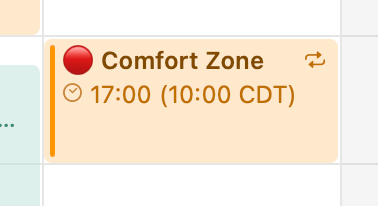
Weekly Topics Other Things Discussed- A very reasonable calendar invite
- Node Playground
- Samsung T7 SSD
- Mimestream
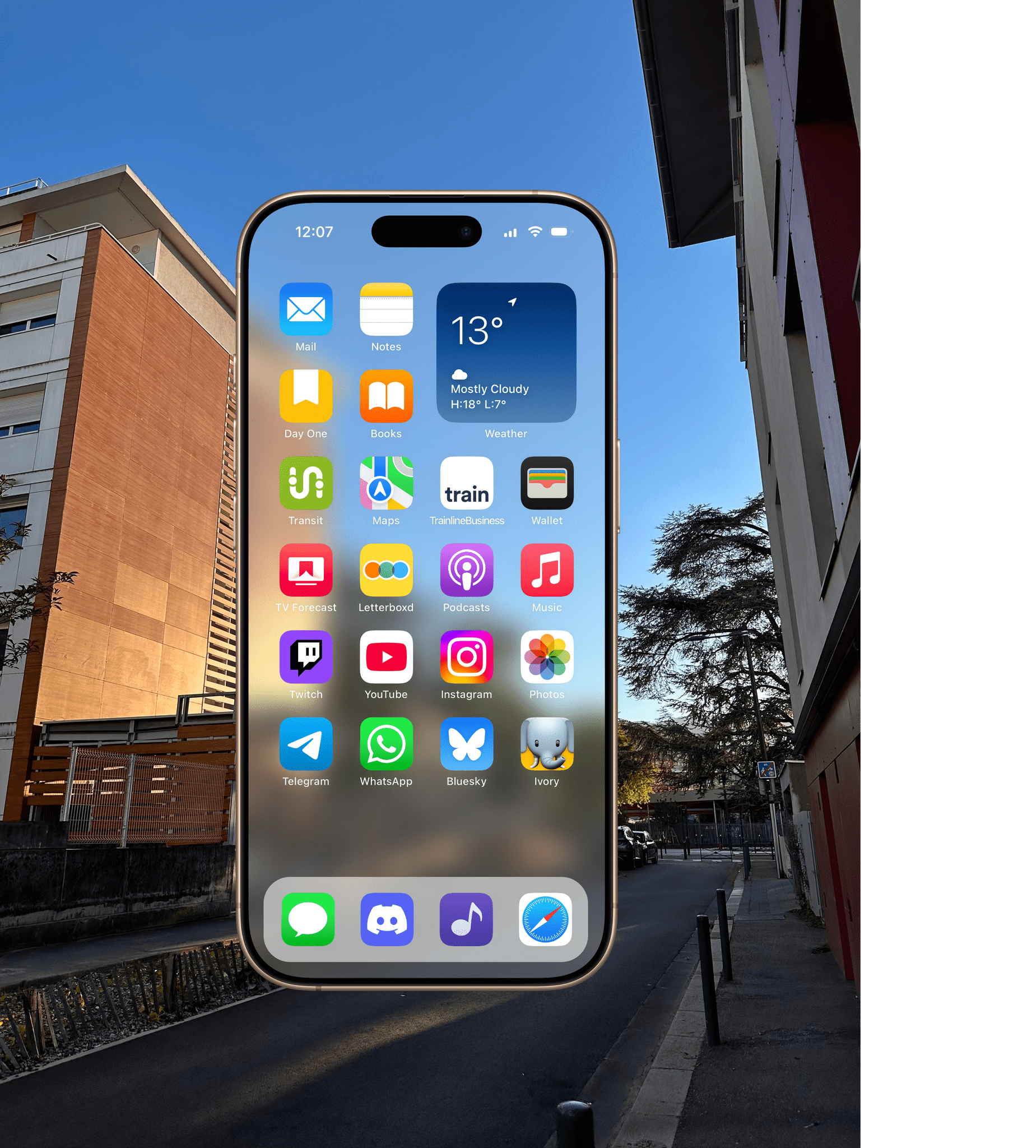
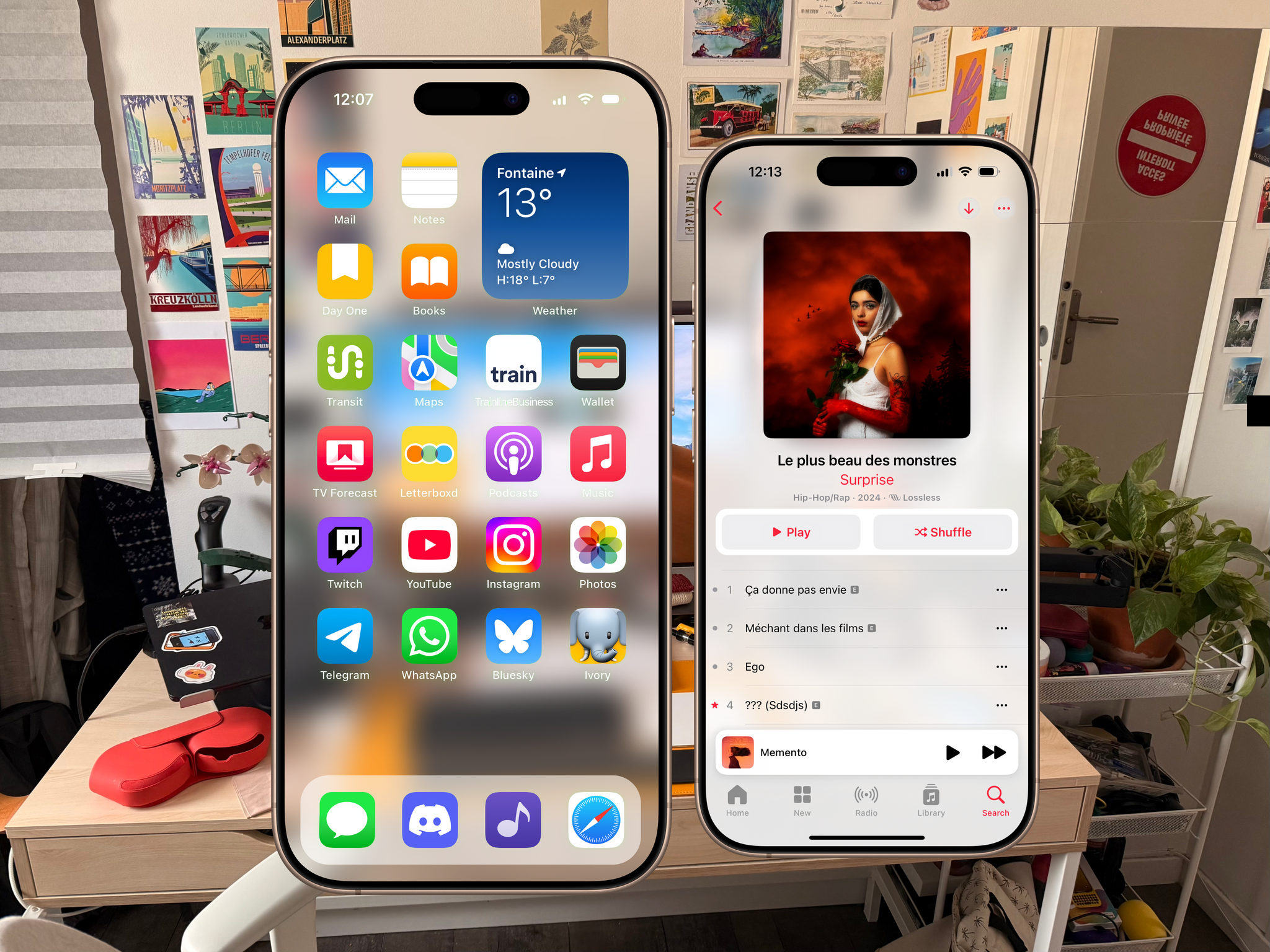
- Niléane's mock ups Image 1, Image 2, and Image 3

Transcript
1060 segmentsWelcome to Comfort Zone, a podcast all about pushing your hosts, well, outside of their comfort zone. I'm Christopher Lawley, and I'm joined by two incredible co-hosts, and this week, we know what the Nintendo Switch 2 is. This episode is sponsored by Rogue Amoeba. As always, I am joined by Matt Birchler. Matt, how are you doing? Oh, Chris, I'm so excited about the Switch 2. I just don't know how many thousands of dollars it's going to cost me to buy one day. Dear listener, we literally sat down to record to the news.
It just broke minutes ago that the Nintendo Switch 2 pre-orders for the US have been postponed because of tariffs. So that's fun. Yeah, it's going to be a fortune for me and Matt. But we are also joined by Niléane, who hopefully it's not nearly as expensive for. Yes. Well, I'm doing well first, and I'm not getting it second. Ah, okay. So that's a problem solved. Okay, well, there you go. I would have if Mario Kart didn't cost as much.
Maybe. That's the thing. You buy the bundle and it's $30 cheaper. Oh, my God. That's business, baby. The bundle. I automatically went straight to the bundle because it's, okay, even if Mario Kart was $60 still, it would be $10 cheaper. But the bundle is only, I don't know how it works in France money, but in US money. I don't know what the currency's called We trade tiny Eiffel Towers That's your guys' cash and like Beignets or like your coins
Like your change I like it We need to get off this tangent because I don't know where I'm going with it And I can just ramble We got some tiny topics Niléane I think you put this first thing In the document Yep point of order that we need to address live because transparency matters. So there's a link in the show notes that you can click. It's a screenshot of our weekly calendar event
that Matt has set up for us. It's a recurring calendar event on which we're invited. It looks perfect. I thought today as I was tweaking my menu bar setup on the Mac I have once again added the thing in data which shows the upcoming event in my menu bar because I've had trouble getting on time in meetings on meetings lately so yeah unfortunately Matt you felt
the need to add this huge red dot on the event so now every Friday which is the day that we record on there's a huge red dot in my menu bar that's staring at me like it's um it's how 9000 from 2001 and i don't know i think we should get a bit of it i would actually agree with that because it does actually throw off my calendar as well there you go i i will agree with neely on on this one. Oh my god.
It does make my calendar look very dramatic. Yeah. It looks like it's the most critical thing in my week. Yeah. And it is. It is. It absolutely is. If this doesn't happen, everything else falls apart. The whole world. You guys remember Lost? The whole number sequence and you had to do the thing every 33 minutes or something like that or whatever it was. It's like that. If we don't do it, Everything falls apart. Yeah.
Yeah. But I still vote in favor of removing the red dot emoji. Okay. I'm removing it. But if you guys aren't here on time next week, I'm putting it right back. Well, like I said, it's in my menu bar. There's a countdown in my menu bar now. Okay. I love that you chose to air this on the show and not just in private. Nobody else sees this. It's literally the three of us. But now everybody knows. Thousands of people know. I wanted to know. I wanted everyone to know that you're the kind of guy who does this.
Oh, my God. You know what the stupid thing is? It's literally the only calendar event I have that has an emoji in it. I will not believe you. Now it's time to zero. You're the kind of person who has an emoji in every calendar event, which is kind of cute, but also kind of dramatic. Well, all right. Well, dirty laundry aired. Good Lord. We also have some listener feedback.
Do you guys, I'm not sure who put what in here, but yeah, we got some good feedback. Yeah, I think I put all these in there. We got an email this past week from a listener, George, who made an app called Node Playground. He said he was inspired by seeing how quickly a dummy like me could put together an app. Those are my words, not his. He was very nice. He was actually very nice. But yeah, the app's called Node Playground. We'll put a link in the show notes. But it's just kind of like a physics simulation thing. That's pretty cool. So it was cool to see a listener kind of inspired to take, I think, a thing they made on the web previously and make it on iOS.
And then last week's challenge was to find a new Raycast extension that we really liked. And we got some feedback from listeners. listener Ian said he really likes the extension 2FA code finder which finds your 2FA codes from messages and lets you easily access them to paste into other apps such as non-Safari browsers which is really cool because I've this is a as a zen user who does not have access to the 2FA fill out that Safari gets I miss that and so this is really cool so I haven't gotten a 2FA code since I got this
recommendation but assuming it works this sounds great um and finally listener hero uh recommended he does like the hero report which is a cool weekly newsletter uh he recommended ai chat things and fantastical which i don't use um but uh he seems to like them for like quick adding stuff so as raycast extensions as raycast extensions yes so thought that was pretty cool back on my previous Mac stint, I used the Things and the Fantastical one, and they were both really good back then. I haven't used them
since, because since I've been back on the Mac, I haven't used Things and Fantastical. So, yeah, that's great. I had one little note, and it doesn't even need to be a discussion, but I just wanted to bring it as a point of order. As I always do, except for one time when I had COVID, Matt edited the episode, but except for that one episode, I have edited every single episode of Comfort zone and uh as i listen as i edit i listen to the whole episode i play the whole thing back so that means i listened to the scrabble section again last week while i was editing the episode i still don't understand what's probably yes i still don't understand i don't and it's not
i i get that it's logging essentially i don't get the why i get the i get the how i get i get i understand that now i don't get the why um but that's okay it doesn't need to be a whole discussion i just still don't get it i don't know why it just doesn't look for me so so i'm sorry here's i'll give it one more shot and it's gonna take two seconds you have a synology drive don't you yes i do and you also have like iCloud storage yes i do do you is that the reason you like to have your own personal version of your files your photos backed up is a similar reason why you might
want to scrabble rather than relying on apple music or spotify okay i i get that maybe i'm just not that big of a music listener that could be it like i said i've lost my music library before like i had a all my cds ripped into files perfectly named and i lost that whole thing and when that happened i was It's like, oh, well, I'll rebuild it in Apple Music with their library and their tools. Like, I wasn't going to go through all that work again. So, yeah, maybe I'm just not the person that this is for.
And that's okay. That's okay. Not everything has to be for me. I mean, most things need to be for me, but not everything. Definitely not okay. Last tiny topic is from me, which is just to say that my blog is officially on the Fediverse. I've been threatening to do this for, like, years. And Ghost finally rolled it out. It's in beta right now. I migrated my entire site to Ghost Pro, which was a whole thing. Actually, it wasn't a whole thing. It was like super easy. It was an afternoon of work. And now it's there. But it's natively on the Fediverse, and I'm so happy about that.
And yeah, it's great. So what does this get you? Like, what does this mean? Because I get the idea of Mastodon. I get the idea of the Fediverse. But having your blog on the Fediverse, what does that get you out? So, yeah. So, at a base level, I used to have to have an automation setup to post everything I posted on the blog to get posted to Mastodon. So, if you wanted to follow the blog on Mastodon, you could do that by following the Mastodon account that was hooked up to an API that was auto-posting.
Now, the moment I publish a link or a post, it goes immediately to ActivityPub and gets sent out everywhere. So it immediately shows up. No third-party automation is needed. So that's nice. And when someone replies to that post or retuits it, retuits it, oh boy, reblogs it, reposts it. Boost. Boost. Boost. Thank you. I kind of like retuit. Anyway, whenever someone interacts with that post.
It shows up. There's a whole new homepage in Ghost where I see it's basically it's similar to Mastodon where I have a profile page. I can see who's following me. I have a notifications tab. I have a home feed where I can see people I follow, what they're posting. And so you kind of get that. I think I don't know if there's 100 percent on the roadmap, but I think they're working on a way to make Fediverse replies show as comments on the post. I'm not sure if that's going to happen. But that's the sort of thing that they could enable with this. So instead of having to sign up or create an account on BirchTree, you could just reply in whatever app you're using for ActivityPub.
And they'll show up in the blog. They won't do that yet, but I think that's the thing that is on the roadmap. So it's fine. It's not necessary, but it's cool. And I support the Fediverse. I love ActivityPub. I want it to keep growing, so I wanted to be an example. Okay. So I am first up in the document, and I have for you guys today an external hard drive. What? That's not exciting. Yeah. No, this is exciting. This is the Akius.
You know what? I'm just going to call it Arceus after the Pokemon God, because I have no idea how to pronounce it. Links will be in the show notes. Akasus? Akasus, maybe? Akasus. Yeah. Sure. We'll go with that. And this, all this is, is actually an external drive enclosure. This isn't, it actually, if you just buy this, there's no storage in it. You put an NVMe drive in this. But what this is, is a Thunderbolt 5 enclosure for an NVMe drive.
So I have in here, so it's the Akasas, we'll just go with that enclosure. And then inside, I have the Western Digital Black NVMe chip, a 4TB one. And like I said, this is a Thunderbolt 5 external drive. So the Mac Mini I've been using, this is the review unit Apple sent me, only has 1TB of internal storage. That's not nearly enough for me to be able to hold my data and do video projects. So I was constantly having to do weird things in order to be able to edit video and have my stuff on it.
Like I was having to do the iCloud thing where like your documents aren't actually on your computer and your photos aren't actually on your computer and your music library is not actually on your computer. It's all offloaded and like it'll download it when you need something. And that's fine. It works okay, especially if you have a fast internet connection. But I'm the kind of person that I just like all my stuff local. It's just, it's just, I don't know. I'm old and that's the way I do computers. So the way this works is, I'm not going to open it up because it's kind of, actually, you know what, I will open it up.
Let's see if I can open it up for the video viewers. So in here, you will see for the video viewers here, this white strip, that's just thermal tape. Underneath that is where the Western Digital Black drive is. This takes NVMe drives, and like there's really specific NVMe drives you're supposed to use. Like if you look at this, if you look at their website or even the Amazon page, it kind of tells you like, hey, these are the drives we recommend because they will take full advantage of the Thunderbolt 5 bandwidth.
So that's one. This Western Digital one is the best one. I've always really liked Western Digital drives. I've had really good luck with them in the past. So the way the way this works is this just opens up, put the drive in there. There's like a screw thing that holds the drive in place, a little bit of thermal tape. So that way the heat from the drive kind of gets pushed into the metal enclosure. And that way you doesn't heat up. It also has a fan on the top.
So that way you get nice ventilation. I did have this thing sitting on top of the Mac Mini under my monitor stand for a little while. And it got really hot really quick. So now this just sits on top of my monitor stand. it doesn't look the best but it stays nice and cool uh there's even fan controls on this but i haven't messed with that i just kind of leave it alone and let it do its thing and it's fine the fan itself isn't that loud uh i i have to put my ear right up next to it in order to hear it but what what's really cool about this and like i've kind of said it's thunderbolt 5 so this thing
is stupid fast. So the internal drive speeds of the M4 Pro Mac Mini, I did a Blackmagic test, and these always kind of differ a little bit and stuff like that, but I was getting around 6,912 megabytes per second, megabits per second. I'm confusing myself now. Is it megabytes or megabits? It's gigawatts. Okay, gigawatts. And then the read was 5,144. So pretty fast.
Like that's really fast. But with this external drive, the write speeds I was getting was 5,854. So about a thousand slower, but still really fast. And the read was 5,952, which actually was faster than the read of the M4 Pro storage. There's always kind of like an asterisk with that Blackmagic speed check thing. Because like there's certain parts of drives that are kind of caches that are faster than other parts. So this isn't exactly like the most representative test.
But it does kind of show that this is about just as fast as the internal storage of an M4 Pro chip. Which is exactly what I wanted. So I have been using this. I put all my projects on this. And I have been editing off this. I have not noticed a performance difference at all. And I'm doing some pretty heavy stuff in Final Cut. So one thing I do a lot is I will do like, you know, those big, slow panning shots in my videos where I slow everything down. It's like super cinematic.
Well, my camera shoots those at 60 frames per second. But if I want to make it even slower, when you put that in Final Cut, when you put a 60 frames per second clip in Final Cut, you can slow that down to 40% if your timeline is in the proper frame rate of 24 frames per second. That is a shot at Matt. If you want something to be even slower, you can slow it down to 20 or even 10%, but it's going to look choppy because it doesn't have enough frames there. But you can go into Final Cut, and there is a feature in there that basically uses machine learning to generate frames.
So it literally creates a frame. So you can have an A and a B frame. well you'd have an a and a c frame and then it would create a b frame essentially for you and it kind of adds those frames in automatically this takes up a ton of processing power and it eats up a ton of storage like an absolute crap ton of storage i was trying to remember if i could say crap or not um one terabyte was not enough i've been doing that a lot with this drive and it works
fantastic like it absolutely it plays back beautifully in fact i did a test of like i was editing a project on the mac uh on the mac mini and i brought it over to the macbook air which does not have thunderbolt 5 it just has thunderbolt 4 and the speeds were about half but i was still able to play back my video project just fine like it still worked just fine but editing with this guy is really nice. I was a little concerned because this is not a brand I've heard of before.
And there wasn't a ton of reviews on this thing out there. It's fairly new. So I was like, I was a little worried about just editing off this guy. So I set up Carbon Copy Cloner to replicate this drive to my NAS every single hour. It basically just does a diff, figures out what's different, backs up those files. And the nice thing is because I use Final Cut Pro, the Final Cut Pro project package files, it doesn't recopy those every single time. It goes into the package, looks to see what's different, and then just does what's different. So it's not constantly copying
over like the same footage and stuff every single time. So it's just doing what's different. And that has worked really well for me. The one last thing I will say is I have openly talked about how much I hate editing from external storage. When Final Cut Pro for the iPad came out and it didn't have external storage support, every YouTuber and their mother lost their mind. I was like, I don't care. I'll never, ever use that. I got my two terabyte iPad. I don't care. I'll never use that.
I've kind of been a little more okay with that, with the Mac Mini, because I'm not having to unplug it and replug it. And nobody else comes into the studio, because I don't... Have I ever told you guys the story about why I hate editing from external storage? Like, the traumatic story that happened to me? No. So the year is 2008. Barack Obama is president. Actually, I don't know if he was president. Yeah, he was about to be president. But president-elect, maybe, I don't actually remember.
I just know it was 2008. I was in film school. It was a much simpler time. And we were working on a big documentary project for a client. And this documentary was going to be shown in front of thousands of people. At that point in my life, it was the biggest thing I had ever worked on. We had one pickup shot that was shot on the very last day of the project, the day that the video was going to be shown. It was the only time we were able to get this one shot that we needed.
So somebody went out, shot it, brought it back. This was the day of tape. So they took it off the tape, put it on a thumb drive, gave me the thumb drive. And at the time, I was editing on a Mac Pro. So we plugged it right in the thumb drive, didn't copy it off the thumb drive. That was mistake number one. Just threw it in the timeline, got everything else going. The person who owned that thumb drive needed to leave and then was going to meet us at the venue later. they unplugged the thumb drive left didn't think anything of it at the time we had already watched the video through we finalized everything at that point so i just started the export uh and i lived
like down the street from the school so i ran home to go get changed and then i was going to come back and pick up the video and then go to the venue uh so i picked it up uh so i came back picked it up copied it over to a drive drove cross town to the venue thousands of people fancy dinner sitting down we watch it now this was edited on final cut pro 7 it's playing playing playing we get to that shot red screen of media not available so ever since then i swore i would never ever edit from an external
drive again um i am breaking that but that is because nobody comes into the studio nobody is going to unplug this drive it sits plug they literally the this is the first time i've unplugged it since i did that macbook air test and before that it was plugged in the mac mini um so this the it doesn't get unplugged it just sits plugged in to the mac mini in the back into one of the thunderbolt 5 ports and it's worked great for me um this combo is not cheap uh if i remember right i spent like uh i'm quickly looking it up quickly looking it up stall stall stall okay so for this whole package
this uh the nvme chip and i did buy a thunderbolt 5 cable because i couldn't tell if it actually came with a thunderbolt 5 cable or not um was 592 dollars that's a lot of money i will fully admit that is a lot of money but you know what it's half of what it would cost for me to get a four terabyte drive in a mac mini so uh if you're looking to expand the storage and you have thunderbolt 5 this is a decent way to go so far i have not had any issues with it that seems insane to me how performant it is yeah so it's yeah it's about the same as the internal storage it's a little bit
slower on the right speeds and again the black magic thing there's a lot of asterisk to it about like is it actually accurate and what is it writing to and is it writing to the fast cache of a store storage or is it writing to the slow like you can kind of tell when it's writing to the fast cache and when it's writing to the slow because like it it just keeps going and going and going and all of a sudden like it'll be like doing like 5 000 megabits a second and then it'll drop down to like two so like that's when you know it's writing to either the fast or the slow so take that with a grain of
salt but i'm editing multiple streams of 4k hevc 10-bit video off of an external storage and have no slowdowns whatsoever i have no hiccups it i i i couldn't tell like if you were to put a project on either the internal storage or the external drive and blindfolded me i didn't know which one you picked and i sat down and i just started editing there's no way i'd be able to tell the difference unless i actually went and looked at like the directory and where that file is located yeah the crazy thing is i too edit my videos in final cuts on an external drive and i use one of
these this is a samsung t7 ssd which is 90 for the two terabyte one no maybe that's the one terabyte it is 140 for the two terabyte one so this is the one i have um i just ran the black magic test compared to my internal drive it is 11 of the speed of the internal drive oh wow jeez yeah it's about one tenth of what you've got over there i actually don't notice any differences either so we have very different workflows it seems we do i i know i do a lot more of the high frame rate like i'm gonna slow this thing down to 10 generate frames i do i do a lot of log and
color grading and stuff like that you you don't even use log anymore don't you i don't know yeah it's a very weird thing this isn't the topic but like i've i have like all this like fancy setup to do fancy shots and i've learned over the years that my audience on youtube literally just wants me to put a camera on my face as i use a piece of software and share my screen not no fanciness no b-roll just show the thing um which is a little sad as a gearhead but yeah i i think my audience is very similar but i kind of do the fancy b-roll for me yeah i like the fancy b-roll on yours like
yours is like it makes it feel like in it makes you feel more in the realm of like the mkbhds and stuff rather than like the scrappy youtubers yeah and also i will say or i will fully admit you have a job uh when i had a full-time day job doing the fancy b-roll was really hard because that is the thing that takes up the most amount of time uh i did that macbook air video i i'll peel back the a little bit that day working from the macbook air video it was actually more like a day and a half because it just took so long to shoot all that b-roll that it kind of bled into another day like
i just ran out of time so like it does it does kind of like the fancy b-roll kind of does take up a lot of time to do nice well i'm glad you found a solution that works for you like that is that's that's really great um that you can get like that you don't take a hit in performance by using an external drive yeah and this i think works particularly well with the mac mini because it's not going anywhere i'm not having to unplug it constantly i'm not having to make sure i have it with me i'm not oh man if this thing gets lost or dropped in a bucket of water or something like that
i'm screwed like it just sits on my desk if i was to be ordering a macbook pro tomorrow i'd be ordering a MacBook Pro with 4 terabytes of storage and I wouldn't be using this. But because I'm using a Mac Mini that just sits at my desk, this to me is an acceptable solution. Yeah, since we're talking about storage, like the thing you just said, I bought my MacBook Air not having any storage needs
and now I want to travel around with my full music library locally and I can't. of Doppler. The curse of Doppler. I've come up with another solution, but yeah. If I had to buy a MacBook today, yeah, I would get a lot more storage. Yeah, that's always the thing that I tell people, don't cheap out on. Like, don't go for the base Mac. Like, if you're going to upgrade one thing, at least upgrade the storage. Especially now that, like, all Macs ship with 16 gigs of RAM.
At the time, Yeah, at the time, I had to make a choice. My MacBook is the M2 MacBook Air. So it still had the base tier, 8 gigabytes of RAM. Yeah, yeah. And I did not want that. So I only had a budget to upgrade one thing, and I went for the RAM instead of storage. That I totally see making sense, especially for you at that time, like when you didn't have a bunch of storage needs. But now since the max ship with at least 16 gigs of RAM, I would say storage over RAM upgrades.
But everyone has different needs. But for the general person, storage probably, unless everything you're doing is just cloud-based. But yeah, that's the Strive. Any questions on it? I'm very happy with it. I was very nervous about using it and working off of it, But I've been doing it for a few weeks now I've had it. And it's been solid. I waited to bring it to the show because I was like, I want to stress test this thing and make sure it's not going to die
before I tell thousands of people about it. Yeah, I have a question that's totally relevant. How would you say it would perform if, say, You want it to stream a bunch of lossless music files from it using a random app like Doppler on your Mac? I mean, I think it would work great, absolutely. For you, though, this would be overkill because the M2 MacBook Air doesn't have Thunderbolt 5, so you can get a Thunderbolt 4 one significantly cheaper.
There are Thunderbolt 4 enclosures for NVMe drives and stuff that are significantly cheaper than this Thunderbolt 5 one. But I went with Thunderbolt 5 because it is a dramatic upgrade in bandwidth. In fact, I think it's like double Thunderbolt 4. I should have looked that up, but I think Thunderbolt 4 is 40 gigabits a second, and this is 80 gigabits a second, right? Does that sound about right? Actually, I know this is 80 because it says it right there. Yeah, but yeah, if you have a Thunderbolt 5 Mac, I would look at something like this.
If you have a Thunderbolt 4 Mac, look at a Thunderbolt 4 drive. But if you're going to be upgrading your Mac soon, I'd probably look at this just so you're not wasting money. Because it is backwards compatible. And if you don't have very high needs, I still think these are awesome. Yeah, I have a bunch of these. I have a bunch of the Samsung T9s and those work great for, like I use those to move files around and stuff like that all the time. Like they work great for that. In fact, I use them for capturing the raw log footage from the iPhone.
I have like a little like enclosure mount thing that you can use with the iPhone. So like if I'm shooting with my iPhone and I want that raw log footage, I can just use those and they work fantastic. Yeah. Nice. We live in a golden age of storage. It's no longer the pain point. Just someone please tell Apple that. They're not aware. They're very expensive. Somebody let Apple know they're charging about double what they need to for storage. But, well, maybe not anymore.
And if you can talk to them, talk to them about the RAM as well. The RAM upgrades. I'm not the first person to say this. I've heard several people say this. But the best thing to come out of Apple intelligence is the fact that the base RAM has been upgraded on all of their devices. On the Mac, it's 16 gigs. On everything else, it's 8 gigs except for the base iPad, which I have here. I don't know if I should bring that to the show one day, but I do have the new 11th gen iPad here. You don't have to. Unless it's yellow.
It is yellow, actually. Do you want to see it? Oh, I got you. Yeah. Actually, I don't know where it is right now. I think it's in a box. Sorry. Poor iPad. It's not very noticeably yellow. It's very Apple yellow. Oh, they're supposed to be vibrant. Oh, but the newer ones are less vibrant. They're not as vibrant as the older ones. Yeah. All right. Well, I think that just does it for this. Niléane, you want to do the ad break? This episode is sponsored by Rugamiba, makers of incredibly useful audio tools for your Mac.
Learn all about their apps at macaudio.com slash MacStories. Take SoundSource, for example, which gives you amazing control over audio. Use it to apply audio effects and volume control to every app on your Mac. You can even redirect any app's audio to a different output, which is something I do all the time. With their flagship product, Audio Hijack, you can record any audio on your Mac and so much more. Bring your microphone and apps together into a powerful virtual device using Loopback. Perfect for audio and video chats, just like us on Comfort Zone.
add on their soundboard app Fargo, and you'll have audio clips at your fingertips ready for playback at a moment's notice. All of the Rogo Gamiba's apps are available as fully functional free trials right from their site. And with recent updates, you can now get started in seconds with no restarts, no extensions, no having to change something in system settings. Best of all, through the end of April, you can save 20% off your purchase. Just enter coupon code MS2504 at checkout.
That's MS2504. Visit macaudio.com slash MacStories to get started. Thanks to Rogamiba for powering our audio needs on the Mac and sponsoring the show. All right, Matt, what do you got for us this week? I have my favorite thing to bring to the show. Oh, is it a web browser? It's an email app. Close. Now, this email app, it has a minimal, delightful UI, optimized for speed, with keyboard shortcuts for everything, some AI power-ups.
This sounds like a cult. It's not the cult one. It is Notion Mail, which I got access to. Okay, that's still a cult. It's not. Notion is absolutely a cult. Notion is a cult, but I feel like they're a warm and fuzzy cult. Have I told you about the period of time when I had nightmares about Notion? No. Like little nightmares at night about Notion? Explain everything. Oh, wait, I've been sponsored by Notion. I have to be nice to them.
That's okay. I don't have to. No, sorry. I'm just kidding. I'm kidding, people. A few years ago, like many years ago now, when Notion was starting to take off, people were talking all about Notion all the time. There were entire YouTube videos about Notion. There were some lifestyle YouTubers showing off their entire life through Notion. Incredible time. And I remember being stuck in a loop in all the algorithms about this on Twitter at the time.
YouTube and all of the platforms. And literally, when I was sleeping at night, I remember waking up having dreamt about having to organize my life through Notion. And it was horrible. Like, I hated it. Wow. So, there you go. It's a real story. Notion, nightmare fuel. There was a window of time there. I feel like this was like Rome Research was kind of on the scene as well. Like there was this whole like wave of like no taking lifestyle stuff that I feel like is, we're a little more practical now.
Although we'll probably look back on this time and be like, oh, we were so weird about something. Just give me Obsidian and I'm good to go. Yeah. So anyway, Notion Mail. I really like this app. It's not perfect. There's a couple things. There's one main thing. But it's really, really nice. as a superhuman recovery I'm recovering a recovering superhuman subscriber whatever you know whatever
whatever phrase you want to use it actually scratches a lot of those same itches like it has the keyboard navigation that I've been wanting it has it's like super super fast it has a very similar UI actually like in layout it doesn't have the like two column like list of emails and then the full email on the side It does kind of the one-pager thing with a list of emails, and they all open on top of it. But it's super fast. It's super nice.
It does this cool thing I haven't seen other emails do, where if you are using the mouse and you just hover over things in your inbox, it just shows you a preview of them, kind of like tab previews in a web browser, which is actually kind of decent when you're kind of just looking at what's come through. You can see what each one is. and if it's only text it actually optimizes the view to like just show you the first like paragraph so pretty slick um the things that make it special though um also i should say like all of notions things it's totally free it's still in beta so you have to join a wait list right now um but once you're in it is totally free to use and it totally works um very functionally um what
you're going to pay for is mostly the ai stuff um and the ai stuff is kind of cool uh so they have the main thing they have now is basically auto labeling things when they come in and so you can kind of give it a list of you can show it an email and say any email that looks like this give it this label or you can just like chatbot style you can just write a sentence that says if an email has this and is from this person or it has this sort of content in it do this and so you can like label
it with something like app store so i have i distribute to the app store i have like these emails from apple that come in i can just have those all be labeled the same thing never go in my inbox they just go into this separate kind of view of app store emails um and i didn't have to set like a specific rule to like say this exact string or this whatever the sender um i was able to give just a little search thing and it's done a really good job um you can also do things like have it append like dates as a label so if like someone if like for example chris you have emails come in from sponsors that have like due dates on them or something like that you can create a uh a filter
through this ai tool that basically will find the date and append that to like the note title so that's kind of cool so if there's an important date yeah that oh okay really quick Because there's one deal breaker for every email app, and all the fancy email apps do this. Does it support IMAP? No. It is Gmail only. Chris, are you hoping for web standards on this show? What are you doing? IMAP, people.
Like, literally, it is just like Neil Young said. It's an open standard. It doesn't exist. 2025. I'm so sorry. Notion Calendar just added iCloud support. So maybe they'll add it to the mail. After I just moved to Google Calendar because of... You got to move to Gmail now. Honestly, I kind of have a feeling I'm going to end up having to move to like Google Business or something like that. Because there's just so many, like my whole thing is I cover apps.
But there's so many apps now that are like these really cool email apps specifically. Because there's this one and then there was the other one that you were using. And I know Federico and John use it. No, the non-cult one. Superhuman. No, the other one. Superhuman. Shortwave. Shortwave. Or Superhuman, whichever you prefer. Shortwave was just Gmail as well, right? Yeah. Remember Inbox, my Gmail? I loved Inbox. I was a diehard Inbox user.
Anyways. Sorry, Matt. That's okay. That's with all email apps. That's the first question I always ask, And it's the first thing that I'm always disappointed about. Yeah. So the problem, of course, is that I don't have access to any of these AI features right now. And that is because, of course, they cost money. So it is, unlike Superhuman, it's $10 a month to get AI features on your Notion account. And so I guess if you do that, you also get them in Notion and Calendar.
But yeah, if you just want them for email, all that labeling stuff I just talked about is $10 a month, which I'm not prepared to pay for right now because I'm really just waiting for Mimestream to release the iOS app. Oh, please. Yes. And iMap support. Chris, you need to get a button. You need to use the Rogamiv app to just... Farago. Yes, thank you. That's actually a great idea of like, there's a few like reoccurring bits in this show that I should just splice as I'm editing and throw that in there.
Yeah, just Daft Punk sucks. It doesn't have IMAP support. You're in a cult. The other thing that's really cool, I don't have a good way to show you guys this as we talk about it, but they have this concept of views. And so one view is like your inbox. That's the default view. I just described the second inbox I have, which is for App Store. And so it's kind of like different split inboxes. Some emails have that. But they also have these templates for different views, such as recruiting or support or stuff like that.
And so you can create a view, like if you are using this for your business and you have support emails coming in to this address, you could have them go in here. And when they come in, they're under like the to be picked up section. And then you can drag them up into, what are the statuses? I need to check this out. I don't do support really. Pending, resolved, bugs, feedback. You can kind of filter them into different sections. And it's kind of, again, that's kind of like Notions thing, right? If this was a Notion doc, you would be able to move things around and stuff.
So they brought that over to email, which I think is pretty cool. I don't personally, I think, have a use case for this. But if you are doing, if it is like a company email that's done for like used for like one thing, that could be good. And is there anything else in here? Oh, snippets. I talked about this, I think, last week or the week before. You can create snippets that intelligently like pull in things like the sender's name and company and stuff. That's not that interesting.
I guess most email apps have that. Not mail. Oh, really? Oh, bummer. I don't think so. Mail is like stuck in 2004. Sorry, I was muted just for you. I was talking in the void. I was asking, what are snippets in the mail client? What does that mean? So it's basically like a text expansion, so an email form, basically. So I made one. The one I made last week was if someone asked me about where my wallpaper comes from, I have a snippet where I can auto say like,
hi, whoever messaged me, thanks for reaching out, here's the email. Here's the link to the one, and then I have like three different links to ones that I typically use, and so I just delete the ones that they weren't asking about. An email snippet I have, and I'm using the Raycast snippet thing because mail doesn't have snippet support. If you go to my website and the about page, at the very bottom of it, there is a little text blurb about if you send me unsolicited emails about redesigning my website, SEO, or anything like that, I will charge you $10,000 for wasting my time.
So I literally have a snippet that has that text, and then I have a screenshot saved in a particular place, and anytime I get those emails, I just reply with that. And I reply, the line in there is, thank you for sending this email. Thank you for sending this email. Please let me know where to send my invoice. I look forward to spending your money. And then it's a screenshot and a link to that bit. Nobody ever replies and tells me where I can send them the invoice, though.
Oh, that's a bummer. Yeah. Yeah. If listener, you can try, see if Chris replies with his snippet. I will reply. I will reply. Please don't send me an email. Please don't send me an email. Yeah, okay. I have over a thousand unread emails in my inbox right now. Oh, my God. We live different lives. I have zero. Please don't send me an email. My partner lives with, you know, those people. They live with a notification badge that's four digits in their dock.
Every time I look at this, I have to make a comment about it, and they're really mad every time. I know this pain as well. Guys, you want to know what brings great shame to my house? Danielle force quits her apps. On the iPhone, you mean? On the iPhone. She force quits it. When she's done, like she has Reddit open and she's done with it, she force quits it. Oh, well. Because she was told that would save battery life. Oh, my God. Maybe it does, Chris. It doesn't. Maybe it saves your soul.
Whoa. Huge of truth. Huge of truth. yeah i'd rather have my abs much fast yeah no one no one has proven the contrary so anyway oh my god uh so yeah that's uh that's uh that's notion mail um i i oh the one thing i don't like about it and this is gonna if if you are queued up not to like it you're you're gonna really hate this part um the thing that's not good about it is that it refreshes your inbox on a seemingly a
regular interval i don't know if it's a minute or something but like sometimes i'll like something will trigger a two-factor code uh email to me right we just emailed you this six-digit code we need you to enter and i'll just stare at the inbox for a couple seconds and it doesn't show up it doesn't show up if i have mime stream running at the same time i'll see like in the background mime stream will update instantly with it because mime stream is incredible for getting emails immediately um and it's not showing up in notion so what do i do i hit command r of course that's what you do
That's the refresh, reload. However, because it is an Electron app that has not done all the things to become a great native app, it refreshes the entire UI because it's just a web page. And so it takes a couple seconds. It's like two or three seconds. It's not that long. But it is not just refreshing the inbox. It is refreshing the entire app. So that is annoying. And then the email shows up. It's there. But that is annoying. So I really want that to be. that in discord the discord app no also sometimes i do it by mistake well i was gonna say this is this is the thing that gets me like people are i know
there are people who hate electron with all of their soul and they will say like ah see this is this is why electron sucks and it is a reason why electron sucks but it's not do this in one password do this in visual studio code it does not happen in those apps like you can have this not happen it's just these they aren't putting the work in to make it not anyway yeah off my soapbox it's not that it can't be done it's that they just haven't done it which is annoying in its own way yeah a good implementation of an electron app can actually be a good app i i will agree with you on that uh
the worst thing ever ever ever invented in the modern tech sphere uh two-factor authentication codes going to email or login links going to your email. Like, oh, yeah, just type in your username. Oh, we don't need a password. We'll send you a login link to your email. And you sit there for five minutes waiting for it to come in. And it's like... Matt is grimacing because that's his website. I know. I know. I know.
I mean, listen, it is annoying. I will say when I migrated my website, it was nice not to have a database of secure data transfer over. I have no passwords. You can't hack those. So that's nice. I wouldn't want to log people's passwords. If I had a website like that, I wouldn't want that responsibility, but it's still annoying from a user perspective. I agree. Anything else on this? Yeah, one last thing. The design of Notion Mail reminds me of Newton Mail.
Do you remember? Oh yeah. That's an old thing. Maybe it's still around. I don't know. No, they died. They shut down a couple years ago. Okay. I really loved this app. At the time, it had some really smart features. I don't remember which, but they're probably extremely basic today, these smart features. But at the time, they were like, oh my God, you can snooze an email. Yes. I sometimes wonder that about these emails.
Like you guys talked about like Inbox. That was so great. and I remember loving like this is way way long ago but Facebook paper their paper which is like an alternate UI for Facebook I loved that and I sometimes wonder if I went back in time would I be like oh this was great or if I'd be like ooh actually this wasn't so good but anyway yeah Notion Mail join the wait list hopefully it's just out soon but I kind of dig it and I'm not going to pay for it but as a free alternative to Mimestream it's pretty decent so nice
nice alright time for the challenge let's get into the toughest challenge we may have ever done it's an amazing challenge it's a really good challenge it's a really good challenge I struggled hard with this one so Niléane it was your challenge tell the people what we had to do okay so the challenge was come up with a mock-up or a new concept just come up with a new idea, let's say that, for iOS and iPadOS 19, either of them.
So yeah, I don't know how hard you worked on this, but I didn't. So, because I just had one idea and it took me like about 30 minutes at most in Figma to show it off. So, I will go first, if that's alright. Yeah. My idea for iOS 19 is, my prediction, should I say, iOS 19 deprecates the concept of a wallpaper.
No wallpaper anymore. And you know why. So, you can click on your mobile device, in your podcast player, maybe it's the chapter art, I don't know. But in the show notes, guys, you can click the mockups that I've made and you'll understand. So there are three images. And the idea is, I don't know if you've ever seen this, but there was a time where there were a bunch of Instagram ads showcasing fake apps on the App Store that would make your
screen transparent. They had fake screenshots where your hand was visible through the screen. Yeah, I was thinking back to that. And also thinking about the rumors of iOS 19, which are like, it will feature a VisionOS-inspired design. And obviously, VisionOS is designed around the pass-through a lot. You can see through windows. They have a frosted glass look.
The light comes through them. So I was thinking, hey, maybe in iOS 19, there is no more wallpaper that you set. Now the iPhone, iOS passively uses the iPhone's camera system and shows you what it sees through. Interesting. So if you look at the images to describe it a little bit, there's one screenshot of my iPhone home screen and instead of the wallpaper it's a blurred version of whatever is in front of me so in this case a street
in Grenoble at sunset and a second image is in front of my desk same thing my iPhone home screen is see-through like the wallpaper is see-through it's blurred I try to do it with the music app in the second image where the background, the white background in the Apple Music app is slightly transparent it's still mostly white
but slightly transparent we can see through and the third image is a live demo of my concept an interactive demo a very interactive demo with a photo I took in Berlin in front of a bakery stand or whatever. It's the Apple Pay, the wallet app. And there as well, the background is translucent. And you can see the pastries through the wallet app.
There you go. I think this is really interesting for a couple of reasons. number one is I keep you're right with the iOS 19 redesign rumors I do hear a lot of people bringing up vision OS and like this idea that like vision OS feels so futuristic and if this glass thing is really cool and like I keep thinking every time these conversations come up that like it's a completely different paradigm to the phone there's something behind this that's why the transparent
glass works it's because there's like the real world behind it there's in an app it would just be like a white background and so you wouldn't see anything because it's just white yeah the transparent layer on top but if it was the real world suddenly the glass makes more sense so that's and that's definitely an interesting if they had committed to like making that ui everywhere i do think there's a clever way to make that happen so that's that's something i was thinking right there so maybe it's not happening this year because this was this would consume a lot of battery probably
yeah the camera is also like one of the biggest battery suckers yeah the the yeah i'd get like 10 minutes of battery life uh this reminds me of my previous podcast show title it's just it would just be a slab of glass like that's what it would be basically emulating is you're just holding a slab of glass like and like it just you know it's frosted glass but yeah i like it the other thing it made me think of is and this is going way back now in 2017 before the iphone 10 came out
i was listening to a mac break weekly episode and i still remember this i don't know why i remember this so many years later but i was listening to mac break weekly and leo laporte was talking about someone who had talked to him about they were describing the new iphone to him and they were describing it as like the phone is invisible like you don't see oh yeah anymore and this is a version that as well if like the if you're just if you hold up your phone and it's just showing you like the world behind it that's kind of that same same idea so i don't know why i think about that it's
weird how little things stick in your head that that little thing is stuck in my head for eight years i don't nine years but what was the context they were talking about having the camera app open i think no so they were talking about like describing a phone with no bezels right okay and so like you would look at your phone and you wouldn't even see that there's like a phone there. I'm not going to quote it word for word nine years later, but that's the idea. Eight years later. We have a team of factikos in the back.
Oh, thank goodness. And if you get it wrong... I'm not good. I like this, Niléane. It's pretty cool. What do you got for the challenge? I have one that's going to make everybody mad. Mine is called boot camp. Oh my god. Oh god. Oh I love this. I love this. Oh you did not spend a lot of time on this.
Yeah you were like 30 minutes and I was like 30 minutes. Oh my god. So my idea is we're hyping this up way too much i love it so here's the idea go with me here you're using an ipad and you're like i want this
ipad to do more i need five windows on screen i'd like to use these rogamy apps that i love so much what am I going to do? I got to go grab a whole new computer. Get out of here. Here's what I'm going to do. Just like when Apple moved from PowerPC to Intel and they gave us Bootcamp. I just realized we've been going this far in the segment and I haven't even said I did say Bootcamp. Never mind. They gave us Bootcamp which let us run Windows on our Macs.
Not in some emulated mode. Not in some like window inside your Mac you can boot the sucker into Windows. Let's keep going. On the iPad you should have the option to install Mac OS and just boot into it. That's it. You could have it use as much of the hard drive as you want. Maybe you can even wipe iPad OS entirely from the device. But you would be able to use Mac OS, go to the App Store on the iPad just like download macOS Sequoia, install it, or whatever the new one is this year, install it and run it on the iPad.
Now, would the touchscreen work with macOS? A thousand percent, yes. Matt, I would cut off my left leg for this. I'm just saying, you have a 13-inch M4-powered iPad Pro. That is a MacBook Air. Yes. That is a MacBook Air in every single way. It has the same RAM, same storage. Incredible. Use it with a magic keyboard. It is literally a MacBook Air. Use it with a touchscreen, and you can do touch things. Maybe this is the year macOS also gets those couple updates they
need to make touch work better. Even if they don't, make it a power user thing. Make it a thing that you just have to do yourself, not the default. But everyone who's happy with iPadOS, keep using it. But we have this incredible hardware. Let's do it. Apple Pencil support. Like, yeah. Sure. This, I, I, would I, oh, I would love this. I would absolutely love this. Honestly, if this was to come and iPadOS didn't get some extreme major overhaul, and I do mean extreme, I would just use, like, I would just be booting into macOS on the iPad.
I wouldn't even touch iPadOS again. Well, and this solves the problem. Like, I get a lot of feedback from people who, like, don't want touch to come to the Mac because I think it's going to ruin the Mac that they love. This makes it so they don't have to touch the Mac yet. They obviously should. But, like, this doesn't hurt the Mac people. The iPad people can keep doing this. Maybe this is a pro iPad only thing. I really, if there's anything I want to be known for, it's that I got out of the cult of Superhuman. But if there's a second thing I want to be known for, it's that I really want to tear down this wall between macOS and touch and that they are fundamentally incompatible.
The only operating system in the world that will not support touch and cannot work with touch. Everything else can do it, but apparently macOS can't. So, yeah. I really love that you called it boot camp because it's exactly that. That's it. Yeah. For years, Apple allowed you to install a competitor's OS on your Mac. Yes. So that you could get to the finish line on some tasks, on work, on whatever software that wasn't available on Mac OS.
And we have the exact same problem with iPad OS today, and they will not do it even with their own OS. I mean, they could still go fetch Windows 11, maybe. Imagine if they ship Bootcamp with Windows 11 instead. Yeah. My inspiration is not Linux or Microsoft. It's Apple. It's Apple's done this. They could do it again. Yeah. The whole reason why I was able to buy my first Mac was because Bootcamp existed, and I was able to jump into Windows when need be. Because I had a class in college that required Windows application for something.
And I don't even remember what the exact details were. But I just remember I had to buy Windows 7 key. Sure, we'll go with that. I don't remember if that was that. It might have been Vista or XP. I don't remember. I'm old. But yeah, I needed that to do it. And Boot Camp was the reason why I was able to do it. Yeah, I like this. I would, like I said, I'd cut off my left leg for it. So from, oh, go ahead. No, no, no, go ahead.
I'll you. I'm curious if you put in more effort than me. So don't even bother clicking the link in the show. I love this thing. It's an internal obsidian link. It's not even, I tried so hard. I spent probably a good solid hour trying to Photoshop my vision. And I just, I'm a terrible designer. I was embarrassed. I was not going, like, it's deleted. It's gone. It's not recoverable.
The Mac, I did it on. I got out a flamethrower, and I melted it, because it was that bad. I'm kidding. I did not. But I am calling this Apple OS. And I have a description for you, a written description, just because I was just not able to, I just don't have the skill set for that. You two, you know, Matt clearly, you know, spent a ton of design time taking the Finder logo. Listen, I had to find it on the website. It was a lot of work. I mean, I get it. I totally get it.
Hey, I'm the guy that replaced the Files app icon with the Finder logo on my iPad because the Files app icon is literally the laziest icon ever made ever. Wait, Matt, did you just use shortcuts and took a screenshot? No, I googled finder icon PNG. Yeah, but then you pasted it on top of the home screen? Oh, no. In my defense, I did use Apple's official Figma design toolkit and got their home screen.
And then I put in. So the sizing is all 100% perfect. The corners are perfect. So it is an actual icon. It's just, yeah. So my description for Apple OS is Apple will throw the baby out with the bathwater and combine the design of iOS, iPadOS, and MacOS into one. This one OS will adapt to the screen size and the hardware of the device. For example, you don't need the camera app on the Mac, so it kind of, you know, it adapts sensically.
They will have similar multitasking features set to something similar to split view. the iPhone will kind of get top and bottom, you know, split view support, like a Nintendo DS, if you think about it like that. The iPad and Mac will have a grid-based system, and of course there will be a Pro mode that gives you windowing on the iPad and Mac, and they will work kind of similar to what we have now. But for the most part, like, the windowing part, whereas, like, you have Stage Manager on the iPad, and then you have a bunch of different stuff on the Mac, that will get combined, and it'll just be one fluid thing.
So I can sit down and use windowing on a Mac or on an iPad and it'll work exactly the same. Apps like Files and Finder will be replaced with whichever is better. And of course, in this case, that's Finder. Apps like Reminders that have subtle differences between the Mac, the iPad, and the iPhone will kind of get flushed out and get feature and design parity. Other stuff, like the share sheet, will be rethought so that it works the same on all devices. Meaning you'll be able to do things like run shortcuts from the share sheet on the Mac. The Mac share sheet is so dramatically different from the iPhone and iPad.
For the first time, all three major platforms will have a similar design language and work mostly the same, but again, they will adapt to the device they are running on. So that's Apple OS. I think I did something similar to this in our predictions episode, but I expanded on it. Yeah. Because I really like this idea of like, it doesn't matter what Apple device you're using. If you go to do a task, whether it's multitasking, browsing in Safari, doing something in reminders, it works the same on whatever device. It's the same consistency, same keyboard shortcuts, same kind of feature set. But again, it just adapts to the screen size.
I like it. I have a prediction. So I like the idea, but I have a prediction. They will not do it. Yeah, I don't think they'll do it either. But here's the prediction part. If they ever asked about it and choose to release a statement about it in whatever shape or form, they will say it's because of the DMA. So it's your fault. It's your fault in particular, Leon. Yeah. I don't think the DMA would prevent them from having...
No, it would not. I'm not saying that. I'm saying they would say. They would blame the DMA. Gotcha, gotcha, gotcha. Because the idea of merging platforms, I could see them being reticent to that today because of this, even if it doesn't make sense. But even in a subtle way, it would actually sort of help the DMA, because what I didn't put in there is you would be able to do side loading because you can't take that away from the Mac.
And if you're doing it here, you've got to do it everywhere. And also app design and stuff like that. Yes, you can bring your iPhone and iPad apps to the Mac, but they don't work great. If that whole system was rethought from the ground up, I'm sure being able to design an app for the iPhone, iPad, and Mac and have it adapt a little bit smoother could be a lot easier. But that was kind of bolted on top and not thought from the ground up.
Although those would work better if the Mac had a touchscreen they'd feel better to use. There you go too. Yeah. Hey, I'm with you on this. Like I'm full blown. Like give me, I want Apple to make a two in one. That's what I really want. And they do. It's called the iPad Pro with the magic keyboard. But the problem is iPadOS. anyway that's that's rabbit hole i i think apple os i know they they have that big slide that they put up years ago that was like no they're not no i don't see yeah i don't see how that
i don't see what other future there is though especially when we think about like the folding phone like that they're clearly working on it's iphone os and then you make it big and now it's an ipad mini which again as other people have said is very funny because now your ipad literally is big iPhone like but um but yeah I mean like this idea of like this operating system that runs on a six inch screen an eight inch screen a 12 inch screen maybe a desktop screen I think I think there is something there so I don't know if they'll ever do it but I could see a world where they do
bring that out to WWDC and people lose their minds because it would be huge it'd be a huge change and i do believe apple when they said we're not going to combine mac os and ipad os but if it's a whole new operating system that's not combining it loophole i i that's why i'm kind of like because okay we if we look at what apple's operating systems are we they're they're unix and it's all based on darwin every every single one of them from from the mac mac os to watch os to tv os they're all based on that at some point they're going to do a whole new base like the darwin's not going to
be able to exist forever like at some point technology will evolve and they will have to do something else like kind of like going from x86 to 64 bit and all that stuff like or i'm sorry 32 bit to 64 bit or or x86 intel to arm or something like that like eventually there's going to be a a a jump where the current base OS, and this is where I'm kind of starting to get out of my debt because I'm not some OS developer, but I mean, eventually they will have to come up with a new base.
Like, you know, 100 years from now, they're not going to be using Darwin. So, I mean, if you're going to do it and you have all these different platforms, especially your big three, why not have just one? And that way, no matter what device your users are using, they can do, you know, they know what to do on any device. You know, they're not having to be shown like, okay, you do this on the iPhone, but on the Mac, it works this way. But yeah, that's Apple OS.
All right. I think that was a good challenge. That was a great challenge, ANiléane. You guys would have laughed so hard at the concept. I should have just sent it to you guys, but I was really embarrassed. Yes, show us. I should have. No, it's gone. Like, I'm not even joking. It's gone. I was so embarrassed. Do not save it. It did not save it. It is gone. I did not take a flamethrower to that computer, but I essentially took a flamethrower to that file. Oh, boy. But, yeah. Matt, I believe it's your challenge for the coming week. What do you got for us?
It is. I've been sitting on this one for a few weeks. I think a few weeks ago I teased that you guys may not even accept my challenge as a challenge. I remember this. I've been looking forward to it. So my challenge is simple. What app is undefeated? What? What does that even mean? Take it as you will. Okay.
All right. Who is the heavyweight champion of the world? What app is undefeated? Would you like an example? superhuman is the answer right apple music on the mac oh no it's a troll situation yes give us an example matt so an example so the way i was thinking of it was what's the app that is on your device any device that you have that just sticks around new apps come out you try new apps and you always come back to this one
what app is undefeated in fending off all the new entrants that try to take their spot on your home screen or something like that yeah okay up until I did the reminder switch a few months ago I would have said things like that would have been so I think okay cool I like this this makes sense this isn't so much a try a new thing this is think about your computing life and what is what just will not leave what is undefeated.
Man, I actually can think of a few examples already. Just looking at my doc, I'm like, oh yeah, yeah, oh yeah, you too. Yep. Okay, cool. I like this. I like this. This is a good challenge. All right. Well, that just about does it for the show. Thank you all so much for listening. But before we end the show, we always end with an end of the show question and a reminder that we want you all to play along with the challenge. And if you'd like to answer this question too, feel free to add us on Mastodon or Blue Sky. You can add the Comfort Zone accounts or our personal accounts, and we'll take the listener responses,
and we'll put it in the show notes for next episode. But my question for the two of you, we just had the Nintendo Direct a couple days ago, and I want to know what feature you're most excited about when it comes to the Nintendo Switch 2. Not a game, just a feature. We'll cover games next week, though we've already covered Niléane is probably not getting one. but I have a feeling she might still be excited about something I'm hoping because I just put this question in there without thinking about it yeah I would say the mouse thing and only just because during the Nintendo live event they
demoed yeah they showed a demo of Civilization 7 and I was thinking are we going to get strategy more strategy type games like this on the platform. Age of vampires. Yeah, things like that. But having seen a few of the first hands-on looks like using the Joy-Cons in mouse mode it seems awful. And I don't see how you could play Civilization 7 with that for hours at a time.
Yeah. Maybe third-party mouse mice? That's what I was going to say. I'm hoping it supports Bluetooth mouses or something like that. They haven't said anything about this because I've looked it up. But yeah, I'm hoping for it. Yeah, I was very curious about mouse mode, but it does look a little bit on the awkward side. Matt, what about you? What are you excited about? Oh, I think you can pair Switch controllers with a Mac. So I wonder if someone will figure out how to use it as a mouse on their Mac.
Anyway, that's not the thing I'm most excited about. Although I will be if they do that. It's still better than the magic mouse. Although you can't charge it and use it at the same time. Ah, dang. But you can game while you charge it. Oh, imagine scrolling web pages. You hold the joy-con and you drag on your table like this. That would be awesome. I use the joystick. There's a lot of opportunities here, actually. My partner enters the room. What are you doing? I'm just using my Mac.
Don't worry about it. I am most excited about the screen. The screen is, it's an LCD, which is a little annoying, but it seems like it's a much better LCD than the original Switch had, which is good. But I'm excited because it's 1080p. I was expecting 720 still. So 1080p is really, really good, especially at that size, really pixel dense. And it's 120 hertz variable refresh rate. It's a ProMotion screen, everybody. in the very conservative Nintendo company product.
But yeah, I'm really excited about that. I'm excited Metroid Prime 4 is going to support it. I watched MKBHD's video about it, his hands-on with it. He didn't get into it too much, and maybe there's more on this, but he said all the games he played used the high refresh, or he said used the screen, and so I'm wondering how many games are going to have like 120 hertz modes like our native switch 2 games like mario kart gonna do it or is it just like older games that are coming up i don't really know but i'm excited it's there i would hope they're targeting 120 i it could be one of those things it's like you get either
1080p at 60 frames per second or 720p at 120 maybe but in handheld mode or it's maybe it's you get 1080p 60 frames per second in handheld mode and if you dock it that's when you get 4k 120 or 4k whatever like like there's so many unanswered questions but they did yeah sorry no no go ahead yeah i was about to say i think they did announce that when docked it could output either at 4k 60
or 1080 120 HDMI 2.0 or something so yeah 4K60 1080 120 it also sports 1440p output I'm not sure what that's weird probably for monitors gaming monitors probably yeah yeah but yeah I'm excited I'm excited for the screen yeah so the screen is the big thing one note on that is I saw somebody today post like a little thing it was like five second video where they were holding the switch OLEDs over the new switch 2 and the switch 2 the screen is significantly brighter than the switch OLED one which makes sense HDR and all that
stuff but like it looked really good like even though it's LCD and not OLED looked really good um thing I'm excited for I like the screen but I'm excited for the fact that it's bigger uh slightly bigger I have big hands the Nintendo switch is really small uh I have a hard time getting like the the a b x y buttons i have a really hard time with them and then the triggers too like they they can they're just a little too small for me so i'm excited that it's a little bit bigger uh i'm hoping that means better battery and all that stuff but the switch is always kind of like a little weird
when it comes to battery life because it always depends on what game you're playing and stuff like that so uh yeah that's what i'm excited about thank you all so much for listening a big thanks to rogue amoeba for sponsoring this episode of comfort zone and a big thank you to MacStories for having us. We are a MacStories podcast. Be sure to go to the website. Check out all the other writings that's happening and podcasts and stuff like that. There's so much stuff happening over there. Thank you all so much for listening. Have a great day. Bye-bye. Okay, thumbnail, and then we can pop off. Skedaddle.
Skedaddle. I will unbutton my shirt for the thumbnail. Like, this is act. Maybe not. What? Like this. Oh, okay. Okay, ready? One, two, three. Got it. Oh, shit.
What? I dropped my drive. I don't know. And then I hit my funny bone. I hit the funny bone on my elbow, so my arm's all tingly. and your segment is already obsolete