I'm Not a Panda Person

Now playing
I'm Not a Panda Person
Show Notes
Niléane has a new webcam, Chris is drowning in keyboards, and everyone installs some web-ass web apps.
Weekly Topics Other Things Discussed Follow the Hosts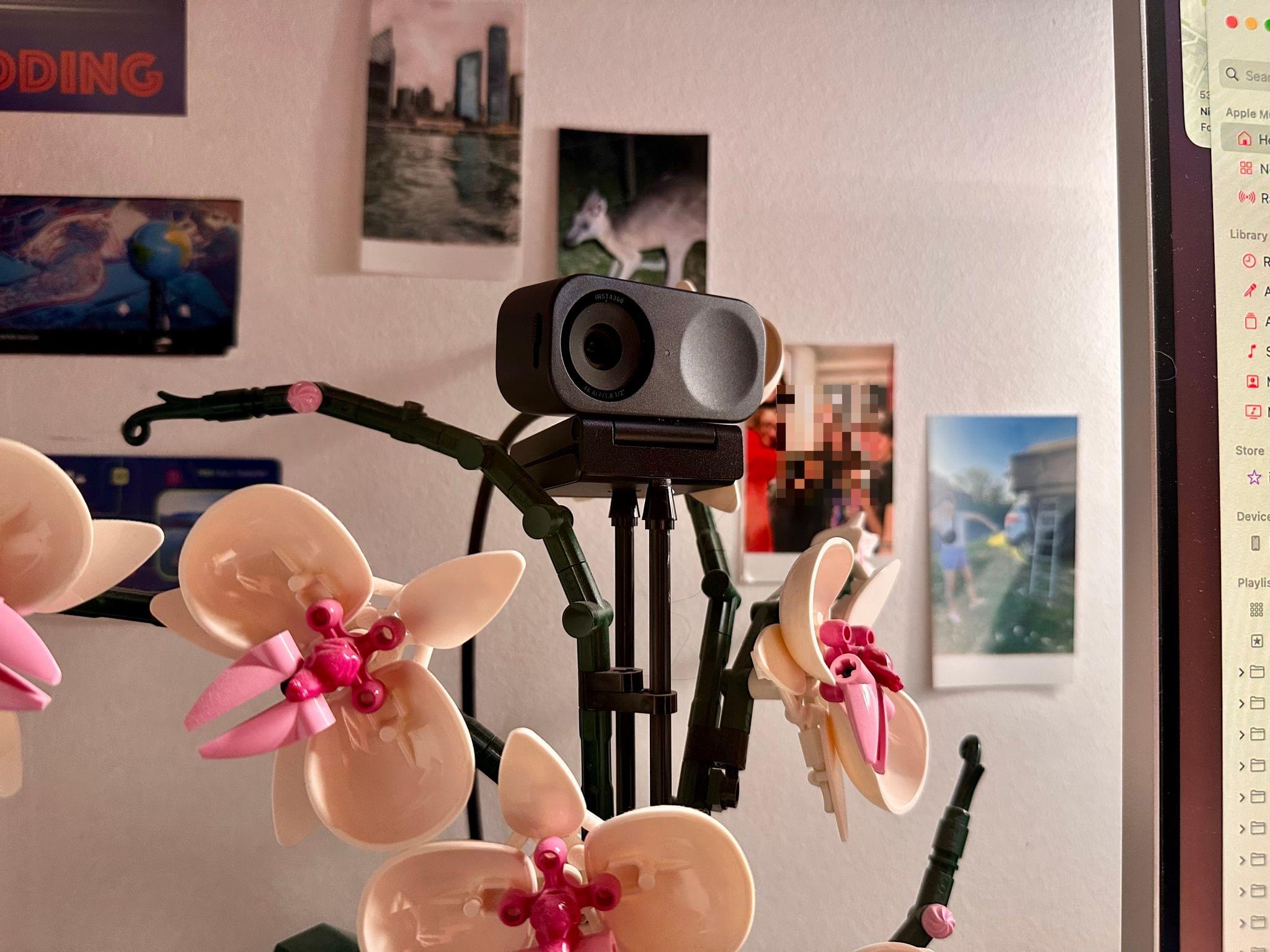
Transcript
1067 segmentsWelcome to Comfort Zone, a podcast all about pushing your hosts, well, outside of their comfort zone. I'm Christopher Lawley, and as always, I'm joined by two incredible co-hosts, and all of us are feeling merry this time of year. As always, I am joined by Matt Birchler. Matt, how are you doing? I'm doing okay, although I'm realizing my camera angle is wrong, and it's going to bother me for a long time. I have a new desk setup, and I should not have done that before the episode.
Always making changes right before we start recording. Speaking of which, we're also joined by Niléane, who made a couple of changes as well. Yeah, totally. This will be my topic, so you'll hear about it. But I'm fine. Yeah, good, good, good, good. And the only change I really made to my setup is I have a candle right here. Oh. Is it festive? No. Well, I'm going to say yes, but no. Anyways, let's get into the show. We have some follow-up.
I think the first thing in here is from Matt. What's going on with you, Matt? Yeah. So a number of episodes ago, I think, Niléane, you brought the topic that you had moved away from Fantastical. And over the next minute, all of us were like, me too. It's the first and only time we've ever all been in sync. Truly. And I've been using Apple Calendar for a few weeks, and it was going okay.
And then it really fell apart for me. I was showing up to meetings that no longer existed. I was not knowing about meetings that had been scheduled. And my endless challenge with Apple Sync across Calendar and Mail continues. And so Calendar is literally making my job hard to do. So I'm deciding what to do next. I have been using BusyCal, which I got a recommendation for and hadn't used in a long time.
And then I tried to make an edit to a recurring event, our recording episode, a recording event for this podcast. And it deleted every single one after the one that I changed. So that's losing trust. And so basically what I'm saying is in a month or two when my Flexibit subscription is supposed to renew, I may have to actually keep it going because it's the only freaking calendar app that works for me. I know. I'm kind of in the same boat too. I haven't had anything massive wrong with Apple Calendar, but I have everything feels a little clunky in it.
Like everything feels a little slower and not as smooth as Fantastical. and I can't put my finger on exactly what it is. All my stuff is still there, but I don't know. I'm kind of in that same boat with you. I think my Fantastical subscription is up in March, so technically I could just put Fantastical back on my device and it wouldn't cost me anything right now. Yeah, so anyway, it's a pain. I would love to just be able to use the free app, but I can't have it be so wrong as often as it's been.
So yeah, kind of a bummer. Well, we also have another item in follow-up that just says ear updates. And I have no idea what's going on with this. Yeah, last time I mentioned that my ears, my hearing was off-center. And I had to adjust my settings. Just an update to tell you all that it's back to just being normal again. And since everyone cares so dearly about my hearing, you have this update today.
Everything's fine. Well, I'm glad your hearing's fine. That's important for a podcaster, you know, to be able to hear things. Yeah. I also took the hearing test on my iPhone with the AirPods Pro 2. And because the update, the latest update iOS 18.2 rolled out the hearing test in France, finally. Although not the hearing aid feature, just the hearing test. So I'm guessing the hearing aid is not certified yet here.
So we've just got the hearing test and that's fine too. My hearing is very good. So that's fine. Every time I've sat down to do the hearing test, something comes in and interrupts me. It's a process. It takes a minute. It takes a little while, yeah. Yeah, so every time somebody will call me or my girlfriend will come home or there's just always been something. Every time I've sat down to do it, something interrupts me and I'm just like, this is hilarious. I'm never actually going to be able to do it.
Niléane, you're first up in the dock. What do you got for us this week? Yeah, so people watching the video will notice, apart from the slanted camera that Matt has today, although it's fixed now. It's fixed. Apart from that, you will notice that my video looks different, slightly worse. So here's the story behind it. That's my topic. I mentioned a while ago that I was using an iPhone SE.
It's right here. as my camera for calls and for this podcast. I was using it with continuity camera on the Mac, which was very nice. And the reason for that is that even though that's an iPhone SE from 2020, the camera looks a lot nicer than any webcam you can get. Like, it's very nice. The issue is continuity camera. That's not nice.
It's very buggy and I've put up with it. I've tried to work around it. I even wrote an article on Mac Stories once in which I investigate the causes of the issues I was having with continuity camera, only to realize that it was surprisingly linked to the unlock with Apple Watch feature on the Mac, which makes no sense. But I realized, you can go check this article, but I realized that if you have trouble with continuity camera you can just toggle this feature on and off unlock with apple watch on
the mac and it will most often fix it temporarily at least uh which makes no sense so there you go um yeah so anyway continue continuity camera got even worse recently apart from all these issues And the reason is that in iOS 18, Apple silently added something to iOS, which is that now an iPhone, which is inactive for, I believe, 48 hours or that's 72 hours or something, will reboot by itself overnight.
Oh, yeah. That was the thing the cops were paranoid about. apparently like i mean we don't know why they did it officially but people have been happy about it because it's a way to lock iphones which get in which are inactive so that people can't access it easily um so yeah because it reboots by itself you will have to enter your passcode to start using it again that's a problem when you've got a stationary iphone on your desk that you're using as a camera
because it means every couple of days you will have to take your iPhone off the stand and unlock it again so it starts working with continuity camera on a Mac again, which is very annoying. Because apparently using it with continuity camera doesn't reset the inactivity cooldown that iOS seems to be using to reboot itself, you know? So even though I use it every day, it will still reboot after a couple of days. what about yeah and i'm just gonna float this out here to to solve i got two things for you to solve your issue with the iphone uh first off instead of using continuity camera what about camo the the
app camo have you tried that that that's also an issue anyway because the app will still the iphone will still reboot by itself but i have i have a i have a solution for that the iphone mirroring thing on the Mac, can you set up an automation that it just opens and closes it once a day? Oh, so you mean the feature that's not available in the European Union? Oh, I forgot about that. That's right. Dang it. I was like, I was so excited. I thought I solved your problem completely.
I forgot about that. I forgot Apple's mad at Europe. Sorry. There's got to be a switch bot that you can use to, like maybe a combination of switch bots to like swipe up and then a couple of them to tap at different spots. And then what you might have to do, because it's not an actual finger, you might have to put one of those conductive gloves on it that acts like a finger. Oh, yeah. Obviously, just rip one of them off, so it's one finger. Yeah, it's just one finger, just tapping it. This embodied finger tapping your screen. Something to think about. I don't know. I'm just saying, we solved your issue, Niléane.
Okay, thanks, dads. So, anyway, in the meantime, I got a new camera. It's a webcam. Oh, that's an even better solution. That's better. No, the Rube Goldberg machine of automations is the perfect solution. I knew going into this that whatever I picked, it would be worse. Because like I said, the iPhone's camera is just better than any webcam you can get. Even more expensive ones. Unless you get like real big cameras, which I don't have the money for.
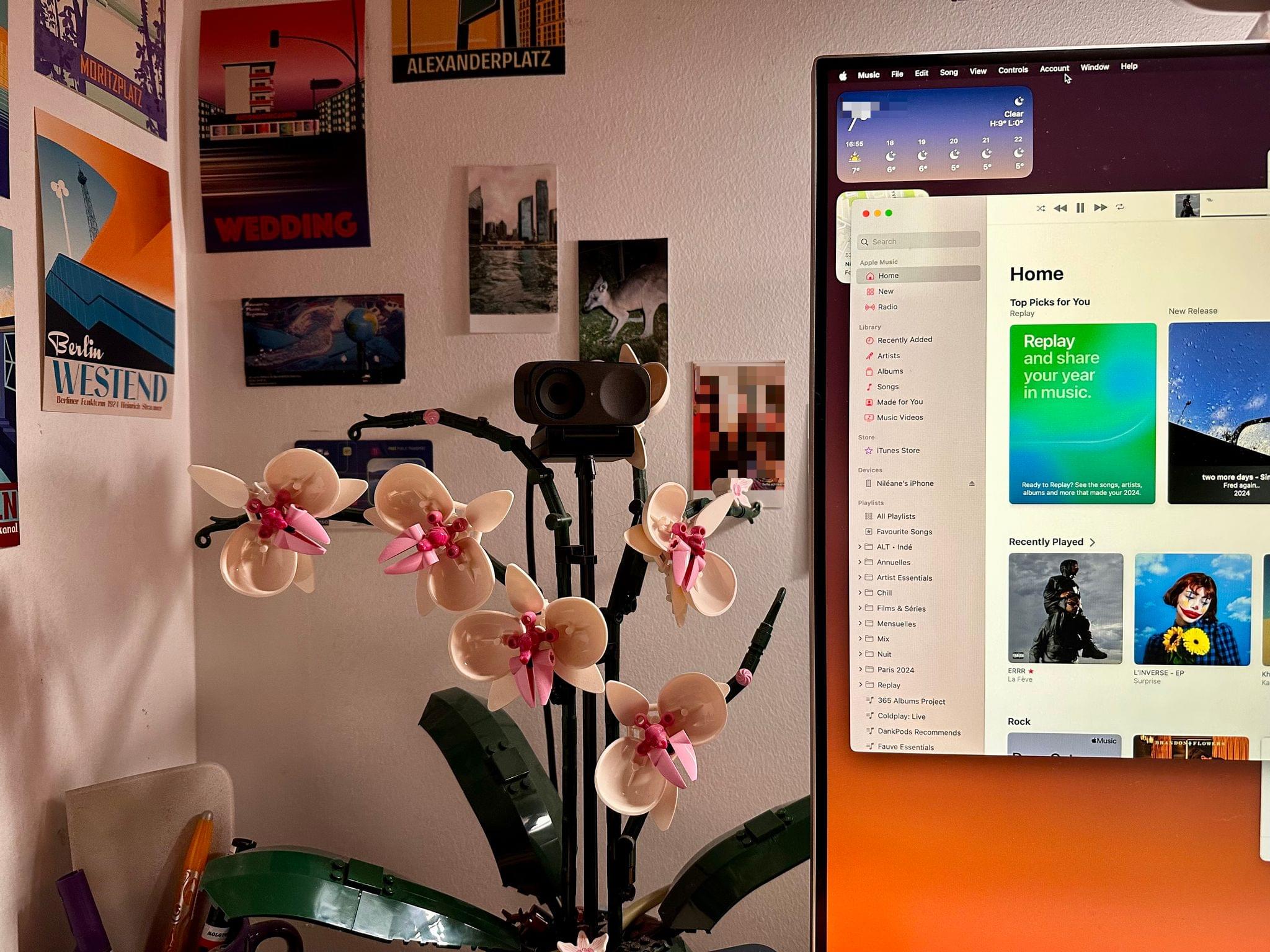
So I picked up the Insta360 Link 2C. And actually, I didn't pick it up. It's a gift. So there you go. Oh, nice. Yeah, it's a Christmas gift two weeks in advance. So I've set it up just hours before this. That's why I don't know how to use it. But I have some first impressions. First, I've mounted it just like the iPhone SE before. I've mounted it on top of my Lego Orchid on my desk.
I have two links to images of this in the show notes, if you want to look at it. Yeah, I think it's very cute. It's giving eyes to my Lego arcade. I have this same Lego on my desk, by the way, as well. This is great. Yeah. And it's the perfect eye, too. It's really nice. Yeah. So that's the mounting system. The Insta360 Link 2C is the second generation of their InstaLink webcam.
Insta360 Link webcam. The Link 2C is the C in the name means it's the version without the automatically rotating stand. Yeah. The one that tracks you around, the physically moving stand. I don't have a need for that. So that's fine. Otherwise, the camera is pretty much the same. First impressions on the camera itself. I think the image looks good.
I'm having trouble with, for the past few hours, while trying to set it up, with auto exposure. Like, right now, I'm a bit blown up. And sometimes it fixes by itself. I think it's having a hard time with the dim environment that I have in my room. During the day, I didn't notice this as much. It definitely looks like the highlights are a bit high. Like if you look at your nose and mouth area, that's where it's kind of like a little blown up.
Yeah, my face is very white. I'm not that white, I swear. So, yeah, I will try to tweak this because the camera has a software on the Mac, which is called the Insta360 Link Controller. And this software is, yeah, it's here. Here's my review of it. It's all right. And you can tweak a bunch of things in there.
and it can actually add a virtual camera to the macOS. So like a bunch of settings don't save to the device. So if you want to use your color adjustments or filters or whatever you do with your video feed on the Mac, you have to use the virtual camera, which is another video source in any app that you can use with a camera. but that's fine it works um and i'm having trouble with the resolution as well for some reason it keeps setting itself back to 720p sometimes right now it's at 1080 which is which is what i've set it
at but sometimes it will just downgrade itself for some reason uh so that's not great um all right and I think yeah I think that's it I don't have a lot of hours with it I will have to see how it goes over my video calls over the week um for now I'm pretty happy the dim environment is really yeah it makes it struggle you can tell if right now maybe uh editor has put me in full screen so
which way is it there you go so you can tell here by looking at the clothes that it's very noisy in the corners, in the dark spots. It's getting very noisy. In the room, my face is not. But, yeah. That's just webcams in general. There's not a webcam on the market that's not noisy, especially in dark, because they don't have the ability to open up the sensor, like the f-stop, as high as something like the cameras that Matt and I are using, which are, you know, mirrorless cameras from Canon,
because Canon's the best. But yeah, yeah. So like mine, even though I'm pumping a bunch of light into it, I can open up the f-stop and bump up the ISO. So, well, you don't want to bump up the ISO too high because that does add noise. But I can open up the f-stop, open up that sensor really wide, and, you know, it's not as noisy. Yeah. Yeah, and I mean, for a webcam, it's very, very decent, I think. And I think, like, I'm only slightly, like, I'm being very nuanced here just because I'm coming from an iPhone, using an iPhone for over years, my camera, which is a high standard.
So, yeah. Yeah. Anyway. I've been using the previous model of that, the Insta360 Link, the first one, that does have the swivel head that follows you around if you want. But it's the most happy I've ever been with a webcam. like it's it's quite good quality not as good as an iphone but it's good quality it's reliable like that's the thing for me that always scared me away from continuity camera is like having something that has to like wirelessly connect every time i want to use it and like i'm just worried about that and so i'm just like wired in and just always just turns on immediately is
is nice for me um yeah i've reached the point where i don't care i i just either use the studio displays built-in webcam or uh i use the ipad's webcam and a little peek behind the curtain most of my video calls like if i'm going to do a video call it's like apple briefings and stuff like that so if it's bad it's kind of on them i don't care yeah so yeah that's it uh that's that's my topic i will report back maybe if i have other things to say uh i'm at least i'm happy that now i don't have to worry about will my iPhone connect when I get on a call which started to get on my nerves
really really hard so yeah yeah yeah no I totally get that I uh having just using like the built-in webcam on the studio display or the iPad it's nice because I don't have to worry about oh is this capture card working or is this USB cable working or any of that stuff this is the only video thing video kind of call I do in my week where I use my Canon camera unless I'm guessing on a podcast like when I guessed it on AppStories I use
this camera but other than that I just use whatever's built in because I can't be bothered to care anymore I almost forgot almost yeah I forgot to mention it's got gestures that are accidentally she could. Show them off. It's like it doesn't work. So apparently I do this and we'll zoom. Yeah, so it's registered right now. Yeah, it's like zooming by two pixels for some reason. I can't do it continuously.
Yeah, I think it turns it on and off. I think once you turn it on, now if you move your head left and right, it should follow you. Oh, that's so weird. I was trying to zoom. Maybe the gestures are different, though. I think you do a nail like this to zoom. Yeah. Oh. And if you put it down, it goes out. Okay. So it's like you're dragging a zoom scroll. Yeah, very laggy zoom scroll bar. And I think that's the hand that will follow me around.
That's the tracking one. Okay. It looks terrible, but okay. And if I do this, will it reset, please? No. So most of the time, I just go into the software to reset it manually because it doesn't work. So there you go. I just wanted to mention those gestures that I will disable as soon as I can. There you go. It's disabled. So there you go. Nice. Yeah. I will say the one thing that's nice about the swivel one, the swivel variant of it, is it does those gestures, but it doesn't have to zoom in or anything because it can just move the whole camera and follow you around.
So it doesn't get that center stage thing where like it's a it's cropping in a ton and you're getting lower quality video. You're getting the full quality. No matter what you're doing. Oh, I totally leave center stage still enabled because the iPad camera is so low. If I'm just using the magic keyboard, I either have to put it on a stand or I just like, again, don't care. And then the studio display one, even though like I have the monitor at like the appropriate ergonomic height, Because the camera's up so high, there's a ton of space between me and my head, like a ton of empty space.
So I'm just like center stage. Don't care. Video calls are not something I worry about looking incredibly good for anymore unless it's something that's being recorded and going out. So, Chris, I've dressed up for the occasion. I think you have something I'm passionate about. Yes. So I'm actually, you hopped on the call, I saw your T-shirt, and I was like, yes, this is perfect. Okay. So I have for you all, just if you give me one second. An addiction. That's what you got for us. It is an addiction.
It's a problem. Yeah, Niléane's completely right. I have not one, not two, but three mechanical keyboards for you that I've been testing out lately. Meanwhile, Clack has five settings. Clack is an abomination. I had to mention it. It should be banned. I'm going to talk to Apple about using Gatekeeper to block Clack from being installed because it's an abomination to me.
I've mentioned it three times in a row now, in three episodes in a row, so maybe it's your curse now. It will happen every time. It's a Beetlejuice situation, yeah. Anyways, let's get to some keyboards. Okay, so I have three keyboards here for you. All of these were sent to me. Just disclosure, right thing to do. They were all sent to me, not a sponsorship or anything like that. They were just sent to me to test out. And if I wanted to make a video, I can, but there's like zero obligation behind any of this.
But the first two are from Keychron. And this is, okay, I got to get, Keychron's naming isn't the best. This one right here that I'm holding in my hand for video viewers is the Q1HE. And this one right here is the K2HE. They're very similar in a lot of ways. They are both 75% layouts. Actually, I think this one's technically a 70% and this is a 75%. And basically what that means is, for those that aren't big mechanical keyboard people, is what keys are available.
So you can go from like a 40% keyboard, which like is missing letters and stuff. It's wild to 100% keyboard, which has like the numeric pad on the side and function row and arrow keys and all that stuff. There's a wide spectrum of like percentage mechanical keyboards as to like what keys are available. You can get pretty crazy with it. I typically don't go below 75, and an 80% keyboard is kind of my favorite.
But sometimes I will drop down to like a 60, just if it's interesting. But what interested me about both these mechanical keyboards, and I think Matt will have some takes on this, is that these use the Gatron, Gateron? How do you pronounce that? Does anyone know? I think it's Gateron. Gateron? Okay. I think it's Gateron. Sure. We'll go either one of those. Dealer's choice, whatever you want to pronounce it. But these use double rail magnetic switches.
And I've never heard of magnetic switches until this. So what magnetic switches allow you to do is Keychron has their own web interface that's very similar to VIA. We've talked about it on this show before. VIA is a website you can customize the firmware of your mechanical keyboards. Keychron kind of has their own variant of it. In fact, I'm assuming it's a fork because it's very similar. but tweaked slightly. And what you can do in here with these specific keyboards and their magnetic switches is you can actually change
how much pressure you apply to the key press in order for it to activate. So you can kind of change the levels of like rest and stuff like that. So you can apply more force, you can apply less force. So if you want like a sick gaming keyboard, you can apply even less force. If you want like a really nice typing keyboard, you could apply more force. For me, I applied more and I really like that. It's something that's a little different from other keyboards. Now, these switches are just linear switches.
There's nothing special about them except for the fact that they're magnetic. So you're not getting that like tactical feel of like a second press kind of thing. But overall, they're both kind of interesting keyboards to use because of that magnetic property. You can customize them into whatever way you want. Yeah, these Hall Effect things are really interesting, and we're seeing them in more things now. I know a lot of third-party gaming controllers have the same tech in it for analog sticks, which are less likely to break or to have drift in the long run, which is cool.
But I've used a keyboard with these as well. And it is kind of strange. It is strange to be able to go in and like basically use a slider to say like how far, where is the actuation point? Which is normally something you have to choose when you buy switches. Yes. How far is it? How far down do you have to press? This you can kind of tweak it to your liking. So they're very cool. And what gets even weirder is it's not a one size fits all. you can apply that setting to every key, or you could do different actuation points for each individual key.
So, like, if you maybe had a co-worker that had one of these, and you were to borrow their keyboard for a second, you could absolutely change every actuation point on every key to be something different. Might be a fun prank. Useful for pranks. I don't know if it's useful for anything else. Maybe gaming? Like, okay, like the WASD, I want to push in a little bit further. But like, you know, if I need a 360 no scope, bro, like that key doesn't require as much force. I don't know.
I'm not a PC keyboard gamer anymore. That was a long, long time ago. But yeah, that's kind of interesting. Now, in this web interface, you could do things just like you can in VIA. You can write macros. You can customize the backlighting of the key. You can remap the keys. So like if you wanted to put media key, well, they have media keys on both these. They have function rows. But like if you wanted to change that up, if you wanted to add specific keys for backlighting controls or any of that stuff, you can. And what's nice is this is at the firmware level.
So if you're changing these keys or adding macros or something to these keys, it transfers to any computer you plug it into, including the iPad, which is really nice. For a while ago, I took one of these keyboards and I wrote a macro that would bring up Spotlight, autofill a shortcut's name, and then hit enter. So it was kind of my way of being able to trigger a shortcut from a keyboard shortcut. Nice. Unfortunately, Spotlight on the iPad is really buggy, so it wasn't exactly the kind of thing that worked 100% of the time.
Of course. Yeah. Both these keyboards work wired Bluetooth, and they have like a USB dongle if you wanted. To get into a little bit about how they're built, they both are double gasket mounted, which means they're not as loud. They're not as clacky. They kind of muffle that noise a little bit, which some people like. I personally, I want my keyboards loud. I want people to know I'm working. I'm just kidding. I work alone in my house. There's nobody here.
It doesn't matter. but I do like my keyboards loud I will say that but I like them loud but finely tuned maybe we'll get into that in another episode on how I like customized keyboards and stuff like that that might be interesting but not for this one the keycaps on both of these are double shot PBT keycaps which are personally my favorite I'm curious if Matt has any opinions on this they look good and they last a long time I don't have any opinion on this.
I don't understand key caps. Really? Okay. I don't understand. Profiles and I have no idea. Oh, profiles are easy. Just go cherry profile. Oh, no. What am I thinking of then? I'm thinking about the slope from the front to the back. Yeah, that's the profile. Yeah, that's the cherry profile. What? I thought those were the connections. There's cherry profile. There's like ABS. No, those are. So the profiles are like the kind of like how the keys are molded, essentially. So like if you pull it up, there's a ton of diagrams on the Internet, but like there's the cherry profile.
So like how like the bottom row is kind of sloped up and the top rows are sloped backwards and the top row sloped up and stuff like that. Yeah, these have the kind of the cherry profile, but the really big keys, which I'm not exactly a huge fan of, but they work. And both of these do have hot swappable switches, which means you can take those magnetic linear switches out, put in whatever switches you want, but you're kind of, at that point, you're defeating the purpose of using these keyboards. Interesting.
So they are hot swappable, which is nice. So you can change them, but I think if you were going to get a keyboard and swap out the key caps or the switches, I'd probably get something different. And Keychron is now using screw-in stabilizers instead of the like the clip-in ones so big thumbs up there i like screw-in ones they're way less rattly like if you ever use a mechanical keyboard and like hit the space bar or the enter key and hear kind of like a rattle that's usually because they're snap-in stabilizers and not screw-in
stabilizers so i big fan on that the nice thing about these keyboards they're extremely customizable You can open them up. You can basically change out whatever you want, even though they kind of come pre-built. They're extremely customizable. The Q1 right here is made out of heavy aluminum. It's a heavy aluminum body. It's very like zombie apocalypse happens. You're going to whack some zombies upside the head with this thing. It's going to do some damage.
This thing is heavy. This looks like a weapon from the back, but it's a keyboard. This is my Q1, an older one, and it is... I feel so left out. Yeah. Actually, mine is so full of like... What's the... Foam? Yes, so full of foam. It doesn't clang, but it's aluminum. I did that. I have the older Q1 as well, and I did that as well. I have the blue one. Well, you had to. It was so echoey.
Oh my gosh, that was an incredibly echoey keyboard. It was unusable until you opened it up. This one doesn't have that issue. This one, the nice thing is the keys are separated. So the function row is separated out. The arrow keys are separated out. It also has a volume knob, which is very handy. So you can turn up and down the volume from the knob. You can push into mute. Again, you can go into the Keychron customization website, And you can change this push in from mute to play pause,
which is something I did, because I would much rather have this be play pause than mute. You could technically make it anything. Technically, you can't make it anything. I mean, you can make this the A key. The lead button. Yeah. You could make, I think, turn right. I think you could make that a key as well. If you just want to, like, scream, you could just make it A and just spin that thing around. Yeah, exactly. A lot of potential. There is a ton of potential with mechanical keyboards. And then it's got a decent keycap design. It actually reminds me, it's very, very similar to the very first custom keycap set I ever ordered, which is weird because mine literally was the same thing where, like, the modifier keys were black,
the enter and escape keys were red, and then everything else was white, which is exactly what this is. So I'm like, huh, that's interesting. But yeah, so that's the Q1HE right there. The K2HE right here is made out of plastic, which is weird. But you can get the special edition version, which has wood on the side, and you can have it put a name or some text or something in here.
They didn't do that for this one because they just sent it to me. What I don't like about this one is all the key caps are pushed together. There is no space between the arrow keys. There's no space between the function row keys. And that causes me to hit the wrong key a lot when I'm typing. So I'm not as big of a fan as this style of keyboards, especially in like a 75% layout where there has a function row and has a bunch of extra keys and stuff like that. This one does have modified keys.
has volume stuff uh up here as well so or a function row i'm sorry not modifier keys but a function row so it has all that stuff overall these are nice keyboards uh keychron is a great i always say keychron is the best place to start with mechanical keyboards but if you're uh if you're looking to get into something that's like i want to build it myself i want to customize every single bit of it and money is no object i always say go mode mode keyboards are my absolute favorite uh they have a new keyboard that i really wanted i priced it out the other day and i'm like
i don't know but um let's just say i do have one mode keyboard and it's one of the most expensive it is the most expensive keyboard i've i ever purchased and it has way too much money in it yeah but key crowns are a really great place um because like you said they a lot of mechanical keyboards don't do wireless more than ever do today but like the key crown ones can use bluetooth you can pair with three different devices with bluetooth with across all their keyboards they have a dongle uh wireless connection they have usbc connection so whatever works for you is great
um i really like them i'm i recently started using their lemo key l4 uh which they disclosure also send me for review um but uh it's really great um so i think keychron has they used to have um good starter level ones but like they do have some really nice uh keyboards this limo key one i think gives my mode a run for its money wow that's saying something the mode the mode is still better but yeah doesn't do wireless yeah that that doesn't bother me as much because i just use it as at a desk it's not like i'm traveling with it or something but uh the nice thing about keychron
keyboards is you can get them and typically all of their keyboards and i think there's some exceptions but tip most of their keyboards you can either get a fully assembled version where it comes with the keycaps uh switches and sometimes there's options to pick what switches you want and you can just use it right out of the box or there's a bare bones version which you have to supply your own keycaps and your own switches and it's a little bit less money too but uh that way you can customize it you You can put in the switches you want. You can put on the keycaps and design it yourself. So there are a lot of options for getting started, and that's why I kind of think it's the best place to go
because you're not having to worry about stabilizers and PCB boards. And is this PCB board, do I have to solder switches in, or is it hot-spop-able? What do I need for stabilizers? Do I need to lubricate the stabilizers? Do I need to add tape to the PCB board or extra foam or any of that stuff? Most of this, it's very simple, straight out of the box. You can get going with it, and it's kind of a good way to learn. So I have one more keyboard for you, and this one is very interesting. This is the Nada, Nada, Nada, Nada, I'm going to say Nada, Panda65.
So this is a 65% keyboard. Basically means it has all your letters, all your numbers, but there's no function row, and there's no, like, number pad or anything like that. And this right here, I actually think I mentioned this on a previous episode, but I didn't go into the details of it. This keyboard right here has ceramic keycaps, which is not something I had heard of before. They claim it's the world's first keyboard with ceramic keycaps. No idea if that's true or not.
But what's interesting about this is it gives a really interesting sound. And I'm going to try and put it right here and type, but I don't know how well it's going to come up with the podcast. One second. yeah i have no idea if that hurt if you guys were able to hear that okay okay i love the sound of this keyboard absolutely freaking love the sound of this keyboard it sounds so good it's loud but it sounds it sounds good there's no rattling or anything like that that sometimes you get from mechanical keyboards so good the ceramic keycaps are great the one issue with ceramic keycaps is
they're ceramic so they leave fingerprints they're my fingerprints are all over this keyboard um i mean my fingerprints can be all over any of my keyboards but like they're very noticeable on this keyboard like if i shine it just in the right light you will absolutely see my fingerprints on it uh the other thing too is the makers of this uh really love pandas so at the bottom of this It's covered in pandas. And then the key caps, despite the fact that out of the box, it can work with the Mac and iPad.
There's no command key to put on this keyboard. So you have to use like this panda key unless you are okay leaving the Windows key on it. I was not. So if you like... Get to use a panda key. I guess, I don't know. I guess I'm not like the biggest panda person. I was like, I would rather have had a command key than a panda key. So you hate pandas, huh? I wouldn't say hate pandas. I'm ambivalent about them.
But also, I'm a nerd, and I would have rather have had a key that's a command on it than a panda crawling on top of another panda. I think it's supposed to be a mama panda and a baby panda, but it doesn't really do anything for me. I do like the design, the color scheme of these keycaps. So the numbers, letters, and spacebar are black. The modifier keys are white. And escape and enter are kind of like this mint green color. And with the really, like, it's a very shiny black.
It looks really good. It kind of reminds me of Jet Black, the iPhone. Jet Black, where it was kind of a little shiny and stuff. and like it kind of reminds me of that a little bit so that looks good um again this is gasket mounted but it's still nice and loud so you can hear everything i haven't opened up any of these and modified them yet but i'm going to uh this one comes with celeste blue linear switches i think i'm going to swap them out for something tactical though i have been enjoying linear switches lately
and for those that don't know linear switches are kind of like your typical keyboard switches where you just push on them tactical switches have like you push down and there's like the second level of like click sort of where like you feel like okay it's it's clicked it's it's registered and then you can release kind of thing i think people most usually refer to the tactile ones as a there's a bump so before you bottom out there's a bump at which point it actuates so you can kind of feel it um yeah i like those as well yeah that that's a good way of putting it um i used to be a huge
clicky person and i don't know what it was just one day i was just like eh over it you grew up tactical we all we all grew up grow out of our clicky keyboard phase yeah uh you know what was funny is back in my it days i that was when i really loved clicky keyboards i had uh a wasd code mechanical keyboard uh that was my first mechanical keyboard and this was before way way before like custom mechanical keyboards blew up and were like a thing and hot swap bowl was the stuff and all that stuff.
So I had one of those and I wanted to use it in my office space. And I had a, I kind of had a guy that shared the same office area as me. So I made a deal with him that if I bought him a mechanical keyboard, he would be okay with me using my mechanical keyboard. So I bought somebody off so I could use a mechanical keyboard. Basically. Basically. But we were also on like the far side of the building so nobody else was around. So nobody was going to complain. I just had to make sure he was cool with it. So I was like, look, if I buy you one, will you let me use this?
And he's like, yeah. I was like, cool. Yeah, and that's kind of it. These are the mechanical keyboards I'm using. Oh, the other thing is this Not a Panda one. Also, Bluetooth and wired keyboard works with Windows and Mac. Same thing with the Keycrons. They work with Windows and Mac. They're just switches. I really like these. I always leave them in wired mode and then just plug them in at my desk, and I just have a cable that comes out from underneath my monitor stand. and I can swap any keyboard around. It just makes things really easy.
Yeah. Any questions on the keyboards? If you had to use one of these full time, which would you use? Not a panda one. Not a panda. I love the sound of it. Absolutely. I've been jumping between the other. I've been working on four really big scripts to kind of finish off my videos for the rest of the year. I've been jumping across all three of these keyboards during that time. This is the one that I stick with the longest. The only thing I don't like, So on the F and J key, they're indented more than the other keys.
So you can put your fingers on the home row. But they don't have the bump. I prefer the bump to the indent. I've never heard of the indent. Really? Yeah. So these are just more indented than other keys. But I prefer the bump on the F and J keys. Absolutely. I have a gross question. Okay. Yeah, how do the ceramic caps handle sweat?
I've never sweated on my keyboards. I don't know. You don't have sweaty fingers? No, not really. I usually actually have quite dry hands. Oh, okay. I'm worried that it will get gross with my hands. Well, the nice thing is with any mechanical keyboards, you could just pop off the key caps and clean them. Like, they're really easy. Like, you can pop off any or most, I should say most, probably not any, but most mechanical keyboard keycaps. You can just pop them off.
You can replace them with another keycap set or you can just clean them if you want. I mean, for some reason, my mechanical keyboard here, I can't. I don't know how to. Dear listeners. How does it work? Niléane is holding up an Apple Magic Keyboard and calling it a mechanical keyboard. This is fake news. This is not. Take these off. This is strange. Yeah, I can't. You know how you take them off? You take the keyboard, you walk outside, throw that in the dumpster, and go get yourself a proper mechanical keyboard. That's how you fix it.
Okay. I actually agree with you. I just can't. I just love any opportunity to show the Magic Keyboard. I mean, technically, I have a Magic Keyboard. Actually, I have two Magic Keyboards. I have one here that I reluctantly bought after I got the Vision Pro because I found out the QuickType bar only registers with the mechanic with the magic keyboard which is dumb and then now with vision os2 uh the magic keyboard is the only keyboard that does proper pass through and then i have a
second one that the really nice folks over at editor keys made me a custom version of it uh but with like all the key keyboard shortcuts and stuff for luma fusion back when i was using that back in the day and like it has my name on it and my uh it was my old youtube profile picture and all that stuff and some information it was really really nice of them uh and that that one just kind of sits on my wall but because i don't want to ruin it but yeah uh i really hate the magic keyboard all right all right well that's that's kind of it for the keyboard segment um i i'm curious do you actually have a proper mechanical keyboard not a uh not not a magic keyboard uh okay so
So somebody... I'm opening my huge drawer that you can't see. Oh, okay. Let me look. I have a second magic keyboard. So there you go. But I have something else too. There's a mechanical keyboard here that somebody gifted me. It's going to be a third magical keyboard. But I've never used and I think it's not great. It's whatever this is.
I don't know what this is. I have no idea what that is. It looks interesting. It is interesting. You've never used it? What's it say on the bottom? I used it when I unboxed it and then never again. Oh, okay. I don't know. Okay. All right. I have one. See? I'm not lying. Honestly, the only reason why I asked is an idea for your future challenge but uh we'll we'll we'll get to that later get a third magic
keyboard no i want a colored one like i want a yellow one so bad that's so dumb they don't sell those and you know you can't even get the space black one on its own the space black one without a number pad on its own like when i had to buy one for the vision pro i had to buy a white one like a monster. I'm so sorry. Yeah. As you should be. I blame Matt for all that. You could have returned the Vision Pro, bought an iMac with it, and still have $3,000 left.
I should have just returned the Vision Pro, period. That's all. That's what I should have done. That's not to think about it too much. So bad. Do we still have a challenge in this show or something? I believe so. I believe the challenge was, was it Matt's challenge? It was my challenge. Okay. Matt, what did you have us do? So I challenged you. After you guys roasted Chrome for ruining the Mac by killing native apps, I asked you all to find a web app that you could install on your device.
I actually said it was because of capitalism, not Chrome. That's true. That's true. There was nothing I could do to stop that in a week. So, yeah. So find an app that a web app you can install in your home screen or your doc or whatever, however, whatever method you want it to do, but a progressive web app, find one that you like and you ideally one that you could see yourself using instead of the native app. We'll see. So for mine, it's not my pick, but the one that I use every single day is Puzmo.
Puzmo is I brought, I brought it to a challenge a while ago, but it's a daily puzzle game. Love, love, love it. And they don't have an iOS app, but I installed it as an app on my home screen, and I completely forget about that because it just works great. But my actual pick is Discord on the Mac, which is the greatest upgrade to an app you can possibly do. Because I hate the Mac version of Discord primarily because every couple times I launch it, there's an update.
And that leads you to this five-part update process that is mandatory, that you can't skip, is several hundred megabytes, and it just drives me absolutely crazy. But when you install it as a web app, it just works. It's the exact same interface. Notifications work. You don't have to even turn those off because it uses notifications. And every time you launch it, it is 100% up to date because it is literally the web, and the web is always up to date and i love that um so this is fantastic the one side effect and this
is not discord's fault it's actually apple's fault is i saved it from safari um because i wanted to just have like the native system way to save a web app and i saved it to my doc and then kicked it out of the doc because i don't use discord that much but um i saved it to the doc from safari and now whenever i launch it if safari is not open safari also launches which is very annoying you can close safari once it's like once discord is open you can close safari and it works fine but if safari is not
open and you have a web app saved it will open both of them for you i assume there's some connection there it has to like load real safari to do something but like it's very strange or it's like deep linking and jumping between it. I didn't know I did that. Yeah, it's very strange. I've had this happen on two computers so I know it's not just one weirdness. So if you use Safari, that's lovely. You won't even notice. But yeah. It's great. It's wonderful.
It's an absolute delight. Nice. I like it. You know what would also solve your problem, Matt? The update problem? No. The iPad. No. That's no. I don't ever see pop-ups about updates. Are you going to defend the iPad version of Discord? No. Is that what you want to do right now? Actually, you know what? Actually, I will say this. A couple months ago, they did some updates, and it works so much better with Stage Manager now.
That's cool. It actually legitimately does. The sidebar doesn't get all messed up, and text doesn't get cut off or anything anymore. It actually legitimately does work a lot better with Stage Manager now. So I know it's not a great app, but at least they fixed a big issue. It's about time. All right. Well, for mine, I picked Airtable. I've talked about Airtable on this show in the past. I've used it. So I did talk about how I moved all my project management stuff out of Airtable.
I still have my expense tracking and like tax write-off items and stuff like that in Airtable for this year. And the Airtable iPhone and iPad app is a joke. It is absolutely horrible. There are very common things you can't do in those apps. And the layout is bad. Everything about it is bad. It's slow. It's not good. Do not even bother installing the Airtable app. But if you go into Safari on your iPad, you can add it to your home screen and it makes it a progressive web app, which, hey, hurrah, works fairly well.
There are a couple of times where it kind of gets messed up with like the like clicking on some items and stuff like that. Not entirely sure if that's a Safari thing or if that's an air table thing or whatever. It's not the end of the world. It's really not a huge deal. It doesn't happen that often for me. But I get full air table in a web app icon right on the home screen. The only downside of using progressive web apps on the iPad is it doesn't do any of the dark mode icon stuff. So I did create a shortcut that redirects to the progressive web app, which was a whole pain because you can't just use the open app action.
You actually have to use like a URL scheme in order to open to it. It was a whole big thing. I had this problem once. Yeah. Yeah. So I did figure that out. There is a URL scheme that you can use to open a PWA. But it's... Oh, really? Yeah. Yeah. It's... Let me see if I can find it really quick. Oh, okay. Yeah. Yeah. I remember wanting to do that with Google News. I wanted to install it as a web app instead of using the real Google News app, which is horrible.
But yeah, didn't work. So if you use the URL action, web app colon forward slash forward slash, and then in this case, it's airtable.com forward slash, and then just the open URL action, it'll open that PWA. Works perfect. Yeah, it was great. So I did do that. Overall, really like AirTable as a service. I wish their iPad and iPhone app was better, but this is how I'm getting around that.
It's a very, I mean, it's a spreadsheet service. It's a database service. It can be as complex as you want it, or it can be as simple as you want it. I have mine to be very complex where things are getting linked together and all that stuff. And it's exactly what I need, especially for expense tracking and like tax write-off items and stuff like that. Exactly what I need right now. Really helpful. I have a question. um how do you feel about the iPadOS cursor on dense apps like these um I've always found it like irritable I want I just want to
I just want the classic arrow cursor yeah I see people I get comments about that on my YouTube channel all the time about like Apple needs to just bring the the actual cursor to it but if they I don't know. The thing I don't get, are you wanting them to just swap out the cursor imagery, like the actual arrow or the behavior of it? Because to me, the iPad cursor makes sense for the iPad. Yeah, I think so too. Because stuff is built for your finger.
But for things like this, I can see like the classic Mac arrow being nice. I don't know. I kind of go back and forth on it. And you know what? I also like the feature where the iPad cursor snaps to items. So, like, you know, if you have, like, a button or something, it snaps to it. I actually like that behavior. I know not everyone does. I think it's fine. But if Apple, there was that report from Mark Gurman yesterday where Apple's working on a big foldable iPad,
and he thinks it's going to run some kind of hybrid iPadOS, MacOS, but probably iPadOS will be getting closer to MacOS in the next few years. So I wonder if that is true, if the cursor will evolve from there. Yeah, I like the iPadOS cursor. I just think sometimes you need it to be precise, and it's not precise enough. I think they could solve it. I have an idea for them. they could solve it just by adding a dot in the middle of the cursor.
Yeah. Yeah. Just so you can pinpoint things. Yeah. I definitely see what you mean by it not being accurate, especially with stuff like this. And sometimes even in apps like Obsidian that aren't truly native apps, it can get a little confused sometimes. So yeah, that would be helpful. The other thing too is the Apple Pencil. The Apple Pencil is very precise. I use the Apple Pencil to navigate through UI stuff all the time. All right, Niléane, what do you have?
Okay, so mine is weird. Okay. I watch a lot of Twitch. Like, I'm a big fan of Twitch streams. I watch them during the day, during the night, while working on things, while flying a plane in flight simulator. Wait, do you watch people playing Fight Simulator as you're playing Flight Simulator? I sometimes do, yes. Meta. Yeah, these days. Yeah, it helps me. They help me learn.
There's so much to learn in these planes. Oh, yeah. Some of those Flight Simulator streamers know a lot. And some of them are pilots, real-life pilots. Yeah, that's cool. They can teach you a lot. Anyway, so, yeah, I wanted to... So, it's not a new thing, by the way. This is something I've been doing for weeks. But this challenge is the perfect time to bring it up. On the Mac, just like Matt, I've used the Safari feature where you can add a web app to the dock. And I've done this for Twitch.
Since there is no native Twitch player on macOS, I've done this with the web app. However, this is not great out of the box. First, I've replaced the icon. By default, the Twitch icon that you get from the web when you add it to your dock, it doesn't look as good. So what I've done is I've used a shortcut, I think by Federico, a shortcut that lets you download an icon from the App Store.
And I've done this to download the Twitch app icon from the App Store and I've used this icon as the icon for the web app on the Mac. which looks a lot nicer. Second thing, I want to be able to easily enter picture-in-picture when I'm watching a stream on Twitch. And in Safari, when you have just a Twitch web page open in Safari, that's easy to do. You can either use an extension or you can right-click the sound icon in the address
bar in Safari and click enter picture in picture. Until recently, you couldn't have extensions for web apps, for Safari web apps on the Mac. But now in Sequoia? Is it Sonoma? No, it's this year, right? Anyway, since recently, we can now have Safari extensions in web apps too, which is what I've done. I'm using the extension called over picture for Safari.
There's a link in the show notes. And what this does, it works both in Safari and in Safari web apps. When you're on a web page with a video that's playing, you can just press P on the keyboard, on your white magic keyboard, and it enters picture-in-picture immediately. And it also adds an icon to the toolbar. If you have the toolbar enabled, and on YouTube, it also adds a picture-in-picture icon to the player itself.
So it's really nice. But in any case, you can just press P anywhere a video is playing and it enters picture-in-picture. So that's nice. So I've solved two problems. Third problem to solve is Twitch on the web isn't... It's very cluttered. There's a lot of things that are not necessary to me. Like you've got a sidebar, full sidebar. You've got a lot of things below every stream player, like images, links to donation links to, I don't know, sponsorships.
It's very cluttered. So what I've done is I've installed another extension called UserScripts for Safari. This extension, like the name suggests, lets you install JavaScript user scripts for any web pages and also CSS style sheets. I've written my own little CSS sheet for Twitch with just a couple of rules in there that hide blocks on the Twitch web apps.
For example, I'm hiding the sidebar. I'm hiding the top bar and a bunch of our little things. For example, there's always a red badge in the top toolbar on Twitch. It's very annoying. It's where you get like prime benefits or whatever, offers and stuff like that and notifications and drops and I don't care about any of that. So I'm hiding just the red badge because I really hate having a red badge all the time.
So yeah, I wanted to mention an extension that's not available for Safari, but that you can use with user scripts. So you can just download the script and put it in user scripts and it will work in Safari. This extension is called Better TTV, and it's an extension to customize Twitch. And so if you don't like to write your own style sheet or whatever, this extension, this user script when used in Safari, just has a very nice dialogue, settings dialogue, which lets you customize the sidebar, customize the following page, customize a bunch of things about the chat and the way streams work.
It's very nice. You should explore that. So there you go. My challenge is, I believe, one. I have a very nice Twitch web app on the Mac, which is very, very customized to my needs. And yeah, I like it. I don't know if you won, but you definitely went above and over or over and above on the challenge.
That is some really impressive plug-in work there. I chose not to mention my 1Password extension in my Discord app or my Readwise Reader extension. Did I mention Airtable? My Airtable database does my taxes for me. I don't have to, you know. Okay, okay. It also makes me dinner. My Twitch web app does my taxes as well. Yeah. Airtable wrapped all my Christmas presents. Yeah, no, this is really cool.
This is really cool. Actually, I think this was a legitimate good challenge. Maybe I cheated a little bit because I was already using the Airtable one, but I legitimately do like this. I was also already using the Twitch setup. Oh, okay. Nice. All right. Well, Niléane, I believe it is your challenge for us this week. And before you say what it is, I will say you texted us and basically said this is going to be the end of the show, but hopefully we can still be friends afterwards.
So I've been, ever since you sent us that message, I have been nervous about this. So what do you've got for us this week? So I often tease you both guys because you are old. My two, no, yes. But you're also two American men. Checks out. You've got American habits. Yeah. Which means when you message people, you use a specific app most of the time. Oh, no. Which is iMessage. Oh, no. But that's not how the rest of the world works.
Oh, no. Oh, no. So my challenge is, until next week, we shall use WhatsApp for our group chat. No. And you will see how the rest of the world works, how we do things. Why do you hate us? And I think it's nice because we don't often have a collective challenge like this. Like, we're all doing the same thing.
We'll just be using WhatsApp for our group chat over the next week. I'll be creating the group shortly after recording. And, yeah, I think we'll just have a nice set of impressions to give next time. Okay. I have to go to the App Store to get this. I've literally never used WhatsApp. Wow, you don't even have the app. Okay. I don't even. I see. Oh, my gosh. Okay, at least there's an iPad app. Oh, there's a Vision Pro app. Good, I can message you guys from Vision Pro. I think the iPad app is out.
Oh, am I not looking at the right thing? Oh, no, this is not WhatsApp. This is something else. Okay. It might not be. We're going to struggle. We might install Telegram and Signal and be like, Niléane, where's the chat? Why is there? There's like five different apps labeled WhatsApp. I believe on the iPad, the app is not out, but it's in beta right now so you might be able to find the test flight i don't know i don't know there's a web app anyway so what's up so i'm hoping we can still be friends i don't know about that i honestly this this might
be the deal breaker um oh found it found the found the the beta let's see if i can get into What's up? Nope, it's full. Dang it. Web app it is. Do you know how to contact us? Do you have our phone numbers? You probably don't. How does this even work? Yes, I do need your phone number, do I? So I have Chris's. I don't have Matt's. So Matt, I need you. Oh, I do have your phone number.
All good. I can create the group. I take it back. Apparently, I have downloaded WhatsApp before. It has the cloud icon. I have no idea when I did it, but apparently I did. Back when you lived in Europe. Okay. Yeah. I have it back installed on my phone, and I have one chat in it, and it is a WhatsApp chat that it auto-generated when I logged in that's telling me how to use WhatsApp. That's my entire WhatsApp right now.
We'll talk about it next week, but I don't know if you realize that my whole life is in WhatsApp right now, along with Discord. Except us. We're the only thing that's not. Except you and a couple of other people. Okay. Well, this will be fun. I am cautiously excited. I'm not what this will be. Yeah, it's been on my list of challenges for a while, and we've come to it. I'm happy. Just before Christmas, too.
all righty well that's that is gonna be a challenge i'm i'm excited for the uh shenanigans that were unfold in this because i have a feeling it's not gonna be straightforward i have a feeling there's gonna be uh some some uh shenanigans anyways my biggest concern is that it's gonna be so much better than i message and we're gonna be like what have we been doing no no no no no no No, no, no, no. My whole life is an iMessage. I'm good.
All right. Let's wrap up the show. But as always, I have a question for you. And we started a couple weeks ago a series about kind of like the apps and stuff we're using. And I had an interesting thought. And I have a feeling I know what Neil Yance is going to be. And everyone probably knows what mine's going to be. But really, this is targeted at Matt. And I have a complicated answer. I want to know what your default web browser is. So I don't use a web browser. Oh, my God. Just kidding.
It's a system of sticky notes. Carrier pigeons that send Wikipedia, or not Wikipedia, encyclopedia pages back and forth between you. No, I use Safari, of course. Okay. All right. That's kind of what I was thinking you were going to say. Matt, what about you? Well, I have a raft of computers in my life. and they all use different browsers. So on my personal computer, I use Vivaldi. On my work computer, I use Arc. And on my iPad and iPhone, I use Safari.
Wow. Why? Why not? I'm using the best one for each use case. Yeah, but like none of your tab sync, none of your bookmarks or any of that, that would drive me bonkers. So I only have so many bookmarks. I have like 10 bookmarks, so I just kind of set them up and that's easy. and I don't care about synced tabs. Maybe that's weird, but I've never ever wanted that feature. I love that feature so much. There's been so many times I've been like, I need this thing and I'm out of the house, but I know it's on a tab on my iPad
and I can just pull it up right on my iPhone. I love that feature so much. And vice versa. There's been things where it's like, okay, this is on my iPhone. Let's open it up on my iPad. Yeah, but I do, I think Safari on iPad and iPhone are just, it's fantastic. And the UI is very, very good. And so even though I could have those syncing things, yeah, Safari is just too good there. All righty. Well, that just about does it for this week. A huge thank you to MacStories for having us. We're MacStories podcast after all.
Go check out all the other podcasts on the MacStories network. Do either of you have something you want to promote this week? this week I should be publishing a review of the webcam that I talked about today nice once I've spent more hours of calls with it I will write a review nice soon after this podcast goes out, I don't know how soon after, but soon after, I should have a review up of a new computer monitor that I'm using That is better than the studio display in every way except one.
And we'll... Is it the Vision Pro? It is not the Vision Pro. Okay. Okay, I'm very curious about this because I'm thinking about getting a second monitor for in here as like a temporary setup when I need to work in here because like people are in the house and I can't work at my desk. So I'm curious about that. I'll tell you offline. Okay. All right. Cool, cool, cool, cool. All right. Well, that just about does it. Thank you all so much for listening. Have a great day.