Oh, I'm a Limb!

Now playing
Oh, I'm a Limb!
Show Notes
Niléane is back and she's brought the long-awaited Mastodon 4.3 update, Matt brought Omnivore, and Chris rounds out his new Apple product reviews with the Apple Watch Series 10. Then we see who took the best photo with an iPhone and introduce a fun new, accessible challenge.
Weekly Topics Other Stuff We Discussed Follow the Hosts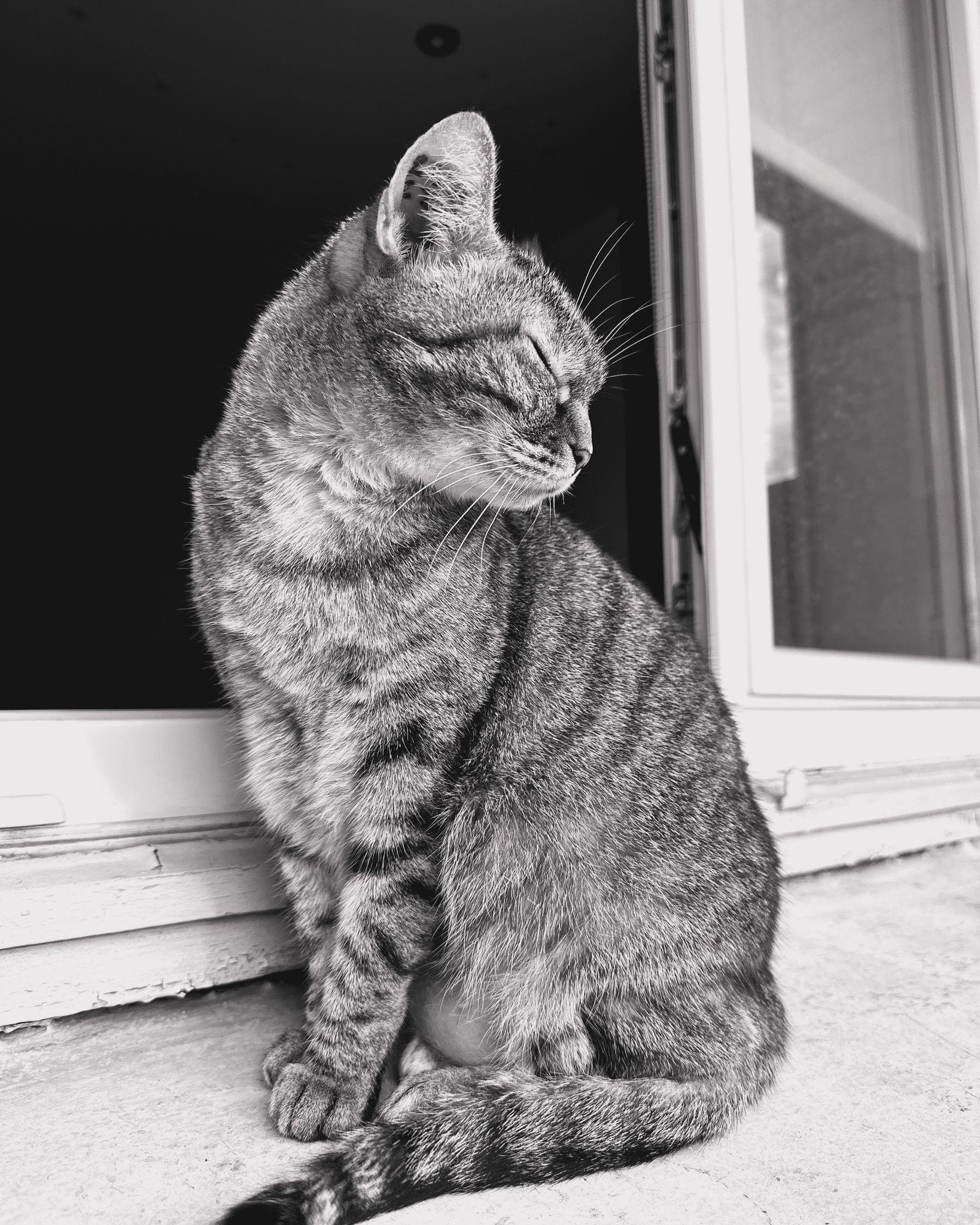

Transcript
1196 segmentsWelcome to Comfort Zone, a podcast all about pushing your hosts, well, outside of the comfort zone. I'm Christopher Lawley, and each week I am joined by two incredible co-hosts. And this week, we're back to our full lineup. As always, I'm joined by Matt Birchler. Matt, how are you doing? I'm doing great. I feel whole again this week. I know, right? I feel good because guess what? Niléane is back. Niléane, how are you doing? Hello, I'm back. I'm doing back. Is that... Baby, come back.
Three weeks in a row. You can blame it all on me. There was something. Yeah, it was time that I come back because you guys are a vibe, a weird vibe without me. Yeah. And yeah, I think we should restore the things how they're meant to be. Yeah, it's like we lost a limb. Like we were just like... Oh, I'm a limb. Well, I mean, I feel like we're all a limb and like the body is the podcast. I don't know where I'm going with this. All right. Let's move along.
Yeah. All right. So, Nealon, you put something right at the top of the document. But before we do that, we decided you were going to get to pick the winner of the challenge from two weeks ago. We didn't really do a challenge last week because Matt and I did our movie corner spinoff podcast. That was wild. Yeah, that was something. I enjoy doing that, but I don't think it'll be something we do very often. So maybe just like when it's a slow news week or something. I don't know. We'll see. But Niléane, who do you feel won the challenge when we had Mr. John Voorhees, the one true John, on?
All right. So the answer is obviously John Voorhees. He won the challenge. What? It's obvious. He channeled me. and he was one of the greatest guests we've ever had and I think we should be on the guest I think we should congratulate him for that so well done John, you won there you go I knew John was going to win when John channeled Niléane and brought
a tail scale, I was like yeah if we give Niléane the ability to pick she's going to pick John. But no, it's a good pick. It's a good pick. I will say I did bring two things in, you know, classic comfort zone trying to subvert the rules. But that's okay. We'll move on. You also have something in the notes about your AirPods Max. And I'm very curious what's going on there. Yeah. Well, I was on a break, right? We were on a break. Exactly. I was about to. Yeah. I was on a break.
And during that break, I ate my words. Is that the expression? Did you do it? Regarding the AirPods Max, remember that I complained and complained about Dolby Atmos. So you already convinced me to go back on Dolby Atmos, and I love it. But I've gone back on something else, and that's head tracking. I used to hate head tracking with the AirPods Max.
And I think the reason is that I was coming from the AirPods Pro. And before that, the Bit Studio Pro, which also have head tracking with Dolby Atmos. And I think with those two, it was really uncomfortable. Whereas with the AirPods Max, with some albums, with some songs, it's actually incredible to just be able to turn your head and listen to a part of the track more closely.
Turn your head the other way and another part of the track. And just, I find myself having a lot of fun just standing up and moving around while listening to Dolby Atmos track with head tracking on. It's a lot of fun. I like it. My advice is don't move around too much because it loses its senses. But if you're almost stationary but move around a little bit while standing up, I think it's great.
And yeah, there you go. That's my update on that. Interesting. I thought you were going to say you got the USB-C ones, but... Oh, no. No, no, I'm not doing that. Okay. I will, because you were so gracious in giving Dolby Atmos a second shot after I recommended Dark Side of the Moon, I will give this a shot, but I'm curious, do you have an album you recommend for trying the head tracking? Oh, that's a good question. All right.
I will say the Coldplay album that came out yesterday is pretty good with it. But I won't go this route. I can advise you to listen to... That's very stereotypical of me, but listen to one of Sigur Rós' albums. The untitled one with the two parathesis on the cover.
There's a remastered edition, I believe, that came out in 2020, and it's got Dolby Atmos remixes, and they're extremely good. Try it with that. okay all right i i will try it matt are you a head tracking person i'm not um but my i don't usually listen to headphones while i'm sitting in the room i usually use my normal speakers so i only use headphones mostly when i'm walking the dog and running and in both those cases i'm like turning corners and then the music turns around me and then a few seconds later the whole
thing kind of rotates to catch up to where i'm looking and so i hate it but yeah i understand that's a different thing yeah you gotta stay in place a little bit i i turned off head tracking because i throw in airpods while i'm filming b-roll and when i'm filming b-roll i'm moving around this room or my office quite a bit so i kind of had a similar situation to matt where like it would rotate and then snap back and it was just it was very discombobulating.
Yes. Absolutely. An additional advice, maybe try it in bed. Hmm. Okay. Lie in bed and turn your head a little bit on the sides to the sides. I like it too. Hmm. Okay. I was going to sit in my spinny chair, my spinny office chair and just spin around. Oh, sure. Yeah. All right. Well, All right. We want to get into some picks? Let's do it. All right. Niléane, you're first up in the document. We've missed you. So I feel you got to go first this week.
Yeah, I like it. I like it. Okay. So as we're recording, none of this has happened, but I can predict the future. Because the episode is coming out next week. And by then, all of it will be true. So, earlier this week, I woke up hearing a knock on my door. And with a glance at my HomeKit weather station, it's on my window, right?
I could tell that the sun was shining bright and that the outdoor temperature was cool, but comfortably cool. Like, you know, you can come out. Yeah, it's fine. But yet, and yet, I was somewhat anxious. I was feeling very anxious about this mysterious knock at the door. What was it? So I softly moved the cat who was asleep on my chest. Yeah, and purring on my chest. I softly moved it.
I lifted myself off the bed and I walked up to the door. All right, following along? Yeah. Yep, so far so good. At this moment, as the bright silhouette behind the door revealed itself, I was flabbergasted. Is that a word? I learned that it was a word. Yes. I was flabbergasted. It's a great word. Fantastic word. There stood a fair-skinned, below-average height man who was capped with short haircut and an Apple Vision Pro lazily laying on his forehead.
In his right hand, he was wielding, as if it was a casually carried weapon, a Google Pixel 9 Pro Fold. And in his left hand, he was wielding the 2013 all-time great Random Access Memories album by Taft Punk in vinyl, please. So you guessed it, this man was the one and only Matt Birchler, redacting chief of the great Birch Street Art Me. As he looked at me on my doorstep, he started crying.
So I went, what the hell, Matt? You're a long way from America. Insert a French accent there. So that's why I exclaimed, Niléane, I can't believe it's finally happened. Matt answered as he was drowning himself in tears. Well, I'm glad we've finally met too, Matt, but there's no reason to be in such a state, I exclaimed. Well, I'm glad that we finally met, yes, but you know, Niléane, you don't understand what I mean.
I can't believe Masterdun 4.3 is finally out. Yes. I've waited for so long. I've heard rumors of this for years, it seems. I barely had time to even plan a reply in my head to this dramatic statement that he had already gone. With the Vision Pro back on his eyes, he climbed down the stairs, presumably jumped back into his private jet parked outside my building and disappeared into oblivion
also known as america so that happened earlier this week and now as you're listening to this masternone 4.3 is out oh my god i feel left out how come matt didn't invite me on his private plane what what geez matt you're so rude he's weird he's a weird guy um i totally forgot about this until this very moment. So thank you for the reminder. Totally did not write this down. So write all of
this down. I wanted to catch you up on what's new in Mastodon 4.3. What is it even? Because we often mention Mastodon in a casual way, like find us on Mastodon and stuff. Maybe some people don't know this, don't know what it is and how it works. So Mastodon obviously is a social network, federated on the Fediverse. You can look up these words if you want to go into more details, but the idea is that you can have your account on one of many servers.
And this new release means that your server can be upgraded to a new version, a new major version. And this new version has new features. So let's go through these new features. The biggest new feature, which I think we will all love really love it because I've been running the beta on my server is grouped notifications oh yeah Matt you're happy I see oh what do you what do you mean by grouped notifications I say okay so I mean like when you've got a post taking
off on the Fediverse going viral as they say right now on the Mastodon web interface and in most Mastodon clients some already do group notification but in and clients in Ivory, for example, each person that has interacted with your post gets its own notifications. So you can be flooded with notifications if you've got hundreds of likes, hundreds of comments, hundreds of boosts.
And it shows you in the Massathon web interface, it shows you the entire post. So if you had like an image, that image is there for all, every single like. It's so, I can fit like one post on screen at once. Okay, that makes sense. I never log into mastodon.social, which is where my account is. I never spun up my own server just because that's one more thing I would have to manage that I just don't want to manage. I got too much on my plate already. But this sounds awesome. Like, yeah, this actually happened to me a couple days ago.
There was somebody that posted about an AI artist was upset because people were stealing his work. And literally, I I quote, quote, boosted it or whatever using ivory. And my reply was, ha, ha, ha, ha, ha, with 500 characters all the way. Like, I literally did it to hit the character limit. And I just had everyone, you know, people liking it. And, like, you could just scroll through the notifications. And it was just so-and-so liked, ha, ha, ha, ha, ha, ha, ha. So, yeah, that's a pretty good thing.
It was pretty funny. Honestly, I got a good chuckle out of my ivory notifications that day. But the good news is that these group notifications won't only matter on the web interface because this comes with an API. Yeah, and I think that's pretty novel. It means that developers who make clients for Mastodon, such as Ivory, IceCubes and others, it means they can now tap into this API instead of implementing group notifications themselves.
They can fetch notifications that are directly grouped, already grouped. So that's pretty big. I think because it's an API, we're going to start seeing group notifications arrive very quickly in third-party apps. Hopefully not very soon. Maybe. I don't know. I have no... No inside info on that. No inside info. They're usually pretty quick on that stuff. I mean, I doubt it'll be day one, but probably a week or so later.
Again, I don't know anything. I don't even know if I have that test flight anymore. Yeah. I just hope I'm right. That's it. So, yeah, that's pretty good. Pretty cool. Other new features. So, still in notifications, you've got filtered notifications. There's regularly a spam problem on Masterzone these days because there are attacks of bots, spam bots that are created en masse and who flood people's mentions and notifications.
So now they will automatically go into a drawer, a separate drawer that's a filtered notifications drawer which you can configure. So that's good. But aside from notifications, there's a new feature which I think is really nice for journalists and writers in general, which is author attributions. So now when you link to articles on the web, if the writer of those articles or the websites hosting those articles
have implemented it, you will see inside Mastodon a link to the Fediverse profile of the person who wrote the article. I hope I'm clear. So for example, if you link to a John Voorhees article on MaxTorys, the link card on Mastodon will have a little section below it by John Voorhees. And if you tap on John Voorhees, you'll jump right into John Voorhees' profile on Mastodon. So that's really nice.
Nice. Now, I have a question. Will this also kind of fix? So something happened to Mastodon or maybe it's just ivory a couple of weeks ago. And now if you post a YouTube.com, a video from YouTube, it just has a generic YouTube.com card in it. It doesn't show the video. It doesn't show the thumbnail. It doesn't even say the title of the video. Is this going to be fixed in here as well? So I know what is the issue you're referring to.
It's unrelated. And it's actually YouTube's fault, Google's fault. Of course it is. Of course it is, because it turns out that a few weeks back, they started blocking. I mean, not blocking, but like considering differently requests that servers who fetch the previews to make their link cards. They started, like, yeah, not considering them as bots and considering them as users. And I'm just simplifying and basing this off what I understood.
But basically, the preview is as it is right now because the server is seeing a cookie wall. So if your server, sometimes you will see, like on Amazon.Social, some people are seeing the YouTube previews in German, like the generic YouTube preview in German. That's because the server is hosted in Germany and the server hosted in Germany is seeing a cookie wall. It cannot get past it to fetch the information for the YouTube video that's linked. So, yeah.
unrelated Google has got to fix it so it'll never get fixed then is what you're saying I think it got better because my server started like it started working on my server recently so maybe they changed something hopefully they do because I noticed that and I was very upset by that because I post YouTube videos to Macedon quite a bit So I was having to like put the thumbnail in there and like so that it wouldn't generate the card and all that stuff.
And that was a bummer. Yeah. Going in along from more new features in Mastodon 4.3, the follow recommendations are improved in general. I want to mention this because I've noticed it actually. if you go into the explore tab in masterdown now in 4.3 and you go into the people sub tab the recommendations are actually pretty good like you can find some good people to follow
they're now based off who you're already following and who the people you're following are following i think that's what it is like it's got two levels deep and and follow recommendations will also show up in your home timeline directly if your home timeline is not active enough. So there you go. Oh, interesting. Yeah. Moving along, the design is improved overall. The web design is improved.
Of course, it's a matter of taste. I don't think it looks that nice, which is why I made my own theme. But we'll come back to that. And especially, I want to shout out the new Compose form on the web is really nice now. Oh, thank you. Oh, yeah, it's really nice. So it looks nicer. It's cleaner. And it's got new features as well. Like if you want to add images to the post you're composing, you can now reorder your images. And the preview is exactly how it will look once the post is online, is published.
So that's really helpful. Yeah. And coming back to what I just mentioned, I'm designing my own theme for MasterDone. It's a theme that you can install on your server, but if you don't run your own server, you can still install it with a user-style extension, a browser extension. You can find a bunch of those if you Google it. It's called Tangerine UI. And with this new release, MasterDone 4.3, I'm releasing Tangerine UI 2.0, which is a much improved version of my theme,
and I'm really happy that I can finally release it. alright that's it this is the reason I've been wanting 4.3 for so long because when did you first release Tangerine 2.0 like months ago I've actually released pre-releases only since the supported version of Amazon wasn't out and I'm now up to pre-release number 8 so yeah it's been months It looks great.
There's a red variant now, right? Yeah, a cherry variant and a lagoon variant, which is kind of blueish. Yeah, lagoon. So my question is, when's the iOS version of this coming out? When's the iOS app of Tangerine coming out? It's a progressive web app. Yeah, never. Yeah, you can install it as a progressive web app. It works great, actually. And the theme that I made actually improves on the design, the web design, so that it works better on the iPhone, for example, or on Android.
For example, I'm moving the navigation bar to the bottom of the screen and the way that the top bar is compact and many things like this. Lots of small details. Leaving aside my custom theme, MasterDone 4.3, I want to shout out the fact that I've only highlighted a few new features here, but they've been at this for months, like months and months on end, without end.
and it's got thousands of tiny new things and tiny improved things. So like it's maybe the changelog will mention it all, but you've got to look it up on GitHub, I guess. But like it's many new things that you will only notice after using the web app. You go, ah, that's changed. Oh, that's improved. That's fixed. So yeah, I want to shout out the fact that Mastodon is made by like, less than a handful of paid people.
That's pretty insane considering the usage that it's getting. And of course, the releases are slow to come out, but the amount of work that they're doing is pretty incredible, I think. Yeah, this seems like a huge update. I'm surprised they're only calling it 4.3 and not Macedon 5.0 because this seems like a massive change. There's more changes in this than there is in iPadOS 18. Ouch. Agreed. Yeah. Are quote posts, no, quote posts are for another update, right?
Yeah. So that's in the near future. I mean, relatively near future, I guess, considering how long it can take to release a new version. I believe MasterDone 4.4, the next version after that, is focused on quote posts. Nice. And I think they have some great ideas around that. I know they're working on implementing some privacy firsts. They want to implement it with privacy first controls in mind, like limiting who can quote you and stuff like that.
So I'm excited to see what they're able to work on there. I like that because, you know, back in the Twitter days when you would do like a quote retweet and all that stuff, like it was always used to like dunk on somebody. It was never used to be additive. It was always used to be like, ha-ha, I caught you doing this other thing that you said you didn't do or whatever.
But they can also be very handy features. I use them quite a bit. Like I even said, I use it to dunk on some AI artist. And I use AI artist in quotes there because AI artists are not real artists. spicy take for the week um actually i don't even know if that's a spicy take um but no like being able to quote tweet or quote boost or quote post or whatever we want to call it uh these names so hi it's i'm having a hard time keeping it all straight uh actually here's a thought now that twitter is no longer twitter it's that stupid letter uh what if macedon just stole that trademark
somehow like i know there's all legalese and stuff like that i don't want it to no oh okay all right all right i honestly i feel like it would just make what's his name you know what's his face mad but uh yeah uh and that's why i kind of want it but anyways i don't even know where i was going with all this this sounds like a great update yeah uh if you're wondering the last thing is if you're wondering how to update like first question is do you run your own server if If you run your own server, you should already know how to update. If you don't run your own server, just wait until the team or the person who runs your server makes the update.
So most probably you don't have to do anything. That's ideal. Yeah. Yeah. Nice. I like it. Well, super excited. Yeah. Yeah. That's why you showed up on my doorstep. That was weird. That was the most elaborate intro to anything we've ever done. I don't even know how anyone will be able to top that. Halfway through, I was like, is a pale skinned... I know. I was like, wait, is this middle height, short haired person with a vision pro?
And I was like, is this me? Oh, that's great. And the joy of when it was. See, I knew it wasn't me because I'm not below average height. Well, I have no idea. Maybe Matt is tall. I just wanted to guess. No. Okay. Then you go. Okay. So I am bringing zero stories. I'm so sorry.
We are part of Mac's stories, Matt. You're supposed to have a story about a Macintosh. So what I'm bringing lets you save stories for later. And that is Omnivore, which is a read later app and is what I'm currently using to save everything to read later. Interesting. And it's awesome. So for those who don't know, Omnivore is a read-later app in the vein of Pocket or Instapaper or some more recent ones are Readwise Reader and Matter.
Those kind of kicked off kind of a new wave of excitement around them a couple years ago. And I've been using Readwise Reader for a couple years now. And I really, really, really like it. But it's also like $100 a year. And my renewal was coming up. And I was wondering, do I still need this? Is there another option? I hate Pocket. I don't like Instapaper. And Matter is also $100 a year or something. Or it's like $70 a year or something like that. But Omnivore is free and open source.
And that's worth it on its own. Or at least worth looking at. And I think the killer feature for Omnivore is its text-to-speech, which is the best out there. um i i read a lot in these apps but i also like i said earlier walk the dog a lot i go i exercise a lot and i like to listen to things and i listen to a lot of articles uh through my read later app and omnivore just has the best voices they have so many voices to choose from you can use they have like all of open ai's voices they have some other services voices they've got tons of voices
You can find pretty much anything you want in English. I don't know how there are other languages are, but for English, it's great. And so I was actually finding over the last like year or so when I was saving an article to Readwise, sometimes I would save it again to Omnivore because I wanted to listen to it in Omnivore because the text-to-speech was so good. And that's a silly state to be in where you're saving to two different apps. But it's so slick and it is completely free. It looks really nice. It's a beautiful app.
It is, I think, completely funded on donations right now, which is marginally sustainable. I think they have a Patreon and I think they take one time donations as well. But yeah, it's kind of like how Ghost, the blogging engine, has an open source version anyone can install on any server and they have their kind of first party one that you can pay for. This is kind of that same idea, except the first party one is free. so I highly recommend just using that one and it's totally fine I think another thing that's really nice about it is it feels if you're someone who likes native feeling iOS apps and you don't
like how readwise especially kind of feels like a web app in an app form this is a very nice iOS app yeah Chris you're nodding your head or you're stretching read wise I keep trying read wise um I've tried it so many times and it's iPad app is so unbelievably bad uh to the point where like the sidebar just like randomly shows up in different places it is not a good I know uh Federico and
John have complained about it over on app stories and stuff like that it is not a good iPad app uh so I have never been able to give Readwise a real shot just because of just how bad its iPad app is. Yeah, interestingly, I think their web app is where their app is the best. Yeah. But that doesn't help you much on... I mean, you could always make a PWA, but I mean, that's what I did with Airtable is their iPad app is so bad that I just made a PWA of their web app and it works significantly better.
yeah um oh the other thing i i didn't even mention the killer app for me which is uh obsidian sync which is the best thing uh readwise does it as well so this isn't like exclusive to it but when you highlight something in omnivore you can have those automatically sync to your obsidian uh library and you can customize how the notes are saved so you can basically what i've done is saved like here's the author here's the name of it here's the url and then here's the highlight you can also save the entire text of the post so i have like a horizontal hr in my a horizontal rule
in my uh thing and then the entire article is below that so in obsidian i have all my highlights and i have the entire posts so i can search for things i remember i read a while ago and i'm using a shortcut through an obsidian plugin that i think federico made or no it's the mac stories related thing i forget i forget what it's called it's shortcut launcher and oh yeah let's you launch a shortcut with an obsidian note as an input oh yeah and i'm using that with a combination of some regular expressions to parse through the uh saved highlight to automatically generate link posts
for myself in Ulysses. So I can just find a highlight that I liked, hit a keyboard shortcut, it launches Obsidian, or not Obsidian, too many apps, Ulysses, with the link post formatted, with the title there and everything, the author listed, the highlight as a quote, and then I can just write whatever I want below it. And I've used this thousands of times over the years. It's so great. Permission to go on a tangent? Denied. The next thing, no.
that's fine that's fine that's really it you can also sync to things like readwise and to notion and other things but the obsidian one is awesome for me tangent away so you're using obsidian and ulysses why explain yourself I demand explain yourself did you just say because I can yes because i can the most american answer possible um it's called freedom text
so my workflow for like blogging is i read things in reader i save them to read later in omnivore i highlight things in omnivore that sync to obsidian and from obsidian i generate posts that go into Ulysses, Ulysses posts my blog, which is Ghost. It's very simple. I don't understand why everyone doesn't do that. It's very simple. Well, I mean, I'm like, why? You could just pair all that down to like two apps, but okay.
I don't think I can. I mean, why not just write your post in Obsidian? Then how do I post them to Ghost? There's not an Obsidian plugin for Ghost? There is, but it sucks. It doesn't support images. It doesn't support, yeah. There's a native ghost plug-in for Ulysses? It's just built in. It's built in to Ulysses, yeah. Ulysses is the best way, by a mile, the best way to publish to Ghost if you have a ghost blog.
Gotcha. Okay, all right. Okay, that's wild. Okay, I haven't used Ulysses in a really long time. But also, I don't publish. Like, if I'm going to publish text to a website, so I use block.im for my website. Like, that's the back end because it's great. You pay a little bit of money, but it's cheap. And my favorite thing about it is it's just a bunch of text files. Like, literally, it creates folders, and you can either sync it with Git or Dropbox.
If you do Dropbox, it literally just creates a folder structure in Dropbox. Or if you do Git, it's kind of the same thing. It's just a bunch of folders. I use Git and use working copy. And so basically I can just send any text file to it. So how many apps is this? Technically, I would just use Obsidian and Git. Like that's all I would use is I would use Obsidian. And then I have a shortcut that sends it through working copy and publishes it right to my website. Okay, fair enough. So two, two, two.
which I could probably simplify it down to one, but I've never looked for an Obsidian Git plugin. I feel like there has to be overlap between people who know Git and those who use Obsidian. There's 100% something out there. I've just never looked for it because I don't write a ton of blog posts. Most of my blog posts are like, hey, I published this new video. Here's the video and here's a link, all the links. And that is actually a shortcut that generates all of that. It pulls the latest video from the RSS feed from the YouTube channel.
It pulls the description, uses some regular expressions to format that all nicely, and just publishes it right to my website. So for those things, those don't even hit Obsidian. Okay. Very nice. This is the difference between you and me. I recently pulled all of the things I've ever written on my blog, and in the past eight years, I've written one million words in blog posts. Gee, ho! One million. That's awesome. That's awesome. Congratulations Shocking I've considered going back and writing blog posts But I think I'm just going to do short form video stuff
For the stuff that I would do Just because I get more eyes on it Just gotta publish one million Yeah the first million words are the hardest It gets easier after that Yeah yeah yeah after that Well congratulations on a million words That's awesome Yeah Editor Chris this is where you put confetti Going up here I probably won't do that. Too much work. Already takes enough time to edit this show.
Yep. All right. But anyway, that's it for Omnivore. I think it's awesome. And again, totally free and not like full of ads or anything. So if you want something free that isn't also recommending horrendous articles like Pocket does, for example, Omnivore is a great, great option. Gotta love Mozilla. Yeah. Great. Pocket is the very definition of you either die a hero or you live long enough to see yourself become the villain. Well, okay. It's not good.
I'm probably going to get some emails on that. Anyways, moving on. Anything else on Omnivore before we move on? I like the name. It's a fun name. Yeah. I think this is something. It's been in my apps to check out for a while now, and I just haven't had a chance to do it. So it'll definitely, I'll bump it up on the list and check it out. Nice. Chris, what do you have? So this week, I have the last of my review unit stuff from, you know, the Apple event a few weeks ago. And I have the Apple Watch Series 10.
I'm curious, do either of you wear an Apple Watch? I'm assuming Matt. I have a feeling you do, but I don't know. Neil, do you wear one? Oh, Matt has got a perfect colored bracelet on his Apple Watch. I do. Do you not see what I have? That's a wrong kind of orange. It's orange. Yeah, but that's not the right orange. That's like the flashy orange, the one that no one likes. Sorry. I'm so mean.
Sorry. I cannot win with Neil Yod. It's like she agreed to join the podcast, and then after that, everything's just like, nope, nope, nope, nope, nope. Yeah, here's my answer. I don't wear anything on my... Okay. All right. I was curious about that. I didn't know which way you would go, Niléane, if you would have an Apple Watch or not. I knew Matt would because Matt used to do the big Apple Watch or WatchOS review and stuff like that. Which you don't really do that anymore, do you?
No. A big chunk of my old personality was the Apple Watch. And now it's just whatever I like. Nice. No, I like that. As somebody that had to make a video about iPadOS 18, I completely understand. This was the thing. I don't know if there's much else to say at this point. Honestly, other than the widget stacks and stuff like that, I actually can't tell you what's new in WatchOS 10. I have to look it up. I didn't make a video. If you want to know what's new, check out Jonathan's review of WatchOS.
It was very good. I started reading it. It's saved. I just haven't had a chance to finish it. I'm talking to the audience, Chris. Don't worry. But I also feel like I'm being called out. So I'm like, it is saved. I'm going to get to it. It's like Federico's too. I always end up reading Federico's at some point, his iOS walkthrough. And this year I got to read the intro and the conclusion, which is always my favorite. I got to read that early because I did the trailer for the Mac story stuff this year. But I always read it eventually.
but it usually takes me a couple of weeks because, like, I just made my iOS and iPadOS video. So it's like, okay, I need a break from this stuff before I can do it. But I will get to it. Anyways, so I have the Apple Watch Series 10. I have it in Jet Black here. It looks gorgeous. Jet Black everything. Bring back Jet Black for everything. That was, hands down, my iPhone 7 Jet Black. That was my favorite. The Darth Vader iPhone. Oh, you had it. It was great. I had it. I had the 7 Plus.
Absolutely loved that phone. It is, as far as, like, colors go, there's that one. There's the 11 Pro's, like, dark green. And then there's the 12 Pro's dark blue. Those are my, hands down, my favorite looking iPhones. Favorite color-wise. Those were the best. Because they are the ones that were actually, like, meaningfully color. Like, even the Jet Black. Like, you looked at that thing, and it was black. It was not like this darkish gray, you know, maybe depending on what year it is, it's a little lighter, a little darker, whatever.
But no, the jet black absolutely looks gorgeous. It's this watch is incredibly thin. Now, I will say for the last year, I've been wearing the Apple Watch Ultra 2. So I got used to a really big, hefty, thick watch. So going to this is a very dramatic difference from how thick the Ultra 2 is to how thin the Series 10 is. Now, I've been really paying attention because I'm working on my Series 10 review video right now.
And I've been really paying attention to how I naturally use my watch. Not how, like in years past, I feel like I always tried to force myself to use the watch more. where I'm like, I'm going to dictate notes, or I'm going to add tasks, or I'll reply to messages from the watch and do all this stuff. Yay! But all that stuff ends up kind of fizzling after a while. Like, I can get myself to do it, but really what it comes down to for me for the watch is two things. Notifications, which we talked about in our notifications episode.
I only, like, really important notifications come to my watch. Phone calls, messages, event reminders, task reminders. Those are the kinds of things that come to my watch. Delivery information, whether it's like parcel or Instacart or something like that, that stuff will come to my watch because I want to make sure I get that stuff right away. So I will deal with like I will see those notifications on my watch. But like if I get like a message from you guys or something like that, I'll pull out my phone to reply.
I rarely reply with just my watch unless my phone is not around me. That's pretty much the only time I reply with the watch is like, hey, my phone is in my bedroom or maybe it's here in the studio and I'm out in the living room or something like that. And then the other core thing I do is workout tracking. I am getting back into working out because I realized how out of shape I was and I just I needed to get back into it. So we have a Peloton rowing machine here. So I've been doing rows.
I try and do it, you know, four or five times a week. and doing row tracking. What's rowing? Okay. Is that it? Oh, did you ever see the social network? Okay, I've got it. Yeah, yeah, yeah. It's that. Yeah, yeah. If you ever see the social network with the twin brothers that say they invented Facebook, it's what they do. They're on the Harvard rowing team, you know. But it's a really good workout. Like, if you're ever looking for, like, one workout to, like, do legs, arms, back, rowing is it.
It's great. I will put it in and I will either listen to the Peloton class if it's good music or I'll put on a podcast or something like that. And I can go for like 20 minutes or so and just row, row, row your boat gently down the stream. Anyways, yeah, you can kind of see how my brain works. But those are like the two core things I use the watch for. And I'm kind of curious. Neely, you obviously don't wear one. Matt, if you were to boil down what you actually use your watch for, what would it be?
Telling the time. Okay, I guess I do use it for that as well, yeah. Checking the date. Okay, wow, this is riveting. It's a watch. Sunset. When it sunsets today. You were mocking my sundial. I was put in a position where I had to mock everyone else's. Okay. I mean, honestly, it's not that exciting.
Working out is the big thing. I do workouts for everything I do. If we are friends on Apple Fitness, you should turn off notifications for me, because every walk gets a workout. Every run gets a workout. Yeah, I've noticed. So, yeah. So I got a pitch for you, Matt. A product. Instead of a watch, just a wrist band, a smart band that maybe even had a display just for the time, but not even that.
Really, honestly, not even that. And it just tracked your fitness stuff. You'd probably have to start your workouts from your phone, but then it would track on the band. and like as you got notifications it would vibrate and it could do different vibrations for different notifications like if it's a phone call it could vibrate repeatedly. If it's a text message maybe like double pulses and everything else is just like a single pulse so important notifications there and just workout tracking and it was just
a band and then on your other wrist you could wear a mechanical watch which that's what I want. I'm curious if that's something you guys would be interested in. I think a few weeks ago I talked about thinking about a mechanical watch. Yes. As soon as I looked into them, I lost all interest in them because I like my Apple Watch. Okay. I do like getting the notifications on there. And one of the things in WatchOS 11 that is new and is really awesome are live activities.
So I had an order in, a food order, and I was able to just track it on my wrist automatically, which was really cool. That is nice. I almost want to do an experiment where I stop wearing the watch for a week and just see what I miss. Actually, I think I'm going to do that. After I finish my Series 10 review, I'm going to do that. I'm going to stop wearing the watch. I'll wear a mechanical watch and see what happens. Because I'm kind of curious what I would actually miss. I feel like I'm being extra critical right now.
But that being said, if you like the Apple Watch, just the generic Apple Watch, the Series 10 is a really nice upgrade, especially if you want to go jet black. It looks really good. The thinness is nice. Like, it is really nice because it just feels like it's just sitting right on top of your wrist. And yeah, that's cool. The bigger screen is a huge thing. Like, I don't even think after wearing the ultra, I don't think I would be able to go to the regular watch because the having the big ultra screen is nice for dealing with notifications, for responding to messages and stuff like that.
Which, like I said, I do do that sometimes. Not I don't respond to every message, but I do. You know, if I don't have my phone next to me, I will respond to a message that way, especially if it's just a short reply. So that that is kind of nice. I am wearing the Nomad Sport Band, the orange one that they made for the Apple Watch Ultra when that came out, what, like three years ago. I did just order the dark green one because I thought it would look really nice with the Jet Black Series 10. And plus, that's, you know, the color of the walls in my studio here.
So it'll blend in. And after nearly unroasted your orange one. Yeah, I'm sorry. You don't have to give it up. It's okay. No, I feel like I have to, like, burn it now. Like, oh, it's filthy. Look down upon it. No, but I do like, so I don't like any of the Apple bands. Like, the Apple bands, to me, like, there really isn't any that jump out at me. The Apple sent me with the review unit, the Sport Loop Band, the one that's Velcro, and it opens up, but you don't, like, it doesn't come completely apart.
It just kind of, like, slides open, and it makes the hole really big. And with my big hands, I have a hard time getting it off and on. I just don't like that one. So the Nomad Sport Band has been my favorite band for the last three years. None of the Apple ones really worked. Before that, I did wear the Apple leather one. But they've discontinued that for fine woven, which is... That leather one was great. Fine woven, they sent me that one last year, I think.
I hated that one. It is so bad. But yeah, I really like this sport band. Matt, what sport band are you wearing? Or what Apple Watch band are you wearing? So I'm currently also using a Nomad band. This is their Rocky Point one, which I think just came out. And I have it in the Soul color, S-O-L. Which is apparently the right orange. As I knew. Oh, Soul, as in the sun. Okay. Yes. Yeah, it's a yellowish, orangeish. Oh, so it's not even orange.
Niléane, is that the right color then? Yeah, yellowish-orange. This is the right color, yeah. But for the Apple ones, I think the Alpine loop is really good. That's my favorite of the Apple ones. They just don't have a fun enough color right now for me. That's what they sent me with the review unit for the Ultra last year. And I'm trying to remember, is that the one that comes in dark green now this year? Because I was going to buy it. I think they do have a dark green one this year. I was going to buy it If I went back to the ultra, yeah, okay.
That's the one that's dark green. I don't know why I'm really in this dark green phase where I'm like, yeah, dark green everything. Matt Black, obviously everything. Give me Matt Black. Matt Birchler. Birchler. No, he's busy showing up at your house in France for some reason. No, but Matt Black, everything. But if I want to color a dark green. But anyways, point being, series 10, I think it's a decent upgrade. I'm struggling with what I actually use my Apple Watch for, and I was hoping this would be an intervention.
You guys would tell me, oh, here's all these great things you could use your Apple Watch for that I just wasn't thinking about. Oh, I have an intervention. Okay. Yeah, you should not wear an Apple Watch. Oh, no, no, no. Cutter mic. Explain yourself, Niléane. No, just a joke. Okay, all right. No, I only mean that I stopped wearing an Apple Watch because for me, I realized how useless it was in my life to wear an Apple Watch. So I stopped wearing it and I've been fine.
Well, when I was dealing with anxiety a lot, to the point like crippling anxiety, when I would get notifications and stuff from the Apple Watch, it would literally cause me anxiety for whatever reason. I can't get into it to the point where I would literally rip it off my wrist and throw it across my desk because I was just like, I can't handle this right now. So there was a time, there was a few years where I actually stopped wearing an Apple Watch altogether and just wore mechanical watches.
But then I don't remember what happened. I think it was like notification stuff. Like I just started paring down notification stuff and it just became a little more manageable. But I guess that's my pro tip for using the Apple Watch is don't let everything through. Like, even if you, like, pare down notifications on your iPhone, you should probably pare it down in your watch even more. So only just the most important things grab your attention. Because if your wrist is buzzing all the time, that's no fun. That's no bueno.
This is a way. All right. Well, that's all I got on the Apple Watch, unless you guys got anything else. All right. Well, let's get to a challenge. We didn't do the challenge last week. So this challenge was issued two weeks ago because Matt and I did our movie corner. So this week's challenge was do some iPhone photography and use third-party apps if possible in any way you want, but third-party camera apps or editing apps or anything like that. So, Niléane, what do you got for us?
Oh, I'm first. Nice. So I wanted to experiment for this challenge with black and white photography. And I mean this in the most casual way possible because I'm not a photographer. And obviously we're talking iPhone here. So yeah, keep it casual. If you look at the show notes, there's three photos that I took this week. You may have already seen them on social media.
I've posted them in places. Number one was taken with the default camera app on the iPhone. and I've used the built-in noir filter. So that's one of the three, I believe, two black and white filters that's built into the iPhone. So this first photo is a photo of my cat and I really like how it turned out.
So it's definitely a default camera photo, right? I think there's a lot of detail in the fur that's pretty satisfying to look at. Honestly, the framing of this photo is really good. I really like this photo. You did a great job here. The lines of the window, the way you just framed it, perfect. You didn't try and do a straight-on shot of the window with the window in the background, I mean. But it's like this side profile, using the lines of the window with your cat and the way your cat, the direction your cat is looking.
Honestly, it's a really good photo. I really like this. Oh, thank you. Hey, I really like it. So there you go. Just plain default all the way. Default camera app, default filter. I took a second picture. The number two was taken with, I think, my favorite third-party camera app on the iPhone right now, which is Obscura. by Ben Ries. And so I love this camera app because I love its filters.
I don't know what kind of eye Ben has, but it's a good eye. Those filters are really good. And the black and white filters are really nice too. This is one of the many black and white filters inside Obscura. It's one that kind of fades a little bit the photo. It removes a bit of contrast. So the photo looks flatter overall. And I like that. It's the same window as before, but seen from the other side.
And the cat is coming in and trying to jump out, jump inside the apartment from the window. This is kind of like a film-like black and white filter where it doesn't bring down highlights or anything like that, but it definitely brings down contrast, which it's a lot more film-like with that. There's also some grain built in there. So this is another photo I think you did a great job, especially with, like, the sky in the background. And, yeah, you're killing it so far. Oh, nice.
Yeah, I really like the... You mentioned the sky. I really like how the sky looks in this one. The silhouettes of the clouds, the white clouds. All right. Third one is my most controversial one, which is why it's here. Because I want to see your reactions. In the show notes, I have redacted the name of the app that was used to take this photo. Can you try to guess which app I used to take this photo? So let me describe the photo for the audio listeners.
It's a photo taken in one of the main streets in the city center of Grenoble, France, where I live. There are train tracks in the middle of the road. It's a pedestrian street with only tram tracks in the middle. Some people are walking around. It was taken very late at night, I believe three in the morning. And there's a single bike on the bike rack. So there's a bit of a niri vibe that I like. And I like that it feels very clustered. in the center like there's a cluster of light down the road down the street uh a cluster of street lamps with a little bit of lit up buildings and it looks very noisy although the photo itself
is not very noisy but very detailed and too much detailed i think what do you think yeah it definitely feels like somebody went in and turned the sharpness and clarity all the way up but i'm i'm trying to figure out how you like what app you took this photo with and i and i can't without looking at metadata or anything like that which i feel would be cheating uh i can't i don't think the metadata is in there okay yeah i yeah i have no idea it makes it seem like it's a
surprising pick. That's what I was thinking. What could be surprising? I was going to say like highlight or something, but I'm like, nah, that doesn't sound surprising enough. All right. So if you give it up, the app is Instagram. Ah, okay. This was shot with the Instagram, the built-in camera in the Instagram app. Okay. And is this a built-in Instagram filter? Yep. One of the black and white. I believe it's called New York.
I believe something. Yeah. I don't remember. I've never been a big fan. I should have known this right away because I've never been a big fan of Instagram's filters because they do that thing where they turn the sharpen up all the way so that, like, it's... Yeah. No, I should have known that right away. But it's a very good framed photo. If I was going to critique one thing, I would have stood on the train tracks to take this photo. So that way, like, it would have been even going all the way down. And, like, you could have used the lines of the train tracks and then the buildings on the side as kind of, like, this nice, like, line.
I can't think of what it's called. But basically, like, kind of this direction, essentially. Like, that's my only critique for this photo. But I think it's still a really good photo. I think I wanted to highlight the single bike on the bike rack. I think that was a bit funny to me. I like it. yeah these are all very good thank you uh so just to specify um the number one photo uh has nothing third party in like nothing third party was involved so i don't think it's eligible
to the challenge i i i for the challenge itself i i think the challenge was do iphone photography the subtitle was hey try and use third party apps but I still think like if you wanted to submit that one for your you're going to win no matter what because it's a cat photo. Nah. You're going to win because Mastodon loves you and it's a cat photo. I kind of gave up trying to win this one because I was like as soon as I realized you were going to use
a cat photo I was like yeah no there's no way I'm going to be able to win this one so I'm like whatever. Matt may win, I think. Anyway. So, okay. But I've decided. I've already decided. So I don't want to change my mind. So the first one is not eligible. So I will submit officially to the registry of challenges at comfortzone.inc. The number two photo that was taken with Obscura. This is honestly the one I would submit if I was you too.
I think this is a very good looking photo. and it shows off kind of like what you can do with the iPhone camera and making it look like if you're looking for that more film-like image, which is very, very popular in photography right now, like people using film cameras and stuff like that, I think this is a good image. Yay, thank you. All right, Matt, what do you got for us? Oh, boy. Okay, so I have a story of someone who doesn't read the rules very well or didn't read the rules and just remembered the conversation.
I thought it was do something with photography. And so I went to an Apple Orchard, picked apples with my family and my niece and everything, took some amazing photos, but only with my Canon. What the hell? I have zero iPhone photos from that day. And I was going to talk about how iPhones are amazing. I thought I was breaking the rules. But like there's something special about a real camera and like putting it up to your eye and like looking through the viewfinder.
And it was going to be this beautiful story about how cameras and photography are a beautiful thing. But throw that in the trash because that is irrelevant to this conversation. So what I did instead was while Neil Leigh-Anne was talking and I was panicking about not having... Okay. So that's why he didn't say much. That's why you disagree. Yeah, yeah, nice photo, nice photo, nice photo.
What I've been playing around with are photographic styles on the new iPhone. For the last 30 seconds. What a scam. Oh, my God. So I had already taken these photos. So these photos already existed. I just had to choose the one to use and figure out how the heck am I going to talk about this. So I took a very nice picture of my dog. And now this is a dog's versus cat's thing. uh my dog likes to sit in the window at the front of the house on top of the couch and just stare out at the neighborhood and typically bark at anyone who has the audacity to exist in their own
yard well he's guarding the neighborhood matt he's a very good boy this is what he's telling me good good dog good boy um and so i wanted to get a photo of him looking out and being just uh just just being being that protector for me uh but every time i like got into position directly behind him he would always look back at me and be like what are you doing and so the only photos i was able to get were of him looking back at me uh not protecting me at all but i was this just is a kind of a normal photo and it doesn't look that great um i mean it's fine it looks good but it's not
like artistic at all it shows nice dynamic range i i will give you i will 100% give you that that It shows the dynamic range of the iPhone of you can see out the window, you can see your dog, you can tell it's the couch. I think it does a great job of showing dynamic range. Yeah. And so I took this in like my normal, I think I use amber, it's called. And then I have it slightly adjusted. That's my normal photographic style. But the beauty is that I was able to turn this into a black and white photo. And I could undo this if I wanted as well.
I actually dropped the shadows a little bit. So I could actually get more detail out of him in the couch if I wanted. So there's even more range there. But I just thought it looked nice. So this is the one I'm officially bringing. And not the 120 photos I took at the orchard that looked unbelievably beautiful. And I gave the three-year-old the camera and she's snapping photos. And that's irrelevant to this conversation. This is very funny. I love that. Oh, my God. I love that so much.
And I'm going to lose again. So, you know, here we go. Honestly, I think it's going to come down to you, Niléane, because people like pets and people like dogs and cats and stuff like that. I really don't even have pets. There's no way I'm even in contention. But I wanted dogs so bad, but we can't have one right now. Long story. Anyways, I like this photo. I think you did a great job. I'm curious. I'm not the biggest photographic styles fan right now. I feel they're way too finicky to get exactly where you want them to be.
And it's way too easy for them to reset. So then you have to go back and try and recreate. What would make it so much easier is if you could tap in the tone section and just type in what number you want if you weren't trying to use that drag thing, which is just, it doesn't work well for me. Plus, I take all my photos in RAW. And we'll get to it in a second. So I just edit all my photos manually. I have a few Lightroom presets I've made for myself that I use, and then I just edit from there.
Yeah. So not to make a whole segment out of it, but the thing I love about photographic styles is that I can shoot with a style applied. But as if I was shooting RAW, I'm not locked into it. I can change it later if I want. So that is the thing I really like about it. I do love that. And for people that aren't going to shoot raw, these are absolutely the best way to edit your photos. I wish you were able to shoot raw and then apply a photographic style on top of it, but you are not. You either have to pick raw or regular Heif photo with live action and photographic style and all that stuff.
But, and for me, I'm always going to choose raw because I do do photography stuff. And I'm always, always, always going to pick raw because there's just so much more information in a raw photo so that you can fix highlights. You can fix shadows. And, I mean, as your photo shows, the iPhone has great dynamic range. So that shouldn't be too much of an issue. Yeah, it's pretty incredible. But I'd still like to be able to, you know, be able to clean things up in photos and stuff like that and be able to edit it.
But overall, I think this is a good photo, Matt. Cool. Thank you. yeah only caveat there's a big car and i don't like cars so there you go well let me use the cleanup feature to get rid of that thank you replace it with a dragon please okay that would actually be funny with the way your dog's looking if that was a dragon what am i supposed to do about this oh that's great so for me i did so for me my whole plan was to go up to yosemite and shoot a bunch of photos uh but this week we ended up having some family stuff happen and it just fell apart the
whole plan fell apart so i wasn't able to do that uh it's it's all working out but it's just it is i i ended up needing to be at home and going up to yosemite and spending the day up there just was not going to be a thing that I should do. So what I did is I took some personal photos, and I'm not going to share these because they have family members and my girlfriend and stuff like that. And I don't know, I never feel right about sharing like personal photos and stuff. So but I did a bunch of personal photos with highlight and their new process zero feature, which I love this
in this app, I absolutely love this feature so much. So what it does is it takes a raw photo, but it applies a very light film-like filter on top of it. And it just kind of gives very fun, whimsical photos, like kind of nice in-the-moment captures and stuff like that, especially for photos you're not going to edit. That's what I was kind of using it for. It's great outdoors. It works amazing outdoors. The minute you use it indoors, you have a 50-50 shot of that photo looking good or not.
Because it's trying to apply this film-like filter, sometimes the highlights can be blown out, sometimes the shadows can be too high. Is that a filter? It is a filter in the sense that it's being applied on top of an image. You're taking a raw photo and then it's doing some post-processing so it is filter-like in that. Okay. So I thought the noise, the film-like nature of the noise that you get in those shots was a product of just the raw image.
I don't know. No, I think that's just like if you were to go into Lightroom and turn up noise, I think it's very similar to that. So I think it's just part of the filter. And it's not like a one generic filter. I think it's doing some smart processing to kind of determine like where the highlights should be, where the shadows should be, how much grain and noise and stuff should be in there. But the photo I am submitting, so I put two links in the show doc. There's an original and edited.
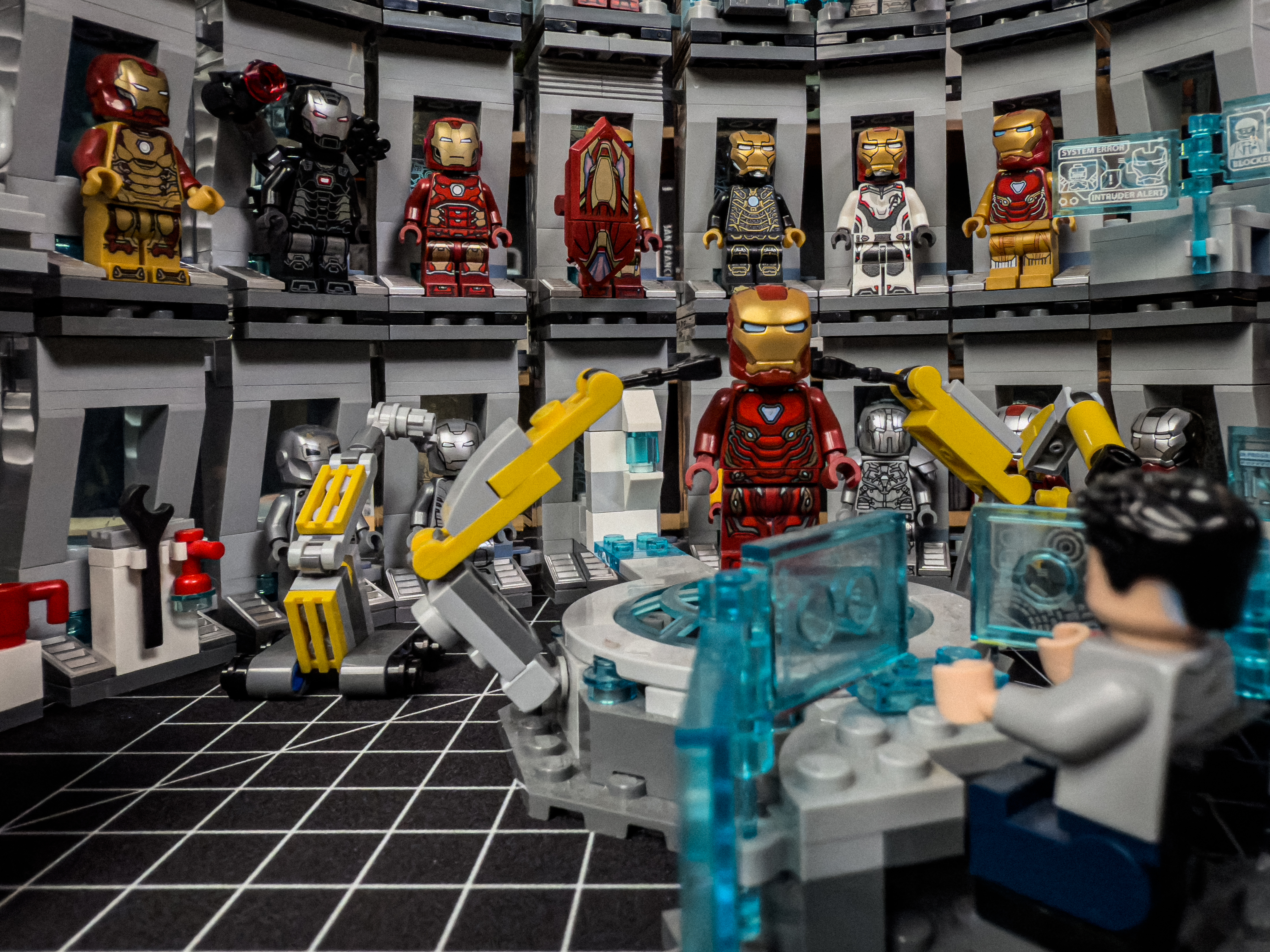
So I did, so obviously I have an iPhone 16 Pro, and the big upgrade to the iPhone 16 Pro this year is the macro lens, or the wide-angle lens, essentially. But the macro photography is a part of the wide-angle lens. So I took some Lego sets, and I'm only going to submit one photo because the other ones didn't really turn out so great. But this one I thought turned out amazing. These are some Lego photography. So what you can see in the image is it is the Iron Man Hall of Armor sets.
Because you take multiple sets and you put them together and stuff like that. And you got Tony Stark sitting at his desk. You have an Iron Man armor being built. You got armor in the background, all that stuff. And I think it does a great job at showing off the macro photography and like how good that got this year. Because the macro photography lens before this year was not something I was interested in ever using in a semi-professional context whatsoever. just because I didn't think it looked very good. But if you click over to the edited image, you know, I did some things to clean it up.
I threw it in Lightroom, first of all. Lightroom is my photo editing app. I've tried all the photo editing apps, Darkroom, whatever. Lightroom's the one I like. It's the one I get the image I like. It's really good at being able to not only save your presets, but try other people's presets. And trying other people's presets is how I learned how to do photography. or how to edit photos, essentially, is I found a bunch of photographers I liked. I bought their presets, and I just looked at their presets, and I was like, okay, how did they get this kind of image and look to see, like, okay,
so this is what sharpen does. This is what contrast does. This is what exposure does. This is what the whites, the blacks, the shadows, that's what all those controls do. So that's how I learned, and I've went and made my own presets since then. So comic book-wise, the Iron Man Hall of Armor is supposed to be this basement, So I kind of turned the light down low, kind of brought up the blues, turned down the yellows, essentially. I used clarity, texture, and sharpen to kind of make the image a little more lifelike, essentially.
Oh, there's a dog dog. That's what my niece calls them, dog dogs. Yeah, it's adorable when she says it. When I say it, it just sounds weird. But so I use the clarity texture and sharpen to kind of make it a little more realistic, make it kind of like, you know, a little less blurry, a little less fuzzy in the background. I brought down the noise. I brought down the color noise to kind of just give it that nice, like kind of almost like, like this is a movie set kind of look.
And then I use the geometry feature in Lightroom to take out the warp. So I just want to stop right here. Yeah. I knew you were going to do this. I knew you were going to do this. In the show notes, it's... I don't know why it just makes me laugh so much. In the show notes, there's the bullet point. Geometry to take out the warp. And when I read this, I was like, what the hell does this mean? This sounds so cool, but what the hell?
So when you shoot with the ultra-wide lens, you get that kind of warp feature. Like, if you look at the edges of the ultra-wide lens, things are warped a little bit. It doesn't look like, yeah, it looks fisheye. Yeah, exactly. They're called fisheye lenses. Like, it looks out. So, what I did is I used the geometry feature in Lightroom to kind of flatten it out a little bit and take out that warp. So, it didn't look like it was, you know, you're a fish looking at this, essentially.
It looked a little more, like I said, I was kind of trying to go for this film set thing. So, like, I even used, like, a mechanical keyboard desk mat as the bottom. I made sure, like, you couldn't see any of the background, any and stuff like that. So, like, I wanted to make this look like a film set. A lot of work went into this. Oh, yeah, yeah, yeah. I set up lighting. I, yeah. Oh, yeah. No, a ton of work went into this because I was, like, I was so disappointed I wasn't going to be able to do Yosemite photos because I thought that was going to be my only way to beat your pet photos.
This could do it. Some nerds. Yeah, but everyone's going to vote for cat or dog photos. It is really, I think that definitely did work because when I'm bouncing back and forth between the two of them, the original shot looks very much like someone who set up a Lego thing and has their camera just kind of on the ground next to it. You can kind of tell it's just a toy in a room. But the edited one, I think I didn't really notice. It didn't hit me at first, but I think by warping the image to get rid of the the fisheye look has made everything look bigger and the lighting looks more natural.
And so this looks more to me like a large Legoland like thing rather than a just a little thing in your living room or wherever this was. Yeah, it's pretty cool. Thank you. Yeah, no, I definitely was like, okay, I'm going to try and make this look as film-setty as possible. I was bummed I didn't finish. I have the big LEGO Millennium Falcon I'm working on right now. I didn't finish it in time. I was like, I was going to use that, but it's so big. It's so long. There's so many pieces to that thing. But anyways, yep, that's what I got for you.
It wasn't what I originally set out to do. It wasn't what I had in mind when I issued the challenge, but I think it gets the job done. I think it shows what the ultra-wide lens is capable of on the 16 Pro. I like it. All righty. Anything else before? I believe it's Niléane's turn to give us a challenge. Yeah. Hit us. All right. So it's pretty simple, I think. And I think it's going to be fun. I want us to explore the accessibility settings on a device of our choice.
I like that on your iPhone for example go into the accessibility settings and try to highlight one thing next week something that you can maybe use for something or that you have found to be useful for you just in general or that you like or that maybe you did not expect to be this good or this bad I don't know just find an accessibility setting that you think you like setting or feature I mean yeah that's awesome I like this one a lot this would be a good one.
Perfect. Yeah. Alrighty. All right. Well, that just about does it this week. But before we wrap up, we have our in-show question, as always. Okay. All right. So my question for you guys is, what Lord of the Rings race would you want to be? Like, what would you want to be a part of? Would you want to be a dwarf, a man, an elf, an orc, bell rock, whatever. What would you want to be a part of? I would want to be a hobbit. Okay. Honestly, that's exactly what I thought you would pick, Matt. Yes.
I think they've got it figured out. Yeah. You know, they just eat, drink, and be merry. I think I'd want to be an Ishtari, you know, a wizard. Okay. But not one of the blues that just disappears or a Radagast that's obsessed with nature. Either, you know, like Gandalf or Saruman. Oh, so you hate nature. I got it. Yeah. I'm no tree hugger. I think I want to be a dwarf.
Okay. All right. Cool. Yeah. All right. Well, that just about does it this week. Do you guys have anything you want to promote? Plug? Mention where you're at? Follow me on Mastodon. Support your trans friends. I don't know. All right. I think that's pretty good. I like it. No, I like it. Matt, what about you? You got anything? I just reviewed the iPhone 16 Pro on my YouTube channel. So check that out so I can continue to pay this thing off.
There you go. And I'm on YouTube as always. I'm going to have a bunch of videos coming out here very soon. I've been working on a few different things all at once. So that means I'm going to have a slew of videos. Thank you all so much for listening. And a big thank you to Mac Stories. We are a Mac Stories podcast after all. And have a great day. Bye-bye. Bye-bye.
Okay.